
Release Notes
5580E ControlLogix XT controller catalog 1756-L82EXT
Version 37.013 (released 2/2026)
Catalog Number 1756-L82EXT (series B)
Security
This release includes security enhancements as a part of our ongoing efforts to improve security. For information regarding Rockwell Automation's vulnerability disclosure process, please reference the Rockwell Automation Vulnerability Policy.
Improved Product Resiliency for Redundancy Firmware Bundle Revision 37.013_kit1
Product improvements have been made to increase product resiliency to potentially disruptive activities. These enhancements have been verified not to affect product safety, performance, expected life, configuration, or operation of the product. Rockwell Automation recommends that you follow good Industrial Control System (ICS) security practices that include regular product updates. To maintain authenticity, obtain product updates and new releases directly from Rockwell Automation.
Requirements
This release has the following requirements.
|
From Firmware Revision
|
Firmware Revision Updates Conditionally Not Allowed*
|
|
33.011_kit1
|
—
|
|
33.011_kit2
|
—
|
|
33.012_kit1
|
—
|
|
33.015_kit1
|
—
|
|
33.015_kit2
|
34.011_kit1
|
|
33.017_kit1
|
34.011_kit1, 34.011_kit2, 34.014_kit1
|
|
33.017_kit2
|
34.011_kit1, 34.011_kit2, 34.014_kit1, 34.014_kit2, 34.015_kit1
|
|
34.011_kit1
|
—
|
|
34.011_kit2
|
35.011_kit1
|
|
34.014_kit1
|
35.011_kit1, 35.011_kit2, 35.011_kit3
|
|
34.014_kit2
|
35.011_kit1, 35.011_kit2, 35.011_kit3, 35.013_kit1
|
|
34.015_kit1
|
35.011_kit1, 35.011_kit2, 35.011_kit3, 35.013_kit1
|
|
34.015_kit2
|
35.011_kit1, 35.011_kit2, 35.011_kit3, 35.013_kit1, 35.013_kit2, 35.014_kit1
|
|
35.011_kit1
|
—
|
|
35.011_kit2
|
—
|
|
35.011_kit3
|
—
|
|
35.013_kit1
|
—
|
|
35.013_kit2
|
36.011_kit1
|
|
35.014_kit1
|
36.011_kit1
|
|
35.014_kit2
|
36.011_kit1, 36.011_kit2
|
|
35.016_kit1
|
36.011_kit1, 36.011_kit2
|
|
35.017_kit1
|
36.011_kit1, 36.011_kit2, 36.011_kit3, 36.013_kit1
|
|
36.011_kit1
|
—
|
|
36.011_kit2
|
—
|
|
36.011_kit3
|
37.011_kit1
|
|
36.013_kit1
|
37.011_kit1
|
|
36.014_kit1
|
37.011_kit1, 37.011_kit2, 37.012_kit1
|
|
37.011_kit1
|
—
|
|
37.011_kit2
|
—
|
|
37.012_kit1
|
—
|
|
37.013_kit1
|
38.011_kit1
|
|
38.011_kit1
|
—
|
Digitally Signed Ethernet Module Firmware for Revision 37.013_kit1
Catalog Numbers:
Digitally signed firmware provides more security over the unsigned firmware. This firmware is different based on the EtherNet/IP™ communication modules that you use.
|
Cat. No.
|
Supported
Firmware Revisions
|
Digitally Signed
Firmware
|
Included with this
Redundancy Bundle
|
| 1756-EN2T/D
1756-EN2TK/D
1756-EN2TXT/D
|
12.002
|
Yes
|
Yes
|
| 1756-EN2T/C or earlier
1756-EN2TXT/C or earlier
|
5.009
|
No
|
Yes
|
|
5.029
|
Yes
|
No
| |
| 1756-EN2TP/A
1756-EN2TPK/A
1756-EN2TPXT/A
|
12.002
|
Yes
|
Yes
|
| 1756-EN2TR/C
1756-EN2TRK/C
|
12.002
|
Yes
|
Yes
|
| 1756-EN2TR/B or earlier
1756-EN2TRXT/B or earlier
|
5.009
|
No
|
Yes
|
|
5.029
|
Yes
|
No
| |
| 1756-EN2F/C
1756-EN2FK/C
|
12.002
|
Yes
|
Yes
|
| 1756-EN2F/B or earlier
1756-EN2FK/B or earlier
|
5.009
|
No
|
Yes
|
|
5.029
|
Yes
|
No
| |
| 1756-EN4TR/A
1756-EN4TRK/A
1756-EN4TRXT/A
|
8.001
|
Yes
|
Yes
|
Firmware revision 5.029 is not included in the redundancy system, revision 37.013_kit1 firmware bundle. You must download and install this digitally signed firmware after the redundancy bundle is installed.
Important: When you install the digitally signed firmware, that is, firmware revision 5.029, into a 1756-EN2T/C (or earlier), 1756-EN2TR/B (or earlier), or 1756-EN2F/B (or earlier) module, the installation makes the module incompatible with some firmware revisions. For example, after you update firmware, the module supports use of only digitally signed firmware. The module rejects any unsigned firmware updates.
You can download firmware revision 5.029 and the redundancy system firmware bundle, revision 37.013_kit1, at the Product Compatibility and Download Center.
Tip: Select the base catalog number in ControlFLASH Plus™ software when upgrading extended temperature or conformal coated modules. For example, select the 1756-EN2TR when upgrading a 1756-EN2TRXT module. Extended temperature and conformal coated modules use the same Redundancy module ControlFLASH Plus kit.
ControlLogix Redundancy System Components Revision 37.013_kit1
Catalog Numbers: ControlLogix® 5580 controllers, 1756-RM2, 1756-RM2K, 1756-RM2XT, 1756-RM3, 1756-RM3XT
This redundancy system revision includes the following:
|
Cat. No.
|
Module Description
|
Series
|
Firmware Revision
|
|
1756-EN2F, 1756-EN2FK
|
ControlLogix EtherNet/IP™ fiber
communication module
|
C
|
12.0021
|
|
B or earlier
|
5.009 or 5.0292
| ||
|
1756-EN2T
|
ControlLogix EtherNet/IP
communication module
|
D
|
12.0021
|
|
C or earlier
|
5.009 or 5.0292
| ||
|
1756-EN2TK
|
ControlLogix EtherNet/IP
communication module (conformal
coated)
|
D
|
12.0021
|
|
1756-EN2TXT
|
ControlLogix-XT™ EtherNet/IP
communication module
|
D
|
12.0021
|
|
C or earlier
|
5.009 or 5.0292
| ||
|
1756-EN2TP, 1756-EN2TPK,
1756-EN2TPXT
|
ControlLogix EtherNet/IP
communication module – Parallel
Redundancy Protocol (PRP)
|
A
|
12.0021
|
|
1756-EN2TR
|
ControlLogix EtherNet/IP
communication module
|
C
|
12.0021
|
|
B or earlier
|
5.009 or 5.0292
| ||
|
1756-EN2TRK
|
ControlLogix EtherNet/IP
communication module (conformal
coated)
|
C
|
12.0021
|
|
1756-EN2TRXT
|
ControlLogix-XT EtherNet/IP
communication module
|
C
|
12.0021
|
|
B
|
5.009 or 5.0292
| ||
|
1756-EN4TR, 1756-EN4TRK,
1756-EN4TRXT
|
ControlLogix EtherNet/IP
communication module
|
A
|
8.001
|
|
1756-L81E, 1756-L81EK, 1756-L82E,
1756-L82EK, 1756-L83E, 1756-L83EK,
1756-L84E, 1756-L84EK, 1756-L85E,
1756-L85EK
|
ControlLogix 5580 standard
controllers
|
B
|
37.013
|
| 1756-L81E-NSE, 1756-L82E-NSE,
1756-L83E-NSE, 1756-L84E-NSE,
1756-L85E-NSE,
1756-L81E-NSEXT, 1756-L82E-NSEXT,
1756-L83E-NSEXT, 1756-L84E-NSEXT,
1756-L85E-NSEXT
|
ControlLogix 5580 No Stored
Energy (NSE) controllers
|
B
|
37.013
|
|
1756-L81EXT, 1756-L82EXT,
1756-L83EXT, 1756-L84EXT,
1756-L85EXT
|
ControlLogix-XT 5580 controllers
|
B
|
37.013
|
|
1756-L81EP, 1756-L83EP,
1756-L85EP, 1756-L81EPXT,
1756-L83EPXT, 1756-L85EPXT
|
ControlLogix 5580 process
controllers
|
B
|
37.013
|
|
1756-RM2
|
ControlLogix redundancy module
|
All
|
20.031
|
|
1756-RM2K
|
ControlLogix redundancy module
(conformal coated)
|
All
|
20.031
|
|
1756-RM2XT
|
ControlLogix-XT redundancy
module
|
All
|
20.031
|
|
1756-RM3
|
ControlLogix redundancy module
|
A
|
22.011
|
|
1756-RM3XT
|
ControlLogix-XT redundancy
module
|
A
|
22.011
|
|
1756-N2
|
Slot Filler Module
|
All
|
N/A
|
(1) Firmware revision 12.002 is digitally signed firmware.
(2) Firmware revision 5.029 is digitally signed firmware. Firmware revision 5.009 is unsigned firmware.
Additional Resources for Revision 37.013_kit1
For more information on how to install, configure and use your ControlLogix redundancy system, see:
ControlLogix Redundancy Compatible Software for Revision 37.013_kit1
Catalog Numbers: ControlLogix® 5580 controllers.
|
Software
|
Required Software Version, Min
|
|
Logix Designer Compare Tool
|
11.00.00
|
|
ControlFLASH Plus™
|
6.00.00
|
|
FactoryTalk® Services Platform
|
6.50.00 (CPR9-SR15)
|
|
FactoryTalk Activation Manager
|
5.01.01
|
|
FactoryTalk Alarms and Events(1)
|
6.50.00 (CPR9-SR15)
|
|
FactoryTalk View Site Edition(2)
|
15.00 (CPR9-SR15)
|
|
FactoryTalk Batch(3)
|
17.00.00
|
|
FactoryTalk AssetCentre
|
13.00.00 (CPR9-SR14)
|
|
FactoryTalk Linx Redundancy Module
Configuration Tool
|
10.00.00
|
|
FactoryTalk Linx(4)
|
6.50 (CPR9-SR15)
|
|
Studio 5000 Logix Designer®
|
37.00.00
|
(1) You must download a FactoryTalk Alarm and Events patch. See Knowledgebase Article Master list of all available Patch TOCs.
(2) The installation of FactoryTalk View Site Edition also installs FactoryTalk Services Platform, which installs FactoryTalk Alarms and Events. Also, if you download and install the latest FactoryTalk Services Patch Rollup, this patch automatically installs the patch for FactoryTalk Alarms and Events.
(3) Use the most recent FactoryTalk Batch Patch Roll-up with this redundancy firmware revision. For the most recent patch roll-up, see Knowledgebase Article Master list of all available Patch TOCs.
(4) For the most recent FactoryTalk Linx patch roll-up, see Rockwell Automation Knowledgebase Article Master list of all available Patch TOCs.
Controller Restrictions in Redundancy Systems with Revision 37.013_kit1
Known Restrictions as of ControlLogix® Redundancy Revision 37.013_kit1
This revision supports the following: ControlLogix 5580 controllers, 1756-RM2, 1756-RM2K, 1756-RM2XT, 1756-RM3, and 1756-RM3XT modules.
1756-EN2T, 1756-EN2TK, 1756-EN2TR, 1756-EN2TXT, 1756-EN2F, 1756-EN2FK, 1756-EN2TP, 1756-EN2TPK, 1756-EN2TPXT
The 1756-EN2x communication modules provide 259 CIP™ connections. However, three of the 259 CIP connections are always reserved for redundant control. These three redundant-system CIP connections always appear to be in use, even when no connections are open. Because three of the 259 CIP connections are reserved for redundancy, 256 CIP connections are available for nonredundancy use.
The Immediate Output (IOT) instruction does not function correctly when used in redundancy and should not be used. Additionally, the 1756-EN2x communication modules do not support bumpless I/O on switchover with IOT instructions. Because these modules do not support bumpless I/O on switchover with the IOT instruction, they cannot override the RPI in a remote chassis and immediately send new data over the EtherNet/IP™ network.
1756-EN4TR, 1756-EN4TRK, 1756-EN4TRXT
ControlLogix 5580 redundancy-enabled controllers, 1756-EN2T, 1756-EN2TK, 1756-EN2TR, 1756-EN2TRK, 1756-EN2TRXT, 1756-EN2TXT, 1756-EN2F, 1756-EN2FK, 1756-EN2TP, 1756-EN2TPK, 1756-EN2TPXT, 1756-EN4TR, 1756-EN4TRK, 1756-EN4TRXT
CIP Sync™ Technology Included in Redundant Systems:
ControlLogix 5580 controllers
1756-EN2T, 1756-EN2TK, 1756-EN2TR, 1756-EN2TRK, 1756-EN2TRXT, 1756-EN2TXT, 1756-EN2F, 1756-EN2FK, 1756-EN2TP, 1756-EN2TPK, 1756-EN2TPXT
Corrected Anomalies in This Release
This release corrects the following anomalies.
|
Controllers
|
First Known in
Firmware Revision
|
Corrected in Firmware Revision
|
|
CompactLogix® 5380
|
36.011
|
36.014, 37.013
|
|
Compact GuardLogix® 5380 SIL 2
|
36.011
|
36.014, 37.013
|
|
Compact GuardLogix 5380 SIL 3
|
36.011
|
36.014, 37.013
|
|
CompactLogix 5380 Process
|
36.011
|
36.014, 37.013
|
|
CompactLogix 5480
|
36.011
|
36.014, 37.013
|
|
ControlLogix® 5580
|
36.011
|
36.014, 37.013
|
|
GuardLogix 5580
|
36.011
|
36.014, 37.013
|
|
ControlLogix 5580 Process
|
36.011
|
36.014, 37.013
|
|
Controllers
|
First Known in
Firmware Revision
|
Corrected in Firmware
Revision
|
|
CompactLogix® 5380
|
36.011
|
36.014, 37.013, 38.011 and later
|
|
Compact GuardLogix® 5380 SIL 2
|
36.011
|
36.014, 37.013, 38.011 and later
|
|
Compact GuardLogix 5380 SIL 3
|
36.011
|
36.014, 37.013, 38.011 and later
|
|
CompactLogix 5380 Process
|
36.011
|
36.014, 37.013, 38.011 and later
|
|
CompactLogix 5480
|
36.011
|
36.014, 37.013 and later
|
|
ControlLogix® 5580
|
36.011
|
36.014, 37.013, 38.011 and later
|
|
GuardLogix 5580
|
36.011
|
36.014, 37.013, 38.011 and later
|
|
ControlLogix 5580 Process
|
36.011
|
36.014, 37.013, 38.011 and later
|
|
Controllers
|
First Known in
Firmware Revision
|
Corrected in Firmware Revision
|
|
CompactLogix® 5380
|
28.011
|
36.014, 37.013, 38.011 and later
|
|
Compact GuardLogix® 5380 SIL 2
|
31.011
|
36.014, 37.013, 38.011 and later
|
|
Compact GuardLogix 5380 SIL 3
|
32.013
|
36.014, 37.013, 38.011 and later
|
|
CompactLogix 5380 Process
|
33.011
|
36.014, 37.013, 38.011 and later
|
|
CompactLogix 5480
|
32.011
|
36.014, 37.013 and later
|
|
ControlLogix® 5580
|
28.011
|
36.014, 37.013, 38.011 and later
|
|
GuardLogix 5580
|
31.011
|
36.014, 37.013, 38.011 and later
|
|
ControlLogix 5580 Process
|
33.011
|
36.014, 37.013, 38.011 and later
|
Known Anomalies from Previous Releases
These anomalies are from previous releases but are still known in this release.
MCTPO Conflict Causes Incorrect Instruction Outputs (1806725)
|
Controllers
|
First Known in
Firmware Revision
|
Corrected in Firmware
Revision
|
|
CompactLogix™ 5380
|
31.011
|
—
|
|
Compact GuardLogix® 5380 SIL 2
|
31.011
|
—
|
|
Compact GuardLogix 5380 SIL 3
|
32.013
|
—
|
|
CompactLogix 5380 Process
|
33.011
|
—
|
|
CompactLogix 5480
|
32.011
|
—
|
|
ControlLogix® 5580
|
31.011
|
—
|
|
GuardLogix 5580
|
31.011
|
—
|
|
ControlLogix 5580 Process
|
33.011
|
—
|
When you use a Motion Calculate Transform Position with Orientation (MCTPO) instruction in multiple tasks simultaneously, the MCTPO reports an incorrect transform position.
To work around this anomaly, place a User Interrupt Disable (UID) instruction before each MCTPO instruction in each task, then place a User Interrupt Enable (UIE) instruction after each MCTPO operation in each task. If all the MCTPO instructions are used in only one task, no change needs to be made.
Connected Uncached Messages Fail (00173896)
- GuardLogix® 5580 Controllers, Revision 29.011
- ControlLogix® 5580 Controllers, Revision 28.011
- ControlLogix 5580 Process Controllers, Revision 33.011
- CompactLogix™ 5380 Controllers, Revision 28.011
- CompactLogix 5380 Process Controllers, Revision 33.011
- Compact GuardLogix 5380 SIL 2 Controllers, Revision 31.011
- Compact GuardLogix 5380 SIL 3 Controllers, Revision 32.013
- CompactLogix 5480 Controllers, Revision 32.011
Connected UnCached messages that are sent to the controller can fail. This anomaly typically occurs if the Connected UnCached messages are sent when the controller is handling many messages and has temporarily run out of buffer resources.
To work around the anomaly, try the following:
- Cache connections. As many as 256 connections are available.
- Use the message instructions in a periodic task instead of a continuous task.
- Do not trigger messages as quickly as possible.
MSF Instruction Clears the .DriveEnableStatus Bit after the .DN is Set (00175088)
Known Anomaly First Identified in:
- ControlLogix® 5580 Controllers, Revision 28.011
- ControlLogix 5580 Process Controllers, Revision 33.011
- GuardLogix® 5580 Controllers, Revision 29.011
- CompactLogix™ 5380 Motion Controllers, Revision 28.011
- CompactLogix 5380 Process Controllers, Revision 33.011
- Compact GuardLogix 5380 SIL2 Controllers, Revision 31.011
- Compact GuardLogix 5380 SIL3 Controllers, Revision 32.013
- CompactLogix 5480 Controllers, Revision 32.011
The Motion Servo Off (MSF) instruction can report a .DN (Done) status before the drive clears the .DriveEnableStatus bit.
Value That Is Outside the Supported WallClockTime Range (00182341, 00182342, 00190288, Lgx00169520)
Corrected Anomaly in:
- ControlLogix® 5570, Firmware Revision 30.011 and 20.019
- GuardLogix® 5570, Firmware Revision 30.011
- CompactLogix™ 5370, Firmware Revision 30.011 and 20.019
- Compact GuardLogix 5370, Firmware Revision 30.011
- ControlLogix 5560, Firmware Revision 20.019
Known Anomaly First Identified in:
- ControlLogix® 5580, Firmware Revision 28.011
- ControlLogix 5580 Process, Firmware Revision 33.011
- GuardLogix® 5580, Firmware Revision 31.011
- CompactLogix™ 5380, Firmware Revision 28.011
- CompactLogix 5380 Process, Firmware Revision 33.011
- Compact GuardLogix 5380 SIL2, Firmware Revision 31.011
- Compact GuardLogix 5380 SIL3, Firmware Revision 32.013
- CompactLogix 5480, Firmware Revision 32.011
- ControlLogix 5570, Firmware Revision 19.011
- GuardLogix 5570, Firmware Revision 20.011
- CompactLogix 5370, Firmware Revision 20.011
- Compact GuardLogix 5370, Firmware Revision 28.011
- ControlLogix 5560, Firmware Revision 11.011
When reading or viewing the WCT (WallClockTime) of the controller, the year can show a value of 586XXX (where the XXX is any values). This means that the wallclock value is outside the valid range for EPoch time.
The range of the WCT has been tightened in the controller to 1/1/1970 00:00:00.000...12/31/2069 23:59:59.999. If the controller tries to handle a value outside the defined range, the controller does not apply the new value. It now logs a minor fault, Type 13 Code 21. The fault displays an unknown fault in the RSLogix 5000® software.
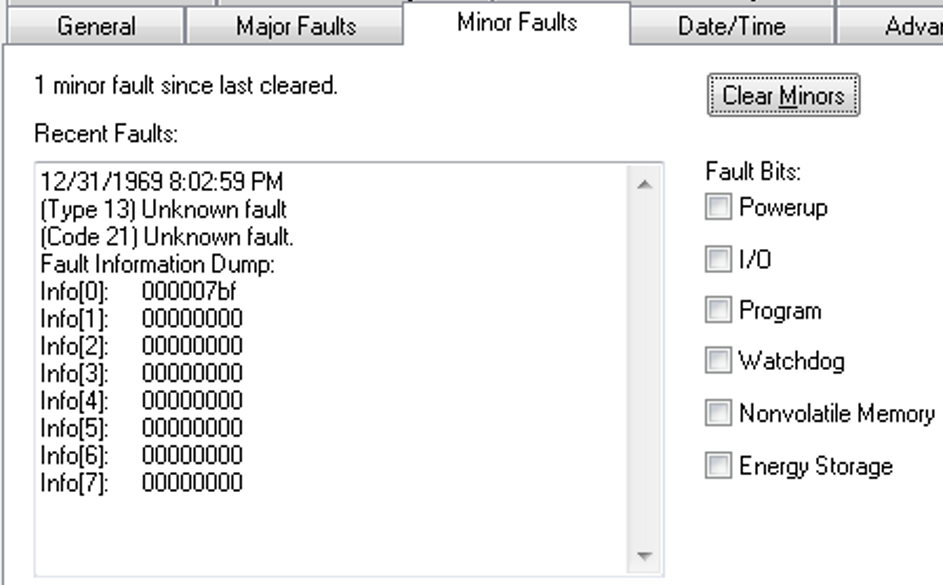
When the fault is logged, the WCT of the controller is set to 1/1/19XX 00:00:00.000, where XX is 81...86. The year corresponds to the Info[0] value for the minor fault.
- GuardLogix® 5580 Controllers, Revision 31.011
- ControlLogix® 5580 Controllers, Revision 31.011
- ControlLogix 5580 Process Controllers, Revision 33.011
- CompactLogix™ 5380 Controllers, Revision 31.011
- CompactLogix 5380 Process Controllers, Revision 33.011
- Compact GuardLogix 5380 SIL 2 Controllers, Revision 31.011
- Compact GuardLogix 5380 SIL 3 Controllers, Revision 32.013
- CompactLogix 5480 Controllers, Revision 32.011
Known Anomaly First Identified in:
- ControlLogix® 5580 Controllers, Revision 32.011
- ControlLogix 5580 Process Controllers, Revision 33.011
- GuardLogix® 5580 Controllers, Revision 32.011
- CompactLogix™ 5380 Motion Controllers, Revision 32.011
- CompactLogix 5380 Process Controllers, Revision 33.011
- Compact GuardLogix 5380 SIL2 Controllers, Revision 32.011
- Compact GuardLogix 5380 SIL3 Controllers, Revision 32.013
Minor fluctuations of the system time offset both on the producer controller and consumer controller side can cause minor velocity spikes, typically less than 1 % on the consumed axes in the remote controller.
This behavior is aesthetic and does not impact functionality.
Known Anomaly First Identified as of Firmware Revision 32.012
Catalog Numbers:
- ControlLogix® 5580 Controllers
- ControlLogix 5580 Process Controllers
- CompactLogix™ 5380 Controllers
- CompactLogix 5380 Process Controllers
- GuardLogix® 5580 Controllers
- Compact GuardLogix 5380 Controllers
- CompactLogix 5480 Controllers
Known Anomaly First Identified as of Firmware Revision 33.011
Concurrent Updates of 1756-RM2 and Communication Modules Causes 1756-RM2 To MNRF/ASSERT (987259)
|
Devices
|
First Known in Firmware
Revision
|
Corrected in Firmware
Revision
|
|
1756-RM2/1756-RM2XT
|
20.030
|
—
|
|
ControlLogix® 5570
redundant controllers
|
34.051
|
—
|
|
ControlLogix 5580
controllers
|
33.011
|
—
|
|
ControlLogix 5580
Process controllers
|
33.011
|
—
|
If you update the 1756-RM2 module to revision 20.030 or later while concurrently updating 1756-ENx communication modules to revision 5.008 or 5.028, the 1756-RM2 firmware update fails. The 1756-RM2 displays "ERAS" and/or "E813 Comm Error".
To work around this issue, do not select the 1756-RM2 module along with 1756-ENx revision 5.0xx modules for concurrent updates.
If you do experience a 1756-RM2 firmware update failure:
- Power cycle the 1756-RM2 to clear the fault (E813).
- After other concurrent updates are completed, relaunch ControlFLASH Plus® and update the 1756-RM2 module.
See the Knowledgebase Technote Concurrent flashing of 1756-RM2 and Communication modules causes 1756-RM2 to fail.
Disqualification of Redundant Chassis Pair Due to Concurrent Connection Timeout (1895856)
|
Communication Modules
|
First Known in Firmware
Revision
|
Corrected in Firmware
Revision
|
|
1756-EN4TR, 1756-EN4TRK,
1756-EN4TRXT |
5.001
|
5.003
|
|
Controllers
|
First Known in
Firmware
Revision
|
Corrected in Firmware
Revision
|
|
ControlLogix® 5580
|
33.011
|
—
|
|
ControlLogix 5580 Process
|
33.011
|
—
|
|
GuardLogix 5580
|
37.011
|
—
|
|
ControlLogix 5590
|
38.011
|
—
|
|
ControlLogix 5590 Process
|
38.011
|
—
|
|
Controllers
|
First Known in Firmware
Revision
|
Corrected in Firmware
Revision
|
|
CompactLogix™ 5370
|
20.011
|
38.011 and later
|
|
Compact GuardLogix® 5370
|
28.011
|
38.011 and later
|
|
ControlLogix® 5570
|
18.012
|
38.011 and later
|
|
GuardLogix 5570
|
20.011
|
38.011 and later
|
|
CompactLogix 5380
|
28.011
|
38.011 and later
|
|
Compact GuardLogix 5380 SIL 2
|
31.011
|
38.011 and later
|
|
Compact GuardLogix 5380 SIL 3
|
32.013
|
38.011 and later
|
|
CompactLogix 5380 Process
|
33.011
|
38.011 and later
|
|
CompactLogix 5480
|
32.011
|
38.011 and later
|
|
ControlLogix 5580
|
28.011
|
38.011 and later
|
|
GuardLogix 5580
|
31.011
|
38.011 and later
|
|
ControlLogix 5580 Process
|
33.011
|
38.011 and later
|
Work arounds to consider:
Application Notes
This release has the following application notes.
PXRQ Instruction Can Cause a Controller MNRF/Assert
|
Controllers
|
First Known in Firmware
Revision
|
|
CompactLogix™ 5380
|
31.011
|
|
Compact GuardLogix® 5380 SIL
2
|
31.011
|
|
Compact GuardLogix 5380 SIL 3
|
32.013
|
|
CompactLogix 5380 Process
|
33.011
|
|
CompactLogix 5480
|
32.011
|
|
ControlLogix® 5580
|
31.011
|
|
GuardLogix 5580
|
31.011
|
|
ControlLogix 5580 Process
|
33.011
|
Writing to the Equipment Phase External Request (PXRQ) instruction control\backing tag needs to be conditioned with a set .PC bit of the control\backing tag or the controller can MNRF/assert.
New Firmware Updates Can Impact the Performance of Message Rate Capacity HMI/MSG (Class 3) Data
Each new major revision of the controller/communication module firmware provides additional features and functionality, but this consumes additional processing power from the module even if the features are not utilized. This manifests as degrading HMI/messaging performance for the respective module.
Despite this degradation, the specifications defined for the respective modules have been maintained:
|
Module
|
Message Rate Across the Embedded Ethernet Port
|
|
ControlLogix® 5580
CompactLogix® 5380 |
2000 MSG/sec
|
|
GuardLogix® 5580 controllers in a SIL3 configuration
Compact GuardLogix 5380 SIL3 controllers |
1000 MSG/sec
|
|
1756-EN4TR Ethernet modules
|
3700 MSGs/sec
|
To improve the messaging capacity, it is recommended to employ the following:
- For high-frequency messaging, utilize connected cached messages
- Utilize message reads as opposed to message writes; they’re more efficient
- For ControlLogix 5580 controllers, route HMI/messages through communication modules in the chassis as
opposed to going directly to the embedded port of the controller
- Offloading some of the processing to the communications module results in greater messaging capacity than using the front port alone
- This recommendation does not apply to I/O or produce/consume data, it is more efficient and there is more capacity for that data to route through the embedded port of the controller
- Upgrade to a 5590 controller
- The HMI/messaging messaging capacity is doubled through the embedded ethernet port
For more information, see these publications:
- ControlLogix and GuardLogix Controller Specifications Technical Data, publication 1756-TD001
- CompactLogix 5380, Compact GuardLogix 5380, and CompactLogix 5480 Controllers Specifications Technical Data, publication 5069-TD002
- 1756 ControlLogix Communication Modules Specifications Technical Data, publication 1756-TD003
Copyright © 2026 Rockwell Automation, Inc. All rights reserved.
Rockwell Automation, Allen-Bradley, and FactoryTalk are trademarks of Rockwell Automation, Inc.
To view a complete list of Rockwell Automation trademarks please click here.
Trademarks not belonging to Rockwell Automation are property of their respective companies.