
Release Notes
( 9301-OPCx , 9301M-KSETx) KEPServer Enterprise connects 3rd Party HW / SW, from plant control systems to enterprise information systems
Version 15.00.00 (released 9/2024)
Catalog Number KepServer Enterprise
Requirements
This release has the following requirements.
- 1 GHz processor
- 2 GB of RAM (defer to the suggestion for the Operating System)
- Ethernet card
- 600 MB free hard disk space
- Windows Server 2022
- Note: Hardware key licensing may present unexpected errors.
- Windows Server® 2019 x64 - Runs in the 32-bit compatibility mode. Windows Server Core deployments are not supported.
- Windows 11 Enterprise (Recommended CS Benchmark) (
- Note: Hardware key licensing may present unexpected errors.
- Windows 11 Professional
- Windows 11 IoT Enterprise LTSC 2024 (v24H2)
- Windows 10 Enterprise 64-bit (Recommended, CIS Benchmark)
- Windows 10 Professional 64-bit (Runs in the 32-bit compatibility mode)
- Windows 10 Enterprise 2021 Long-Term Servicing Channel (LTSC)
- Windows 10 Enterprise 2019 Long-Term Servicing Channel (LTSC)
Features
This release includes the following system features.
Administration
- Certificate Management - The Certificate Store now manages certificates used in the IEC 61850 MMS Client driver.
General
- Projects and Links
- Replaced links to Kepware.com with links to PTC.com.
- Configuration
- Added an event log message when device discovery automatically renames a discovered device when there is a naming conflict.
- Configuration API
- About - Added server version and status information to the About endpoint.
Server
- Configuration
- Links - Updated web links to PTC.com (retiring kepware.com).
- Event Logs - Improved event log messages with additional information on security and certificate handling.
- Security
- This version contains several security enhancements. We recommend updating to this version of the product as soon as you can.
- The Secure Deployment Guide has been updated to provide guidance on protecting against UNC path injection attacks.
ABB Totalflow
- Added support for ABB Totalflow XSeries G5 (Remote Modular Controller RMC-100).
- Added support for Double data types in trend files.
Application Reporting Tool
- The Application Report Utility can now configure automatic Crash Dump generation and collect crash dumps for the Store and Forward Service, Local Historian Service, and Script Engine Service.
Fanuc Focas Ethernet Driver
- Coriolis Meter Type - Added the ability for the meter type to be set to Coriolis for liquid meters that provide a volume input.
Fisher ROC Plus Ethernet Driver
- Coriolis Meter Type - Added the ability for the meter type to be set to Coriolis for liquid meters that provide a volume input.
Fisher ROC Plus Serial Driver
- Coriolis Meter Type - Added the ability for the meter type to be set to Coriolis for liquid meters that provide a volume input.
IEC 60870-5-104 Client Driver
- Channel Maximum and Disconnect Restore - Increased the maximum number of channels from 256 to 1024.
IEC 61850 MMS Client Driver
- Certificates
- Added the ability for the server Certificate Store to manage driver MMS and TLS certificates.
- Created the ability to establish secure connections using certificates when the Authentication Mechanism property is configured with Certificate.
- Added event log messages for certificate handling.
IOT Gateway Plug-in
- MQTT Agent JSON Array - The MQTT Agent now accepts a write as a single JSON object as well as an array of JSON.
EFM Exporter
- Event Log Messages - Improved the clarity of the source agent sending event log messages.
- EFM Exporter FlowCal Exporter for liquid meter types now allows exporting CFX V8.1 format.
- CFX File Version 7 is still available in the drop-down, but the default for new liquid exporters is Version 8.
- The CFX File Version property allows selecting Version 5 or Version 8 for gas meter types.
- History Type options for both CFX File Version 7 and 8 are Type 11, 12, and 13.
- History Type options for CFX File Version 5 remain Type 1, 2, 3, & 4.
- History Type options for CFX File Version 8 are Type 1 & 2.
- When exporting a PollGroup to CSV, the CFX File Version is now included with each FlowCal Exporter.
Fast DDE™ / SuiteLink Native Client Interface
- Updated the Wonderware toolkit to support encrypted SuiteLink communications.
Local Historian Plug-in
- Timed Interval - Added the ability to log data on a set-timed interval (seconds, minutes, hours, or days).
Media-Level Redundancy Plug-In
- Monitor Interval - Updated the Monitor Interval(s) property so it can be specified even when a Monitor Item is not set.
Memory Based Driver
- String Array - Added support for String Array data type.
- Users can now configure the rate at which tag values are persisted to the file. The range is 5-60 seconds.
MTConnect Driver
- Memory - Fixed a memory issue for projects containing many MTConnect devices.
OMNI Flow Computer Driver
- Coriolis Meter Types and Duplicate Records - Added support for Coriolis meter types.
OPC DA Client Driver
- Tag Browser and Security - Improved the tag browser to include sorting and filtering.
OPC UA Client
- Added support for connecting to some OPC UA servers that require separate discovery endpoints when configured to maximum security.
OPC UA Client Interface
- Increased the upper limit on OPC UA connections allowed to 256. The default value is still 128.
ThingWorx Interface
- Security / Publishing
- For the ThingWorx Native interface, decreased the minimum allowed value on Max Updates per Publish and provides event log feedback when a message is too large or timing out. Also adjusted the internal memory allocation buffer for better performance.
- Updated to C SDK 3.1.0 to address a race condition that prevents sending property updates for remote properties when the platform or thing restarts. This version also contains several security enhancements and anomaly fixes.
TIA Portal Exporter Plug-in
- Added support for v17 and v18 TIA Portal projects.
Torque Tool Ethernet Driver
- Added support for MID61 with Revision 998 in the Open Protocol device model.
- Added OTR_NEWDATA / MID65 tag address as a flag for when Old Tightening Result requests write responses are completed.
Toyopuc PC3/PC2 Ethernet Driver
- Added support for the GX Nano model.
Corrected Anomalies in This Release
This release corrects the following anomalies.
Installation
Enable Configuration API
- Fixed an issue that could prevent the Enable Configuration API option from working during an upgrade
Server
General
- Fixed an issue that could cause a crash at startup
OPC UA Interface
- Fixed a deadlock that could occur when simultaneously processing reads, writes, and/or updates on a monitored item.
- Fixed an issue that could cause the server to crash.
- Fixed issue with OPC UA tag quality going bad when the tag name has trailing percent signs or other special characters.
- Fixed an OPC UA memory leak resulting from a direct read.
ABB Total Flow Driver
- Meter ID - Fixed an issue where the wrong meter ID could be logged in EFM Exporter output.
- Plate Material Configuration - Fixed an issue where the plate material configuration attribute was incorrectly reported for some calculation methods for gas EFM data.
- Fixed an issue where register block size changes would not be applied while an active client was running.
Advanced Simulator Driver
- ODBC Crash - fixed an issue that could cause ODBC drivers to crash or become unresponsive.
BACnet Driver
- Processing Fix - fixed an issue where the driver could become unresponsive while processing updates.
- I-Am Broadcasts - Resolved an issue communicating with some BACnet devices that require BACnet I- Am broadcasts before communicating.
DataLogger Plug-In
- ODBC Crash - Fixed an issue that could cause ODBC drivers to crash or become unresponsive.
Fanuc Focas Ethernet Driver
- Fixed an issue that could cause timer values to be misread when multiple devices are under one channel.
- Fixed an issue reading macros when some macros were undefined (vacant).
- Fixed an issue reading floating point values.
IEC 6070-5-104 Client Driver
- Fixed an issue where a physical disconnect could result in long reconnect times once the network was restored.
IOT Gateway Plug-in
- Fixed an issue where the formatting of non-numeric floating-point values, such as #INF and #NAN, were invalid in JSON payloads.
Local Historian Plug-in
- Fixed an issue where updates would drop when the quality contained a quality status mask.
Modbus Ethernet Driver
- Fixed an issue that could cause high CPU usage
MTConnect Driver
- Memory - Fixed an issue for projects containing many MTConnect devices
ODBC Client Driver
- ODBC Crash - fixed an issue that could cause ODBC drivers to crash or become unresponsive.
OMNI Flow Computer Driver
- Fixed an issue that could duplicate an event record.
Omron NJ Ethernet Driver
- Dynamic Array Scan Rate - fixed an issue with dynamic array tags where the scan rate is not honored.
OPC DA Client Driver
-
- Fixed an issue where attempting to read a write-only tag could cause reads to fail.
Siemens S7 TCP/IP Ethernet Driver
-
- Fixed an issue with some array tag offsets within a data block for automatic tag generation from Step7 project files.
- Fixed an issue where multi-line comments in the TIA Portal project could cause automatic tag generation to fail.
Siemens S7 Plus Ethernet Driver
- Fixed issue connecting to SoftPLC using insecure communications.
- Symbol Reload and S7-1507SF Connect
- Fixed an issue where a symbol reload would be performed for some invalid tags even when Symbol load on invalid tag setting was set to disabled.
- Fixed an issue connecting to a Siemens software controller, such as an S7-1507SF.
Universal Device Driver
- Fixed an issue in UDP mode where the driver would stop communicating if messages larger than 1024 bytes were received.
Functional Changes
This release has the following functional changes from the previous release.
KEPServer Enterprise version 15 .00.00 has the following changes in functionality since the last release:
- Decreased the minimum allowed value on Max Updates per Publish and provides event log feedback when a message is too large or timing out. Also adjusted the internal memory allocation buffer for better performance.
- Updated to C SDK 3.1.0 to address a race condition that prevents sending property updates for remote properties when the platform or thing restarts. This version also contains several security enhancements and bug fixes.
Application Notes
This release has the following application notes.
- You can only install one version of KEPServer Enterprise per computer.
- The silent installation is an automated installation method that you can use to install KEPServer Enterprise. You can use the silent installation during large-scale rollouts when it might be too slow or
- costly to have administrators or technicians interactively install the KEPServer Enterprise software on individual computers.
- KEPServer Enterprise version 15.00.00 is only available in the PC edition. KEPServer Enterprise version 10.00.00 is the latest version supported by PanelView Plus.
- Multiple failed attempts to authenticate usernames or passwords will now result in a ten-minute lockout period.
- KEPServer Enterprise is only able to browse tags using nested structures within four levels deep.
- Hilscher Universal Driver
- Deprecates this driver. Existing OPF project files have loaded, but the channels present an error in the event log. Existing JSON project files are unable to load.
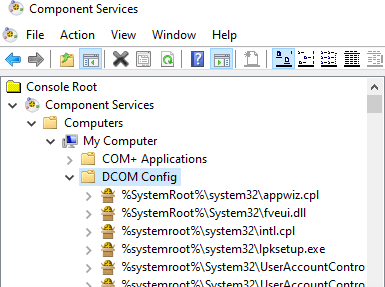
- Open Component Services.
- Double-click Console Root > Component Services > Computers > My Computer > DCOM Config.
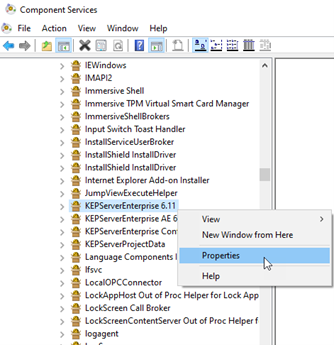
- Right-click KEPServerEnterprise x.xx and select Properties.
- On the General tab, select the authentication level in Authentication Level.
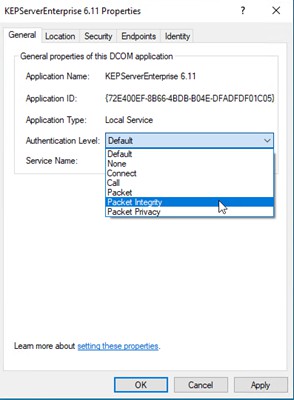
- Click OK and restart KEPServer Enterprise.
- From the notification area, right-click KEPServerEnterprise and select Settings.
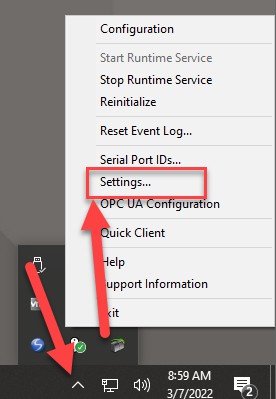
- In the Settings - KEPServerEnterprise dialog box, select Runtime Options > Use DCOM configuration settings.
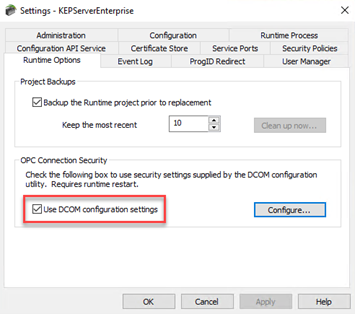
- Click OK. Supported Drivers
The PC edition of KEPServer Enterprise version 15.00.00 supports these drivers:
|
Driver List
| |||
|
Advanced Simulator
|
GE SNP
|
Omron NJ Ethernet
|
Themo Westronics Serial
|
|
Allen-Bradley Bulletin
1609
|
GE SNPX
|
Omron Process Suite
|
TIWAY Host Adapter
|
|
Allen-Bradley Bulletin
900
|
Honeywell HC900
Ethernet
|
Omron Toolbus
|
Torque Tool Ethernet
|
|
Analog Devices
|
Honeywell UDC Ethernet
|
OPC DA Client
|
Toshiba Ethernet
|
|
Aromat Ethernet
|
Honeywell UDC Serial
|
OPC UA Client
|
Toshiba Serial
|
|
Aromat Serial
|
IA Super SEL
|
OPC XML-DA Client
|
Toyopuc® PC2 Serial
|
|
AutomationDirect
DirectNET
|
Idec Serial
|
Optimation OptiLogix
|
Toyopuc PC3/PC2
Ethernet
|
|
AutomationDirect EBC
|
IOtech PointScan 100
|
Opto 22 Ethernet
|
User Configurable (U-
CON)
|
|
AutomationDirect ECOM
|
Keyence KV Ethernet
|
Partlow ASCII
|
Wago Ethernet
|
|
AutomationDirect K
Sequence
|
KraussMaffei MC4
Ethernet
|
Philips P8/PC20
|
Wonderware InTouch
Client
|
|
AutomationDirect
Productivity Series
Ethernet
|
Memory Based
|
SattBus Ethernet
|
Yaskawa Memobus Plus
(SA85)
|
|
BACnet™ /IP
|
Mettler Toledo Serial
|
SattBus Serial
|
Yaskawa MP Series
Ethernet
|
|
Beckhoff® TwinCAT®
|
Micro-DCI™
|
Scanivalve Ethernet
|
Yaskawa MP Series
Serial
|
|
Busware Ethernet
|
Mitsubishi® CNC
Ethernet
|
Siemens® S5 (3964R)
|
Yokogawa Controller
|
|
CODESYS®
|
Mitsubishi Ethernet
|
Siemens S5 (AS511)
|
Yokogawa CX Ethernet
|
|
Contrex® M-Series
|
Mitsubishi FX
|
Siemens S7 MPI
|
Yokogawa Darwin
Ethernet
|
|
Contrex Serial
|
Mitsubishi FX Net
|
Siemens S7-200
|
Yokogawa Darwin Serial
|
|
Cutler-Hammer D50/
D300
|
Mitsubishi Serial
|
Siemens TCP/IP
Ethernet
|
Yokogawa DX Ethernet
|
|
Cutler-Hammer ELC
Ethernet
|
Modbus® ASCII Serial
|
Siemens TCP/IP Slave
Ethernet
|
Yokogawa DX Serial
|
|
Cutler-Hammer ELC
Serial
|
Modbus Plus
|
Simatic/TI 505 Ethernet
|
Yokogawa DXP Ethernet
|
|
Dataforth® isoLynx®
|
Modbus RTU Serial
|
Simatic/TI 505 Serial
|
Yokogawa HR2400
Serial
|
|
DDE Client
|
Modbus Slave RTU
Serial
|
Simulator
|
Yokogawa MW Ethernet
|
|
Fanuc Focas Ethernet
|
Modbus TCP/IP Ethernet
|
SIXNET EtherTRAK®
|
Yokogawa MX Ethernet
|
|
Driver List
| |||
|
Fanuc Focas HSSB
|
MTConnect® Client
|
SIXNET UDR
|
Yokogawa
SMARTDAC+ GX,
GP, and GM
|
|
Fuji Flex
|
ODBC Client
|
SquareD Serial
|
Yokogawa YS100
Serial
|
|
GE® CCM
|
Omron FINS Ethernet
|
System Monitor
|
|
|
GE Ethernet
|
Omron FINS Serial
|
Telemecanique
Uni- Telway Slave
|
|
|
GE Ethernet Global
Data
|
Omron Host Link
|
Thermo
Westronics
Ethernet
|
|
|
KEPServer
Enterprise
version
|
KEPServerEX
equivalent
version
|
FactoryTalk
View SE and
ME Station
|
PanelView™
Plus
|
MobileView™
|
|
5.00.00
|
4.5
|
5.00.00
|
5.00.00 to
5.10.00
|
Not applicable
|
|
8.00.00
|
5.13.235
|
8.00.00
|
8.00.00 to
8.20.00
|
Not applicable
|
|
9.00.00
|
5.19.476
|
9.00.00
|
9.00.00
|
Optional
installation
|
|
10.00.00
|
5.21.158
|
10.00.00
11.00.00
(patch required
for v11)
|
10.00.00 to
13.00.00
|
11.00.00 to
13.00.00
|
|
11.00.00
|
6.6.504
|
11.00.00
|
Not supported
|
Not supported
|
|
12.00.00
|
6.9.572
|
12.00.00
|
Not supported
|
Not supported
|
|
12.01.00
|
6.9.636
|
12.00.00
|
Not supported
|
Not supported
|
|
13.00.00
|
6.11.725
|
13.00.00
|
Not supported
|
Not supported
|
|
13.01.00
|
6.12.325
|
13.00.00
|
Not supported
|
Not supported
|
|
14.00.00
|
6.14.263
|
14.00.00
|
Not supported
|
Not supported
|
|
15.00.00
|
6.16.217.0
|
15.00.00
|
Not supported
|
Not supported
|
Copyright © 2026 Rockwell Automation, Inc. All rights reserved.
Rockwell Automation, Allen-Bradley, and FactoryTalk are trademarks of Rockwell Automation, Inc.
To view a complete list of Rockwell Automation trademarks please click here.
Trademarks not belonging to Rockwell Automation are property of their respective companies.