
Release Notes
Universal I/O Module, 8 Isolated Points, HART, Fault Tolerant
Version 1.012 (released 1/2024)
Catalog Number 5015-U8IHFTXT (series A)
Known Anomalies in This Release
This release has the following known anomalies.
Intermittent Fault of FLEXHA 5000 Backplane Interface Module
Known Anomaly First Identified as of Firmware Revision 1.011
Catalog Number 5015-BIMXT
A FLEXHA 5000™ can intermittently indicate the presence of a Base Interface Module (BIM) fault that is not the result of a failing BIM.
When this anomaly occurs, both the S:Basex.InterfaceAInternalFault and S:Basex.InterfaceBInternalFault adapter tags for the same base transition to 1. (x represents the base number.)
These faults may clear without user intervention and may reassert at a later time.
An event that results in only a single S:Basex.InterfaceAInternalFault or single S:Basex.InterfaceBInternalFault adapter tag transitioning to 1 is not the result of this anomaly, and should be diagnosed accordingly.
FLEXHA 5000 I/O Module Channels Can Fault at Power-up in Low Temperature Conditions
Known Anomaly First Identified as of Firmware Revision 1.012
Catalog Number 5015-U8IHFTXT
If you attempt to power up a FLEXHA 5000™ I/O system in extremely low temperatures, for example, at or approaching -30 °C (-22 °F), FLEXHA 5000 8-channel Universal I/O module channels, including both channels in a duplex pair, can fault.
FLEXHA 5000 I/O Module Channels Can Fault in High Humidity Environments
Known Anomaly First Identified as of Firmware Revision 1.012
Catalog Number 5015-U8IHFTXT
When a FLEXHA 5000™ 8-channel Universal I/O module operates in an environment with high humidity, module channels can fault.
We recommend that you use the I/O module in a humidity-controlled environment.
PlantPAx® HART Connection Data Type Not Supported (CVBLNXESW-85112)
Corrected Anomaly Firmware Revision 3.011
Known Anomaly First Identified as of Firmware Revision 1.012
Catalog Number 5015-U8IHFTXT
When you connect a FLEXHA 5000™ 8-channel Universal I/O module to a HART device, you can configure in Studio 5000 Logix Designer® application to use the PlantPAx Data connection type.
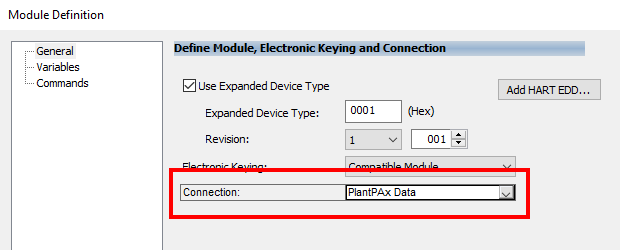
The data that is provided in the controller tags from the HART device is not supported, and you shouldn’t use it. The following is an example of some HART PlantPAx tags whose data shouldn’t be used.

Rockwell Automation Company 'Internal'
Known Anomalies from Previous Releases
These anomalies are from previous releases but are still known in this release.
Incorrect Removable Terminal Block Use is Not Reported
Known Anomaly First Identified as of Firmware Revision 1.011
Catalog Number 5015-U8IHFTXT
If you use the wrong removable terminal block (RTB) on a FLEXHA 5000™ 8-channel Universal I/O module, Studio 5000 Logix Designer® application doesn’t report that the error exists.
You can establish a Simplex connection to an I/O module connected to a Duplex RTB and a Duplex connection to an I/O module connected to a Simplex RTB. But Logix Designer application doesn’t read nor provide the data of the RTB, including the following:
- Vendor ID
- Product Type
- Product Code
- Major Revision
- Minor Revision
- Serial Number
- Series
- Major Hardware Revision
- Minor Hardware Revision
- Product Name
- Catalog Number
- Warranty Number
- Manufacture Date
- Plex (Simplex or Duplex)
Ignore any indications in the Studio 5000 Logix Designer application that the RTB Fault diagnostic is available. For example, the I.Modx.RTBFault is always set to 0, even if you are using the wrong RTB.
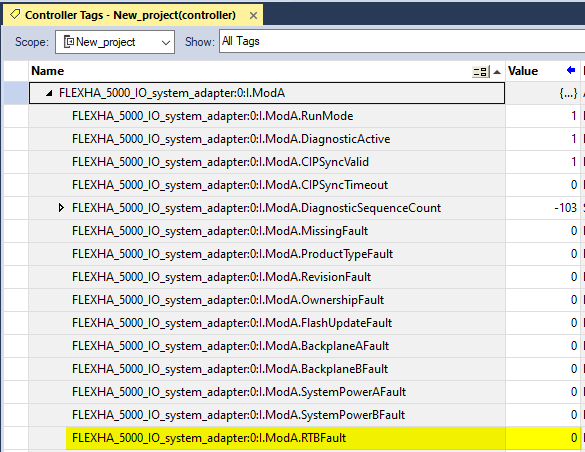
Verify that you are using the correct RTB(s) based on your I/O module’s configuration. If you misuse RTBs with your I/O module, unexpected and/or undesired behavior can occur. This can include damage to any devices that are connected to the wrong RTB(s).
Must Remove the I/O Module in Duplex Pair to Update Firmware Without Loss of Control
Corrected Anomaly as of Firmware Revision 2.011
Known Anomaly First Identified as of Firmware Revision 1.011
Catalog Number 5015-U8IHFTXT
You can’t update the firmware on a FLEXHA 5000™ 8-channel Universal I/O module that is part of a Duplex Pair while the I/O module resides in an operating FLEXHA 5000 I/O system and maintain control.
You must remove the I/O module from the system and update the firmware in a test system. Before you can remove the I/O module, you must turn it off. When the module is removed, the partner module maintains control.
For more information on how to update firmware on an I/O module, see the FLEXHA 5000 I/O System User Manual, publication 5015-UM001.
NAMUR Threshold Configuration Not Available
Known Anomaly First Identified as of Firmware Revision 1.011
Catalog Number 5015-U8IHFTXT
Studio 5000 Logix Designer® doesn’t provide a NAMUR threshold for FLEXHA 5000™ 8-channel Universal I/O module channels that use Analog Input mode.
IEC Type III Devices are Not Supported with FLEXHA 5000 8-channel Universal I/O Module
Known Anomaly First Identified as of Firmware Revision 1.011
Catalog Number 5015-U8IHFTXT
The FLEXHA 5000™ 8-channel Universal I/O module doesn’t support IEC Type III devices with the channels that are configured for digital input mode.
Ignore any indications in Studio 5000 Logix Designer® application that the module supports IEC III Type devices with channels that are configured for digital input mode.
FLEXHA 5000 8-channel Universal I/O Module Does Not Count Inputs
Known Anomaly First Identified as of Firmware Revision 1.011
Catalog Number 5015-U8IHFTXT
The FLEXHA 5000™ 8-channel Universal I/O module doesn’t support Counting Inputs on channels that are configured for digital input mode.
Ignore any indications in Studio 5000 Logix Designer® application that the module counts inputs on channels that are configured for digital input mode.
Precision Time Protocol Timestamping Not Available
Known Anomaly First Identified as of Firmware Revision 1.011
Catalog Number 5015-U8IHFTXT
Ignore any indications in Studio 5000 Logix Designer® application PTP timestamping is available on channels that are configured for digital input mode.
Must Reset I/O Module to Clear a Channel Fault
Corrected Anomaly as of Firmware Revision 2.011
Known Anomaly First Identified as of Firmware Revision 1.011
Catalog Number 5015-U8IHFTXT
When a channel fault occurs on the FLEXHA 5000™ 8-channel Universal I/O module, you can’t reset the channel individually. You must reset the entire I/O module to clear a channel fault.
IMPORTANT: When you reset an I/O module, the connections to all channels are broken. As a result, control is lost on all channels until the connections are restored.
To reset the I/O module, you use the I/O module’s QTA or Studio 5000 Logix Designer ® application.
For more information on how to reset an I/O module, see the FLEXHA 5000 I/O System User Manual, publication 5015-UM001.
Multiple I/O Module Resets
Some fault causes are detected but not indicated in the Logix Designer application module tags. They only appear as a channel faults. In these cases, you must troubleshoot your application for all possible causes of a channel fault.
Each time that you take action to resolve a channel fault, you must reset the I/O module and wait for the power-up sequence to complete to see if the fault has been cleared.
Diagnostic Timestamping is Not Available
Known Anomaly First Identified as of Firmware Revision 1.011
Catalog Number 5015-U8IHFTXT
Diagnostic timestamping isn’t available with FLEXHA 5000™ 8-channel Universal I/O modules when an event occurs. Timestamps are not available for the following events:
- Open Wire
- Short Circuit
- Over Temperature
- Critical Temperature
- Field Power Off
- Field Power On
- Internal Fault
Without diagnostic timestamps, you can’t determine the fault sequence in a process. The tags that are associated with these events are not populated when they occur.
The Diagnostics page timestamps show None for each event on both I/O modules whether the event occurred or not.
Return Current Mismatch Diagnostic Not Available
Known Anomaly First Identified as of Firmware Revision 1.011
Catalog Number 5015-U8IHFTXT
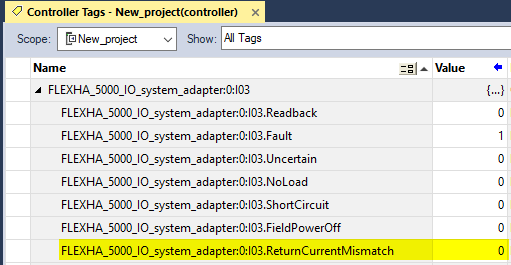
The Return Current Mismatch diagnostic isn’t available on a FLEXHA 5000™ 8-channel Universal I/O module.
The I/O module doesn’t detect when the return current for a module channel doesn’t match the outgoing current. As a result, some miswiring conditions might not be detected and channel faults are not set.
Cannot Reset Only One I/O Module in a Duplex Pair Via Studio 5000 Logix Designer
Corrected Anomaly as of Firmware Revision 2.011
Known Anomaly First Identified as of Firmware Revision 1.011
Catalog Number 5015-U8IHFTXT
When a module or channel fault occurs on a FLEXHA 5000™ 8-channel Universal I/O module in a Duplex Pair, you must reset the I/O module to clear it.
IMPORTANT: When you reset an I/O module, the connections to all channels are broken. As a result, control is lost on all channels until the connections are restored.
You can reset an I/O module via its quarter-turn actuator (QTA) or Studio 5000 Logix Designer® application.
However, if the faulted I/O module is part of a Duplex Pair, you can’t reset only that module via the Logix Designer application and maintain control.
For more information on how to reset an I/O module, see the FLEXHA 5000 I/O System User Manual, publication 5015-UM001.
Multiple I/O Module Resets
Some fault causes are detected but not indicated in the Logix Designer application module tags. They only appear as a channel faults. In these cases, you must troubleshoot your application for all possible causes of a channel fault.
Each time that you take action to resolve a channel fault, you must reset the I/O module and wait for the power-up sequence to complete to see if the fault has been cleared.
Digital Output Pulse Testing Not Available
Known Anomaly First Identified as of Firmware Revision 1.011
Catalog Number 5015-U8IHFTXT
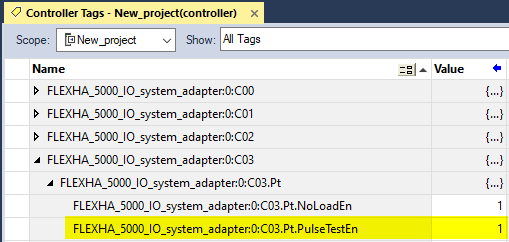
The Digital Output Pulse Test feature isn’t available on a FLEXHA 5000™ 8-channel Universal I/O module.
IMPORTANT: Logix Designer application appears to let you enable Digital Output Pulse Testing. However, none of these methods enable Digital Output Pulse Test.
- Module Properties Dialog Box

or
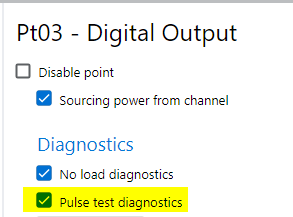
- Controller Tags
Analog Output Pulse Testing Not Available
Known Anomaly First Identified as of Firmware Revision 1.011
Catalog Number 5015-U8IHFTXT
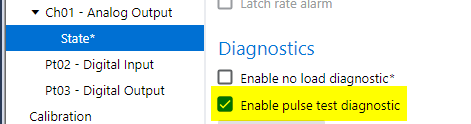
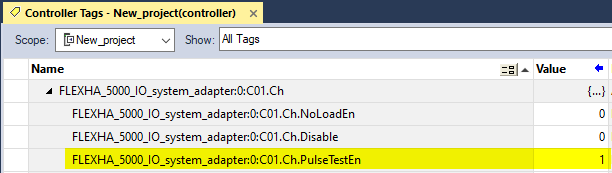
The Analog Output Pulse Test feature isn’t available on a FLEXHA 5000™ 8-channel Universal I/O module.
IMPORTANT: Logix Designer application appears to let you enable Analog Output Pulse Testing. However, none of these methods enable Analog Output Pulse Test.
- Module Properties Dialog Box

or
- Controller Tags
FLEXHA 5000 Universal I/O Channel Cannot Tolerate a -32 V DC Miswire While Operating
Known Anomaly First Identified as of Firmware Revision 1.011
Catalog Number 5015-U8IHFTXT
If negative voltage is connected to a FLEXHA 5000™ 8-channel Universal I/O module channel and the channel is operating, damage can occur.
Open Wire Condition Not Indicated in Studio 5000 Logix Designer Application For FLEXHA 5000 I/O Modules in Some Conditions
Known Anomaly First Identified as of Firmware Revision 1.011
Catalog Number 5015-U8IHFTXT
On a FLEXHA 5000™ 8-channel Universal I/O module an Open Wire condition can exist but not be indicated in the Studio 5000 Logix Designer® application.
If you receive a channel fault but no indication of the cause via the input tags, an Open Wire condition is one possible cause that you should consider when you troubleshoot your application to find the cause of the channel fault.
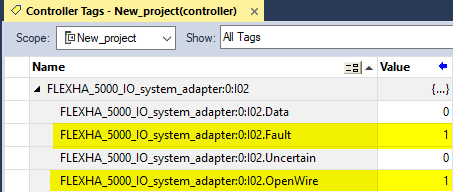
For example, if an Open Wire condition exists, the channel’s Fault input tag transitions to 1 but the Ixx.OpenWire input tag might remain 0, as shown in the example.

The tag might transition to 1. If the tag transitions to 1, as shown, an Open Wire condition exists on that channel.
After you correct the cause of the channel fault, you must reset the I/O module to clear the fault. To reset the I/O module, you use the I/O module’s QTA or Studio 5000 Logix Designer application.
For more information on how to reset the module, see the FLEXHA 5000 I/O System User Manual, publication 5015-UM001.
Short Circuit Detection is Not Indicated in Studio 5000 Logix Designer Application For FLEXHA 5000 I/O Modules in Some Conditions
Known Anomaly First Identified as of Firmware Revision 1.011
Catalog Number 5015-U8IHFTXT
On a FLEXHA 5000™ 8-channel Universal I/O module a Short Circuit condition can exist but not be indicated in the Studio 5000 Logix Designer® application.
If you receive a channel fault but no indication of the cause via the input tags, a Short Circuit condition is one possible cause that you should consider when you troubleshoot your application to find the cause of the channel fault.
For example, if a Short Circuit condition exists, the channel’s Ixx.Fault input tag transitions to 1 but the Ixx.ShortCircuit input tag might remain 0, as shown in the example.
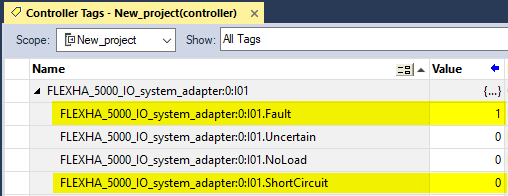
The tag might transition to 1. If the tag transitions to 1, as shown, a Short Circuit condition exists on that channel.
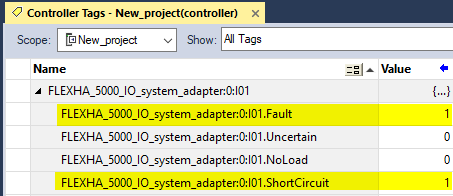
After you correct the cause of the channel fault, you must reset the I/O module to clear the fault. To reset the I/O module, you use the I/O module’s QTA or Studio 5000 Logix Designer application.
For more information on how to reset the module, see the FLEXHA 5000 I/O System User Manual, publication 5015-UM001.
No Load Condition Not Indicated in Studio 5000 Logix Designer Application For FLEXHA 5000 I/O Modules in Some Conditions
Known Anomaly First Identified as of Firmware Revision 1.011
Catalog Number 5015-U8IHFTXT
On a FLEXHA 5000™ 8-channel Universal I/O module a No Load condition can exist but not be indicated in the Studio 5000 Logix Designer® application.
If you receive a channel fault but no indication of the cause via the input tags, a No Load condition is one possible cause that you should consider when you troubleshoot your application to find the cause of the channel fault.
For example, if a No Load condition exists, the channel’s Fault input tag transitions to 1 but the Ixx.NoLoad input tag might remain 0, as shown in the example.
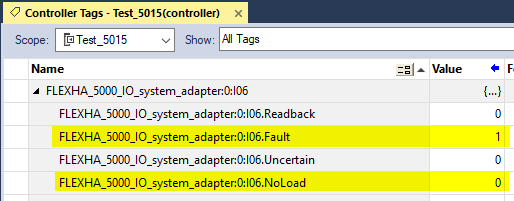
The tag might transition to 1. If the tag transitions to 1, as shown, a No Load condition exists on that channel.
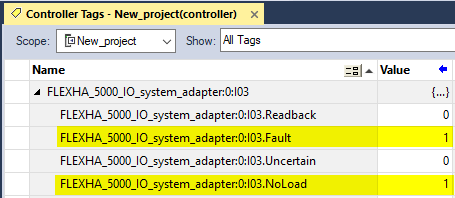
After you correct the cause of the channel fault, you must reset the I/O module to clear the fault. To reset the I/O module, you use the I/O module’s QTA or Studio 5000 Logix Designer application.
For more information on how to reset the module, see the FLEXHA 5000 I/O System User Manual, publication 5015-UM001.
IMPORTANT: Logix Designer application appears to let you enable No Load Detection. However, none of the following methods change the functionality.
- Module Properties Dialog Box
- Digital Output Mode

Or
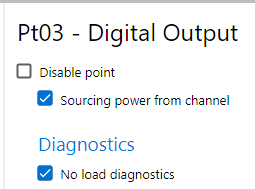
-
- Analog Output Mode

Or
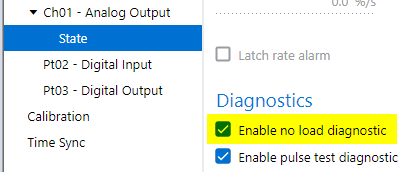
- Controller Tags
- Digital Output Mode
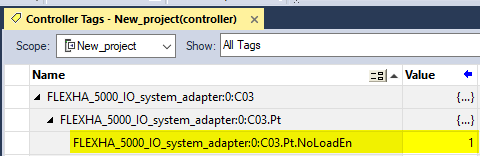
-
- Analog Output Mode
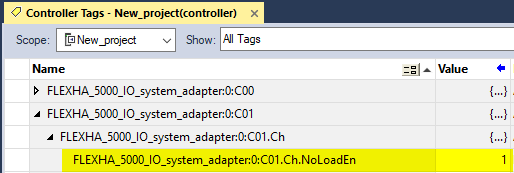
Field Power Diagnostic Enable Tag Does Not Change Functionality on Digital Input Channels
Known Anomaly First Identified as of Firmware Revision 1.011
Catalog Number 5015-U8IHFTXT
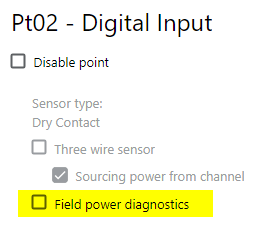
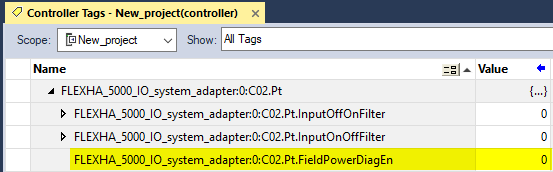
The Field Power diagnostic is available on FLEXHA 5000™ I/O module channels that are configured for digital input mode. However, the FieldPowerDiagEn tag does not change the functionality regardless of setting.
For example, you can try to disable the Field Power diagnostic in the following ways and field power diagnostics are still reported.
- Module Properties Dialog Box

or
- Controller Tags
Connection From a FLEXHA 5000 I/O Module Channel in Analog Output Mode to a HART Device Isn’t Automatically Restored (CVBLNXESW-85231)
Known Anomaly First Identified as of Firmware Revision 1.011
Catalog Number 5015-U8IHFTXT
An anomaly exists in the following conditions:
- A FLEXHA 5000™ 8-channel Universal I/O module resides on an I/O base.
- A channel on the module is configured for analog output mode and is connected to a HART device.
- The backplane A and B connections from Adapter base to the I/O base break.
When the backplane connections are restored, the connection between the channel and the HART device isn’t restored. As a result, the channel faults and HART data is not available. The channel’s status indicator flashes red and its NoLoad input tag changes to 1.
To restore the connection and resume normal operation, complete one of the following:
- Change the channel’s ResetFault output tag to 1 and then change it back to 0 after the fault is cleared.
- Cycle power to the I/O either by removing and reinserting it or unlocking and relocking it.
Copyright © 2026 Rockwell Automation, Inc. All rights reserved.
Rockwell Automation, Allen-Bradley, and FactoryTalk are trademarks of Rockwell Automation, Inc.
To view a complete list of Rockwell Automation trademarks please click here.
Trademarks not belonging to Rockwell Automation are property of their respective companies.