
Release Notes
( 9301-OPCx , 9301M-KSETx) KEPServer Enterprise connects 3rd Party HW / SW, from plant control systems to enterprise information systems
Version 14.00.00 (released 11/2023)
Catalog Number KepServer Enterprise
These release notes describe version information for KepServer Enterprise, version 14.00.00 (released 11/2023).
Requirements
This release has the following requirements.
KEPServer Enterprise works within the system requirements of all Rockwell
Automation® software products. For the latest compatibility information, refer to the
Product Compatibility and Download Center.
Hardware requirements
KEPServer Enterprise requires the following hardware:
- 1 GHz processor
- 1 GB of RAM
- Ethernet card
- 530 MB free hard disk space
Software requirements
KEPServer Enterprise has been tested on the following operating systems:
- Windows 10 (v21H2 and v22H2)
- Windows 10 IoT Enterprise 2019 Long-Term Servicing Channel (LTSC)
- Windows 10 IoT Enterprise 2021 Long-Term Servicing Channel (LTSC)
- Windows 11 (v21H2 and v22H2)
- Windows Server® 2019
- Windows Server 2022
Features
This release includes the following system features.
KEPServer Enterprise version 14.00.00 has the following new and enhanced features:
New features
Server
- General
- Adds warning messages if not all properties being set on an object are applied.
- Installation
- Supports enabling the Configuration API functionality during installation through the installation user interface, command line interface, and silent install workflow.
- Configuration API
- Adds the metadata defining group name and section name for properties.
Fanuc Focas Ethernet Driver
- Supports the cnc_rdprogdir3 function call.
Modbus Ethernet Driver
- Supports hostnames that start with a number.
Torque Tool Ethernet Driver
- Supports MID 140 (Execute Dynamic Job Request).
Enhanced features
Server
- General
- Updates relevant components to OpenSSL version 3.0 for improved security.
- Updates error messages to provide information about where the error is occurring.
Memory Based Driver
- Updates Persistence to save values automatically every 60 seconds when enabled.
ODBC Client Driver
- Improves the accuracy of event log messages and documentation.
Omron FINS Ethernet Driver
- Improves the read performance with String data types.
OPC UA Client Driver
- Updates the Subscription Publishing Interval to support a minimum value of 50 ms.
Torque Tool Ethernet Driver
- Increases the maximum channel count to 1,024.
User Configurable (U-CON®) Driver
- Updates behavior to ensure that all the tags are updated with the correct expected values even if the data from the device or simulator is padded with white spaces.
Corrected Anomalies in This Release
This release corrects the following anomalies.
The list identifies the anomalies corrected in the KEPServer Enterprise version 14.00.00.
Server
- General
- Fixes a potential failure in scenarios where Ethernet encapsulation is being used for certain drivers.
- Fixes an issue with parsing dynamic tags with quotation marks in the address.
- Configuration
- Fixes an issue with filtering behavior that might cause the configuration to stop responding during startup.
- OPC UA Interface
- Fixes a possible deadlock and failure.
Fanuc Focas Ethernet Driver
- Fixes an issue with interpreting the Sign bit while using the cnc_rdparam call.
GE Ethernet Driver
- Fixes an issue with tags showing bad quality while using a block size of 2,048.
Mitsubishi Ethernet Driver
- Fixes an issue with address validation for M series tags in the Mitsubishi iQ-R.model.
Modbus Ethernet Driver
- Fixes an issue with CPU usage in the driver.
Modbus Serial Driver
- Fixes an issue with timing out when the PLC connects but refuses the request.
Functional Changes
This release has the following functional changes from the previous release.
KEPServer Enterprise version 14.00.00 has the following changes in functionality since the last release:
- Server
KEPServer Enterprise version 14.00.00 does not support TLS 1.0 and 1.1.
Application Notes
This release has the following application notes.
The following are the application notes for KEPServer Enterprise version 14.00.00.
- You can only install one version of KEPServer Enterprise per computer.
- The silent installation is an automated installation method that you can use to install KEPServer Enterprise. You can use the silent installation during large-scale rollouts when it might be too slow or costly to have administrators or technicians interactively install the KEPServer Enterprise software on individual computers.
- KEPServer Enterprise version 14.00.00 is only available in the PC edition. KEPServer Enterprise version 10.00.00 is the latest version supported by PanelView Plus.
Known limitations of KEPServer Enterprise
- Multiple failed attempts to authenticate usernames or passwords will now result in a ten-minute lock-out period.
- KEPServer Enterprise is only able to browse tags using nested structures within four levels deep.
- Hilscher Universal Driver
Deprecates this driver. Existing OPF project files have loaded, but the channels present an error in the event log. Existing JSON project files are unable to load.
Mitigation for Microsoft DCOM Hardening patch
In response to Microsoft Distributed Component Object Model (DCOM) Hardening patch (MS KB5004442), the minimum DCOM
authentication level used by Rockwell Automation products was raised to Packet Integrity.
IMPORTANT: Installing this product’s latest version with earlier unpatched versions of other FactoryTalk products or
products using Classic OPC DA connections may cause a loss of connectivity due to the difference in DCOM
authentication level used. For additional information, see the Knowledgebase Document ID: IN39461 - Microsoft DCOM
Hardening Information TOC.
Microsoft releases the DCOM Hardening patch in response to CVE-2021-26414. This patch elevates the minimum DCOM
authentication level that is required to establish a DCOM connection. DCOM is used by many Rockwell Automation products and
may be affected by the change that is made by the Microsoft patch. For additional information about the affected Rockwell
Automation products, see the Knowledgebase Document ID: PN1581 - Product Notification 2022-01-001 - Rockwell Automation
products unable to establish proper DCOM connection after installing Microsoft DCOM Hardening patch (MS KB5004442).
Set DCOM authentication level of KEPServer Enterprise
When using KEPServer Enterprise, change the authentication level through the following:
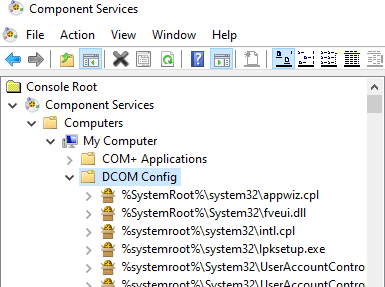
- Open Component Services.
- Double-click Console Root > Component Services > Computers > My Computer > DCOM Config.
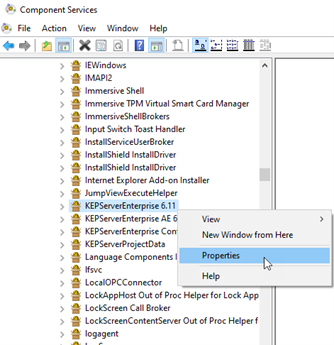
- Right-click KEPServerEnterprise x.xx and select Properties.
- On the General tab, select the authentication level in Authentication Level.
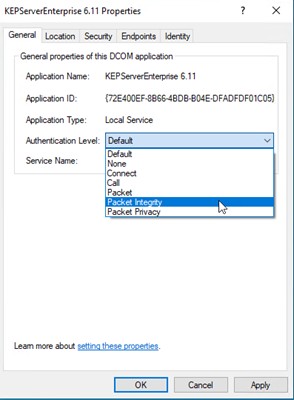
- Click OK and restart KEPServer Enterprise.
In addition to DCOM configuration, you must configure the following setting:
- From the notification area, right-click KEPServerEnterprise and select Settings.
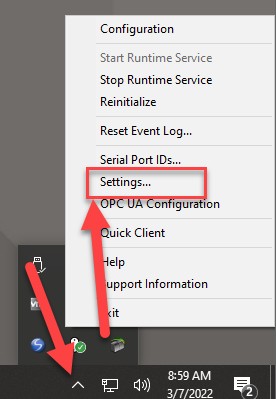
- In the Settings - KEPServerEnterprise dialog box, select Runtime Options > Use DCOM configuration settings.
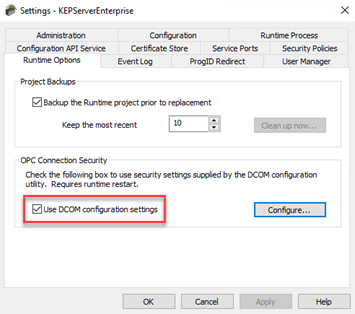
- Click OK.
Supported Drivers
The PC edition of KEPServer Enterprise version 14.00.00 supports these drivers:
|
Driver List
|
| ||
|
Advanced Simulator
|
GE SNP
|
Omron NJ Ethernet
|
Themo Westronics Serial
|
|
Allen-Bradley Bulletin 1609
|
GE SNPX
|
Omron Process Suite
|
TIWAY Host Adapter
|
|
Allen-Bradley Bulletin 900
|
Honeywell HC900 Ethernet
|
Omron Toolbus
|
Torque Tool Ethernet
|
|
Analog Devices
|
Honeywell UDC Ethernet
|
OPC DA Client
|
Toshiba Ethernet
|
|
Aromat Ethernet
|
Honeywell UDC Serial
|
OPC UA Client
|
Toshiba Serial
|
|
Aromat Serial
|
IA Super SEL
|
OPC XML-DA Client
|
Toyopuc® PC2 Serial
|
|
AutomationDirect DirectNET
|
Idec Serial
|
Optimation OptiLogix
|
Toyopuc PC3/PC2 Ethernet
|
|
AutomationDirect EBC
|
IOtech PointScan 100
|
Opto 22 Ethernet
|
User Configurable (U-CON)
|
|
AutomationDirect ECOM
|
Keyence KV Ethernet
|
Partlow ASCII
|
Wago Ethernet
|
|
AutomationDirect K Sequence
|
KraussMaffei MC4 Ethernet
|
Philips P8/PC20
|
Wonderware InTouch Client
|
|
AutomationDirect Productivity
Series Ethernet
|
Memory Based
|
SattBus Ethernet
|
Yaskawa Memobus Plus (SA85)
|
|
BACnet™ /IP
|
Mettler Toledo Serial
|
SattBus Serial
|
Yaskawa MP Series Ethernet
|
|
Beckhoff® TwinCAT®
|
Micro-DCI™
|
Scanivalve Ethernet
|
Yaskawa MP Series Serial
|
|
Busware Ethernet
|
Mitsubishi® CNC Ethernet
|
Siemens® S5 (3964R)
|
Yokogawa Controller
|
|
CODESYS®
|
Mitsubishi Ethernet
|
Siemens S5 (AS511)
|
Yokogawa CX Ethernet
|
|
Contrex® M-Series
|
Mitsubishi FX
|
Siemens S7 MPI
|
Yokogawa Darwin Ethernet
|
|
Contrex Serial
|
Mitsubishi FX Net
|
Siemens S7-200
|
Yokogawa Darwin Serial
|
|
Cutler-Hammer D50/D300
|
Mitsubishi Serial
|
Siemens TCP/IP Ethernet
|
Yokogawa DX Ethernet
|
|
Cutler-Hammer ELC Ethernet
|
Modbus® ASCII Serial
|
Siemens TCP/IP Slave Ethernet
|
Yokogawa DX Serial
|
|
Cutler-Hammer ELC Serial
|
Modbus Plus
|
Simatic/TI 505 Ethernet
|
Yokogawa DXP Ethernet
|
|
Dataforth® isoLynx®
|
Modbus RTU Serial
|
Simatic/TI 505 Serial
|
Yokogawa HR2400 Serial
|
|
DDE Client
|
Modbus Slave RTU Serial
|
Simulator
|
Yokogawa MW Ethernet
|
|
Fanuc Focas Ethernet
|
Modbus TCP/IP Ethernet
|
SIXNET EtherTRAK®
|
Yokogawa MX Ethernet
|
|
Fanuc Focas HSSB
|
MTConnect® Client
|
SIXNET UDR
|
Yokogawa SMARTDAC+ GX, GP,
and GM
|
|
Fuji Flex
|
ODBC Client
|
SquareD Serial
|
Yokogawa YS100 Serial
|
|
GE® CCM
|
Omron FINS Ethernet
|
System Monitor
|
|
|
GE Ethernet
|
Omron FINS Serial
|
Telemecanique Uni-Telway Slave
|
|
|
GE Ethernet Global Data
|
Omron Host Link
|
Thermo Westronics Ethernet
|
|
KEPServer Enterprise versions
This table displays the versions of KEPServer Enterprise and the related or equivalent versions for the following software:
|
KEPServer Enterprise
version
|
KEPServerEX equivalent
version
|
FactoryTalk View SE and
ME
Station
|
PanelViewPlus
|
MobileView
|
|
5.00.00
|
4.5
|
5.00.00
|
5.00.00 to 5.10.00
|
Not applicable
|
|
8.00.00
|
5.13.235
|
8.00.00
|
8.00.00 to 8.20.00
|
Not applicable
|
|
9.00.00
|
5.19.476
|
9.00.00
|
9.00.00
|
Optional installation
|
|
10.00.00
|
5.21.158
|
10.00.00 11.00.00 (requires patch)
|
10.00.00 to 12.00.00
|
11.00.00 to 12.00.00
|
|
11.00.00
|
6.6.504
|
11.00.00
|
Not supported
|
Not supported
|
|
12.00.00
|
6.9.572
|
12.00.00
|
Not supported
|
Not supported
|
|
12.01.00
|
6.9.636
|
12.00.00
|
Not supported
|
Not supported
|
|
13.00.00
|
6.11.725
|
13.00.00
|
Not supported
|
Not supported
|
|
13.01.00
|
6.12.325
|
13.00.00
|
Not supported
|
Not supported
|
|
14.00.00
|
6.14.263
|
14.00.00
|
Not supported
|
Not supported
|
 Tip: FactoryTalk View SE and ME Station versions 10.00.00 and 11.00.00 require this patch to use KEPServer Enterpriseversion 10.00.00:
 For more information, see KEPServer Enterprise User Manual (publication KSE–UM001).
Rockwell Automation recognizes that some of the terms that are currently used in our industry and in this publication are not in alignment with the movement toward inclusive language in technology. We are proactively collaborating with industry peers to find alternatives to such terms and making changes to our products and content. Please excuse the use of such terms in our content while we implement these changes.
Copyright © 2026 Rockwell Automation, Inc. All rights reserved.
Rockwell Automation, Allen-Bradley, and FactoryTalk are trademarks of Rockwell Automation, Inc.
To view a complete list of Rockwell Automation trademarks please click here.
Trademarks not belonging to Rockwell Automation are property of their respective companies.
Copyright © 2026 Rockwell Automation, Inc. All rights reserved.
Rockwell Automation, Allen-Bradley, and FactoryTalk are trademarks of Rockwell Automation, Inc.
To view a complete list of Rockwell Automation trademarks please click here.
Trademarks not belonging to Rockwell Automation are property of their respective companies.