
Release Notes
Latest software patches for CPR9 SR12 and later
Version Jan 2023 (released 1/2023)
Catalog Number Patch Roll-up CPR9 SRx
Requirements
This release has the following requirements.
- Should only be applied to English language products
- Only installs the patches for the product versions that are installed on the computer.
- Copies the Install log and Patch Validation to C:\Program Files\Common Files (x86)\Rockwell\Install logs
- Can be uninstalled through the Windows Control Panel
The setup.exe supports the following command-line parameters (e.g. C:\Patches-Aug.2022\Setup.exe /Q). The parameters are not case-sensitive.
|
Parameter
|
Description
|
|
One of /Q and
/QS is required
|
Silent Install, installs the patch in the silent mode without any user
interface.
It’s recommended if you are deploying the installation using an IT tool
or script, and don’t expect to see any error or restart messages.
With this parameter, IT tool or script should check the error codes,
and take action accordingly.
|
| /QS
One of /Q and
/QS is required
|
Unattended Install, installs the patch in the unattended mode without
user interaction during installation, and shows the progress, errors, or
complete messages on the user interface.
With this parameter, you will not have to check the error codes, and
the installation will prompt you if there are error or restart messages.
|
|
Default (or /I) Optional.
|
Installs the patch.
|
| /Uninstall (or /X)
Optional.
|
Uninstalls the patch.
|
| /Repair
Optional.
|
Repairs the patch.
|
Error Codes
|
Error Code
|
Value
|
Description
|
|
ERROR_SUCCESS
|
0
|
The installation completed
successfully.
|
|
ERROR_INVALID_PARAMETER
|
87
|
One of the parameters was invalid.
|
|
ERROR_INSTALL_USEREXIT
|
1602
|
The user cancels installation.
|
|
ERROR_INSTALL_FAILURE
|
1603
|
A fatal error occurred during
installation.
|
|
ERROR_BAD_CONFIGURATION
|
1610
|
The configuration data for this PIM
is corrupt. Contact your support
personnel.
|
|
ERROR_SUCCESS_REBOOT_REQUIRED
|
3010
|
A restart is required to complete
the installation. This message is
indicative of a success.
|
|
ERROR_SUCCESS_NOT_APPLICABLE
|
3013
|
There is nothing to do, or already
installed
|
- FactoryTalk Action Manager 1.00.00
- FactoryTalk Alarms and Events 6.20.00 and later
- FactoryTalk AssetCentre 10.00.00 and later
- FactoryTalk Batch 13.00.02 and later
- FactoryTalk Diagnostics 6.20.00 and later
- FactoryTalk Historian 7.00.00 and later
- FactoryTalk Linx (RSLinx Enterprise) 6.20.00 and later
- FactorTalk Linx Data Bridge 6.20.00 and later
- FactoryTalk Linx Gateway 6.20.00 and later
- FactoryTalk Metrics (RSBizWare) 13.00.00 and later
- FactoryTalk Services Platform 6.20.00 and later
- FactoryTalk Transaction Manager 13.00.00 and later
- FactoryTalk View ME 12.00.00 and later
- FactoryTalk View SE 12.00.00 and later
- FactoryTalk ViewPoint 12.00.00 and later
- RSLinx Classic 4.12.00 and later
- ThinManager 11.02.00 and later
Corrected Anomalies in This Release
This release corrects the following anomalies.
Product Anomalies in Patch Roll-up CPR9 SRx January 2023
This release corrects these product anomalies:
FactoryTalk Live Data, version 6.20.00
- FactoryLinx Linx is unable to access bits 32 to 63 in a LINT or ULINT Data type (Knowledgebase Technote 1136621)
FactoryTalk Live Data, version 6.21.00
- FactoryLinx Linx is unable to access bits 32 to 63 in a LINT or ULINT Data type (Knowledgebase Technote 1136621)
FactoryTalk Live Data, version 6.30.00
- FactoryLinx Linx is unable to access bits 32 to 63 in a LINT or ULINT Data type (Knowledgebase Technote 1136621)
FactoryTalk Batch, version 14.00.00
- Batch Server stops unexpectedly when deploying an area model update. (Knowledgebase Technote 1137085)
FactoryTalk Linx OPC UA Connector, version 6.21.00
- Data synchronization issue where some values coming from the UA Connector are not updating. (Knowledgebase Technote 1137099)
FactoryTalk Linx OPC UA Connector, version 6.30.00
- Data synchronization issue where some values coming from the UA Connector are not updating. (Knowledgebase Technote 1137099)
FactoryTalk AssetCentre, version 11.00.00
- FTAC: Asset Lifecycle capability could not retrieve PCDC device metadata for some 5069 hardware devices (Knowledgebase Technote 1137320)
FactoryTalk Linx, version 6.30.00
- FactoryTalk Linx had difficulty communicating to a PowerFlex drive connected through a ControlLogix chassis and did not return an appropriate response to FactoryTalk AssetCentre, causing its user interface to stop responding. (Knowledgebase Technote 1137418)
FactoryTalk Linx, version 6.31.00
- FactoryTalk Linx had difficulty communicating to a PowerFlex drive connected through a ControlLogix chassis and did not return an appropriate response to FactoryTalk AssetCentre, causing its user interface to stop responding. (Knowledgebase Technote 1137418)
FactoryTalk Alarms & Events, version 6.20.00
- FTA&E objects do not show timestamp in View SE client or Studio (Knowledgebase Technote 1137504)
FactoryTalk Alarms & Events, version 6.21.00
- FTA&E objects do not show timestamp in View SE client or Studio (Knowledgebase Technote 1137504)
FactoryTalk Alarms & Events, version 6.30.00
- FTA&E objects do not show timestamp in View SE client or Studio (Knowledgebase Technote 1137504)
FactoryTalk Alarms & Events, version 6.31.00
- FTA&E objects do not show timestamp in View SE client or Studio (Knowledgebase Technote 1137504)
FactoryTalk AssetCentre, version 11.00.00
- Change Detect sends corrupted audit log entry to FactoryTalk AssetCentre server (Knowledgebase Technote 1137530)
FactoryTalk Services Platform, version 6.30.00
- FTAC Server memory leak (Knowledgebase Technote 1137531)
FactoryTalk Services Platform, version 6.31.00
- FTAC Server memory leak (Knowledgebase Technote 1137531)
FactoryTalk Live Data, version 6.21.00
- FactoryTalk Live Data was slow to resolve tag requests after a FactoryTalk View SE application was converted from V10 to V13 resulting slow initial screen update. (Knowledgebase Technote 1137546)
FactoryTalk Live Data, version 6.30.00
- FactoryTalk Live Data was slow to resolve tag requests after a FactoryTalk View SE application was converted from V10 to V13 resulting slow initial screen update. (Knowledgebase Technote 1137546)
FactoryTalk Live Data, version 6.31.00
- FactoryTalk Live Data was slow to resolve tag requests after a FactoryTalk View SE application was converted from V10 to V13 resulting slow initial screen update. (Knowledgebase Technote 1137546)
FactoryTalk View, version 12.00.00
- GDI leak in FTView V12 for faceplate display with bmp image (Knowledgebase Technote 1137581)
FactoryTalk View, version 13.00.00
- GDI leak in FTView V12 for faceplate display with bmp image (Knowledgebase Technote 1137581)
FactoryTalk Linx, version 6.30.00
- When using FactoryTalk Linx, the Module Info tab inside Module Properties cannot be accessed when online in Studio 5000 Logix Designer. (Knowledgebase Technote 1137582)
FactoryTalk View ME, version 13.00.00
- Patch: Cannot created 5.0 and 5.10 MER files, FactoryTalk View 13.0 (Knowledgebase Technote 1137593)
FactoryTalk Services Platform, version 6.10.00
- Memory leak encountered when creating FTDir backup (BAK) (Knowledgebase Technote 1137596)
FactoryTalk Services Platform, version 6.11.00
- Memory leak encountered when creating FTDir backup (BAK) (Knowledgebase Technote 1137596)
FactoryTalk Services Platform, version 6.20.00
- Memory leak encountered when creating FTDir backup (BAK) (Knowledgebase Technote 1137596)
FactoryTalk Services Platform, version 6.21.00
- Memory leak encountered when creating FTDir backup (BAK) (Knowledgebase Technote 1137596)
FactoryTalk Services Platform, version 6.30.00
- Memory leak encountered when creating FTDir backup (BAK) (Knowledgebase Technote 1137596)
FactoryTalk Services Platform, version 6.31.00
- Memory leak encountered when creating FTDir backup (BAK) (Knowledgebase Technote 1137596)
FactoryTalk Linx, version 6.31.00
- FactoryTalk Linx Network Browser operating remotely through a FactoryTalk Linx Gateway Proxy service may not present all the devices (Knowledgebase Technote 1137667)
Application Notes
This release has the following application notes.
The roll-up uses specific checks to confirm which product is installed. The roll-up will only install patch files provided these files already exist on the target computer, unless a new binary file is being introduced as part of a patch.
Patch a distributed system in the following order:
- Patch the client computer(s), and shut down (turned off).
- Patch the FactoryTalk View SE server(s), and shut down.
- Patch the FactoryTalk Directory computer and restart.
- Restart the FactoryTalk View SE server computers.
- Restart the client computers.
- Follow the link to download and extract the latest patch roll-up. If you agree to the Software End-User License Agreement, the latest version of the Rockwell Automation Download Manager will be installed on your computer (if necessary), and the patch files will be automatically downloaded and extracted to C:\RA.
- These are default locations that can be changed anytime during the download
- The Download Manager will give the user a link to take them directly to the download folder when the download is complete.
- Shut down all Rockwell Software applications on the local computer (for example, SE Client, FactoryTalk View Studio, FactoryTalk Admin Console, etc).
- Uninstall any previous roll-up through the Windows Control Panel.
- You MUST Restart the target computer.
- On a Server: Do not open any of the Rockwell Software programs. Auto-start services (for example, HMI servers, Data servers, etc) will be-stopped during the patch install.
- On a Client: If FactoryTalk View SE Client is set to auto-start, ensure that it is
shut down now.
!!! This install will stop all Rockwell services on the local computer !!!
- Double-click Setup.exe and follow the prompts.
- Note: To correctly install this roll-up, the user login must have full administrative privileges
- You MUST Restart the computer to complete the patch update.
To run the roll-up on these operating systems, you must first disable User Account Control (UAC).
- In the Start menu under Search program and files type "UAC"
- Press the Enter key or click the only search result under Control
Panel.
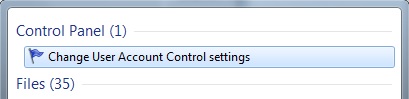
- Bring the slider all the way down to Never notify and reboot the PC.
Copyright © 2025 Rockwell Automation, Inc. All rights reserved.
Rockwell Automation, Allen-Bradley, and FactoryTalk are trademarks of Rockwell Automation, Inc.
To view a complete list of Rockwell Automation trademarks please click here.
Trademarks not belonging to Rockwell Automation are property of their respective companies.