
Release Notes
ControlLogix 5580 Enhanced Redundancy System
Version 33.015_kit1 (released 11/2022)
Catalog Number 1756-L8x Enhanced Redundancy Bundle
Security
This release includes security enhancements as a part of our ongoing efforts to improve security. For information regarding Rockwell Automation's vulnerability disclosure process, please reference the Rockwell Automation Vulnerability Policy.
CVE-2022-3752: Denial-of-Service Vulnerability That Affects Logix 5000™ Controllers
|
Controllers
|
First Known in
Firmware Revision
|
Corrected in Firmware Revision
|
|
CompactLogix™ 5380
|
31.011
|
32.016, 33.015, 34.011 and later
|
|
Compact GuardLogix® 5380 SIL 2
|
31.011
|
32.016, 33.015, 34.011 and later
|
|
Compact GuardLogix 5380 SIL 3
|
32.013
|
32.016, 33.015, 34.011 and later
|
|
CompactLogix 5380 Process
|
33.011
|
33.015, 34.011 and later
|
|
CompactLogix 5480
|
32.011
|
32.016, 33.015, 34.011 and later
|
|
ControlLogix® 5580
|
31.011
|
32.016, 33.015, 34.011 and later
|
|
GuardLogix 5580
|
31.011
|
32.016, 33.015, 34.011 and later
|
|
ControlLogix 5580 Process
|
33.011
|
33.015, 34.011 and later
|
For a full list of the potentially affected Rockwell Automation products and a description of the vulnerability, see Knowledgebase Product Notice Logix Controllers Vulnerable to Denial-of-Service Attack.
Requirements
This release has the following requirements.
ControlLogix Redundancy Compatible Software for Revision 33.015_kit1
Catalog Numbers: ControlLogix® 5580 controllers*
|
Software
|
Required Software Version, Min
|
|
CompareTool
|
8.12.00
|
|
ControlFLASH Plus™
|
4.00.00
|
|
FactoryTalk® Services Platform
|
6.20.00 (CPR9-SR12)
|
|
FactoryTalk Activation Manager
|
4.04.14 (CPR9-SR12)
|
|
FactoryTalk Alarms and Events(1)
|
6.20.00 (CPR9-SR12)
|
|
FactoryTalk AssetCentre
|
10.00.00 (CPR9-SR12)
|
|
FactoryTalk Batch
|
14.00 (3)
|
|
FactoryTalk View Site Edition(2)
|
12.00 (CPR9-SR12)
|
|
Redundancy Module Configuration Tool
|
8.06.03
|
|
FactoryTalk Linx (4)
|
6.20 (CPR9-SR12)
|
|
RSLinx® Classic
|
4.20 (CPR9-SR12)
|
|
Studio 5000 Logix Designer®
|
33.00.00
|
(1) You must download a FactoryTalk Alarm and Events patch. See Knowledgebase Technote Master list of all available Patch TOCs.
(2) The installation of FactoryTalk View Site Edition also installs FactoryTalk Services Platform, which installs FactoryTalk Alarms and Events. Also, if you download and install the latest FactoryTalk Services Patch Rollup, this patch automatically installs the patch for FactoryTalk Alarms and Events.
(3) Use the most recent FactoryTalk Batch Patch Roll-up with this redundancy firmware revision. For the most recent patch roll-up, see Knowledgebase Technote Master list of all available Patch TOCs.
IMPORTANT: The following steps apply only to the FactoryTalk Alarms and Events installation:
- Install FactoryTalk View Site Edition.
This installation installs FactoryTalk Services Platform, which installs FactoryTalk Alarms and Events.
- Download and install the latest FactoryTalk Services Patch Rollup.
This installation automatically installs the patch for FactoryTalk Alarms and Events.
(4) For the most recent FactoryTalk Linx patch roll-up, see Knowledgebase Technote Master list of all available Patch TOCs.
ControlLogix Redundancy System Components Revision 33.015_kit1
Catalog Numbers
- ControlLogix® 5580 controllers
- 1756-RM2, 1756-RM2K, 1756-RM2XT
This redundancy system revision includes the following:
|
Cat. No.
|
Module Description
|
Series
|
Firmware Revision
|
|
1756-EN2F
|
ControlLogix EtherNet/IP™
fiber communication module
|
C
|
11.0031
|
|
B or earlier
|
5.008 or 5.0282
| ||
|
1756-EN2T
|
ControlLogix EtherNet/IP
communication module
|
D
|
11.0031
|
|
C or earlier
|
5.008 or 5.0282
| ||
|
1756-EN2TK
|
ControlLogix EtherNet/IP
communication module
(conformal coated)
|
D
|
11.0031
|
|
1756-EN2TXT
|
ControlLogix-XT™ EtherNet/IP
communication module
|
D
|
11.0031
|
|
C or earlier
|
5.008 or 5.0282
| ||
|
| |||
|
1756- EN2TP
|
ControlLogix EtherNet/IP
communication module –
Parallel Redundancy Protocol
(PRP)
|
A
|
11.0031
|
|
1756-EN2TR
|
ControlLogix EtherNet/IP
communication module
|
C
|
11.0031
|
|
B or earlier
|
5.008 or 5.0282
| ||
|
1756-EN2TRK
|
ControlLogix EtherNet/IP
communication module
(conformal coated)
|
C
|
11.0031
|
|
1756-EN2TRXT
|
ControlLogix-XT EtherNet/IP
communication module
|
C
|
11.0031
|
|
B
|
5.0282
| ||
|
1756-L81E,
1756-L81EK,
1756-L82E,
1756-L82EK,
1756-L83E,
1756-L83EK,
1756-L84E,
1756-L84EK, 1756-L85E, 1756-L85EK |
ControlLogix 5580 standard
controllers
|
B
|
33.015
|
|
1756-L81E-NSE,
1756-L82E-NSE,
1756-L83E-NSE,
1756-L84E-NSE,
1756-L85E-NSE
|
ControlLogix 5580 No Stored
Energy (NSE) controllers
|
B
|
33.015
|
|
1756-L81EXT,
1756-L82EXT,
1756-L83EXT,
1756-L84EXT,
1756-L85EXT
|
ControlLogix-XT 5580
controllers
|
B
|
33.015
|
|
1756-L81EP,
1756-L83EP,
1756-L85EP
|
ControlLogix 5580 process
controllers
|
B
|
33.015
|
|
1756-RM2
|
ControlLogix redundancy
module
|
All
|
20.030
|
|
1756-RM2K
|
ControlLogix redundancy
module (conformal coated)
|
All
|
20.030
|
|
1756-RM2XT
|
ControlLogix-XT redundancy
module
|
All
|
20.030
|
(1) Firmware revision 11.003 is digitally signed firmware.
(2) Firmware revision 5.028 is digitally signed firmware. Firmware revision 5.008 is unsigned firmware.
EtherNet/IP is a trademark of ODVA, Inc.
Additional Resources for Revision 33.015_kit1
For more information on how to install, configure and use your ControlLogix redundancy system, see:
- The ControlLogix Redundancy Modules Installation Instructions, publication 1756-IN087.
- The ControlLogix 5580 Redundant Controller User Manual, publication 1756-UM015.
- High Availability System Reference Manual, publication HIGHAV-RM002-EN-P.
- Replacement Guidelines: Logix 5000™ Controllers, publication 1756-RM100.
Digitally Signed Ethernet Module Firmware for Revision 33.015_kit1
Catalog Numbers
- 1756-EN2T/C, 1756-EN2T/D, 1756-EN2TR/B, 1756-EN2TR/C, 1756- EN2TP/A, 1756-EN2F/B, 1756-EN2F/C
Digitally signed firmware provides more security over the unsigned firmware. This firmware is different based on the EtherNet/IP™ communication modules you use.
|
Cat. No.
|
Supported Firmware
Revisions
|
Digitally Signed
Firmware
|
Included with this
Redundancy Bundle
|
|
1756-EN2T/D
|
11.003
|
Yes
|
Yes
|
|
1756-EN2T/C or
earlier
|
5.008
|
No
|
Yes
|
|
5.028
|
Yes
|
No
| |
|
1756-EN2TP/A
|
11.003
|
Yes
|
Yes
|
|
1756-EN2TR/C
|
11.003
|
Yes
|
Yes
|
|
1756-EN2TR/B or
earlier
|
5.008
|
No
|
Yes
|
|
5.028
|
Yes
|
No
| |
|
1756-EN2F/C
|
11.003
|
Yes
|
Yes
|
|
1756-EN2F/B or
earlier
|
5.008
|
No
|
Yes
|
|
5.028
|
Yes
|
No
|
Firmware revision 5.028 is not included in the redundancy system, revision 33.015_kit1 firmware bundle. You must download and install this digitally signed firmware after the redundancy bundle is installed.
Important: When you install the digitally signed firmware, that is, firmware revision 5.028, into a 1756-EN2T/C (or earlier), 1756-EN2TR/B (or earlier), or 1756-EN2F/B (or earlier) module, the installation makes the module incompatible with some firmware revisions. For example, after you update firmware, the module supports use of only digitally signed firmware. The module rejects any unsigned firmware updates.
You can download firmware revision 5.028 and the redundancy system firmware bundle, revision 33.015_kit1, at the Product Compatibility and Download Center.
Tip: Select the base catalog number in ControlFLASH PLUS™ software when upgrading extended temperature or conformal coated modules. For example, select the 1756-EN2TR when upgrading a 1756-EN2TRXT module. Extended temperature and conformal coated modules use the same Redundancy module ControlFLASH PLUS™ kit.
EtherNet/IP is a trademark of ODVA, Inc.
Controller Restrictions in Redundancy Systems with Revision 33.015_kit1
Known Restrictions as of ControlLogix® Redundancy Revision 33.015_kit1
This revision supports the following:
- ControlLogix 5580 controllers
- 1756-RM2, 1756-RM2K, and 1756-RM2XT modules
Catalog Numbers
1756-EN2T, 1756-EN2TR, 1756-EN2TXT, 1756-EN2F, 1756-EN2TP:
- The 1756-EN2x communication modules provide 259 CIP™ connections. However, three of the 259 CIP connections are always reserved for redundant control. These three redundant-system CIP connections always appear to be in use, even when no connections are open. Because three of the 259 CIP connections are reserved for redundancy, 256 CIP connections are available for nonredundancy use.
- The 1756-EN2x communication modules do not support bumpless I/O on switchover with Immediate Output (IOT) instructions. Because these modules do not support bumpless I/O on switchover with the IOT instruction, they cannot override the RPI in a remote chassis and immediately send new data over the EtherNet/IP™ network.
1756-EN4TR:
- The 1756-EN4TR modules are not supported in the local rack for redundancy. The 1756-EN4TR modules are only supported in a remote rack as a standard adapter or in a redundant adapter architecture.
ControlLogix 5580 redundancy-enabled controllers, 1756-EN2T, 1756-EN2TR, 1756-EN2TXT, 1756-EN2F, 1756-EN2TP:
- A redundant controller project cannot contain consumed Unicast connections. The project can contain produced Unicast tags that are consumed by remote consumers.
CIP Sync™ Technology Included in Redundant Systems:
- There are differences between CIP Sync technology in non-redundant systems and redundancy systems.
- ControlLogix 5580 Redundant Controller User Manual, publication 1756-UM015
- Integrated Architecture® and CIP Sync Configuration Application Technique, publication IA-AT003
- Consider the following when you use CIP Sync technology in a redundancy system:
- If you enable CIP Sync Time Synchronization in the controllers in a redundant chassis pair, you must also enable Time Synchronization in the EtherNet/IP™ communication modules in the redundant chassis pair so all devices have one path to the Grandmaster.
- If time synchronization is enabled in any controller in the primary chassis of a disqualified Redundant Chassis Pair, and no EtherNet/IP communication modules in the primary chassis have time synchronization enabled, the redundant chassis pair attempts to qualify. However, in these application conditions, the attempt to qualify fails.
- While CIP Sync technology can handle multiple paths between master and slave clocks, it resolves mastership most effectively if you configure the redundant paths so that Time Synchronization is enabled in only the minimum required number of EtherNet/IP communication modules.
- For example, if your redundant chassis pair has three 1756-EN2T communication modules and all are connected to the same network, enable Time Synchronization in only one of the modules.
- If the primary controller is the Grandmaster, the redundancy system automatically manages the CIP Sync clock attributes so that the controller in the primary chassis is always set to be the Grandmaster instead of the secondary controller. This clock management makes sure that a change to a new Grandmaster when the redundancy system switches over.
- When a switchover occurs, these events take place:
- The Grandmaster status transfers from the original primary controller to the new primary controller. This transfer can take longer to complete than if Grandmaster status was transferred between devices in a non-redundant system.
- The synchronization of the redundancy system can take longer when you use CIP Sync technology.
ControlLogix 5580 controllers
- You can have only one controller in each chassis in a redundant chassis pair.
- The embedded EtherNet port is disabled when the controller is enabled for redundancy.
- Do not use Match Project to Controller property with redundant controllers. If you use the Match Project to Controller property available in the Advanced tab of the Controller Properties dialog box, you cannot go online with, download to, or upload from the new primary controller after a switchover. This is because the serial number of the new primary controller is not the same as the serial number of the old primary controller and the project cannot be matched to the new primary controller.
- The Firmware Supervisor feature is not supported in a redundant system.
- You cannot use event tasks in a ControlLogix redundancy system. When you enable redundancy, you must change event tasks to nonevent tasks or delete them from your project.
- You cannot use Motion in ControlLogix redundancy systems. A remote controller can contain motion instructions even if it is on the same network as a redundancy system.
- Under some error conditions, often configuration related, the 1756-RM2 module continually attempts to requalify the system while the error prevents it from being successful. This causes the redundancy module error log to fill with the same error condition. If the system is in this condition, the redundancy module display cycles between QFNG and DISQ. To stop this from happening, change the redundancy module synchronization trigger in the Redundancy Module Configuration Tool (RMCT) to Never, until the error condition is corrected.
- The MinDurationACC alarm tag member value does not update and it stays at a 0 value. This change does not affect the MinDuration calculations.
1756-EN2T, 1756-EN2TR, 1756-EN2TXT, 1756-EN2F, 1756-EN2TP:
- The System Event History displays a `Module Failure’ entry when you insert a 1756-EN2x communication module in the chassis while the redundant chassis pair is synchronized. This is not indicative of any module failure; instead, it indicates that only a communication module was inserted in the chassis.
CIP, CIP Sync, and EtherNet/IP are trademarks of ODVA, Inc.
|
From Firmware Revision
|
Firmware Revision Updates Conditionally Not Allowed*
|
|
33.011_kit1
|
—
|
|
33.011_kit2
|
—
|
|
33.012_kit1
|
—
|
|
33.015_kit1
|
—
|
|
33.015_kit2
|
34.011_kit1
|
|
33.017_kit1
|
34.011_kit1, 34.011_kit2, 34.014_kit1
|
|
33.017_kit2
|
34.011_kit1, 34.011_kit2, 34.014_kit1, 34.014_kit2, 34.015_kit1
|
|
34.011_kit1
|
—
|
|
34.011_kit2
|
35.011_kit1
|
|
34.014_kit1
|
35.011_kit1, 35.011_kit2, 35.011_kit3
|
|
34.014_kit2
|
35.011_kit1, 35.011_kit2, 35.011_kit3, 35.013_kit1
|
|
34.015_kit1
|
35.011_kit1, 35.011_kit2, 35.011_kit3, 35.013_kit1, 35.014_kit1
|
|
34.015_kit2
|
35.011_kit1, 35.011_kit2, 35.011_kit3, 35.013_kit1, 35.013_kit2, 35.014_kit1
|
|
35.011_kit1
|
—
|
|
35.011_kit2
|
—
|
|
35.011_kit3
|
—
|
|
35.013_kit1
|
—
|
|
35.013_kit2
|
36.011_kit1
|
|
35.014_kit1
|
36.011_kit1
|
|
35.014_kit2
|
36.011_kit1, 36.011_kit2
|
|
35.016_kit1
|
36.011_kit1, 36.011_kit2
|
|
36.011_kit1
|
—
|
|
36.011_kit2
|
—
|
|
36.011_kit3
|
37.011_kit1
|
|
36.013_kit1
|
37.011_kit1
|
|
37.011_kit1
|
—
|
|
37.011_kit2
|
—
|
|
37.012_kit1
|
—
|
|
38.011_kit1
|
—
|
Corrected Anomalies in This Release
This release corrects the following anomalies.
PlantPAx® Embedded Instruction PVSD - Returning from Hand While Drive Is Running Results in Running Wrong Direction (1424134, 1430601)
|
Controllers
|
First Known in Firmware
Revision
|
Corrected in Firmware
Revision
|
|
ControlLogix® 5580
Process
|
33.011
|
33.015, 34.011 and later
|
|
CompactLogix™ 5380
Process
|
33.011
|
33.015, 34.011 and later
|
Transitioning the command source from “Hand” to any other command source while the drive is still running, even if decelerating when commanded to stop, results in the drive continuing to run but in the opposite direction. This action requires that the drive is configured to have reverse capability and the drive is still running while the transition from “Hand” occurs.
As a workaround to the above issue, you can add logic to issue a drive Stop in Override command source on transition from Hand to (not in Hand).
Errors on I/O After Redundancy System Update (1286591, 1286593)
|
Controllers
|
First Known in Firmware
Revision
|
Corrected in Firmware
Revision
|
|
ControlLogix® 5580
|
33.011
|
33.015, 34.011 and later
|
|
ControlLogix 5580
Process
|
33.011
|
33.015, 34.011 and later
|
16#FF08-Invalid path to module error codes could occur on I/O modules that were inhibited or disconnected during a Redundancy System Update (RSU), and then uninhibited or reconnected after the update is complete. Error codes can be found on the Connection Tab in the I/O module properties. See Knowledgebase Technote 16#FF08 errors on I/O after a Redundancy System Update.
Online Edits of a Drive Peripheral for a Drive That Does Not Support ADC Can Cause a Controller MNRF (1502674, 1518216)
|
Controllers
|
First Known in Firmware
Revision
|
Corrected in Firmware
Revision
|
|
ControlLogix® 5580
|
33.011
|
33.015, 34.011 and later
|
|
ControlLogix 5580
Process
|
33.011
|
33.015, 34.011 and later
|
For a full list of the potentially affected Rockwell Automation products and a description of the vulnerabilities, see Knowledgebase Technote Product Notice 2022-05-002 - ControlLogix 5580 Redundancy Controller with V33 Firmware May Experience Anomalous Behavior when online Editing of Drive Peripherals Associated with Drives that do not support ADC.
PlantPAx® Embedded Instruction PPID - Instruction Windup Inputs Do Not Affect the Instruction Windup Status Bits (1180548, 1455895, 1707712)
|
Controllers
|
First Known in Firmware
Revision
|
Corrected in Firmware
Revision
|
|
ControlLogix® 5580
Process
|
33.011
|
33.015, 34.011 and later
|
|
CompactLogix™ 5380
Process
|
33.011
|
33.015, 34.011 and later
|
The Process Proportional + Integral + Derivative (PPID) instruction does not use the Inp_WindupHi or the Inp_WindupLo inputs in the determination of the Sts_WindupHi or Sts_WindupLo status bits.
ControlFLASH and ControlFLASH Plus Prevents Update to V33.011, V33.012, and V34.011 for ControlLogix 5580 XT Controllers
|
Controllers
|
First Known in Firmware
Revision
|
Corrected in Firmware
Revision
|
|
ControlLogix® 5580
XT
|
33.011
|
33.015, 34.014, 35.011 and later
|
When you attempt to update a ControlLogix 5580 XT controller from a prior operational firmware (such as V32.016) to 33.011, 33.012, or 34.011 firmware, ControlFLASH™ and ControlFLASH Plus® prevents the update, and displays this error message:
“Invalid Revision: The update revision selected is not compatible with the selected target device. Press F1 for more information”
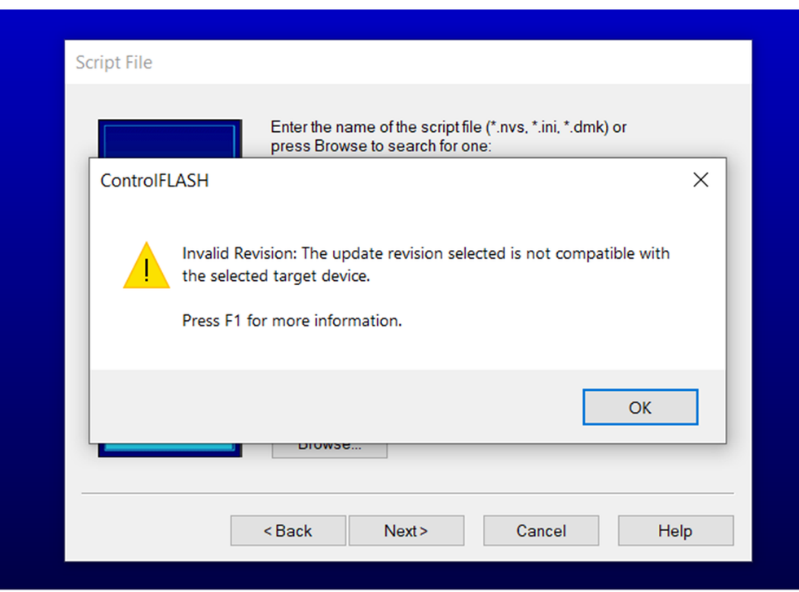
This does not occur when you attempt to update from boot firmware.
If 33.011, 33.012, or 34.011 is desired, flash to a version that has corrected this anomaly prior to the flash attempt.
PlantPAx® Embedded Instruction PAIM – Does not pass through all SrcQ values from Inp_SrcQ (1384787, 1672172, 1664909)
|
Controllers
|
First Known in Firmware
Revision
|
Corrected in Firmware
Revision
|
|
ControlLogix® 5580 Process
|
33.011
|
33.015, 34.014, 35.011 and later
|
|
CompactLogix™ 5380 Process
|
33.011
|
33.015, 34.014, 35.011 and later
|
The Process Multi Sensor Analog Input (PAIM) instruction is only able to pass values of 0, 1, 32, or 35 to the SrcQ Output Parameter from the Inp_SrcQ Input Parameter. All remaining supported values of the SrcQ Output Parameter are not passed through correctly.
PlantPAx® Embedded Instruction PAIM - Instruction Can Cause a Type 1 Code 60 MNRF (1360436, 1430595)
|
Controllers
|
First Known in Firmware
Revision
|
Corrected in Firmware
Revision
|
|
ControlLogix® 5580
Process
|
33.011
|
33.015, 34.011 and later
|
|
CompactLogix™ 5380
Process
|
33.011
|
33.015, 34.011 and later
|
- At least six of the instruction’s eight inputs are configured as Used
- Cfg_AbsDevLim parameter is set to 0.0
- 3 or more of the inputs have identical values
As a workaround to avoid this issue, you can add external logic to check for a zero value in Cfg_AbsDevLim and replace it with a nonzero value.
Known Anomalies from Previous Releases
These anomalies are from previous releases but are still known in this release.
|
Device
|
First Known in
Firmware Revision
|
Corrected in Firmware Revision
|
|
CompactLogix® 5380
|
28.011
|
34.014, 35.013, 36.011 and later
|
|
Compact GuardLogix® 5380 SIL 2
|
31.011
|
34.014, 35.013, 36.011 and later
|
|
Compact GuardLogix 5380 SIL 3
|
32.013
|
34.014, 35.013, 36.011 and later
|
|
CompactLogix 5380 Process
|
33.011
|
34.014, 35.013, 36.011 and later
|
|
CompactLogix 5480
|
32.011
|
34.014, 35.013, 36.011 and later
|
|
ControlLogix® 5580
|
28.011
|
34.014, 35.013, 36.011 and later
|
|
GuardLogix 5580
|
31.011
|
34.014, 35.013, 36.011 and later
|
|
ControlLogix 5580 Process
|
33.011
|
34.014, 35.013, 36.011 and later
|
|
1756-EN4TR
|
2.001
|
6.001 and later
|
|
1756-EN3TR/B, 1756-EN2TR/C
|
10.007
|
12.001 and later
|
|
1756-EN2TP
|
10.020
|
12.001 and later
|
|
1756-EN2T/D
|
10.006
|
12.001 and later
|
|
1756-EN2F/C
|
10.009
|
12.001 and later
|
|
Controllers
|
First Known in
Firmware
Revision
|
Corrected in Firmware
Revision
|
|
ControlLogix® 5580
|
33.011
|
—
|
|
ControlLogix 5580 Process
|
33.011
|
—
|
|
GuardLogix 5580
|
37.011
|
—
|
|
ControlLogix 5590
|
38.011
|
—
|
|
ControlLogix 5590 Process
|
38.011
|
—
|
Keyswitch Does Not Clear Major Fault on Disqualified Secondary (1524410)
|
Controllers
|
First Known in Firmware
Revision
|
Corrected in Firmware
Revision
|
|
ControlLogix® 5580
|
33.011
|
35.011 and later
|
|
ControlLogix 5580 Process
|
33.011
|
35.011 and later
|
If you use the keyswitch to clear a major fault on a disqualified secondary controller, it clears the OK status indicator on the controller, but the 4-character display still shows a major fault.
To clear the fault:
- Use the Studio 5000 Logix Designer® application to clear the fault. This does not work if the fault was already cleared using the Keyswitch.
- Use ControlFLASH Plus™ software to update the controller firmware to the existing firmware to reset it.
PortPhysicalAddressInfo GSV Does Not Populate After Controller Power Cycle (1451494, 1514584)
|
Controllers
|
First Known in
Firmware Revision
|
Corrected in Firmware
Revision
|
|
CompactLogix® 5380
|
28.011
|
34.015, 35.011 and later
|
|
Compact GuardLogix® 5380 SIL 2
|
31.011
|
34.015, 35.011 and later
|
|
Compact GuardLogix 5380 SIL 3
|
32.013
|
34.015, 35.011 and later
|
|
CompactLogix 5380 Process
|
33.011
|
34.015, 35.011 and later
|
|
CompactLogix 5480
|
32.011
|
34.015, 35.011 and later
|
|
ControlLogix® 5580
|
28.011
|
34.015, 35.011 and later
|
|
GuardLogix 5580
|
31.011
|
34.015, 35.011 and later
|
|
ControlLogix 5580 Process
|
33.011
|
34.015, 35.011 and later
|
When a Get System Value (GSV) instruction configured for Class Name: TimeSynchronize and Attribute Name: PortPhysicalAddressInfo executes after a controller power cycle, the physical address (MAC ID) does not populate.
Controller Can MNRF When Executing CPS Instruction with Specific Data Types (1800992, 2129625, 2129629)
|
Controllers
|
First Known in Firmware Revision
|
Corrected in Firmware Revision
|
|
CompactLogix™ 5380
|
28.011
|
33.017, 34.014, 35.011 and later
|
|
Compact GuardLogix® 5380 SIL 2
|
31.011
|
33.017, 34.014, 35.011 and later
|
|
Compact GuardLogix 5380 SIL 3
|
32.013
|
33.017, 34.014, 35.011 and later
|
|
CompactLogix 5380 Process
|
33.011
|
33.017, 34.014, 35.011 and later
|
|
CompactLogix 5480
|
32.011
|
33.017, 34.014, 35.011 and later
|
|
ControlLogix® 5580
|
28.011
|
33.017, 34.014, 35.011 and later
|
|
GuardLogix 5580
|
31.011
|
33.017, 34.014, 35.011 and later
|
|
ControlLogix 5580 Process
|
33.011
|
33.017, 34.014, 35.011 and later
|
When executing a Synchronous Copy File (CPS) instruction with a motion diagnostics connection as the source or destination tag, the controller can experience a major nonrecoverable fault (MNRF).
To work around this anomaly, do not use motion diagnostics connections (such as AB:Motion_Diagnostics:S:1) as arguments to the CPS instruction. If a copy is still necessary, use a non-synchronous copy via the COP instruction.
Periodic User Tasks Without Any Scheduled Programs Experience Overlaps on The New Primary Controller After Switchover (1723127, 1810033)
|
Controllers
|
First Known in
Firmware Revision
|
Corrected in Firmware
Revision
|
|
ControlLogix® 5580
|
33.011
|
34.015, 35.011 and later
|
|
ControlLogix 5580 Process
|
33.011
|
34.015, 35.011 and later
|
When configured for redundancy, if the application contains a periodic user task without any scheduled programs, then that user task will report task overlaps on the new Primary controller after a switchover.
The task overlaps result in a minor fault being reported.
Periodic User Tasks Can Experience Unexpected Overlaps on The New Primary Controller If Switchover Occurs Soon After Qualification Completes (1723127)
|
Controllers
|
First Known in Firmware
Revision
|
Corrected in Firmware
Revision
|
|
ControlLogix® 5580
|
33.011
|
34.015, 35.011 and later
|
|
ControlLogix 5580 Process
|
33.011
|
34.015, 35.011 and later
|
When configured for redundancy, if a switchover occurs before the period of the periodic user task expires, then the periodic user tasks that are running on the new Primary controller can report overlaps following the switchover.
The task overlaps result in a minor fault being reported.
Controller Can MNRF During Online Edit (2123008, 2306717, 3741373)
|
Controllers
|
First Known in Firmware Revision
|
Corrected in Firmware Revision
|
|
CompactLogix® 5380
|
33.011
|
34.015, 35.014, 36.011 and later
|
|
Compact GuardLogix® 5380 SIL 2
|
33.011
|
34.015, 35.014, 36.011 and later
|
|
Compact GuardLogix 5380 SIL 3
|
33.011
|
34.015, 35.014, 36.011 and later
|
|
CompactLogix 5380 Process
|
33.011
|
34.015, 35.014, 36.011 and later
|
|
CompactLogix 5480
|
33.011
|
34.015, 35.014, 36.011 and later
|
|
ControlLogix® 5580
|
33.011
|
34.015, 35.014, 36.011 and later
|
|
GuardLogix 5580
|
33.011
|
34.015, 35.014, 36.011 and later
|
|
ControlLogix 5580 Process
|
33.011
|
34.015, 35.014, 36.011 and later
|
Controller Can Become Unresponsive When You Inhibit or Uninhibit a Module (3080005)
|
Controllers
|
First Known in Firmware Revision
|
Corrected in Firmware Revision
|
|
CompactLogix™ 5380
|
33.011
|
36.011 and later
|
|
Compact GuardLogix® 5380 SIL 2
|
33.011
|
36.011 and later
|
|
Compact GuardLogix 5380 SIL 3
|
33.011
|
36.011 and later
|
|
CompactLogix 5380 Process
|
33.011
|
36.011 and later
|
|
CompactLogix 5480
|
33.011
|
36.011 and later
|
|
ControlLogix® 5580
|
33.011
|
36.011 and later
|
|
GuardLogix 5580
|
33.011
|
36.011 and later
|
|
ControlLogix 5580 Process
|
33.011
|
36.011 and later
|
|
Controllers
|
First Known in
Firmware Revision
|
Corrected in Firmware
Revision
|
|
CompactLogix™ 5380
|
33.011
|
34.011 and later
|
|
Compact GuardLogix® 5380 SIL 2
|
33.011
|
34.011 and later
|
|
Compact GuardLogix 5380 SIL 3
|
33.011
|
34.011 and later
|
|
CompactLogix 5380 Process
|
33.011
|
34.011 and later
|
|
CompactLogix 5480
|
33.011
|
34.011 and later
|
|
ControlLogix® 5580
|
33.011
|
34.011 and later
|
|
GuardLogix 5580
|
33.011
|
34.011 and later
|
|
ControlLogix 5580 Process
|
33.011
|
34.011 and later
|
- Update the firmware on the controller.
- Open the final copy of the project and download it to the controller.
- Stay in Program Mode and store the project to the SD card.
- When the storing process is complete, the controller can be put into Run Mode.
|
Anomaly
|
First Known in
Firmware Revision
|
Corrected in Firmware Revision
|
| When limit switches are used for feedback instead of an
analog position feedback, the indication on the dialog box
and HMI was not accurate to the position of the valve.
(2185730, 2296172, 2296183, 2296204)
|
33.011
|
33.017, 34.014, 35.013, 36.011
and later
|
| The deviation alarm (Sts_Dev) incorrectly alarms when
the instruction was “Out of Service” (Sts_OoS).
(2185779, 2297867, 2297871, 3064567)
|
33.011
|
33.017, 34.014, 35.013, 36.011
and later
|
| Cfg_CVIntlk incorrectly limits the value between
Cfg_CVEUMin and Cfg_CVEUMax.
(2185788, 2297912, 2297916, 2297921)
|
33.011
|
33.017, 34.014, 35.013, 36.011
and later
|
Online Configuration of I/O Devices can Cause a MNRF/Assert (3231324, 3385069, 3335724, 3355887, 3355890)
|
Controllers
|
First Known in
Firmware Revision
|
Corrected in Firmware Revision
|
|
CompactLogix® 5380
|
34.011
|
34.015, 35.014, 36.013, 37.011 and later
|
|
Compact GuardLogix® 5380 SIL 2
|
34.011
|
34.015, 35.014, 36.013, 37.011 and later
|
|
Compact GuardLogix 5380 SIL 3
|
34.011
|
34.015, 35.014, 36.013, 37.011 and later
|
|
CompactLogix 5380 Process
|
34.011
|
34.015, 35.014, 36.013, 37.011 and later
|
|
CompactLogix 5480
|
34.011
|
34.015, 35.014, 36.013, 37.011 and later
|
|
ControlLogix® 5580
|
34.011
|
34.015, 35.014, 36.013, 37.011 and later
|
|
GuardLogix 5580
|
34.011
|
34.015, 35.014, 36.013, 37.011 and later
|
|
ControlLogix 5580 Process
|
34.011
|
34.015, 35.014, 36.013, 37.011 and later
|
|
1756-L8x Enhanced Redundancy
Firmware Bundle
|
33.011
|
33.017, 34.015, 35.014, 36.013, 37.011 and
later
|
When an I/O device is owned by the controller, if you make an online change with either the module properties dialog or a MSG instruction with a “Module Reconfigure” message type, the controller can MNRF/assert.
There is a higher probability for this anomaly to occur when there are many unconnected I/O devices in the I/O tree.
We recommend that you inhibit devices in the I/O tree that are not powered or do not exist on the network. If possible, inhibit the device while offline with the controller and then download the application to the controller.
This anomaly does not impact all I/O devices:
• Common I/O devices include: 1718 Ex I/O, 1719 Ex I/O, ArmorBlock® I/O, Compact 5000® I/O, FLEX 5000® I/O, Armor™ PowerFlex® Drives, E300™ Electronic Overload Relays, Dynamix™ 1444 Series modules.
• For all impacted I/O devices, see Knowledgebase Technote Determining the I/O devices for release note reference number 3231324
Workaround:
Inhibit the I/O connection to the device while online before you start any reconfiguration. Once you complete the reconfiguration, then uninhibit the I/O connection.
|
Controllers
|
First Known in
Firmware Revision
|
Corrected in Firmware Revision
|
|
CompactLogix™ 5380
|
30.011
|
33.017(1), 34.015(2), 35.014(3), 36.011 and later
|
|
Compact GuardLogix® 5380
SIL 2
|
31.011
|
33.017(1), 34.015(2), 35.014(3), 36.011 and later
|
|
Compact GuardLogix 5380 SIL
3
|
32.013
|
33.017(1), 34.015(2), 35.014(3), 36.011 and later
|
|
CompactLogix 5380 Process
|
33.011
|
33.017(1), 34.015(2), 35.014(3), 36.011 and later
|
|
CompactLogix 5480
|
32.012
|
33.017(1), 34.015(2), 35.014(3), 36.011 and later
|
|
ControlLogix® 5580
|
30.011
|
33.017(1), 34.015(2), 35.014(3), 36.011 and later
|
|
GuardLogix 5580
|
31.011
|
33.017(1), 34.015(2), 35.014(3), 36.011 and later
|
|
ControlLogix 5580 Process
|
33.011
|
33.017(1), 34.015(2), 35.014(3), 36.011 and later
|
- Upgrade the controller’s firmware.
- Install the latest release of software associated with the major revision of firmware.
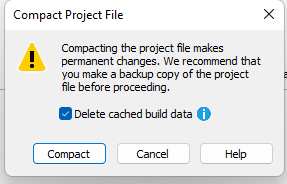
- Open the project file and perform a compact and delete of cache.
- Go to File → Compact
- When the Compact Project File dialog appears, make sure the Delete cached build data checkbox is checked.
- Download the project to the controller.
|
Controllers
|
First Known in
Firmware Revision
|
Corrected in Firmware Revision
|
|
CompactLogix® 5380
|
33.011
|
35.016, 36.013, 37.012, 38.011 and later
|
|
Compact GuardLogix® 5380 SIL
2
|
33.011
|
35.016, 36.013, 37.012, 38.011 and later
|
|
Compact GuardLogix 5380 SIL 3
|
33.011
|
35.016, 36.013, 37.012, 38.011 and later
|
|
CompactLogix 5380 Process
|
33.011
|
35.016, 36.013, 37.012, 38.011 and later
|
|
CompactLogix 5480
|
33.011
|
35.016, 36.013, 37.012 and later
|
|
ControlLogix® 5580
|
33.011
|
35.016, 36.013, 37.012, 38.011 and later
|
|
GuardLogix 5580
|
33.011
|
35.016, 36.013, 37.012, 38.011 and later
|
|
ControlLogix 5580 Process
|
33.011
|
35.016, 36.013, 37.012, 38.011 and later
|
|
Controllers
|
First Known in
Firmware Revision
|
Corrected in Firmware Revision
|
|
CompactLogix® 5380
|
28.011
|
34.015, 35.014, 36.013, 37.012, 38.011 and later
|
|
Compact GuardLogix® 5380 SIL
2
|
31.011
|
34.015, 35.014, 36.013, 37.012, 38.011 and later
|
|
Compact GuardLogix 5380 SIL
3
|
32.013
|
34.015, 35.014, 36.013, 37.012, 38.011 and later
|
|
CompactLogix 5380 Process
|
33.011
|
34.015, 35.014, 36.013, 37.012, 38.011 and later
|
|
CompactLogix 5480
|
32.011
|
34.015, 35.014, 36.013, 37.012 and later
|
|
ControlLogix® 5580
|
28.011
|
34.015, 35.014, 36.013, 37.012, 38.011 and later
|
|
GuardLogix 5580
|
31.011
|
34.015, 35.014, 36.013, 37.012, 38.011 and later
|
|
ControlLogix 5580 Process
|
33.011
|
34.015, 35.014, 36.013, 37.012, 38.011 and later
|
Application Notes
This release has the following application notes.
New Firmware Updates Can Impact the Performance of Message Rate Capacity HMI/MSG (Class 3) Data
Each new major revision of the controller/communication module firmware provides additional features and functionality, but this consumes additional processing power from the module even if the features are not utilized. This manifests as degrading HMI/messaging performance for the respective module.
Despite this degradation, the specifications defined for the respective modules have been maintained:
|
Module
|
Message Rate Across the Embedded Ethernet Port
|
|
ControlLogix® 5580
CompactLogix® 5380 |
2000 MSG/sec
|
|
GuardLogix® 5580 controllers in a SIL3 configuration
Compact GuardLogix 5380 SIL3 controllers |
1000 MSG/sec
|
|
1756-EN4TR Ethernet modules
|
3700 MSGs/sec
|
To improve the messaging capacity, it is recommended to employ the following:
- For high-frequency messaging, utilize connected cached messages
- Utilize message reads as opposed to message writes; they’re more efficient
- For ControlLogix 5580 controllers, route HMI/messages through communication modules in the chassis as
opposed to going directly to the embedded port of the controller
- Offloading some of the processing to the communications module results in greater messaging capacity than using the front port alone
- This recommendation does not apply to I/O or produce/consume data, it is more efficient and there is more capacity for that data to route through the embedded port of the controller
- Upgrade to a 5590 controller
- The HMI/messaging messaging capacity is doubled through the embedded ethernet port
For more information, see these publications:
- ControlLogix and GuardLogix Controller Specifications Technical Data, publication 1756-TD001
- CompactLogix 5380, Compact GuardLogix 5380, and CompactLogix 5480 Controllers Specifications Technical Data, publication 5069-TD002
- 1756 ControlLogix Communication Modules Specifications Technical Data, publication 1756-TD003
Copyright © 2025 Rockwell Automation, Inc. All rights reserved.
Rockwell Automation, Allen-Bradley, and FactoryTalk are trademarks of Rockwell Automation, Inc.
To view a complete list of Rockwell Automation trademarks please click here.
Trademarks not belonging to Rockwell Automation are property of their respective companies.