
Release Notes
5580E GuardLogix Controller
Version 35.011 (released 11/2022)
Catalog Number 1756-L83ES (series B)
Security
This release includes security enhancements as a part of our ongoing efforts to improve security. For information regarding Rockwell Automation's vulnerability disclosure process, please reference the Rockwell Automation Vulnerability Policy.
Controller May Not Re-establish Outgoing Secured I/O Connections After Cable Breaks or Power-Cycles (1432106, 1489122, 1804298, 2136899)
|
Controllers
|
First Known in Firmware Revision
|
Corrected in Firmware Revision
|
|
CompactLogix™ 5380
|
34.011
|
34.014, 35.011 and later
|
|
Compact GuardLogix® 5380 SIL 2
|
34.011
|
34.014, 35.011 and later
|
|
Compact GuardLogix 5380 SIL 3
|
34.011
|
34.014, 35.011 and later
|
|
CompactLogix 5380 Process
|
34.011
|
34.014, 35.011 and later
|
|
CompactLogix 5480
|
34.011
|
34.014, 35.011 and later
|
|
ControlLogix® 5580
|
34.011
|
34.014, 35.011 and later
|
|
GuardLogix 5580
|
34.011
|
34.014, 35.011 and later
|
|
ControlLogix 5580 Process
|
34.011
|
34.014, 35.011 and later
|
In a CIP Security™ application, the controller may not re-establish secured I/O connections after multiple cable breaks or power cycles.
The Studio 5000 Logix Designer® application shows:
(Code 16#0204) Connection Request Error: Connection request timed out
If you experience this anomaly, power cycle the controller again.
Controller Can Fail to Re-Establish an Outgoing Secured I/O Connection to Remote I/O Modules After a Cable-Break (1753900)
|
Controllers
|
First Known in Firmware Revision
|
Corrected in Firmware Revision
|
|
CompactLogix™ 5380
|
34.011
|
36.011 and later
|
|
Compact GuardLogix® 5380 SIL 2
|
34.011
|
36.011 and later
|
|
Compact GuardLogix 5380 SIL 3
|
34.011
|
36.011 and later
|
|
CompactLogix 5380 Process
|
34.011
|
36.011 and later
|
|
ControlLogix® 5580
|
34.011
|
36.011 and later
|
|
GuardLogix 5580
|
34.011
|
36.011 and later
|
|
ControlLogix 5580 Process
|
34.011
|
36.011 and later
|
CVE-2024-3493: Logix Controllers and Communication Modules Vulnerable to MNRF Due to Invalid Header Value
|
Controllers and Communication
Modules
|
First Known in Firmware
Revision
|
Corrected in Firmware
Revision
|
|
CompactLogix™ 5380
|
35.011
|
35.013, 36.011 and later
|
|
Compact GuardLogix® 5380 SIL 2
|
35.011
|
35.013, 36.011 and later
|
|
Compact GuardLogix 5380 SIL 3
|
35.011
|
35.013, 36.011 and later
|
|
CompactLogix 5380 Process
|
35.011
|
35.013, 36.011 and later
|
|
CompactLogix 5480
|
35.011
|
35.013, 36.011 and later
|
|
ControlLogix® 5580
|
35.011
|
35.013, 36.011 and later
|
|
GuardLogix 5580
|
35.011
|
35.013, 36.011 and later
|
|
ControlLogix 5580 Process
|
35.011
|
35.013, 36.011 and later
|
|
1756-EN4TR, 1756-EN4TRK,
1756-EN4TRXT
|
5.001
|
6.001 and later
|
For a full list of the potentially affected Rockwell Automation products and a description of the vulnerability, see Security Advisory ControlLogix and GuardLogix Vulnerable to major nonrecoverable fault due to Invalid Header Value.
CVE 2024-5659: Multicast Request Causes Major Nonrecoverable Fault on Select Controllers
|
Controllers and Communication
Modules
|
First Known in
Firmware Revision
|
Corrected in Firmware Revision
|
|
CompactLogix™ 5380
|
34.011
|
V34.014, V35.013, V36.011 and later
|
|
Compact GuardLogix® 5380 SIL 2
|
34.011
|
V34.014, V35.013, V36.011 and later
|
|
Compact GuardLogix 5380 SIL 3
|
34.011
|
V34.014, V35.013, V36.011 and later
|
|
CompactLogix 5380 Process
|
34.011
|
V34.014, V35.013, V36.011 and later
|
|
CompactLogix 5480
|
34.011
|
V34.014, V35.013, V36.011 and later
|
|
ControlLogix® 5580
|
34.011
|
V34.014, V35.013, V36.011 and later
|
|
GuardLogix 5580
|
34.011
|
V34.014, V35.013, V36.011 and later
|
|
ControlLogix 5580 Process
|
34.011
|
V34.014, V35.013, V36.011 and later
|
|
1756-EN4TR, 1756-EN4TRK,
1756-EN4TRXT
|
4.001
|
6.001 and later
|
For a full list of the potentially affected Rockwell Automation products and a description of the vulnerability, see Security Advisory ControlLogix and GuardLogix Vulnerable to Multicast Request Causes major nonrecoverable fault on Select Controllers.
Requirements
This release has the following requirements.
Compatible Software for Controller Firmware Revision 35.011
System Requirements as of Revision 35.011 for these catalog numbers:
- CompactLogix™ 5370 controllers
- Compact GuardLogix® 5370 controllers
- ControlLogix® 5570 controllers
- GuardLogix 5570 controllers
- CompactLogix 5380 controllers
- Compact GuardLogix 5380 SIL 2 controllers
- Compact GuardLogix 5380 SIL 3 controllers
- CompactLogix 5380 Process controllers
- CompactLogix 5480 controllers
- ControlLogix 5580 controllers
- GuardLogix 5580 controllers
- ControlLogix 5580 Process controllers
This table identifies the minimum software versions that are compatible with firmware revision 35.011:
|
Software
|
Version
|
|
|
Studio 5000 Logix Designer®
|
35.00.00
|
|
|
RSLinx® Classic
|
4.30.00
|
|
|
FactoryTalk® Linx
|
6.31.00
|
|
|
ControlFLASH™
|
15.06.00
|
|
|
ControlFLASH Plus™
|
5.00.00
|
|
Features
This release includes the following system features.
|
Controllers
|
Feature Added in Firmware Revision
|
|
GuardLogix® XT 5580
|
31.015, 32.016, 33.015, 34.014, 35.011 and later
|
Corrected Anomalies in This Release
This release corrects the following anomalies.
PortPhysicalAddressInfo GSV Does Not Populate After Controller Power Cycle (1451494, 1514584)
|
Controllers
|
First Known in
Firmware Revision
|
Corrected in Firmware
Revision
|
|
CompactLogix® 5380
|
28.011
|
34.015, 35.011 and later
|
|
Compact GuardLogix® 5380 SIL 2
|
31.011
|
34.015, 35.011 and later
|
|
Compact GuardLogix 5380 SIL 3
|
32.013
|
34.015, 35.011 and later
|
|
CompactLogix 5380 Process
|
33.011
|
34.015, 35.011 and later
|
|
CompactLogix 5480
|
32.011
|
34.015, 35.011 and later
|
|
ControlLogix® 5580
|
28.011
|
34.015, 35.011 and later
|
|
GuardLogix 5580
|
31.011
|
34.015, 35.011 and later
|
|
ControlLogix 5580 Process
|
33.011
|
34.015, 35.011 and later
|
When a Get System Value (GSV) instruction configured for Class Name: TimeSynchronize and Attribute Name: PortPhysicalAddressInfo executes after a controller power cycle, the physical address (MAC ID) does not populate.
Online Edit to Compact 5000 I/O and FLEX 5000 I/O Safety Modules Can Cause a Controller MNRF (1660629, 2301013)
|
Controllers
|
First Known in
Firmware Revision
|
Corrected in Firmware
Revision
|
|
Compact GuardLogix® 5380 SIL 2
|
31.011
|
34.015, 35.011 and later
|
|
Compact GuardLogix 5380 SIL 3
|
32.013
|
34.015, 35.011 and later
|
|
GuardLogix 5580
|
31.011
|
34.015, 35.011 and later
|
If an online edit is made to the configuration of an inhibited Compact 5000® I/O or inhibited FLEX 5000® I/O safety module, and a safety task watchdog occurs while the safety task is running, the controller can experience a major nonrecoverable fault (MNRF).
Controller Can Assert When A THRS Safety Instruction Exists in An Application That Has a Safety Signature Applied (1766633, 1770546, 1770549)
|
Controllers
|
First Known in Firmware Revision
|
Corrected in Firmware Revision
|
|
Compact GuardLogix® 5380 SIL 2
|
31.011
|
33.017, 34.014, 35.011 and later
|
|
Compact GuardLogix 5380 SIL 3
|
32.013
|
33.017, 34.014, 35.011 and later
|
|
GuardLogix 5580
|
31.011
|
33.017, 34.014, 35.011 and later
|
The Two Hand Run Station (THRS) instruction can cause safety controllers to assert when a safety signature is applied. If an update to one of these versions or later is not possible, it is recommended to use the Two Hand Run Station Enhanced (THRSe) safety instruction, which has additional features and does not have this anomalous behavior.
Controller Can MNRF When Executing CPS Instruction with Specific Data Types (1800992, 2129625, 2129629)
|
Controllers
|
First Known in Firmware Revision
|
Corrected in Firmware Revision
|
|
CompactLogix™ 5380
|
28.011
|
33.017, 34.014, 35.011 and later
|
|
Compact GuardLogix® 5380 SIL 2
|
31.011
|
33.017, 34.014, 35.011 and later
|
|
Compact GuardLogix 5380 SIL 3
|
32.013
|
33.017, 34.014, 35.011 and later
|
|
CompactLogix 5380 Process
|
33.011
|
33.017, 34.014, 35.011 and later
|
|
CompactLogix 5480
|
32.011
|
33.017, 34.014, 35.011 and later
|
|
ControlLogix® 5580
|
28.011
|
33.017, 34.014, 35.011 and later
|
|
GuardLogix 5580
|
31.011
|
33.017, 34.014, 35.011 and later
|
|
ControlLogix 5580 Process
|
33.011
|
33.017, 34.014, 35.011 and later
|
When executing a Synchronous Copy File (CPS) instruction with a motion diagnostics connection as the source or destination tag, the controller can experience a major nonrecoverable fault (MNRF).
To work around this anomaly, do not use motion diagnostics connections (such as AB:Motion_Diagnostics:S:1) as arguments to the CPS instruction. If a copy is still necessary, use a non-synchronous copy via the COP instruction.
Sent Bytes Per Second Displays a Larger Incorrect Value (1548181)
|
Controllers and Communication Modules
|
First Known in
Firmware Revision
|
Corrected in Firmware
Revision
|
|
CompactLogix™ 5380
|
28.011
|
35.011 and later
|
|
Compact GuardLogix® 5380 SIL 2
|
31.011
|
35.011 and later
|
|
Compact GuardLogix 5380 SIL 3
|
32.013
|
35.011 and later
|
|
CompactLogix 5380 Process
|
33.011
|
35.011 and later
|
|
CompactLogix 5480
|
32.011
|
35.011 and later
|
|
ControlLogix® 5580
|
28.011
|
35.011 and later
|
|
GuardLogix 5580
|
31.011
|
35.011 and later
|
|
ControlLogix 5580 Process
|
33.011
|
35.011 and later
|
|
1756-EN4TR, 1756-EN4TRK, 1756-EN4TRXT
|
2.01
|
5.001 and later
|
Under HMI/MSG Connected (EtherNet/IP Port) on the device Diagnostic webpages, Sent Bytes Per Second displays a much larger incorrect value, not the actual sent bytes per second.
Download Results in a Safety I/O Connection Error (1929038)
|
Controllers
|
First Known in Firmware
Revision
|
Corrected in Firmware
Revision
|
|
Compact GuardLogix® 5380 SIL 2
|
34.011
|
35.011 and later
|
|
Compact GuardLogix 5380 SIL 3
|
34.011
|
35.011 and later
|
|
GuardLogix 5580
|
34.011
|
35.011 and later
|
When downloading a safety-locked application without a safety signature, a (16#080a) Safety Parameter Error: Invalid CPCRC error occurs on all safety IO connections.
The workaround is to unlock the controller and either:
• Do not safety-lock the application and download the application to the controller,
• Download the application to the controller, and while in program mode: apply a safety signature, safety-lock the
application, and then transition the controller to run mode.
Known Anomalies in This Release
This release has the following known anomalies.
Unintended Motion with Kinetix K5300 when Changing the Feedback1StartupMethod (3440481, 3687085, 3687087)
|
Controllers
|
First Known in
Firmware Revision
|
Corrected in Firmware Revision
|
|
CompactLogix® 5380
|
35.011
|
35.014, 36.013, 37.011 and later
|
|
Compact GuardLogix® 5380 SIL 2
|
35.011
|
35.014, 36.013, 37.011 and later
|
|
Compact GuardLogix 5380 SIL 3
|
35.011
|
35.014, 36.013, 37.011 and later
|
|
CompactLogix 5380 Process
|
35.011
|
35.014, 36.013, 37.011 and later
|
|
CompactLogix 5480
|
35.011
|
35.014, 36.013, 37.011 and later
|
|
ControlLogix® 5580
|
35.011
|
35.014, 36.013, 37.011 and later
|
|
GuardLogix 5580
|
35.011
|
35.014, 36.013, 37.011 and later
|
|
ControlLogix 5580 Process
|
35.011
|
35.014, 36.013, 37.011 and later
|
A defined workflow and workaround is documented in the Knowledgebase Article Unexpected Motion after enabling the axis with Kinetix 5300.
|
Controllers
|
First Known in
Firmware Revision
|
Corrected in Firmware Revision
|
|
CompactLogix® 5380
|
35.011
|
35.016, 36.013, 37.012, 38.011 and later
|
|
Compact GuardLogix® 5380 SIL
2
|
35.011
|
35.016, 36.013, 37.012, 38.011 and later
|
|
Compact GuardLogix 5380 SIL 3
|
35.011
|
35.016, 36.013, 37.012, 38.011 and later
|
|
CompactLogix 5380 Process
|
35.011
|
35.016, 36.013, 37.012, 38.011 and later
|
|
CompactLogix 5480
|
35.011
|
35.016, 36.013, 37.012 and later
|
|
ControlLogix® 5580
|
35.011
|
35.016, 36.013, 37.012, 38.011 and later
|
|
GuardLogix 5580
|
35.011
|
35.016, 36.013, 37.012, 38.011 and later
|
|
ControlLogix 5580 Process
|
35.011
|
35.016, 36.013, 37.012, 38.011 and later
|
Open Socket Functionality Not Behaving as Expected (1957130, 1957175)
|
Controllers and Communication Modules
|
First Known in Firmware Revision
|
Corrected in Firmware Revision
|
|
CompactLogix™ 5380
|
35.011
|
35.013, 36.011 and later
|
|
Compact GuardLogix® 5380 SIL 2
|
35.011
|
35.013, 36.011 and later
|
|
Compact GuardLogix 5380 SIL 3
|
35.011
|
35.013, 36.011 and later
|
|
CompactLogix 5380 Process
|
35.011
|
35.013, 36.011 and later
|
|
CompactLogix 5480
|
35.011
|
35.013, 36.011 and later
|
|
ControlLogix® 5580
|
35.011
|
35.013, 36.011 and later
|
|
GuardLogix 5580
|
35.011
|
35.013, 36.011 and later
|
|
ControlLogix 5580 Process
|
35.011
|
35.013, 36.011 and later
|
|
1756-EN4TR, 1756-EN4TRK, 1756-EN4TRXT
|
5.001
|
—
|
In a Socket Read Message, when reading an empty TCP Ethernet Buffer (buffer length of 0), the expectation is that a 12 byte header will be returned for the Socket Read Message’s .DN_LEN ([MessageTag].DN_LEN=12).
Instead, 0 bytes are returned by the message ([MessageTag].DN_LEN=0).
This anomaly affects the Rockwell Automation® Sample Code Add-On Instructions and Applications. For more information and a workaround for this anomaly, see the Knowledgebase Technote Socket functionality may not behave as expected in specific Logix controllers at version 35.011 and 1756-EN4TR version 5.001.
I/O Device Configured Within a 5032 IO-Link Module Stuck in Shutting Down State (2003359, 2117004)
|
Controllers
|
First Known in Firmware Revision
|
Corrected in Firmware Revision
|
|
CompactLogix™ 5380
|
35.011
|
35.013, 36.011 and later
|
|
Compact GuardLogix® 5380 SIL
2
|
35.011
|
35.013, 36.011 and later
|
|
Compact GuardLogix 5380 SIL 3
|
35.011
|
35.013, 36.011 and later
|
|
CompactLogix 5380 Process
|
35.011
|
35.013, 36.011 and later
|
|
CompactLogix 5480
|
35.011
|
35.013, 36.011 and later
|
|
ControlLogix® 5580
|
35.011
|
35.013, 36.011 and later
|
|
GuardLogix 5580
|
35.011
|
35.013, 36.011 and later
|
|
ControlLogix 5580 Process
|
35.011
|
35.013, 36.011 and later
|
If the configuration of an I/O device within a 5032 IO-Link module fails while performing greater than 20 simultaneous configurations, one or more I/O devices can get stuck in the Shutting Down state.
For more information, see Knowledgebase Technote IO-Link device shows Shutting Down.
Studio 5000 Logix Designer Trends Can Cause the Controller to MNRF (3062715, 3081542)
|
Controllers
|
First Known in Firmware Revision
|
Corrected in Firmware Revision
|
|
CompactLogix™ 5380
|
35.011
|
35.013, 36.011 and later
|
|
Compact GuardLogix® 5380 SIL 2
|
35.011
|
35.013, 36.011 and later
|
|
Compact GuardLogix 5380 SIL 3
|
35.011
|
35.013, 36.011 and later
|
|
CompactLogix 5380 Process
|
35.011
|
35.013, 36.011 and later
|
|
CompactLogix 5480
|
35.011
|
35.013, 36.011 and later
|
|
ControlLogix® 5580
|
35.011
|
35.013, 36.011 and later
|
|
GuardLogix 5580
|
35.011
|
35.013, 36.011 and later
|
|
ControlLogix 5580 Process
|
35.011
|
35.013, 36.011 and later
|
If the Studio 5000 Logix Designer® application shuts down unexpectedly while running trends, the controller can experience a major non-recoverable fault (MNRF).
Workaround: If the Logix Designer application is running trends and shuts down unexpectedly, open Microsoft Windows Task Manager, select the RATrendSrvU.exe task, and click End task.
A Project with Multiple FLEXHA 5000 I/O Modules can Fail to Download to the Controller (3196845, 1867140)
|
Controllers
|
First Known in Firmware
Revision
|
Corrected in Firmware Revision
|
|
ControlLogix® 5580
|
35.011
|
35.013, 36.011 and later
|
|
GuardLogix 5580
|
35.011
|
35.013, 36.011 and later
|
|
ControlLogix 5580 Process
|
35.011
|
35.013, 36.011 and later
|
A Studio 5000 Logix Designer application that has a large number (greater than 200) of FLEXHA 5000™ Universal I/O modules (5015-U8IHFTXT) in the I/O tree can fail to download to the controller.
Known Anomalies from Previous Releases
These anomalies are from previous releases but are still known in this release.
MSF Instruction Clears the .DriveEnableStatus Bit after the .DN is Set (00175088)
Known Anomaly First Identified in:
- ControlLogix® 5580 Controllers, Revision 28.011
- ControlLogix 5580 Process Controllers, Revision 33.011
- GuardLogix® 5580 Controllers, Revision 29.011
- CompactLogix™ 5380 Motion Controllers, Revision 28.011
- CompactLogix 5380 Process Controllers, Revision 33.011
- Compact GuardLogix 5380 SIL2 Controllers, Revision 31.011
- Compact GuardLogix 5380 SIL3 Controllers, Revision 32.013
- CompactLogix 5480 Controllers, Revision 32.011
The Motion Servo Off (MSF) instruction can report a .DN (Done) status before the drive clears the .DriveEnableStatus bit.
IP Route Table Web Page Shows the Mask in Reverse Order (00183121)
Corrected anomaly with Firmware Revision 31.011
Known Anomaly First Identified as of Firmware Revision 28.011
Catalog Numbers: CompactLogix™ 5380, ControlLogix® 5580
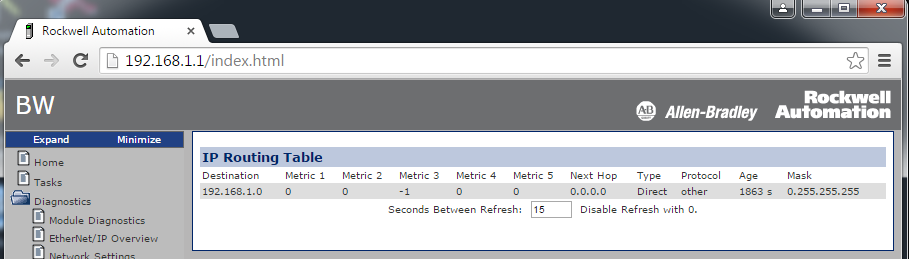
The IP Route Table diagnostic web page shows the mask in reverse order (0.255.255.255).
Value That Is Outside the Supported WallClockTime Range (00182341, 00182342, 00190288, Lgx00169520)
Corrected Anomaly in:
- ControlLogix® 5570, Firmware Revision 30.011 and 20.019
- GuardLogix® 5570, Firmware Revision 30.011
- CompactLogix™ 5370, Firmware Revision 30.011 and 20.019
- Compact GuardLogix 5370, Firmware Revision 30.011
- ControlLogix 5560, Firmware Revision 20.019
Known Anomaly First Identified in:
- ControlLogix® 5580, Firmware Revision 28.011
- ControlLogix 5580 Process, Firmware Revision 33.011
- GuardLogix® 5580, Firmware Revision 31.011
- CompactLogix™ 5380, Firmware Revision 28.011
- CompactLogix 5380 Process, Firmware Revision 33.011
- Compact GuardLogix 5380 SIL2, Firmware Revision 31.011
- Compact GuardLogix 5380 SIL3, Firmware Revision 32.013
- CompactLogix 5480, Firmware Revision 32.011
- ControlLogix 5570, Firmware Revision 19.011
- GuardLogix 5570, Firmware Revision 20.011
- CompactLogix 5370, Firmware Revision 20.011
- Compact GuardLogix 5370, Firmware Revision 28.011
- ControlLogix 5560, Firmware Revision 11.011
When reading or viewing the WCT (WallClockTime) of the controller, the year can show a value of 586XXX (where the XXX is any values). This means that the wallclock value is outside the valid range for EPoch time.
The range of the WCT has been tightened in the controller to 1/1/1970 00:00:00.000...12/31/2069 23:59:59.999. If the controller tries to handle a value outside the defined range, the controller does not apply the new value. It now logs a minor fault, Type 13 Code 21. The fault displays an unknown fault in the RSLogix 5000® software.
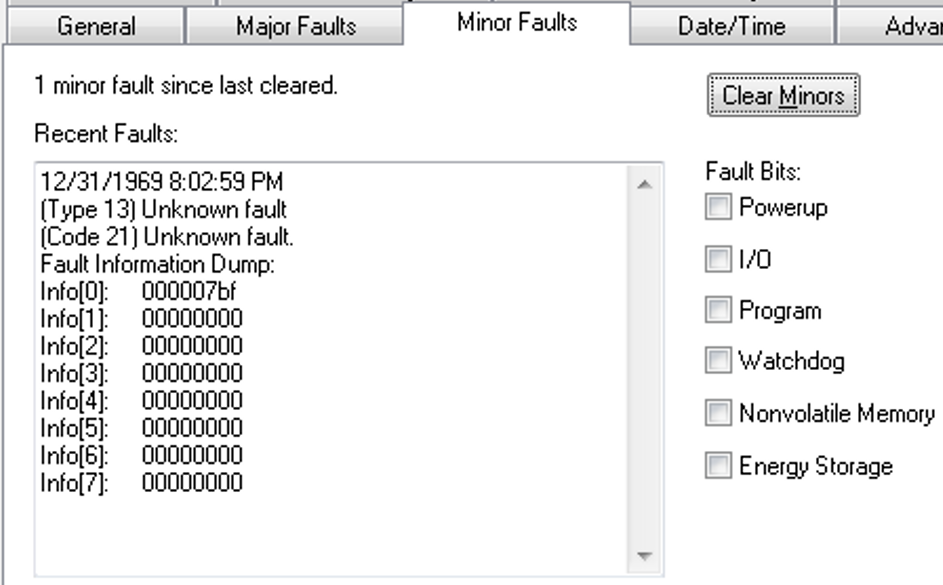
When the fault is logged, the WCT of the controller is set to 1/1/19XX 00:00:00.000, where XX is 81...86. The year corresponds to the Info[0] value for the minor fault.
|
Controllers
|
First Known in
Firmware Revision
|
Corrected in Firmware Revision
|
|
CompactLogix® 5380
|
34.011
|
35.016, 36.013, 37.012, 38.011 and later
|
|
Compact GuardLogix® 5380 SIL
2
|
34.011
|
35.016, 36.013, 37.012, 38.011 and later
|
|
Compact GuardLogix 5380 SIL 3
|
34.011
|
35.016, 36.013, 37.012, 38.011 and later
|
|
CompactLogix 5380 Process
|
34.011
|
35.016, 36.013, 37.012, 38.011 and later
|
|
CompactLogix 5480
|
34.011
|
35.016, 36.013, 37.012 and later
|
|
ControlLogix® 5580
|
34.011
|
35.016, 36.013, 37.012, 38.011 and later
|
|
GuardLogix 5580
|
34.011
|
35.016, 36.013, 37.012, 38.011 and later
|
|
ControlLogix 5580 Process
|
34.011
|
35.016, 36.013, 37.012, 38.011 and later
|
|
Controllers
|
First Known in
Firmware
Revision
|
Corrected in
Firmware
Revision
|
|
Compact GuardLogix®
5380 SIL 2
|
34.011
|
38.011 and later
|
|
GuardLogix 5580
|
34.011
|
38.011 and later
|
|
Device
|
First Known in
Firmware Revision
|
Corrected in Firmware Revision
|
|
CompactLogix® 5380
|
28.011
|
34.014, 35.013, 36.011 and later
|
|
Compact GuardLogix® 5380 SIL 2
|
31.011
|
34.014, 35.013, 36.011 and later
|
|
Compact GuardLogix 5380 SIL 3
|
32.013
|
34.014, 35.013, 36.011 and later
|
|
CompactLogix 5380 Process
|
33.011
|
34.014, 35.013, 36.011 and later
|
|
CompactLogix 5480
|
32.011
|
34.014, 35.013, 36.011 and later
|
|
ControlLogix® 5580
|
28.011
|
34.014, 35.013, 36.011 and later
|
|
GuardLogix 5580
|
31.011
|
34.014, 35.013, 36.011 and later
|
|
ControlLogix 5580 Process
|
33.011
|
34.014, 35.013, 36.011 and later
|
|
1756-EN4TR
|
2.001
|
6.001 and later
|
|
1756-EN3TR/B, 1756-EN2TR/C
|
10.007
|
12.001 and later
|
|
1756-EN2TP
|
10.020
|
12.001 and later
|
|
1756-EN2T/D
|
10.006
|
12.001 and later
|
|
1756-EN2F/C
|
10.009
|
12.001 and later
|
|
Controllers
|
First Known in
Firmware Revision
|
Corrected in
Firmware Revision
|
|
CompactLogix® 5380
|
32.011
|
37.011 and later
|
|
Compact GuardLogix® 5380 SIL 2
|
32.011
|
37.011 and later
|
|
Compact GuardLogix 5380 SIL 3
|
32.013
|
37.011 and later
|
|
CompactLogix 5380 Process
|
33.011
|
37.011 and later
|
|
CompactLogix 5480
|
32.011
|
37.011 and later
|
|
ControlLogix® 5580
|
32.011
|
37.011 and later
|
|
GuardLogix 5580
|
32.011
|
37.011 and later
|
|
ControlLogix 5580 Process
|
33.011
|
37.011 and later
|
|
Controllers
|
First Known in Firmware
Revision
|
Corrected in Firmware
Revision
|
|
CompactLogix™ 5370
|
20.011
|
38.011 and later
|
|
Compact GuardLogix® 5370
|
28.011
|
38.011 and later
|
|
ControlLogix® 5570
|
18.012
|
38.011 and later
|
|
GuardLogix 5570
|
20.011
|
38.011 and later
|
|
CompactLogix 5380
|
28.011
|
38.011 and later
|
|
Compact GuardLogix 5380 SIL 2
|
31.011
|
38.011 and later
|
|
Compact GuardLogix 5380 SIL 3
|
32.013
|
38.011 and later
|
|
CompactLogix 5380 Process
|
33.011
|
38.011 and later
|
|
CompactLogix 5480
|
32.011
|
38.011 and later
|
|
ControlLogix 5580
|
28.011
|
38.011 and later
|
|
GuardLogix 5580
|
31.011
|
38.011 and later
|
|
ControlLogix 5580 Process
|
33.011
|
38.011 and later
|
Work arounds to consider:
Connected Uncached Messages Fail (00173896)
- GuardLogix® 5580 Controllers, Revision 29.011
- ControlLogix® 5580 Controllers, Revision 28.011
- ControlLogix 5580 Process Controllers, Revision 33.011
- CompactLogix™ 5380 Controllers, Revision 28.011
- CompactLogix 5380 Process Controllers, Revision 33.011
- Compact GuardLogix 5380 SIL 2 Controllers, Revision 31.011
- Compact GuardLogix 5380 SIL 3 Controllers, Revision 32.013
- CompactLogix 5480 Controllers, Revision 32.011
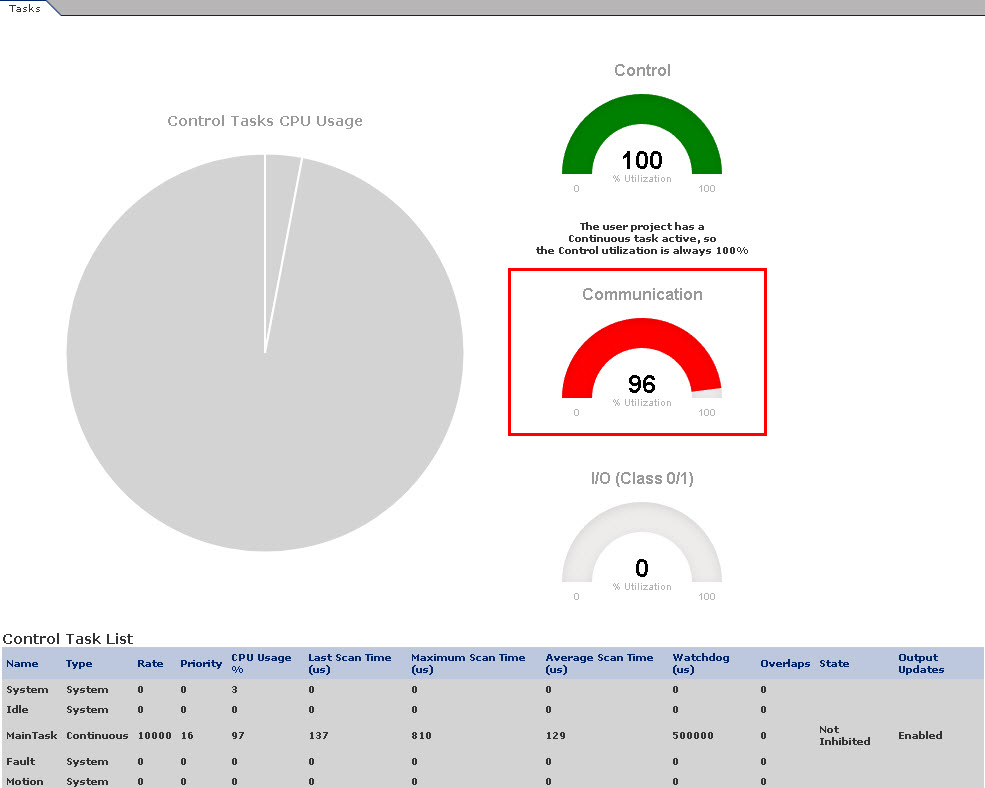
Connected UnCached messages that are sent to the controller can fail. This anomaly typically occurs if the Connected UnCached messages are sent when the controller is handling many messages and has temporarily run out of buffer resources.
To work around the anomaly, try the following:
- Cache connections. As many as 256 connections are available.
- Use the message instructions in a periodic task instead of a continuous task.
- Do not trigger messages as quickly as possible.
- GuardLogix® 5580 Controllers, Revision 31.011
- ControlLogix® 5580 Controllers, Revision 31.011
- ControlLogix 5580 Process Controllers, Revision 33.011
- CompactLogix™ 5380 Controllers, Revision 31.011
- CompactLogix 5380 Process Controllers, Revision 33.011
- Compact GuardLogix 5380 SIL 2 Controllers, Revision 31.011
- Compact GuardLogix 5380 SIL 3 Controllers, Revision 32.013
- CompactLogix 5480 Controllers, Revision 32.011
GuardLogix 5580 Controller Can Experience a MNRF if Safety Partner is Removed (00215763)
Known Anomaly First Identified as of Firmware Revision 32.011
Catalog Numbers: GuardLogix 5580® Controllers
Known Anomaly First Identified in:
- ControlLogix® 5580 Controllers, Revision 32.011
- ControlLogix 5580 Process Controllers, Revision 33.011
- GuardLogix® 5580 Controllers, Revision 32.011
- CompactLogix™ 5380 Motion Controllers, Revision 32.011
- CompactLogix 5380 Process Controllers, Revision 33.011
- Compact GuardLogix 5380 SIL2 Controllers, Revision 32.011
- Compact GuardLogix 5380 SIL3 Controllers, Revision 32.013
Minor fluctuations of the system time offset both on the producer controller and consumer controller side can cause minor velocity spikes, typically less than 1 % on the consumed axes in the remote controller.
This behavior is aesthetic and does not impact functionality.
Known Anomaly First Identified as of Firmware Revision 32.012
Catalog Numbers:
- ControlLogix® 5580 Controllers
- ControlLogix 5580 Process Controllers
- CompactLogix™ 5380 Controllers
- CompactLogix 5380 Process Controllers
- GuardLogix® 5580 Controllers
- Compact GuardLogix 5380 Controllers
- CompactLogix 5480 Controllers
SDI Instruction Triggers the SDI Limit After the Configured SDI Position Window (1163130)
|
Controllers
|
First Known in Firmware
Revision
|
Corrected in Firmware
Revision
|
|
Compact GuardLogix® 5380 SIL 2
|
31.011
|
—
|
|
Compact GuardLogix 5380 SIL 3
|
32.013
|
—
|
|
GuardLogix 5580
|
31.011
|
—
|
SDI Safety Instruction triggers SDI Limit after the SDI Position Window with 16-bit encoder rollover. See Knowledgebase Technote GuardLogix Safe Direction (SDI) unintended motion at SFX Feedback Position encoder rollover.
SDI Safety Instruction False Triggers the SDI Limit (1165263)
|
Controllers
|
First Known in Firmware
Revision
|
Corrected in Firmware
Revision
|
|
Compact GuardLogix® 5380 SIL 2
|
33.011
|
—
|
|
Compact GuardLogix 5380 SIL 3
|
32.013
|
—
|
|
GuardLogix 5580
|
31.011
|
—
|
SDI Safety Instruction false triggers SDI Limit with 16-bit encoder rollover. See Knowledgebase Technote 843ES CIP Safety Encoder experience Safe Direction (SDI) Limit at rollover.
MCTPO Conflict Causes Incorrect Instruction Outputs (1806725)
|
Controllers
|
First Known in
Firmware Revision
|
Corrected in Firmware
Revision
|
|
CompactLogix™ 5380
|
31.011
|
—
|
|
Compact GuardLogix® 5380 SIL 2
|
31.011
|
—
|
|
Compact GuardLogix 5380 SIL 3
|
32.013
|
—
|
|
CompactLogix 5380 Process
|
33.011
|
—
|
|
CompactLogix 5480
|
32.011
|
—
|
|
ControlLogix® 5580
|
31.011
|
—
|
|
GuardLogix 5580
|
31.011
|
—
|
|
ControlLogix 5580 Process
|
33.011
|
—
|
When you use a Motion Calculate Transform Position with Orientation (MCTPO) instruction in multiple tasks simultaneously, the MCTPO reports an incorrect transform position.
To work around this anomaly, place a User Interrupt Disable (UID) instruction before each MCTPO instruction in each task, then place a User Interrupt Enable (UIE) instruction after each MCTPO operation in each task. If all the MCTPO instructions are used in only one task, no change needs to be made.
SD Status Indicator Flashes When I/O Connection Errors Exist (1917586, 1917602, 1917603)
|
Controllers
|
First Known in Firmware Revision
|
Corrected in Firmware Revision
|
|
CompactLogix™ 5380
|
34.011
|
34.014, 35.013, 36.011 and later
|
|
Compact GuardLogix® 5380 SIL 2
|
34.011
|
34.014, 35.013, 36.011 and later
|
|
Compact GuardLogix 5380 SIL 3
|
34.011
|
34.014, 35.013, 36.011 and later
|
|
CompactLogix 5380 Process
|
34.011
|
34.014, 35.013, 36.011 and later
|
|
CompactLogix 5480
|
34.011
|
34.014, 35.013, 36.011 and later
|
|
ControlLogix® 5580
|
34.011
|
34.014, 35.013, 36.011 and later
|
|
GuardLogix 5580
|
34.011
|
34.014, 35.013, 36.011 and later
|
|
ControlLogix 5580 Process
|
34.011
|
34.014, 35.013, 36.011 and later
|
The SD status indicator flashes and decreases SD card performance when I/O connection errors exist. The impact on SD card performance is directly related to the number of I/O connection errors present at that time.
Accepting Online Edits Can Cause a Controller MNRF or Software Error (2111853, 2111905, 2111908)
|
Controllers
|
First Known in Firmware Revision
|
Corrected in Firmware Revision
|
|
Compact GuardLogix® 5380 SIL 2
|
34.011
|
34.014, 35.013, 36.011 and later
|
|
Compact GuardLogix 5380 SIL 3
|
34.011
|
34.014, 35.013, 36.011 and later
|
|
GuardLogix 5580
|
34.011
|
34.014, 35.013, 36.011 and later
|
The controller can experience a major non-recoverable fault (MNRF) - Type 14 Code 7, or a software error, when the following are created online:
• Safety program Input parameters
• Safety program Public parameters
• Safety program Local tags
For more information, see Knowledgebase Technote 5580/5380 Safety Controller Assert, Major Recoverable Fault type 14 code 7, or software error.
Controller Can MNRF During Online Edit (2123008, 2306717, 3741373)
|
Controllers
|
First Known in Firmware Revision
|
Corrected in Firmware Revision
|
|
CompactLogix® 5380
|
33.011
|
34.015, 35.014, 36.011 and later
|
|
Compact GuardLogix® 5380 SIL 2
|
33.011
|
34.015, 35.014, 36.011 and later
|
|
Compact GuardLogix 5380 SIL 3
|
33.011
|
34.015, 35.014, 36.011 and later
|
|
CompactLogix 5380 Process
|
33.011
|
34.015, 35.014, 36.011 and later
|
|
CompactLogix 5480
|
33.011
|
34.015, 35.014, 36.011 and later
|
|
ControlLogix® 5580
|
33.011
|
34.015, 35.014, 36.011 and later
|
|
GuardLogix 5580
|
33.011
|
34.015, 35.014, 36.011 and later
|
|
ControlLogix 5580 Process
|
33.011
|
34.015, 35.014, 36.011 and later
|
Controller Can Become Unresponsive When You Inhibit or Uninhibit a Module (3080005)
|
Controllers
|
First Known in Firmware Revision
|
Corrected in Firmware Revision
|
|
CompactLogix™ 5380
|
33.011
|
36.011 and later
|
|
Compact GuardLogix® 5380 SIL 2
|
33.011
|
36.011 and later
|
|
Compact GuardLogix 5380 SIL 3
|
33.011
|
36.011 and later
|
|
CompactLogix 5380 Process
|
33.011
|
36.011 and later
|
|
CompactLogix 5480
|
33.011
|
36.011 and later
|
|
ControlLogix® 5580
|
33.011
|
36.011 and later
|
|
GuardLogix 5580
|
33.011
|
36.011 and later
|
|
ControlLogix 5580 Process
|
33.011
|
36.011 and later
|
Controller Can Experience a MNRF When You Inhibit and Uninhibit an Axis and Drive (2069903, 2162056, 2162057)
|
Controllers
|
First Known in Firmware Revision
|
Corrected in Firmware Revision
|
|
CompactLogix™ 5380
|
34.011
|
34.014, 35.013, 36.011 and later
|
|
Compact GuardLogix® 5380 SIL 2
|
34.011
|
34.014, 35.013, 36.011 and later
|
|
Compact GuardLogix 5380 SIL 3
|
34.011
|
34.014, 35.013, 36.011 and later
|
|
CompactLogix 5380 Process
|
34.011
|
34.014, 35.013, 36.011 and later
|
|
CompactLogix 5480
|
34.011
|
34.014, 35.013, 36.011 and later
|
|
ControlLogix® 5580
|
34.011
|
34.014, 35.013, 36.011 and later
|
|
GuardLogix 5580
|
34.011
|
34.014, 35.013, 36.011 and later
|
|
ControlLogix 5580 Process
|
34.011
|
34.014, 35.013, 36.011 and later
|
Inhibiting the Axis and then the associated Drive with SSV instructions (in that order) can cause the controller to experience a major non-recoverable fault (MNRF).
Workaround: Inhibit the Drive, then inhibit the Axis (in that order). The order of uninhibiting the axis and drive does not matter.
Online Configuration of I/O Devices can Cause a MNRF/Assert (3231324, 3385069, 3335724, 3355887, 3355890)
|
Controllers
|
First Known in
Firmware Revision
|
Corrected in Firmware Revision
|
|
CompactLogix® 5380
|
34.011
|
34.015, 35.014, 36.013, 37.011 and later
|
|
Compact GuardLogix® 5380 SIL 2
|
34.011
|
34.015, 35.014, 36.013, 37.011 and later
|
|
Compact GuardLogix 5380 SIL 3
|
34.011
|
34.015, 35.014, 36.013, 37.011 and later
|
|
CompactLogix 5380 Process
|
34.011
|
34.015, 35.014, 36.013, 37.011 and later
|
|
CompactLogix 5480
|
34.011
|
34.015, 35.014, 36.013, 37.011 and later
|
|
ControlLogix® 5580
|
34.011
|
34.015, 35.014, 36.013, 37.011 and later
|
|
GuardLogix 5580
|
34.011
|
34.015, 35.014, 36.013, 37.011 and later
|
|
ControlLogix 5580 Process
|
34.011
|
34.015, 35.014, 36.013, 37.011 and later
|
|
1756-L8x Enhanced Redundancy
Firmware Bundle
|
33.011
|
33.017, 34.015, 35.014, 36.013, 37.011 and
later
|
When an I/O device is owned by the controller, if you make an online change with either the module properties dialog or a MSG instruction with a “Module Reconfigure” message type, the controller can MNRF/assert.
There is a higher probability for this anomaly to occur when there are many unconnected I/O devices in the I/O tree.
We recommend that you inhibit devices in the I/O tree that are not powered or do not exist on the network. If possible, inhibit the device while offline with the controller and then download the application to the controller.
This anomaly does not impact all I/O devices:
• Common I/O devices include: 1718 Ex I/O, 1719 Ex I/O, ArmorBlock® I/O, Compact 5000® I/O, FLEX 5000® I/O, Armor™ PowerFlex® Drives, E300™ Electronic Overload Relays, Dynamix™ 1444 Series modules.
• For all impacted I/O devices, see Knowledgebase Technote Determining the I/O devices for release note reference number 3231324
Workaround:
Inhibit the I/O connection to the device while online before you start any reconfiguration. Once you complete the reconfiguration, then uninhibit the I/O connection.
|
Controllers
|
First Known in
Firmware Revision
|
Corrected in Firmware Revision
|
|
CompactLogix™ 5380
|
30.011
|
33.017(1), 34.015(2), 35.014(3), 36.011 and later
|
|
Compact GuardLogix® 5380
SIL 2
|
31.011
|
33.017(1), 34.015(2), 35.014(3), 36.011 and later
|
|
Compact GuardLogix 5380 SIL
3
|
32.013
|
33.017(1), 34.015(2), 35.014(3), 36.011 and later
|
|
CompactLogix 5380 Process
|
33.011
|
33.017(1), 34.015(2), 35.014(3), 36.011 and later
|
|
CompactLogix 5480
|
32.012
|
33.017(1), 34.015(2), 35.014(3), 36.011 and later
|
|
ControlLogix® 5580
|
30.011
|
33.017(1), 34.015(2), 35.014(3), 36.011 and later
|
|
GuardLogix 5580
|
31.011
|
33.017(1), 34.015(2), 35.014(3), 36.011 and later
|
|
ControlLogix 5580 Process
|
33.011
|
33.017(1), 34.015(2), 35.014(3), 36.011 and later
|
- Upgrade the controller’s firmware.
- Install the latest release of software associated with the major revision of firmware.
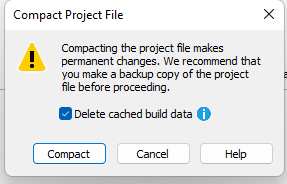
- Open the project file and perform a compact and delete of cache.
- Go to File → Compact
- When the Compact Project File dialog appears, make sure the Delete cached build data checkbox is checked.
- Download the project to the controller.
TSSM Instruction May Not Function as Documented (3343045, 3343105)
|
Controllers
|
First Known in
Firmware Revision
|
Corrected in
Firmware Revision
|
|
Compact GuardLogix® 5370
|
28.011
|
37.011 and later
|
|
Compact GuardLogix® 5380 SIL 2
|
31.011
|
37.011 and later
|
|
Compact GuardLogix 5380 SIL 3
|
32.013
|
37.011 and later
|
|
GuardLogix 5560
|
17.008
|
—
|
|
GuardLogix 5570
|
20.011
|
37.011 and later
|
|
GuardLogix 5580
|
31.011
|
37.011 and later
|
For additional information, see Knowledgebase Article Unexpected TSSM Instruction Behaviour.
|
Controllers
|
First Known in Firmware
Revision
|
Corrected in Firmware Revision
|
|
CompactLogix® 5370
|
20.011
|
37.011 and later
|
|
Compact GuardLogix® 5370
|
28.011
|
37.011 and later
|
|
ControlLogix® 5570
|
20.011
|
37.011 and later
|
|
GuardLogix 5570
|
20.011
|
37.011 and later
|
|
CompactLogix 5380
|
29.011
|
34.015, 35.014, 36.013, 37.011 and
later
|
|
Compact GuardLogix 5380 SIL 2
|
31.011
|
34.015, 35.014, 36.013, 37.011 and
later
|
|
Compact GuardLogix 5380 SIL 3
|
32.013
|
34.015, 35.014, 36.013, 37.011 and
later
|
|
CompactLogix 5380 Process
|
33.011
|
34.015, 35.014, 36.013, 37.011 and
later
|
|
CompactLogix 5480
|
32.011
|
34.015, 35.014, 36.013, 37.011 and
later
|
|
ControlLogix 5580
|
28.011
|
34.015, 35.014, 36.013, 37.011 and
later
|
|
GuardLogix 5580
|
31.011
|
34.015, 35.014, 36.013, 37.011 and
later
|
|
ControlLogix 5580 Process
|
33.011
|
34.015, 35.014, 36.013, 37.011 and
later
|
Download of signed application with 5094-IJ2IS or 5094-IRT8S fails (3797237)
|
Controllers
|
First Known in
Firmware Revision
|
Corrected in Firmware Revision
|
|
Compact GuardLogix® 5380 SIL 2
|
32.011
|
37.011 and later
|
|
Compact GuardLogix 5380 SIL 3
|
32.013
|
37.011 and later
|
|
GuardLogix 5580
|
32.011
|
37.011 and later
|
|
Controllers
|
First Known in
Firmware Revision
|
Corrected in Firmware
Revision
|
|
CompactLogix® 5370
|
31.011
|
37.011 and later
|
|
CompactLogix 5380
|
28.011
|
37.011 and later
|
|
Compact GuardLogix® 5380 SIL 2
|
31.011
|
37.011 and later
|
|
Compact GuardLogix 5380 SIL 3
|
32.013
|
37.011 and later
|
|
CompactLogix 5380 Process
|
33.011
|
37.011 and later
|
|
CompactLogix 5480
|
32.012
|
37.011 and later
|
|
ControlLogix® 5580
|
28.011
|
37.011 and later
|
|
GuardLogix 5580
|
31.011
|
37.011 and later
|
|
ControlLogix 5580 Process
|
33.011
|
37.011 and later
|
|
Controllers
|
First Known in
Firmware Revision
|
Corrected in Firmware Revision
|
|
CompactLogix® 5380
|
33.011
|
35.016, 36.013, 37.012, 38.011 and later
|
|
Compact GuardLogix® 5380 SIL
2
|
33.011
|
35.016, 36.013, 37.012, 38.011 and later
|
|
Compact GuardLogix 5380 SIL 3
|
33.011
|
35.016, 36.013, 37.012, 38.011 and later
|
|
CompactLogix 5380 Process
|
33.011
|
35.016, 36.013, 37.012, 38.011 and later
|
|
CompactLogix 5480
|
33.011
|
35.016, 36.013, 37.012 and later
|
|
ControlLogix® 5580
|
33.011
|
35.016, 36.013, 37.012, 38.011 and later
|
|
GuardLogix 5580
|
33.011
|
35.016, 36.013, 37.012, 38.011 and later
|
|
ControlLogix 5580 Process
|
33.011
|
35.016, 36.013, 37.012, 38.011 and later
|
|
Controllers
|
First Known in
Firmware Revision
|
Corrected in Firmware Revision
|
|
CompactLogix® 5380
|
28.011
|
34.015, 35.014, 36.013, 37.012, 38.011 and later
|
|
Compact GuardLogix® 5380 SIL
2
|
31.011
|
34.015, 35.014, 36.013, 37.012, 38.011 and later
|
|
Compact GuardLogix 5380 SIL
3
|
32.013
|
34.015, 35.014, 36.013, 37.012, 38.011 and later
|
|
CompactLogix 5380 Process
|
33.011
|
34.015, 35.014, 36.013, 37.012, 38.011 and later
|
|
CompactLogix 5480
|
32.011
|
34.015, 35.014, 36.013, 37.012 and later
|
|
ControlLogix® 5580
|
28.011
|
34.015, 35.014, 36.013, 37.012, 38.011 and later
|
|
GuardLogix 5580
|
31.011
|
34.015, 35.014, 36.013, 37.012, 38.011 and later
|
|
ControlLogix 5580 Process
|
33.011
|
34.015, 35.014, 36.013, 37.012, 38.011 and later
|
Application Notes
This release has the following application notes.
New Firmware Updates Can Impact the Performance of Message Rate Capacity HMI/MSG (Class 3) Data
Each new major revision of the controller/communication module firmware provides additional features and functionality, but this consumes additional processing power from the module even if the features are not utilized. This manifests as degrading HMI/messaging performance for the respective module.
Despite this degradation, the specifications defined for the respective modules have been maintained:
|
Module
|
Message Rate Across the Embedded Ethernet Port
|
|
ControlLogix® 5580
CompactLogix® 5380 |
2000 MSG/sec
|
|
GuardLogix® 5580 controllers in a SIL3 configuration
Compact GuardLogix 5380 SIL3 controllers |
1000 MSG/sec
|
|
1756-EN4TR Ethernet modules
|
3700 MSGs/sec
|
To improve the messaging capacity, it is recommended to employ the following:
- For high-frequency messaging, utilize connected cached messages
- Utilize message reads as opposed to message writes; they’re more efficient
- For ControlLogix 5580 controllers, route HMI/messages through communication modules in the chassis as
opposed to going directly to the embedded port of the controller
- Offloading some of the processing to the communications module results in greater messaging capacity than using the front port alone
- This recommendation does not apply to I/O or produce/consume data, it is more efficient and there is more capacity for that data to route through the embedded port of the controller
- Upgrade to a 5590 controller
- The HMI/messaging messaging capacity is doubled through the embedded ethernet port
For more information, see these publications:
- ControlLogix and GuardLogix Controller Specifications Technical Data, publication 1756-TD001
- CompactLogix 5380, Compact GuardLogix 5380, and CompactLogix 5480 Controllers Specifications Technical Data, publication 5069-TD002
- 1756 ControlLogix Communication Modules Specifications Technical Data, publication 1756-TD003
|
Controllers
|
Application Note First Identified in
Firmware Revision
|
|
Compact GuardLogix® 5380 SIL 2
|
31.011
|
|
Compact GuardLogix 5380 SIL 3
|
32.013
|
|
GuardLogix 5580
|
31.011
|
|
Compact GuardLogix® 5370
|
28.011
|
|
GuardLogix 5570
|
20.011
|
The RunMode state will provide the mode of the Producing controller from within the Consuming tag’s data. The RunMode state does not provide unique values in the Producing tag’s data. To monitor the state of the Producing controller within the Producing controller’s logic, use a Get System Value (GSV), with the Object set to ControllerDevice and the Attribute set to Status.
This application note applies to all firmware revisions of:
- GuardLogix® 5580, GuardLogix 5570, and GuardLogix 5560 controllers
- Compact GuardLogix 5380 and Compact GuardLogix 5370 controllers
- Compact GuardLogix L4 controllers
- All major and minor firmware releases for GuardLogix controller systems are certified for use in safety applications. As part of the certification process, Rockwell Automation tests the safety-related firmware functions (for example the CIP Safety™ communication subsystems, embedded safety instruction execution, and safety-related diagnostic functions). The firmware release notes identify changes to safety-related functions.
- Perform an impact analysis of the planned firmware upgrade.
- Review of the firmware release notes for changes in safety-related functionality.
- Review of hardware and firmware compatibility in the Product Compatibility and Download site to identify potential compatibility conflicts.
- Any modification, enhancement, or adaptation of your validated software must be planned and analyzed for any impact to the functional safety system as described in the ‘Edit Your Safety Application’ section in the safety reference manual for your controller.
- You must remove and regenerate the safety signature as part of the firmware upgrade process. Use the online and offline edit process described in the safety reference manual for your controller.
- GuardLogix 5580 and Compact GuardLogix 5380 Safety Reference Manual, 1756-RM012
- GuardLogix 5570 and Compact GuardLogix 5370 Safety Reference Manual, 1756-RM099
- GuardLogix 5560 and Compact GuardLogix L4 Safety Reference Manual, 1756-RM093
- From the Product Compatibility and Download Center:
- Review all firmware release notes, starting with the original firmware revision through the new firmware revision, to identify any changes that impact the safety-related implementation of the application.
- Review hardware and firmware compatibility to identify any restrictions between the original system components and the new system components.
- Perform a hazard and risk assessment for any changes identified during the impact analysis and determine what additional testing is necessary.
- Perform the online and offline edit process described in the safety reference manual for your controller. You can restrict the ‘Test the Application’ block to the testing identified by the hazard and risk assessment.
PXRQ Instruction Can Cause a Controller MNRF/Assert
|
Controllers
|
First Known in Firmware
Revision
|
|
CompactLogix™ 5380
|
31.011
|
|
Compact GuardLogix® 5380 SIL
2
|
31.011
|
|
Compact GuardLogix 5380 SIL 3
|
32.013
|
|
CompactLogix 5380 Process
|
33.011
|
|
CompactLogix 5480
|
32.011
|
|
ControlLogix® 5580
|
31.011
|
|
GuardLogix 5580
|
31.011
|
|
ControlLogix 5580 Process
|
33.011
|
Writing to the Equipment Phase External Request (PXRQ) instruction control\backing tag needs to be conditioned with a set .PC bit of the control\backing tag or the controller can MNRF/assert.
Copyright © 2025 Rockwell Automation, Inc. All rights reserved.
Rockwell Automation, Allen-Bradley, and FactoryTalk are trademarks of Rockwell Automation, Inc.
To view a complete list of Rockwell Automation trademarks please click here.
Trademarks not belonging to Rockwell Automation are property of their respective companies.