
Release Notes
( 9301-OPCx , 9301M-KSETx) KEPServer Enterprise connects 3rd Party HW / SW, from plant control systems to enterprise information systems
Version 13.00.00 (released 3/2022)
Catalog Number KepServer Enterprise
Requirements
This release has the following requirements.
The following are the system requirements for KEPServer Enterprise version 13.00.00.
KEPServer Enterprise works within the system requirements of all Rockwell Automation® software products.
For the latest compatibility information, refer to the Product Compatibility and Download Center.
Hardware requirements
KEPServer Enterprise was tested with the following hardware:
- 1 GHz processor
- 1 GB of RAM
- Ethernet card
- 180 MB free hard disk space
Software requirements
KEPServer Enterprise runs on these Windows® operating systems:
- Windows 10* (v2004, v20H2, v21H1, and 21H2)
- Windows 10 IoT Enterprise 2016 Long-Term Servicing Branch (LTSB)
- Windows 10 IoT Enterprise 2019 Long-Term Servicing Channel (LTSC)
- Windows 11
- Windows Server® 2012
- Windows Server 2012 R2
- Windows Server 2016
- Windows Server 2019
*For additional information about Windows 10 Support for the FactoryTalk Suite of Rockwell Software products, refer to Knowledgebase Document ID: IN4493 - Windows 10 Support for the FactoryTalk Suite of Rockwell Software products
 |
Note: Windows Server Core deployments are not supported for Windows
Server 2019 and Windows Server 2016.
|
Features
This release includes the following system features.
KEPServer Enterprise version 13.00.00 has the following new and enhanced features:
New features
Server
- Configuration API
- Adds the ability to page, filter, and sort returned results.
- Adds an endpoint to query which ID type should be used for each device model.
- Adds Health Status Endpoint to retrieve information about the ''Rest'' service status.
- Licensing
- Supports the server for requesting the license status from the activation manager on startup in
real time.
- If the status on startup is License Valid, KepServer Enterprise runs.
- If the status on startup is Grace Period, KepServer Enterprise runs.
- If the status on startup is Grace Period Expired, KepServer Enterprise enters time-limited mode and runs for 2 hours before the server features expire.
- Supports the server for requesting the license status from the activation manager on startup in
real time.
- OPC DA Interface
- Adds a new project setting for Maximum Connections that defaults to 512. Any connections that exceed the maximum allowable are rejected.
- Adds a new project setting for Maximum OPC Groups that defaults to 2000. Any groups that exceed the maximum allowable are rejected.
Fanuc Focas Ethernet Driver
- Supports the cnc_sysinfo call.
- Supports the cnc_rdtimer call for reading five different timers from the device.
- Supports the cnc_rdalmmsg call for reading current alarm information, including number, type, and message.
Siemens TCP/IP Ethernet Driver
- Supports Siemens TIA Portal v16.0.0.
Torque Tool Ethernet Driver
- Supports subscription to relay functions for devices that only support generic subscriptions.
Yokogawa GX Ethernet Driver
- Supports communication with the Yokogawa SMARTDAC+ product family, including these
models:
- Yokogawa GX
- Yokogawa GP
- Yokogawa GM
- Supports reading tag values for process values, alarms, channel configuration from IO, math, and com channels (writing to devices is not supported in this release).
Enhanced features
Server
- General
- Updates non-inclusive terms.
- The installer installs Visual Studio 2015-2019 C++ redistributables, and the product uses them as its primary dependency.
- Security improvements are implemented in this release.
- The server improves vendor data handling.
- Server Configuration
- Supports adding multiple devices through Device Discovery.
- Configuration API
- Adds a Required attribute for identifying the required properties when creating objects.
- Adds a Server_only attribute for identifying the internal server properties that should not be shown in UI clients.
- The project ID is now returned with all successful API responses (GET/PUT/POST/DELETE) as an HTTP header.
- Property validation errors are now returned as a JSON object with property names in a separate key-value pair.
- Adds X-Frame-Options, Content-Security-Policy, and HSTS headers to all requests.
- ThingWorx Native Interface
- Enhances the interface to support more than 500 Things to be bound to a single server instance.
- Enhances diagnostic logging functionality consistent with OPC diagnostics and communication diagnostics. Diagnostic Log settings are accessed in the logging property group of the project and the Event Log tab on Server Administration.
- OPC UA Server Interface
- When Channel Level Encryption is set to None, the UserNameIdentityToken policy will now default to Basic256Sha256 instead of Basic128Rsa15.
- The server now returns ''BadOutOfMemory'' when unable to send service data to subscriptions due to out-of-memory conditions.
Automation DirectNET Driver
- Removes non-inclusive terms.
BACnet Driver
- Increases the supported values for Max Items per Request and sets the default to 64.
- Updates Tag Import Group default values.
- Devices that are added through Device Discovery are now named based on the discovered device’s name, instead of putting that in the description.
CODESYS Driver
- Enhances the v2.3 model to support strings with extended ASCII characters.
Fanuc Focas Ethernet Driver
- Extends the range for Tool Offset Number and Type limits.
Mitsubishi Ethernet Driver
- All requests now include a ''monitoring timer'' value to support timeout issues when multiple devices are connected.
Modbus RTU Server Serial Driver
- Removes non-inclusive terms out of respect for users. Renames this driver in compliance with the updated terminology.
Modbus TCP/IP Ethernet Driver
- Unsolicited sockets are now only listened when a device is pointing at a local IP address.
MTConnect Driver
- Adds a property that allows users to skip schema validation.
OPC DA Client Driver
- The driver rebuilds the connection if the device level group fails to be added, similar to a shutdown notification, status, or watchdog failure.
Siemens TCP/IP Server Ethernet Driver
- Removes non-inclusive terms. Renames this driver in compliance with the updated terminology.
SIXNET UDR Driver
- Removes non-inclusive terms.
Telemecanique Uni-Telway Driver
- Removes non-inclusive terms. Renames this driver in compliance with the updated terminology.
Toyopuc Ethernet Driver
- Significantly improves stability and reliability of driver through anomaly fixes and strategic enhancements made in collaboration with customers.
Corrected Anomalies in This Release
This release corrects the following anomalies.
The following list identifies the anomalies corrected in the KEPServer Enterprise version 13.00.00.
Server
- General
- The server prevented some OPC DA 3.0 writes.
- Server Configuration
- Some server configuration settings are not persisting.
- Configuration API
- The collection name is missing from some JSON response bodies.
- Using the HTTPS endpoint with an HTTP port might stop responding.
- There is a memory leak associated with each request.
- Server Administration
- Renaming a username with invalid characters, most notably a slash (\), might render the server unusable.
- Unable to change language in the notification of the server admin system tray interface or in the demo warning message.
- Fixes an issue related to ThingWorx user group permission management.
- OPC UA Server Interface
- Fixes an OPC UA Server performance issue with read requests when the MaxAge parameter is set to a value greater than zero.
- Corrects the datatype of the MinimumSampling attribute of tag nodes.
- The server might expire inactivated sessions before the client could activate them and the BadSessionIdInvalid would be returned from the ActivateSessionRequest when the client attempts to activate them.
- Certain interface requests might crash the runtime.
Automation DirectNET Driver
- The driver prevents all communications with devices.
Beckhoff TwinCAT Driver
- Unable to generate tags during Automatic Tag Generation (ATG).
Fanuc Focas Ethernet Driver
- The driver might stop responding when reading the cnc_exeprgname_Name tag.
GE Ethernet Driver
- Values would not update after downloading a new program or changing the CPU in the device and restarting.
Mitsubishi Ethernet Driver
- The Mitsubishi iQ-R model is using the Q model’s time synchronization format and time synchronization failed for iQ-R model devices.
- The driver fails to send data change updates for string tags.
Modbus TCP/IP Ethernet Driver
- Fixes an issue where including a random character after the null terminator in the last word of even-length string writes.
MTConnect Driver
- The driver might stop responding when removing all the devices under a channel then performing a device discovery.
OPC DA Client Driver
- The driver prevents successful DA 3.0 writes.
- Fixes an issue when trying to write to tags before they are added to a subscription.
OPC UA Client Driver
- The driver clears the values of tags with uncertain quality.
- The driver is unable to write to tags with an initial quality of uncertainty.
- The driver might stop responding when using Poll Mode.
- A malformed response from a UA server during Tag Import might stop responding.
- The Deadband Value property always loads "0" from JSON projects.
OPC XML-DA Client Driver
- The driver is not correctly handling UTF-8 encoding.
- There is a communication break when receiving not valid or empty subscription handles from the server.
Siemens TCP/IP Ethernet Driver
- TIA Portal offsets might be miscalculated in bits or BOOL arrays.
- ATG on a structure fails if the END_STRUCT had additional characters (such as a comment).
- The TIA Portal Exporter might stop responding when users provide invalid file paths.
SIXNET UDR Driver
- The _PendingWrites tag reported numbers greater than the actual number of writes.
SNMP Driver
- Fixes an issue encoding large integers in an SNMP OID.
Known Anomalies in This Release
This release has the following known anomalies.
- Multiple failed attempts to authenticate usernames or passwords will now result in a ten-minute lock-out period. First identified in KEPServer Enterprise version 13.00.00.
- KEPServer Enterprise is only able to browse tags using nested structures within four levels deep. First identified in KEPServer Enterprise version 13.00.00.
Functional Changes
This release has the following functional changes from the previous release.
KEPServer Enterprise version 13.00.00 has no changes in functionality since the last release.
Application Notes
This release has the following application notes.
The following are the application notes for KEPServer Enterprise version 13.00.00.
- You can only install one version of KEPServer Enterprise per computer.
- KEPServer Enterprise version 13.00.00 is only available in the PC edition. KEPServer Enterprise version 10.00.00 is the latest version supported by PanelView Plus.
Mitigation for Microsoft DCOM Hardening patch
In response to Microsoft Distributed Component Object Model (DCOM) Hardening patch (MS KB5004442), the minimum DCOM authentication level used by Rockwell Automation products was raised to Packet Integrity.
|
IMPORTANT
|
Installing this product’s latest version with earlier unpatched
versions of other FactoryTalk products or products using Classic
OPC DA connections may cause a loss of connectivity due to the
difference in DCOM authentication level used. For additional
information, see the Knowledgebase Document ID: IN39461 -
Microsoft DCOM Hardening Information TOC.
|
Microsoft releases the DCOM Hardening patch in response to CVE-2021-26414. This patch elevates the minimum DCOM authentication level that is required to establish a DCOM connection. DCOM is used by many Rockwell Automation products and may be affected by the change that is made by the Microsoft patch. For additional information about the affected Rockwell Automation products, see the Knowledgebase Document ID: PN1581 - Product Notification 2022-01-001 - Rockwell Automation products unable to establish proper DCOM connection after installing Microsoft DCOM Hardening patch (MS KB5004442).
Set DCOM authentication level of KEPServer Enterprise
When using KEPServer Enterprise, change the authentication level through the following:
- Open Component Services.
- Double-click Console Root > Component Services > Computers > My Computer > DCOM Config.
- Right-click KEPServerEnterprise x.xx and select Properties.
- On the General tab, select the authentication level in Authentication Level.
- Click OK and restart KEPServer Enterprise.
In addition to DCOM configuration, you must configure the following settings:
- From the notification area, right-click KEPServerEnterprise and select Settings.
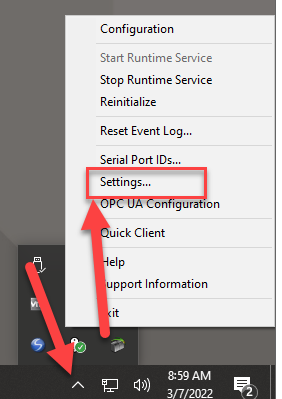
- In the Settings - KEPServerEnterprise dialog box, select Runtime Options > Use DCOM configuration settings.
- Click OK.
Supported Drivers
The PC edition of KEPServer Enterprise version 13.00.00 supports these drivers:
|
Driver list
|
Driver list
|
Driver list
|
Driver list
|
|
Advanced Simulator
|
GE SNP
|
Omron Host Link
|
Thermo Westronics Ethernet
|
|
Allen-Bradley® Bulletin 1609
|
GE SNPX
|
Omron NJ Ethernet
|
Thermo Westronics Serial
|
|
Allen-Bradley Bulletin 900
|
Hilscher Universal
|
Omron Process Suite
|
TIWAY Host Adapter
|
|
Analog Devices
|
Honeywell HC900 Ethernet
|
Omron Toolbus
|
Torque Tool Ethernet
|
|
Aromat Ethernet
|
Honeywell UDC Ethernet
|
OPC® DA Client
|
Toshiba Ethernet
|
|
Aromat Serial
|
Honeywell UDC Serial
|
OPC UA Client
|
Toshiba Serial
|
|
AutomationDirect DirectNET
|
IA Super SEL
|
OPC XML-DA Client
|
Toyopuc® PC2 Serial
|
|
AutomationDirect EBC
|
Idec Serial
|
Optimation OptiLogix
|
Toyopuc PC3/PC2 Ethernet
|
|
AutomationDirect ECOM
|
IOtech PointScan 100
|
Opto 22 Ethernet
|
U-CON (user-configurable)
|
|
AutomationDirect K Sequence
|
Keyence KV Ethernet
|
Partlow ASCII
|
Wago Ethernet
|
|
AutomationDirect Productivity
Series Ethernet
|
KraussMaffei MC4 Ethernet
|
Philips P8/PC20
|
Wonderware InTouch Client
|
|
BACnet™/IP
|
Memory Based
|
SattBus Ethernet
|
Yaskawa Memobus Plus
(SA85)
|
|
Beckhoff® TwinCAT®
|
Mettler Toledo Serial
|
SattBus Serial
|
Yaskawa MP Series Ethernet
|
|
Busware Ethernet
|
Micro-DCI™
|
Scanivalve Ethernet
|
Yaskawa MP Series Serial
|
|
CODESYS®
|
Mitsubishi® CNC Ethernet
|
Siemens® S5 (3964R)
|
Yokogawa Controller
|
|
Contrex® M-Series
|
Mitsubishi Ethernet
|
Siemens S5 (AS511)
|
Yokogawa CX Ethernet
|
|
Contrex Serial
|
Mitsubishi FX
|
Siemens S7 MPI
|
Yokogawa Darwin Ethernet
|
|
Cutler-Hammer D50/D300
|
Mitsubishi FX Net
|
Siemens S7-200
|
Yokogawa Darwin Serial
|
|
Cutler-Hammer ELC Ethernet
|
Mitsubishi Serial
|
Siemens TCP/IP Ethernet
|
Yokogawa DX Ethernet
|
|
Cutler-Hammer ELC Serial
|
Modbus® ASCII Serial
|
Siemens TCP/IP Slave
Ethernet
|
Yokogawa DX Serial
|
|
Dataforth® isoLynx®
|
Modbus Plus
|
Simatic/TI 505 Ethernet
|
Yokogawa DXP Ethernet
|
|
DDE Client
|
Modbus RTU Serial
|
Simatic/TI 505 Serial
|
Yokogawa HR2400 Serial
|
|
Fanuc Focas Ethernet
|
Modbus Slave RTU Serial
|
Simulator
|
Yokogawa MW Ethernet
|
|
Fanuc Focas HSSB
|
Modbus TCP/IP Ethernet
|
SIXNET EtherTRAK®
|
Yokogawa MX Ethernet
|
|
Fuji Flex
|
MTConnect® Client
|
SIXNET UDR
|
Yokogawa YS100 Serial
|
|
GE® CCM
|
ODBC Client
|
SquareD Serial
|
|
|
GE Ethernet
|
Omron FINS Ethernet
|
System Monitor
|
|
|
GE Ethernet Global Data
|
Omron FINS Serial
|
Telemecanique Uni-Telway
Slave
|
|
KEPServer Enterprise versions
This table displays the versions of KEPServer Enterprise and the related or equivalent versions for the following software:
|
KEPServer
Enterprise
version
|
5.00.00
|
8.00.00
|
9.00.00
|
10.00.00
|
11.00.00
|
12.00.00
|
12.01.00
|
13.00.00
|
|
KEPServerEX
equivalent
version
|
4.5
|
5.13.235
|
5.19.476
|
5.21.158
|
6.6.504
|
6.9.572
|
6.9.636
|
6.11.725
|
|
FactoryTalk
View SE and
ME Station
|
5.00.00
|
8.00.00
|
9.00.00
|
10.00.00
11.00.00
(requires
patch)
|
11.00.00
|
12.00.00
|
12.00.00
|
13.00.00
|
|
PanelViewPlus
|
5.00.00 to
5.10.00
|
8.00.00 to
8.20.00
|
9.00.00
|
10.00.00 to
12.00.00
|
Not
supported
|
Not
supported
|
Not
supported
|
Not
supported
|
|
MobileView
|
Not applicable
|
Not
applicable
|
Optional
installation
|
11.00.00 to
12.00.00
|
Not
supported
|
Not
supported
|
Not
supported
|
Not
supported
|
 |
Tip: FactoryTalk View SE and ME Station versions 10.00.00 and 11.00.00
require this patch to use KEPServer Enterprise version 10.00.00:
https://rockwellautomation.custhelp.com/app/answers/answer_view/a_id/1083527
|
Copyright © 2025 Rockwell Automation, Inc. All rights reserved.
Rockwell Automation, Allen-Bradley, and FactoryTalk are trademarks of Rockwell Automation, Inc.
To view a complete list of Rockwell Automation trademarks please click here.
Trademarks not belonging to Rockwell Automation are property of their respective companies.