
Release Notes
ControlLogix 5580 Process Controller, use ControlLogix 5580 Harsh Corrosive Environment Process Controller as a direct replacement.
Version 34.011 (released 3/2022)
Catalog Number 1756-L85EP (series B)
Security
This release includes security enhancements as a part of our ongoing efforts to improve security. For information regarding Rockwell Automation's vulnerability disclosure process, please reference the Rockwell Automation Vulnerability Policy.
Controller Can Fail to Re-Establish an Outgoing Secured I/O Connection to Remote I/O Modules After a Cable-Break (1753900)
|
Controllers
|
First Known in Firmware Revision
|
Corrected in Firmware Revision
|
|
CompactLogix™ 5380
|
34.011
|
36.011 and later
|
|
Compact GuardLogix® 5380 SIL 2
|
34.011
|
36.011 and later
|
|
Compact GuardLogix 5380 SIL 3
|
34.011
|
36.011 and later
|
|
CompactLogix 5380 Process
|
34.011
|
36.011 and later
|
|
ControlLogix® 5580
|
34.011
|
36.011 and later
|
|
GuardLogix 5580
|
34.011
|
36.011 and later
|
|
ControlLogix 5580 Process
|
34.011
|
36.011 and later
|
CVE-2022-3752: Denial-of-Service Vulnerability That Affects Logix 5000™ Controllers
|
Controllers
|
First Known in
Firmware Revision
|
Corrected in Firmware Revision
|
|
CompactLogix™ 5380
|
31.011
|
32.016, 33.015, 34.011 and later
|
|
Compact GuardLogix® 5380 SIL 2
|
31.011
|
32.016, 33.015, 34.011 and later
|
|
Compact GuardLogix 5380 SIL 3
|
32.013
|
32.016, 33.015, 34.011 and later
|
|
CompactLogix 5380 Process
|
33.011
|
33.015, 34.011 and later
|
|
CompactLogix 5480
|
32.011
|
32.016, 33.015, 34.011 and later
|
|
ControlLogix® 5580
|
31.011
|
32.016, 33.015, 34.011 and later
|
|
GuardLogix 5580
|
31.011
|
32.016, 33.015, 34.011 and later
|
|
ControlLogix 5580 Process
|
33.011
|
33.015, 34.011 and later
|
For a full list of the potentially affected Rockwell Automation products and a description of the vulnerability, see Knowledgebase Product Notice Logix Controllers Vulnerable to Denial-of-Service Attack.
Improved Product Resiliency for Redundancy Firmware Bundle Version 34.011_kit2
Product improvements have been made to increase product resiliency to potentially disruptive activities. These enhancements have been verified not to affect product safety, performance, expected life, configuration, or operation of the product. Rockwell Automation recommends that you follow good Industrial Control System (ICS) security practices that include regular product updates. To maintain authenticity, obtain product updates and new releases directly from Rockwell Automation.
Controller May Not Re-establish Outgoing Secured I/O Connections After Cable Breaks or Power-Cycles (1432106, 1489122, 1804298, 2136899)
|
Controllers
|
First Known in Firmware Revision
|
Corrected in Firmware Revision
|
|
CompactLogix™ 5380
|
34.011
|
34.014, 35.011 and later
|
|
Compact GuardLogix® 5380 SIL 2
|
34.011
|
34.014, 35.011 and later
|
|
Compact GuardLogix 5380 SIL 3
|
34.011
|
34.014, 35.011 and later
|
|
CompactLogix 5380 Process
|
34.011
|
34.014, 35.011 and later
|
|
CompactLogix 5480
|
34.011
|
34.014, 35.011 and later
|
|
ControlLogix® 5580
|
34.011
|
34.014, 35.011 and later
|
|
GuardLogix 5580
|
34.011
|
34.014, 35.011 and later
|
|
ControlLogix 5580 Process
|
34.011
|
34.014, 35.011 and later
|
In a CIP Security™ application, the controller may not re-establish secured I/O connections after multiple cable breaks or power cycles.
The Studio 5000 Logix Designer® application shows:
(Code 16#0204) Connection Request Error: Connection request timed out
If you experience this anomaly, power cycle the controller again.
CVE 2024-5659: Multicast Request Causes Major Nonrecoverable Fault on Select Controllers
|
Controllers and Communication
Modules
|
First Known in
Firmware Revision
|
Corrected in Firmware Revision
|
|
CompactLogix™ 5380
|
34.011
|
V34.014, V35.013, V36.011 and later
|
|
Compact GuardLogix® 5380 SIL 2
|
34.011
|
V34.014, V35.013, V36.011 and later
|
|
Compact GuardLogix 5380 SIL 3
|
34.011
|
V34.014, V35.013, V36.011 and later
|
|
CompactLogix 5380 Process
|
34.011
|
V34.014, V35.013, V36.011 and later
|
|
CompactLogix 5480
|
34.011
|
V34.014, V35.013, V36.011 and later
|
|
ControlLogix® 5580
|
34.011
|
V34.014, V35.013, V36.011 and later
|
|
GuardLogix 5580
|
34.011
|
V34.014, V35.013, V36.011 and later
|
|
ControlLogix 5580 Process
|
34.011
|
V34.014, V35.013, V36.011 and later
|
|
1756-EN4TR, 1756-EN4TRK,
1756-EN4TRXT
|
4.001
|
6.001 and later
|
For a full list of the potentially affected Rockwell Automation products and a description of the vulnerability, see Security Advisory ControlLogix and GuardLogix Vulnerable to Multicast Request Causes major nonrecoverable fault on Select Controllers.
Requirements
This release has the following requirements.
ControlLogix Redundancy Compatible Software for Revision 34.011_kit2
Catalog Numbers: ControlLogix® 5580 controllers (including ControlLogix-XT™ and K versions).
|
Software
|
Required Software Version, Min
|
|
CompareTool
|
9.00.00
|
|
ControlFLASH Plus™
|
4.01.00
|
|
FactoryTalk® Services Platform
|
6.30.00 (CPR9-SR13)
|
|
FactoryTalk Activation Manager
|
4.06.13 (CPR9-SR13)
|
|
FactoryTalk Alarms and Events(1)
|
6.30.00 (CPR9-SR13)
|
|
FactoryTalk AssetCentre
|
11.00.00 (CPR9-SR13)
|
|
FactoryTalk Batch
|
15.00 (3)
|
|
FactoryTalk View Site Edition(2)
|
13.00 (CPR9-SR13)
|
|
FactoryTalk Linx Redundancy Module
Configuration Tool
|
9.01.00
|
|
FactoryTalk Linx (4)
|
6.30 (CPR9-SR13)
|
|
RSLinx® Classic
|
4.30 (CPR9-SR13)
|
|
Studio 5000 Logix Designer®
|
34.00.00
|
(1) You must download a FactoryTalk Alarm and Events patch. See Knowledgebase Article Master list of all available Patch TOCs.
(2) The installation of FactoryTalk View Site Edition also installs FactoryTalk Services Platform, which installs FactoryTalk Alarms and Events. Also, if you download and install the latest FactoryTalk Services Patch Rollup, this patch automatically installs the patch for FactoryTalk Alarms and Events.
(3) Use the most recent FactoryTalk Batch Patch Roll-up with this redundancy firmware revision. For the most recent patch roll-up, see Knowledgebase Article Master list of all available Patch TOCs.
(4) For the most recent FactoryTalk Linx patch roll-up, see Rockwell Automation Knowledgebase Article Master list of all available Patch TOCs.
Digitally Signed Ethernet Module Firmware for Revision 34.011_kit2
Catalog Numbers:
Digitally signed firmware provides more security over the unsigned firmware. This firmware is different based on the EtherNet/IP communication modules you use.
|
Cat. No.
|
Supported
Firmware
Revisions
|
Digitally Signed
Firmware
|
Included with this
Redundancy Bundle
|
| 1756-EN2T/D
1756-EN2TK/D
1756-EN2TXT/D
|
11.004
|
Yes
|
Yes
|
| 1756-EN2T/C or earlier
1756-EN2TXT/C or earlier
|
5.009
|
No
|
Yes
|
|
5.029
|
Yes
|
No
| |
| 1756-EN2TP/A
1756-EN2TPK/A
1756-EN2TPXT/A
|
11.004
|
Yes
|
Yes
|
| 1756-EN2TR/C
1756-EN2TRK/C
|
11.004
|
Yes
|
Yes
|
| 1756-EN2TR/B or earlier
1756-EN2TRXT/B or earlier
|
5.009
|
No
|
Yes
|
|
5.029
|
Yes
|
No
| |
| 1756-EN2F/C
1756-EN2FK/C
|
11.004
|
Yes
|
Yes
|
| 1756-EN2F/B or earlier
1756-EN2FK/B or earlier
|
5.009
|
No
|
Yes
|
|
5.029
|
Yes
|
No
| |
| 1756-EN4TR/A
1756-EN4TRK/A
1756-EN4TRXT/A
|
5.002
|
Yes
|
Yes
|
Firmware revision 5.029 is not included in the redundancy system, revision 34.011_kit2 firmware bundle. You must download and install this digitally signed firmware after the redundancy bundle is installed.
Important: When you install the digitally signed firmware, that is, firmware revision 5.029, into a 1756-EN2T/C (or earlier), 1756-EN2TR/B (or earlier), or 1756-EN2F/B (or earlier) module, the installation makes the module incompatible with some firmware revisions. For example, after you update firmware, the module supports use of only digitally signed firmware. The module rejects any unsigned firmware updates.
You can download firmware revision 5.029 and the redundancy system firmware bundle, revision 34.011_kit2, at the Product Compatibility and Download Center.
Tip: Select the base catalog number in ControlFLASH PLUS™ software when upgrading extended temperature or conformal coated modules. For example, select the 1756-EN2TR when upgrading a 1756-EN2TRXT module. Extended temperature and conformal coated modules use the same Redundancy module ControlFLASH PLUS™ kit.
ControlLogix Redundancy System Components Revision 34.011_kit2
Catalog Numbers: ControlLogix® 5580 controllers, 1756-RM2, 1756-RM2K, 1756-RM2XT
This redundancy system revision includes the following:
|
Cat. No.
|
Module Description
|
Series
|
Firmware Revision
|
|
1756-EN2F
1756-EN2FK
|
ControlLogix EtherNet/IP fiber
communication module
|
C
|
11.0041
|
|
B or earlier
|
5.009 or 5.0292
| ||
|
1756-EN2T
|
ControlLogix EtherNet/IP
communication module
|
D
|
11.0041
|
|
C or earlier
|
5.009 or 5.0292
| ||
|
1756-EN2TK
|
ControlLogix EtherNet/IP
communication module (conformal
coated)
|
D
|
11.0041
|
|
1756-EN2TXT
|
ControlLogix-XT™ EtherNet/IP
communication module
|
D
|
11.0041
|
|
C or earlier
|
5.009 or 5.0292
| ||
|
| |||
| 1756-EN2TP
1756-EN2TPK
1756-EN2TPXT
|
ControlLogix EtherNet/IP
communication module – Parallel
Redundancy Protocol (PRP)
|
A
|
11.0041
|
|
1756-EN2TR
|
ControlLogix EtherNet/IP
communication module
|
C
|
11.0041
|
|
B or earlier
|
5.009 or 5.0292
| ||
|
1756-EN2TRK
|
ControlLogix EtherNet/IP
communication module (conformal
coated)
|
C
|
11.0041
|
|
1756-EN2TRXT
|
ControlLogix-XT EtherNet/IP
communication module
|
C
|
11.0041
|
|
B
|
5.0292
| ||
|
1756-EN4TR
1756-EN4TRK
1756-EN4TRXT
|
ControlLogix EtherNet/IP
communication module
|
A
|
5.002
|
| 1756-L81E
1756-L81EK
1756-L82E
1756-L82EK
1756-L83E
1756-L83EK
1756-L84E
1756-L84EK
1756-L85E
1756-L85EK
|
ControlLogix 5580 standard
controllers
|
B
|
34.011
|
| 1756-L81E-NSE
1756-L82E-NSE
1756-L83E-NSE
1756-L84E-NSE
1756-L85E-NSE
|
ControlLogix 5580 No Stored
Energy (NSE) controllers
|
B
|
34.011
|
| 1756-L81EXT
1756-L82EXT
1756-L83EXT
1756-L84EXT
1756-L85EXT
|
ControlLogix-XT 5580 controllers
|
B
|
34.011
|
|
1756-L81EP
1756-L83EP
1756-L85EP
|
ControlLogix 5580 process
controllers
|
B
|
34.011
|
|
1756-RM2
|
ControlLogix redundancy module
|
All
|
20.031
|
|
1756-RM2K
|
ControlLogix redundancy module
(conformal coated)
|
All
|
20.031
|
|
1756-RM2XT
|
ControlLogix-XT redundancy
module
|
All
|
20.031
|
|
1756-N2
|
Slot Filler Module
|
All
|
N/A
|
(1) Firmware revision 11.004 is digitally signed firmware.
(2) Firmware revision 5.029 is digitally signed firmware. Firmware revision 5.009 is unsigned firmware.
Additional Resources for Revision 34.011_kit2
For more information on how to install, configure and use your ControlLogix redundancy system, see:
Controller Restrictions in Redundancy Systems with Revision 34.011_kit2
Known Restrictions as of ControlLogix® Redundancy Revision 34.011_kit2
This revision supports the following: ControlLogix 5580 controllers, 1756-RM2, 1756-RM2K, and 1756-RM2XT modules.
1756-EN2T, 1756-EN2TK, 1756-EN2TR, 1756-EN2TXT, 1756-EN2F, 1756-EN2FK, 1756-EN2TP, 1756-EN2TPK, 1756-EN2TPXT:
1756-EN4TR, 1756-EN4TRK, 1756-EN4TRXT:
ControlLogix 5580 redundancy-enabled controllers, 1756-EN2T, 1756-EN2TK, 1756-EN2TR, 1756-EN2TRK, 1756-EN2TRXT, 1756-EN2TXT, 1756-EN2F, 1756-EN2FK, 1756-EN2TP, 1756-EN2TPK, 1756-EN2TPXT, 1756-EN4TR, 1756-EN4TRK, 1756-EN4TRXT:
CIP Sync Technology Included in Redundant Systems:
ControlLogix 5580 controllers
1756-EN2T, 1756-EN2TK, 1756-EN2TR, 1756-EN2TRK, 1756-EN2TRXT, 1756-EN2TXT, 1756-EN2F, 1756-EN2FK, 1756-EN2TP, 1756-EN2TPK, 1756-EN2TPXT:
ControlLogix Redundancy Compatible Software for Revision 34.011_kit1
Catalog Numbers: ControlLogix® 5580 controllers*
|
Software
|
Required Software Version, Min
|
|
CompareTool
|
9.00.00
|
|
ControlFLASH Plus™
|
4.01.00
|
|
FactoryTalk® Services Platform
|
6.30.00 (CPR9-SR13)
|
|
FactoryTalk Activation Manager
|
4.06.13 (CPR9-SR13)
|
|
FactoryTalk Alarms and Events(1)
|
6.30.00 (CPR9-SR13)
|
|
FactoryTalk AssetCentre
|
11.00.00 (CPR9-SR13)
|
|
FactoryTalk Batch
|
15.00 (3)
|
|
FactoryTalk View Site Edition(2)
|
13.00 (CPR9-SR13)
|
|
FactoryTalk Linx Redundancy Module
Configuration Tool
|
9.01.00
|
|
FactoryTalk Linx (4)
|
6.30 (CPR9-SR13)
|
|
RSLinx® Classic
|
4.30 (CPR9-SR13)
|
|
Studio 5000 Logix Designer®
|
34.00.00
|
(1) You must download a FactoryTalk Alarm and Events patch. See Knowledgebase Article Master list of all available Patch TOCs.
(2) The installation of FactoryTalk View Site Edition also installs FactoryTalk Services Platform, which installs FactoryTalk Alarms and Events. Also, if you download and install the latest FactoryTalk Services Patch Rollup, this patch automatically installs the patch for FactoryTalk Alarms and Events.
(3) Use the most recent FactoryTalk Batch Patch Roll-up with this redundancy firmware revision. For the most recent patch roll-up, see Knowledgebase Article Master list of all available Patch TOCs.
(4) For the most recent FactoryTalk Linx patch roll-up, see Rockwell Automation Knowledgebase Article Master list of all available Patch TOCs.
Digitally Signed Ethernet Module Firmware for Revision 34.011_kit1
Catalog Numbers
1756-EN2TRXT/B, 1756-EN2TR/C, 1756-EN2TRK/C, 1756- EN2TP/A, 1756-EN2TPK/A, 1756-EN2TPXT/A, 1756-EN2F/B, 1756-EN2FK/B, 1756-EN2F/C, 1756-EN2FK/C, 1756-EN4TR/A, 1756-EN4TRK/A,
1756-EN4TRXT/A
Digitally signed firmware provides more security over the unsigned firmware. This firmware is different based on the EtherNet/IP™ communication modules you use.
|
Cat. No.
|
Supported
Firmware
Revisions
|
Digitally Signed
Firmware
|
Included with this
Redundancy Bundle
|
| 1756-EN2T/D
1756-EN2TK/D
1756-EN2TXT/D
|
11.003
|
Yes
|
Yes
|
| 1756-EN2T/C or earlier
1756-EN2TXT/C or earlier
|
5.008
|
No
|
Yes
|
|
5.028
|
Yes
|
No
| |
| 1756-EN2TP/A
1756-EN2TPK/A
1756-EN2TPXT/A
|
11.003
|
Yes
|
Yes
|
| 1756-EN2TR/C
1756-EN2TRK/C
|
11.003
|
Yes
|
Yes
|
| 1756-EN2TR/B or earlier
1756-EN2TRXT/B or earlier
|
5.008
|
No
|
Yes
|
|
5.028
|
Yes
|
No
| |
| 1756-EN2F/C
1756-EN2FK/C
|
11.003
|
Yes
|
Yes
|
| 1756-EN2F/B or earlier
1756-EN2FK/B or earlier
|
5.008
|
No
|
Yes
|
|
5.028
|
Yes
|
No
| |
| 1756-EN4TR/A
1756-EN4TRK/A
1756-EN4TRXT/A
|
4.001
|
Yes
|
Yes
|
Firmware revision 5.028 is not included in the redundancy system, revision 34.011_kit1 firmware bundle. You must download and install this digitally signed firmware after the redundancy bundle is installed.
Important: When you install the digitally signed firmware, that is, firmware revision 5.028, into a 1756-EN2T/C (or earlier), 1756-EN2TR/B (or earlier), or 1756-EN2F/B (or earlier) module, the installation makes the module incompatible with some firmware revisions. For example, after you update firmware, the module supports use of only digitally signed firmware. The module rejects any unsigned firmware updates.
You can download firmware revision 5.028 and the redundancy system firmware bundle, revision 34.011_kit1, at the Product Compatibility and Download Center.
Tip: Select the base catalog number in ControlFLASH PLUS™ software when upgrading extended temperature or conformal coated modules. For example, select the 1756-EN2TR when upgrading a 1756-EN2TRXT module. Extended temperature and conformal coated modules use the same Redundancy module ControlFLASH PLUS™ kit.
EtherNet/IP is a trademark of ODVA, Inc.
ControlLogix Redundancy System Components Revision 34.011_kit1
Catalog Numbers
- ControlLogix® 5580 controllers
- 1756-RM2, 1756-RM2K, 1756-RM2XT
This redundancy system revision includes the following:
|
Cat. No.
|
Module Description
|
Series
|
Firmware Revision
|
|
1756-EN2F
1756-EN2FK
|
ControlLogix EtherNet/IP™
fiber communication module
|
C
|
11.0031
|
|
B or earlier
|
5.008 or 5.0282
| ||
|
1756-EN2T
|
ControlLogix EtherNet/IP
communication module
|
D
|
11.0031
|
|
C or earlier
|
5.008 or 5.0282
| ||
|
1756-EN2TK
|
ControlLogix EtherNet/IP
communication module
(conformal coated)
|
D
|
11.0031
|
|
1756-EN2TXT
|
ControlLogix-XT™ EtherNet/IP
communication module
|
D
|
11.0031
|
|
C or earlier
|
5.008 or 5.0282
| ||
|
| |||
| 1756-EN2TP
1756-EN2TPK
1756-EN2TPXT
|
ControlLogix EtherNet/IP
communication module –
Parallel Redundancy Protocol
(PRP)
|
A
|
11.0031
|
|
1756-EN2TR
|
ControlLogix EtherNet/IP
communication module
|
C
|
11.0031
|
|
B or earlier
|
5.008 or 5.0282
| ||
|
1756-EN2TRK
|
ControlLogix EtherNet/IP
communication module
(conformal coated)
|
C
|
11.0031
|
|
1756-EN2TRXT
|
ControlLogix-XT EtherNet/IP
communication module
|
C
|
11.0031
|
|
B
|
5.0282
| ||
|
1756-EN4TR
1756-EN4TRK
1756-EN4TRXT
|
ControlLogix EtherNet/IP
communication module
|
A
|
4.001
|
| 1756-L81E
1756-L81EK
1756-L82E
1756-L82EK
1756-L83E
1756-L83EK
1756-L84E
1756-L84EK
1756-L85E
1756-L85EK
|
ControlLogix 5580 standard
controllers
|
B
|
34.011
|
| 1756-L81E-NSE
1756-L82E-NSE
1756-L83E-NSE
1756-L84E-NSE
1756-L85E-NSE
|
ControlLogix 5580 No Stored
Energy (NSE) controllers
|
B
|
34.011
|
| 1756-L81EXT
1756-L82EXT
1756-L83EXT
1756-L84EXT
1756-L85EXT
|
ControlLogix-XT 5580
controllers
|
B
|
34.011
|
|
1756-L81EP
1756-L83EP
1756-L85EP
|
ControlLogix 5580 process
controllers
|
B
|
34.011
|
|
1756-RM2
|
ControlLogix redundancy
module
|
All
|
20.031
|
|
1756-RM2K
|
ControlLogix redundancy
module (conformal coated)
|
All
|
20.031
|
|
1756-RM2XT
|
ControlLogix-XT redundancy
module
|
All
|
20.031
|
(1) Firmware revision 11.003 is digitally signed firmware.
(2) Firmware revision 5.028 is digitally signed firmware. Firmware revision 5.008 is unsigned firmware.
EtherNet/IP is a trademark of ODVA, Inc.
Additional Resources for Revision 34.011_kit1
For more information on how to install, configure and use your ControlLogix redundancy system, see:
- The ControlLogix Redundancy Modules Installation Instructions, publication 1756-IN087.
- The ControlLogix 5580 Redundant Controller User Manual, publication 1756-UM015.
- High Availability System Reference Manual, publication HIGHAV-RM002-EN-P.
- Replacement Guidelines: Logix 5000™ Controllers, publication 1756-RM100.
Controller Restrictions in Redundancy Systems with Revision 34.011_kit1
Known Restrictions as of ControlLogix® Redundancy Revision 34.011_kit1
This revision supports the following:
- ControlLogix 5580 controllers
- 1756-RM2, 1756-RM2K, and 1756-RM2XT modules
Catalog Numbers
1756-EN2T, 1756-EN2TK, 1756-EN2TR, 1756-EN2TXT, 1756-EN2F, 1756-EN2FK, 1756-EN2TP, 1756-EN2TPK, 1756-EN2TPXT:
- The 1756-EN2x communication modules provide 128 TCP and 256 CIP™ connections.
- The 1756-EN2x communication modules do not support bumpless I/O on switchover with Immediate Output (IOT) instructions. Because these modules do not support bumpless I/O on switchover with the IOT instruction, they cannot override the RPI in a remote chassis and immediately send new data over the EtherNet/IP™ network.
1756-EN4TR, 1756-EN4TRK, 1756-EN4TRXT:
- The 1756-EN4TR modules with firmware revision 4.001 or later support CIP Security for program upload/download/monitoring (not I/O) when the modules are paired with redundant ControlLogix 5580 controllers in the redundant chassis pair. The ControlLogix 5580 controllers must be at firmware revision 34.011 or later, and the 1756-EN4TR pair must be configured for non-IP address swapping.
- The 1756-EN4TR modules are also supported in a remote rack as a standard adapter or in a redundant adapter architecture.
ControlLogix 5580 redundancy-enabled controllers, 1756-EN2T, 1756-EN2TK, 1756-EN2TR, 1756-EN2TRK, 1756-EN2TRXT, 1756-EN2TXT, 1756-EN2F, 1756-EN2FK, 1756-EN2TP, 1756-EN2TPK, 1756-EN2TPXT, 1756-EN4TR, 1756-EN4TRK, 1756-EN4TRXT:
- A redundant controller project cannot contain consumed Unicast connections. The project can contain produced Unicast tags that are consumed by remote consumers.
CIP Sync™ Technology Included in Redundant Systems:
- There are differences between CIP Sync technology in non-redundant systems and redundancy systems.
- ControlLogix 5580 Redundant Controller User Manual, publication 1756-UM015
- Integrated Architecture® and CIP Sync Configuration Application Technique, publication IA-AT003
- Consider the following when you use CIP Sync technology in a redundancy system:
- If you enable CIP Sync Time Synchronization in the controllers in a redundant chassis pair, you must also enable Time Synchronization in the EtherNet/IP™ communication modules in the redundant chassis pair so all devices have one path to the Grandmaster.
- If time synchronization is enabled in any controller in the primary chassis of a disqualified Redundant Chassis Pair, and no EtherNet/IP communication modules in the primary chassis have time synchronization enabled, the redundant chassis pair attempts to qualify. However, in these application conditions, the attempt to qualify fails.
- While CIP Sync technology can handle multiple paths between master and slave clocks, it resolves mastership most effectively if you configure the redundant paths so that Time Synchronization is enabled in only the minimum required number of EtherNet/IP communication modules.
- For example, if your redundant chassis pair has three 1756-EN2T communication modules and all are connected to the same network, enable Time Synchronization in only one of the modules.
- If the primary controller is the Grandmaster, the redundancy system automatically manages the CIP Sync clock attributes so that the controller in the primary chassis is always set to be the Grandmaster instead of the secondary controller. This clock management makes sure that a change to a new Grandmaster when the redundancy system switches over.
- When a switchover occurs, these events take place:
- The Grandmaster status transfers from the original primary controller to the new primary controller. This transfer can take longer to complete than if Grandmaster status was transferred between devices in a non-redundant system.
- The synchronization of the redundancy system can take longer when you use CIP Sync technology.
ControlLogix 5580 controllers
- You can have only one controller in each chassis in a redundant chassis pair.
- The embedded EtherNet port is disabled when the controller is enabled for redundancy.
- Do not use Match Project to Controller property with redundant controllers. If you use the Match Project to Controller property available in the Advanced tab of the Controller Properties dialog box, you cannot go online with, download to, or upload from the new primary controller after a switchover. This is because the serial number of the new primary controller is not the same as the serial number of the old primary controller and the project cannot be matched to the new primary controller.
- The Firmware Supervisor feature is not supported in a redundant system.
- You cannot use event tasks in a ControlLogix redundancy system. When you enable redundancy, you must change event tasks to nonevent tasks or delete them from your project.
- You cannot use Motion in ControlLogix redundancy systems. A remote controller can contain motion instructions even if it is on the same network as a redundancy system.
- Under some error conditions, often configuration related, the 1756-RM2 module continually attempts to requalify the system while the error prevents it from being successful. This causes the redundancy module error log to fill with the same error condition. If the system is in this condition, the redundancy module display cycles between QFNG and DISQ. To stop this from happening, change the redundancy module synchronization trigger in the Redundancy Module Configuration Tool (RMCT) to Never, until the error condition is corrected.
- The MinDurationACC alarm tag member value does not update and it stays at a 0 value. This change does not affect the MinDuration calculations.
1756-EN2T, 1756-EN2TK, 1756-EN2TR, 1756-EN2TRK, 1756-EN2TRXT, 1756-EN2TXT, 1756-EN2F, 1756-EN2FK, 1756-EN2TP, 1756-EN2TPK, 1756-EN2TPXT:
- The System Event History displays a `Module Failure’ entry when you insert a 1756-EN2x communication module in the chassis while the redundant chassis pair is synchronized. This is not indicative of any module failure; instead, it indicates that only a communication module was inserted in the chassis.
CIP, CIP Sync, and EtherNet/IP are trademarks of ODVA, Inc.
|
From Firmware Revision
|
Firmware Revision Updates Conditionally Not Allowed*
|
|
33.011_kit1
|
—
|
|
33.011_kit2
|
—
|
|
33.012_kit1
|
—
|
|
33.015_kit1
|
—
|
|
33.015_kit2
|
34.011_kit1
|
|
33.017_kit1
|
34.011_kit1, 34.011_kit2, 34.014_kit1
|
|
33.017_kit2
|
34.011_kit1, 34.011_kit2, 34.014_kit1, 34.014_kit2, 34.015_kit1
|
|
34.011_kit1
|
—
|
|
34.011_kit2
|
35.011_kit1
|
|
34.014_kit1
|
35.011_kit1, 35.011_kit2, 35.011_kit3
|
|
34.014_kit2
|
35.011_kit1, 35.011_kit2, 35.011_kit3, 35.013_kit1
|
|
34.015_kit1
|
35.011_kit1, 35.011_kit2, 35.011_kit3, 35.013_kit1
|
|
34.015_kit2
|
35.011_kit1, 35.011_kit2, 35.011_kit3, 35.013_kit1, 35.013_kit2, 35.014_kit1
|
|
35.011_kit1
|
—
|
|
35.011_kit2
|
—
|
|
35.011_kit3
|
—
|
|
35.013_kit1
|
—
|
|
35.013_kit2
|
36.011_kit1
|
|
35.014_kit1
|
36.011_kit1
|
|
35.014_kit2
|
36.011_kit1, 36.011_kit2
|
|
35.016_kit1
|
36.011_kit1, 36.011_kit2
|
|
35.017_kit1
|
36.011_kit1, 36.011_kit2, 36.011_kit3, 36.013_kit1
|
|
36.011_kit1
|
—
|
|
36.011_kit2
|
—
|
|
36.011_kit3
|
37.011_kit1
|
|
36.013_kit1
|
37.011_kit1
|
|
36.014_kit1
|
37.011_kit1, 37.011_kit2, 37.012_kit1
|
|
37.011_kit1
|
—
|
|
37.011_kit2
|
—
|
|
37.012_kit1
|
—
|
|
37.013_kit1
|
38.011_kit1
|
|
38.011_kit1
|
—
|
Corrected Anomalies in This Release
This release corrects the following anomalies.
Major Fault T01:C01 - Power-up Fault After Switchover (961095, 961088)
|
Controllers
|
First Known in
Firmware Revision
|
Corrected in
Firmware Revision
|
|
ControlLogix® 5580
|
33.011
|
33.012, 34.011 and
later
|
|
ControlLogix 5580 Process
|
33.011
|
33.012, 34.011 and
later
|
If you use a power-up handler program in your ControlLogix 5580 redundancy system, you can experience a Major Fault T01:C01 - Power-up Fault on the new primary controller after switchover.
To avoid this condition, remove the power-up handler and use the S:FS bit to execute the logic that was contained within the power-up handler.
PlantPAx® Embedded Instruction PVLV - Incorrect Operation on Change of Valve Type Selection (1088575, 1090027)
|
Products
|
First Known in Version
|
Corrected in Version
|
|
Process Library, version
5.00.00
|
5.00.00
|
5.00.02 and later
|
|
ControlLogix® 5580 Process
Controllers
|
33.011
|
33.012, 34.011 and later
|
|
CompactLogix™ 5380
Process Controller
|
33.011
|
33.012, 34.011 and later
|
For the Process Valve (PVLV) instruction, output to device is incorrectly generated when valve type selection is changed among selections of solenoid operated valve, motor-operated valve, or hand operated valve. Errant outputs can also be generated when changing valve action between “normally open” and “normally closed” selections for the solenoid operated valve.
For more information, see Knowledgebase Technote PVLV outputs incorrectly energize when changing the valve type while online.
PlantPAx® Embedded Instruction PVLV - Incorrect Operation When Controller Transitions from Program to Run (1061579, 1067067)
|
Products
|
First Known in Version
|
Corrected in Version
|
|
Process Library, version
5.00.00
|
5.00.00
|
5.00.02 and later
|
|
ControlLogix® 5580 Process
Controllers
|
33.011
|
33.012, 34.011 and later
|
|
CompactLogix™ 5380
Process Controller
|
33.011
|
33.012, 34.011 and later
|
For the Process Valve (PVLV) instruction, output to device is incorrectly generated when the controller is transitioned from Program to Run status. Expected behavior is that the PVLV function should not produce any output when the valve is at rest in the selected position unless there is an operator or program command to do so.
For more information, see Knowledgebase Technote Product Notice 2021-03-002 - PlantPAx 5.0 Execution Anomaly with PVLV Instruction When Controller Transitions from Program to Run.
Actual Position of Mover Axis Does Not Match the Physical Location For iTRAK 5730 (1046443, 1064016)
|
Controllers
|
First Known in
Firmware Revision
|
Corrected in
Firmware Revision
|
|
CompactLogix™ 5380
|
33.011
|
33.012, 34.011 and
later
|
|
Compact GuardLogix® 5380
SIL 2
|
33.011
|
33.012, 34.011 and
later
|
|
Compact GuardLogix 5380 SIL
3
|
33.011
|
33.012, 34.011 and
later
|
|
CompactLogix 5380 Process
|
33.011
|
33.012, 34.011 and
later
|
|
CompactLogix 5480
|
33.011
|
33.012, 34.011 and
later
|
|
ControlLogix® 5580
|
33.011
|
33.012, 34.011 and
later
|
|
GuardLogix 5580
|
33.011
|
33.012, 34.011 and
later
|
|
ControlLogix 5580 Process
|
33.011
|
33.012, 34.011 and
later
|
An offset is introduced in the Actual Position of the Mover Axis when the position of the axis is recovered after any of the following:
- iTRAK® power cycle
- a controller power cycle
- a network interruption
For more information, see Knowledgebase Technote iTRAK 5730: Actual Position of Mover Axis does not match the physical location.
Custom Communication Drivers Can Display Error When Accessing Tags (1093759, 1093806)
|
Controllers
|
First Known in
Firmware Revision
|
Corrected in
Firmware Revision
|
|
CompactLogix™ 5380
|
33.011
|
33.012, 34.011 and
later
|
|
Compact GuardLogix® 5380
SIL 2
|
33.011
|
33.012, 34.011 and
later
|
|
Compact GuardLogix 5380 SIL
3
|
33.013
|
33.012, 34.011 and
later
|
|
CompactLogix 5380 Process
|
33.011
|
33.012, 34.011 and
later
|
|
CompactLogix 5480
|
33.011
|
33.012, 34.011 and
later
|
|
ControlLogix® 5580
|
33.011
|
33.012, 34.011 and
later
|
|
GuardLogix 5580
|
33.011
|
33.012, 34.011 and
later
|
|
ControlLogix 5580 Process
|
33.011
|
33.012, 34.011 and
later
|
Custom communication drivers that are written using the Logix 5000 Controllers Data Access Programming Manual, 1756-PM020G-EN-P, can display error code 0x04 or 0x05 when attempting to access a structure and tags within the structure using Symbol Instance Addressing.
To avoid this anomaly, access a structure and tags within the structure using Symbolic Segment Addressing.
This anomaly does not affect Rockwell Automation communication software packages.
A Controller Producing Tags, Consumed by Two Or More Controllers Can MNRF/Assert (987186)
|
Controllers
|
First Known in
Firmware Revision
|
Corrected in
Firmware
Revision
|
|
CompactLogix™ 5380
|
33.011
|
34.011 and later
|
|
Compact GuardLogix® 5380 SIL 2
|
33.011
|
34.011 and later
|
|
Compact GuardLogix 5380 SIL 3
|
33.011
|
34.011 and later
|
|
CompactLogix 5380 Process
|
33.011
|
34.011 and later
|
|
CompactLogix 5480
|
33.011
|
34.011 and later
|
|
ControlLogix® 5580
|
33.011
|
34.011 and later
|
|
GuardLogix 5580
|
33.011
|
34.011 and later
|
|
ControlLogix 5580 Process
|
33.011
|
34.011 and later
|
If network disruptions are present that cause connections to drop, the producing controller can experience a major nonrecoverable fault (MNRF/Assert). The likelihood of the MNRF/Assert occurring on a producing controller increases as the:
- Number of consuming controllers increases.
- Number of consuming tags increases.
- Amount of network disruptions increases.
FactoryTalk Batch Server Does Not Re-Connect to The PhaseManager™ Phases on The Controller After a Download (1084737, 1087383, 1087379)
|
Controllers
|
First Known in Firmware Revision
|
Corrected in Firmware Revision
|
|
CompactLogix™ 5380
|
32.011
|
32.016, 33.012, 34.011 and later
|
|
Compact GuardLogix® 5380 SIL 2
|
32.011
|
32.016, 33.012, 34.011 and later
|
|
Compact GuardLogix 5380 SIL 3
|
32.013
|
32.016, 33.012, 34.011 and later
|
|
CompactLogix 5380 Process
|
33.011
|
33.012, 34.011 and later
|
|
CompactLogix 5480
|
32.011
|
32.016, 33.012, 34.011 and later
|
|
ControlLogix® 5580
|
32.011
|
32.016, 33.012, 34.011 and later
|
|
GuardLogix 5580
|
32.011
|
32.016, 33.012, 34.011 and later
|
|
ControlLogix 5580 Process
|
33.011
|
33.012, 34.011 and later
|
Downloading a large ACD file improperly places the phases in the controller into an unknown state instead of the expected Idle state. This occurs more often with larger projects but does not occur every time. To recover, cycle power on the controller or break the connection between FactoryTalk® Batch and the controller for a duration longer than the connection timeout.
PlantPAx® Embedded Instruction PAIM - Instruction Can Cause a Type 1 Code 60 MNRF (1360436, 1430595)
|
Controllers
|
First Known in Firmware
Revision
|
Corrected in Firmware
Revision
|
|
ControlLogix® 5580
Process
|
33.011
|
33.015, 34.011 and later
|
|
CompactLogix™ 5380
Process
|
33.011
|
33.015, 34.011 and later
|
- At least six of the instruction’s eight inputs are configured as Used
- Cfg_AbsDevLim parameter is set to 0.0
- 3 or more of the inputs have identical values
As a workaround to avoid this issue, you can add external logic to check for a zero value in Cfg_AbsDevLim and replace it with a nonzero value.
Inverting Motion Polarity Does Not Invert the Value of Certain Signal Attributes (1329074, 1332544)
|
Controllers
|
First Known in Firmware
Revision
|
Corrected in Firmware Revision
|
|
CompactLogix™ 5370
|
20.011
|
34.011 and later
|
|
Compact GuardLogix® 5370
|
28.011
|
34.011 and later
|
|
ControlLogix® 5570
|
19.011
|
34.011 and later
|
|
GuardLogix 5570
|
20.011
|
34.011 and later
|
|
CompactLogix 5380
|
28.011
|
34.011 and later
|
|
CompactLogix 5380 process
|
33.011
|
34.011 and later
|
|
Compact GuardLogix 5380 SIL 2
|
31.011
|
34.011 and later
|
|
Compact GuardLogix 5380 SIL 3
|
32.013
|
34.011 and later
|
|
CompactLogix 5480
|
32.011
|
34.011 and later
|
|
ControlLogix 5580
|
28.011
|
34.011 and later
|
|
ControlLogix 5580 process
|
33.011
|
34.011 and later
|
|
GuardLogix 5580
|
31.011
|
34.011 and later
|
When the axis Motion Polarity bit is set to inverted, certain Signal attributes for a CIP™ axis will display a value opposite of the programmed direction of the axis.
The affected signal attributes are:
• #365 Fine Command Position
• #495 Torque Estimate
• #432 Position Reference
• #523 Motor Electrical Angle
• #565 Slip Compensation
• #600 Output Frequency
• #601 Output Current
• #602 Output Voltage
• #603 Output Power
• #1403 Velocity Feedback 1
• #1453 Velocity Feedback 2
For more information, see the Knowledgebase Technote Inverting Motion Polarity Does Not Invert the Value of Certain Signal Attributes.
PlantPAx® Embedded Instruction PVSD - Returning from Hand While Drive Is Running Results in Running Wrong Direction (1424134, 1430601)
|
Controllers
|
First Known in Firmware
Revision
|
Corrected in Firmware
Revision
|
|
ControlLogix® 5580
Process
|
33.011
|
33.015, 34.011 and later
|
|
CompactLogix™ 5380
Process
|
33.011
|
33.015, 34.011 and later
|
Transitioning the command source from “Hand” to any other command source while the drive is still running, even if decelerating when commanded to stop, results in the drive continuing to run but in the opposite direction. This action requires that the drive is configured to have reverse capability and the drive is still running while the transition from “Hand” occurs.
As a workaround to the above issue, you can add logic to issue a drive Stop in Override command source on transition from Hand to (not in Hand).
MAR and MAW Instructions Do Not Execute Properly After Controller Power Is Cycled (1120359, 1161982)
|
Controllers
|
First Known in Firmware
Revision
|
Corrected in Firmware Revision
|
|
CompactLogix™ 5370
|
20.011
|
34.011
|
|
Compact GuardLogix® 5370
|
28.011
|
34.011
|
|
ControlLogix® 5570
|
20.011
|
34.011
|
|
GuardLogix 5570
|
28.011
|
34.011
|
|
CompactLogix 5380
|
28.011
|
34.011
|
|
Compact GuardLogix 5380 SIL 2
|
31.011
|
34.011
|
|
Compact GuardLogix 5380 SIL 3
|
32.013
|
34.011
|
|
CompactLogix 5380 Process
|
33.011
|
34.011
|
|
CompactLogix 5480
|
32.011
|
34.011
|
|
ControlLogix 5580
|
28.011
|
34.011
|
|
GuardLogix 5580
|
31.011
|
34.011
|
|
ControlLogix 5580 Process
|
33.011
|
34.011
|
If a controller is powered down while a Motion Arm Registration (MAR) and/or a Motion Arm Watch (MAW) instruction is active, the state of the instruction will not be accurate on controller power up.
- A Motion Disarm Registration (MDR) is required to reset the MAR instruction.
- A Motion Disarm Watch (MDW) is required to reset to the MAW instruction.
For more information, see the Knowledgebase Technote MAR or MAW Instruction Not Executing Properly After a Power cycle.
AxisHomedStatus Bit Clears After Storing Project to Nonvolatile Memory (1169495, 1218911)
|
Controllers
|
First Known in Firmware
Revision
|
Corrected in Firmware
Revision
|
|
CompactLogix™ 5380
|
33.011
|
33.017, 34.011 and later
|
|
Compact GuardLogix® 5380 SIL 2
|
33.011
|
33.017, 34.011 and later
|
|
Compact GuardLogix 5380 SIL 3
|
33.011
|
33.017, 34.011 and later
|
|
CompactLogix 5380 Process
|
33.011
|
33.017, 34.011 and later
|
|
CompactLogix 5480
|
33.011
|
33.017, 34.011 and later
|
|
ControlLogix® 5580
|
33.011
|
33.017, 34.011 and later
|
|
GuardLogix 5580
|
33.011
|
33.017, 34.011 and later
|
|
ControlLogix 5580 Process
|
33.011
|
33.017, 34.011 and later
|
For a motion axis that was previously homed, the AxisHomedStatus bit will clear (value=0) after a project is stored to Nonvolatile Memory. See Knowledgebase Technote AxisHomeStatus bit cleared after storing project to the SD card.
Errors on I/O After Redundancy System Update (1286591, 1286593)
|
Controllers
|
First Known in Firmware
Revision
|
Corrected in Firmware
Revision
|
|
ControlLogix® 5580
|
33.011
|
33.015, 34.011 and later
|
|
ControlLogix 5580
Process
|
33.011
|
33.015, 34.011 and later
|
16#FF08-Invalid path to module error codes could occur on I/O modules that were inhibited or disconnected during a Redundancy System Update (RSU), and then uninhibited or reconnected after the update is complete. Error codes can be found on the Connection Tab in the I/O module properties. See Knowledgebase Technote 16#FF08 errors on I/O after a Redundancy System Update.
Controller Input Data Associated with Remote 5069/5094 Standard Modules Can Be Inconsistent When Communication Errors Occur (1297430)
|
Controllers
|
First Known in Firmware
Revision
|
Corrected in Firmware
Revision
|
|
CompactLogix™ 5380
|
31.011
|
34.011
|
|
Compact GuardLogix® 5380 SIL 2
|
31.011
|
34.011
|
|
Compact GuardLogix 5380 SIL 3
|
32.013
|
34.011
|
|
CompactLogix 5380 Process
|
33.011
|
34.011
|
|
CompactLogix 5480
|
32.011
|
34.011
|
|
ControlLogix® 5580
|
31.011
|
34.011
|
|
GuardLogix 5580
|
31.011
|
34.011
|
|
ControlLogix 5580 Process
|
33.011
|
34.011
|
Remote 5069\5094 standard modules with unicast connection type can have inconsistent data when communication errors occur.
For more information, see Knowledgebase Technote Controller Input Data Associated with Remote 5069/5094 Standard Modules Can Be Inconsistent When Communication Errors Occur.
PCMD Returns Incorrect Error Code (1056295)
|
Controllers
|
First Known in Firmware
Revision
|
Corrected in Firmware
Revision
|
|
CompactLogix™ 5370
|
20.011
|
34.011
|
|
Compact GuardLogix® 5370
|
28.011
|
34.011
|
|
ControlLogix® 5570
|
20.011
|
34.011
|
|
ControlLogix 5570 redundant
|
20.054
|
34.051
|
|
GuardLogix 5570
|
28.011
|
34.011
|
|
CompactLogix 5380
|
28.011
|
34.011
|
|
Compact GuardLogix 5380 SIL 2
|
31.011
|
34.011
|
|
Compact GuardLogix 5380 SIL 3
|
32.013
|
34.011
|
|
CompactLogix 5380 Process
|
33.011
|
34.011
|
|
CompactLogix 5480
|
32.011
|
34.011
|
|
ControlLogix 5580
|
28.011
|
34.011
|
|
GuardLogix 5580
|
31.011
|
34.011
|
|
ControlLogix 5580 Process
|
33.011
|
34.011
|
Equipment Phase Command (PCMD) returns the incorrect error code “0x6003, HIGH_PRIORITY_OWNED” when it should return “0x6004, NOT_ATTACHED”
CIP™ Axis Velocity Loop Causes Controller To MNRF/Assert (1008498, 1006943)
|
Controllers
|
First Known in Firmware
Revision
|
Corrected in Firmware
Revision
|
|
CompactLogix™ 5370
|
20.011
|
34.011
|
|
Compact GuardLogix® 5370
|
28.011
|
34.011
|
|
ControlLogix® 5570
|
20.011
|
34.011
|
|
GuardLogix 5570
|
28.011
|
34.011
|
|
CompactLogix 5380
|
28.011
|
34.011
|
|
Compact GuardLogix 5380 SIL 2
|
31.011
|
34.011
|
|
Compact GuardLogix 5380 SIL 3
|
32.011
|
34.011
|
|
CompactLogix 5380 Process
|
33.011
|
34.011
|
|
CompactLogix 5480
|
32.011
|
34.011
|
|
ControlLogix 5580
|
28.011
|
34.011
|
|
GuardLogix 5580
|
31.011
|
34.011
|
|
ControlLogix 5580 Process
|
33.011
|
34.011
|
Setting the Axis Direct Command Velocity Tag to “Not a Number” (NaN) causes the controller to experience a major nonrecoverable fault/assert.
Task Switching of User Tasks When Executing Multiple RTOS Instructions Can Cause A MNRF/Assert (1105041)
|
Controllers
|
First Known in
Firmware
Revision
|
Corrected in
Firmware
Revision
|
|
CompactLogix™ 5380
|
32.011
|
34.011 and later
|
|
Compact GuardLogix® 5380 SIL 2
|
32.011
|
34.011 and later
|
|
Compact GuardLogix 5380 SIL 3
|
32.013
|
34.011 and later
|
|
CompactLogix 5380 Process
|
33.011
|
34.011 and later
|
|
CompactLogix 5480
|
32.011
|
34.011 and later
|
|
ControlLogix® 5580
|
32.011
|
34.011 and later
|
|
GuardLogix 5580
|
32.011
|
34.011 and later
|
|
ControlLogix 5580 Process
|
33.011
|
34.011 and later
|
If the application contains RTOS (Real to String) instructions in different user tasks and the following execution occurs:
- Task A is executing an RTOS.
- Task A is interrupted to execute Task B.
- Task B executes an RTOS.
- Task A completes the RTOS previously interrupted.
A major nonrecoverable fault (MNRF/Assert) can occur.
For information on how to work around this in user application code, see Knowledgebase Technote RTOS instruction execution causes controller to MNRF.
|
Controllers
|
First Known in
Firmware Revision
|
Corrected in
Firmware Revision
|
|
ControlLogix® 5580
|
33.011
|
34.011 and later
|
|
ControlLogix 5580 Process
|
33.011
|
34.011 and later
|
|
Controllers
|
First Known in
Firmware Revision
|
Corrected in
Firmware Revision
|
|
CompactLogix™ 5380
|
33.011
|
34.011 and later
|
|
Compact GuardLogix® 5380
SIL 2
|
33.011
|
34.011 and later
|
|
Compact GuardLogix 5380 SIL
3
|
33.011
|
34.011 and later
|
|
CompactLogix 5380 Process
|
33.011
|
34.011 and later
|
|
CompactLogix 5480
|
33.011
|
34.011 and later
|
|
ControlLogix® 5580
|
33.011
|
34.011 and later
|
|
GuardLogix 5580
|
33.011
|
34.011 and later
|
|
ControlLogix 5580 Process
|
33.011
|
34.011 and later
|
An OPC Client Requests an Excessively High Number of OPC Groups from RSLinx Classic’s OPC Interface (1239180, 1646089)
|
Controllers
|
First Known in Firmware
Revision
|
Corrected in Firmware
Revision
|
|
CompactLogix™ 5380
|
33.011
|
33.017, 34.011 and later
|
|
Compact GuardLogix® 5380 SIL 2
|
33.011
|
33.017, 34.011 and later
|
|
Compact GuardLogix 5380 SIL 3
|
33.011
|
33.017, 34.011 and later
|
|
CompactLogix 5380 Process
|
33.011
|
33.017, 34.011 and later
|
|
CompactLogix 5480
|
33.011
|
33.017, 34.011 and later
|
|
ControlLogix® 5580
|
33.011
|
33.017, 34.011 and later
|
|
GuardLogix 5580
|
33.011
|
33.017, 34.011 and later
|
|
ControlLogix 5580 Process
|
33.011
|
33.017, 34.011 and later
|
If an OPC Client requests a high number of OPC groups, this causes RSLinx® Classic to make a high number of optimized tag requests to a Logix controller and causes the Logix controller to experience a major nonrecoverable fault.
Online Edits of a Drive Peripheral for a Drive That Does Not Support ADC Can Cause a Controller MNRF (1502674, 1518216)
|
Controllers
|
First Known in Firmware
Revision
|
Corrected in Firmware
Revision
|
|
ControlLogix® 5580
|
33.011
|
33.015, 34.011 and later
|
|
ControlLogix 5580
Process
|
33.011
|
33.015, 34.011 and later
|
For a full list of the potentially affected Rockwell Automation products and a description of the vulnerabilities, see Knowledgebase Technote Product Notice 2022-05-002 - ControlLogix 5580 Redundancy Controller with V33 Firmware May Experience Anomalous Behavior when online Editing of Drive Peripherals Associated with Drives that do not support ADC.
PlantPAx® Embedded Instruction PPID - Instruction Windup Inputs Do Not Affect the Instruction Windup Status Bits (1180548, 1455895, 1707712)
|
Controllers
|
First Known in Firmware
Revision
|
Corrected in Firmware
Revision
|
|
ControlLogix® 5580
Process
|
33.011
|
33.015, 34.011 and later
|
|
CompactLogix™ 5380
Process
|
33.011
|
33.015, 34.011 and later
|
The Process Proportional + Integral + Derivative (PPID) instruction does not use the Inp_WindupHi or the Inp_WindupLo inputs in the determination of the Sts_WindupHi or Sts_WindupLo status bits.
Known Anomalies in This Release
This release has the following known anomalies.
Applying Online Changes to an Armor PowerFlex Drive Can Cause an Error (3310370)
|
Controllers
|
First Known in
Firmware Revision
|
Corrected in Firmware Revision
|
|
CompactLogix® 5380
|
34.011
|
35.016*, 36.011 and later
|
|
Compact GuardLogix® 5380 SIL 2
|
34.011
|
35.016*, 36.011 and later
|
|
Compact GuardLogix 5380 SIL 3
|
34.011
|
35.016*, 36.011 and later
|
|
CompactLogix 5380 Process
|
34.011
|
35.016*, 36.011 and later
|
|
CompactLogix 5480
|
34.011
|
35.016*, 36.011 and later
|
|
ControlLogix® 5580
|
34.011
|
35.016*, 36.011 and later
|
|
GuardLogix 5580
|
34.011
|
35.016*, 36.011 and later
|
|
ControlLogix 5580 Process
|
34.011
|
35.016*, 36.011 and later
|
If you apply changes to non-safety parameters of an Armor™ PowerFlex® Drive while online, this can trigger ‘Error during AOP Apply’ in the Studio 5000 Logix Designer® application.
*The correction for this anomaly in firmware revision 35.016 also requires an upgrade to version 35.03 of Logix Designer.
You must also perform these steps with the application.
- Open the project file and perform a compact and delete of cache.
- Go to File → Compact.
- When the Compact Project File dialog appears, make sure the ‘Delete cached build data’ checkbox is selected.
- Download the project to the controller.
|
Controllers
|
First Known in
Firmware Revision
|
Corrected in Firmware Revision
|
|
CompactLogix® 5380
|
34.011
|
35.016, 36.013, 37.012, 38.011 and later
|
|
Compact GuardLogix® 5380 SIL
2
|
34.011
|
35.016, 36.013, 37.012, 38.011 and later
|
|
Compact GuardLogix 5380 SIL 3
|
34.011
|
35.016, 36.013, 37.012, 38.011 and later
|
|
CompactLogix 5380 Process
|
34.011
|
35.016, 36.013, 37.012, 38.011 and later
|
|
CompactLogix 5480
|
34.011
|
35.016, 36.013, 37.012 and later
|
|
ControlLogix® 5580
|
34.011
|
35.016, 36.013, 37.012, 38.011 and later
|
|
GuardLogix 5580
|
34.011
|
35.016, 36.013, 37.012, 38.011 and later
|
|
ControlLogix 5580 Process
|
34.011
|
35.016, 36.013, 37.012, 38.011 and later
|
Controller Assert After Executing an SASI Instruction (5916192)
|
Devices
|
First Known in
Firmware
Revision
|
Corrected in Firmware
Revision
|
|
ControlLogix 5590
|
38.011
|
—
|
|
CompactLogix 5380
|
34.011
|
—
|
|
CompactLogix 5380 Process
|
34.011
|
—
|
|
Compact GuardLogix 5380 SIL2
|
34.011
|
—
|
|
Compact GuardLogix 5380 SIL3
|
34.011
|
—
|
|
ControlLogix 5580
|
34.011
|
—
|
|
ControlLogix 5580 Process
|
34.011
|
—
|
|
GuardLogix 5580
|
34.011
|
—
|
An assert can occur if the Equipment Sequence Assign Sequence Identifier (SASI) Instruction is
configured with the Result parameter of 0 and is executed. 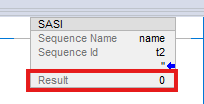
Workaround: Set a DINT tag for the instruction result, instead of an immediate value of 0.
SD Status Indicator Flashes When I/O Connection Errors Exist (1917586, 1917602, 1917603)
|
Controllers
|
First Known in Firmware Revision
|
Corrected in Firmware Revision
|
|
CompactLogix™ 5380
|
34.011
|
34.014, 35.013, 36.011 and later
|
|
Compact GuardLogix® 5380 SIL 2
|
34.011
|
34.014, 35.013, 36.011 and later
|
|
Compact GuardLogix 5380 SIL 3
|
34.011
|
34.014, 35.013, 36.011 and later
|
|
CompactLogix 5380 Process
|
34.011
|
34.014, 35.013, 36.011 and later
|
|
CompactLogix 5480
|
34.011
|
34.014, 35.013, 36.011 and later
|
|
ControlLogix® 5580
|
34.011
|
34.014, 35.013, 36.011 and later
|
|
GuardLogix 5580
|
34.011
|
34.014, 35.013, 36.011 and later
|
|
ControlLogix 5580 Process
|
34.011
|
34.014, 35.013, 36.011 and later
|
The SD status indicator flashes and decreases SD card performance when I/O connection errors exist. The impact on SD card performance is directly related to the number of I/O connection errors present at that time.
Rejection of Messages Received by IO-Link Devices in a High Availability Application (1631817, 1767445)
|
Controllers
|
First Known in Firmware Revision
|
Corrected in Firmware Revision
|
|
ControlLogix® 5580
|
34.011
|
34.014, 35.011 and later
|
|
ControlLogix 5580 Process
|
34.011
|
34.014, 35.011 and later
|
In a high availability application, I/O devices that accept reconfiguration messages only from the owner device (the one which initiated communication to the target /IO device) reject any reconfiguration sent via message communication with a 16#0010 error code.
Disqualification of Redundant Chassis Pair Due to Concurrent Connection Timeout (1895856)
|
Communication Modules
|
First Known in Firmware
Revision
|
Corrected in Firmware
Revision
|
|
1756-EN4TR, 1756-EN4TRK,
1756-EN4TRXT |
5.001
|
5.003
|
Controller Can Experience a MNRF When You Inhibit and Uninhibit an Axis and Drive (2069903, 2162056, 2162057)
|
Controllers
|
First Known in Firmware Revision
|
Corrected in Firmware Revision
|
|
CompactLogix™ 5380
|
34.011
|
34.014, 35.013, 36.011 and later
|
|
Compact GuardLogix® 5380 SIL 2
|
34.011
|
34.014, 35.013, 36.011 and later
|
|
Compact GuardLogix 5380 SIL 3
|
34.011
|
34.014, 35.013, 36.011 and later
|
|
CompactLogix 5380 Process
|
34.011
|
34.014, 35.013, 36.011 and later
|
|
CompactLogix 5480
|
34.011
|
34.014, 35.013, 36.011 and later
|
|
ControlLogix® 5580
|
34.011
|
34.014, 35.013, 36.011 and later
|
|
GuardLogix 5580
|
34.011
|
34.014, 35.013, 36.011 and later
|
|
ControlLogix 5580 Process
|
34.011
|
34.014, 35.013, 36.011 and later
|
Inhibiting the Axis and then the associated Drive with SSV instructions (in that order) can cause the controller to experience a major non-recoverable fault (MNRF).
Workaround: Inhibit the Drive, then inhibit the Axis (in that order). The order of uninhibiting the axis and drive does not matter.
Online Configuration of I/O Devices can Cause a MNRF/Assert (3231324, 3385069, 3335724, 3355887, 3355890)
|
Controllers
|
First Known in
Firmware Revision
|
Corrected in Firmware Revision
|
|
CompactLogix® 5380
|
34.011
|
34.015, 35.014, 36.013, 37.011 and later
|
|
Compact GuardLogix® 5380 SIL 2
|
34.011
|
34.015, 35.014, 36.013, 37.011 and later
|
|
Compact GuardLogix 5380 SIL 3
|
34.011
|
34.015, 35.014, 36.013, 37.011 and later
|
|
CompactLogix 5380 Process
|
34.011
|
34.015, 35.014, 36.013, 37.011 and later
|
|
CompactLogix 5480
|
34.011
|
34.015, 35.014, 36.013, 37.011 and later
|
|
ControlLogix® 5580
|
34.011
|
34.015, 35.014, 36.013, 37.011 and later
|
|
GuardLogix 5580
|
34.011
|
34.015, 35.014, 36.013, 37.011 and later
|
|
ControlLogix 5580 Process
|
34.011
|
34.015, 35.014, 36.013, 37.011 and later
|
|
1756-L8x Enhanced Redundancy
Firmware Bundle
|
33.011
|
33.017, 34.015, 35.014, 36.013, 37.011 and
later
|
When an I/O device is owned by the controller, if you make an online change with either the module properties dialog or a MSG instruction with a “Module Reconfigure” message type, the controller can MNRF/assert.
There is a higher probability for this anomaly to occur when there are many unconnected I/O devices in the I/O tree.
We recommend that you inhibit devices in the I/O tree that are not powered or do not exist on the network. If possible, inhibit the device while offline with the controller and then download the application to the controller.
This anomaly does not impact all I/O devices:
• Common I/O devices include: 1718 Ex I/O, 1719 Ex I/O, ArmorBlock® I/O, Compact 5000® I/O, FLEX 5000® I/O, Armor™ PowerFlex® Drives, E300™ Electronic Overload Relays, Dynamix™ 1444 Series modules.
• For all impacted I/O devices, see Knowledgebase Technote Determining the I/O Devices that Utilize an EDS AOP
Workaround:
Inhibit the I/O connection to the device while online before you start any reconfiguration. Once you complete the reconfiguration, then uninhibit the I/O connection.
Known Anomalies from Previous Releases
These anomalies are from previous releases but are still known in this release.
|
Controllers
|
First Known in
Firmware Revision
|
Corrected in Firmware Revision
|
|
CompactLogix® 5370
|
31.011
|
35.017, 36.014, 37.011 and later
|
|
CompactLogix 5380
|
28.011
|
35.017, 36.014, 37.011 and later
|
|
Compact GuardLogix® 5380 SIL 2
|
31.011
|
35.017, 36.014, 37.011 and later
|
|
Compact GuardLogix 5380 SIL 3
|
32.013
|
35.017, 36.014, 37.011 and later
|
|
CompactLogix 5380 Process
|
33.011
|
35.017, 36.014, 37.011 and later
|
|
CompactLogix 5480
|
32.012
|
35.017, 36.014, 37.011 and later
|
|
ControlLogix® 5580
|
28.011
|
35.017, 36.014, 37.011 and later
|
|
GuardLogix 5580
|
31.011
|
35.017, 36.014, 37.011 and later
|
|
ControlLogix 5580 Process
|
33.011
|
35.017, 36.014, 37.011 and later
|
|
Controllers
|
First Known in
Firmware Revision
|
Corrected in Firmware Revision
|
|
CompactLogix® 5380
|
33.011
|
35.016, 36.013, 37.012, 38.011 and later
|
|
Compact GuardLogix® 5380 SIL
2
|
33.011
|
35.016, 36.013, 37.012, 38.011 and later
|
|
Compact GuardLogix 5380 SIL 3
|
33.011
|
35.016, 36.013, 37.012, 38.011 and later
|
|
CompactLogix 5380 Process
|
33.011
|
35.016, 36.013, 37.012, 38.011 and later
|
|
CompactLogix 5480
|
33.011
|
35.016, 36.013, 37.012 and later
|
|
ControlLogix® 5580
|
33.011
|
35.016, 36.013, 37.012, 38.011 and later
|
|
GuardLogix 5580
|
33.011
|
35.016, 36.013, 37.012, 38.011 and later
|
|
ControlLogix 5580 Process
|
33.011
|
35.016, 36.013, 37.012, 38.011 and later
|
|
Controllers
|
First Known in
Firmware Revision
|
Corrected in Firmware Revision
|
|
CompactLogix® 5380
|
28.011
|
34.015, 35.014, 36.013, 37.012, 38.011 and later
|
|
Compact GuardLogix® 5380 SIL
2
|
31.011
|
34.015, 35.014, 36.013, 37.012, 38.011 and later
|
|
Compact GuardLogix 5380 SIL
3
|
32.013
|
34.015, 35.014, 36.013, 37.012, 38.011 and later
|
|
CompactLogix 5380 Process
|
33.011
|
34.015, 35.014, 36.013, 37.012, 38.011 and later
|
|
CompactLogix 5480
|
32.011
|
34.015, 35.014, 36.013, 37.012 and later
|
|
ControlLogix® 5580
|
28.011
|
34.015, 35.014, 36.013, 37.012, 38.011 and later
|
|
GuardLogix 5580
|
31.011
|
34.015, 35.014, 36.013, 37.012, 38.011 and later
|
|
ControlLogix 5580 Process
|
33.011
|
34.015, 35.014, 36.013, 37.012, 38.011 and later
|
|
Device
|
First Known in
Firmware Revision
|
Corrected in Firmware Revision
|
|
CompactLogix® 5380
|
28.011
|
34.014, 35.013, 36.011 and later
|
|
Compact GuardLogix® 5380 SIL 2
|
31.011
|
34.014, 35.013, 36.011 and later
|
|
Compact GuardLogix 5380 SIL 3
|
32.013
|
34.014, 35.013, 36.011 and later
|
|
CompactLogix 5380 Process
|
33.011
|
34.014, 35.013, 36.011 and later
|
|
CompactLogix 5480
|
32.011
|
34.014, 35.013, 36.011 and later
|
|
ControlLogix® 5580
|
28.011
|
34.014, 35.013, 36.011 and later
|
|
GuardLogix 5580
|
31.011
|
34.014, 35.013, 36.011 and later
|
|
ControlLogix 5580 Process
|
33.011
|
34.014, 35.013, 36.011 and later
|
|
1756-EN4TR
|
2.001
|
6.001 and later
|
|
1756-EN3TR/B, 1756-EN2TR/C
|
10.007
|
12.001 and later
|
|
1756-EN2TP
|
10.020
|
12.001 and later
|
|
1756-EN2T/D
|
10.006
|
12.001 and later
|
|
1756-EN2F/C
|
10.009
|
12.001 and later
|
|
Controllers
|
First Known in
Firmware Revision
|
Corrected in Firmware Revision
|
|
CompactLogix® 5380
|
32.011
|
35.017, 36.014, 37.011 and later
|
|
Compact GuardLogix® 5380 SIL 2
|
32.011
|
35.017, 36.014, 37.011 and later
|
|
Compact GuardLogix 5380 SIL 3
|
32.013
|
35.017, 36.014, 37.011 and later
|
|
CompactLogix 5380 Process
|
33.011
|
35.017, 36.014, 37.011 and later
|
|
CompactLogix 5480
|
32.011
|
35.017, 36.014, 37.011 and later
|
|
ControlLogix® 5580
|
32.011
|
35.017, 36.014, 37.011 and later
|
|
GuardLogix 5580
|
32.011
|
35.017, 36.014, 37.011 and later
|
|
ControlLogix 5580 Process
|
33.011
|
35.017, 36.014, 37.011 and later
|
|
Controllers
|
First Known in
Firmware
Revision
|
Corrected in Firmware
Revision
|
|
ControlLogix® 5580
|
33.011
|
—
|
|
ControlLogix 5580 Process
|
33.011
|
—
|
|
GuardLogix 5580
|
37.011
|
—
|
|
ControlLogix 5590
|
38.011
|
—
|
|
ControlLogix 5590 Process
|
38.011
|
—
|
|
Controllers
|
First Known in Firmware
Revision
|
Corrected in Firmware
Revision
|
|
CompactLogix™ 5370
|
20.011
|
38.011 and later
|
|
Compact GuardLogix® 5370
|
28.011
|
38.011 and later
|
|
ControlLogix® 5570
|
18.012
|
38.011 and later
|
|
GuardLogix 5570
|
20.011
|
38.011 and later
|
|
CompactLogix 5380
|
28.011
|
38.011 and later
|
|
Compact GuardLogix 5380 SIL 2
|
31.011
|
38.011 and later
|
|
Compact GuardLogix 5380 SIL 3
|
32.013
|
38.011 and later
|
|
CompactLogix 5380 Process
|
33.011
|
38.011 and later
|
|
CompactLogix 5480
|
32.011
|
38.011 and later
|
|
ControlLogix 5580
|
28.011
|
38.011 and later
|
|
GuardLogix 5580
|
31.011
|
38.011 and later
|
|
ControlLogix 5580 Process
|
33.011
|
38.011 and later
|
Work arounds to consider:
|
Controllers
|
First Known in
Firmware Revision
|
Corrected in Firmware Revision
|
|
CompactLogix® 5380
|
28.011
|
36.014, 37.013, 38.011 and later
|
|
Compact GuardLogix® 5380 SIL 2
|
31.011
|
36.014, 37.013, 38.011 and later
|
|
Compact GuardLogix 5380 SIL 3
|
32.013
|
36.014, 37.013, 38.011 and later
|
|
CompactLogix 5380 Process
|
33.011
|
36.014, 37.013, 38.011 and later
|
|
CompactLogix 5480
|
32.011
|
36.014, 37.013 and later
|
|
ControlLogix® 5580
|
28.011
|
36.014, 37.013, 38.011 and later
|
|
GuardLogix 5580
|
31.011
|
36.014, 37.013, 38.011 and later
|
|
ControlLogix 5580 Process
|
33.011
|
36.014, 37.013, 38.011 and later
|
Connected Uncached Messages Fail (00173896)
- GuardLogix® 5580 Controllers, Revision 29.011
- ControlLogix® 5580 Controllers, Revision 28.011
- ControlLogix 5580 Process Controllers, Revision 33.011
- CompactLogix™ 5380 Controllers, Revision 28.011
- CompactLogix 5380 Process Controllers, Revision 33.011
- Compact GuardLogix 5380 SIL 2 Controllers, Revision 31.011
- Compact GuardLogix 5380 SIL 3 Controllers, Revision 32.013
- CompactLogix 5480 Controllers, Revision 32.011
Connected UnCached messages that are sent to the controller can fail. This anomaly typically occurs if the Connected UnCached messages are sent when the controller is handling many messages and has temporarily run out of buffer resources.
To work around the anomaly, try the following:
- Cache connections. As many as 256 connections are available.
- Use the message instructions in a periodic task instead of a continuous task.
- Do not trigger messages as quickly as possible.
MSF Instruction Clears the .DriveEnableStatus Bit after the .DN is Set (00175088)
Known Anomaly First Identified in:
- ControlLogix® 5580 Controllers, Revision 28.011
- ControlLogix 5580 Process Controllers, Revision 33.011
- GuardLogix® 5580 Controllers, Revision 29.011
- CompactLogix™ 5380 Motion Controllers, Revision 28.011
- CompactLogix 5380 Process Controllers, Revision 33.011
- Compact GuardLogix 5380 SIL2 Controllers, Revision 31.011
- Compact GuardLogix 5380 SIL3 Controllers, Revision 32.013
- CompactLogix 5480 Controllers, Revision 32.011
The Motion Servo Off (MSF) instruction can report a .DN (Done) status before the drive clears the .DriveEnableStatus bit.
Value That Is Outside the Supported WallClockTime Range (00182341, 00182342, 00190288, Lgx00169520)
Corrected Anomaly in:
- ControlLogix® 5570, Firmware Revision 30.011 and 20.019
- GuardLogix® 5570, Firmware Revision 30.011
- CompactLogix™ 5370, Firmware Revision 30.011 and 20.019
- Compact GuardLogix 5370, Firmware Revision 30.011
- ControlLogix 5560, Firmware Revision 20.019
Known Anomaly First Identified in:
- ControlLogix® 5580, Firmware Revision 28.011
- ControlLogix 5580 Process, Firmware Revision 33.011
- GuardLogix® 5580, Firmware Revision 31.011
- CompactLogix™ 5380, Firmware Revision 28.011
- CompactLogix 5380 Process, Firmware Revision 33.011
- Compact GuardLogix 5380 SIL2, Firmware Revision 31.011
- Compact GuardLogix 5380 SIL3, Firmware Revision 32.013
- CompactLogix 5480, Firmware Revision 32.011
- ControlLogix 5570, Firmware Revision 19.011
- GuardLogix 5570, Firmware Revision 20.011
- CompactLogix 5370, Firmware Revision 20.011
- Compact GuardLogix 5370, Firmware Revision 28.011
- ControlLogix 5560, Firmware Revision 11.011
When reading or viewing the WCT (WallClockTime) of the controller, the year can show a value of 586XXX (where the XXX is any values). This means that the wallclock value is outside the valid range for EPoch time.
The range of the WCT has been tightened in the controller to 1/1/1970 00:00:00.000...12/31/2069 23:59:59.999. If the controller tries to handle a value outside the defined range, the controller does not apply the new value. It now logs a minor fault, Type 13 Code 21. The fault displays an unknown fault in the RSLogix 5000® software.
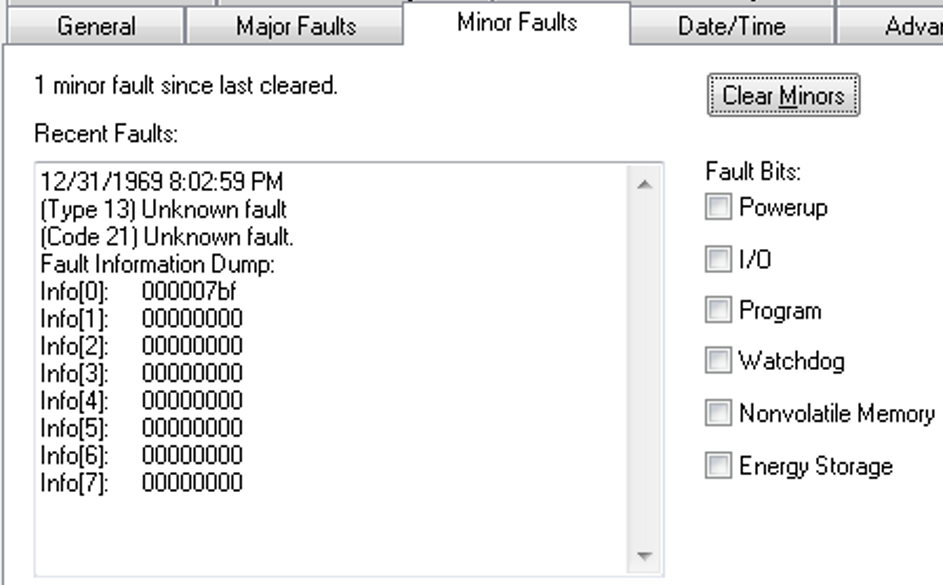
When the fault is logged, the WCT of the controller is set to 1/1/19XX 00:00:00.000, where XX is 81...86. The year corresponds to the Info[0] value for the minor fault.
- GuardLogix® 5580 Controllers, Revision 31.011
- ControlLogix® 5580 Controllers, Revision 31.011
- ControlLogix 5580 Process Controllers, Revision 33.011
- CompactLogix™ 5380 Controllers, Revision 31.011
- CompactLogix 5380 Process Controllers, Revision 33.011
- Compact GuardLogix 5380 SIL 2 Controllers, Revision 31.011
- Compact GuardLogix 5380 SIL 3 Controllers, Revision 32.013
- CompactLogix 5480 Controllers, Revision 32.011
Known Anomaly First Identified in:
- ControlLogix® 5580 Controllers, Revision 32.011
- ControlLogix 5580 Process Controllers, Revision 33.011
- GuardLogix® 5580 Controllers, Revision 32.011
- CompactLogix™ 5380 Motion Controllers, Revision 32.011
- CompactLogix 5380 Process Controllers, Revision 33.011
- Compact GuardLogix 5380 SIL2 Controllers, Revision 32.011
- Compact GuardLogix 5380 SIL3 Controllers, Revision 32.013
Minor fluctuations of the system time offset both on the producer controller and consumer controller side can cause minor velocity spikes, typically less than 1 % on the consumed axes in the remote controller.
This behavior is aesthetic and does not impact functionality.
Known Anomaly First Identified as of Firmware Revision 32.012
Catalog Numbers:
- ControlLogix® 5580 Controllers
- ControlLogix 5580 Process Controllers
- CompactLogix™ 5380 Controllers
- CompactLogix 5380 Process Controllers
- GuardLogix® 5580 Controllers
- Compact GuardLogix 5380 Controllers
- CompactLogix 5480 Controllers
Known Anomaly First Identified as of Firmware Revision 33.011
MCTPO Conflict Causes Incorrect Instruction Outputs (1806725)
|
Controllers
|
First Known in
Firmware Revision
|
Corrected in Firmware
Revision
|
|
CompactLogix™ 5380
|
31.011
|
—
|
|
Compact GuardLogix® 5380 SIL 2
|
31.011
|
—
|
|
Compact GuardLogix 5380 SIL 3
|
32.013
|
—
|
|
CompactLogix 5380 Process
|
33.011
|
—
|
|
CompactLogix 5480
|
32.011
|
—
|
|
ControlLogix® 5580
|
31.011
|
—
|
|
GuardLogix 5580
|
31.011
|
—
|
|
ControlLogix 5580 Process
|
33.011
|
—
|
When you use a Motion Calculate Transform Position with Orientation (MCTPO) instruction in multiple tasks simultaneously, the MCTPO reports an incorrect transform position.
To work around this anomaly, place a User Interrupt Disable (UID) instruction before each MCTPO instruction in each task, then place a User Interrupt Enable (UIE) instruction after each MCTPO operation in each task. If all the MCTPO instructions are used in only one task, no change needs to be made.
Periodic User Tasks Without Any Scheduled Programs Experience Overlaps on The New Primary Controller After Switchover (1723127, 1810033)
|
Controllers
|
First Known in
Firmware Revision
|
Corrected in Firmware
Revision
|
|
ControlLogix® 5580
|
33.011
|
34.015, 35.011 and later
|
|
ControlLogix 5580 Process
|
33.011
|
34.015, 35.011 and later
|
When configured for redundancy, if the application contains a periodic user task without any scheduled programs, then that user task will report task overlaps on the new Primary controller after a switchover.
The task overlaps result in a minor fault being reported.
Periodic User Tasks Can Experience Unexpected Overlaps on The New Primary Controller If Switchover Occurs Soon After Qualification Completes (1723127)
|
Controllers
|
First Known in Firmware
Revision
|
Corrected in Firmware
Revision
|
|
ControlLogix® 5580
|
33.011
|
34.015, 35.011 and later
|
|
ControlLogix 5580 Process
|
33.011
|
34.015, 35.011 and later
|
When configured for redundancy, if a switchover occurs before the period of the periodic user task expires, then the periodic user tasks that are running on the new Primary controller can report overlaps following the switchover.
The task overlaps result in a minor fault being reported.
Sent Bytes Per Second Displays a Larger Incorrect Value (1548181)
|
Controllers and Communication Modules
|
First Known in
Firmware Revision
|
Corrected in Firmware
Revision
|
|
CompactLogix™ 5380
|
28.011
|
35.011 and later
|
|
Compact GuardLogix® 5380 SIL 2
|
31.011
|
35.011 and later
|
|
Compact GuardLogix 5380 SIL 3
|
32.013
|
35.011 and later
|
|
CompactLogix 5380 Process
|
33.011
|
35.011 and later
|
|
CompactLogix 5480
|
32.011
|
35.011 and later
|
|
ControlLogix® 5580
|
28.011
|
35.011 and later
|
|
GuardLogix 5580
|
31.011
|
35.011 and later
|
|
ControlLogix 5580 Process
|
33.011
|
35.011 and later
|
|
1756-EN4TR, 1756-EN4TRK, 1756-EN4TRXT
|
2.01
|
5.001 and later
|
Under HMI/MSG Connected (EtherNet/IP Port) on the device Diagnostic webpages, Sent Bytes Per Second displays a much larger incorrect value, not the actual sent bytes per second.
PlantPAx® Embedded Instruction PVSD - Unlimited Jog Request Stops When Horn Time Expires (1662547, 1795646, 1795647)
|
Controllers
|
First Known in Firmware
Revision
|
Corrected in Firmware
Revision
|
|
ControlLogix® 5580 Process
|
33.011
|
33.017, 34.014, 35.011 and later
|
|
CompactLogix™ 5380 Process
|
33.011
|
33.017, 34.014, 35.011 and later
|
When the Process Variable Speed Drive (PVSD) instruction is configured to enable unlimited jog with a nonzero horn sound time, and the Jog button is pushed and held, then the jog command stops when the horn sound stops. The expected result is for the jog to continue after the horn sound stops.
To work around this anomaly, set the jog timer to a very large number instead of zero.
PlantPAx® Embedded Instruction PMTR - Unlimited Jog Request Stops When Horn Time Expires (1657427, 3397702)
|
Controllers
|
First Known in Firmware
Revision
|
Corrected in Firmware
Revision
|
|
ControlLogix® 5580 Process
|
33.011
|
33.017, 35.011 and later
|
|
CompactLogix™ 5380 Process
|
33.011
|
35.011 and later
|
When the Process Motor (PMTR) instruction is configured to enable unlimited jog with a nonzero horn sound time, and Jog button is pushed and held, then the jog command stops when the horn sound stops.
The expected result is for the jog to continue after the horn sound stops.
To work around this anomaly, set the jog timer to a very large number instead of zero.
PlantPAx® Embedded Instruction PAI - Deviation Alarm Settings Not Checked in Logic (1661684, 3637718)
|
Controllers
|
First Known in Firmware
Revision
|
Corrected in Firmware
Revision
|
|
ControlLogix® 5580 Process
|
33.011
|
33.017, 35.011 and later
|
|
CompactLogix™ 5380 Process
|
33.011
|
33.017, 35.011 and later
|
The Process Analog Input (PAI) instruction logic allows the instruction to process infeasible deviation alarm settings. High deviation limit (Cfg_HiDevLim) can be set negative and low deviation limit (Cfg_LoDevLim) can be set positive, which results in an incorrect calculation.
To work around this anomaly, follow the parameter description and take care writing proper values from the range specified.
PlantPAx® Embedded Instruction PAI - Infeasible Low Deviation Deadband Setting Allowed (1661686, 3559581)
|
Controllers
|
First Known in Firmware
Revision
|
Corrected in Firmware
Revision
|
|
ControlLogix® 5580 Process
|
33.011
|
33.017, 35.011 and later
|
|
CompactLogix™ 5380 Process
|
33.011
|
33.017, 35.011 and later
|
The Process Analog Input (PAI) instruction logic accepts a low deviation deadband (Cfg_LoDevDB) setting, violating the range of feasible values.
To work around this anomaly, set the low deviation deadband parameter to ≥ -Cfg_LoDevLim and ≤ 0.
PlantPAx® Embedded Instruction PAI - Infeasible High Deviation Deadband Setting Allowed (1661688, 3559637)
|
Controllers
|
First Known in Firmware
Revision
|
Corrected in Firmware
Revision
|
|
ControlLogix® 5580 Process
|
33.011
|
33.017, 35.011 and later
|
|
CompactLogix™ 5380 Process
|
33.011
|
33.017, 35.011 and later
|
The Process Analog Input (PAI) instruction logic accepts a high deviation deadband (Cfg_HiDevDB) setting, violating range of feasible values.
To work around this anomaly, set the high deviation deadband parameter to ≥ 0 and ≤ Cfg_HiDevLim.
Concurrent Updates of 1756-RM2 and Communication Modules Causes 1756-RM2 To MNRF/ASSERT (987259)
|
Devices
|
First Known in Firmware
Revision
|
Corrected in Firmware
Revision
|
|
1756-RM2/1756-RM2XT
|
20.030
|
—
|
|
ControlLogix® 5570
redundant controllers
|
34.051
|
—
|
|
ControlLogix 5580
controllers
|
33.011
|
—
|
|
ControlLogix 5580
Process controllers
|
33.011
|
—
|
If you update the 1756-RM2 module to revision 20.030 or later while concurrently updating 1756-ENx communication modules to revision 5.008 or 5.028, the 1756-RM2 firmware update fails. The 1756-RM2 displays "ERAS" and/or "E813 Comm Error".
To work around this issue, do not select the 1756-RM2 module along with 1756-ENx revision 5.0xx modules for concurrent updates.
If you do experience a 1756-RM2 firmware update failure:
- Power cycle the 1756-RM2 to clear the fault (E813).
- After other concurrent updates are completed, relaunch ControlFLASH Plus® and update the 1756-RM2 module.
See the Knowledgebase Technote Concurrent flashing of 1756-RM2 and Communication modules causes 1756-RM2 to fail.
PortPhysicalAddressInfo GSV Does Not Populate After Controller Power Cycle (1451494, 1514584)
|
Controllers
|
First Known in
Firmware Revision
|
Corrected in Firmware
Revision
|
|
CompactLogix® 5380
|
28.011
|
34.015, 35.011 and later
|
|
Compact GuardLogix® 5380 SIL 2
|
31.011
|
34.015, 35.011 and later
|
|
Compact GuardLogix 5380 SIL 3
|
32.013
|
34.015, 35.011 and later
|
|
CompactLogix 5380 Process
|
33.011
|
34.015, 35.011 and later
|
|
CompactLogix 5480
|
32.011
|
34.015, 35.011 and later
|
|
ControlLogix® 5580
|
28.011
|
34.015, 35.011 and later
|
|
GuardLogix 5580
|
31.011
|
34.015, 35.011 and later
|
|
ControlLogix 5580 Process
|
33.011
|
34.015, 35.011 and later
|
When a Get System Value (GSV) instruction configured for Class Name: TimeSynchronize and Attribute Name: PortPhysicalAddressInfo executes after a controller power cycle, the physical address (MAC ID) does not populate.
Controller Can MNRF When Executing CPS Instruction with Specific Data Types (1800992, 2129625, 2129629)
|
Controllers
|
First Known in Firmware Revision
|
Corrected in Firmware Revision
|
|
CompactLogix™ 5380
|
28.011
|
33.017, 34.014, 35.011 and later
|
|
Compact GuardLogix® 5380 SIL 2
|
31.011
|
33.017, 34.014, 35.011 and later
|
|
Compact GuardLogix 5380 SIL 3
|
32.013
|
33.017, 34.014, 35.011 and later
|
|
CompactLogix 5380 Process
|
33.011
|
33.017, 34.014, 35.011 and later
|
|
CompactLogix 5480
|
32.011
|
33.017, 34.014, 35.011 and later
|
|
ControlLogix® 5580
|
28.011
|
33.017, 34.014, 35.011 and later
|
|
GuardLogix 5580
|
31.011
|
33.017, 34.014, 35.011 and later
|
|
ControlLogix 5580 Process
|
33.011
|
33.017, 34.014, 35.011 and later
|
When executing a Synchronous Copy File (CPS) instruction with a motion diagnostics connection as the source or destination tag, the controller can experience a major nonrecoverable fault (MNRF).
To work around this anomaly, do not use motion diagnostics connections (such as AB:Motion_Diagnostics:S:1) as arguments to the CPS instruction. If a copy is still necessary, use a non-synchronous copy via the COP instruction.
PlantPAx® Embedded Instruction PAIM – Does not pass through all SrcQ values from Inp_SrcQ (1384787, 1672172, 1664909)
|
Controllers
|
First Known in Firmware
Revision
|
Corrected in Firmware
Revision
|
|
ControlLogix® 5580 Process
|
33.011
|
33.015, 34.014, 35.011 and later
|
|
CompactLogix™ 5380 Process
|
33.011
|
33.015, 34.014, 35.011 and later
|
The Process Multi Sensor Analog Input (PAIM) instruction is only able to pass values of 0, 1, 32, or 35 to the SrcQ Output Parameter from the Inp_SrcQ Input Parameter. All remaining supported values of the SrcQ Output Parameter are not passed through correctly.
Controller Can MNRF During Online Edit (2123008, 2306717, 3741373)
|
Controllers
|
First Known in Firmware Revision
|
Corrected in Firmware Revision
|
|
CompactLogix® 5380
|
33.011
|
34.015, 35.014, 36.011 and later
|
|
Compact GuardLogix® 5380 SIL 2
|
33.011
|
34.015, 35.014, 36.011 and later
|
|
Compact GuardLogix 5380 SIL 3
|
33.011
|
34.015, 35.014, 36.011 and later
|
|
CompactLogix 5380 Process
|
33.011
|
34.015, 35.014, 36.011 and later
|
|
CompactLogix 5480
|
33.011
|
34.015, 35.014, 36.011 and later
|
|
ControlLogix® 5580
|
33.011
|
34.015, 35.014, 36.011 and later
|
|
GuardLogix 5580
|
33.011
|
34.015, 35.014, 36.011 and later
|
|
ControlLogix 5580 Process
|
33.011
|
34.015, 35.014, 36.011 and later
|
Controller Can Become Unresponsive When You Inhibit or Uninhibit a Module (3080005)
|
Controllers
|
First Known in Firmware Revision
|
Corrected in Firmware Revision
|
|
CompactLogix™ 5380
|
33.011
|
36.011 and later
|
|
Compact GuardLogix® 5380 SIL 2
|
33.011
|
36.011 and later
|
|
Compact GuardLogix 5380 SIL 3
|
33.011
|
36.011 and later
|
|
CompactLogix 5380 Process
|
33.011
|
36.011 and later
|
|
CompactLogix 5480
|
33.011
|
36.011 and later
|
|
ControlLogix® 5580
|
33.011
|
36.011 and later
|
|
GuardLogix 5580
|
33.011
|
36.011 and later
|
|
ControlLogix 5580 Process
|
33.011
|
36.011 and later
|
|
Anomaly
|
First Known in
Firmware Revision
|
Corrected in Firmware Revision
|
| When limit switches are used for feedback instead of an
analog position feedback, the indication on the dialog box
and HMI was not accurate to the position of the valve.
(2185730, 2296172, 2296183, 2296204)
|
33.011
|
33.017, 34.014, 35.013, 36.011
and later
|
| The deviation alarm (Sts_Dev) incorrectly alarms when
the instruction was “Out of Service” (Sts_OoS).
(2185779, 2297867, 2297871, 3064567)
|
33.011
|
33.017, 34.014, 35.013, 36.011
and later
|
| Cfg_CVIntlk incorrectly limits the value between
Cfg_CVEUMin and Cfg_CVEUMax.
(2185788, 2297912, 2297916, 2297921)
|
33.011
|
33.017, 34.014, 35.013, 36.011
and later
|
|
Controllers
|
First Known in
Firmware Revision
|
Corrected in Firmware Revision
|
|
CompactLogix™ 5380
|
30.011
|
33.017(1), 34.015(2), 35.014(3), 36.011 and later
|
|
Compact GuardLogix® 5380
SIL 2
|
31.011
|
33.017(1), 34.015(2), 35.014(3), 36.011 and later
|
|
Compact GuardLogix 5380 SIL
3
|
32.013
|
33.017(1), 34.015(2), 35.014(3), 36.011 and later
|
|
CompactLogix 5380 Process
|
33.011
|
33.017(1), 34.015(2), 35.014(3), 36.011 and later
|
|
CompactLogix 5480
|
32.012
|
33.017(1), 34.015(2), 35.014(3), 36.011 and later
|
|
ControlLogix® 5580
|
30.011
|
33.017(1), 34.015(2), 35.014(3), 36.011 and later
|
|
GuardLogix 5580
|
31.011
|
33.017(1), 34.015(2), 35.014(3), 36.011 and later
|
|
ControlLogix 5580 Process
|
33.011
|
33.017(1), 34.015(2), 35.014(3), 36.011 and later
|
- Upgrade the controller’s firmware.
- Install the latest release of software associated with the major revision of firmware.
- Open the project file and perform a compact and delete of cache.
- Go to File → Compact
- When the Compact Project File dialog appears, make sure the Delete cached build data checkbox is checked.
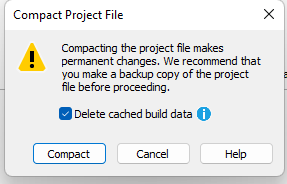
- Download the project to the controller.
|
Controllers
|
First Known in Firmware
Revision
|
Corrected in Firmware Revision
|
|
CompactLogix® 5370
|
20.011
|
37.011 and later
|
|
Compact GuardLogix® 5370
|
28.011
|
37.011 and later
|
|
ControlLogix® 5570
|
20.011
|
37.011 and later
|
|
GuardLogix 5570
|
20.011
|
37.011 and later
|
|
CompactLogix 5380
|
29.011
|
34.015, 35.014, 36.013, 37.011 and
later
|
|
Compact GuardLogix 5380 SIL 2
|
31.011
|
34.015, 35.014, 36.013, 37.011 and
later
|
|
Compact GuardLogix 5380 SIL 3
|
32.013
|
34.015, 35.014, 36.013, 37.011 and
later
|
|
CompactLogix 5380 Process
|
33.011
|
34.015, 35.014, 36.013, 37.011 and
later
|
|
CompactLogix 5480
|
32.011
|
34.015, 35.014, 36.013, 37.011 and
later
|
|
ControlLogix 5580
|
28.011
|
34.015, 35.014, 36.013, 37.011 and
later
|
|
GuardLogix 5580
|
31.011
|
34.015, 35.014, 36.013, 37.011 and
later
|
|
ControlLogix 5580 Process
|
33.011
|
34.015, 35.014, 36.013, 37.011 and
later
|
Functional Changes
This release has the following functional changes from the previous release.
Consumer Axis State Shows Configuring/Synchronizing When A PTP Loss Fault Occurs on Producer Axis (36092)
|
Controllers
|
Functional Change in
Firmware Revision
|
Corrected in Firmware Revision
|
|
CompactLogix™ 5380
|
34.011
|
—
|
|
Compact GuardLogix® 5380 SIL 2
|
34.011
|
—
|
|
Compact GuardLogix 5380 SIL 3
|
34.011
|
—
|
|
CompactLogix 5380 Process
|
34.011
|
—
|
|
CompactLogix 5480
|
34.011
|
—
|
|
ControlLogix® 5580
|
34.011
|
—
|
|
GuardLogix 5580
|
34.011
|
—
|
|
ControlLogix 5580 Process
|
34.011
|
—
|
With firmware revision 34.011 or later, when PTP Loss fault occurs on a Producer Axis, the Consumer Axis State now shows Configuring/Synchronizing. With firmware revision V33.011, the Consumer Axis State would be Faulted when a PTP Loss Fault occurred on the Producer Axis.
Application Notes
This release has the following application notes.
New Firmware Updates Can Impact the Performance of Message Rate Capacity HMI/MSG (Class 3) Data
Each new major revision of the controller/communication module firmware provides additional features and functionality, but this consumes additional processing power from the module even if the features are not utilized. This manifests as degrading HMI/messaging performance for the respective module.
Despite this degradation, the specifications defined for the respective modules have been maintained:
|
Module
|
Message Rate Across the Embedded Ethernet Port
|
|
ControlLogix® 5580
CompactLogix® 5380 |
2000 MSG/sec
|
|
GuardLogix® 5580 controllers in a SIL3 configuration
Compact GuardLogix 5380 SIL3 controllers |
1000 MSG/sec
|
|
1756-EN4TR Ethernet modules
|
3700 MSGs/sec
|
To improve the messaging capacity, it is recommended to employ the following:
- For high-frequency messaging, utilize connected cached messages
- Utilize message reads as opposed to message writes; they’re more efficient
- For ControlLogix 5580 controllers, route HMI/messages through communication modules in the chassis as
opposed to going directly to the embedded port of the controller
- Offloading some of the processing to the communications module results in greater messaging capacity than using the front port alone
- This recommendation does not apply to I/O or produce/consume data, it is more efficient and there is more capacity for that data to route through the embedded port of the controller
- Upgrade to a 5590 controller
- The HMI/messaging messaging capacity is doubled through the embedded ethernet port
For more information, see these publications:
- ControlLogix and GuardLogix Controller Specifications Technical Data, publication 1756-TD001
- CompactLogix 5380, Compact GuardLogix 5380, and CompactLogix 5480 Controllers Specifications Technical Data, publication 5069-TD002
- 1756 ControlLogix Communication Modules Specifications Technical Data, publication 1756-TD003
PXRQ Instruction Can Cause a Controller MNRF/Assert
|
Controllers
|
First Known in Firmware
Revision
|
|
CompactLogix™ 5380
|
31.011
|
|
Compact GuardLogix® 5380 SIL
2
|
31.011
|
|
Compact GuardLogix 5380 SIL 3
|
32.013
|
|
CompactLogix 5380 Process
|
33.011
|
|
CompactLogix 5480
|
32.011
|
|
ControlLogix® 5580
|
31.011
|
|
GuardLogix 5580
|
31.011
|
|
ControlLogix 5580 Process
|
33.011
|
Writing to the Equipment Phase External Request (PXRQ) instruction control\backing tag needs to be conditioned with a set .PC bit of the control\backing tag or the controller can MNRF/assert.
Copyright © 2026 Rockwell Automation, Inc. All rights reserved.
Rockwell Automation, Allen-Bradley, and FactoryTalk are trademarks of Rockwell Automation, Inc.
To view a complete list of Rockwell Automation trademarks please click here.
Trademarks not belonging to Rockwell Automation are property of their respective companies.