
Release Notes
20G - Firmware versions and revisions can be found in the Versions tab above
Version 14.005 Signed (released 2/2021)
Catalog Number PowerFlex 755 (series A)
Requirements
This release has the following requirements.
EtherNet/IP Port and 20-750-ENETR Require Quality of Service (QoS)
System Requirements Identified as of PowerFlex 755 Drive Firmware Revision 9.001
System Requirements Identified as of PowerFlex 753 Drive Firmware Revision 9.001
With this firmware revision, the EtherNet/IP port and 20-750-ENETR require the EtherNet/IP scanner to use a compatible method of specifying Quality of Service (QoS). The following table details the compatible products and firmware revisions.
|
Product
|
Compatible Rev. No.
|
|
DriveLogix 5730 Embedded
Ethernet Port
|
Rev. 3.1.4
|
|
CompactLogix (1769-L2x/L3x)
|
Rev. 17.03
|
|
ControlLogix (1756-ENBT)
|
Rev. 4.005
|
|
CompactLogix (1768-ENBT)
|
Rev. 2.001
|
|
FlexLogix (1788-ENBT)
|
Rev. 2.004
|
|
ControlLogix 1756-EN2T (F)(XT)
|
No Update needed
|
|
SoftLogix I/O Messaging
|
No Update needed
|
System Requirements Identified as of PowerFlex 755 Drive Firmware Revision 3.004
The new Auto/Manual HIM Preload feature requires firmware in the HIM that is newer than 1.007.
System Requirements Identified as of PowerFlex 755 Drive Firmware Revision 3.004
System Requirements Identified as of PowerFlex 753 Drive Firmware Revision 5.001
The Customer Configurable Response to HIM Communications Loss feature requires a new enhanced style HIM (20-HIM-A6, 20-HIM-C6S). This feature will not work with older contemporary 7-Class HIM’ s (20-HIM-A3, 20-HIM-A5, 20-HIM-C3S, 20-HIM-C5S).
System Requirement Identified as of PowerFlex 755 Drives Firmware Revision 8.001
System Requirement Identified as of PowerFlex 753 Drives Firmware Revision 9.001
Drive Firmware, Series, and Frame Size Compatibility Requirements
System Requirement Identified as of PowerFlex 755 Drive Firmware Revision 3.004
The following table identifies firmware revisions and the PowerFlex 755 drive series and frame sizes with which they are compatible:
|
Firmware
Revision
|
Compatible with Drive
Series
|
Compatible with Drive Frame
Size
|
|
2.xxx
|
A
|
2…8
|
|
3.xxx…5.xxx
|
A
|
2…7
|
|
B
|
8 and 9
| |
|
6.xxx…7.xxx
|
A
|
1…7
|
|
B
|
8 and 9
| |
|
8.xxx and
Later
|
A
|
1…7
|
|
B
|
8…10
|
1756-L85E Controller is Compatible with PowerFlex Firmware Revision 12.001 or Later
System Requirement Identified as of PowerFlex 755 Drives Firmware Revision 12.001
The 1756-L85E controller will only work with PowerFlex 755 drives firmware revision 12.001 or later due to the 2-cycle timing update.
Corrected Anomalies in This Release
This release corrects the following anomalies.
20-750-S4 Safety Option Module Allows Reset to Defaults
CORRECTED Anomaly with PowerFlex 755 Firmware Revision 14.005
CIP Motion Implementation Does Not Reset Service Data Transaction ID
CORRECTED Anomaly with PowerFlex 755 Firmware Revision 14.005
Unconnected CIP Axis State When Using PowerFlex 755-EENET-CM-Sx Motion
CORRECTED Anomaly with PowerFlex 755 Firmware Revision 14.005
Known Anomaly First Identified as of PowerFlex 755 Firmware Revision 14.004
Known Anomalies from Previous Releases
These anomalies are from previous releases but are still known in this release.
Universal Feedback Board Module Does Not Annunciate Fault
Known Anomaly First Identified as of:
- PowerFlex 755 Drive Firmware Revision 12.001
- PowerFlex 753 Drive Firmware Revision 12.001
When the UFB is configured to use the SSI Full Digital Feedback Device, the UFB does not annunciate a fault when the SSI Full Digital is the signal is lost. For full details on possible workarounds to this anomaly, see Technical Support Knowledgebase Article #463171. To determine if this notice affects you and for additional information, please refer to Knowledgebase Document Number #745654.
Known Anomaly First Identified as of PowerFlex 755 Drives Firmware Revision 3.004
Known Anomaly First Identified as of PowerFlex 753 Drives Firmware Revision 5.001
The HIM startup on the PowerFlex 755 drive includes a feedback device selection step. Depending on the option modules installed, that step may first ask the user to choose a port, then a parameter. In some situations, the list of ports incorrectly shows multiple copies of 'Port 0 - PowerFlex 755' followed by the feedback port/module.
The incorrect behavior happens only under the following conditions:
- It is the first time that startup feedback selection has been run since flashing the drive.
- The feedback module is a dual encoder or UFB and no other option modules are installed.
- A reset to defaults of the drive NVS parameters has not been performed since the drive was last flashed.
When the incorrect port list appears, it is still possible to successfully select the feedback module port by following one of these methods.
- Scroll past the multiple copies of Port 0 to reach the desired feedback module.
- Press the Esc soft key to back up one screen, then select Feedback and press the Enter soft key to display the port selection screen a second time. This time the correct list will be shown.
Known Anomaly First Identified as of PowerFlex 755 Drives Firmware Revision 8.001
Known Anomaly First Identified as of PowerFlex 753 Drives Firmware Revision 8.001
In an application with the use of a PowerFlex 755 or PowerFlex 753 along with the 20-750-ENETR dual port Ethernet/IP module, a persistent stop command may appear in some cases. The action of disconnecting the Ethernet cable from the 20-750-ENETR module, which will result in the drive stopping, may follow with a nuisance fault action. This fault action previously noted is persistent communication of stop commands.
Known Anomaly First Identified as of PowerFlex 755 Drives Firmware Revision 8.001
Known Anomaly First Identified as of PowerFlex 753 Drives Firmware Revision 8.001
In an application with the use of a PowerFlex 755 or PowerFlex 753 along with the 20-750-ENETR dual port Ethernet/IP module, in which a user attempts to save all parameters using DriveExplorer® in some causes the save execution does not complete. When attempting to execute the save all parameters in DriveExplorer the software tool enters an infinite loop and does not progress through the save in some instances. To exit the loop, press the cancel button and check if the text file has been saved.
Known Anomaly First as of PowerFlex 755 Drive Firmware Revision 2.011
The protection algorithms in frame 8 drives create false 168 “PWM Freq Reduced” exception events when running at zero speed. These can occur when the drive is first energizing the motor and establishing motor flux.
Known Anomaly First Identified as of PowerFlex 755 Drive Firmware Revision 2.011
Known Anomaly First Identified as of PowerFlex 753 Drive Firmware Revision 7.001
You cannot change the level of current used during the direction test on a permanent magnet motor while in Integrated Motion on EtherNet/IP (CIP Motion) mode. It is set at 10%. If the system requires more than 10% to turn the motor, it will fail to perform the test.
Known Anomaly First Identified as of PowerFlex 755 Drive Firmware Revision 3.004
Known Anomaly First Identified as of PowerFlex 753 Drive Firmware Revision 5.001
The following internal diagnostic items may contain incorrect data after upgrading a PowerFlex 755 from revision 1 to revision 6 firmware: 2 [PBLT Pwrup Time], 3 [PBLT GatesOnTime], 4 [PBLT Mtr MW Hrs], 5 [PBLT Rgn MW Hrs] and 67 [PwrBd Pwr Cycles].
The following parameters may contain incorrect data after upgrading a PowerFlex 755 from revision 1 to revision 6 firmware: 13[Elapsed MWH], 14 [Elapsed kWH], 15 [Elapsed Run Time], 16 [Elpsd Mtr MWHrs], 17 [Elpsd Rgn MWHrs], 18 [Elpsd Mtr kWHrs], 19 [Elpsd Rgn kWHrs], 490 [HSFan ElpsdLife], 497 [InFan ElpsdLife], 503 [MtrBrngElpsdLife], 508 [MtrLubeElpsdHrs], 512 [MchBrngElpsdLife] and 517 [MchLubeElpsdHrs].
These values will affect the associated calculated “ remaining life ” parameter values and predictive maintenance events.
Known Anomaly First Identified As of PowerFlex 755 Drive Firmware Revision 3.004
This anomaly affected customers using Integrated Motion on EtherNet/IP (CIP Motion). If you attempted to use Drive NV when configuring the motor on a motion axis with a PowerFlex 755, the drive would not return the appropriate error. This feature is not currently supported in the PowerFlex 755.
Known Anomaly First Identified as of PowerFlex 755 Drive Firmware Revision 8.001
The drive may throw an F927 fault when an axis is inhibited. If this occurs, the drive will shut down allowing the motor to coast. The status LED will blink 27 times, pause, then repeat. If this occurs, cycle power to the drive to clear the fault.
Known Anomaly First Identified as of PowerFlex 755 Drive Firmware Revision 6.004
Known Anomaly First Identified as of PowerFlex 753 Drive Firmware Revision 6.004
When running in Flux Vector open loop mode for induction motor or Interior Permanent Magnet (IPM) motor mode, the drive may experience an F918 exception event when the motor accelerates through a 7 Hz operating frequency due to the simultaneous transition from a 2 to 4 KHz carrier frequency. This exception can be avoided by setting parameter 40 [Mtr Options Cfg] bit 9 – PWM FreqLock], which will keep the carrier frequency at 4 KHz.
Application Notes
This release has the following application notes.
Application Notes
Use the Drive LCD HIM
- Access the Status screen, which is displayed on HIM power up.
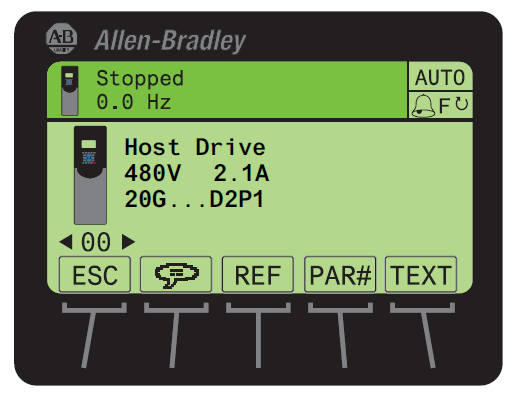
- Use the
 or
or  key to scroll to Port 00 for the Host Drive.
 - Press the
 key to display its last-viewed folder.
 - Use the
 or
or  key to scroll to the DIAGNOSTIC folder.
 - Use the
 or
or  key to select Device Version.
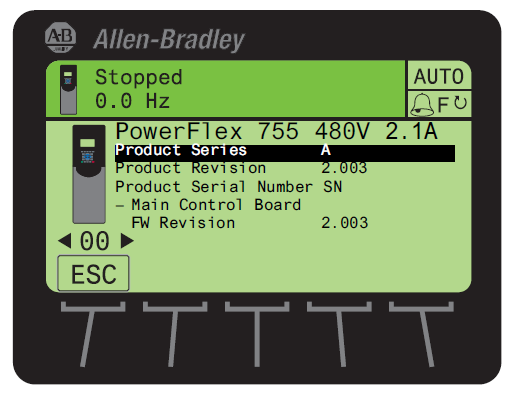
 - Press the
 (Enter) key to display device version information.
FW Revision is listed under – Main Control Board.
Use DriveExplorer Lite/Full
Important: You need DriveExplorer version 6.01 or later to interface with the PowerFlex 755 drive. To obtain the latest version, visit the Allen-Bradley Web Updates site located at http://www.ab.com/support/abdrives/webupdate
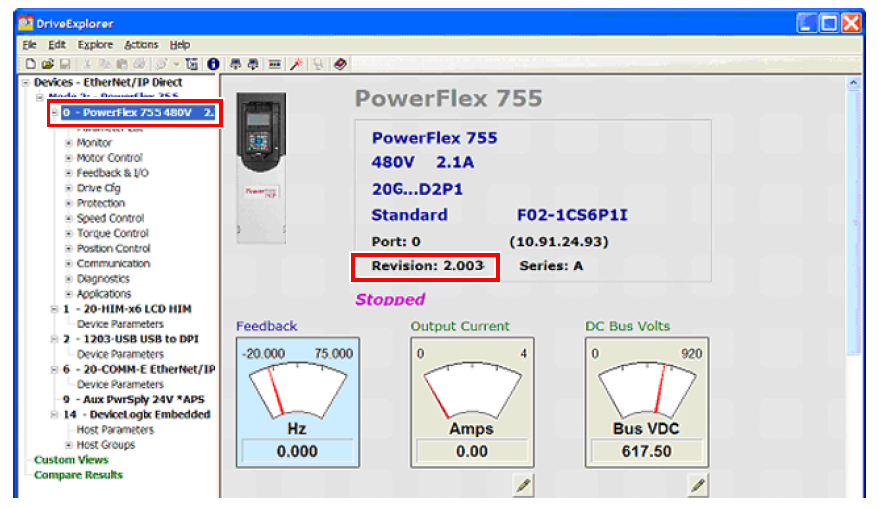
- Launch DriveExplorer and go online with the PowerFlex 755 drive. To connect to the drive, use a 1203-USB converter, a 1203-SSS converter, or an EtherNet/IP network connection.
- In the Devices hardware view, select the PowerFlex 755 drive.
Once selected, information regarding the PowerFlex 755 drive is shown in the right panel including the current firmware revision number.
Use DriveExecutive
Important: You need DriveExecutive version 5.01 or later to interface with the PowerFlex 755 drive. To obtain the latest version, visit the Allen- Bradley Web Updates site located at http://www.ab.com/support/abdrives/webupdate
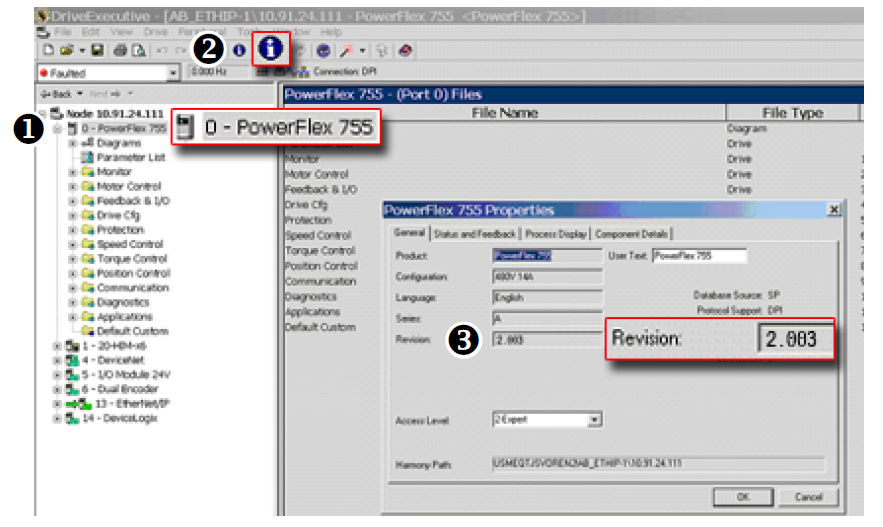
- Launch DriveExecutive and go online with the PowerFlex 755 drive. To connect to the drive, use a 1203-USB converter, a 1203-SSS converter, or an EtherNet/IP network connection.
- In the Drives hardware view, select the PowerFlex 755 drive (
 ).
). - Click the information icon (
 ) to display the drive’
s Properties dialog box.
) to display the drive’
s Properties dialog box.
In the Properties dialog box the “
Revision:”
field ( ) will show the drive
’s
current firmware revision number.
) will show the drive
’s
current firmware revision number.
Product Updates and Replacements
PowerFlex® 755 firmware revision 14.004 or later is installed by using a *.dmk file. Firmware updates for PowerFlex 755 drives can be performed using the following software:
|
Software
|
Version
|
Additional Software
|
Communication Adapters
|
|
ControlFLASH
Plus™
|
3.01.00
|
The following software
must be installed before
running ControlFLASH
Plus:
ControlFLASH Plus
version 2.00.00 or later
includes the installation
package for FactoryTalk
Linx.
|
One of the following
communication devices must
be used:
|
|
ControlFLASH™
|
15.03.00
|
One of the following
software packages must
be installed before
running ControlFLASH:
|
One of the following
communication devices must
be used:
|
Before You Begin a Firmware Update
If necessary, download and install the preferred software from the Product Compatibility and Download Center.
- ControlFLASH Firmware Upgrade Kit User Manual, publication 1756-UM105
- ControlFLASH Plus Quick Start Guide, publication CFP-QS001
For information on connecting the 1203-USB or 1203-SSS converter to your drive, see these publications:
- 1203-USB USB Converter User Manual, publication DRIVES-UM001
- 1203-SSS Smart Self-powered Serial Converter User Manual, publication 20COMM-UM001
Use ControlFLASH Plus to Update the Firmware
See “Use ControlFLASH Plus to update firmware” in the ControlFLASH Plus Quick Start Guide, publication CFP-QS001
Use ControlFLASH to Update the Firmware
Follow these steps to update your PowerFlex 755 drive firmware.
- Download the applicable firmware revision from the Product Compatibility and Download Center.
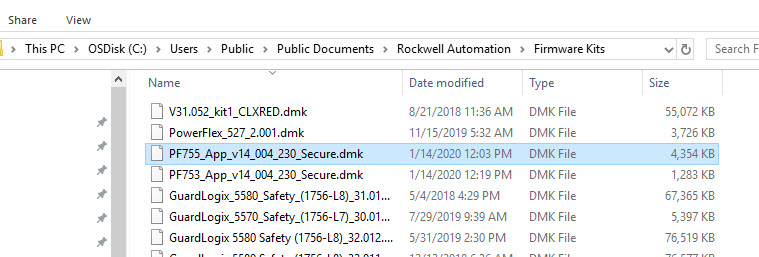
- Place the *.dmk file in one of the following directories on your computer:
- C:\Program Files (x86)\ControlFLASH
- C:\Users\Public\Documents\Rockwell Automation\Firmware Kit
- C:\Users\USER NAME\Downloads\RA
- C:\Users\USER NAME\Desktop\cfkits
Note: In this example, the file name is PF755_App_v14_004_230_Secure.dmk.
- Verify that the drive is stopped and not communicating with a controller, by inhibiting the drive in the software.
- Open ControlFLASH on your computer.
- In the Welcome dialog box, choose RSLinx Classic or FactoryTalk Linx. RSLinx Classic is used in this example.
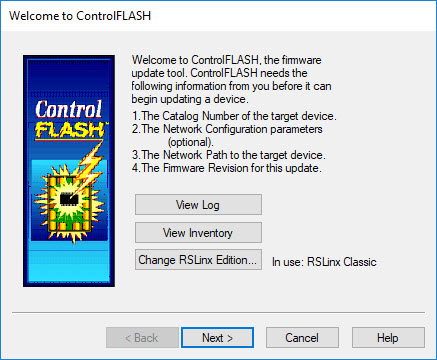
- Click Next.
- In the Catalog Number dialog box, select the appropriate drive family.
Important: Choose the appropriate “PowerFlex 755 xx” catalog number selection for your application. Do not choose an option that includes the “via…” option.
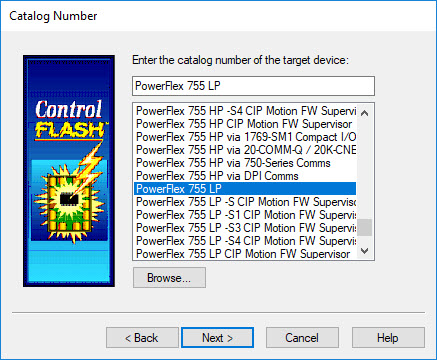
- Click Next.
- In the RSWho browser dialog box, select your drive.
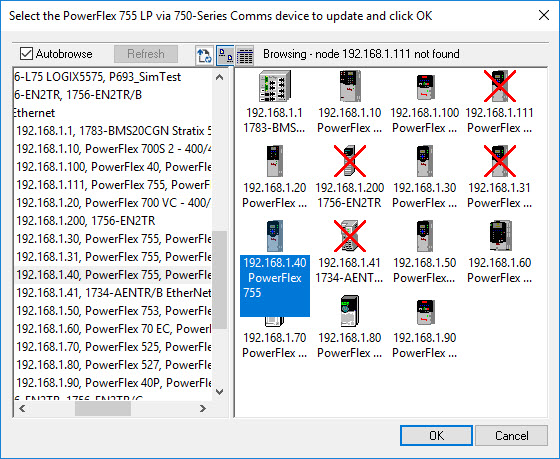
- Click OK.
- In the Multiple Assemblies Found dialog box, select Port 0 – PowerFlex 755.
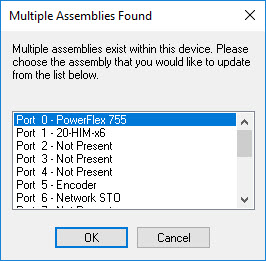
- Click OK.
- In the Firmware Revision dialog box, click Show all revisions.
- Below Revision, select the applicable firmware revision.
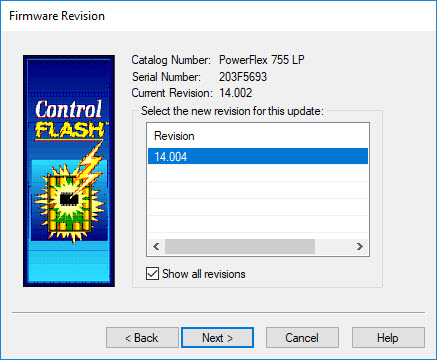
- Click Next.
- In the Summary dialog box, click Finish.
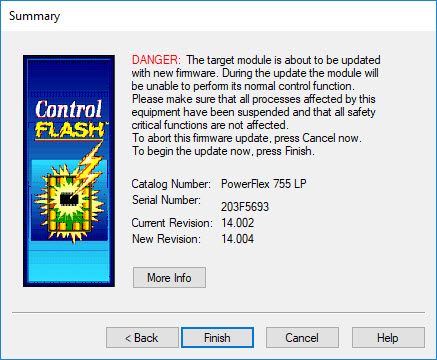
- In the ControlFLASH message box, click Yes.
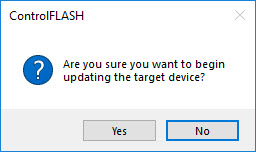
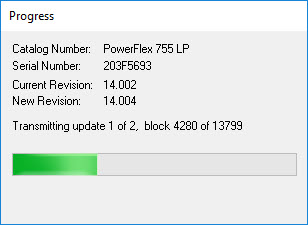
- The firmware update begins and a Progress dialog box appears.
- When the firmware update is complete, the Update Status dialog box appears.
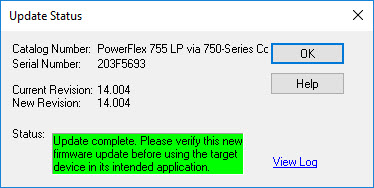
- Click OK.
- Exit ControlFLASH.
The drive firmware update has been completed.
Copyright © 2026 Rockwell Automation, Inc. All rights reserved.
Rockwell Automation, Allen-Bradley, and FactoryTalk are trademarks of Rockwell Automation, Inc.
To view a complete list of Rockwell Automation trademarks please click here.
Trademarks not belonging to Rockwell Automation are property of their respective companies.