
Release Notes
1734 POINT I/O EtherNet/ IP Adapters
Version 5.018 (released 8/2020)
Catalog Number 1734-AENTR (series B)
Features
This release includes the following system features.
Enable and disable web server in AOP
Feature First Identified as of Series B Firmware Revision 5.018
Feature First Identified as of Series C Firmware Revision 6.013
Catalog Numbers:
- 1734-AENT series B and series C
- 1734-AENTR series B and series C
- 1738-AENT series B
- 1738-AENTR series B
The web server feature for POINT I/O™ and ArmorPOINT® I/O EtherNet/IP™ adapters can be enabled or disabled in AOP version 7.01.01 or later.
Corrected Anomalies in This Release
This release corrects the following anomalies.
Web server anomalies
Corrected Anomaly with Series B Firmware Revision 5.018
Corrected Anomaly with Series C Firmware Revision 6.013
Known Anomaly First Identified as of Series B Firmware Revision 5.015
Known Anomaly First Identified as of Series C Firmware Revision 6.011
Catalog Numbers:
- 1734-AENT series B and series C
- 1734-AENTR series B and series C
- 1738-AENT series B
- 1738-AENTR series B
The following web server anomalies can occur due to improper validation and authentication:
- Malicious code can be executed in the web browser due to cross-site scripting.
- Local files can be exposed on the web server due to local file inclusion.
- Login password and web form fields can be changed without logging in to the web server due to unauthenticated configuration.
POINTBus indicator blinks red after cable break
Corrected Anomaly with Series B Firmware Revision 5.018
Corrected Anomaly with Series C Firmware Revision 6.013
Known Anomaly First Identified as of Series B Firmware Revision 5.016
Known Anomaly First Identified as of Series C Firmware Revision 6.011
Catalog Numbers:
- 1734-AENT series B and series C
- 1734-AENTR series B and series C
- 1738-AENT series B
- 1738-AENTR series B
The POINTBus™ indicator blinks red continuously after a safety application is downloaded to the Logix controller. The rack consists of an adapter and a combination of standard and safety modules. No errors are communicated to the controller from the adapter when this scenario occurs. The setup works as expected.
IP address conflict is not detected during ARP Probe
Corrected Anomaly with Series B Firmware Revision 5.018
Corrected Anomaly with Series C Firmware Revision 6.013
Known Anomaly First Identified as of Series B Firmware Revision 5.017
Known Anomaly First Identified as of Series B Firmware Revision 6.012
Catalog Numbers:
- 1734-AENT series B and series C
- 1734-AENTR series B and series C
- 1738-AENT series B
- 1738-AENTR series B
An IP address conflict is not detected when an ARP Probe is performed to validate an IP address on the network.
ControlFLASH update indicates failed when adapter is selected from backplane
Corrected Anomaly with Series B Firmware Revision 5.018
Known Anomaly First Identified as of Series B Firmware Revision 5.014
Catalog Numbers:
- 1734-AENT series B
- 1734-AENTR series B
- 1738-AENT series B
- 1738-AENTR series B
When ControlFLASH™ is used to update the adapter firmware and the adapter is selected from the backplane, a failure message occurs even though the firmware is updated properly.
Functional Changes
This release has the following functional changes from the previous release.
Web page validation and constraints
Functional Changes First Identified as of Series B Firmware Revision 5.018
Functional Changes First Identified as of Series B Firmware Revision 6.013
Catalog Numbers:
- 1734-AENT series B and series C
- 1734-AENTR series B and series C
- 1738-AENT series B
- 1738-AENTR series B
The following table lists the constraints when validating the form fields in each web page.
|
Web Page
|
Form Field
|
Constraints
|
|
Identity.html
|
Module Description
|
|
|
Module Location
| ||
|
Chassis Size
|
| |
|
NetConfig.html
|
Domain Name
|
|
|
IP Address, Subnet,
Gateway, Primary, Secondary
|
|
Application Notes
This release has the following application notes.
Update adapter firmware with ControlFLASH
Application Notes First Identified as of Series B Firmware Revision 5.018
Application Notes First Identified as of Series C Firmware Revision 6.013
Catalog Number:
- 1734-AENT series B and series C
- 1734-AENTR series B and series C
- 1738-AENT series B
- 1738-AENTR series B
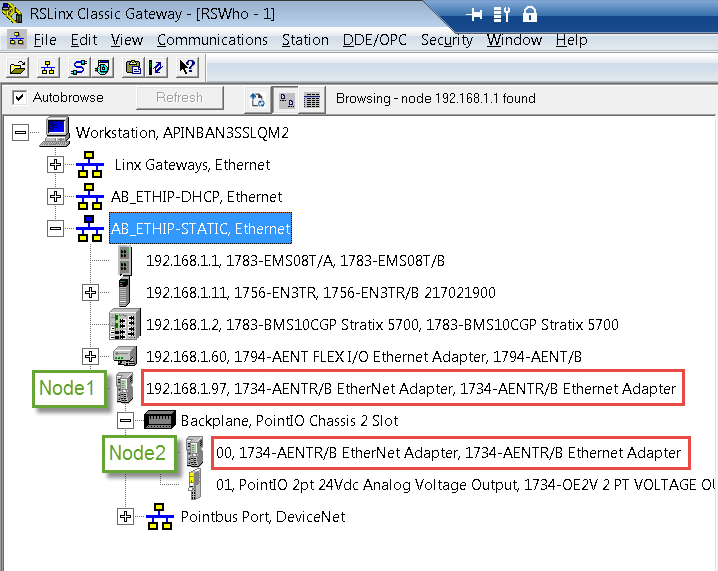
When ControlFLASH™ is used to update the adapter firmware, select the adapter from Node 1 as shown in the following example. If you select the adapter from Node 2, the firmware update fails and results in improper functioning of the web server feature.
ControlFLASH example
ControlFLASH software required:
- ControlFLASH Plus™ software version 3.01.00 or later
- ControlFLASH software version 15.03.00 or later
Copyright © 2025 Rockwell Automation, Inc. All rights reserved.
Rockwell Automation, Allen-Bradley, and FactoryTalk are trademarks of Rockwell Automation, Inc.
To view a complete list of Rockwell Automation trademarks please click here.
Trademarks not belonging to Rockwell Automation are property of their respective companies.