
Release Notes
25C... More information: PowerFlex® 527 Site
Version 2.001 (released 7/2019)
Catalog Number PowerFlex 527
Features
This release includes the following system features.
Added Flying Start function (Lgx00174796)
System Feature First Identified as of PowerFlex 527 Drives Firmware Revision 2.001
Catalog Number: 25C
A Flying Start function is added to PowerFlex® 527 drives and can be programmed using the following attributes:
|
Attribute
|
Parameter
|
|
380
|
Flying Start Enable Only
|
|
3050
|
Flying Start Freq Sweep Time
|
|
3501
|
Flying Start Reconnect Delay
|
|
3052
|
Flying Start VHz End Pt
|
|
3053
|
Flying Start VHz Fixed
|
|
3054
|
Flying Start Init Volt Kp
|
|
3055
|
Flying Start Init Volt Ki
|
|
3056
|
Flying Start Recover Ki
|
|
3057
|
Flying Start VReg Kp
|
|
3058
|
Flying Start VReg Ki
|
|
3059
|
Flying Start Speed Detect Lvl
|
|
3060
|
Flying Start Speed Detect Time
|
|
3061
|
Flying Start DC Brake Level
|
|
3062
|
Flying Start DC Brake Time
|
|
3063
|
Flying Start Zero Speed Threshold
|
Added unassigned output behavior control (Lgx00176942)
System Feature First Identified as of PowerFlex 527 Drives Firmware Revision 2.001
Catalog Number: 25C
Two attributes are added to PowerFlex® 527 drives to program the behavior of unassigned outputs.
|
Attribute
|
Parameter
|
|
3100
|
Unassigned Output Idle Behavior
|
|
3101
|
Unassigned Outputs Idle State
|
Added DC Braking Stop Mode function (Lgx00187275)
System Feature First Identified as of PowerFlex 527 Drives Firmware Revision 2.001
Catalog Number: 25C
A DC Braking Stop Mode function is added to PowerFlex® 527 drives and can be programmed using the following attributes:
|
Attribute
|
Parameter
|
|
610
|
Stop Type, Add DC Brake Enum
|
|
870
|
DC Injection Brake Current
|
|
872
|
DC Injection Brake Time
|
|
3065
|
DC Brake Cur Reg BW
|
|
3066
|
FluxDown Voltage Reg Ki
|
|
3067
|
FluxDown Voltage Reg Kp
|
Updated overcurrent limit detection sensitivity (Lgx00220071)
System Feature First Identified as of PowerFlex 527 Drives Firmware Revision 2.001
Catalog Number: 25C
The sensitivity of the overcurrent limit detection is updated to be in-line with PowerFlex® 525 and PowerFlex 523 drives.
Added Protected Mode settings
System Feature First Identified as of PowerFlex 527 Drives Firmware Revision 2.001
Catalog Number: 25C
To enhance security, the following Protected Mode settings are added to PowerFlex® 527 drives:
- Reset
- Network Config
- Flash Update
- Device Config
These settings are enabled by default. For more information, see the PowerFlex 527 Adjustable Frequency AC Drive User Manual, publication 520-UM002.
Added Web Server setting
System Feature First Identified as of PowerFlex 527 Drives Firmware Revision 2.001
Catalog Number: 25C
To enhance security, a Web Server setting is added to PowerFlex® 527 drives. This setting is disabled by default. For more information, see the PowerFlex 527 Adjustable Frequency AC Drive User Manual, publication 520-UM002.
Corrected Anomalies in This Release
This release corrects the following anomalies.
Opto 1 output toggles state during power-up (Lgx00175840)
Corrected Anomaly with PowerFlex 527 Drives Firmware Revision 2.001
Known Anomaly First Identified as of PowerFlex 527 Drives Firmware Revision 1.001
Catalog Number: 25C
When the drive is powering up, the Opto 1 output toggles to “normally open” and OFF state.
Workaround is to use the Opto 2 output.
With firmware revision 2.001 or later, the Opto 1 output no longer toggles state during power-up. This fix only applies to a PowerFlex 527 series B or later drive.
Safe FLT 01 fault occurs when the drive and connected Stratix 5700 switch are powered up simultaneously (Lgx00180298)
Corrected Anomaly with PowerFlex 527 Drives Firmware Revision 2.001
Known Anomaly First Identified as of PowerFlex 527 Drives Firmware Revision 1.001
Catalog Number: 25C
When the drive is connected to a Stratix® 5700 switch and both devices are powered up simultaneously, a Safe FLT 01 – Safety Core Internal fault is reported. This anomaly occurs when the Stratix 5700 switch is set for DHCP persistent.
With firmware revision 2.001 or later, this anomaly no longer occurs when both the drive and switch are powered up simultaneously.
Change drive fault FLT S45 to FLT S43 (Lgx00202596)
Corrected Anomaly with PowerFlex 527 Drives Firmware Revision 2.001
Known Anomaly First Identified as of PowerFlex 527 Drives Firmware Revision 1.001
Catalog Number: 25C
When an encoder loss occurs, the incorrect fault code FLT S45 – Feedback Comm FL is reported.
With firmware revision 2.001 or later, the correct fault code FLT S43 - FDBK SIG FL is reported when an encoder loss occurs.
LCD display segments not cleared after drive is powered on (Lgx00207409)
Corrected Anomaly with PowerFlex 527 Drives Firmware Revision 2.001
Known Anomaly First Identified as of PowerFlex 527 Drives Firmware Revision 1.001
Catalog Number: 25C
After the drive is powered on, segments of the LCD display sometimes turn on and remain on until the drive is powered off.
Overspeed fault occurs when motor is running at constant speed (Lgx00198123)
Corrected Anomaly with PowerFlex 527 Drives Firmware Revision 2.001
Known Anomaly First Identified as of PowerFlex 527 Drives Firmware Revision 1.001
Catalog Number: 25C
If the Decel Status remains "Active" for an extended period, the current DC Bus memory value is not added to the bus memory average counter.
Therefore the DC Bus memory and the Bus Regulator turn "On" value exponentially decreases over time.
Once the actual DC Bus equals the Bus Regulator turn "On" value, the Bus Regulator remains "On", and causes the output Frequency to increase until the drive faults on an M19, S03, or S04 fault.
Workaround is to disable the Bus Regulator Action setting.
Application Notes
This release has the following application notes.
Determine PowerFlex 527 Firmware Revision Level
Using Studio 5000 Logix Designer® Software
- Launch the Logix Designer software.
- Open the project for your PowerFlex® 527 drive.
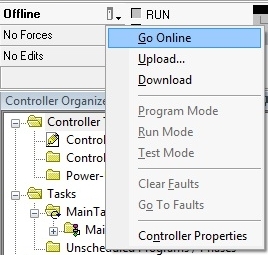
- On the main screen, click
 and select Go Online.
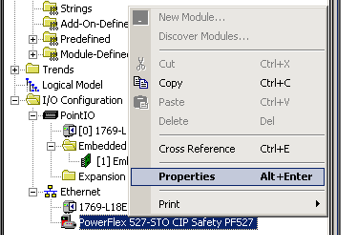
- Right-click on the PowerFlex 527 drive and select Properties.
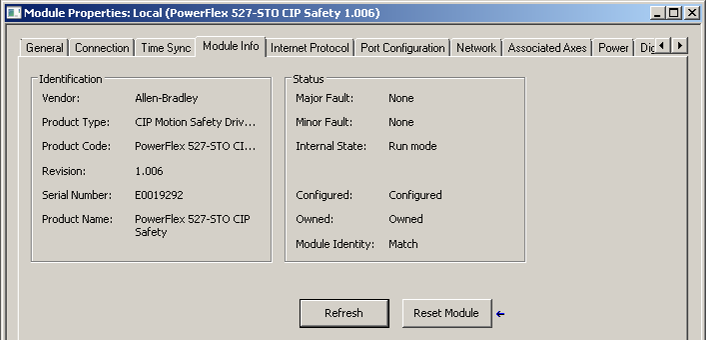
- In the Module Properties window, select the Module Info tab to display the firmware revision.
Use ControlFLASH and ControlFLASH Plus to Update Your Firmware
For instructions on how to install ControlFLASH™ and ControlFLASH Plus software and upgrade your drive firmware by using these software tools, see these publications:
- For ControlFLASH software version 15.03 or later, see ControlFLASH User Manual, publication 1756-UM105
- For ControlFLASH Plus software version 3.01 or later, see ControlFLASH Plus Quick Start Guide Quick Start, publication CFP-QS001
Copyright © 2026 Rockwell Automation, Inc. All rights reserved.
Rockwell Automation, Allen-Bradley, and FactoryTalk are trademarks of Rockwell Automation, Inc.
To view a complete list of Rockwell Automation trademarks please click here.
Trademarks not belonging to Rockwell Automation are property of their respective companies.