
Release Notes
CompactLogix L43 Controller
Version 17.004 (released 3/2010)
Catalog Number 1768-L43 (series A)
Security
This release includes security enhancements as a part of our ongoing efforts to improve security. For information regarding Rockwell Automation's vulnerability disclosure process, please reference the Rockwell Automation Vulnerability Policy.
Access Denied dialog box does not appear when users without FactoryTalk Security access attempt to modify Motion Configuration (Lgx00184951)
Studio 5000 Logix Designer v29.00
Corrected Anomaly with Studio Logix Designer v30.00
When a user without Motion: Modify Configuration security credentials attempts to modify the motion configuration, an Access Denied dialog box does not appear.
Denial of Service/Buffer Overflow Vulnerability
Known Anomaly in Logix5000 Programmable Controllers, Firmware Revisions 16-21
A vulnerability exists in the Logix5000™ Programmable Controller product line that, if successfully exploited, can cause a Denial of Service ("DoS") or potentially allow an attacker to alter the operating state of the controller through a buffer overflow.
Risk Mitigations
Customers using affected controllers are encouraged to upgrade to an available firmware version that addresses the associated risk.
For details on affected controllers, recommended firmware revisions, and other risk mitigations, see Knowledgebase ID 970074.
Requirements
This release has the following requirements.
Firmware Requirements – 1768 CompactLogix Controllers
Catalog Numbers 1768-L43, 1768-L43S, 1768-L45, 1768-L45S
Consider the following before a firmware upgrade on your 1768 CompactLogix™ controller.
|
Consideration
|
Description
|
| End cap needed for firmware
upgrade
|
When upgrading your controller firmware, verify that
your end cap is properly attached and locked. If you
attempt to upgrade without the end cap that is
attached, your firmware upgrade cannot complete
successfully.
|
|
Controller memory limits
|
If your controller is close to its memory limit and this
firmware revision requires more project memory, you
can upgrade to a controller that has more memory.
|
|
Avoid loss of communication
or power during firmware
update
|
Loss of communication or power during a controller
firmware upgrade can result in rejection of new
firmware by the controller. Loss of communication or
power during a controller firmware upgrade can result
in rejection of new firmware by the controller. If the
controller firmware upgrade fails due to such loss, take
the following corrective actions:
|
|
Disconnect controller from
DH-485 Network before
firmware upgrade
|
If your controller is connected to a DH-485 network,
disconnect it from the DH-485 network before you
upgrade the firmware of the controller. If you upgrade
the firmware of a controller while it is connected to a
DH-485 network, communication on the network can
stop.
|
| Use of ControlFLASH™
software, Version 9 (CPR9
SR3) with Firmware Revision
19
IMPORTANT: This
consideration applies only
when you are using firmware
revision 19.
|
Consider the following before you install the
ControlFLASH software, version 9:
If you click Cancel, you must select a
directory.
|
Your Controller Meets the
Following Conditions:
IMPORTANT: This
consideration applies only
when you are using firmware
revision 19.
|
Remove the CompactFlash card from the controller or
check the Load Image option of the CompactFlash
card. If it is set to On Power Up or On Corrupt Memory,
first store the project with the Load Image option set to
User Initiated.
Otherwise, you can get a major fault when you update
the firmware of the controller. This fault occurs
because the On Power Up or On Corrupt Memory
options cause the controller to load the project from
nonvolatile memory. The firmware mismatch after the
load then causes a major fault.
|
Features
This release includes the following system features.
Produced Consumed Tag Structures Status - 1768 and 1769 CompactLogix Controllers
System Feature First Available as of:
- Firmware Revision 17.005, 1769-L31, 1769-L32E, 1769-L32C, 1769-L35E, 1769-L35CR
- Firmware Revision 17.004, 1768-L43, 1768-L45
- Firmware Revision 18.011, 1768-L43S, 1768-L45S
Status information can be included with produced and consumed tags. To take advantage of this enhancement, the Produced/Consumed tag will need to be a User Defined Type (UDT) with the first member being of data type CONNECTION_STATUS.
IMPORTANT: RSNetWorx software, version 9.00.00 or later, is required when scheduling a ControlNet network that has Produced/Consumed tags with status.
Kinetix 6000 Advanced Safety Drive (S1) Support
System Feature First Identified as of:
- Firmware Revision 17.004, 1768-L43, 1768-L45
- Firmware Revision 18.011, 1768-L43S, 1768-L45S
Kinetix 6000 Sercos S1 Advanced Safety drives are supported. The safety status can be directly accessed by the user’s application via two new sercos Axis attributes (GuardStatus and GuardFaults) in the Axis_Servo_Drive data type. The configuration of the S1 Drive’s safety parameters is done via an Ethernet WEB based interface and downloaded to the Kinetix 6000 drive via this Ethernet connection.
Kinetix 6000 Enhanced Safe Torque-off Drive (SO) Support
System Feature First Available as of:
- Firmware Revision 17.004, 1768-L43, 1768-L45
- Firmware Revision 18.011, 1768-L43S, 1768-L45S
Kinetix 6000 SERCOS S0 Enhanced Safety-based family of drives is now supported. The safety status can be directly accessed by the user’s application via a bit attribute (SafeOff) in the Axis_Servo_Drive data type.
New MAOC Instruction Cam and Compensation Extended Error Codes
System Feature First Available as of:
- Firmware Revision 17.004, 1768-L43, 1768-L45
- Firmware Revision 18.011, 1768-L43S, 1768-L45S
For Error Codes 36 and 37, new Extended Error Codes are available for Output Cam array and Output Compensation array errors. The Extended Error Codes describe errors that may occur because the element is incorrectly configured or the value of one of its members is out of range.
Programmable Jerk for Multi-axis Coordinated Move Instructions
System Feature First Identified as of:
- Firmware Revision 17.004, 1768-L43, 1768-L45
- Firmware Revision 18.011, 1768-L43S, 1768-L45S
Support for programmable jerk has been extended to the multi-axis move instructions, that is, MCCM, MCLM, MCCD and MCS instructions.
You are now able to specify acceleration and deceleration jerk rates for the multi-axis coordinated moves directly via operands in the instruction faceplate for S-Curve profile motion for these instructions.
The configurable maximum jerk rates are also accessible programmatically via the Get System Variable (GSV) and the Set System Variable (SSV) instructions.
For project conversions, the new Jerk Operands are pre-populated in the MCLM, MCCM, MCCD and MCS instructions with default values for Jerk rate as 100% of time.
Programmable Jerk for Single-axis Change Dynamics Instruction
System Feature First Identified as of:
- Firmware Revision 17.004, 1768-L43, 1768-L45
- Firmware Revision 18.011, 1768-L43S, 1768-L45S
Support for programmable jerk with the single-axis move instruction, that is, MCD instruction, is now available.
The MCD instruction is used to Change the Speed, Acceleration and Deceleration of a running Single Axis Motion. Now with the Programmable Jerk, you can specify the Accel and Decel Jerk for S-Curve Profiles.
Change Dynamics of Active and Pending Motion
System Feature First Identified as of:
- Firmware Revision 17.004, 1768-L43, 1768-L45
- Firmware Revision 18.011, 1768-L43S, 1768-L45S
A new enumeration, that is Active and Pending Motion, has been added to the Scope variable of the MCCD instruction.
Choosing Active and Pending Motion specifies that the changes affect the motion dynamics of the active coordinated motion instruction and any pending coordinated motion instruction in the queue.
Advanced Process Control Instructions - 1768 and 1769 CompactLogix Controllers
System Feature First Identified as of:
- Firmware Revision 17.005, 1769-L31, 1769-L32E, 1769-L32C, 1769-L35E, 1769-L35CR
- Firmware Revision 17.004, 1768-L43, 1768-L45
- Firmware Revision 18.011, 1768-L43S, 1768-L45S
Three new instructions targeted for process applications have been added with the firmware revision/software versions listed above.
The following are the new instructions:
- Internal Model Control (IMC) – Compares actual process error against error calculated by an internal first order lag plus dead time model.
- Coordinated Control (CC) – Controls a single process variable by manipulating as many as three different control variables.
- Modular Multivariable Control (MMC) – Controls two process variables to their setpoints by using up to three control variables.
Instructions need to be purchased separately and licensed per use. The catalog numbers and associated use types include the following:
- 9324-RLDAPCENE – Provides a license to use the instructions in RSLogix 5000 software and provides a license to use them in a single Logix controller.
- 9324-RLDAPCCLENE - Provides a license to use the instructions in an additional controller, pay-to-deploy.
Runtime Partial Import - 1768 and 1769 CompactLogix Controllers
System Feature First Corrected as of:
- Firmware Revision 17.005, 1769-L31, 1769-L32E, 1769-L32C, 1769-L35E, 1769-L35CR
- Firmware Revision 17.004, 1768-L43, 1768-L45
- Firmware Revision 18.011, 1768-L43S, 1768-L45S
You can now import programs, equipment phases, routines, rungs, and new Add-On Instructions into a running system.
You can add these new components, as well as replace existing programs, equipment phases, and routines, while the system is running. New tags and User-Defined Types will be created as needed with values initialized from the import file. Data values of existing tags will be maintained.
Pause Management for Step Timer ACC - 1768 and 1769 CompactLogix Controllers
System Feature First Available as of:
- Firmware Revision 17.005, 1769-L31, 1769-L32E, 1769-L32C, 1769-L35E, 1769-L35CR
- Firmware Revision 17.004, 1768-L43, 1768-L45
- Firmware Revision 18.011, 1768-L43S, 1768-L45S
The Logix5000 timers store a portion of the wall clock with each scan and compare this to the value from the last scan. The timer’s ACC value is updated by the difference. Previous to revision 17, when a Sequential Function Chart (SFC) routine was paused and then released, all of the step timers jumped forward by the length of the pause time. Revision 17 now provides an option to control how the step timers will treat the pause – ignore it or count the pause time.
Reading SFC Chart Paused State via GSV Instruction
System Feature First Available as of:
- Firmware Revision 17.005, 1769-L31, 1769-L32E, 1769-L32C, 1769-L35E, 1769-L35CR
- Firmware Revision 17.004, 1768-L43, 1768-L45
- Firmware Revision 18.011, 1768-L43S, 1768-L45S
The paused state of a Sequential Function Chart can be determined programmatically by using the Get System Variable (GSV) instruction.
Corrected Anomalies in This Release
This release corrects the following anomalies.
Online Edits Cause Major Fault (0075608, 00096513)
Known Anomaly
Online edits result in major non-recoverable faults (MNRFs). Causes of this anomaly include:
- a controller that was or is near its limits in memory.
- doing many online edits (tag additions and deletions) without downloading again.
- using RSLinx Enterprise software (CPR9).
When this anomaly occurs, the controller generates a major non-recoverable fault during an online edit (tag additions and deletions). I/O goes to their configured safe state, and the user application is cleared from memory. At this point, a Code 1 Type 60 or 61 major fault is logged in the controller. This requires you to download the application again.
When online edits are made to a controller, RSLinx Enterprise software (CPR9) monitors them. When a large number of edits are made to a controller, RSLinx Enterprise software (CPR9) re-optimizes communication to the controller.
Two anomalies in RSLinx Enterprise software (CPR9) are aggravating factors to this controller anomaly:
- The algorithm used to determine if communication re-optimization is needed causes communication re-optimization to occur too often.
- When the communication re-optimizations occur, the connections to the controller should close. However, these connections do not close. This causes the controller to orphan all information related tags on scan by RSLinx Enterprise software (CPR9).
You must upgrade your controller firmware and apply RSLinx Enterprise patches. The RSLinx Enterprise patches reduce the likelihood of the controller faulting and remove the excessive memory consumption. The firmware upgrade eliminates the controller major non-recoverable faults caused by this anomaly.
These RSLinx Enterprise patches are on the Rockwell Automation Knowledgebase at: http://www.rockwellautomation.com/knowledgebase:
- RSLinx Enterprise software version 5.00 CPR9, ID number 65818
- RSLinx Enterprise software version 5.17 CPR9 SR1, ID number 65819
- RSLinx Enterprise software version 5.20 CPR9 SR2, ID number 65820
Connection Loss Slows Slot Status Bit Update (00072697)
Known Anomaly First Identified as of:
- Firmware Revision 16.024, 1768-L43, 1768-L45
- Firmware Revision 16.022, 1769-L31, 1769-L32C, 1769-L32E, 1769-L35CR, 1769-L35E
The Slot Status bit for an I/O connection is slow to update if the connection is lost.
When using I/O on an Ethernet network, if the connection to the network is lost at the adapter, the SlotStatusBit for that connection does not register the disconnect for 9 seconds or more.
If you require loss-of-connection data more quickly than the 9 seconds, use the GSV instruction to monitor the entry status of the connection as it updates more quickly than the SlotStatusBit.
SSV of MotionGroup Average Scan Time Causes Jump (00071520)
Known Anomaly First Identified as of:
- Firmware Revision 16.024, 1768-L43, 1768-L45
Setting the Message Timeout Bit Causes a Major Nonrecoverable Fault
Known Anomaly First Identified as of:
- Firmware Revision 16.024, 1768-L43, 1768-L45
- Firmware Revision 16.022, 1769-L31, 1769-L32C, 1769-L32E, 1769-L35CR, 1769-L35E
Setting the message timeout bit (.TO) within the message control structure while the message is active can result in a major nonrecoverable fault of the controller.
To avoid the MNRF, do not manipulate the message timeout bit (.TO). Instead, change the values for the unconnected timeout (.UnconnectedTimeout) and connection rate (.ConnectionRate) in the message control structure.
Changing the unconnected timeout (.UnconnectedTimeout) and connection rate (.ConnectionRate) values from their defaults to smaller values causes the message instruction to error earlier and avoids the MNRF.
For more information about changing the values in the message control structure, see the Logix5000™ Controllers General Instruction Reference Manual, publication 1756-RM003.
Serial-port Control Structure Bit Inaccurately Cleared
Known Anomaly First Identified as of:
- Firmware Revision 16.024, 1768-L43, 1768-L45
- Firmware Revisions 16.022, 1769-L31, 1769-L32C, 1769-L32E, 1769-L35CR, 1769-L35E
If the ACL instruction is used to clear instructions from the ASCII queue, the serial-port control structures’ RN bit is cleared (that is, the RN bit is set to zero).
Extended Program Scan Times Possible
Known Anomaly First Identified as of:
- Firmware Revision 16.024, 1768-L43, 1768-L45
- Firmware Revision 16.022, 1769-L31, 1769-L32C, 1769-L32E, 1769-L35CR, 1769-L35E
If you use firmware at revision 16, including revisions 16.06...16.20, and the controller’s serial port, the program scan time can increase. The program scan-time increase in revision 16 may be 2…10 times the scan time of the same program with revision 15. This anomaly only occurs when the controller serial port is used and there is no workaround.
Indirect Addressing in an Add-On Instruction Causes Major Nonrecoverable Fault
Corrected as of:
- Firmware Revision 17.004, 1768-L43, 1768-L45
- Firmware Revision 17.005, 1769-L31, 1769-L32C, 1769-L32E, 1769-L35CR, 1769-L35E
Known Anomaly First Identified as of:
- Firmware Revision 16.024, 1768-L43, 1768-L45
- Firmware Revisions 16.022, 1769-L31, 1769-L32C, 1769-L32E, 1769-L35CR, 1769-L35E
When an indirectly addressed instance tag is used instead of a directly- addressed instance tag within an Add-On Instruction, a Major Non-Recoverable Fault occurs. Typically the major fault occurs during the prescan of the controller.
Outputs Controlled by an MAOC Instruction Can Remain On In Some Configurations
Known Anomaly First Identified as of:
- Firmware Revision 16.024, 1768-L43, 1768-L45
A Major Fault May Occur During Rapid Power Cycles (00077713)
Known Anomaly First Identified as of:
- Firmware Revision 16.024, 1768-L43, 1768-L45
Duration Cam - Latch and Unlatch Delays (00068599)
Known Anomaly First Identified as of:
- Firmware Revision 16.024, 1768-L43, 1768-L45
Axis ActualAcceleration Tag Is Not Updated For Virtual Axes (00073829)
Known Anomaly First Identified as of:
- Firmware Revision 16.024, 1768-L43, 1768-L45
- Virtual_Axis.CommandPosition
- Virtual_Axis.CommandVelocity
- Virtual_Axis.CommandAcceleration
SFC Instruction Setting Causes a Major Nonrecoverable Fault (00072702)
Known Anomaly First Identified as of:
- Firmware Revision 16.024, 1768-L43, 1768-L45
- Firmware Revision 16.022, 1769-L31, 1769-L32C, 1769-L32E, 1769-L35CR, 1769-L35E
When the SFC instruction’s Last Scan of Active Steps option is set to Automatic Reset, a Major Non-Recoverable Fault occurs.
- A Major Non-Recoverable Fault can occur when these elements are present in the program:
- Within an SFC, a JSR instruction is used to jump to another SFC, also known as a nested SFC.
- One or more of the nested SFC instructions contains Simultaneous Branches.
- The Last Scan of Active Steps option (specified in the SFC Execution tab of the controller Properties dialog) is set to Automatic Reset.
To avoid a Major Non-Recoverable Fault when these elements are present, set the Last Scan of Active Steps to Don’t Scan or to Programmatic Reset.
Setting Invalid Home Sequence Value Via SSV Instruction
Known Anomaly First Identified as of:
- Firmware Revision 16.024, 1768-L43, 1768-L45
Known Anomaly First Identified as of:
- Firmware Revision 16.024, 1768-L43, 1768-L45
- An IOT instruction is used to send Produce Tag data.
- The IOT instruction is used in a Periodic Task.
- The Consume Tag is configured at an RPI within 1 ms of the Periodic Task rate.
SFC R Action Continues to Post-Scan (00069295)
Known Anomaly First Identified as of:
- Firmware Revision 16.024, 1768-L43, 1768-L45
- Firmware Revision 16.022, 1769-L31, 1769-L32C, 1769-L32E, 1769-L35CR, 1769-L35E
An SFC R action continues to post-scan on the specified action.
This anomaly occurs only if the SFC Last Scan of Active Steps option is set to Programmatic Reset or Automatic Reset. When the default, Don’t Scan, is set, the anomaly does not occur.
The intention of a reset action, type R, is to terminate the execution of another action that was previously stored. When configured as described, the reset action causes logic to execute a final scan.
The reset action does not check to verify that an action is stored before it completes the final scan. As a result, each time the reset action is scanned, the target logic is scanned one last time.
These observable behaviors can result:
- The timer of the stored action continues to time even though the action is no longer active.
- The logic in the stored action is executed in the configured mode.
- At Automatic Reset, non-retentive outputs are cleared.
- At Programmatic Reset, the logic executes. In this situation, the action logic checks for the final scan condition
(action.A = 1 and action.Q = 0) and performs some shutdown operations. This code is the code that is executed.
MCT Instruction .PC Bit Operational but not Defined
Known Anomaly First Identified as of:
- Firmware Revision 16.024, 1768-L43, 1768-L45
Within an MCT instruction control word, there is a default .PC bit. When the MCT instruction transitions from true to false, the.PC bit may set to 1. The MCT instruction is not intended to have operation that is associated with this bit and we recommend that you do not use the .PC bit in your application.
Program Download Successful After Failed Firmware Upgrade Attempt
Known Anomaly First Identified as of:
- Firmware Revision 16.024, 1768-L43, 1768-L45
- Firmware Revision 16.022, 1769-L31, 1769-L32C, 1769-L32E, 1769-L35CR, 1769-L35E
Attempts to download a program to a controller following a failed firmware upgrade are successful. (Failure is indicated by the OK status indicator flashing red after the upgrade is complete.)
After a firmware upgrade attempt fails during the upgrade (for example, the cable is disconnected or communication is interrupted), the controller's OK status indicator flashes red and any attempts to clear the fault by toggling the controller's keyswitch are unsuccessful.
You can download a program to the controller, place the controller in Run mode, and run the program (the RUN status indicator displays run status). The outputs behave as specified by the program. However, when controller power is cycled, the program is lost and the controller properties indicate a firmware revision different from the most recently downloaded to the controller.
Passing a UDT into an AOI Causes Issue (00077270, 00076136)
Known Anomaly First Identified as of:
- Firmware Revision 16.024, 1768-L43, 1768-L45
- Firmware Revision 16.022, 1769-L31, 1769-L32C, 1769-L32E, 1769-L35CR, 1769-L35E
Passing a User-defined Data Type (UDT) into an Add-On Instruction results in a Major Recoverable Fault or data memory corruption.
An anomaly occurs when you pass a tag that is based on a User-defined Data Type (UDT) into an Add-On Instruction, and certain conditions are met that result in a Major Recoverable Fault or data memory corruption.
Conditions that are required for Major Recoverable Fault or data memory corruption include:
- A one-dimensional array tag that is based on a UDT is passed into the Add-On Instruction.
- The UDT tag contains a member that is a one-dimensional array.
- Inside the Add-On Instruction, an operand address that specifies an immediate member of the UDT tag array and a variable element of the member array (for example, array[0].memberArray[x]) is used.
Examples:
UDT array[0].memberArray[x]
When the size of the UDT array is smaller than the memberArray and the [x] value of the memberArray is larger than the size of the UDT array, a Major Recoverable Fault Code 4 Type 20 occurs.
UDT array[0].memberArray[x]
When the size of the UDT array is bigger than the memberArray and the [x] value is smaller than the size of the UDT Array but larger than the size of the memberArray, the expected fault does not occur. The data is written to a location outside the bounds of the memberArray.
ControlFLASH Firmware Upgrade Requires CF Card Presence in Controller (00073863)
Known Anomaly First Identified as of:
- Firmware Revision 16.022, 1769-L31, 1769-L32C, 1769-L32E, 1769-L35CR, 1769-L35E
- Firmware Revision 16.024, 1768-L43, 1768-L45
If you have stored your program on a CompactFlash card, then remove the CompactFlash card while power is off without replacing it, attempts to upgrade the controller firmware are unsuccessful.
Reinserting the CompactFlash card restores the ability to upgrade firmware.
Upload of Some AOIs with Boolean Input Parameter Modifies Offline Image (00077802)
Known Anomaly First Identified as of:
- Firmware Revision 16.024, 1768-L43, 1768-L45
- Firmware Revision 16.022, 1769-L31, 1769-L32C, 1769-L32E, 1769-L35CR, 1769-L35E
An upload of an Add-On Instruction with a literal Boolean input parameter modifies offline image.
When an Add-On Instruction containing a literal value for one of its Boolean input parameters is referenced from a Ladder Diagram routine, an upload of the project modifies the display of the literal value by appending a “.0”. Each time the project is downloaded and reuploaded, another “.0” is appended, so that after the second download/upload sequence, the project file will not verify and can no longer be downloaded without first editing the modified literal value. The edit can be successfully performed either online or offline.
Note, however, that when editing online, because the rung is in an unverified state, the `Finalize All Edits in Program’ does not operate. In this case, use of the Accept/Test/Assemble sequence of operations allow the edit to be completed. This condition does not affect the executing image, which continues execution using the unmodified literal value. To avoid exposure to this problem, replace the literal value with a reference to a tag having the desired value.
Remote Outputs Predefined Mode (00099405)
Known Anomaly
CONNECTION_STATUS.RunMode (0009405)
Known Anomaly
The CONNECTION_STATUS.RunMode indication in a Produced tag may not indicate correctly.
When using Produced/Consumed tags with CONNECTION_STATUS, the CONECTION_STATUS.RunMode indication in the producing controller may not indicate correctly if it is not in RUN mode. The CONNECTION_STATUS.RunMode indication in the Consuming controller will indicate correctly.
Acknowledging an Alarm Does Not Clear Tag (00081999)
Known Anomaly First Identified as of:
- Firmware Revision 16.024, 1768-L43, 1768-L45
- Firmware Revision 16.022, 1769-L31, 1769-L32C, 1769-L32E, 1769-L35CR, 1769-L35E
Acknowledging an analog or digital alarm does not clear the alarm's unacknowledged (InAlarmUnack) tag.
If an alarm has an active status (InAlarm tag is true) and is unacknowledged (InAlarmUnack is true), acknowledging the alarm does not reset the alarm's unacknowledged tag (that is, even after being acknowledged, the InAlarmUnack continues to be true).
This anomalous behavior occurs with both digital (ALMD) and analog (ALMA) alarms.
SPCascadeInv Value of PIDE Set Erroneously (00065664)
Known Anomaly First Identified as of:
- Firmware Revision 16.022, 1769-L31, 1769-L32C, 1769-L32E, 1769-L35CR, 1769-L35E
- Firmware Revision 16.024, 1768-L43, 1768-L45
The SPCascadeInv value of a PIDE instruction is set any time SPCascade exceeds the SP limits.
When the AllowCasRat and UseRatio tags are set, the SPCascadeInv must be set only if SPCascade multiplied by the ratio value exceeds the SP limits. However, the SPCascadeInv is set any time SPCascade exceeds the SP limits. SPCascade is set even when the setpoint (SPCascade multiplied by the ratio value) is below SP limits.
Some Serial Messages May Cause Others to Fail (00079116)
Known Anomaly First Identified as of:
- Firmware Revision 16.022, 1769-L31, 1769-L32C, 1769-L32E, 1769-L35CR, 1769-L35E
- Firmware Revision 16.024, 1768-L43, 1768-L45
Serial messages that are broadcast from a master controller to station address 255 results in other messages failing.
When two controllers are used in a master/slave configuration and the message to the broadcast station address (255) is executed, that message errors. Some messages occurring after the message addressed to address 255 also error with the same error code.
Motion Redefine Position (MRP) Error 13 (00068599)
Known Anomaly First Identified as of:
- Firmware Revision 16.024, 1768-L43, 1768-L45
Motion Redefine Position (MRP) Error 13 for Positions within the range.
You can get the error “Parameter out of Range” if the MRP is executed when:
Current Position + MRP Position > 231/Axis Conversion Constant. Or Current Position + MRP Position <- 231/Axis Conversion Constant.
For example, assume that the:
- axis conversion constant = 120,000.0 feedback counts/1.0 unit.
- current command position = 17,893.0 units.
If you MRP with a position of five units, which exceeds 231/Axis Conversion Constant, the MRP will error. To work around this anomaly, move the axis to a value within the acceptable range specified.
MAOC Instruction and 1756-OB16IS Module Can Overwrite Memory (00082622)
Known Anomaly
An MAOC instruction used in conjunction with a 1756-OB16IS Scheduled Output Module can overwrite memory if the 1756-OB16IS module is not configured with the default communications format “Scheduled Output Data per Point”.
If the format is changed to either “Listen Only – Output Data” or “Output Data”, the memory allocated for the schedule data used by the MAOC instruction is not present.
Jerk Parameters are Incorrectly Computed (00081390)
Known Anomaly
The Master Offset Moves are used to offset the Position cams.
The Jerk parameters of the Master offset Move using a MAM instruction are incorrectly applied if the conversion constant of the master and the slave are different. The slave axis conversion constant is applied instead of the master axis conversion constant for master offset move.
Motion Stop Issues if Program Stop Action is Hard Disable for a Virtual Axis (00077357)
Known Anomaly
If MCLM or MCCM instructions are in process and the controller transitions to Program Mode, the system’s transition takes longer than expected for the axes to stop. Your controller experiences this issue only if the Program Stop Action configured in the axis properties is set to Hard Disable.
With the corrected behavior in this release, the transition to the program mode is immediate.
Prevent Execution of Motion Instructions While an MGS, MAS-ALL or MCS-All Instruction is Executing (0083819)
Known Anomaly
Previously, if certain Motion Instructions overlapped while Motion Stop Instructions were active, your application experiences unexpected behavior. When an instruction is actively stopping and a second instruction is initiated that overlaps the active instruction you see this anomaly.
Previous to this firmware revision, if certain Motion Instructions overlapped while Motion Stop Instructions are active, you see Error Code #78.
For more information about Error Code #78 and the affected Motion Instructions, see the Error Codes for Motion Instructions Appendix of the Logix5000 Controllers Motion Instructions Reference Manual, publication 1756-RM007.
Parameter Combination Causes Non-recoverable Fault on Controller (00082075)
Known Anomaly
A non-recoverable fault is caused by a very unlikely and unexpected combination of initial conditions when velocity = 0 and acceleration < > 0. The only way to achieve this combination of initial conditions is to stop the axis with an MAS instruction (Speed = 0) or an MCD instruction (Speed = 0) and to start the motion exactly one iteration before the MAS instruction or MCD instruction is complete.
Armed MAOC Instruction Remains Armed During a Power Cycle (00085513)
Known Anomaly
If an MAOC instruction is armed when a system power cycle occurs, the MAOC instruction remains armed at system power-up.
The MAOC instruction may become disarmed if a physical axis fault is detected. Additionally, the MAOC instruction may cause a group overlap fault if a physical axis reports a large delta position during power-up.
Axis Experiences Unwanted Motion on Rotary Axis (00078215)
Known Anomaly
Your controller may experience unwanted motion if your application has the following conditions:
- The axis is a rotary axis.
- The axis position was less than 1/2 drive count away from unwind.
- An MRP instruction was executed with a commanded position of zero.
Base Offset X1b With a Negative Value in Delta Gives MCT Error 61 Exerr 15 (00083890)
Known Anomaly
For a 2 & 3 axes Delta robot, you can now use both negative and positive values for the X1 Base Offset.
For both of these 2 Delta robot geometries, an error is now forced if L1 + X1b-x1e > L2.
Axis May Move in Opposite Direction for Rotary Positive or Rotary Negative Moves (00080848)
Known Anomaly
An axis may move in the opposite direction specified in a MAM instruction if the following events occur at the same time:
- The servo loop for an axis is closed by an MSO instruction.
- A MAM instruction (with a Move Type of Rotary Positive or Rotary Negative) is configured with Merge Enabled and is executed in the same iteration as the MSO instruction.
The axis doesn't reverse the direction but instead continues moving to the programmed end point in the direction of the MAM instruction.
You may also experience a similar issue for a non-merged move if a MAM Instruction with Move Type Rotary Positive or Rotary Negative is followed by a MAM instruction with a rotary move in the opposite direction while the move is in progress.
The axis doesn't reverse the direction but instead continues moving to the programmed end point in the direction of the first MAM.
MCD Instruction on Rotary Unidirectional Moves with Reduced Deceleration May Cause a Non-Recoverable Fault (00080762)
Known Anomaly
Your controller occasionally experiences a non-recoverable fault if the following sequence of events occurs:
- A rotary axis is programmed to move in either a positive or negative only mode in an MAM instruction.
- The rotary axis is currently decelerating.
- An MCD instruction is issued to stop such an axis by a programmed speed of 0.
A slight overshoot may result when the axis finally comes to a stop. When this axis is restarted again by another MCD, the non-recoverable fault may occur.
Incremental MCCM Move with Merge Enabled May Cause Error 46: Circular R1 R2 Mismatch Error (00079059)
Known Anomaly First Identified as of:
Your controller occasionally sees a Circular R1 R2 Mismatch error on a merge of a MCCM instruction with either of the following whether the occurred error was a function of the parameters of the circle and the merge point of the circle:
- Circle Type = Center
Move Type = Incremental
- Circle Type = Center Incremental
Any Move Type
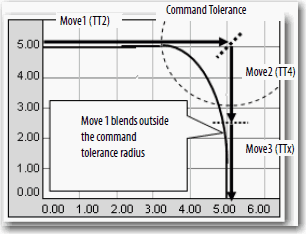
Combination of Termination Types May Cause You to Miss the Target Position (00088549)
Known Anomaly
You may have missed hitting the end point of a move with Termination Type 4 or 5 (TT4/5) when it was preceded by another move with Termination Type 2 or 3 (TT2/3). See the figure below as one possible combination:
Writing 483 SINT Values Via MSG Instruction Causes Errors (00073863)
Known Anomaly First Identified as of:
- Firmware Revision 16.022, 1769-L31, 1769-L32C, 1769-L32E, 1769-L35CR, 1769-L35E
- Firmware Revision 16.024, 1768-L43, 1768-L45
Writing 483 SINT values to another controller by using an MSG instruction causes an error.
If you attempt to write 483 SINT values to another controller by using an MSG instruction, an error occurs. This anomalous behavior does not occur with any other number of SINT values (for example, attempting to write 482 or 484 SINT values to the other local controller does not cause this anomaly).
Using CIP Table Read or Write MSG May Cause Errors (00083193)
Known Anomaly First Identified as of:
- Firmware Revision 16.022, 1769-L31, 1769-L32C, 1769-L32E, 1769-L35CR, 1769-L35E
- Firmware Revision 16.024, 1768-L43, 1768-L45
If you perform a CIP data table read or write message to another controller with User-defined Data Types (UDTs), the message instructions can error with code 16#001F (extended error code 16#203).
Alias Tag Renaming Unsuccessful in Some Scenarios (00079805)
Known Anomaly First Identified as of:
- Firmware Revision 16.022, 1769-L31, 1769-L32C, 1769-L32E, 1769-L35CR, 1769-L35E
- Firmware Revision 16.024, 1768-L43, 1768-L45
Attempts to rename Alias tags for bits within in a DINT referenced by an HMI are unsuccessful.
If your HMI references any bit of a DINT and you try to rename Alias tags for bits 0...7 within that DINT, the new alias name fails to be set. Attempting to rename Alias tags for bits 8 and higher is successful.
Function Block Instructions Can Cause Minor Faults (00045364)
Use of certain Function Block instructions causes various minor faults.
The use of these Function Block instructions may result in various minor faults when your program executes: BAND, BOR, BNOT, BXOR, CTUD, D2SD, D3SD, DFF, JKFF, OSFI, OSRI, RESD, SETD, TONR, TOFR, RTOR, and OSC.
The minor faults result because the Overflow status flag (S:V) is set each time an instruction listed above is carriedout.
Nested SFCs Prescanned Rather Than Postscanned (00086725)
Known Anomaly First Identified as of:
- Firmware Revision 16.022, 1769-L31, 1769-L32C, 1769-L32E, 1769-L35CR, 1769-L35E
- Firmware Revision 16.024, 1768-L43, 1768-L45
Nested SFCs, when configured to Automatic Reset, are prescanned rather than postscanned. Normally, if in an SFC where the configuration of the last scan is set to Automatic Reset, the code of associated actions are executed a final time and the Scan mode is set to postscan. Postscan execution is a system-defined mode similar, but not the same as, prescan.
With this anomaly, if an action in the SFC contains a JSR to another SFC, the subroutine is prescanned rather than postscanned (that is, the incorrect scan mode is set).
Many instructions, especially motion instructions, remain inactive during a postscan, but reinitialize during a prescan.
Totalizer Instruction May Remain in Program Mode (00077908)
Known Anomaly First Identified as of:
- Firmware Revision 16.022, 1769-L31, 1769-L32C, 1769-L32E, 1769-L35CR, 1769-L35E
- Firmware Revision 16.024, 1768-L43, 1768-L45
Totalizer (TOT) instruction can continually remain in Program mode.
Setting the ProgValueReset input puts the Totalizer into Program mode. The ProgOper output continues to indicate the mode that is requested (that is, Operator mode), however, only ProgStartReq, ProgStopReq, and ProgResetReq are recognized.
Known Anomalies in This Release
This release has the following known anomalies.
Forcing IO Status Word is Unsuccessful (Lgx00086933, Lgx00101628, Lgx00089942)
Corrected as of:
- Firmware Revision 18.011, 1768-L43, 1768-L45
- Firmware Revision 18.011, 1769-L23E-QB1B, 1769-L23E-QBFC1B, 1769-L23-QBFC1B
- Firmware Revision 18.011, 1769-L31, 1769-L32C, 1769-L32E, 1769-L35CR, 1769-L35E
Known Anomaly First Identified as of:
- Firmware Revision 17.004, 1768-L43, 1768-L45
Forcing the I/O status word is unsuccessful.
When you attempt to force the input status word, the force is unsuccessful, though RSLogix™ 5000 software indicates that the force is enabled.
With firmware revision 18.011, forces are applied as expected.
Actions with ProSoft Modules May Cause Major Nonrecoverable Faults (00103449)
Corrected as of:
- Firmware Revision 18.011, 1768-L43, 1768-L45
Known Anomaly First Identified as of:
- Firmware Revision 17.004, 1768-L43, 1768-L45
A program that uses a ProSoft communication module in the I/O Configuration tree can cause a major nonrecoverable fault (MNRF) when these actions are taken:
- The project is downloaded to the controller a second time.
- The ProSoft communication module is inhibited via the module configuration tab.
Velocity Spike May Occur When An MCCD Instruction is Executed (00088802)
Corrected as of:
- Firmware Revision 18.011, 1768-L43, 1768-L45
Known Anomaly
- Firmware Revision 17.004, 1768-L43, 1768-L45
Under certain application conditions, you can see a velocity spike if you are using termination type 4 or 5 with coordinated moves and you execute an MMD instruction on the last iteration of a move.
For more information about this anomaly, see the Technical Note titled “Possible Velocity Spike When a Motion Coordinated Change Dynamics (MCCD) Instruction is Executed”, #53928, in the Technical Support Knowledgebase (available at http://www.rockwellautomation.com/knowledgebase/).
Axis Stopping Status Bit is Incorrect for MAS(All) Instruction with Coordinated Motion (00085033)
Corrected as of:
- Firmware Revision 18.011, 1768-L43, 1768-L45
Known Anomaly First Identified as of:
- Firmware Revision 17.004, 1768-L43, 1768-L45
If you execute a MAS of Type = ALL on motion that started with an MCLM instruction, the Axis.StoppingStatus bit briefly transitions to true but then transitions back to false and remains in that state until the axis comes to a complete stop.
Multiple Absolute MAM Instructions with S-curve and Merge Enabled Can Overshoot Target Position (00078822)
Known Anomaly First Identified as of:
- Firmware Revision 17.004, 1768-L43, 1768-L45
- Firmware Revision 18.011, 1768-L43S, 1768-L45S
Overshoot can occur with MAM instruction with Merge Enabled if there is not enough distance until the end of the move for the programmed dynamic jerk parameters, that is decel jerk and axis decel, in the merged move.
Overshoot can be avoided by increasing the decel jerk or not using the merge.
Modular Multivariable Control (MMC) Instruction (Lgx00100721, Lgx00091924)
Corrected as of:
- Firmware Revision 18.011, 1768-L43, 1768-L45
- Firmware Revision 18.011, 1769-L23E-QB1B, 1769-L23E-QBFC1B, 1769-L23-QBFC1B
- Firmware Revision 18.011, 1769-L31, 1769-L32C, 1769-L32E, 1769-L35CR, 1769-L35E
Known Anomaly First Identified as of:
- Firmware Revision 17.004, 1768-L43, 1768-L45
- Firmware Revision 17.005, 1769-L23E-QB1B, 1769-L23E-QBFC1B, 1769-L23-QBFC1B
- Firmware Revision 17.012, 1769-L23E-QB1B. 1769-L23E-QBFC1B
- Firmware Revision 17.005, 1769-L31, 1769-L32C, 1769-L32E, 1769-L35CR, 1769-L35E
The Modular Multivariable Control (MMC) instruction does not always use the second or third control variable (CV) parameters to achieve the process variable (PV) setpoint when certain limits are specified for the CV.
In applications where the MMC function block is used to control one PV through manipulation of up to three CVs, only the first CV is manipulated by the instruction if the CVxEUMax, CVEUMin, CVxHLimit, and CVxLLimit input parameters for the first CV are set at conflicting values. These input parameters conflict when the CVxHLimit or CVxLLimit keeps the CV clamped at a value inside the range that is specified with the CVxEUMax and CVxEUMin parameters. If the CV does not extend outside the CVxEUMax and CVxEUMin parameters, the second and third CVs of the MMC instruction are not used to manipulate the PV.
With firmware revision 18.11, the second and third CVs of the MMC instruction are manipulated, even if the first CV is within the range indicated by CVxHLimit and CVxLLimit.
Corrected as of:
- Firmware Revision 18.011, 1768-L43, 1768-L45
- Firmware Revision 18.011, 1769-L23E-QB1B, 1769-L23E-QBFC1B, 1769-L23-QBFC1B
- Firmware Revision 18.011, 1769-L31, 1769-L32C, 1769-L32E, 1769-L35CR, 1769-L35E
Known Anomaly First Identified as of:
- Firmware Revision 17.004, 1768-L43, 1768-L45
- Firmware Revision 17.005, 1769-L23E-QB1B, 1769-L23E-QBFC1B, 1769-L23-QBFC1B
- Firmware Revision 17.012, 1769-L23E-QB1B. 1769-L23E-QBFC1B
- Firmware Revision 17.005, 17.007, 17.012, 1769-L31, 1769-L32C, 1769-L32E, 1769-L35CR, 1769-L35E
Using an SSV instruction to set the WallClockTime causes a fault.
Setting the WallClockTime to an invalid value by using an SSV instruction results in a Major Nonrecoverable Fault (MNRF).
Using an SSV instruction to set the local controller's WALLCLOCKTIME by using the LocalDateTime attribute can result in an incorrect WALLCLOCKTIME value upon execution of the program. This incorrect time is evident in the seconds field.
The discrepancy in the WALLCLOCKTIME can also result in an MNRF during controller power down or just after controller power has been cycled.
To avoid this behavior, use the DateTime attribute and arithmetic to handle the GMT offset instead of using the LocalDateTime attribute to set the local controllers WALLCLOCKTIME object.
With firmware revision 18.011, if a WallClockTime object’s DateTime attribute is invalid, a minor fault results.
STOD Instruction (Lgx00102980, Lgx000102979, Lgx00095528)
Corrected as of:
- Firmware Revision 18.011, 1768-L43, 1768-L45
- Firmware Revision 18.011, 1769-L23E-QB1B, 1769-L23E-QBFC1B, 1769-L23-QBFC1B
- Firmware Revision 18.011, 1769-L31, 1769-L32C, 1769-L32E, 1769-L35CR, 1769-L35E
Known Anomaly Identified as of:
- Firmware Revision 17.004, 17.012, 1768-L43, 1768-L45
- Firmware Revision 17.005, 17.007, 1769-L23E-QB1B, 1769-L23E-QBFC1B, 1769-L23-QBFC1B
- Firmware Revision 17.012, 1769-L23E-QB1B. 1769-L23E-QBFC1B
- Firmware Revision 17.005, 17.007, 17.012, 1769-L31, 1769-L32C, 1769-L32E, 1769-L35CR, 1769-L35E
Use of an STOD instruction and a program upgrade from revision 16 to revision 17 results in the program-scan time increasing.
When an STOD is used in an application that has been upgraded from revision 16 to revision 17, the program scan time dramatically increases due to an anomaly correction made to the STOD instruction in revision 17.
With revision 18.011, the program-scan time returns to the time observed with version 16.
Corrected as of:
- Firmware Revision 18.011, 1768-L43, 1768-L45
- Firmware Revision 18.011, 1769-L23E-QB1B, 1769-L23E-QBFC1B, 1769-L23-QBFC1B
- Firmware Revision 18.011, 1769-L31, 1769-L32C, 1769-L32E, 1769-L35CR, 1769-L35E
Known Anomaly First Identified as of:
- Firmware Revision 17.004, 1768-L43, 1768-L45
- Firmware Revision 17.005, 1769-L23E-QB1B, 1769-L23E-QBFC1B, 1769-L23-QBFC1B
- Firmware Revision 17.012, 1769-L23E-QB1B. 1769-L23E-QBFC1B
- Firmware Revision 17.005, 1769-L31, 1769-L32C, 1769-L32E, 1769-L35CR, 1769-L35E
Partial import of a project that is developed and run on a SoftLogix™ controller causes fault.
Completing a partial import of a project that is developed and run on a SoftLogix controller causes a Major Nonrecoverable Fault if certain instructions are used in the program.
A Major Nonrecoverable Fault occurs on the controller when a program is developed and run on a SoftLogix controller, and then a partial import online is completed to a Logix5000™ controller while the Logix5000 controller is in Run mode (online). A Major Nonrecoverable Fault occurs if the imported project contains these instructions:
• Coordinated Control (CC)
• Internal Model Control (IMC)
• Modular Multivariable Control (MMC)
The Major Nonrecoverable Fault occurs after the partial import is completed and the edits to the program are finalized.
Corrected as of:
- Firmware Revision 18.011, 1768-L43, 1768-L45
- Firmware Revision 18.011, 1769-L23E-QB1B, 1769-L23E-QBFC1B, 1769-L23-QBFC1B
- Firmware Revision 18.011, 1769-L31, 1769-L32C, 1769-L32E, 1769-L35CR, 1769-L35E
Known Anomaly First Identified as of:
- Firmware Revision 17.004, 1768-L43, 1768-L45
- Firmware Revision 17.005, 1769-L23E-QB1B, 1769-L23E-QBFC1B, 1769-L23-QBFC1B
- Firmware Revision 17.012, 1769-L23E-QB1B, 1769-L23E-QBFC1B
- Firmware Revision 17.005, 1769-L31, 1769-L32C, 1769-L32E, 1769-L35CR, 1769-L35E
When an SFC Reset (SFR) instruction that is executed specifies a target step that is not the initial step, and the step is anywhere below (but outside) a simultaneous branch, the SFC no longer executes. The SFC remains in the step it was reset to, and attempts to progress via a Transition, Force, or Step Through are unsuccessful. To begin executing the SFC again, you must execute an SFR instruction to the initial step or to a step above the first simultaneous branch.
With firmware revision 18.011, when an SFC is reset to a specified step the transitions occur as expected.
Interrupted Service Communication (Lgx00101330, Lgx00103549, Lgx00098734)
Corrected as of:
- Firmware Revision 18.011, 1768-L43, 1768-L45
- Firmware Revision 18.011, 1769-L23E-QB1B, 1769-L23E-QBFC1B, 1769-L23-QBFC1B
- Firmware Revision 18.011, 1769-L31, 1769-L32C, 1769-L32E, 1769-L35CR, 1769-L35E
Known Anomaly First Identified as of:
- Firmware Revision 17.004, 1768-L43, 1768-L45
- Firmware Revision 17.005, 1769-L23E-QB1B, 1769-L23E-QBFC1B, 1769-L23-QBFC1B
- Firmware Revision 17.012, 1769-L23E-QB1B. 1769-L23E-QBFC1B
- Firmware Revision 17.005, 1769-L31, 1769-L32C, 1769-L32E, 1769-L35CR, 1769-L35E
Interrupted service communication during a connection closure causes a fault.
Depending on the structure of your program, if your service communication is interrupted for longer than 300 ms (as determined by the System Overhead Time Slice setting) and a connection is in the process of closing, a major nonrecoverable fault (MNRF) can result. The connection that is closing could be a connection that is used for I/O, a message instruction, a forward open, and so on.
With firmware revision 18.011, a connection in the process of closing during a service communication interrupt of >300 ms occurs, but does not cause an MNRF.
Deleting Program Tags While Online (Lgx00086136, Lgx00085678)
Corrected as of:
- Firmware Revision 18.011, 1768-L43, 1768-L45
- Firmware Revision 18.011, 1769-L23E-QB1B, 1769-L23E-QBFC1B, 1769-L23-QBFC1B
- Firmware Revision 18.011, 1769-L31, 1769-L32C, 1769-L32E, 1769-L35CR, 1769-L35E
Known Anomaly
- Firmware Revision 17.004, 1768-L43, 1768-L45
- Firmware Revision 17.004, 1769-L31, 1769-L32C, 1769-L32E, 1769-L35CR, 1769-L35E
Deleting program tags while online is successful, even though they are being referenced by RSLinx® software and must not be deleted.
RSLogix 5000 software and Logix5000™ controller firmware allow deletion of program tags while online with the controller. As a precaution, the firmware checks the tag to verify that it is not in use (that is, the tag is not being scanned or referenced) by RSLinx® Classic or RSLinx® Enterprise software. If the tag is being used by RSLinx software, the deletion is not allowed and an error dialog box indicates `Failed to delete tag’.
However, with certain tags, the deletion is always allowed—even if the tag is being used by RSLinx software. These tag types are always deleted, even if being used by RSLinx software:
• Motion Axis
• Motion Group
• Digital Alarm
• Analog Alarm
• Message
With firmware revision 18.011, tags being used by RSLinx software cannot be deleted while online with the controller
Corrected as of:
- Firmware Revision 18.011, 1768-L43, 1768-L45
- Firmware Revision 18.011, 1769-L23E-QB1B, 1769-L23E-QBFC1B, 1769-L23-QBFC1B
- Firmware Revision 18.011, 1769-L31, 1769-L32C, 1769-L32E, 1769-L35CR, 1769-L35E
Known Anomaly First Identified as of:
- Firmware Revision 17.004, 1768-L43, 1768-L45
- Firmware Revision 17.004, 1769-L31, 1769-L32C, 1769-L32E, 1769-L35CR, 1769-L35E
SSV class name SerialPort, attribute PendingComDriverID, does not set.
With firmware revision 18.011, attempts to use an SSV instruction to set the SerialPort class, PendingComDriverID attribute, are successful.
Echo Mode and Read Write Buffer (Lgx00087052, Lgx00087176)
Corrected as of:
- Firmware Revision 18.011, 1768-L43, 1768-L45
- Firmware Revision 18.011, 1769-L23E-QB1B, 1769-L23E-QBFC1B, 1769-L23-QBFC1B
- Firmware Revision 18.011, 1769-L31, 1769-L32C, 1769-L32E, 1769-L35CR, 1769-L35E
Known Anomaly First Identified as of:
- Firmware Revision 17.004, 1768-L43, 1768-L45
- Firmware Revision 17.005, 1769-L31, 1769-L32C, 1769-L32E, 1769-L35CR, 1769-L35E
Setting the Read/Write Buffer size parameter before checking Echo Mode does not result in a message echo.
In the User Protocol tab of the Controller Properties dialog box, if the Read/Write Buffer size is specified before Echo Mode is checked, the message echo does not execute.
For the message echo to execute, first check Echo Mode, then specify the Read/Write Buffer size.
With firmware revision 18.011, you can specify the Read/Write Buffer size and check Echo Mode in any order to achieve a message echo.
Corrected as of:
- Firmware Revision 18.011, 1768-L43, 1768-L45
- Firmware Revision 18.011, 1769-L23E-QB1B, 1769-L23E-QBFC1B, 1769-L23-QBFC1B
- Firmware Revision 18.011, 1769-L31, 1769-L32C, 1769-L32E, 1769-L35CR, 1769-L35E
Known Anomaly First Identified as of:
- Firmware Revision 17.004, 1768-L43, 1768-L45
- Firmware Revision 17.005, 1769-L31, 1769-L32C, 1769-L32E, 1769-L35CR, 1769-L35E
RMPS instruction in a continuous task does not count down.
If an RMPS instruction is used in a continuous task and a Soak Time value greater than 1024 minutes is specified, the countdown (SoakTimeLeft) does not countdown and the RMPS instruction appears to stop executing. This anomaly does not occur if the RMPS is used in a periodic task or the continuous task program is run in SoftLogix™ 5800 or RSEmulate™ 5000 software.
To work around this anomaly, do one of the following.
• Use multiple soaks to achieve your total soak times greater than 1024 minutes.
• Use the RMPS in a periodic task that has a Period of 10 ms or greater.
This anomaly has been resolved with firmware revision 18.011. You can use an RMPS instruction in a continuous task with a Soak Time value greater than 1024 minutes.
MSG Execution in Master Slave Configurations (Lgx00083882, Lgx00082610)
Corrected as of:
- Firmware Revision 20.011, 11769-L23E-QB1B, 1769-L23E-QBFC1B, 1769-L23-QBFC1B
- Firmware Revision 20.011, 1769-L31, 1769-L32E, 1769-L32C, 1769-L35E, 1769-L35CR
- Firmware Revision 20.011, 1768-L43, 1768-L45
- Firmware Revision 20.011, 1768-L43S, 1768-L45S
Known Anomaly
- Firmware Revision 18.011, 1769-L23E-QB1B, 1769-L23E-QBFC1B, 1769-L23-QBFC1B
- Firmware Revision 17.005, 1769-L31, 1769-L32E, 1769-L32C, 1769-L35E, 1769-L35CR
- Firmware Revision 17.004, 1768-L43, 1768-L45
- Firmware Revision 18.011, 1768-L43S, 1768-L45S
Unsuccessful MSG execution results in subsequent unsuccessful messages in master/slave controller configurations.
When a DF1 serial connection is used between a master and slave controller, an MSG instruction is not successfully executed and an in-polling sequence error occurs if the master station address is not listed in the poll node list.
However, with this anomaly, after the in-polling sequence error, subsequent MSG instructions are also unsuccessful.
To work around this anomaly, change the master station address of a controller to another value or re-execute the unsuccessful MSG instruction in Master
Transmit mode and use the Between Station Polls parameter.
Known Anomalies from Previous Releases
These anomalies are from previous releases but are still known in this release.
FFU Instruction (Lgx00096621, Lgx00105710)
Corrected as of:
- Firmware Revision 18.011, 1768-L43, 1768-L45
- Firmware Revision 18.011, 1769-L23E-QB1B, 1769-L23E-QBFC1B, 1769-L23-QBFC1B
- Firmware Revision 18.011, 1769-L31, 1769-L32C, 1769-L32E, 1769-L35CR, 1769-L35E
Known Anomaly First Identified as of:
- Firmware Revision 16.024, 1768-L43, 1768-L45
- Firmware Revision 17.005, 1769-L23E-QB1B, 1769-L23E-QBFC1B, 1769-L23-QBFC1B
- Firmware Revision 16.022, 1769-L31, 1769-L32C, 1769-L32E, 1769-L35CR, 1769-L35E
Use of an FFU instruction in an SFC program results in a major nonrecoverable fault (MNRF) when the last scan of the SFC is configured to Auto Reset.
With firmware revision 18.011, this anomaly has been corrected.
FIND Instruction Use Results in Fault (Lgx00094007, Lgx00101633)
Corrected as of:
- Firmware Revision 18.011, 1768-L43, 1768-L45
- Firmware Revision 18.011, 1769-L23E-QB1B, 1769-L23E-QBFC1B, 1769-L23-QBFC1B
- Firmware Revision 18.011, 1769-L31, 1769-L32C, 1769-L32E, 1769-L35CR, 1769-L35E
Known Anomaly First Identified as of:
- Firmware Revision 17.004, 1768-L43, 1768-L45
- Firmware Revision 17.005, 1769-L23E-QB1B, 1769-L23E-QBFC1B, 1769-L23-QBFC1B
- Firmware Revision 17.005, 1769-L31, 1769-L32C, 1769-L32E, 1769-L35CR, 1769-L35E
Use of a FIND instruction results in a major recoverable fault (MRF).
Attempts to use the FIND instruction to search a large string of characters results in a MRF. If you attempt to use the ASCII FIND instruction to search a source-data string of 32,767 characters, or more, a major fault Type 4 Code 51 results.
With firmware revision 18.011, the FIND instruction can successfully search a source-data string as large as 65,535 characters, the largest number of characters that can be used in a string.
Carry Status Flag Not Set as Expected (Lgx00105710, Lgx00074175)
Corrected as of:
- Firmware Revision 18.011, 1768-L43, 1768-L45
- Firmware Revision 18.011, 1769-L23E-QB1B, 1769-L23E-QBFC1B, 1769-L23-QBFC1B
- Firmware Revision 18.011, 1769-L31, 1769-L32C, 1769-L32E, 1769-L35CR, 1769-L35E
Known Anomaly First Identified as of:
- Firmware Revision 16.024, 1768-L43, 1768-L45
- Firmware Revision 17.005, 1769-L23E-QB1B, 1769-L23E-QBFC1B, 1769-L23-QBFC1B
- Firmware Revision 16.022, 1769-L31, 1769-L32C, 1769-L32E, 1769-L35CR, 1769-L35E
When certain values are converted from a floating point number to an integer, the Carry Status flag (S:C) is not set as expected for the value being converted.
Setting Task Priority via SSV Instruction Causes Unexpected Execution Times
Corrected as of:
- Firmware Revision 18.011, 1768-L43, 1768-L45
- Firmware Revision 18.011, 1769-L23E-QB1B, 1769-L23E-QBFC1B, 1769-L23-QBFC1B
- Firmware Revision 18.011, 1769-L31, 1769-L32C, 1769-L32E, 1769-L35CR, 1769-L35E
Known Anomaly First Identified as of:
- Firmware Revision 16.024, 1768-L43, 1768-L45
- Firmware Revision 17.004, 1768-L43, 1768-L45
- Firmware Revision 16.022, 1769-L31, 1769-L32C, 1769-L32E, 1769-L35CR, 1769-L35E
- Firmware Revision 17.005, 1769-L31, 1769-L32C, 1769-L32E, 1769-L35CR, 1769-L35E
If you use an SSV instruction to set a task's priority at 0 (by using the class name Task, attribute Priority), abnormal task execution times result. Tasks cannot have a priority of 0; permissible priority values are 1…15. To avoid abnormal task execution times, do not use the SSV instruction to set a task's priority at 0.
PI Function Block Appears to Stop Executing
Known Anomaly First Identified as of:
- Firmware Revision 16.024, 1768-L43, 1768-L45
- Firmware Revision 18.001, 1768-L43S, 1768-L45S
- Firmware Revision 18.011, 1769-L23-QBFC1B, 1769-L23E-QB1B,
1769-L23E-QBFC1B - Firmware Revision 16.022, 1769-L31, 1769-L32C, 1769-L32E, 1769-L35CR, 1769-L35E
The PI Function block appears to stop executing as the output does not change and instruction faults are logged.
If the PI instruction is being used in Linear mode, this floating point equation is used to calculate the ITerm.

Due to the use of the single-precision floating point values, it is possible. This possibility is dependant on on the values of WLD and KP, for the ITerm value to be small enough, less than 0.0000001, to be lost when adding to the ITermn-1.
For more information regarding the PI instruction, see the Logix5000™ Controllers Process Control and Drives Instructions User Manual, publication 1756-RM006.
Alarm Systems Timeout Changes Require New Download (00069461)
Known Anomaly First Identified as of:
- Firmware Revision 16.024, 1768-L43, 1768-L45
- Firmware Revision 18.011, 1768-L43S, 1768-L45S
- Firmware Revision 18.011, 1769-L23-QBFC1B, 1769-L23E-QB1B, 1769-L23E-QBFC1B
- Firmware Revision 16.022, 1769-L31, 1769-L32C, 1769-L32E, 1769-L35CR, 1769-L35E
Changes made to the Buffer Timeout value for FactoryTalk® Alarm subscribers do not take effect until the existing buffer has been deleted.
The FactoryTalk alarm buffer (stored in Logix controller memory) is designed to persist through power cycles. If you change the Buffer Timeout value (via the Communication Setup dialog in FactoryTalk View SE), the controller does not use the new timeout value until the existing buffer is deleted and then recreated. To force recreation of this buffer, you can either:
- Redownload the project to the controller
- Disconnect the FactoryTalk Alarm subscriber and leave it disconnected until the existing timeout expires.
Cycle Power to Clear a Major Fault
Known Anomaly First Identified as of:
- Firmware Revision 17.005, 1769-L23E-QB1B, 1769-L23E-QBFC1B, 1769-L23-QBFC1B
- Firmware Revision 16.022, 1769-L31, 1769-L32C, 1769-L32E, 1769-L35CR, 1769-L35E
- Firmware Revision 16.024, 1768-L43, 1768-L45
- Firmware Revision 18.011, 1768-L43S, 1768-L45S
If a 1769 I/O fault occurs, you must cycle power to the CompactLogix™ controller after clearing the major fault. I/O communication is not restored until after the power cycle. Never use the fault handling routine to clear local I/O faults. Clear local I/O faults manually on a per case basis, and then the controller must be power cycled.
Fault/Program States Not Supported by Using the Module Configuration
Dialog Box
Known Anomaly First Identified as of:
- Firmware Revision 17.005, 1769-L23E-QB1B, 1769-L23E-QBFC1B, 1769-L23-QBFC1B
- Firmware Revision 16.022, 1769-L31, 1769-L32E, 1769-L32C, 1769-L35E, 1769-L35CR
- Firmware Revision 16.024, 1768-L43, 1768-L45
- Firmware Revision 18.011, 1768-L43S, 1768-L45S
This anomaly applies to CompactLogix™ systems as follows:
- 1768 CompactLogix™ and 1769 CompactLogix controllers – Local I/O modules
- 1769 CompactLogix packaged controllers – Embedded I/O modules or local I/O modules, also known as expansion I/O modules in this case
In this description, the term I/O module refers to 1769 Compact output modules or output points on 1769 Compact combination modules.
RSLogix™ 5000 software does not support Fault/Program state action for I/O modules in CompactLogix systems. The controller cannot trigger the configured Fault/Program state action. You can configure the Fault/Program state action in RSLogix 5000 software, but the configuration does not take effect.
If either of the following conditions exists, outputs turn off, regardless of the Fault/Program state action configuration:
- The output loses communication with the controller.
- The controller is placed in Program mode.
Additionally, RSLogix 5000 software generates configuration tags for any I/O modules in the project. Some of the tags define configuration (C) data type members that include attributes for Fault/Program states, also known as alternate output states.
Because CompactLogix systems do not support Fault/Program state action for I/O modules, do not configure the attribute tags listed in the following table.
Attribute Tags to Avoid
|
Digital Output Modules
|
Analog Output Modules
|
|
Where CHx = the channel number
|
Functional Changes
This release has the following functional changes from the previous release.
V17 Additional Memory Requirements for 1768 CompactLogix Controllers
Functional Change First Identified as of:
- Firmware Revision 17.004, 1768-L43, 1768-L45
Firmware revision 17.000 or later can require more memory than previous revisions, for example, revision 10.xxx or 11.xxx). To estimate the additional memory that your project can require, use this table.
| If you
upgrade
from
revision
(add all
that
apply)
|
Then add the following memory requirements to
your project
|
Which comes from
this type of memory
| |||
|
Component
|
Increase/Decrease
Per
Instance |
I/O
|
Data
and
Logic
|
Safety
| |
|
16.x to
17.x
|
Task
|
+ 4 bytes
|
|
ü
|
|
|
|
Program
|
+ 4 bytes
|
|
ü
|
|
|
|
Equipment phase
|
+ 8 bytes
|
|
ü
|
|
|
|
LD routine
|
+ 12 bytes
|
|
ü
|
|
|
|
FBD routine
|
- 8 bytes
|
|
ü
|
|
|
|
SFC routine
|
+ 28 bytes
|
|
ü
|
|
|
|
ST routine
|
+ 4 bytes
|
|
ü
|
|
|
|
Add-On Instruction
|
- 12 bytes
|
|
ü
|
|
|
|
If you use a tag of the types
that are listed, increase the
memory as indicated for each
instance:
|
|
|
|
|
|
|
Produced tag
|
+ [4 bytes + (4
bytes x number of
consumers)
|
ü
|
|
|
|
|
Consumed tag
|
+ 8 bytes
|
ü
|
|
|
|
|
Tag that uses MESSAGE data
type
|
+ 4 bytes
|
|
ü
|
|
|
|
Tag that uses
ALARM_ANALOG data type
|
- 64 bytes
|
|
ü
|
|
|
|
Tag that uses
ALARM_DIGITAL data type
|
- 28 bytes
|
|
ü
|
|
|
|
Tag that uses
AXIS_SERVO_DRIVE or
AXIS_GENERIC_DRIVE data
type
|
- 34 bytes
(2 bytes x number of output cam execution targets) |
|
ü
|
|
|
|
Tag that uses AXIS data type
other than
AXIS_SERVO_DRIVE or
AXIS_GENERIC_DRIVE |
- 52 bytes
(2 bytes x number of output cam execution targets) |
|
ü
|
|
|
|
Tag that uses
COORDINATE_SYSTEM data
type of 2 dimensions with 2
transform dimensions
|
+ 20 bytes
|
|
ü
|
|
|
|
Tag that uses
COORDINATE_SYSTEM data
type of 3 dimensions with 3
transform dimensions
|
+ 108 bytes
|
|
ü
|
|
|
15.x to
16.x
|
If you use a tag of the types
that are listed, increase the
memory as indicated for each
instance:
|
|
|
|
|
|
|
Tag that uses
ALARM_ANALOG data type
(with no associated tag
references)
|
+ 16 bytes
|
|
ü
|
|
|
|
Tag that uses
ALARM_DIGITAL data type
(with no associated tag
references)
|
+ 4 bytes
|
|
ü
|
|
|
|
Tag that uses
ALARM_ANALOG data type (if
associated tags are configured
for the ALARM_ANALOG tag)
|
+ 22 bytes
+ (9 x the number of configured, associated tags) + (3 x the sum of the bytes used by the data type of each of the configured associated tags) For example, an analog alarm moved to V16.03 with two Associated Tags – one DINT (4 bytes) and one STRING (88 bytes) would need to add: 22 + 9(2) + 3(92) = 316 bytes |
|
ü
|
|
|
|
Tag that uses the
COORDINATE_SYSTEM data
type
|
+ 132 bytes
|
|
ü
|
|
Copyright © 2026 Rockwell Automation, Inc. All rights reserved.
Rockwell Automation, Allen-Bradley, and FactoryTalk are trademarks of Rockwell Automation, Inc.
To view a complete list of Rockwell Automation trademarks please click here.
Trademarks not belonging to Rockwell Automation are property of their respective companies.