
Release Notes
( 9324-RLDx ) Studio 5000 programming software. All you need for discrete, process, batch, motion, safety etc.
Version 24.02.00 (released 6/2017)
Catalog Number Studio 5000 Logix Designer
Requirements
This release has the following requirements.
System requirements for Studio 5000 Logix Designer version 24.02
For optimal performance of the Logix Designer application, your personal computer should meet or exceed the following hardware and software requirements.
|
Tip:
|
Logix Designer can be installed on a personal computer that meets the operating
system minimum requirements, but may not meet performance expectations when
used in a production system.
|
Hardware Requirements
- Intel Core i5 Standard Power processor (i5-3xxx)
- 8 GB of RAM memory
- 20 GB free hard disk space
Software Requirements
- Operating system and service pack compatibility:
- Windows® 10 Professional (64-bit) version 1607
- Windows 7 Professional (64-bit) with Service Pack 1
- Windows 7 Home Premium (32-bit) with Service Pack 1
- Windows 8.1 Professional (64-bit) with April 2014 Update Roll-up
- Windows Server 2008 R2 Standard Edition with Service Pack 1
- Microsoft Windows 8.1 Professional (64-bit)
- Windows Server 2012 Standard Edition
- Windows Server 2016
|
Tip:
|
If the workstation is loaded with the base Windows
Server 2016 operating system, the Studio 5000
Start Page does not open because the base
operating system does not support the Adobe
Flash Player. To restore Start Page functionality,
add the Remote Desktop Session Host role to the
base OS to add support for the Adobe Flash
Player.
|
|
Important:
|
Keep these operating system considerations in mind:
• Universal C Runtime (CRT) is a Windows operating system
component that enables core functionality on the Windows
operating system. It was introduced in Windows 10 and
distributed to most computers running earlier supported operating
systems. On computers that have been kept up-to-date, this
component is present.
When you install the Logix Designer application on computers
that have not been updated, you will be prompted to install
Universal C Runtime or to update the computer to at least the
Microsoft April 2014 update roll-up.
• While the Windows 8.1 operating system runs on many
touch-enabled devices, various features of the Logix Designer
application may not be touch-enabled. Most functions are
expected to work with touch, but the software has only been
tested with a keyboard and mouse.
• Logix Designer was tested with UAC set to the most restrictive
level (Always notify). This version of the Logix Designer
application is also expected to operate correctly when UAC is
configured for any less restrictive setting.
|
- .NET Framework 4.6
|
Important:
|
When you install version 30 of Logix Designer, Microsoft .NET
Framework 4.6 is installed automatically. However, when
installed on 32-bit Windows operating systems, .NET Framework
4.6 causes versions 23 and earlier of the Logix Designer
application to fail on startup. Also, when previous versions of
Logix Designer are installed after version 30, .NET Framework
4.6 may cause these earlier versions of the Logix Designer
application installation to fail. Refer to the Application notes for
more information on this issue.
|
- This version of Logix Designer is expected to operate correctly on all other editions
and service packs of the following operating systems but has not been tested:
- Microsoft Windows 7
- Microsoft Windows Server 2008 R2
- Microsoft Windows 8
- Microsoft Windows Server 2012
- Microsoft Windows Server 2012 R2
- Windows 10
- The following prerequisite software is required with this version of Logix Designer
application and will be installed when you install this release:
- FactoryTalk® Services Platform v2.90.00
- FactoryTalk® Activation Manager v4.00.02
- RSLinx Classic v3.90.00
- RSLinx Enterprise v5.90.00
- On Windows 8 and later, the Adobe® Flash Player ActiveX Control is included with the operating system. On Windows 7, the Adobe® Flash Player ActiveX Control must be downloaded and installed to operate the Logix Designer Start page. The Adobe Flash Player ActiveX Control can be downloaded from Adobe’s website at this URL: http://get.adobe.com/flashplayer/
- FactoryTalk® View Site Edition (SE) software and RSLinx® Enterprise communication software are required in order to fully use alarming capabilities.
- Be sure to check the software requirements for other Rockwell Software® products that you intend to install to be sure that these products are also compatible with the system.
- Logix5000 controllers and ControlLogix Motion modules in your system must contain a revision of firmware that is compatible with this version of the Logix Designer application. The firmware images for most of the supported modules are contained on a DVD-ROM shipped with Rockwell Software Studio 5000 Automation Engineering & Design Environment™.
To check and download the firmware compatible with this version of the Logix Designer application, use the Product Compatibility and Download Center (http://compatibility.rockwellautomation.com/Pages/MultiProductDownload.aspx?crumb=112 )
- The firmware associated with this release version of the programming software does not support redundancy. Redundancy firmware revisions are released later than the standard revisions and are available for download from the Product Compatibility and Download Center.
|
Tip:
|
Most modules use Flash-ROM for the storage of firmware. If a
module requires a firmware change, use the ControlFLASH™
tool to perform the update to the Flash-ROM. It is contained in
the downloaded image or on a DVD-ROM shipped with the
Logix Designer application. You can also automatically update
the firmware as part of the project download.
For additional information and assistance in performing a
Flash-ROM update, review the ControlFLASH Firmware
Upgrade Software User Manual, publication 1756-UM105 .
|
Corrected Anomalies in This Release
This release corrects the following anomalies.
Anomaly First identified in Studio 5000 Logix Designer v24.00
The Break Voltage and Break Frequency values cannot be changed when online with a PowerFlex 755 drive. To work around this anomaly and change the values, you must go offline with the processor and download the values to the processor. (Lgx00151594, Lgx00173232)
Cannot inhibit or uninhibit digital I/O children of Flex Ethernet adapters (x168597)
Corrected Anomaly with Studio 5000 Logix Designer v27.00 and v24.02
You cannot inhibit or uninhibit digital I/O children of Flex Ethernet adapters. (Lgx00168597, Lgx00173752)
Corrected Anomaly with Studio 5000 Logix Designer v29.00, v24.02
Alias tag definitions sometimes lost during simultaneous online edits on same controller (Lgx00171058)
Corrected Anomaly with Studio 5000 Logix Designer v29.00, v28.02, and v24.02
When two public parameters are aliased to the same local program scoped tag, Logix cannot find the tag whose physical address is the tag that the second public parameter points to (Lgx00175994)
Corrected Anomaly with Studio 5000 Logix Designer v29.00 and v24.02
When you lock a safety task and generate a signature, Logix deletes all comments in safety task (Lgx00177873, Lgx00177995)
Corrected Anomaly with Studio 5000 Logix Designer v29.00, v24.02
Anomaly first identified in Studio 5000 Logix Designer v24.00
Corrected Anomaly with Studio 5000 Logix Designer v24.02
CIP Axis attributes Maximum Voltage and Maximum Frequency are not available when the Frequency Control Method attribute is set to Sensorless Vector. (Lgx00193658)
Anomaly first identified in Studio 5000 Logix Designer v24.00
Corrected Anomaly with Studio 5000 Logix Designer v24.02
Many Frequency Control Method parameters are available only when Frequency Control Method is set to Basic V/Hz in Logix Designer application. (Lgx00193659)
Anomaly first identified in Studio 5000 Logix Designer v21.03
Corrected Anomaly with Studio 5000 Logix Designer v24.02
When online, the program remained in Test mode even though there were no edits present in the Ladder routine. (Lgx00172562)
Anomaly first identified in Studio 5000 Logix Designer v24.01
Corrected Anomaly with Studio 5000 Logix Designer v24.02 and RSLogix 5000 v20.05
There is a 5 minute delay before updating security privileges. (Lgx00191095, Lgx00208159)
Anomaly first identified in Studio 5000 Logix Designer v24.01
Corrected Anomaly with Studio 5000 Logix Designer v24.02
The Studio 5000 Logix Emulate controller fails to restore in a Logix Designer application when a consumed tag exists in the application. (Lgx00175026)
Known Anomalies from Previous Releases
These anomalies are from previous releases but are still known in this release.
Module: Modify Properties (Lgx00072088)
Anomaly
RSLogix 5000 Software 16.x
With the security action “Motion: Modify Configuration” granted, you should be allowed to modify the motion configuration. You are allowed to change the axis association to a module from the Axis Properties dialog but are erroneously prevented from making this change from the Module Properties dialog. To allow the axis association to be configured on the Module Properties dialog, grant access for the security action “Module: Modify Properties”. This will enable all of the tabs of the Module Properties dialog, including the Axis Association tab.
Slow Launch Times (x125369)
Anomaly
RSLogix 5000 Software 20.x
When RSLogix 5000 software is launched for the first time after restarting your personal computer, it may take 1 to 3 minutes for RSLogix 5000 software to be available for use. This behavior is also exhibited when launching FactoryTalk Administration Console or any other product that uses FactoryTalk Services Platform. Note that subsequent launches of these applications will not experience this behavior. This is only observed on the first launch of the application after a restart of the personal computer. If you experience launch times significantly longer than 3 minutes, refer to the firewall configuration settings in Tech Note #29402
Anomaly First identified in Studio 5000 Logix Designer v24.00
Corrected anomaly with Studio 5000 Logix Designer v28.01
Clearing the Enable Alarm check box does not disable the alarm on the 1794-IF8IHNFXT module when it is configured for 4 to 20 milliamps.
When alarm is triggered, clearing the Enable Alarm check box on the Alarm tab does not disable the high and low alarms. The Enable Alarm parameter controls only the Loop/Remote alarms, therefore clearing the Enable Alarm check box disables only the Loop/Remote alarms.
To disable the High and Low alarms, set the "ChxxHAlarmLimit" and "ChxxLAlarmLimit" values in the controller tags to zero, and then clear the Enable Alarm check box on the Alarm tab.
Web-based profiles launch as blank or empty windows with multiple instances of Logix Designer running on one PC (5582938)
If a space exists in a Windows username and/or the user shell folder path, and multiple Logix Designer projects are open, web-based user interface profiles will launch as an empty window.
The profiles will launch correctly in a single instance of Logix Designer or in one of the opened projects but trying to launch profiles from additional open projects will display the anomaly.
To work around the anomaly
Work in one project of Logix Designer at a time.
Log in as a user with no spaces in the username.
This anomaly will be resolved in an upcoming release of Logix Designer Add-on Profiles.
This anomaly first identified in version 20.00
Output data remains high for inhibited modules during testing (Lgx00177604)
Corrected Anomaly with Studio 5000 Logix Designer v29.00
FactoryTalk AssetCentre error caused by the Logix Designer application (961951, Lgx00225888)
The following error will appear in FactoryTalk AssetCentre: "ExtErr: Could not CoCreate RSLogix5000Services. Please re-install Logix5000."
This anomaly is caused by a component of the Logix Designer application, RSLogix5000Services.exe, experiencing a fatal error during the compare operation. (View this error in the Windows Event Logs).
While the error in FactoryTalk AssetCentre can affect all asset versions, the version of software causing the error will be apparent in the Windows Event Logs.
This anomaly first identified in version 20.04.
Please refer to Knowledgebase document 1129799 for more information.
Disable Download Project Documentation and Extended Properties features
To include or exclude project documentation and extended properties from a downloaded project, select or clear the
RSLogix 5000 Clock Update tool does not work properly on 64-bit Windows 7 (Lgx00124864)
The RSLogix 5000 Clock Update tool does not work properly when it is installed on a 64-bit Windows 7 operating system and executed.
After an Add-On Instruction was downloaded, uploading the project caused one of the Add-On Instruction's multi-dimensioned array parameter tag to become invalid. The Logix Designer application generated the error: USER_CONTROL, op errand 1: Invalid size of array. Argument must match number of dimensions.
This anomaly first identified in version 20.04.
After changing a BOOL tag value to Decimal, and then saving, closing, and reopening the project file, the value had reset to Float. A BOOL tag reset to Float disabled manual changing of the value between 0 and 1.
This anomaly first identified in version 20.00.
Trying to upgrade the project in the Controller Properties dialog box, from v20.00.00 to v30.00.00, maintaining the same controller, causes a fatal error.
This anomaly first identified in v20.01.
Cannot add 1734-OBV2S modules to I/O configuration (1145619)
When attempting to add a 1734-OBV2S module to the I/O configuration in the Logix Designer application, installed on Windows 10 OS, these errors display:
- "Unhandled exception has occurred in a component in your application. If you click Continue, the application will ignore the error and attempt to continue.
- "Failed to create model. There was an unspecified failure."
Performing the same workflow in Studio 5000 Logix Designer, installed on Windows 7 OS, does not result in these errors occurring.
Utilizing the application file created on the Windows 7 OS on a Windows 10 OS can still result in errors occurring:
- Module import of Windows 7 OS created file in Windows 10 OS fails when importing module. Error message "Module import failed. No additional information available."
- Fatal error occurs in Studio 5000 Logix Designer when making 1734-OBV2S module configuration changes in Windows 10 OS with file created with Windows 10 OS.
For additional information, refer to this Knowledgebase article: ID: BF26936
This anomaly first identified in version 24.00.
Fatal error can occur accessing an EtherNet/IP Safety device properties in multi-workstation environments of mixed versions of Add-On Profiles (1097239)
RSLogix 5000 Module Profile Core versions earlier than version 26.00 impacts EtherNet/IP Add-On Profile (AOP) device monitoring in Studio 5000 Logix Designer projects versions 24.00 or later.
In a multi-workstation environment where different versions of module AOP exist, it is possible that a mismatch of the version occurs in the ACD file. When this mismatch is present, a fatal error results when accessing the properties of the Ethernet/IP Safety Device, such as when viewing device properties or copying the device.
To work around this issue, ensure installed device AOP versions match in all multi-workstations.
This anomaly first identified in version 24.00.
Fatal error can occur when an RLL rung is edited using ASCII Editor offline (1244044)
When the ASCII Editor is used to edit a rung where previously an online pending delete rung edit was accepted offline for the same rung, a fatal error occurs.
This anomaly first identified in version 20.00.
Some context menus, pop ups, and error messages are showing in English in 8 local languages for version 21 and later of the Logix Designer application.
Microsoft .NET Framework 4 Language Pack is required to show the localized resources for the components developed by .NET for supported languages of the Logix Designer application v21 and later. You need to download and install Microsoft .NET Framework 4 Language Pack or later on the computer in which the Logix Designer application local language is installed. (Lgx00134215, Lgx00134268, Lgx00134269, Lgx00134270, Lgx00134271, Lgx00134292, Lgx00134222, Lgx00134263, Lgx00134272, Lgx00134273, Lgx00134275, Lgx00134290, Lgx00135196, Lgx00135198, Lgx00135219, Lgx00135223, Lgx00135253, Lgx00135216, Lgx00135218, Lgx00135259)
This anomaly first identified in version 21.00
You cannot link a FactoryTalk View Studio SE software, version 6, to a Logix Designer applications that use ALMA or ALMD instructions. You must upgrade your FactoryTalk View Studio SE software to version 7 to link that application to a Logix Designer application that uses the ALMA or ALMD instructions.
|
IMPORTANT
|
This anomaly applies to the use of ALMA and ALMD instruction
only. Tag-based alarming systems that use FactoryTalk Alarms
and Events functionality work as expected with FactoryTalk View
Studio SE software, version 6.
|
Note the following:
- Use FactoryTalk Alarm and Events services. Recommended version is View 8.0 (2.71 CPR 9 SR 7.1)
- The elements related to temporary alarm buffering that were available in pre-v21 releases were replaced with a permanent alarm log. Programming code that used these alarm elements require re-coding.
- Alarms and Events subscription is not supported by v21 and v23 controllers.
- New subscribers support both pre- and post-v24 models.
This anomaly first identified in version 21.00.
When alarm is triggered, clearing the Enable Alarm check box on the Alarm tab does not disable the high and low alarms. The Enable Alarm parameter controls only the Loop/Remote alarms, therefore clearing the Enable Alarm check box disables only the Loop/Remote alarms.
To disable the High and Low alarms, set the ChxxHAlarmLimit and ChxxLAlarmLimit values in the controller tags to zero, and then clear the Enable Alarm check box on the Alarm tab.
This anomaly first identified in version 24.00.
Unexplained motion possibly caused by the application not recognizing the motion database which could cause the motion configuration to change.
Some PlantPAx P_PIDE Add-On Instruction instance values were set to denormalized low REAL values upon import of a P_PIDE 4.00.00 Add-On Instruction into a project that contained a P_PIDE 3.5.xx Add-On Instruction.
This anomaly first identified in version 18.00.
Attempting to import some Add-On Instructions into an existing project generates the error message: Failed to import <file name>. Unable to parse the L5X content.
This anomaly first identified in version 17.00.
To work around this issue, export the Add-On Instruction, modify the file description to remove dashes. Or, open the L5X file in a plain text editor and modify the description to remove dashes. Import the Add-On Instruction.
The Logix Designer application has been upgraded to a version of MSXML that is supported by Microsoft.
This anomaly first identified in version 20.01.
This sequence of events can result in unexpected tag values:
1. An Add-On Instruction contains an alias parameter that points to a member of a local tag.
2. The alias parameter is changed to a base tag, either by editing the AOI definition directly or by importing a modified Add-On Instruction that overwrites the existing Add-On Instruction.
3. The instance values for the previously aliased parameters now contains unexpected values.
This anomaly first identified in version 18.00.
Follow one of these steps to work around the issue:
- To replace all values in all instances of the modified Add-On Instruction with the default values, double-click the Parameters and Local Tags folder for the modified Add-On Instruction, then click Copy default values in the Monitor Tags window. This replaces all existing values for tags of this Add-On Instruction type with their default values.
- To replace the values for only the previously aliased parameters, in the Tag Monitor window, select each Add-On Instruction instance from the Data Context menu and then modify the values for the desired parameters.
After installing version 30.00 or the version 30.00 AOP Bundle, adding an ENBT, ENT2T or EN2TR module causes a fatal error.
This anomaly first identified in version 20.00.
Attempting to search a tag’s cross-reference multiple times may cause the software to crash.
This anomaly first identified in version 20.04.
After performing multiple cross reference tasks and closing the window after tasks, the Logix Designer application stopped performing with error 0xc0000005.
This anomaly first identified in version 20.01.
Adding a new case selection in a Structured Text routine (Lgx00166840)
Adding a new case selection in a Structured Text routine can cause the Logix Designer application to shut down.
This anomaly first identified in version 20.03.
Cannot inhibit or uninhibit digital I/O children of Flex Ethernet adapters. (x168597)
This anomaly first identified in version 23.00.
Selecting any MPAS motor for an AXIS_SERVO_DRIVE axis (Lgx00168128)
Selecting any MPAS motor for an AXIS_SERVO_DRIVE axis, with the A-type feedback (for example, MPAS-A6xxxB-ALM02x), populates incorrect motor feedback data.
This anomaly first identified in version 24.00.
Error indicator does not appear for partial import (Lgx00159197)
An error indicator does not appear when you attempt to perform a partial import of a program that has been configured to include a Fault Handler or Power-Up Handler.
This anomaly first identified in version 24.00.
Labels are cut off and dislocated in BOOTP-DHCP Server applications (Lgx00152848)
When the font size in Windows 7 is set to 125%, the labels in the Network Settings and DHCP properties of BOOTP-DHCP Server application are cut off, making them unreadable. They are also dislocated, where they do not match with the proper input fields.
This anomaly first identified in version 23.00.
Output Cam editor with UDT alias causes a crash when you click Apply (Lgx00161890)
When using the Output CAM Editor to make changes to an Output CAM that contains an Alias Tag, you will get a fatal error when you click Apply within the editor. The work around is to use the direct address for the Output CAM operand of the MAOC rather than the alias tag.
This anomaly first identified in version 20.01.
Filter buttons missing when importing rungs into an AOI (Lgx00156489)
When you import rungs into an Add-On Instruction, the following filter options are missing when you click Final Name on the Configure Tag References pane of the Import Configuration dialog box:
- Input
- Output
- InOut
- Local Filter
Only the Show controller tags and Show program tags check boxes are available.
This anomaly first identified in version 23.00.
Logix Designer sometimes freezes when renaming input tags in AOIs (Lgx00168629)
The Logix Designer application sometimes freezes and must be restarted when you rename an input parameter tag in an Add-On Instruction.
This anomaly first identified in version 24.00.
Import Configuration Error pane fails to display expected errors and warnings (Lgx00163240)
The Errors and Warnings pane on the Import Configuration dialog box sometimes fails to display expected errors.
This anomaly first identified in version 24.00.
Clearing the Enable Alarm check box does not disable the alarm on the 1794-IF8IHNFXT module when it is configured for 4 to 20 milliamps (Lgx00156945, Lgx00158243, Lgx00160986)
When alarm is triggered, clearing the Enable Alarm check box on the Alarm tab does not disable the high and low alarms. The Enable Alarm parameter controls only the Loop/Remote alarms, therefore clearing the Enable Alarm check box disables only the Loop/Remote alarms.
To disable the High and Low alarms, set the "ChxxHAlarmLimit" and "ChxxLAlarmLimit" values in the controller tags to zero, and then clear the Enable Alarm check box on the Alarm tab.
This anomaly first identified in version 24.00.
Undefined Tag error (Lgx00190787)
Undefined Tag error displays when spaces are used between commas in the Ladder Editor. Spaces between commas are no longer needed.
This anomaly first identified in version 20.04.02.
L5X file type allows spaces in Alias Tag name (Lgx00155383)
A tag name in an L5X file that contained spaces was imported and opened in a project.
A space is not permitted in tag names and spaces cannot be entered in tag names in
the Tag Editor.
This anomaly first identified in version 21.03.02.
Module Definition Change button with 1756-L71 (Lgx00167916)
When creating a new project with a 1756-L71 controller on EtherNet/IP, adding a
1756-CNB module, clicking the Change button under Module Definition, and then
switching the input or output module, causes the Logix Designer application to lock and
lose functionality.
This anomaly first identified in version 23.00.00.
Converting a generic Ethernet safety module to a later version (Lgx00195596)
If a project containing a generic Ethernet safety module is converted from one version of
the Logix Designer application to a later version, changes to the safety configuration
signature ID are not deleted. The connection to the safety device keeps running after
the safety configuration signature is changed. If the generic Ethernet safety module is
deleted and re-added to the project, then the safety configuration signature works as
expected.
This anomaly first identified in version 24.00.00.
Failed to create module library, not registered (Lgx00203463)
Failed to create module library in a project that uses the 1768-L45 controller. The
1768-L45 controller is no longer a supported controller.
This anomaly first identified in version 20.04.02.
Vendor specific error code (Lgx00137897)
When the controller attempts to open a connection with a 3rd-party device on
EtherNet/IP, it causes the device to return a vendor specific error (0x01, 0x320). This
error code is interpreted incorrectly in the Logix Designer application Module
Properties dialog box, Connection tab.
This anomaly first identified in version 20.01.02.
Allow Unicast Consumer Connections check box (Lgx00159102)
When offline in the Logix Designer application, the Allow Unicast Consumer
Connections check box clears or resets itself when changing the Max
Consumers value of a safety product tag for the 1756-L73S/A controller, firmware
version 20.01.00. This does not occur when modifying a standard product tag.
This anomaly first identified in version 20.01.02.
Recent projects overridden (Lgx00197976)
When opening a project in Studio 5000 Logix Designer, all Studio 5000 Logix Designer
and RSLogix 5000 recent projects are overridden by the most recent saved project.
This anomaly first identified in version 21.03.02.
Studio 5000 Logix Emulate™ (Lgx00180272)
Studio 5000 Logix Emulate upload fails with Logix 5000 Services
An ACD file uploads successfully from AssetCentre but with the error message Can't
open the specified RSLinx driver.
This anomaly first identified in version 24.01.00.
Find All search limited to Edit Zones produces incorrect results (Lgx00139950)
Corrected Anomaly with Studio 5000 Logix Designer v29.00
Find All search limited to Edit Zones produces incorrect results (Lgx00139950)
Corrected Anomaly with Studio 5000 Logix Designer v29.00
GCC Compile Error occurs when project contains ALMA instructions in FBD routine (Lgx00137675)
Corrected Anomaly with Studio 5000 Logix Designer v29.00
Go To dialog context varies within FBD Editor (Lgx00143603)
Corrected Anomaly with Studio 5000 Logix Designer v29.00
The Go To dialog context varies within the Function Block Diagram (FBD) Editor.
This anomaly first identified in version 23.00.01.
Remove Alarm Buffer object from GSV/SSV instructions (Lgx00138886)
Corrected Anomaly with Studio 5000 Logix Designer v29.00
Remove the Alarm Buffer object from the GSV/SSV instructions. (Lgx00138886)
This anomaly first identified in version 21.00.03.
Enhanced Cam Editor not fully disabled even when Maintain Project permission has been denied (Lgx00029563)
Corrected Anomaly with Studio 5000 Logix Designer v29.00
The Enhanced Cam Editor is not fully disabled even when Maintain Project permission has been denied for the user.
This anomaly first identified in version 11.16.00.
Firmware cannot be updated after licensed connection key has been revoked (Lgx00168994, Lgx00169634, Lgx00156630)
Corrected Anomaly with Studio 5000 Logix Designer v29.00
When the controller contains firmware that has revoked the licensed connection key for older revisions of software, those older revisions of software cannot establish a connection with the controller in order to flash the controller back to a compatible revision of firmware.
This anomaly first identified in version 21.00.03.
Safety modules fail to instantiate after installation of Ethernet module AOP profile 10.00.3664 (Lgx00170167)
Corrected Anomaly with Studio 5000 Logix Designer v29.00
Tool tip for undefined tag in Ladder Editor needs improvement (Lgx00176367)
Corrected Anomaly with Studio 5000 Logix Designer v29.00
Errors and Warnings pane on Import Configuration dialog box sometimes fails to display errors (Lgx00163240)
Corrected Anomaly with Studio 5000 Logix Designer v29.00
Add instruction error code 111, "An Axis With Maximum Acceleration of Zero is Invalid" (Lgx00179479)
Corrected Anomaly with Studio 5000 Logix Designer v29.00
Two public parameters aliased to the same local program scoped tag (Lgx00175994)
Corrected Anomaly with Studio 5000 Logix Designer v29.00
When you lock a safety task and generate a signature, Logix deletes all comments in safety task (Lgx00177873)
Corrected Anomaly with Studio 5000 Logix Designer v29.00
Tool tip for Dest FAL instruction indicates an undefined tag (Lgx00176367)
Corrected Anomaly with Studio 5000 Logix Designer v29.00
Safety Lock LED sometimes fails to show correct status after you restore project from SD card (Lgx00178417)
Corrected Anomaly with Studio 5000 Logix Designer v29.00
The Logix Designer application crashes after multiple cross references (Lgx00208989)
Logix Designer crashes with the error 0xc0000005 after selecting Go to Cross Reference and then closing the open window more than three times.
This anomaly first identified in version 21.03.
Direct Add-on-Profile-to-Device Communication Could Result in Time Out Errors or Communication Routing to the Wrong Device (1927272)
Direct Add-on-Profile-to-device communication could result in time out errors or routing the communication to the wrong device in circumstances where all of the following conditions are met:
- I/O must exist on a different subnet from the controller.
- Layer 3 switches used to separate and manage the routing of communication from the controller network to the network with the I/O.
This applies to configuration data that goes through unconnected communication to the target I/O device (for instance, uploading/downloading device parameters).
This does not apply to I/O data.
This does not apply to commands from the controller (for instance, inhibiting/uninhibiting a device).
Please see technote BF28941 for additional details.
This anomaly first identified in version 20.00.
Mismatching display resolution and scaling may result in overlapping SFC elements (2122642)
Editing a Sequential Function Chart (SFC)) using a display with a given resolution (for example, 1920 x 1200) and Windows scale setting (for example, 100%), closing the ACD, and then opening the same ACD in another resolution (for example, 3840 x 2160) and Windows scale setting (for example, 150%) may result in overlapping SFC elements.
Fatal Error 0xe0434352 when creating, opening, or interacting with a module’s properties after installing a later version of the Studio 5000 Logix Designer application or after installing a new Add-on Profile (3219935)
Fatal Error 0xe0434352 occurs on creating, opening, or viewing of profiles updated with a web-based interface, including 1756 Ethernet modules, 5069 Ethernet Adapters, 5094 Ethernet adapters, 1734 Ethernet Adapters, and 1756 I/O.
This fatal error could occur after an installation of the Studio 5000 Logix Designer application or a stand-alone Add-On Profile (AOP), which causes an upgrade to all module profiles.
The fix for this anomaly is available in the Add-on Profiles update for the 1756 Analog Modules, v40.14.70. The Add-on Profiles can be downloaded from the Product Compatibility and Download Center. For more information on this anomaly and the solution, please see technote ID BF30201.
This anomaly first identified in v20.05.

- GuardLogix 5570 Family with firmware versions earlier than 30.011
- Compact GuardLogix 5370 family with firmware versions earlier than 30.011
- GuardLogix 5560 family with firmware versions 20.018 or earlier (latest firmware is version 20.018)
- GuardLogix 5580 family SIL2/SIL3, all firmware versions
- Compact GuardLogix 5380 family SIL2/SIL3, all firmware versions
Functional Changes
This release has the following functional changes from the previous release.
Functional changes in Studio 5000 Logix Designer version 24.02
Studio 5000 Logix Designer version 24.02 has the following changes in functionality since the last release.
Installation wizard
The entire installation has been automated for ease and convenience. The wizard is used to install Logix Designer and supporting applications on your system. After you select the software you want to install, the installer prepares the files needed for that version of software. After the files are prepared you choose from two installation methods:
- Install now - Installs the components available on your system using the recommended settings.
- Customize - You choose which components to install.
Tip:Keep the following considerations in mind before installing the Logix Designer application:
- Some antivirus software blocks or disrupts the Studio 5000 environment installation. If you experience difficulty, try disabling your antivirus software before installation.
- Make sure that you have Administrator privileges on the computer on which you want to install the Studio 5000 environment.
Studio 5000 Logix Emulate
RSLogix 5000 Emulate software has been renamed to Studio 5000® Logix Emulate™ software. The catalog number has changed from Emulate to Emulate 5570 in the controller selection menu.
Changes to FactoryTalk Security permissions
In this version of Logix Designer, module properties can open device profiles and, when online with the controller, use the profile to directly interact with modules and carry out actions such as changing IP addresses when the Module: View Properties permission is allowed. In earlier versions, users could modify module profile without permission
Import/Export
The Import/Export version number for version 24.02 of Logix Designer application is 2.15. The following table lists the Import/Export versions for previous releases.
|
Release Version
|
Import/Export
Version
|
|
24.xx
|
2.15
|
|
23.xx
|
2.14
|
|
21.xx
|
2.12
|
|
20.xx
|
2.11
|
|
19.xx
|
2.10
|
|
18.xx
|
2.9
|
|
17.xx
|
2.8
|
|
16.xx
|
2.7
|
|
15.xx
|
2.6
|
|
14.xx
|
2.5
|
|
13.xx
|
2.4
|
|
12.xx
|
2.3
|
|
11.xx
|
2.2
|
|
10.xx
|
2.1
|
|
9.00
|
2.0
|
|
5.02
|
1.2
|
|
2.xx, 6.xx, 7.xx, 8.xx
|
1.1
|
|
1.21, 1.23
|
1.0
|
|
1.10, 1.11
|
0.4
|
Application Notes
This release has the following application notes.
The following are the application notes for Logix Designer version 24.02.
While the programming software continues to extend its functionality with each new release, the physical controllers that it supports will vary. New controllers are added, and in some cases, support for existing controllers may be removed. While a specific controller may not be supported by the current release, the side-by-side installation of multiple versions of the software will, in most cases provide a means to support the older hardware. If you decide to migrate from one controller to another, a project created for one controller can be easily converted to another controller using the Controller Properties configuration dialog box within the software.
If you open a project that is configured for a controller that is no longer supported and the older version of software is not installed, the software will provide an appropriate warning and will automatically provide the option to convert the project to one of the controllers supported by the release.
|
|
|
|
Controller Catalog Number
|
Minimum Major
Software Version
|
|
ControlLogix 1756-L71 Series B
|
20
|
|
ControlLogix 1756-L71S Series B
|
20.01
|
|
ControlLogix 1756-L72 Series A
|
19
|
|
ControlLogix 1756-L72 Series B
|
20
|
|
GuardLogix 1756-L72S Series B
|
20
|
|
ControlLogix 1756-L73 Series A
|
18
|
|
ControlLogix 1756-L73 Series B
|
20
|
|
ControlLogix 1756-L73XT Series B
|
20
|
|
GuardLogix 1756-L73S Series B
|
20
|
|
GuardLogix 1756-L73SXT Series B
|
20
|
|
ControlLogix 1756-L74 Series A
|
19
|
|
ControlLogix 1756-L74 Series B
|
20
|
|
ControlLogix 1756-L75 Series A
|
18
|
|
ControlLogix 1756-L75 Series B
|
20
|
|
CompactLogix 1769-L16ER-BB1B Series A
|
20
|
|
CompactLogix 1769-L16ER-BB1B Series B
|
20
|
|
CompactLogix 1769-L18ER-BB1B Series A
|
20
|
|
CompactLogix 1769-L18ER-BB1B Series B
|
20
|
|
CompactLogix 1769-L18ERM-BB1B Series A
|
20
|
|
CompactLogix 1769-L18ERM-BB1B Series B
|
20
|
|
CompactLogix 1769-L24ER-QB1B
|
20
|
|
CompactLogix 1769-L24ER-QBFC1B
|
20
|
|
CompactLogix 1769-L27ERM-QBFC1B
|
20
|
|
CompactLogix 1769-L30ER
|
20
|
|
CompactLogix 1769-L30ER-NSE
|
20
|
|
CompactLogix 1769-L30ERM
|
20
|
|
CompactLogix 1769-L33ER
|
20
|
|
CompactLogix 1769-L33ERM
|
20
|
|
CompactLogix 1769-L36ERM
|
20
|
When you install version 30 of Logix Designer, Microsoft .NET 4.6 is installed automatically. However, .NET 4.6 can cause the following issues:
- When previous versions of Logix Designer are installed after version 30, .NET 4.6 may cause installation to fail for these earlier versions of the Logix Designer application.
- When installed on 32-bit Windows operating systems, .NET 4.6 causes versions 23 and earlier of the Logix Designer application to fail on startup.
Follow one of these steps to work around the issue:
- Do not install version 30 of the Logix Designer application on a 32-bit Windows operating system on which you also run version 23 or earlier of the Logix Designer application.
- Contact Rockwell Automation Support for instructions on disabling the Logix Designer Start page on versions 23 or earlier. Disabling the Start page allows the Logix Designer application to start and run.
Versions 18 and later require updates to Custom Motion Database
If you use a Custom RSLogix 5000 Motion Database in RSLogix 5000 software version 12 through 17, you need an updated motion database to work with versions 18 or later. The following table lists the motion database revisions that are used with these application versions.
|
Version of Application
|
Motion Database Revision
|
|
24.02
|
11.6.0 [ Motion.mdb format ]
|
|
24.01 / 24.00
|
9.24.0 [ Motion.mdb format ]
|
|
23.00 / 20.04
|
9.22.0 [ Motion.mdb format ]
|
|
21.03
|
9.15.0 [ Motion.mdb format ]
|
|
21.00
|
9.8.0 [ Motion.mdb format ]
|
|
20.01
|
8.12.0 [ Motion.mdb format ]
|
|
20.00
|
8.9.0 [ Motion.mdb format ]
|
|
19.01 / 19.00
|
7.5.0 [ Motion.mdb format ]
|
|
18.02 / 18.01 / 18.00
|
6.9.0 [ Motion.mdb format ]
|
|
17.01 / 17.00
|
5.3.0 [ *Motion.md format ]
|
|
16.04 / 16.03 / 16.00
|
4.2.0 [ *Motion.md format ]
|
|
15.03 / 15.02 / 15.01 / 15.00
|
3.24.0 [ *Motion.md format ]
|
|
14.01 / 14.00
|
3.12.0 [ *Motion.md format ]
|
|
13.04 / 13.03 / 13.02 / 13.01 / 13.00
|
3.12.0 [ *Motion.md format ]
|
|
12.06 / 12.05 / 12.04 / 12.03 / 12.02 / 12.01 /
12.00
|
3.3.0 [ *Motion.md format ]
|
* Before a Custom Motor can be used in version 18 or later, any Custom Motor currently in a motion database file at revision 5 or earlier (Motion.db format) must be converted to the newer Motion.mdb format.
When viewing the properties of a Logix Designer file, the computer may show that the digital signature is invalid.
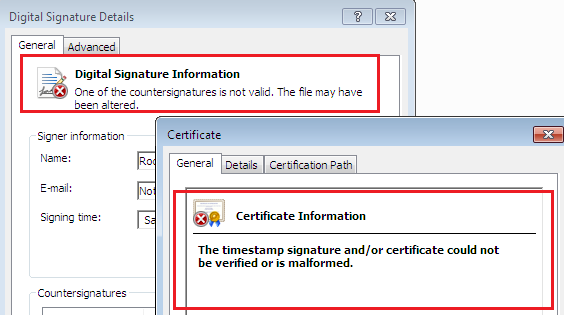
To manually install the updated certificate:
- In the ISO image, navigate to the Redist\RootCert folder.
- Right-click on verisign-univ.cer and click Install Certificate.
- Complete the steps in the installation wizard to successfully install the certificate.
Application Note First Identified Studio 5000 Logix Designer Version 24.00
When using Logix Designer application v24.00 and later to open a prior version .ACD file containing a module referenced by an instruction and also a program-scoped tag of the same name as the module, an “Invalid data type” error occurs during verification.
To work around this error, rename either the module or the tag and ensure all instructions correctly reference the module.
Copyright © 2026 Rockwell Automation, Inc. All rights reserved.
Rockwell Automation, Allen-Bradley, and FactoryTalk are trademarks of Rockwell Automation, Inc.
To view a complete list of Rockwell Automation trademarks please click here.
Trademarks not belonging to Rockwell Automation are property of their respective companies.