
Release Notes
( 9324-RLDx ) Studio 5000 programming software. All you need for discrete, process, batch, motion, safety etc.
Version 29.00.01 (released 8/2016)
Catalog Number Studio 5000 Logix Designer
Security
This release includes security enhancements as a part of our ongoing efforts to improve security. For information regarding Rockwell Automation's vulnerability disclosure process, please reference the Rockwell Automation Vulnerability Policy.
Access Denied dialog box does not appear when users without FactoryTalk Security access attempt to modify Motion Configuration (Lgx00184951)
Studio 5000 Logix Designer v29.00
Corrected Anomaly with Studio Logix Designer v30.00
When a user without Motion: Modify Configuration security credentials attempts to modify the motion configuration, an Access Denied dialog box does not appear.
Requirements
This release has the following requirements.
System Requirements Installation notes for Studio 5000 Logix Designer version 29
Review these notes before attempting to install this version of the Studio 5000® environment.
Prior to Installation
Keep the following considerations in mind before you install the Studio 5000 environment.
- Be certain that no copies of Logix Designer application or RSLogix 5000 software are currently running.
- Some antivirus software blocks or disrupts the Studio 5000 environment installation. If you experience difficulty, try disabling your antivirus software before installation and re-enable it after you install the Studio 5000 environment.
- Make sure that you have Administrator privileges on the personal computer on which you want to install the Studio 5000 environment. You will not be able to complete the installation without these privileges.
- Close all other applications before running the setup process.
- Ensure that there are no pending workstation reboot requests from either Windows Update or any installation program. If there is a pending request, reboot the workstation before starting the Studio 5000 environment installation.
- The Logix Designer application has an optimized EDS subsystem. While this provides significantly better installation time, it can cause some compatibility issues with other software packages. The following list shows some of these incompatibilities.
-
- Logix Designer application v21 and later
- RSNetWorx v25 and later
- RSLinx v3.51 and later
- Add-On Profiles using Core 9.0 and later
- DeviceNet Tag Generator
|
Important:
|
During the installation of Logix Designer application, the installation stops
and a dialog box opens if an incompatible version of RSNetWorx software
is detected on the PC. Upgrade RSNetWorx software to version 21 or
later or uninstall it from your PC, and restart the Studio 5000 environment
installation.
|
Installing the Software
Follow these steps to install the Studio 5000 environment.
- Start your personal computer.
- Insert the Studio 5000 environment installation DVD into your DVD-ROM drive.
- The DVD-ROM should auto-start. If it does not auto-start, run Setup.exe from the root of the DVD.
- The Studio 5000 environment supports multiple versions of the programming software on a single personal computer. With version 10 and later of the application, you may install as many of the later major versions as needed plus one version earlier than version 10 (for example, version 8.02).
- Follow the directions that appear on your screen.
- Note that the Studio 5000 environment may need to update several system files early in the installation process. These updates will likely require you to restart your personal computer. Be sure to close all other applications before clicking OK to initiate this reboot.
- When prompted for a serial number, enter the 10-digit serial number identifying your software license; otherwise, enter any sequence of characters, not longer than 10 characters.
|
Important:
|
The 10-digit serial number is used to determine what functionality to
enable while in Grace Period mode. Entering an invalid serial number will
result in the application operating in Service Edition mode, upload and
download only, while in Grace Period mode.
|
- When prompted, click Activate Studio 5000 to complete the activation of the software.
- Follow the directions that appear on your screen and refer to the FactoryTalk Activation insert for additional information.
|
Important:
|
When a valid activation cannot be located by the application, the
application will enter a seven-day activation grace period, during which
you will be able to run the application with full functionality. If this
seven-day grace period ends before a valid activation has been found,
you will no longer be able to start the Logix Designer application.
|
- Click Close to complete the installation.
When the setup utility finishes, an entry for the Studio 5000 environment appears in the program list in the Rockwell Software group.
- Remove the Studio 5000 environment DVD from the DVD-ROM drive and store it in a safe place.
Starting the Studio 5000 Environment
To start the Studio 5000 environment, from the Start menu, choose All Programs>Rockwell Software>Studio 5000 from the menu.
If Studio 5000 environment does not start up or run properly, keep the following in mind:
- Do you have the correct version of RSLinx Classic software installed? RSLinx Classic software provides communication between the controller and your personal computer.
- Does your computer have enough memory? Running the Studio 5000 Engineering and Design Environment requires a minimum of 4 GB of RAM.
Uninstalling the Software
Follow these steps to uninstall the software when using the default Start menu on the Windows 7, Windows 8, Windows Server 2008R2, or Windows Server 2012 operating system.
- From Windows Explorer, navigate to Control Panel\Programs\Programs and Features.
- From this dialog box, double-click Studio 5000 Logix Designer <version>, and follow the prompts to uninstall.
- If all Studio 5000 Logix Designer <version> applications have been uninstalled, from this dialog box, double-click Studio 5000 Launcher, and follow the prompts to uninstall.
|
Tip:
|
This will uninstall only the Studio 5000 environment. Other components that were installed
with the Studio 5000 environment (such as Start Page Media, Online Books, or RSLinx)
must be uninstalled separately.
|
System Requirements Software requirements for Studio 5000 Logix Designer version 29.00
Operating system and service pack compatibility:
- This version of the Logix Designer application has been tested on the following
operating systems:
- Microsoft® Windows® 7 Professional (64-bit) with Service Pack 1
- Microsoft 7 Home Premium (32-bit) with Service Pack 1
- Microsoft Windows Server 2008 R2 Standard Edition with Service Pack 1
- Microsoft Windows 8 Professional (64-bit)
- Microsoft Windows 8.1 Professional (64-bit)
- Microsoft Windows Server 2012 Standard Edition (server version of Windows 8)
|
Important:
|
While the Windows 8 and Windows 8.1 operating systems run on
many touch-enabled devices, various features of the Logix
Designer application may not be touch-enabled. Most functions
are expected to work with touch, but the software has only been
tested with a keyboard and mouse.
|
- This version of Logix Designer is expected to operate correctly on all other editions
and service packs of the following operating systems but has not been tested:
- Microsoft Windows 7
- Microsoft Windows Server 2008 R2
- Microsoft Windows 8
- Microsoft Windows Server 2012
- Microsoft Windows Server 2012 R2
|
Important:
|
Logix Designer application may fail to launch if the Microsoft
Windows 10 operating system is installed on your personal
computer.
|
The Start Page requires the Adobe Flash Player ActiveX Control to be installed prior to operation of the Start Page.
The Adobe Flash Player ActiveX Control can be downloaded from Adobe’s website at: http://get.adobe.com/flashplayer/
|
Note:
|
For Windows 8 (and later), the Start Page will
work because those versions of Windows have
flash integrated.
|
For operating systems that support User Account Control (UAC), this version of the Logix Designer application was tested with UAC set to the most restrictive level (Always notify for Windows 7). This version of the Logix Designer application is also expected to operate correctly when UAC is configured for any less restrictive setting.
Running the Logix Designer application in conjunction with Fast-User Switching, in Safe mode, or via Remote Desktop is not supported.
Additional Software Product Considerations
- Certain operations related to Factory Talk Security are slower on Windows 7 then
they are on Windows 8.
- Importing or Exporting a FactoryTalk Services Platform secured project
- Securing a controller or a component of a controller with logical name or permission set
- Clicking the Security tab in the Controller Properties dialog box.
- FactoryTalk Services Platform is required to run this version of the Logix Designer application, as it performs some security functions in the Logix Designer application.
- RSLinx Classic communication software is required as part of the installation of the Logix Designer application, as it handles online communication with controllers.
- RSLinx Classic v3.80.00 is a component aligned to Logix Designer v28.01. RSLinx
Classic v3.80.00 (CPR9 Service Release 8) has been tested, and is compatible,
with the following products:
- FactoryTalk Services Platform v2.80.00
- RSLinx Enterprise v5.80.00
- RSNetWorx v25.00.00
- FactoryTalk Activation Manager v4.00.00
- RSLinx Classic v3.80.00, Logix Designer application v28.01, and device profiles
that ship with the Logix Designer application v28.01 are not compatible with:
- RSNetWorx v11.00.00 or earlier
- DeviceNet Tag Generator v11.0.20.0
- FactoryTalk View SE software and RSLinx Enterprise communication software are not required to install the Logix Designer application; however, these products are required in order to fully use the alarm capabilities introduced with RSLogix 5000 v16.
- Microsoft .NET Framework 4 Language Pack is required to show the localized resources for the components developed by .NET for supported languages of the Logix Designer application v21 and later. You need to download and install Microsoft .NET Framework 4 Language Pack or later on the computer in which the Logix Designer application local language is installed.
- Be sure to check the software requirements for other Rockwell Software® products that you intend to install to be sure that these products are also compatible with the system.
Cross Product Revision Interaction
Before performing this upgrade, note that Logix5000 controllers and ControlLogix Motion modules in your system must contain a revision of firmware that is compatible with this version of the Logix Designer application. However, earlier versions of network and I/O modules can operate in your system with the new controller firmware contained in this release. Additionally, other software tools such as RSNetWorx for ControlNet and RSLinx Classic software have been tested to be sure of compatibility with this version of software. Because of this, we recommend that you use the most current versions of these tools.
Rockwell Automation’s Product Compatibility and Download Center (PCDC) provides product-related downloads including firmware, release notes, associated software, drivers, tools and utilities. Use the PCDC to determine how different products interact and to compare features and capabilities between different series of products and associated firmware versions.
Use the following URL to browse to the PCDC:
Most of the modules supported by the Logix Designer application use Flash-ROM for the storage of firmware. If you possess a module that requires a firmware change, the ControlFLASH software tool can be used to perform an update to this Flash-ROM. This software tool and the firmware images for most of the supported modules are contained on a DVD-ROM shipped with Rockwell Software Studio 5000 Automation Engineering & Design Environment™. Starting with version 10.00.00 of the application, you can access the ControlFLASH tool from within the application (from the Tools menu), or you can automatically update your firmware as part of the project download process.
For additional information and assistance in performing a Flash-ROM update, review the ControlFLASH Firmware Upgrade Software User Manual, publication 1756-UM105.
In addition, Rockwell Automation Services & Support has created a website from which you can download firmware images for Logix products. Go to http://www.rockwellautomation.com/rockwellautomation/support/firmware/overview.page? for a list of popular firmware and other downloads, and to view firmware compatibility for a given product. Your Logix Designer application serial number is required to complete the download. .
Firmware for ControlLogix Redundancy
The firmware associated with this standard release version of the programming software does not support redundancy. Software versions 8, 11, 13, 15, 16, 19, 20, and 24 support redundancy, but a separate firmware revision for the hardware in the local chassis is required. The redundancy firmware revisions are released later than the standard revisions are released and are available for download via the same methods as for standard firmware. Go to http://www.rockwellautomation.com/rockwellautomation/support/firmware/overview.page? for a list of popular firmware and other downloads, and to view firmware compatibility for a given product. Your programming software serial number is required to complete the download.
Separately Installed I/O Configuration Profiles
With version 13 and later of the application, new I/O configuration profiles can be delivered independently from the application's release. These profiles can be obtained independently and installed on a personal computer with the application to extend the I/O configuration support beyond the capabilities initially supported when the application was released. This capability was initially limited to a single I/O platform, but with each new release, new I/O platforms are added. If you are using one of the supported platforms and the configuration profile for a specific product was not included with the application, check with the module or device vendor to determine if one is available. Additionally, I/O configuration profiles for modules or devices from Rockwell Automation are generally provided with the application. However, at times, a module or device configuration profile may not be completed in time to make a release. In these instances, the I/O configuration profiles will be made available via the Rockwell Automation Services & Support website http://www.rockwellautomation.com/global/support/downloads.page? The following table provides a listing of versions of the application and their respective ability to support the field addition of I/O configuration profiles.
|
I/O Platform
|
I/O Profile Communication
Methods Supported
|
Logix Designer/
RSLogix 5000 Version |
|
Compact I/O™ (1769)
|
Local to CompactLogix
|
13.00 or later
|
|
CompactBlock™ Guard I/O™
(1732, 1791DS)
|
DeviceNet
|
14.00, 16.00 or later
|
|
CompactBlock Guard I/O
(1791ES)
|
EtherNet/IP
|
16.00 or later
|
|
EtherNet/IP (1746-SLC IO)
|
EtherNet/IP
|
20.00 or later
|
|
POINT I/O™ (1734)
|
ControlNet, EtherNet/IP
|
15.00 or later
|
|
ArmorPOINT® I/O (1738)
|
ControlNet, EtherNet/IP
|
15.00 or later
|
|
PointGuard I/O (1734)
|
EtherNet/IP
|
17.00 or later
|
|
ControlLogix (1756)
|
Local, ControlNet,
EtherNet/IP
|
15.00 or later
|
|
ControlNet Direct Connect
|
ControlNet
|
15.00 or later
|
|
EtherNet/IP Direct Connect
|
EtherNet/IP
|
15.00 or later
|
|
CompactLogix™ I/O (5069)
|
EtherNet/IP
|
28.00 or later
|
New devices supported
|
Catalog number
|
Description
|
Vendor
|
|
Emulate 5570
|
Studio 5000 Logix Emulate Controller
|
Rockwell Automation
|
|
Bus module
|
Bus module Ethernet/IP interface card
|
Advanced Energy Industries,
Inc.
|
|
Thyro-P
|
Thyro-P Ethernet/IP interface card
|
Advanced Energy Industries,
Inc.
|
|
1734-VA11-2
|
2 Point 11mm Valve
|
Buerkert Werke GmbH & Co.
KG
|
|
1734-VA11-8
|
8 Point 11mm Valve
|
Buerkert Werke GmbH & Co.
KG
|
|
1734-IA11-2
|
2 Point 11mm Bi Valve
|
Buerkert Werke GmbH & Co.
KG
|
|
1734-VA16-2
|
2 Point 16mm Valve
|
Buerkert Werke GmbH & Co.
KG
|
|
1734-VA16-4
|
4 Point 16mm Valve
|
Buerkert Werke GmbH & Co.
KG
|
|
1734-IA16-2
|
2 Point 16mm Bi Valve
|
Buerkert Werke GmbH & Co.
KG
|
|
1734-VA11-3
|
3 Point 11mm Valve
|
Buerkert Werke GmbH & Co.
KG
|
|
1734-IA11-8
|
8 Point 11mm Bi Valve
|
Buerkert Werke GmbH & Co.
KG
|
|
SWG70
|
Ethernet/IP Wireless HART Fieldgate
|
Endress+Hauser
|
|
HMS-EN2SE-R
|
Ethernt to Serial linking device
|
HMS Industrail Networks AB
|
|
IB-E01
|
2 Zone controller (standard)
|
Itoh Denki Co., Ltd.
|
|
IB-E03B
|
2 Zone controller (standard)
|
Itoh Denki Co., Ltd.
|
|
IB-E04F
|
2 Zone controller (standard)
|
Itoh Denki Co., Ltd.
|
|
1407-CGCM-DLR
|
Combination Generator Control Module, 2-port
|
Rockwell Automation
|
|
1756-IT16
|
16-channel non-isolated thermocouple analog
input
|
Rockwell Automation
|
|
1756-IR12
|
12-channel non-isolated RTD analog input
|
Rockwell Automation
|
|
5069-L306ER
|
CompactLogix 5380 controller
|
Rockwell Automation
|
|
5069-L306ERM
|
CompactLogix 5380 controller
|
Rockwell Automation
|
|
5069-L310ER
|
CompactLogix 5380 controller
|
Rockwell Automation
|
|
5069-L310ERM
|
CompactLogix 5380 controller
|
Rockwell Automation
|
|
5069-L310ER-NSE
|
CompactLogix 5380 controller
|
Rockwell Automation
|
|
5069-L320ERM
|
CompactLogix 5380 controller
|
Rockwell Automation
|
|
5069-L330ER
|
CompactLogix 5380 controller
|
Rockwell Automation
|
|
5069-L330ERM
|
CompactLogix 5380 controller
|
Rockwell Automation
|
|
5069-L340ER
|
CompactLogix 5380 controller
|
Rockwell Automation
|
|
1756-L81E
|
ControlLogix 5580 controller
|
Rockwell Automation
|
|
1756-L82E
|
ControlLogix 5580 controller
|
Rockwell Automation
|
|
1756-L84E
|
ControlLogix 5580 controller
|
Rockwell Automation
|
|
1426-M5E-A
|
PowerMonitor 5000 M5
|
Rockwell Automation
|
|
1426-M5E-DNT-A
|
PowerMonitor 5000 M5 with DeviceNet card
|
Rockwell Automation
|
|
1426-M5E-CNT-A
|
PowerMonitor 5000 M5 with ControlNet card
|
Rockwell Automation
|
|
1426-M6E-A
|
PowerMonitor 5000 M6
|
Rockwell Automation
|
|
1426-M6E-DNT-A
|
PowerMonitor 5000 M6 with DeviceNet card
|
Rockwell Automation
|
|
1426-M6E-CNT-A
|
PowerMonitor 5000 M6 with ControlNet card
|
Rockwell Automation
|
|
1426-M8E-A
|
PowerMonitor 5000 M8
|
Rockwell Automation
|
|
1426-M8E-DNT-A
|
PowerMonitor 5000 M8 with DeviceNet card
|
Rockwell Automation
|
|
1426-M8E-CNT-A
|
PowerMonitor 5000 M8 with ControlNet card
|
Rockwell Automation
|
|
ETHERNET-SAFETY-
STANDARD-MODULE
|
Generic Ethernet/IP safety and standard module
|
Rockwell Automation
|
Electronic Data Sheets
- Connect the device to the computer.
- Open RSLinx Classic, and browse for the device in RSWho.
- Once you find the device, right-click it, and select Upload EDS file from device.
Hardware requirements for Studio 5000 Logix Designer version 29
The personal computer must meet these minimum requirements. Using a computer meeting or exceeding the recommended characteristics will improve performance.
|
Characteristic
|
Minimum
|
Recommended
|
|
Processor
|
Intel® Core 2 Duo at 2.8 GHz
|
Intel Core i5 at 2.4 GHz
|
|
RAM Memory
|
4 GB
|
8 GB
|
|
Hard Disk Space
|
16 GB free
|
20 GB free
|
|
Graphics Device
|
DirectX 9, with WDDM 1.0 or
higher driver
|
DirectX 9, with WDDM 1.0 or
higher driver
|
Features
This release includes the following system features.
Controller Message to Self Addition
In the v29.00 release of Logix Designer, a Message instruction can be configured to perform a message to the controller itself by using "THIS" in the path for the MSG (Message to Self) instruction.
The following table lists functions that a controller can perform on itself.
|
Function
|
5580 controllers
|
5380 controllers
|
|
LCD disable for 5380 and
5580 controllers
|
See Knowledgebase article KB869648.
| |
|
Disable the embedded
webpage
|
See Knowledgebase
article KB869649.
|
See Knowledgebase article
KB869651.
|
|
Disable the embedded
Ethernet port
|
See Knowledgebase
article KB869650.
|
See Knowledgebase article
KB869652.
|
Click the following URL to browse to the Rockwell Automation Knowledge Base:
https://rockwellautomation.custhelp.com/app/answers/list
Powerflex 755
The Powerflex 755 feature development adds 24-Bit Resolution capability to supported feedback devices and Servo I/O support for Powerflex 755 CIP Motion drives. The 755 CIP Motion drives have also been updated to accept new 11 and 22 Series servo I/O cards that should be placed in slot 7.
Dual configurable Ethernet ports
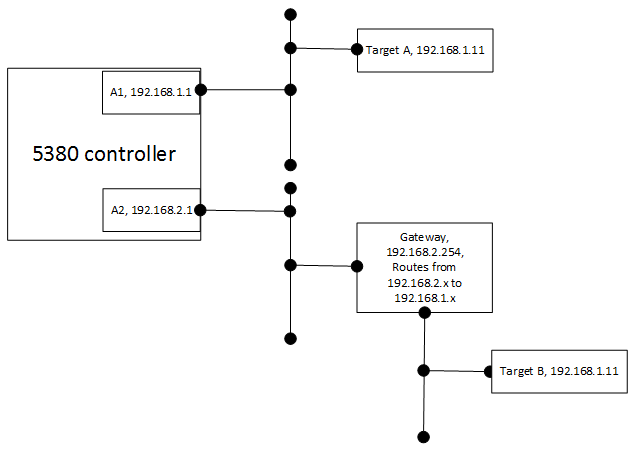
Controllers such as the CompactLogix 5380 support dual configurable Ethernet ports. Dual configurable Ethernet ports allow pairs of physical Ethernet ports to be configured in either a Linear/DLR or Dual-IP mode. When configured for Linear/DLR mode, both Ethernet ports reside on the same Ethernet network and share IP settings. When configured for Dual-IP mode, both Ethernet ports reside on a different Ethernet network with their own IP settings.
Support for PanelView 5000 HMI Button Control
The 5x80 family of controllers now supports HMI button control for the PanelView 5000. The new HMIBC instruction interacts with the HMI and provides the following benefits:
- Reduces lag and improved accuracy for manual jog operations.
- Provides greater flexibility than physical buttons with comparable performance.
- Eliminates the need for custom logic to verify active communications.
Instruction-based alarm support
Instruction-based alarms (ALMA, ALMD) are supported on the 5x80 family of controllers in this release.
String Literals
String literal is the representation of a fixed string value within Logix Designer programming languages. Use the string literal feature to assign string literals to a string tag, or assign a string tag to another string tag in the following editors: Structured Text, Ladder Logic, and embedded Structure Text within Sequential Function Chart. This feature is available for the 5x80 family of controllers only.
Kinetix 5700-VPC motor support
The Logix Designer application supports selection, configuration, and control of Rockwell Automation's new Kinetix VPC motors with Interior Permanent Magnet (IPM) technology.
Controller Properties updates
- Improved controller capacity calculation
- Memory tab has been renamed
- Node Count indication
Corrected Anomalies in This Release
This release corrects the following anomalies.
Find All command fails to find tag names embedded in Structured Text (Lgx00168112)
Anomaly
Studio 5000 Logix Designer v27.00
The Find All command fails to find tag names embedded in Structured Text. (Lgx00168112)
Project containing AOIs fails to download to a safety controller on second attempt (x168232)
Anomaly
Studio 5000 Logix Designer v27.00
A project containing an Add-On Instruction downloads with errors under the following conditions:
- The project is downloaded to a safety controller with the Download Project Documentation and Extended Properties check box unselected.
- The project is uploaded from the controller and the Logix Designer application is taken offline from the controller.
- When offline, the project is downloaded to the safety controller again with the Download Project Documentation and Extended Properties check box unselected, and the following error occurs:
Invalid signature ID. Reseal instruction to resolve. (x168232)
Logix Designer fails to set a default value for ProgrammaticallySendEventTrigger (x168499)
Anomaly
Studio 5000 Logix Designer v27.00
When a project is imported, Logix Designer fails to set a default value for ProgrammaticallySendEventTrigger and the import fails. (Lgx00168499)
Import Configuration Error pane fails to display expected errors and warnings (Lgx00163240)
Anomaly
Studio 5000 Logix Designer v27.00
The Errors and Warnings pane on the Import Configuration dialog box sometimes fails to display expected errors. (Lgx00163240)
Fatal error occurs when deleting uncommitted row in Connection Configuration dialog box
Studio 5000 Logix Designer v28
When working with a program parameter in the Connection Configuration dialog box, if your cursor is in the Name field and you press the Shift +Tab keys to select the entire row and then press the Delete key to delete the row, a fatal error occurs. (Lgx00170925)
Performance problems during various security actions related to Wibu on Windows 7
Known Anomaly First Identified in Studio 5000 Logix Designer v28
Corrected Anomaly with Studio 5000 Logix Designer v29.00 and v28.02
The Logix Designer application can take from 18 to 20 seconds to respond when a project is secured at the controller level with the Logical Name option or the Permission Set option in the Controller Properties dialog box Security tab. This performance issue can be experienced when working with the properties of secured components and when editing permissions in FactoryTalk Service Platform. These performance issues have been traced to Wibu performance on Windows 7. (Lgx00175521, Lgx00171830)
Rung comments in a safety project do not get downloaded to the controller. (Lgx00177998)
Issue with alias of string arrays (Lgx00179379)
Corrected Anomaly with Studio 5000 Logix Designer v28.01
When a string is aliased to another string which is a member of a string array, the string values are inserted only in even number indices. (Lgx00178379)
Add On Instruction with multiple Inputs with the same variable has one instance with the wrong value (Lgx00178841, Lgx00178900)
Corrected Anomaly with Studio 5000 Logix Designer v28.01
When an Add-On Instruction is called in a periodic task and the Add-On Instruction has multiple Inputs with the same variable, one instance of input has a value of 0 instead of 1. (Lgx00178841, Lgx00178900)
Alias bit is not updated (Lgx00180466)
Corrected Anomaly with Studio 5000 Logix Designer v28.01
An alias bit is not updated in the same rung in a project using the ControlLogix 5580 controller. (Lgx00180466)
A JSR instruction with SBR instruction and RET instruction does not pass back data thru the RET correctly (Lgx00181341)
Corrected Anomaly with Studio 5000 Logix Designer v28.01
When using a JSR instruction with the SBR instruction (to pass parameters to the routine) and the RET instruction (to pass parameters from the routine) under certain data type formats, the data is not fully passed back thru the RET correctly. This occurs when then the RET contains a 1 dimensional member UDT. See Rockwell Automation Knowledgebase Tech Note #824690. (Lgx00181341)
Fatal error while searching for text in an Equipment Sequence diagram. (Lgx00177916)
Corrected Anomaly with Studio 5000 Logix Designer v28.01
A fatal error can occur when using the Find dialog box to search for text in an Equipment Sequence diagram. (Lgx00177916, Lgx00177497)
Import secured and bound L5k file, always displays warning that PAS out of date (Lgx00182839)
Corrected Anomaly with Studio 5000 Logix Designer v28.01
Importing an L5K file that is secured and bound, Logix Designer application displays a warning message that the Primary Action Set (PAS) is out of date. (Lgx00182839)
When an AOI that was sealed in a project that used a specific documentation language (English, for example) is imported into a project where the documentation language is different (Italian, for example), the project cannot be verified. (Lgx00177571)
Important: As a result of a correction of this anomaly, AOI signatures that were signed in a previous version of RSLogix 5000 or Studio 5000 Logix Designer will break upon import or project conversion into version 29.00 of Studio 5000 Logix Designer. You must un-seal and then re-seal each AOI to get a new signature.
Corrected Anomaly with Studio 5000 Logix Designer v29.00, v24.02
Module Info page shows wrong string (Lgx00006004)
Corrected Anomaly with Studio 5000 Logix Designer v29.00
When the internal state attribute in the Device Identity object is 0, the Module Info page shows the string "Self-Test," but it should display "Self Test or State Unknown." (Lgx00006004)
CodeMeter installation sometimes fails (Lgx00179433)
Corrected Anomaly with Studio 5000 Logix Designer v29.00
Find All search limited to Edit Zones produces incorrect results (Lgx00139950)
Corrected Anomaly with Studio 5000 Logix Designer v29.00
GCC Compile Error occurs when project contains ALMA instructions in FBD routine (Lgx00137675)
Corrected Anomaly with Studio 5000 Logix Designer v29.00
Go To dialog context varies within FBD Editor (Lgx00143603)
Corrected Anomaly with Studio 5000 Logix Designer v29.00
The Go To dialog context varies within the Function Block Diagram (FBD) Editor. (Lgx00143603)
Remove Alarm Buffer object from GSV/SSV instructions (Lgx00138886)
Corrected Anomaly with Studio 5000 Logix Designer v29.00
Remove the Alarm Buffer object from the GSV/SSV instructions. (Lgx00138886)
Enhanced Cam Editor not fully disabled even when Maintain Project permission has been denied (Lgx00029563)
Corrected Anomaly with Studio 5000 Logix Designer v29.00
The Enhanced Cam Editor is not fully disabled even when Maintain Project permission has been denied for the user. (Lgx00029563)
Size of .ACD file increases following download using v21.03 (Lgx00157573, Lgx00152925)
Corrected Anomaly with Studio 5000 Logix Designer v29.00
The size of an .ACD file increases dramatically following download using Logix Designer version 21.03. (Lgx00157573, Lgx00152925)
Firmware cannot be updated after licensed connection key has been revoked (Lgx00168994, Lgx00169634, Lgx00156630)
Corrected Anomaly with Studio 5000 Logix Designer v29.00
When the controller contains firmware that has revoked the licensed connection key for older revisions of software, those older revisions of software cannot establish a connection with the controller in order to flash the controller back to a compatible revision of firmware. (Lgx00168994, Lgx00169634, Lgx00156630)
EDS AOP feature reports error when device is added with configuration data type smaller than configuration values (Lgx00154242)
Corrected Anomaly with Studio 5000 Logix Designer v29.00
The EDS AOP feature reports an error when you add a device for which the configuration data type is smaller than the configuration values. (Lgx00154242)
Check box in Select Module Type dialog box misplaced in 150% resolution (Lgx00128244)
Corrected Anomaly with Studio 5000 Logix Designer v29.00
The check box in the Select Module Type dialog box is misplaced in 150% resolution. (Lgx00128244)
Safety modules fail to instantiate after installation of Ethernet module AOP profile 10.00.3664 (Lgx00170167)
Corrected Anomaly with Studio 5000 Logix Designer v29.00
Fatal error occurs when the trend configuration changes (Lgx00182252)
Corrected Anomaly with Studio 5000 Logix Designer v29.00 and v28.02
Empty Action body while editing a Sequential Function Block routine online (Lgx00178412)
Corrected Anomaly with Studio 5000 Logix Designer v29.00
Stop Action nomenclature misleading on CIP Actions tab (Lgx00165639, Lgx00146859)
Corrected Anomaly with Studio 5000 Logix Designer v29.00
Alias tag definitions sometimes lost during simultaneous online edits on same controller (Lgx00171058)
Corrected Anomaly with Studio 5000 Logix Designer v29.00, v28.02, and v24.02
Copy-paste errors on Function Block instructions and Add-On Instructions in Function Block routines (Lgx00182706, Lgx00182837)
Corrected Anomaly with Studio 5000 Logix Designer v29.00
Invalid characters in exported XML project file causes import to fail (Lgx00172128)
Corrected Anomaly with Studio 5000 Logix Designer v29.00
Change button sometimes missing from Module Properties dialog box (Lgx00175573)
Corrected Anomaly with Studio 5000 Logix Designer v29.00
Tool tip for undefined tag in Ladder Editor needs improvement (Lgx00176367)
Corrected Anomaly with Studio 5000 Logix Designer v29.00
Commissioning tests stay in testing phase and do not complete (Lgx00177511)
Corrected Anomaly with Studio 5000 Logix Designer v29.00
Project documentation, extended properties, and custom properties not included when copy-pasting project components from one language-switching project to another (Lgx00162447)
Corrected Anomaly with Studio 5000 Logix Designer v29.00
Position Unwind not calculated correctly on Axis Parameter List dialog box (Lgx00179155)
Corrected Anomaly with Studio 5000 Logix Designer v29.00
Project containing Add-On Instructions fails to download to safety controller on second attempt (Lgx00168232)
Corrected Anomaly with Studio 5000 Logix Designer v29.00
Errors and Warnings pane on Import Configuration dialog box sometimes fails to display errors (Lgx00163240)
Corrected Anomaly with Studio 5000 Logix Designer v29.00
Creating alias for Cam, Cam Profile, or Output Cam tag generates error (Lgx00180076, Lgx00180235, Lgx00186575)
Corrected Anomaly with Studio 5000 Logix Designer v29.00, v28.02, and v30.00
Infinite loop sometimes prevents import of L5X file (Lgx00179816)
Corrected Anomaly with Studio 5000 Logix Designer v29.00 and v28.02
Logix Designer fails to set default value for ProgrammaticallySendEventTrigger and import fails (Lgx00168499)
Corrected Anomaly with Studio 5000 Logix Designer v29.00
Add instruction error code 111, "An Axis With Maximum Acceleration of Zero is Invalid" (Lgx00179479)
Corrected Anomaly with Studio 5000 Logix Designer v29.00
Counts are incorrect for Current Range selections on Configuration tab in Module Properties Report dialog box (Lgx00153764)
Corrected Anomaly with Studio 5000 Logix Designer v29.00
Core and first-party Add-On Profiles contain invalid version numbers (Lgx00172292, Lgx00156346)
Corrected Anomaly with Studio 5000 Logix Designer v29.00
Increase Add-On Instruction InOut parameter limit to 64 and decrease AOI nesting levels to 16 (Lgx00181291)
Corrected Anomaly with Studio 5000 Logix Designer v29.00
Handling of Source Key names is different in v28 project than in a v24 project (Lgx00179531)
Corrected Anomaly with Studio 5000 Logix Designer v29.00
When you lock a safety task and generate a signature, Logix deletes all comments in safety task (Lgx00177873, Lgx00177995)
Corrected Anomaly with Studio 5000 Logix Designer v29.00, v24.02
Guest Users cannot flash 1756-L7x controller firmware using Autoflash (Lgx00183696)
Corrected Anomaly with Studio 5000 Logix Designer v29.00
Creating new project in v26 and adding CIP drive to the I/O structure causes project to fail to download (Lgx00168210, Lgx00179057)
Corrected Anomaly with Studio 5000 Logix Designer v29.00
Safety Lock LED sometimes fails to show correct status after you restore project from SD card (Lgx00178417)
Corrected Anomaly with Studio 5000 Logix Designer v29.00
When a safety
locked application is restored from the SD card, the Safety Lock status
indicator on the controller remains off after the restore. The safety
application is locked, and if you go online with the Studio 5000 Logix
Designer® application, the Controller Properties Safety tab shows that the
Safety Application is locked. See Knowledgebase article 791814.
Controller serial number sometimes overwritten when loading project from SD card (Lgx00183376)
Corrected Anomaly with Studio 5000 Logix Designer v29.00
Passive hookup tests do not run when Kinetix 6200 drive is in Shutdown state (Lgx00183678)
Corrected Anomaly with Studio 5000 Logix Designer v29.00
Message dialog box for Add-On Profile time synch error should not contain Help button (Lgx00183837)
Corrected Anomaly with Studio 5000 Logix Designer v29.00
Removing SD card from controller while flashing firmware can lock up the controller (Lgx00170010)
Corrected Anomaly with Studio 5000 Logix Designer v29.00
Unable to import sealed Add-On Instructions when online with the controller (Lgx00185323)
Corrected Anomaly with Studio 5000 Logix Designer v29.00
Output data remains high for inhibited modules during testing (Lgx00177604)
Corrected Anomaly with Studio 5000 Logix Designer v29.00
Cannot overwrite existing Add-On Instruction when imported and existing AOIs have the same edit date (Lgx00183585)
Corrected Anomaly with Studio 5000 Logix Designer v29.00
String values sometimes inserted only in even number indices (Lgx00178120)
Corrected Anomaly with Studio 5000 Logix Designer v29.00
When a string is aliased to another string which is a member of a string array, the string values are inserted only in even-number indices. (Lgx00178120).
Clearing Enable Alarm check box does not disable High and Low alarms (Lgx00179379, Lgx00156945, Lgx00158243, Lgx00160986)
Corrected Anomaly with Studio 5000 Logix Designer v29.00
Clearing the Enable Alarm check box on the Alarm tab in the 1794-IF8IHNFXT Module Profile dialog box does not disable the High and Low alarms when Current Range is configured for 4 to 20 mA - Milliamps x 1000 (2000 to 22000). (Lgx00179379, Lgx00156945, Lgx00158243, Lgx00160986).
When two public parameters are aliased to same local program scoped tag Logix cannot find the tag (Lgx00175994)
Corrected Anomaly with Studio 5000 Logix Designer v29.00 and v28.02
When two public parameters are aliased to the same local program scoped tag, Logix cannot find the tag whose physical address is the tag that the second public parameter points to. (Lgx00175994, Lgx00184548).
Fatal error occurs when opening an Equipment Sequence diagram (Lgx00186631)
Corrected Anomaly with Studio 5000 Logix Designer v29.00.01
Fatal error occurs when opening an Equipment Sequence diagram. (Lgx00186631)
Known Anomalies in This Release
This release has the following known anomalies.
Studio 5000 Logix Designer v29.00
Corrected Anomaly with Studio 5000 Logix Designer v30.00
Follow these steps to correct the issue:
- Power down the controller.
- Disconnect the controller battery.
- Wait five minutes.
- Reconnect the battery.
- When the controller powers up, re-download the project.
Trend restarts from the beginning when Pause is clicked (Lgx00184775)
Studio 5000 Logix Designer v29.00
When you click Pause during trending, the trend sometimes starts over from the beginning. (Lgx00184775)
Cannot delete tag from Safety project (Lgx00184580, Lgx00184569)
Studio 5000 Logix Designer v29.00
Correct Anomaly with Studio 5000 Logix Designer v30.00
As a workaround, copy and paste the tag and then use the Delete option to remove the original tag from the program.
Link error sometimes occurs after new module has been created (Lgx00179911, Lgx00164891)
Studio 5000 Logix Designer v29.00
Corrected Anomaly with Studio 5000 Logix Designer v30.00
- A 5580 controller is configured in the I/O tree under Ethernet.
- The project contains a logic reference, such as a GSV or SSV instruction, to the deleted module.
Phase Manager and Sequence Manager sometimes show different phase states (Lgx00183769)
Studio 5000 Logix Designer v29.00
Instructions incorrect in Structured Text Editor when using drag-and-drop on more than one instruction (Lgx00184727)
Studio 5000 Logix Designer v29.00
Corrected Anomaly with Studio 5000 Logix Designer v30.00
When you copy instructions from the Ladder Editor to the Structured Text Editor using drag-and-drop, the instructions are incorrect in the Structured Text Editor when you copy multiple instructions at the same time. (Lgx00184727, Lgx00165518)
As a workaround, copy the instructions from the Ladder Editor to the Structured Text Editor by copying them one at a time.
Tag properties sometimes disappear from Properties pane for AOI tags (Lgx00184764, Lgx00184554)
Studio 5000 Logix Designer v29.00
Corrected Anomaly with Studio 5000 Logix Designer v30.00
When you update or insert a value for an Add-On Instruction tag and then click outside the Tag editor, the tag properties disappear from the Tag Properties pane. The tag properties reappear when you select the updated tag.
Standard tags mapped to safety tags sometimes cannot be edited in secure project (Lgx00184776, Lgx00184571)
Studio 5000 Logix Designer v29.00
Corrected Anomaly with Studio 5000 Logix Designer v30.00
Users attempting to edit a standard tag that is mapped to a safety tag in a secured project sometimes cannot edit the standard tag.
When FactoryTalk Security Modify Logic access is denied, FBD properties are sometimes inaccessible (Lgx00184895)
Studio 5000 Logix Designer v29.00
When Modify Logic access is denied but View Logic access is allowed in FactoryTalk security settings, users sometimes cannot open the Properties dialog box in the Function Block Diagram editor. (Lgx00184895)
As a workaround, select the FBD instruction and press Alt + Enter to open the Properties dialog box.
New FactoryTalk Security users sometimes fail to appear in FactoryTalk Security when Logix Designer is open (Lgx00184021, Lgx00184586)
Studio 5000 Logix Designer v29.00
Corrected Anomaly with Studio 5000 Logix Designer v30.00
When you add a new user in FactoryTalk Security while the Logix Designer application is open, the new user sometimes does not appear in FactoryTalk Security until you close the Logix Designer application.
Changing 5380 Controller EtherNet/IP Mode incorrectly modifies MSG path port (Lgx00184756)
Studio 5000 Logix Designer v29.00
Corrected Anomaly with Studio 5000 Logix Designer v30.00
When you change the Ethernet/IP Mode on a 5380 controller, the Logix Designer application sometimes incorrectly modifies the communication path for an MSG instruction.
Possible communication with wrong device on 5380 controller when changing Ethernet/IP Mode (Lgx00185070, Lgx00184949)
Studio 5000 Logix Designer v29.00
Corrected Anomaly with Studio 5000 Logix Designer v30.00

When converting CompactLogix 5380, CompactLogix 5480 and ControlLogix 5580 projects, Invalid hostDataTypeID can cause fatal error (Lgx00185197, Lgx00181352)
Studio 5000 Logix Designer v29.00
Correct Anomaly with Studio 5000 Logix Designer v30.00
When creating Event task, Event configuration list can show unexpected module tags (Lgx00179922, Lgx00162453)
Studio 5000 Logix Designer v29.00
Corrected Anomaly with Studio 5000 Logix Designer v30.00
Several object-backed tags can be incorrectly created as local tags (Lgx00183744, Lgx00182809)
Studio 5000 Logix Designer v29.00
Corrected Anomaly with Studio 5000 Logix Designer v30.00
- ALARM_DIGITAL
- ALARM_ANALOG
- HMIBC
- COORDINATE_SYSTEM
Low controller memory can prevent connection to the controller (Lgx00179908)
Studio 5000 Logix Designer v29.00
Changing Data Context for AOI does not change metadata context (Lgx00185356)
Studio 5000 Logix Designer v29.00
Controller displays incorrect date and time (Lgx00182342)
Studio 5000 Logix Designer v29.00
Corrected Anomaly with Studio 5000 Logix Designer v30.00
The controller sometimes displays an incorrect date and time: the year is displayed as a large number (for example, 586,384) and the month, day, and time are incorrect.
Safety Task Prevents Event Instruction from Triggering a Standard Task (Lgx00172306, Lgx00180423)
Corrected Anomaly in Firmware Revision 30.011 and Studio 5000 Logix Designer® v30.00
Known Anomaly First Identified in Version 20.013
Catalog Numbers GuardLogix® 5570
If a project uses an event instruction in the Safety Task to trigger a Standard Task, the instance number for that Standard Task is locked into the Safety Task once a Safety Signature is created.
If you re-download the application, the instance number for the Standard Task changes. This does not change the instance number that is already locked into the Safety Task. This can cause the Safety Task to prevent the event instruction from triggering the Standard task, a major non-recoverable fault on the controller, or the Standard Task to not execute correctly.
MGSD can cause Group Overlap faults in systems with large number of axes (Lgx00174272, Lgx00174469)
Studio 5000 Logix Designer v29.00
Corrected Anomaly with Studio 5000 Logix Designer v30.00
The Motion Group Shutdown (MGSD) instruction can cause a Motion Group Overlap fault when used in a project that contains a large number of axes and the Coarse Update Rate is set too low.
As a workaround, increase the motion group's coarse update rate.
Rungs missing in routine after online edit with Logix Designer (Lgx00196898, Lgx00200753, Lgx00201030)
Anomaly first identified in Studio 5000 Logix Designer v28
Studio 5000 Logix Designer v28, v29, v30
Corrected Anomaly in Studio 5000 Logix Designer v30.01, v28.03
If online changes are made to a ladder logic routine within a ControlLogix 5580 or CompactLogix 5380 controller and those changes are assembled or tested, and subsequently removed, all rungs within the routine may be removed when the Go Online command in Logix Designer application is used to initiate the edit.
The rungs appear as missing within the Logix Designer editor. Controller projects that have been online edited continue to operate as expected until the Go Online command is used and a subsequent download of the resulting project file is performed.
All of the following conditions must be met for this anomaly to occur:
- The routine must have been created using the Logix Designer ladder logic editor.
- Online edits occurred and edits have been assembled or tested.
- Edits made to a ladder routine have been removed through a cancel operation or re-editing the routine to back out changes that have been made such that the resulting routine has not changed.
- Open a file in Studio 5000 Logix Designer application that does not have the changes and use the Go Online command to connect to the edited controller, forcing correlation of the online version with the offline version.
If these conditions are met, when the affected routine is opened in the Logix Designer ladder logic editor, all rungs within that routine are missing and the number of rungs reported by the Controller Organization within Logix Designer is zero. If the affected routine is opened an empty rung is added and project validation fails. However, if the affected routine is not opened, project validation will pass and allow download of the application to the controller with the affected routine now missing all rungs within the controller.
Important - The rungs appear as missing within the Logix Designer ladder editor, but controller projects that have been online edited continue to operate as expected within the controller until downloaded.
For complete information, see Knowledgebase article 1063358: Product Notice 2017-10-002 Logix Designer Ladder Logic Editor Missing All Rungs in a Routine when Online with Correlation after Online Edits are removed in ControlLogix 5580 and CompactLogix 5380.
Known Anomalies from Previous Releases
These anomalies are from previous releases but are still known in this release.
Filter buttons missing when importing rungs into an AOI (Lgx00156489, Lgx00179907, Lgx00183130, Lgx00183131, Lgx00183132, Lgx00183133)
Anomaly
Studio 5000 Logix Designer v27.00
Corrected Anomaly with Studio 5000 Logix Designer v30.00
When you import rungs into an Add-On Instruction, the following filter options are missing when you click Final Name on the Configure Tag References pane of the Import Configuration dialog box:
• Input
• Output
• InOut
• Local Filter
Only the Show controller tags and Show program tags check boxes are available.
Output state user defined value must be 0 when Hold Last State is selected
Studio 5000 Logix Designer v28
A module fault on the 1758-OF8 of: (Code 16#0009) Module Configuration Rejected: Parameter error. Additional Fault Code 16#000e will remain in a fault state after a reset of the slot and when the OK LED is green. As a workaround, the Output State User Defined value must be set to 0 when Hold Last State is selected in the 1756-OF8 module. (Lgx00164117)
Functional Changes
This release has the following functional changes from the previous release.
Functional Changes in this release for Studio 5000 Logix Designer version 29
The following items explain changes that have been made in this or earlier releases in the way that the Logix Designer application works, compared to earlier releases.
Studio 5000 Logix Emulate
In version 29.00 of Studio 5000 Logix Designer, RSLogix 5000 Emulate software has been renamed to Studio 5000 Logix Emulate software. The catalog number has changed from Emulate to Emulate 5570.
Upload button removed from Studio 5000 Launcher
In version 29.00 of Logix Designer, the Upload button has been removed from the Studio 5000 launcher.
Controller Properties Project tab updates
The Download Project Documentation and Extended Properties check box and the Download Custom Properties check box are now on the Controller Properties Project tab. They are selected by default. Rockwell Automation recommends that you always download project documentation. See Download project Documentation and Extended properties in Application notes on page 1 for more information.
Changes to Add-On Instructions (AOI)
The following changes have been made to Add-On Instructions in this release:
- Signatures break for AOIs from earlier releases: As a result of the correction for anomaly Lgx00177571, when you use version 29.00 or later to open a project from a release earlier than version 29.00, the signature breaks for any AOI included in the project. In the same way, when you import an AOI from a project created in a release earlier than version 29.00, the signature breaks for that AOI. You must un-seal and then re-seal each AOI to get a new signature.
- Nesting limit: The nesting limit for AOIs in Logix Designer v29 has decreased from 25 levels deep to 16 levels.
- InOut parameters: The number of InOut parameters permitted within an AOI in Logix Designer v29 has increased from 40 to 64 InOut parameters.
Instruction behavior changes when replacing controllers
Behavior changes occur for some instructions when you replace a ControlLogix 5560 or ControlLogix 5700 controller with a ControlLogix 5580 controller, or replace a CompactLogix 5370 controller with a CompactLogix 5380 controller. Refer to the Replacement Guidelines: Logix5000 Controllers Reference Manual, publication 1756-RM100, for detailed considerations and explanations of the changes that you may have to make to your project when replacing controllers.
Firmware Supervisor with firmware in new DMK file format
In December 2015, firmware for modules may be provided in a new Device Management Kit (DMK) file format, for example, 1756-L73_28.011.dmk. Firmware Supervisor only supports firmware with the NVS and BIN file format.
To use Firmware Supervisor with hardware modules whose firmware is provided in a DMK file format, you must first extract the NVS and BIN files from the DMK file using the DMK Extraction Tool that is installed with ControlFLASH v13.00. Refer to the ControlFLASH online help for instructions on how to use the DMK Extraction Tool.
Controller Memory Changes
This revision of Logix5000 controllers may require more memory than earlier revisions. Before upgrading to this revision, check the amount of unused memory that you have in the controller using the Estimate tool on the Capacity tab of the Controller Properties dialog box.
- For additional information about controller memory issues refer to the Knowledgebase at: http://www.rockwellautomation.com/support/.
For the 5x80 family of controllers, the Capacity tab in the Controller Properties dialog box has been redesigned to show the size of the source code of your application rather than the physical memory the application uses to run. As a result, a new term ‘block’ has been defined that represents a unit of executable code.
The block units are only used for application source code sizes. Data structures and messages are still sized in bytes to support the design and implementation of communication interfaces with other devices.
For more information on migrating to a 5x80 controller, refer to the publication on the Literature Library, Replacement Guidelines: ControlLogix 5560/5570 Controller to ControlLogix 5580 Controller (1756-RM100).
Import/Export Changes
Import/Export Formats – Logix Designer application provides the following five different Import/Export file formats:
- Full project exported to an ASCII text file (.L5K)
- Full project exported to an Extensible Markup Language (XML) formatted file (.L5X)
- Tag definitions and program documentation exported to ASCII text files in a Comma Separated Value (.CSV) format
|
Tip:
|
For the v24.00, v26.00 and v27.00 releases, program parameter
connections are not included in the .CSV file.
|
- Tag definitions and program documentation exported to ASCII text files in a Tab Separated Value (.TXT) format
- Partial project exported to an Extensible Markup Language (XML) formatted file (.L5X)
Each of these formats is documented in Logix5000 Controllers Import/Export Reference Manual, publication 1756-RM084, which also describes modifications that can be made for backward compatibility of export format files.
Import/Export Major and Minor Revision – Beginning with the version 9.00 release, the Import/Export version number is interpreted as a Major Revision and a Minor Revision (major.minor). Each version of Logix Designer application exports *.L5K files with specific IE Version numbers. Logix Designer application imports any *.L5K file with the same Major Revision number and the same or lower Minor Revision number. The Major Revision is incremented when there is a significant change that affects compatibility with earlier versions. The Minor Revision is incremented whenever there is a change in the file format (for example, a new module, an attribute is added, or the set of options for an attribute is changed). Generally, the Minor Revision is incremented for each release.
The Import/Export version number for this version of Logix Designer application has been changed. If you export files (*.L5K) that were created in versions of RSLogix 5000 software with an Import/Export version number less than 2, and you attempt to import them in the latest version of the application, an error is generated. The error message is "Failed to open file *.L5K. Syntax error found while scanning the Import file." To work around the anomaly, edit the *.L5K file and change the line IE_VER := x.x;, where x.x may be 1.0, 1.1, or 1.2 to IE_VER := 2.11;, save the file and retry the import.
|
Release Version
|
Import/Export
Version
|
|
29.xx
|
2.20
|
|
28.xx
|
2.19
|
|
27.xx
|
2.18
|
|
26.xx
|
2.17
|
|
24.xx
|
2.15
|
|
23.xx
|
2.14
|
|
21.xx
|
2.12
|
|
20.xx
|
2.11
|
|
19.xx
|
2.10
|
|
18.xx
|
2.9
|
|
17.xx
|
2.8
|
|
16.xx
|
2.7
|
|
15.xx
|
2.6
|
|
14.xx
|
2.5
|
|
13.xx
|
2.4
|
|
12.xx
|
2.3
|
|
11.xx
|
2.2
|
|
10.xx
|
2.1
|
|
9.00
|
2.0
|
|
5.02
|
1.2
|
|
2.xx, 6.xx, 7.xx, 8.xx
|
1.1
|
|
1.21, 1.23
|
1.0
|
|
1.10, 1.11
|
0.4
|
Import or Paste Error Messages – When attempting to import or paste between versions, if the IE version is invalid, an error message is displayed in the results window. If the major or minor revision number is larger than accepted, the message "Error Line xxx: Invalid IE Version number. Cannot import/paste into older version of RSLogix 5000" is displayed. If the major revision number is smaller than accepted, the message "Error Line xxx: Invalid IE Version number. See Release Notes for more detail" is displayed.
Import/Export Format for Structured Text Routines – The Import/Export format for Structured Text routines was changed in version 12. The STX_ROUTINE and END_STX_ROUTINE delimiters were changed to ST_ROUTINE and END_ST_ROUTINE, respectively. Version 12 or later of the application continues to recognize the obsolete STX_ROUTINE when importing, but exports using the new format. Any attempt to Copy/Paste, Drag/Drop, or Import a version 12 or later Structured Text routine into version 11 software will fail.
Online Editing Views for SFC and ST – With the addition of online editing for SFC and ST in version 13, new LOGIC and END_LOGIC delimiters were added to identify Original, Pending Edits, and Test Edits views in the export file for the SFC and ST languages. These new delimiters are not recognized in older versions of RSLogix 5000 software, so version 13 or later generated .L5K files with SFC or ST online edits should not be imported into versions earlier than version 13.
Data Types and Keywords – If you are importing an older version project (earlier than version 11) you may get the error message "An error occurred while creating DATATYPE xxxx (One or more arguments invalid.)" for some user-defined data types. The likely cause of this error is the use of reserved keywords introduced in version 11 as data type names. Normally, user-defined data types that use keywords are renamed by appending a numeral. If an undefined data type is nested within another data type, it may be that the undefined data type uses a reserved keyword name and causes the error. To work around this anomaly, rename any undefined data types to non-keyword names.
Motion Axis Tags and Axis Object Attributes – In addition to the Import/Export changes described above, there have been many changes to motion axis tags and axis object attributes that result in warning messages when importing older version *.L5K files. These warning messages are in the format:
Warning: Line ###: An error occurred while setting attribute <name_of_attribute> of tag <name_of_axis_tag> (Couldn’t be found).
The same type of warning message is displayed if you import objects that previously accepted NA as values. In this release, the not applicable values are exported as <NA>.
Application Notes
This release has the following application notes.
The following information is provided to help you better understand the behavior of the Logix Designer application in other applications or under certain circumstances.
When an antivirus application is scanning the dynamic data of the CodeMeter CmActLicense, the Logix Designer application cannot access it. If access fails on multiple attempts, the CmActLicense becomes invalid, and you must restart the computer to clear the error. To avoid this error, consider adding the path for the CmActLicense (the default path is C:\ProgramData\CodeMeter\CmAct) to the antivirus application white list, or excluding the path from the virus scan.
To save changes to a component that is protected with License-Based Source Protection, a CmStick containing the required license must be plugged into the computer running the Logix Designer application.
Make sure you save your edits to a project before removing the CmStick containing the required license. If the license is not present or the license has expired, the Cancel/Retry dialog box appears requesting you to restore the CmStick and click Retry, or click Cancel to close Logix Designer application.
|
Important:
|
Leaving the Cancel/Retry dialog box open for a long period of time
causes Windows to display the Component of the Logix Designer
Application has stopped working dialog box. In this event, closing the
Logix Designer application is required resulting in loss of any unsaved
changes.
|
|
|
|
Non-alphanumeric characters in a STRING need an escape carriage
Phase Manager and SequenceManager not available on 5x80 family of controllers
To include or exclude project documentation and extended properties from a downloaded project, select or clear the Download Project Documentation and Extended Properties check box on the Controller Properties dialog box - Project tab.
Downloading project documentation and extended properties to the controller can significantly increase the amount of time it takes to download a project, especially if a project is heavily documented.
Keep the following considerations in mind when you clear Download Project Documentation and Extended Properties check box and download the project to the controller:
- Risk losing project documentation, extended properties and custom properties from the project.
- If extended properties are used in program logic, the download fails. An error in the Error tab states that you cannot access extended properties in logic when extended properties are not downloaded.
- Attempting to add logic to a routine to access extended properties in logic generates an error in the Error tab. The error states that you cannot access extended properties in logic when the extended properties are not downloaded.
- Rung comments and Sequential Function Chart and Function Block Diagram text
boxes no longer exist in the controller. Therefore, code comments are no longer
synchronized among multiple online workstations.
- During online editing of rungs, other workstations display only rung comments for rungs that exactly match the rung type for the comment in their offline database. For example, if Workstation 1 performs edits on a Normal rung, Workstation 2 will not display the rung comment while the rung is in any phase of editing or testing (for example, I/R pair). When the edits are assembled and the rung returns to a Normal rung, Workstation 2 will again display its rung comment.
- Performing online edits of any type on a Sequential Function Chart routine causes other workstations to lose their text box comments for that routine when the edits are accepted. For example, if Workstation 1 begins pending edits on a Sequential Function Chart routine and accepts those edits in any controller mode, when Workstation 2 processes those edits, all text boxes in the Sequential Function Chart routine will become blank, even if they were not modified as part of the edit. Canceling these edits will not restore the text box contents.
- Performing online edits on a Function Block Diagram routine in Program mode causes other workstations to lose their text box comments for that routine when the edits are accepted. This is the same behavior described for Sequential Function Chart routines. In Run mode, the contents are not lost when pending edits are accepted. They essentially become test edits, and will not be lost until those test edits are subsequently assembled. As in Sequential Function Chart routines, canceling these edits will not restore the text box contents.
A limited number of events that report updates to input and output parameters of data type STRING can be generated at the same time.This affects the generation of events:
- Recording initial values of sequencing parameters
- Recording step input data passed from a sequence to a phase
- Recording phase output data passed from a phase to a sequence
- Recording sequence output parameters updating
When using sequence events, keep these recommendations in mind:
- Equipment Phases and Equipment Sequence should be run in periodic, and not continuous, tasks.
- Set the scan rate of the Equipment Sequence to be faster than the time required for an Equipment Phase to run its state routine logic (not the scan rate, but the time a phase spends executing it’s Running, Holding, Aborting, Stopping, or Resetting state routines).
- The phase changes states faster than the scan rate of the equipment sequence program.
- Generating events will constrain the performance of an equipment sequence.Only generate events when records for executing the sequence are required.
- Under rare and extreme conditions, the controller will not accept an operator command if an event to record the command cannot be generated.The Abort command always succeeds. But under the same conditions, is not recorded with an event.
- Sequence event generation can be affected by Avoid generating more than 60 events and alarms combined per second. Describe different ways that multiple events can be generated simultaneously.
Sequence Manager Applications access to Equipment Sequence data from outside the controller.
- FactoryTalk View Site Edition (SE) restricts the number of simultaneous clients connected to a controller to 50.
- The Sequence Manager Controls should not use VBA to unnecessarily request a refresh of cached sequence configuration data as the refresh blocks client applications from commanding sequences until the refresh is complete.
- It is recommended that the user configure a second Event Client service that subscribes redundantly to generate sequence event data through its own RSLinx Classic service.This ensures losing communications between the Client Service and the controller does not result in a loss of cached event data.
Improper startup synchronization between the ControlLogix or CompactLogix processors, and PowerFlex or Kinetix CIP Motion Enabled Drive may result in movement when none is expected, or lack of movement when movement is expected (sleep mode). In the case of unexpected movement, a Drive Fault with Excessive Position Error is issued. While this is not a common occurrence, the possibility of unexpected motion or lack of motion does exist. (Lgx00173808)
Occasionally, the interpolated reg position of an axis will be out of tolerance. For example, the interpolated reg position of the axis should be around .45 revs, but will sometimes show up as .54 revs. The amount that it is off is consistent. During the 1000 rev move, about 120 will be wrong. The values that are right are very accurate. The values that are wrong are consistently off by the same amount.
The workaround is for most cases is to set the RPI of the O1756-B16IEFS faster than the motion group update time. This will allow the normal sending of data at the RPI to retry the previous schedule(s) before a new set of schedules are created.
This workaround cannot cover all cases because a new schedule may be set to expire before the modules RPI can perform the retry. In those cases, the 1756-OB16IEFS will do its normal Late Schedule processing and update the Schedule Status and LateScheduleCount in the input tag.
Logix Designer shuts down when WIBU detects malicious debugger
When WIBU AxProtector detects a potentially malicious debugger application, Logix Designer shuts down. As a workaround, disable debugging applications that are running on your computer and restart Logix Designer. (Lgx00165361)
When upgrading to Logix Designer application v23 or later, any Safety Add-On Instructions that are sealed with a signature in GuardLogix need to be resealed. (Lgx00156316)
In Logix Designer application versions 21 and earlier, Equipment Phase parameters were allowed to alias any in-scope tag. Starting in version 24, Equipment Phase parameters can only alias local, non-parameter tags.
Logix projects designed to work with both FactoryTalk Batch and a Logix internal sequencer program might fail verification when you upgrade to Logix Designer application version 24. You can use the following steps to modify projects with input and output parameter tags (required for FactoryTalk Batch interoperation) that use aliases.
For projects that fail verification, the following errors appear in the errors tab.
Error: Parameter '\T200_Heat.SetPoint_P01': Input and Output parameters cannot alias global tags.
Error: Parameter '\T200_Heat.Temperature_PV': Input and Output parameters cannot alias global tags.
There are two options for resolving the verification errors.
Method 1:
- Create a new public parameter tag to represent the internal sequencing program parameter.
- Set the Alias For field of this tag to the same value that was specified in the Alias For field of the unverified Input or Output parameter.
- Set the Data Type field of this new tag to be the same as that of the unverified Input or Output parameter.
- Remove the alias from the unverified Input or Output parameter tag and instead create a connection.
- The connection is from the unverified Input or Output tag to the newly created Public parameter tag. Make sure the data types match for both ends of the connection.
- Test your changes to ensure that your logic continues to work as expected.
Method 2:
- Remove the alias to the controller scope tag, from the unverified phase Input or Output parameter
- If other programs or phases need to access the value of this phase Input or Output parameter, create an InOut parameter in the other program with the connection set to the Input or Output parameter in the first phase.
- Test your changes to ensure that your logic continues to work as expected.
As a best practice to ensure optimal performance, install the most current version of FactoryTalk Activation on local and centralized activation servers. The most current version is available at the following URL:
http://www.rockwellautomation.com/support/
If you use a remote activation server, refer to the following publication for more information:
https://rockwellautomation.custhelp.com/app/answers/detail/a_id/612825
If the product described by the EDS file is to be used in the I/O configuration using EDS AOP, any EDS files that have been registered for RSLogix 5000 software version 19 and earlier must be re-registered after the installation of RSLogix 5000 software version 20 or later.
If you currently use a Custom RSLogix 5000 Motion Database in RSLogix 5000 software version 12 through 17, you need an updated motion database to work with versions 18 or later. The following table lists the motion database revisions that are used with these application versions.
|
Version of Application
|
Motion Database Revision
|
|
29.00
|
11.5.0 [ Motion.mdb format ]
|
|
28.00
|
10.5.0 [ Motion.mdb format ]
|
|
27.00
|
10.3.0 [ Motion.mdb format ]
|
|
26.01
|
10.3.0 [ Motion.mdb format ]
|
|
24.00
|
9.24.0 [ Motion.mdb format ]
|
|
23.00
|
9.22.0 [ Motion.mdb format ]
|
|
21.03
|
9.15.0 [ Motion.mdb format ]
|
|
21.00
|
9.8.0 [ Motion.mdb format ]
|
|
20.01
|
8.12.0 [ Motion.mdb format ]
|
|
20.00
|
8.9.0 [ Motion.mdb format ]
|
|
19.01 / 19.00
|
7.5.0 [ Motion.mdb format ]
|
|
18.02 / 18.01 / 18.00
|
6.9.0 [ Motion.mdb format ]
|
|
17.01 / 17.00
|
5.3.0 [ *Motion.md format ]
|
|
16.04 / 16.03 / 16.00
|
4.2.0 [ *Motion.md format ]
|
|
15.03 / 15.02 / 15.01 / 15.00
|
3.24.0 [ *Motion.md format ]
|
|
14.01 / 14.00
|
3.12.0 [ *Motion.md format ]
|
|
13.04 / 13.03 / 13.02 / 13.01 / 13.00
|
3.12.0 [ *Motion.md format ]
|
|
12.06 / 12.05 / 12.04 / 12.03 / 12.02 / 12.01 / 12.00
|
3.3.0 [ *Motion.md format ]
|
* Before a Custom Motor can be used in version 18 or later, any Custom Motor currently in a motion database file at revision 5 or earlier (Motion.db format) must be converted to the newer Motion.mdb format.
To initiate the process of getting the database updated, please email your request to raeptechsupport@ra.rockwell.com. Please include any prior tech support case number if your current database includes non-Rockwell motors.
Beginning with version 25 of the Logix Designer application, LINT members must be aligned on 8-byte boundaries, and the UDT that contains LINT members should be sized as a multiple of 8 bytes. This impacts you if either of the following situations are true:
- You use this tag as a producer, and at least one consumer (controller) has firmware earlier than version 25.
- You use this tag as a consumer, and the producer (controller) has firmware earlier than version 25.
If you use a tag with LINT members as a producer (Source Tag), for each consumer (controller) that has firmware earlier than version 25, you need to align the LINT members on the 8-byte boundary for the data type of the consumer tag (Target Tag).
If you use a tag with LINT members as a consumer (Target Tag), for the producer (controller) that has firmware earlier than version 25, you need to align the LINT members on the 8-byte boundary for the data type of the producer tag (Source Tag).
For more information, refer to the following topic in the Logix Designer online help:
LINT data types within this tag now align on 8-byte boundaries. Check produce/consume connection.
(Lgx00167772)
There is a log file generated that records abnormal events and that can be delivered to Rockwell Automation Services & Support so that the anomaly can be recorded, diagnosed, and fixed. An abnormal termination of the Logix Designer application will result in a short period of program unresponsiveness followed by the appearance of a dialog box that identifies the fatal error. The dialog box contains specific details about the cause of the error. In addition, this information is appended to the file fatal error log file.
In order to more effectively address software error conditions, starting with version 15.00, the Fatal Error information is also stored in a file named RSLogix 5000 Fatal Error.Dmp. This file, containing the exact memory image at the time the error occurred, greatly extends our ability to determine the cause of the Fatal Error and to address product anomalies if those were the case. Due to the size of the dump file, special arrangements must be made in order for Technical Support to acquire these files. If it is not needed, the RSLogix 5000 Fatal Error.Dmp file can also be deleted.
These diagnostic files are now located in C:\Users\Public\Public Documents\Rockwell Automation\RSLogix 5000\Logs for the supported operating systems.
The appearance of the Equipment Phase Monitor has been updated as part of SequenceManager:
- The command symbols used in the Command Bar of the Equipment Sequence Diagram Monitor have been added to the Phase Monitor.
- The Pause functionality of the Equipment Phase has been redesigned and
simplified.
- Pause and AutoPause buttons toggle enabled or disabled.
- The Resume button is only enabled when the Equipment Phase is Paused.
- A single state box is filled when the phase is Paused or unfilled when not-paused.
- Improved handling of symbol and comment truncation.
- Improved SLC I/O migration.
- Ability to migrate MicroLogix projects.
Application Note First Identified Studio 5000 Logix Designer Version 24.00
When using Logix Designer application v24.00 and later to open a prior version .ACD file containing a module referenced by an instruction and also a program-scoped tag of the same name as the module, an “Invalid data type” error occurs during verification.
To work around this error, rename either the module or the tag and ensure all instructions correctly reference the module.
Copyright © 2026 Rockwell Automation, Inc. All rights reserved.
Rockwell Automation, Allen-Bradley, and FactoryTalk are trademarks of Rockwell Automation, Inc.
To view a complete list of Rockwell Automation trademarks please click here.
Trademarks not belonging to Rockwell Automation are property of their respective companies.