
Release Notes
5580E ControlLogix controller catalog: 1756-L85E and 1756-L85EK
Version 29.011 (released 7/2016)
Catalog Number 1756-L85E (series B)
Security
This release includes security enhancements as a part of our ongoing efforts to improve security. For information regarding Rockwell Automation's vulnerability disclosure process, please reference the Rockwell Automation Vulnerability Policy.
ControlLogix 5580 and CompactLogix 5380 Programmable Automation Controller Denial of Service
Known Anomaly Identified as of Firmware Revision 28.011
Remediated in Firmware Revision 30.011 and greater
Catalog Numbers: ControlLogix® 5580 controllers and CompactLogix™ 5380 controllers
This product release remediates a security vulnerability in the firmware. This vulnerability can affect the availability of this product due to resource exhaustion. An affected product would require manual intervention to recover. For complete details on the vulnerabilities and recommended mitigations, refer to Knowledgebase Article 1041420.
VxWorks vulnerabilities that affect Logix 5000™ controllers (00225602, 00225603, 00225605, 00225606, 00225607, 880628, 1000204)
CORRECTED Anomaly firmware revisions 28.015, 32.013, and 33.011 for these catalog numbers:
- Compact GuardLogix® 5370 Controllers
CORRECTED Anomaly in firmware revisions 32.013 and 33.011 for these catalog numbers:
- CompactLogix™ 5370 Controllers
- CompactLogix 5480 Controllers
CORRECTED Anomaly in Firmware Revision 31.013, 32.013, and 33.011 for these catalog numbers:
- GuardLogix 5580 Controllers
- Compact GuardLogix 5380 SIL 2 Controllers
CORRECTED Anomaly as of Firmware Revision 30.015, 31.013, 32.013, and 33.011 for these Catalog Numbers:
- ControlLogix® 5580 Controllers
- CompactLogix 5380 Controllers
Known Anomaly First Identified in firmware revision 20.011 for these catalog numbers:
- CompactLogix 5370 Controllers
Known Anomaly First Identified in firmware revision 28.011 for these catalog numbers:
- ControlLogix 5580 Controllers
- CompactLogix 5380 Controllers
- Compact GuardLogix 5370 Controllers
Known Anomaly First Identified in firmware revision 31.011 for these catalog numbers:
- GuardLogix 5580 Controllers
- Compact GuardLogix 5380 SIL2 Controllers
Known Anomaly First Identified in firmware revision 32.011 for these catalog numbers:
- CompactLogix 5480 Controllers
For a full list of the potentially affected Rockwell Automation products and a description of the vulnerabilities, see Knowledgebase Technote VxWorks Vulnerabilities affect Programmable Automation Controllers, EtherNet/IP™ Communication Modules, I/O Modules, Kinetix 6500 Servo Drive, High-Frequency RFID Interface Block.
Denial-of-Service Vulnerability That Affects Logix 5000™ Controllers (1042476,1042479)
|
Controllers
|
First Known in Firmware
Revision
|
Corrected in Firmware
Revision
|
|
CompactLogix™ 5370
|
20.011
|
33.016, 34.011 and later
|
|
Compact GuardLogix®
5370
|
28.011
|
33.016, 34.011 and later
|
|
ControlLogix® 5570
|
20.011
|
33.016, 34.011 and later
|
|
ControlLogix 5570
redundant
|
20.054
|
33.053, 34.051 and later
|
|
GuardLogix 5570
|
20.011
|
33.016, 34.011 and later
|
|
CompactLogix 5380
|
28.011
|
32.016, 33.011 and later
|
|
Compact GuardLogix 5380
SIL 2
|
31.011
|
32.016, 33.011 and later
|
|
Compact GuardLogix 5380
SIL 3
|
32.013
|
32.016, 33.011 and later
|
|
CompactLogix 5480
|
32.011
|
32.016, 33.011 and later
|
|
ControlLogix 5580
|
28.011
|
32.016, 33.011 and later
|
|
GuardLogix 5580
|
31.011
|
32.016, 33.011 and later
|
For a full list of the potentially affected Rockwell Automation products and a description of the vulnerability, see Knowledgebase Product Notice Logix Controllers Vulnerable to Denial-of-Service Attack.
GoAhead Web Server Vulnerability – Logix 5000® Controllers (1693483)
|
Product
|
First Known in Firmware Revision
|
Corrected in Firmware Revision
|
|
Compact GuardLogix® 5380 Family
|
31.011
|
32.016, 33.011 and later
|
|
CompactLogix™ 5380 Family
|
28.011
|
32.016, 33.011 and later
|
|
CompactLogix 5480 Family
|
32.011
|
32.016, 33.011 and later
|
|
ControlLogix® 5580 Family
|
28.011
|
32.016, 33.011 and later
|
|
GuardLogix 5580 Family
|
31.011
|
32.016, 33.011 and later
|
For a full list of the potentially affected Rockwell Automation products and a description of the vulnerabilities and additional mitigations, see Knowledgebase Product Notice, CVE-2019-5096 and CVE 2019-5097 Vulnerabilities Impact Multiple Products.
Requirements
This release has the following requirements.
Compatible Software for Controller Firmware Revision 29
System Requirements as of Revision 29.011
Catalog Numbers:
- GuardLogix® 5570
- ControlLogix® 5570
- ControlLogix 5580
- Compact GuardLogix 5370
- CompactLogix™ 5370
- CompactLogix 5380
This table identifies the minimum software versions that are compatible with firmware revision 29.011.
|
Software
|
Version
|
|
Studio 5000 Logix Designer®
|
29
|
|
RSLinx® Classic
|
3.81
|
|
ControlFLASH™
|
13.00.00
|
Features
This release includes the following system features.
Support for PanelView 5000 Button Control
System Feature as of Firmware Revision 38.011
- ControlLogix® 5590
System Feature as of Firmware Revision 29.011
Catalog Numbers:
- CompactLogix™ 5380
- ControlLogix 5580
The controllers now support HMI button control for the PanelView™ 5000. The new HMIBC instruction interacts with the HMI and provides the following benefits:
- Reduces lag and improved accuracy for manual jog operations.
- Provides greater flexibility than physical buttons with comparable performance.
- Minimizes the need for custom logic to verify active communications.
Instruction-based Alarm Support
System Feature as of Firmware Revision 38.011
- ControlLogix® 5590 Controllers
System Feature as of Firmware Revision 29.011
Catalog Numbers:
- CompactLogix™ 5380
- ControlLogix 5580
Instruction-based alarms are supported in this release.
Controller Message to Self
System Feature as of Firmware Revision 38.011
- ControlLogix® 5590
System Feature as of Firmware Revision 29.011
Catalog Numbers:
- CompactLogix™ 5380
- ControlLogix 5580
You can use a CIP Generic MSG to SELF to disable the Ethernet port, diagnostic web pages, and 4-character display.
For the 4-character display, you have these options:
- Disable the LCD Display (Project Name, Link Status, Port Status, and IP address not shown)
- Turn off just the Project name and Link Status messages
- Turn off just the Network Configuration messages (IP address)
Improved Controller Capacity Calculation
System Feature as of Firmware Revision 38.011
- ControlLogix® 5590
System Feature as of Firmware Revision 29.011
Catalog Numbers:
- CompactLogix™ 5380
- ControlLogix 5580
The Capacity tab, formerly called the Memory tab, provides a more accurate calculation of available controller capacity. Some controllers have limits on the number of Ethernet nodes they support in the I/O Configuration tree. The Node Count feature on the Capacity tab of the Controller Properties dialog box shows the maximum number of Ethernet nodes supported by the controller, and the number of used Ethernet nodes in the I/O Configuration tree.
String Literals
System Feature as of Firmware Revision 38.011
- ControlLogix® 5590 Controllers
System Feature as of Firmware Revision 29.011
Catalog Numbers:
- CompactLogix™ 5380
- ControlLogix 5580
String literal is the representation of a fixed string value within the Studio 5000 Logix Designer® programming languages. Use the string literal feature to assign string literals to a string tag, or assign a string tag to another string tag in the following editors: Structured Text, Ladder Logic, and embedded Structured Text within sequential function chart.
EtherNet/IP Node Guidelines for ControlLogix 5580 Controllers
Product Feature
When used in a Studio 5000 Logix Designer® application project, version 28 or later, ControlLogix® 5580 controllers offer a simplified method to count controller resources.
When you configure a ControlLogix 5580 control system, you count the number of Ethernet nodes that you include in the I/O configuration section of your Logix Designer application project.
On the Controller Properties dialog box, the Logix Designer application project displays the updated number of nodes that are used as you add Ethernet nodes to the project.
ControlLogix 5580 Controller EtherNet/IP Node Guidelines
|
Cat. No. |
Maximum Number of EtherNet/IP
Nodes Supported |
||
|
Logix Designer Application, Version
28 |
Logix Designer Application, Version
29 |
Logix Designer Application, Version
30 |
|
|
1756-L81E |
– |
60 |
100 |
|
1756-L82E |
– |
80 |
175 |
|
1756-L83E |
100 |
100 |
250 |
|
1756-L84E |
– |
150 |
250 |
|
1756-L85E |
300 |
300 |
300 |
Corrected Anomalies in This Release
This release corrects the following anomalies.
Repeated Message Instructions Can Cause Error (00161907)
Corrected Anomaly as of Firmware Revision 29.011
Known Anomaly First Identified as of Firmware Revision 28.011
Catalog Numbers ControlLogix® 5580
Triggering a MSG instruction repeatedly without pause in the Continuous Task results in “No Resource” 0x02 errors.
To work around this anomaly, do not trigger MSG instructions repeatedly without pause in the Continuous Task.
Reported CPU Utilization Rate Is Inaccurate (00175732)
Corrected Anomaly with Firmware Revision 29.011
Known Anomaly First Identified as of Firmware Revision 28.011
Catalog Numbers ControlLogix® 5580
The reported CPU utilization rate for the controller can be inaccurate. This anomaly occurs when the controller is in Run mode and has not had a chance to tune the utilization diagnostic. When the controller is in Program mode and can tune the utilization diagnostic, the reported CPU utilization rate is accurate.
SRT Instruction Fails to Execute Properly (00183217)
Corrected Anomaly with Firmware Revision 29.011
Known Anomaly First Identified as of Firmware Revision 28.011
Catalog Numbers: CompactLogix™ 5380, ControlLogix® 5580
Depending on the length of the array to be sorted, and the actual number of sorts that must be completed to sort the array, the SRT instruction will not properly update the control structure of the backing tag. The sort is properly done.
- GuardLogix® 5570
- ControlLogix® 5570
- ControlLogix 5580
- Compact GuardLogix 5370
- CompactLogix™ 5370
- CompactLogix 5380
Known Anomalies in This Release
This release has the following known anomalies.
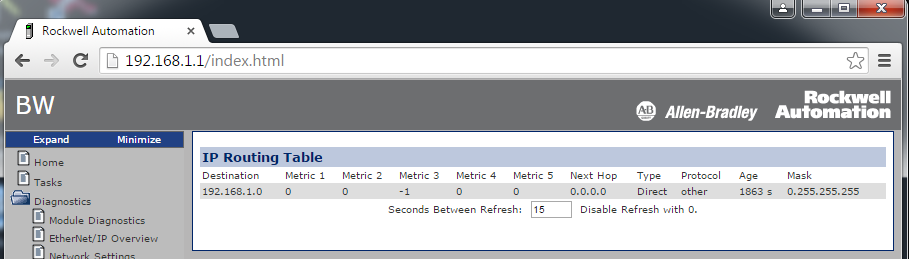
IP Route Table Web Page Shows the Mask in Reverse Order (00183121)
Corrected anomaly with Firmware Revision 31.011
Known Anomaly First Identified as of Firmware Revision 28.011
Catalog Numbers: CompactLogix™ 5380, ControlLogix® 5580
The IP Route Table diagnostic web page shows the mask in reverse order (0.255.255.255).
1756-IB16D Module Can Become Non-operable (00185144, 00185914)
Corrected Anomaly in Firmware Revision 30.011
Known Anomaly First Identified as of Firmware Revision 29.011
Catalog Numbers: CompactLogix™ 5380, ControlLogix® 5580
Using Automatic Firmware Update (Firmware Supervisor) can result in the 1756-IB16D Digital Input Module to be non-operable, and must be returned for repair.
Applications with PowerFlex drives in the I/O configuration can experience a major non-recoverable fault (MNRF) (00200734, 00200735, 00200600, 00200599)
Corrected Anomaly as of Firmware Revision 31.011 and 30.014 for these catalog numbers:
- CompactLogix™ 5370 Controllers
- Compact GuardLogix® 5370 Controllers
Corrected Anomaly as of Firmware Revision 31.011 and 30.013 for these catalog numbers:
- ControlLogix® 5580 Controllers
- ControlLogix 5570 Controllers
- GuardLogix 5570 Controllers
Known Anomaly First Identified as of Firmware Revision 28.011 for these catalog numbers:
- ControlLogix 5580 Controllers
- CompactLogix 5380 Controllers
- Compact GuardLogix 5370 Controllers
Known Anomaly First Identified as of Firmware Revision 20.011 for these catalog numbers:
- ControlLogix 5570 Controllers
- GuardLogix 5570 Controllers
- ControlLogix 5570 (Redundancy) Controllers
- ControlLogix 5560 Controllers
- GuardLogix 5560 Controllers
- ControlLogix 5560 (Redundancy) Controllers
- CompactLogix 5370 Controllers
- 1769 CompactLogix Controllers
- 1768 CompactLogix Controllers
If a controller already has an application loaded into it that contains PowerFlex drives in the I/O configuration, a MNRF (Major Non-Recoverable Fault) can occur when any of the following occurs:
- A download of a project is performed to the controller.
- A PowerFlex drive is deleted while online.
- A firmware flash update of
the controller is performed.
For more information and workarounds, see Knowledgebase document 1067997.
Download Can Fail (00160311, 00206743)
CORRECTED Anomaly in firmware revision 33.011 for these catalog numbers:
- CompactLogix™ 5380 controllers
- CompactLogix 5480 controllers
- Compact GuardLogix® 5380 SIL2 controllers
- Compact GuardLogix 5380 SIL3 controllers
- ControlLogix® 5580 controllers
- GuardLogix 5580 controllers
Known Anomaly First Identified in firmware revision 28.011 for these catalog numbers:
- ControlLogix 5580 controllers
- CompactLogix 5380 controllers
Known Anomaly First Identified in firmware revision 31.011 for these catalog numbers:
- GuardLogix 5580 controllers
- Compact GuardLogix 5380 SIL2 controllers
Known Anomaly First Identified in firmware revision 32.011 for these catalog numbers:
- CompactLogix 5480 controllers
Known Anomaly First Identified in firmware revision 32.013 for these catalog numbers:
- Compact GuardLogix 5380 SIL3 controllers
After a project has been downloaded to a V28-V32 Logix controller, a subsequent download will time out with Error 806-8004253535.
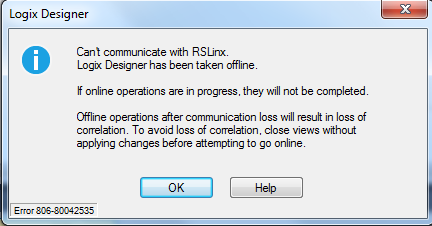
See Knowledgebase Article Communication Loss On Download in Studio 5000 V28-V32.
Known Anomalies from Previous Releases
These anomalies are from previous releases but are still known in this release.
|
Controllers
|
First Known in Firmware
Revision
|
Corrected in Firmware Revision
|
|
CompactLogix® 5370
|
20.011
|
37.011 and later
|
|
Compact GuardLogix® 5370
|
28.011
|
37.011 and later
|
|
ControlLogix® 5570
|
20.011
|
37.011 and later
|
|
GuardLogix 5570
|
20.011
|
37.011 and later
|
|
CompactLogix 5380
|
29.011
|
34.015, 35.014, 36.013, 37.011 and
later
|
|
Compact GuardLogix 5380 SIL 2
|
31.011
|
34.015, 35.014, 36.013, 37.011 and
later
|
|
Compact GuardLogix 5380 SIL 3
|
32.013
|
34.015, 35.014, 36.013, 37.011 and
later
|
|
CompactLogix 5380 Process
|
33.011
|
34.015, 35.014, 36.013, 37.011 and
later
|
|
CompactLogix 5480
|
32.011
|
34.015, 35.014, 36.013, 37.011 and
later
|
|
ControlLogix 5580
|
28.011
|
34.015, 35.014, 36.013, 37.011 and
later
|
|
GuardLogix 5580
|
31.011
|
34.015, 35.014, 36.013, 37.011 and
later
|
|
ControlLogix 5580 Process
|
33.011
|
34.015, 35.014, 36.013, 37.011 and
later
|
|
Device
|
First Known in
Firmware Revision
|
Corrected in Firmware Revision
|
|
CompactLogix® 5380
|
28.011
|
34.014, 35.013, 36.011 and later
|
|
Compact GuardLogix® 5380 SIL 2
|
31.011
|
34.014, 35.013, 36.011 and later
|
|
Compact GuardLogix 5380 SIL 3
|
32.013
|
34.014, 35.013, 36.011 and later
|
|
CompactLogix 5380 Process
|
33.011
|
34.014, 35.013, 36.011 and later
|
|
CompactLogix 5480
|
32.011
|
34.014, 35.013, 36.011 and later
|
|
ControlLogix® 5580
|
28.011
|
34.014, 35.013, 36.011 and later
|
|
GuardLogix 5580
|
31.011
|
34.014, 35.013, 36.011 and later
|
|
ControlLogix 5580 Process
|
33.011
|
34.014, 35.013, 36.011 and later
|
|
1756-EN4TR
|
2.001
|
6.001 and later
|
|
1756-EN3TR/B, 1756-EN2TR/C
|
10.007
|
12.001 and later
|
|
1756-EN2TP
|
10.020
|
12.001 and later
|
|
1756-EN2T/D
|
10.006
|
12.001 and later
|
|
1756-EN2F/C
|
10.009
|
12.001 and later
|
|
Controllers
|
First Known in Firmware
Revision
|
Corrected in Firmware
Revision
|
|
CompactLogix™ 5370
|
20.011
|
38.011 and later
|
|
Compact GuardLogix® 5370
|
28.011
|
38.011 and later
|
|
ControlLogix® 5570
|
18.012
|
38.011 and later
|
|
GuardLogix 5570
|
20.011
|
38.011 and later
|
|
CompactLogix 5380
|
28.011
|
38.011 and later
|
|
Compact GuardLogix 5380 SIL 2
|
31.011
|
38.011 and later
|
|
Compact GuardLogix 5380 SIL 3
|
32.013
|
38.011 and later
|
|
CompactLogix 5380 Process
|
33.011
|
38.011 and later
|
|
CompactLogix 5480
|
32.011
|
38.011 and later
|
|
ControlLogix 5580
|
28.011
|
38.011 and later
|
|
GuardLogix 5580
|
31.011
|
38.011 and later
|
|
ControlLogix 5580 Process
|
33.011
|
38.011 and later
|
Work arounds to consider:
|
Controllers
|
First Known in
Firmware Revision
|
Corrected in Firmware Revision
|
|
CompactLogix® 5380
|
28.011
|
36.014, 37.013, 38.011 and later
|
|
Compact GuardLogix® 5380 SIL 2
|
31.011
|
36.014, 37.013, 38.011 and later
|
|
Compact GuardLogix 5380 SIL 3
|
32.013
|
36.014, 37.013, 38.011 and later
|
|
CompactLogix 5380 Process
|
33.011
|
36.014, 37.013, 38.011 and later
|
|
CompactLogix 5480
|
32.011
|
36.014, 37.013 and later
|
|
ControlLogix® 5580
|
28.011
|
36.014, 37.013, 38.011 and later
|
|
GuardLogix 5580
|
31.011
|
36.014, 37.013, 38.011 and later
|
|
ControlLogix 5580 Process
|
33.011
|
36.014, 37.013, 38.011 and later
|
Drive Instability With Frequent Wall Clock Time Update Requests (00174495, 00174563)
Corrected Anomaly in Firmware Revision 30.011
Known Anomaly First Identified as of Firmware Revision 28.011
Catalog Numbers:
- ControlLogix® 5570
- ControlLogix 5580
- GuardLogix® 5580
- CompactLogix™ 5370 (only controllers that support Integrated Motion over an EtherNet/IP network)
- CompactLogix 5380 (only controllers that support Integrated Motion over an EtherNet/IP network)
Frequent requests to update the controller Wall Clock Time in applications that use Integrated Motion over an EtherNet/IP network can cause drive instability.
The following are examples of wall clock time update requests:
- Logix Clock Update tool update request
- Studio 5000® Clock Sync service
- Execution of Add-On Instructions that request a wall clock time update
The following are examples of drive behavior when the anomaly occurs:
- Drive fails to follow commands
- Drive positioning errors
- Sync faults
Program Save Takes Longer Than Expected (00164549)
Corrected Anomaly as of Firmware Revision 30.011
Known Anomaly First Identified as of Firmware Revision 28.011
Catalog Numbers ControlLogix® 5580
When the controller powers down, the time that is required to save the program can take longer than expected. If the anomaly occurs, the application program can be lost. That is, the controller has no program.
Connected Uncached Messages Fail (00173896)
- GuardLogix® 5580 Controllers, Revision 29.011
- ControlLogix® 5580 Controllers, Revision 28.011
- ControlLogix 5580 Process Controllers, Revision 33.011
- CompactLogix™ 5380 Controllers, Revision 28.011
- CompactLogix 5380 Process Controllers, Revision 33.011
- Compact GuardLogix 5380 SIL 2 Controllers, Revision 31.011
- Compact GuardLogix 5380 SIL 3 Controllers, Revision 32.013
- CompactLogix 5480 Controllers, Revision 32.011
Connected UnCached messages that are sent to the controller can fail. This anomaly typically occurs if the Connected UnCached messages are sent when the controller is handling many messages and has temporarily run out of buffer resources.
To work around the anomaly, try the following:
- Cache connections. As many as 256 connections are available.
- Use the message instructions in a periodic task instead of a continuous task.
- Do not trigger messages as quickly as possible.
GroupOverlapFault After a Motion Group Shutdown Instruction Executes (00174272)
Corrected Anomaly in Firmware Revision 30.011
Known Anomaly First Identified as of Firmware Revision 28.011
Catalog Numbers ControlLogix® 5580
A controller can experience a GroupOverlapFault after a Motion Group Shutdown (MGSD) instruction executes. The anomaly occurs when the MGSD instruction is attempting to shut down a large number of axes and the coarse update rate is insufficient.
1756-OB16IEFS Scheduled Output Module Position Incorrect (00173808, 00187670)
Corrected Anomaly in Firmware Revision 30.011
Known Anomaly First Identified as of Firmware Revision 28.011
Catalog Numbers:
- ControlLogix® 5580
- ControlLogix 5570
If a Motion Arm Output Cam (MAOC) instruction is used with a 1756-OB16IEFS scheduled output module, the output ON position can occasionally be offset.
When the anomaly occurs, the following conditions frequently exist:
- The motion group update period is faster than the RPI rate that is used with the 1756-OB16IEFS scheduled output module.
- Two or more 1756-OB16IEFS module channels have the same On or Off positions. If the On and Off positions are unique for all channels, the anomaly does not occur.
To work around the anomaly, change the 1756-OB16IEFS scheduled output module RPI rate to be three times faster than the motion group update period, if possible.
MSF Instruction Clears the .DriveEnableStatus Bit after the .DN is Set (00175088)
Known Anomaly First Identified in:
- ControlLogix® 5580 Controllers, Revision 28.011
- ControlLogix 5580 Process Controllers, Revision 33.011
- GuardLogix® 5580 Controllers, Revision 29.011
- CompactLogix™ 5380 Motion Controllers, Revision 28.011
- CompactLogix 5380 Process Controllers, Revision 33.011
- Compact GuardLogix 5380 SIL2 Controllers, Revision 31.011
- Compact GuardLogix 5380 SIL3 Controllers, Revision 32.013
- CompactLogix 5480 Controllers, Revision 32.011
The Motion Servo Off (MSF) instruction can report a .DN (Done) status before the drive clears the .DriveEnableStatus bit.
Value That Is Outside the Supported WallClockTime Range (00182341, 00182342, 00190288, Lgx00169520)
Corrected Anomaly in:
- ControlLogix® 5570, Firmware Revision 30.011 and 20.019
- GuardLogix® 5570, Firmware Revision 30.011
- CompactLogix™ 5370, Firmware Revision 30.011 and 20.019
- Compact GuardLogix 5370, Firmware Revision 30.011
- ControlLogix 5560, Firmware Revision 20.019
Known Anomaly First Identified in:
- ControlLogix® 5580, Firmware Revision 28.011
- ControlLogix 5580 Process, Firmware Revision 33.011
- GuardLogix® 5580, Firmware Revision 31.011
- CompactLogix™ 5380, Firmware Revision 28.011
- CompactLogix 5380 Process, Firmware Revision 33.011
- Compact GuardLogix 5380 SIL2, Firmware Revision 31.011
- Compact GuardLogix 5380 SIL3, Firmware Revision 32.013
- CompactLogix 5480, Firmware Revision 32.011
- ControlLogix 5570, Firmware Revision 19.011
- GuardLogix 5570, Firmware Revision 20.011
- CompactLogix 5370, Firmware Revision 20.011
- Compact GuardLogix 5370, Firmware Revision 28.011
- ControlLogix 5560, Firmware Revision 11.011
When reading or viewing the WCT (WallClockTime) of the controller, the year can show a value of 586XXX (where the XXX is any values). This means that the wallclock value is outside the valid range for EPoch time.
The range of the WCT has been tightened in the controller to 1/1/1970 00:00:00.000...12/31/2069 23:59:59.999. If the controller tries to handle a value outside the defined range, the controller does not apply the new value. It now logs a minor fault, Type 13 Code 21. The fault displays an unknown fault in the RSLogix 5000® software.
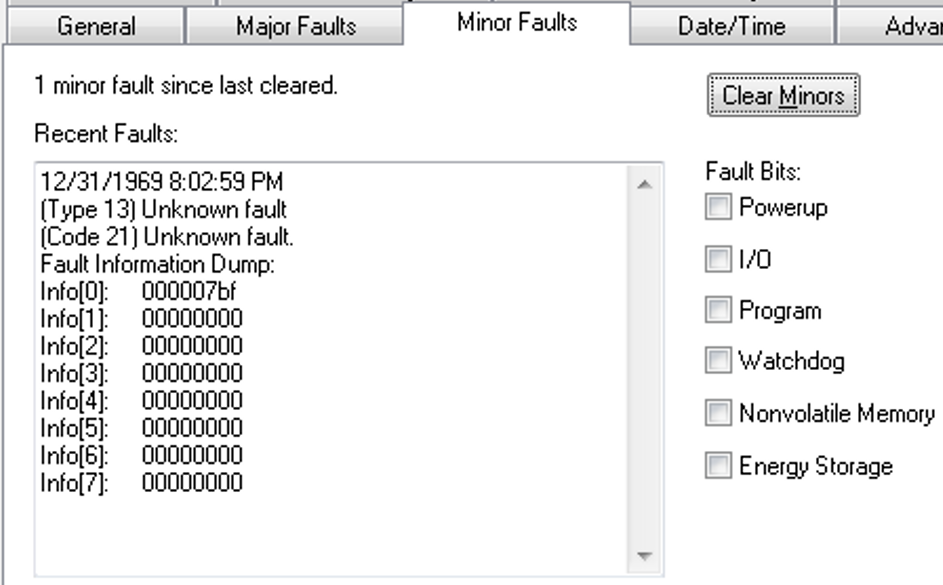
When the fault is logged, the WCT of the controller is set to 1/1/19XX 00:00:00.000, where XX is 81...86. The year corresponds to the Info[0] value for the minor fault.
Multicast Connections with Network Disruptions Can Cause a Controller MNRF/Assert (00210612)
CORRECTED Anomaly with Firmware Revision 32.011
Known Anomaly First Identified in Firmware Revision 31.011 for:
- Compact GuardLogix® 5380 SIL 2 controllers
- GuardLogix 5580 controllers
Known Anomaly First Identified in Firmware Revision 28.011 for:
- CompactLogix™ 5380 controllers
- ControlLogix® 5580 controllers
A controller can experience a major nonrecoverable fault (MNRF/Assert) if a controller application has I/O devices configured to use multicast connections and network disruptions occur.
Online editing of existing LBL or additions of LBL instructions could result in missing code in routines (00200605, 00197657)
Corrected Anomaly with Firmware Revision in:
- ControlLogix® 5580, Revision 31.011
- ControlLogix® 5580, Revision 30.013
- CompactLogix™ 5380, Revision 31.011
- CompactLogix™ 5380, Revision 30.014
Known Anomaly First Identified as of Firmware Revision 28.011 for:
- ControlLogix 5580
- CompactLogix 5380
- The routine must have been created using the Logix Designer ladder logic editor.
- An online edit must have occurred.
- The online edit must have involved changes to existing label (LBL) instructions or the creation of new LBL instructions.
- The controller is power cycled at some later time.
- Go online with a new controller project that was not used to make the previous online changes.
If these conditions have been met, when the affected routine is opened in the Logix Designer ladder logic editor, rungs may be missing from the affected routine. These rungs are not recoverable and must be manually reentered to correct the routine. If you subsequently download this routine into the controller, the missing rungs will be removed from the routine within the controller. Project verification may not catch the rungs that were removed from the project.
For more information, see Knowledgebase document 1063356.
Embedded Ethernet port can cause excessive position error faults in Kinetix drives (Lgx209239)
Corrected Anomaly with Firmware Revision V31.012
Known Anomaly First Identified as of Firmware Revision V28.011
Catalog Numbers:
- ControlLogix® 5580
- CompactLogix™ 5380
When using the controller’s embedded Ethernet® port, cable breaks and disconnections can result in Kinetix® drives reporting excessive position errors and faults.
Socket Application Code Can Cause the Controller to MNRF (00227905, 00228810)
|
Controllers
|
First Known in Firmware
Revision
|
Corrected in Firmware
Revision
|
|
CompactLogix™ 5370
|
20.011
|
33.011
|
|
Compact GuardLogix® 5370
|
28.011
|
33.011
|
|
CompactLogix 5380
|
28.011
|
33.011
|
|
Compact GuardLogix 5380 SIL 2
|
31.011
|
33.011
|
|
Compact GuardLogix 5380 SIL 3
|
32.013
|
33.011
|
|
CompactLogix 5480
|
32.011
|
33.011
|
|
ControlLogix® 5580
|
28.011
|
33.011
|
|
GuardLogix 5580
|
31.011
|
33.011
|
If your application code tries to access a socket that has already been deleted, the controller can experience a major nonrecoverable fault.
Nested SFC with Selection Branch Execution on First Transition May Be Incorrect (00227908, 00225009, 880618, 1594431)
|
Controllers
|
First Known in Firmware
Revision
|
Corrected in Firmware
Revision
|
|
CompactLogix™ 5370
|
20.011
|
33.011 and later
|
|
Compact GuardLogix® 5370
|
28.011
|
33.011 and later
|
|
ControlLogix® 5570
|
20.011
|
33.011 and later
|
|
ControlLogix 5570 redundant
|
20.054
|
33.051 and later
|
|
GuardLogix 5570
|
20.011
|
33.011 and later
|
|
CompactLogix 5380
|
28.011
|
31.013, 32.016, 33.011 and later
|
|
Compact GuardLogix 5380
SIL 2
|
31.011
|
31.013, 32.016, 33.011 and later
|
|
Compact GuardLogix 5380
SIL 3
|
32.013
|
32.016, 33.011 and later
|
|
CompactLogix 5480
|
32.011
|
32.016, 33.011 and later
|
|
ControlLogix 5580
|
28.011
|
31.013, 32.016, 33.011 and later
|
|
GuardLogix 5580
|
31.011
|
31.013, 32.016, 33.011 and later
|
Under the following conditions, a sequential function chart (SFC) selection branch will not execute correctly.
- The selection branch is in a nested SFC.
- SFCs are configured for the following:
- Execution Control, Execute current active steps only
- Restart Position, Restart at initial step
- Last Scan of Active Steps, Automatic Reset
- SFR instruction is used to reset the main SFC to the initial step.
Under these conditions, if an SFC is reset while evaluating parallel transitions, the chart may remember that one transition from before the reset was true. If another transition is true after the execution path reaches that select divergence again, the chart could still remember the transition from before the reset and choose the incorrect execution path.
After Power Cycling, The Controller SFC Routines Do Not Execute Properly (00229202, 00229027, 926153, 1594432)
|
Controllers
|
First Known in Firmware
Revision
|
Corrected in Firmware
Revision
|
|
CompactLogix™ 5370
|
20.011
|
33.011 and later
|
|
Compact GuardLogix® 5370
|
28.011
|
33.011 and later
|
|
ControlLogix® 5570
|
20.011
|
33.011 and later
|
|
ControlLogix 5570 redundant
|
20.054
|
33.051 and later
|
|
GuardLogix 5570
|
20.011
|
33.011 and later
|
|
CompactLogix 5380
|
28.011
|
31.013, 32.016, 33.011 and later
|
|
Compact GuardLogix 5380
SIL 2
|
31.011
|
31.013, 32.016, 33.011 and
later
|
|
Compact GuardLogix 5380
SIL 3
|
32.013
|
32.016, 33.011 and later
|
|
CompactLogix 5480
|
32.011
|
32.016, 33.011 and later
|
|
ControlLogix 5580
|
28.011
|
31.013, 32.016, 33.011 and
later
|
|
GuardLogix 5580
|
31.011
|
31.013, 32.016, 33.011 and
later
|
Following a power cycle, if the application program includes an SFC with a simultaneous branch, the possibility exists for one or more steps on that simultaneous branch not to execute. This anomaly does not occur on every power cycle.
See Knowledgebase Technote Unexplained Sequential Function Chart (SFC) simultaneous branch execution.
Online Editing of PowerFlex Drives (00227003, 1594434)
|
Controllers
|
First Known in Firmware
Revision
|
Corrected in Firmware Revision
|
|
CompactLogix™ 5370
|
20.011
|
33.011 and later
|
|
Compact GuardLogix®
5370
|
28.011
|
33.011 and later
|
|
ControlLogix® 5570
|
20.011
|
33.011 and later
|
|
ControlLogix 5570
redundant
|
20.054
|
33.051 and later
|
|
GuardLogix 5570
|
20.011
|
33.011 and later
|
|
CompactLogix 5380
|
28.011
|
30.015, 31.013, 32.016, 33.011 and
later
|
|
Compact GuardLogix 5380
SIL 2
|
31.011
|
31.013, 32.016, 33.011 and later
|
|
Compact GuardLogix 5380
SIL 3
|
32.013
|
32.016, 33.011 and later
|
|
CompactLogix 5480
|
32.011
|
32.016, 33.011 and later
|
|
ControlLogix 5580
|
28.011
|
30.015, 31.013, 32.016, 33.011 and
later
|
|
GuardLogix 5580
|
31.011
|
31.013, 32.016, 33.011 and later
|
See Knowledgebase Technote Product Notice 2019-01-001 Revision C - Online Editing of PowerFlex Low and Medium Voltage Drives (201901001).
IMPORTANT: You must use a CORRECTED controller firmware revision (listed above) in conjunction with Drives AOP 5.007 or greater; a CORRECTED controller firmware revision alone will not address the anomaly described in the product notice.
Dual Feedback Position Error Jumps (00232347, 00232504)
|
Controllers
|
First Known in Firmware
Revision
|
Corrected in Firmware
Revision
|
|
CompactLogix™ 5370
|
20.011
|
34.011
|
|
Compact GuardLogix® 5370
|
28.011
|
34.011
|
|
ControlLogix® 5570
|
20.011
|
34.011
|
|
GuardLogix 5570
|
20.011
|
34.011
|
|
CompactLogix 5380
|
28.011
|
33.011
|
|
Compact GuardLogix 5380 SIL 2
|
31.011
|
33.011
|
|
Compact GuardLogix 5380 SIL 3
|
32.013
|
33.011
|
|
CompactLogix 5480
|
32.011
|
33.011
|
|
ControlLogix 5580
|
28.011
|
33.011
|
|
GuardLogix 5580
|
31.011
|
33.011
|
When the following configuration or conditions are met:
- Dual feedback.
- Feedback 2 is a linear device.
- Linear load type. Direct coupled linear or linear actuator.
Anytime the axis moves past one meter, the position command jumps by 1000 or 39.37 depending on the configured motion units.
Editing of UDTs and AOIs Online Can Affect Online Behavior (00223654, 00230184, 880629, 1000207)
|
Controllers
|
First Known in Firmware Revision
|
Corrected in Firmware Revision
|
|
CompactLogix™ 5380
|
28.011
|
30.015, 31.013, 32.014, 33.011 and
later
|
|
Compact GuardLogix® 5380 SIL 2
|
31.011
|
31.013, 32.016, 33.011 and later
|
|
Compact GuardLogix 5380 SIL 3
|
32.013
|
32.016, 33.011 and later
|
|
CompactLogix 5480
|
32.011
|
32.016, 33.011 and later
|
|
ControlLogix® 5580
|
28.011
|
30.015, 31.013, 32.014, 33.011 and
later
|
|
GuardLogix 5580
|
31.011
|
31.013, 32.016, 33.011 and later
|
Workflows to potentially induce the anomaly
- Create a user-defined data type (UDT), then, after the creation, modify the definition.
- Take an existing UDT and modify it online.
- Create a new UDT online. Take an existing UDT and add the new UDT as a member of the existing UDT.
- Take an array of UDTs and change the array size.
- Take the above workflows and handle them through a partial import online (PIO).
- Delete UDTs online.
Effects on online behavior
- Controller experiences a major non-recoverable fault after a power cycle.
- Unable to upload the application into a new or existing ACD file.
- Unable to go online with an existing application file.
- After a controller power cycle, HMIs cannot reconnect to the controller and will require a download of the application.
- Studio 5000 Logix Designer® application shuts down due to an exception.
See Knowledgebase Technote Editing of UDTs and AOIs Online Can Affect Online Behavior for additional information.
When Executing Multiple RTOS Instructions A MNRF/Assert Can Occur (00200869)
|
Controllers
|
First Known in
Firmware Revision
|
Corrected in
Firmware
Revision
|
|
CompactLogix™ 5380
|
28.011
|
31.011 and later
|
|
ControlLogix® 5580
|
28.011
|
31.011 and later
|
If the application contains RTOS (Real to String) instructions in different user tasks and the following execution occurs:
- Task A is executing an RTOS.
- Task A is interrupted to execute Task B.
- Task B executes an RTOS.
- Task A completes the RTOS previously interrupted.
A major nonrecoverable fault (MNRF/Assert) can occur.
For information on how to work around this in user application code, see Knowledgebase Technote RTOS instruction execution causes controller to MNRF.
MAR and MAW Instructions Do Not Execute Properly After Controller Power Is Cycled (1120359, 1161982)
|
Controllers
|
First Known in Firmware
Revision
|
Corrected in Firmware Revision
|
|
CompactLogix™ 5370
|
20.011
|
34.011
|
|
Compact GuardLogix® 5370
|
28.011
|
34.011
|
|
ControlLogix® 5570
|
20.011
|
34.011
|
|
GuardLogix 5570
|
28.011
|
34.011
|
|
CompactLogix 5380
|
28.011
|
34.011
|
|
Compact GuardLogix 5380 SIL 2
|
31.011
|
34.011
|
|
Compact GuardLogix 5380 SIL 3
|
32.013
|
34.011
|
|
CompactLogix 5380 Process
|
33.011
|
34.011
|
|
CompactLogix 5480
|
32.011
|
34.011
|
|
ControlLogix 5580
|
28.011
|
34.011
|
|
GuardLogix 5580
|
31.011
|
34.011
|
|
ControlLogix 5580 Process
|
33.011
|
34.011
|
If a controller is powered down while a Motion Arm Registration (MAR) and/or a Motion Arm Watch (MAW) instruction is active, the state of the instruction will not be accurate on controller power up.
- A Motion Disarm Registration (MDR) is required to reset the MAR instruction.
- A Motion Disarm Watch (MDW) is required to reset to the MAW instruction.
For more information, see the Knowledgebase Technote MAR or MAW Instruction Not Executing Properly After a Power cycle.
PCMD Returns Incorrect Error Code (1056295)
|
Controllers
|
First Known in Firmware
Revision
|
Corrected in Firmware
Revision
|
|
CompactLogix™ 5370
|
20.011
|
34.011
|
|
Compact GuardLogix® 5370
|
28.011
|
34.011
|
|
ControlLogix® 5570
|
20.011
|
34.011
|
|
ControlLogix 5570 redundant
|
20.054
|
34.051
|
|
GuardLogix 5570
|
28.011
|
34.011
|
|
CompactLogix 5380
|
28.011
|
34.011
|
|
Compact GuardLogix 5380 SIL 2
|
31.011
|
34.011
|
|
Compact GuardLogix 5380 SIL 3
|
32.013
|
34.011
|
|
CompactLogix 5380 Process
|
33.011
|
34.011
|
|
CompactLogix 5480
|
32.011
|
34.011
|
|
ControlLogix 5580
|
28.011
|
34.011
|
|
GuardLogix 5580
|
31.011
|
34.011
|
|
ControlLogix 5580 Process
|
33.011
|
34.011
|
Equipment Phase Command (PCMD) returns the incorrect error code “0x6003, HIGH_PRIORITY_OWNED” when it should return “0x6004, NOT_ATTACHED”
Controller Can Assert During The I/O Module Configuration Process (1024030, 00219969)
|
Controllers
|
First Known in Firmware
Revision
|
Corrected in Firmware
Revision
|
|
CompactLogix™ 5370
|
20.011
|
34.011
|
|
Compact GuardLogix® 5370
|
28.011
|
34.011
|
|
ControlLogix® 5570
|
20.011
|
34.011
|
|
ControlLogix 5570 redundant
|
20.054
|
34.051
|
|
GuardLogix 5570
|
28.011
|
34.011
|
|
CompactLogix 5380
|
28.011
|
33.011
|
|
Compact GuardLogix 5380 SIL 2
|
31.011
|
33.011
|
|
Compact GuardLogix 5380 SIL 3
|
32.013
|
33.011
|
|
CompactLogix 5480
|
32.011
|
33.011
|
|
ControlLogix 5580
|
28.011
|
33.011
|
|
GuardLogix 5580
|
31.011
|
33.011
|
Certain I/O modules send more configuration data than fits in a standard forward open (508 bytes) when the connection is being established. Therefore, the configuration process can take longer to complete. Examples include E300™ Electronic Overload Relays, 1444 Dynamics, 1718 I/O, 1719 I/O, and many third-party I/O devices.
When the configuration data is being sent to the device, if you change the configuration through the Add-on Profile for the device and then apply the changes the controller can assert.
CIP™ Axis Velocity Loop Causes Controller To MNRF/Assert (1008498, 1006943)
|
Controllers
|
First Known in Firmware
Revision
|
Corrected in Firmware
Revision
|
|
CompactLogix™ 5370
|
20.011
|
34.011
|
|
Compact GuardLogix® 5370
|
28.011
|
34.011
|
|
ControlLogix® 5570
|
20.011
|
34.011
|
|
GuardLogix 5570
|
28.011
|
34.011
|
|
CompactLogix 5380
|
28.011
|
34.011
|
|
Compact GuardLogix 5380 SIL 2
|
31.011
|
34.011
|
|
Compact GuardLogix 5380 SIL 3
|
32.011
|
34.011
|
|
CompactLogix 5380 Process
|
33.011
|
34.011
|
|
CompactLogix 5480
|
32.011
|
34.011
|
|
ControlLogix 5580
|
28.011
|
34.011
|
|
GuardLogix 5580
|
31.011
|
34.011
|
|
ControlLogix 5580 Process
|
33.011
|
34.011
|
Setting the Axis Direct Command Velocity Tag to “Not a Number” (NaN) causes the controller to experience a major nonrecoverable fault/assert.
Controller, Sercos, and Analog Servo Modules Can Stop Communicating or the Controller can MNRF/Assert (00229188)
|
Controllers
|
First Known in Firmware
Revision
|
Corrected in Firmware
Revision
|
|
ControlLogix® 5580
|
28.011
|
33.011
|
|
GuardLogix® 5580
|
31.011
|
33.011
|
In an application with multiple axes, if you power cycle all drives that are connected to a Sercos or analog servo motion module:
- the controller, Sercos module, or analog servo motion module can stop communicating, or
- the controller can experience a major nonrecoverable fault/assert.
This includes these modules:
- 1756-M02AE
- 1756-M02AS
- 1756-M03SE
- 1756-M08SE
- 1756-M08SEG
Misconfigured Produced/Consumed Tags Can Cause a Controller MNRF/Assert (00222833, 1594463)
|
Controllers
|
First Known in Firmware Revision
|
Corrected in Firmware Revision
|
|
CompactLogix™ 5380
|
28.011
|
32.016, 33.011 and later
|
|
Compact GuardLogix® 5380 SIL 2
|
31.011
|
32.016, 33.011 and later
|
|
Compact GuardLogix 5380 SIL 3
|
32.013
|
32.016, 33.011 and later
|
|
CompactLogix 5480
|
32.011
|
32.016, 33.011 and later
|
|
ControlLogix® 5580
|
28.011
|
32.016, 33.011 and later
|
|
GuardLogix 5580
|
31.011
|
32.016, 33.011 and later
|
Mismatch of safety, standard, produced, and consumed tags can cause a producing controller to experience a major nonrecoverable fault/assert.
For more information, see Knowledgebase Technote MNRF on a GuardLogix controller with Produce Consume Tags.
PortPhysicalAddressInfo GSV Does Not Populate After Controller Power Cycle (1451494, 1514584)
|
Controllers
|
First Known in
Firmware Revision
|
Corrected in Firmware
Revision
|
|
CompactLogix® 5380
|
28.011
|
34.015, 35.011 and later
|
|
Compact GuardLogix® 5380 SIL 2
|
31.011
|
34.015, 35.011 and later
|
|
Compact GuardLogix 5380 SIL 3
|
32.013
|
34.015, 35.011 and later
|
|
CompactLogix 5380 Process
|
33.011
|
34.015, 35.011 and later
|
|
CompactLogix 5480
|
32.011
|
34.015, 35.011 and later
|
|
ControlLogix® 5580
|
28.011
|
34.015, 35.011 and later
|
|
GuardLogix 5580
|
31.011
|
34.015, 35.011 and later
|
|
ControlLogix 5580 Process
|
33.011
|
34.015, 35.011 and later
|
When a Get System Value (GSV) instruction configured for Class Name: TimeSynchronize and Attribute Name: PortPhysicalAddressInfo executes after a controller power cycle, the physical address (MAC ID) does not populate.
Controller Can MNRF When Executing CPS Instruction with Specific Data Types (1800992, 2129625, 2129629)
|
Controllers
|
First Known in Firmware Revision
|
Corrected in Firmware Revision
|
|
CompactLogix™ 5380
|
28.011
|
33.017, 34.014, 35.011 and later
|
|
Compact GuardLogix® 5380 SIL 2
|
31.011
|
33.017, 34.014, 35.011 and later
|
|
Compact GuardLogix 5380 SIL 3
|
32.013
|
33.017, 34.014, 35.011 and later
|
|
CompactLogix 5380 Process
|
33.011
|
33.017, 34.014, 35.011 and later
|
|
CompactLogix 5480
|
32.011
|
33.017, 34.014, 35.011 and later
|
|
ControlLogix® 5580
|
28.011
|
33.017, 34.014, 35.011 and later
|
|
GuardLogix 5580
|
31.011
|
33.017, 34.014, 35.011 and later
|
|
ControlLogix 5580 Process
|
33.011
|
33.017, 34.014, 35.011 and later
|
When executing a Synchronous Copy File (CPS) instruction with a motion diagnostics connection as the source or destination tag, the controller can experience a major nonrecoverable fault (MNRF).
To work around this anomaly, do not use motion diagnostics connections (such as AB:Motion_Diagnostics:S:1) as arguments to the CPS instruction. If a copy is still necessary, use a non-synchronous copy via the COP instruction.
Sent Bytes Per Second Displays a Larger Incorrect Value (1548181)
|
Controllers and Communication Modules
|
First Known in
Firmware Revision
|
Corrected in Firmware
Revision
|
|
CompactLogix™ 5380
|
28.011
|
35.011 and later
|
|
Compact GuardLogix® 5380 SIL 2
|
31.011
|
35.011 and later
|
|
Compact GuardLogix 5380 SIL 3
|
32.013
|
35.011 and later
|
|
CompactLogix 5380 Process
|
33.011
|
35.011 and later
|
|
CompactLogix 5480
|
32.011
|
35.011 and later
|
|
ControlLogix® 5580
|
28.011
|
35.011 and later
|
|
GuardLogix 5580
|
31.011
|
35.011 and later
|
|
ControlLogix 5580 Process
|
33.011
|
35.011 and later
|
|
1756-EN4TR, 1756-EN4TRK, 1756-EN4TRXT
|
2.01
|
5.001 and later
|
Under HMI/MSG Connected (EtherNet/IP Port) on the device Diagnostic webpages, Sent Bytes Per Second displays a much larger incorrect value, not the actual sent bytes per second.
Inverting Motion Polarity Does Not Invert the Value of Certain Signal Attributes (1329074, 1332544)
|
Controllers
|
First Known in Firmware
Revision
|
Corrected in Firmware Revision
|
|
CompactLogix™ 5370
|
20.011
|
34.011 and later
|
|
Compact GuardLogix® 5370
|
28.011
|
34.011 and later
|
|
ControlLogix® 5570
|
19.011
|
34.011 and later
|
|
GuardLogix 5570
|
20.011
|
34.011 and later
|
|
CompactLogix 5380
|
28.011
|
34.011 and later
|
|
CompactLogix 5380 process
|
33.011
|
34.011 and later
|
|
Compact GuardLogix 5380 SIL 2
|
31.011
|
34.011 and later
|
|
Compact GuardLogix 5380 SIL 3
|
32.013
|
34.011 and later
|
|
CompactLogix 5480
|
32.011
|
34.011 and later
|
|
ControlLogix 5580
|
28.011
|
34.011 and later
|
|
ControlLogix 5580 process
|
33.011
|
34.011 and later
|
|
GuardLogix 5580
|
31.011
|
34.011 and later
|
When the axis Motion Polarity bit is set to inverted, certain Signal attributes for a CIP™ axis will display a value opposite of the programmed direction of the axis.
The affected signal attributes are:
• #365 Fine Command Position
• #495 Torque Estimate
• #432 Position Reference
• #523 Motor Electrical Angle
• #565 Slip Compensation
• #600 Output Frequency
• #601 Output Current
• #602 Output Voltage
• #603 Output Power
• #1403 Velocity Feedback 1
• #1453 Velocity Feedback 2
For more information, see the Knowledgebase Technote Inverting Motion Polarity Does Not Invert the Value of Certain Signal Attributes.
Cannot Modify Armor PowerFlex Configuration While Online (1640552, 1644553, 00230101)
|
Controllers
|
First Known in
Firmware Revision
|
Corrected in Firmware Revision
|
|
CompactLogix™ 5380
|
28.011
|
V31.015, V32.016, V33.011 and later
|
|
Compact GuardLogix® 5380 SIL 2
|
31.011
|
V31.015, V32.016, V33.011 and later
|
|
Compact GuardLogix 5380 SIL 3
|
32.013
|
V32.016, V33.011 and later
|
|
CompactLogix 5480
|
32.011
|
V32.016, V33.011 and later
|
|
ControlLogix® 5580
|
28.011
|
V31.015, V32.016, V33.011 and later
|
|
GuardLogix 5580
|
31.011
|
V31.015, V32.016, V33.011 and later
|
After you add an Armor™ PowerFlex® Drive to a Studio 5000 Logix Designer® project, you cannot modify the Drive configuration while online with a controller. The project can be unresponsive for up to 30 seconds and can cause the controller to experience an Assert/Major Nonrecoverable Fault.
Note: Armor PowerFlex Drives are currently supported in controller firmware revision 31.011 and later.
|
Controllers
|
First Known in
Firmware Revision
|
Corrected in Firmware Revision
|
|
CompactLogix® 5370
|
31.011
|
35.017, 36.014, 37.011 and later
|
|
CompactLogix 5380
|
28.011
|
35.017, 36.014, 37.011 and later
|
|
Compact GuardLogix® 5380 SIL 2
|
31.011
|
35.017, 36.014, 37.011 and later
|
|
Compact GuardLogix 5380 SIL 3
|
32.013
|
35.017, 36.014, 37.011 and later
|
|
CompactLogix 5380 Process
|
33.011
|
35.017, 36.014, 37.011 and later
|
|
CompactLogix 5480
|
32.012
|
35.017, 36.014, 37.011 and later
|
|
ControlLogix® 5580
|
28.011
|
35.017, 36.014, 37.011 and later
|
|
GuardLogix 5580
|
31.011
|
35.017, 36.014, 37.011 and later
|
|
ControlLogix 5580 Process
|
33.011
|
35.017, 36.014, 37.011 and later
|
Application Notes
This release has the following application notes.
New Firmware Updates Can Impact the Performance of Message Rate Capacity HMI/MSG (Class 3) Data
Each new major revision of the controller/communication module firmware provides additional features and functionality, but this consumes additional processing power from the module even if the features are not utilized. This manifests as degrading HMI/messaging performance for the respective module.
Despite this degradation, the specifications defined for the respective modules have been maintained:
|
Module
|
Message Rate Across the Embedded Ethernet Port
|
|
ControlLogix® 5580
CompactLogix® 5380 |
2000 MSG/sec
|
|
GuardLogix® 5580 controllers in a SIL3 configuration
Compact GuardLogix 5380 SIL3 controllers |
1000 MSG/sec
|
|
1756-EN4TR Ethernet modules
|
3700 MSGs/sec
|
To improve the messaging capacity, it is recommended to employ the following:
- For high-frequency messaging, utilize connected cached messages
- Utilize message reads as opposed to message writes; they’re more efficient
- For ControlLogix 5580 controllers, route HMI/messages through communication modules in the chassis as
opposed to going directly to the embedded port of the controller
- Offloading some of the processing to the communications module results in greater messaging capacity than using the front port alone
- This recommendation does not apply to I/O or produce/consume data, it is more efficient and there is more capacity for that data to route through the embedded port of the controller
- Upgrade to a 5590 controller
- The HMI/messaging messaging capacity is doubled through the embedded ethernet port
For more information, see these publications:
- ControlLogix and GuardLogix Controller Specifications Technical Data, publication 1756-TD001
- CompactLogix 5380, Compact GuardLogix 5380, and CompactLogix 5480 Controllers Specifications Technical Data, publication 5069-TD002
- 1756 ControlLogix Communication Modules Specifications Technical Data, publication 1756-TD003
PXRQ Instruction Can Cause a Controller MNRF/Assert
|
Controllers
|
First Known in Firmware
Revision
|
|
CompactLogix™ 5380
|
31.011
|
|
Compact GuardLogix® 5380 SIL
2
|
31.011
|
|
Compact GuardLogix 5380 SIL 3
|
32.013
|
|
CompactLogix 5380 Process
|
33.011
|
|
CompactLogix 5480
|
32.011
|
|
ControlLogix® 5580
|
31.011
|
|
GuardLogix 5580
|
31.011
|
|
ControlLogix 5580 Process
|
33.011
|
Writing to the Equipment Phase External Request (PXRQ) instruction control\backing tag needs to be conditioned with a set .PC bit of the control\backing tag or the controller can MNRF/assert.
Copyright © 2026 Rockwell Automation, Inc. All rights reserved.
Rockwell Automation, Allen-Bradley, and FactoryTalk are trademarks of Rockwell Automation, Inc.
To view a complete list of Rockwell Automation trademarks please click here.
Trademarks not belonging to Rockwell Automation are property of their respective companies.