
Release Notes
25A... More information: PowerFlex® 523 Site
Version 3.001 (released 7/2016)
Catalog Number PowerFlex 523 (series A)
Features
This release includes the following system features.
System Feature Identified as of PowerFlex 525 Drives Firmware Revision 2.002
System Feature Identified as of PowerFlex 523 Drives Firmware Revision 3.001
A new parameter A573 [Mtr Options Cfg] has been added. Use this parameter to improve the performance of the drive in some applications.
A574 [Mtr Options Cfg]
(With PowerFlex 525 FRN 2.xxx and later.)
(With PowerFlex 523 FRN 3.xxx and later.)
Sets the configuration of the motor option.
Where 1 = Enabled, 0 = Disabled
Bit 0 Jerk Select |
Bit 1 ZeroSpd Slip |
Bit 2 Not Used |
Bit 3 Not Used |
Bit 4 Not Used |
Values | Default: | 11 |
Min/Max: | 00/11 | |
Display: | 00 |
System Feature Identified as of PowerFlex 525 Drives Firmware Revision 3.001
System Feature Identified as of PowerFlex 523 Drives Firmware Revision 3.001
d392 [RdyBit Mode Act]
(With PowerFlex 525 FRN 3.xxx and later.)
(With PowerFlex 523 FRN 3.xxx and later.)
Displays the value of A574 [RdyBit Mode Cfg].
|
Values
|
Default:
|
Read Only
|
|
Min/Max:
|
0/1
| |
|
Display:
|
1
|
A574 [RdyBit Mode Cfg]
 Stop drive before changing this parameter.
(With PowerFlex 525 FRN 3.xxx and later.)
(With PowerFlex 523 FRN 3.xxx and later.)
Determines which Stop conditions causes the drive’ s Ready bit (Network Logic Status bit 1) to go low (0). A reset or power cycle is required after selection is made.
|
Stop Conditions
|
Ready Bit Status 1
| |
|
Standard
|
Enhanced
| |
|
Drive fault
|
0
|
0
|
|
Stop digital input terminal 01/11 open
|
1
|
0
|
|
Holding down the drive’
s keypad or the Remote
DSI
HIM Stop button
|
1
|
0
|
|
Stop commanded through Comms (Stop bit = 1)
|
1
|
0
|
|
Software (SW) Enable digital input terminal open
|
1
|
0
|
| Safe-Torque-Off (STO) condition with value of t105 [Safety Open En] set to 1 “FaultDisabled” (1) |
0
|
0
|
(1) Condition is specific to PowerFlex 525 drives only.
|
Options:
|
0 “Standard”
(Default)
|
|
1 “Enhanced”
|
-------------------------
|
1 1 = Active, 0 = Inactive |
New Flux Braking Function (LGX00131795 and LGX00172394)
System Feature Identified as of PowerFlex 525 Drives Firmware Revision 5.001
System Feature Identified as of PowerFlex 523 Drives Firmware Revision 3.001
Added a new Flux Braking function, and parameter A575 [Flux Braking EN] to enable/disable the function.
A575 [Flux Braking EN]
(With FRN 5.xxx and later.)
(With FRN 3.xxx and later.)
Enables/disables flux braking
|
Options
|
0 “Disable” (Default)
|
|
1 “Enable”
|
Added a new parameter d393 [Drive Status 2] that contains the drive status bit (Bit 1) for when the drive is performing the Flux Braking routine.
d393 [Drive Status 2]
(With FRN 5.xxx and later.)
(With FRN 3.xxx and later.)
Present operating conditions of the drive.
Where 1 = Condition True, 0 = Condition False
|
Bit 0 Jogging
|
|
Bit 1 Flux Braking
|
|
Bit 2 Motor Overload
|
|
Bit 3 Auto Restart Countdown
|
|
Bit 4 DC Braking
|
|
Bit 5 At Frequency
|
|
Bit 6 Auto Tuning
|
|
Bit 7 EM Braking
|
|
Bit 8 Current Limit
|
|
Bit 9 Reserved
|
|
Bit 10 Safety S1 (1)
|
|
Bit 11 Safety S2 (1)
|
|
Bit 12 F111 Status (1)
|
|
Bit 13 Safe Torque Permit (1)
|
|
Bit 14 Reserved
|
|
Bit 15 Reserved
|
(1) This bit status is specific to PowerFlex 525 drives only.
|
Values
|
Default:
|
Read Only
|
|
Min/Max:
|
00000 00000 00000 00000 / 11111 11111 11111 11111
| |
|
Display:
|
00000 00000 00000 00000
|
Drive status bit 1 is true when all the following conditions are true:
- A550 [Bus Reg Enable] = 1 “Enable”
- A575 [Flux Braking EN] = 1 “Enable”
- Decel ramp is active
New Parameter d393 [Drive Status 2] Added to Identify When Drive is Performing Autotune (LGX00136321 and LGX00174995)
System Feature Identified as of PowerFlex 525 Drives Firmware Revision 5.001
System Feature Identified as of PowerFlex 523 Drives Firmware Revision 3.001
Added a new parameter d393 [Drive Status 2] that contains the drive status bit (Bit 6) for when the drive is performing the Autotune routine.
d393 [Drive Status 2]
(With FRN 5.xxx and later.)
(With FRN 3.xxx and later.)
Displays the present operating conditions of the drive.
Where 1 = Condition True, 0 = Condition False
|
Bit 0 Jogging
|
|
Bit 1 Flux Braking
|
|
Bit 2 Motor Overload
|
|
Bit 3 Auto Restart Countdown
|
|
Bit 4 DC Braking
|
|
Bit 5 At Frequency
|
|
Bit 6 Auto Tuning
|
|
Bit 7 EM Braking
|
|
Bit 8 Current Limit
|
|
Bit 9 Reserved
|
|
Bit 10 Safety S1 (1)
|
|
Bit 11 Safety S2 (1)
|
|
Bit 12 F111 Status (1)
|
|
Bit 13 Safe Torque Permit (1)
|
|
Bit 14 Reserved
|
|
Bit 15 Reserved
|
(1) This bit status is specific to PowerFlex 525 drives only.
|
Values
|
Default:
|
Read Only
|
|
Min/Max:
|
00000 00000 00000 00000 / 11111 11111 11111 11111
| |
|
Display:
|
00000 00000 00000 00000
|
New Parameter d394 [Dig Out Status] Added to Store Status of Relay and Opto Outputs (LGX00137389)
System Feature Identified as of PowerFlex 525 Drive Firmware Revision 5.001
System Feature identified as of PowerFlex 523 Drive Firmware Revision 3.001
Added a new parameter d394 [Dig Out Status] that contains the digital output status of the Relay and Opto outputs.
d394 [Dig Out Status]
(With PowerFlex 525 FRN 5.xxx and later.)
(With PowerFlex 523 FRN 3.xxx and later.)
Displays relay output and opto output status.
|
Digit 1 Relay 1 Status
|
|
Digit 2 Relay 2 Status (1)
|
|
Digit 3 Opto 1 Status (1)
|
|
Digit 4 Opto 2 Status (1)
|
|
Digit 5 Not Used
|
(1) Setting is specific to PowerFlex 525 drives only.
|
Status
|
Bit Value = 0
|
Bit Value = 1
|
|
Relay 1 Status
(Normally Open) |
Not activated
(Relay 1 open) |
Activated
(Relay 1 closed) |
|
Relay 2 Status
(Normally Closed) |
Not activated
(Relay 2 closed) |
Activated
(Relay 2 open) |
|
Opto 1 Status
|
Not activated
|
Activated
|
|
Opto 2 Status
|
Not activated
|
Activated
|
New Option 31 Added to Digital Output Parameters to Indicate Auto-Restart Countdown (LGX00137490 and LGX00172402)
System Feature Identified as of PowerFlex 525 Drive Firmware Revision 5.001
System Feature identified as of PowerFlex 523 Drive Firmware Revision 3.001
Currently on the PowerFlex 520-series drive there is no visible indication to a local user that the drive is in an Auto-Restart countdown sequence, which automatically restarts the drive when the sequence is completed.
To enhance drive operation and provide the greatest level of safety, PowerFlex 525 Drive Firmware Revision 5.001 and PowerFlex 523 Drive Firmware Revision 3.001 include another digital output enum option (Option 31) which energizes the output if the drive is performing an Auto-Restart countdown sequence.
This output should only be energized when the drive is actually counting down to a pending re-start. If the drive faults on F033 (Auto Rstrt Tries), the output should not be active.
Option 31 “AutoRst Ctdn” is added to the following parameters:
- t069 [Opto Out1 Sel]
- t072 [Opto Out2 Sel]
- t076 [Relay Out1 Sel]
- t081 [Relay Out1 Sel]
Parameters t069, t072, and t081 are applicable to PowerFlex 525 drives only.
USB Applet Writes Configuration Code of the File into the Drive (LGX00147965 and LGX00174352)
System Feature Identified as of PowerFlex 525 Drives Firmware Revision 5.001
System Feature Identified as of PowerFlex 523 Drives Firmware Revision 3.001
The USB Applet now writes the drive type to the control module.
New Option 4 Added to Parameter P053 [Reset Defalts] to Power Cycle Drive (LGX00147966 and LGX00184867)
System Feature Identified as of PowerFlex 525 Drives Firmware Revision 5.001
System Feature Identified as of PowerFlex 523 Drives Firmware Revision 3.001
Added a new option 4 “Reset Module” to parameter P053 [Reset Defalts] to allow power cycling of the drive without having to remove and reapply mains power.
Additional Parameters Support for PowerFlex 523 Drives
System Feature Identified as of PowerFlex 523 Drives Firmware Revision 3.001
The following parameters are now supported in PowerFlex 523 drives.
- t088 [Analog Out Sel](1)
- t089 [Analog Out High] (1)
- t090 [Anlg Out Setpt] (1)
- d378 [Encoder Speed]
- d392 [RdyBit Mode Act]
- d393 [Drive Status 2]
- d394 [Dig Out Status]
- A535 [Motor Fdbk Type]
- A538 [Ki Speed Loop]
- A539 [Kp Speed Loop]
- A573 [Mtr Options Cfg]
- A574 [RdyBit Mode Cfg]
- A575 [Flux Braking En]
- A576 [Phase Loss Level]
(1) A PowerFlex 523 series B drive is also required to configure this parameter.
Corrected Anomalies in This Release
This release corrects the following anomalies.
Corrected: PowerFlex 525 Drives Firmware Revision 2.002
Corrected: PowerFlex 523 Drives Firmware Revision 3.001
When using either the drive’s built-in keypad or terminal block digital inputs to change direction, nothing happens unless all the digital inputs that have been configured as Stop commands are active.
Corrected: PowerFlex 525 Drives Firmware Revision 2.002
Corrected: PowerFlex 523 Drives Firmware Revision 3.001
The bit value of the “DigInxActive” controller tags are not updated to match what is shown in parameter b014 [Dig In Status].
Corrected: PowerFlex 525 Drives Firmware Revision 2.002
Corrected: PowerFlex 523 Drives Firmware Revision 3.001
When the output current is at 126%, the drive does not trip in three seconds.
Corrected: PowerFlex 525 Drives Firmware Revision 2.002
Corrected: PowerFlex 523 Drives Firmware Revision 3.001
When the drive is in Velocity mode and the value of bit 6 in the Command word is set to 1 “Force Keypad Control”, it prevents bits 12...14 from selecting the Speed Reference parameters.
Corrected: PowerFlex 525 Drives Firmware Revision 2.002
Corrected: PowerFlex 523 Drives Firmware Revision 3.001
Accuracy of the low speed control is affected and the drive can drive can cause rotation when running at zero speed due to inaccurate slip compensation.
Corrected: PowerFlex 525 Drives Firmware Revision 2.002
Corrected: PowerFlex 523 Drives Firmware Revision 3.001
When parameter P045 [Stop Mode] is set to 11 “PointStop”, the Jog function ignores the value of parameter A432 [Jog Accel/Decel] and uses the Accel/Decel Time parameter value instead.
Corrected: PowerFlex 525 Drives Firmware Revision 2.002
Corrected: PowerFlex 523 Drives Firmware Revision 3.001
Pulse Train Input only works when the PowerFlex 25-ENC-1 encoder card is installed.
Corrected: PowerFlex 525 Drives Firmware Revision 2.002
Corrected: PowerFlex 523 Drives Firmware Revision 3.001
When a terminal block digital input parameter is set to 40 “Purge”, the function does not work properly if another digital input parameter is set to 42 “SW Enable” due to incorrect priority handling.
Corrected: PowerFlex 525 Drives Firmware Revision 2.002
Corrected: PowerFlex 523 Drives Firmware Revision 3.001
When control is set to Comms, using digital inputs to switch between the Accel/Decel parameters does not work because communication adapters have a higher priority than the digital inputs.
Corrected: PowerFlex 525 Drives Firmware Revision 2.002
Corrected: PowerFlex 523 Drives Firmware Revision 3.001
When using digital inputs to switch between the preset frequencies to be used for the PID Reference, the PID loop is bypassed because the digital inputs have a higher priority than the PID loop.
Corrected: PowerFlex 525 Drives Firmware Revision 2.002
Corrected: PowerFlex 523 Drives Firmware Revision 3.001
When a terminal block digital input parameter is set to 42 “SW Enable” and the input is active, the value of the “Ready” bit changes from 1 to 0.
Corrected: PowerFlex 525 Drives Firmware Revision 2.002
Corrected: PowerFlex 523 Drives Firmware Revision 3.001
When updating 32-bit parameters, some values are not saved correctly, and the wrong values are then shown on the drive’ s LCD display.
Inconsistent Abbreviations for Word Ethernet in Parameter Names (LGX00131460 and LGX174349)
Corrected: PowerFlex 525 Drives Firmware Revision 5.001
Corrected: PowerFlex 523 Drives Firmware Revision 3.001
The word “Ethernet” is not abbreviated consistently in parameter names.
Fast Accel or Decel Setting for 30 Hp Drive Causes Nuisance Fault (LGX00137447 and LGX00172396)
Corrected: PowerFlex 525 Drives Firmware Revision 5.001
Corrected: PowerFlex 523 Drives Firmware Revision 3.001
Known anomaly first identified as of PowerFlex 525 Drives Firmware Revision 1.001
Known anomaly first identified as of PowerFlex 523 Drives Firmware Revision 1.001
A 30 Hp drive will report a nuisance F013 (Ground Fault) fault when in SVC mode if a fast accel or decel time is set.
Current Clamp Appears to Engage at ~165% Current in Some Conditions (LGX00138121 and LGX00172398)
Corrected: PowerFlex 525 Drives Firmware Revision 5.001
Corrected: PowerFlex 523 Drives Firmware Revision 3.001
Known anomaly first identified as of PowerFlex 525 Drives Firmware Revision 1.001
Known anomaly first identified as of PowerFlex 523 Drives Firmware Revision 1.001
Under some conditions the current clamp appears to engage at below 180% current. Current clamp now engages at proper level according to published specification.
Output Phase Loss Timing is Not Well Defined (LGX00138245 and LGX00174403)
Corrected: PowerFlex 525 Drives Firmware Revision 5.001
Corrected: PowerFlex 523 Drives Firmware Revision 3.001
When parameter A557 [Out Ph Loss En] is set to 1 “Enable”, the drive will detect loss of output phase current in one or all of its output phases. This is usually caused by failure in the motor winding, cable or operation of switching device which interrupts motor current. It should be fast enough to detect current loss within a quarter cycle of the output frequency and yet resistance to false alarm cause by noise or interference. In any case, detection time shall not be more that one second. Loss of all three phase current should be detected during DC injection.
Also, parameter A576 [Phase Loss Level] is added to adjust the sensitivity of the output phase loss detection.
A576 [Phase Loss Level]
(With FRN 5.xxx and later.)
(With FRN 3.xxx and later.)
Output Phase Loss Level. Sets the threshold level which is used to determine an output phase loss condition.
Each motor phase must exceed this value. Decreasing this parameter's value lowers sensitivity.
|
Values
|
Default:
|
25% for Induction motor; 4.0% for PM motor
|
|
Min/Max:
|
0.0/100.0%
| |
|
Display:
|
0.1%
|
Connecting a 1203-USB or 22-HIM-A3 Causes 25-COMM-E2P Card Port LED to Flash Red then Green (LGX00151435 and LGX00151438)
Corrected: PowerFlex 525 Drives Firmware Revision 5.001
Corrected: PowerFlex 523 Drives Firmware Revision 3.001
Known anomaly first identified as of PowerFlex 525 Drives Firmware Revision 2.002
Known anomaly first identified as of PowerFlex 523 Drives Firmware Revision 2.002
When a 1203-USB or 22-HIM-A3 is connected to a PowerFlex 520-series drive with a 25-COMM-E2P card attached, the Port LED on the 25-COMM-E2P card flashes red for a brief moment before flashing green and then turning solid green.
Parameter A548 [Power Loss Mode] Option 1 “Decel” does not work in Economizer Mode (LGX00151718, LGX00152017, and LGX00172399)
Corrected: PowerFlex 525 Drives Firmware Revision 5.001
Corrected: PowerFlex 523 Drives Firmware Revision 3.001
Known anomaly first identified as of PowerFlex 525 Drives Firmware Revision 2.002
Known anomaly first identified as of PowerFlex 523 Drives Firmware Revision 2.001
In Economizer mode, setting parameter A548 [Power Loss Mode] to option 1 “Decel” does not enable the inertia decel function when input power is cut off. The drive will exhibit the same behavior as when parameter A548 is set to option 0 “Coast”.
Incorrect Translation Text String for Parameter C122 [Cmd Stat Select] and A574 [RdyBit Mode Cfg] (LGX00155895 and LGX00172408)
Corrected: PowerFlex 525 Drives Firmware Revision 5.001
Corrected: PowerFlex 523 Drives Firmware Revision 3.001
Known anomaly first identified as of PowerFlex 525 Drives Firmware Revision 3.001
Known anomaly first identified as of PowerFlex 523 Drives Firmware Revision 2.001
Translated text string for Parameter C122 [Cmd Stat Select] (Polish only) and A574 [RdyBit Mode Cfg] (Spanish only).
Default Text of Custom Group is not Translated (LGX00161117 and LGX00174360)
Corrected: PowerFlex 525 Drives Firmware Revision 5.001
Corrected: PowerFlex 523 Drives Firmware Revision 3.001
Known anomaly first identified as of PowerFlex 525 Drives Firmware Revision 2.002
Known anomaly first identified as of PowerFlex 523 Drives Firmware Revision 2.002
The default text of Custom Group is not translated.
Motor Nameplate FLA is Affecting Output Frequency (LGX00166855 and LGX00172401)
Corrected: PowerFlex 525 Drives Firmware Revision 5.001
Corrected: PowerFlex 523 Drives Firmware Revision 3.001
Known anomaly first identified as of PowerFlex 525 Drives Firmware Revision 4.001
Known anomaly first identified as of PowerFlex 523 Drives Firmware Revision 2.002
If you change the Motor FLA parameter P034 [Motor NP FLA], the motor speed increases the frequency and affects the Slip frequency in parameter d375 [Slip Hz Meter].
Slip frequency now works as intended.
Incorrect Display for Parameter A437 [DB Resistor Sel] (LGX00172270 and LGX00173151)
Corrected: PowerFlex 525 Drives Firmware Revision 5.001
Corrected: PowerFlex 523 Drives Firmware Revision 3.001
Known anomaly first identified as of PowerFlex 525 Drives Firmware Revision 4.001
Known anomaly first identified as of PowerFlex 523 Drives Firmware Revision 2.002
When using the drive keypad to access parameter A437 [DB Resistor Sel], incorrect option text was displayed.
Some of the errors include the following:
- Option 4 is displayed as “Devalide” instead of “4% DutyCycle”.
- Option 6 is displayed as “SAS protect” instead of “6% DutyCycle”.
- Option 50 is displayed as “Correcodr on” instead of “50% DutyCycle”.
The option text is now displayed correctly.
Wake-Sleep Mode May Damage IGBTs (LGX00174217 and LGX00174742)
Corrected: PowerFlex 525 Drives Firmware Revision 5.001
Corrected: PowerFlex 523 Drives Firmware Revision 3.001
Known anomaly first identified as of PowerFlex 525 Drives Firmware Revision 1.003
Known anomaly first identified as of PowerFlex 523 Drives Firmware Revision 1.001
When the drive is coming out of sleep mode, the drive will trip on fault F012 (HW OverCurrent) or F013 (Ground Fault), afterwards an unrecoverable fault F013 will occur.
This anomaly happens under the following conditions:
- Parameter t100 [Sleep-Wake Sel] is set to option 3 “Command Freq” and
- Parameters t101…t104 are left at their default values.
Nuisance faults no longer occur when the drive is coming out of sleep mode.
Nuisance Fault When Output Phase Loss Enabled (LGX00174252 and LGX00174363)
Corrected: PowerFlex 525 Drives Firmware Revision 5.001
Corrected: PowerFlex 523 Drives Firmware Revision 3.001
Known anomaly first identified as of PowerFlex 525 Drives Firmware Revision 4.001
Known anomaly first identified as of PowerFlex 523 Drives Firmware Revision 2.001
Nuisance fault on F021 (Output Ph Loss) when parameter A557 [Out Phas Loss En] is set to option 1 “Enabled” for PowerFlex 520-series drives Frame D and E.
Drive Thermal Overload Fault Prematurely When Parameter A554 [Drv Ambient Sel] set to 60C (LGX00174611 and LGX00175941)
Corrected: PowerFlex 525 Drives Firmware Revision 5.001
Corrected: PowerFlex 523 Drives Firmware Revision 3.001
Known anomaly first identified as of PowerFlex 525 Drives Firmware Revision 4.001
Known anomaly first identified as of PowerFlex 523 Drives Firmware Revision 2.002
When parameter A554 [Drv Ambient Sel] is set to option 2 “60C”, a drive thermal overload fault will occur prematurely.
Unable to Select Option 7 “Preset Freq” for Parameter t063 [DigIn TermBlk 03] (LGX00149098)
Corrected: PowerFlex 523 Drives Firmware Revision 3.001
Known anomaly first identified as of PowerFlex 523 Drives Firmware Revision 1.001
When configuring parameter t063 [DigIn TermBlk 03] using Connected Components Workbench or 22-HIM-A3, option 7 “Preset Freq” is displayed as “Reserved” and cannot be selected.
When parameter t063 [DigIn TermBlk 03] using the drive keypad, option 7 “Preset Freq” can be selected but the text is displayed as “Reserved”.
22-HIM-A3/C2S Locks Up When Selecting Logic Parameter Group (LGX00149214)
Corrected: PowerFlex 523 Drives Firmware Revision 3.001
Known anomaly first identified as of PowerFlex 523 Drives Firmware Revision 1.001
When using a 22-HIM-A3 or 22-HIM-C2S to configure the PowerFlex 523 drive parameters, selecting the Logic parameter group (Group L) causes the HIM to lock up. This anomaly occurs because the PowerFlex 523 drives do not have Logic parameters.
The workaround is to disconnect and reconnect the HIM.
Motor Stall Control is not Stable in Stall Torque Test for 30 Hp Drives (LGX00152642)
Corrected: PowerFlex 523 Drives Firmware Revision 3.001
Known anomaly first identified as of PowerFlex 523 Drives Firmware Revision 2.001
When performing the stall torque test (in SVC, SVC with Economizer, and V/Hz modes) for 30 Hp drives, the motor stall control function is unable to keep the motor stable.
Overvoltage Fault Occurs If Power Loss Ride Through Lasts Longer Than 2 Seconds (LGX00151726)
Corrected: PowerFlex 523 Drives Firmware Revision 3.001
Known anomaly first identified as of PowerFlex 523 Drives Firmware Revision 1.001
If Power Loss Ride Through lasts longer than two seconds, an F005 “OverVoltage” fault occurs.
Nuisance Fault F100 “Parameter Chksum” Fault Occurs After Power Cycle (LGX00172403)
Corrected: PowerFlex 523 Drives Firmware Revision 3.001
Known anomaly first identified as of PowerFlex 523 Drives Firmware Revision 1.001
When parameter C121 [Comm Write Mode] is set to option 1 “RAM only”, if the value of another parameter is changed and C121 is then set to option 0 “Save”. A nuisance F100 “Parameter Chksum” fault may occur after the drive is power cycled.
Text Scroll Anomaly for Parameter A437 [DB Resistor Sel] (LGX00173151)
Corrected: PowerFlex 523 Drives Firmware Revision 3.001
Known anomaly first identified as of PowerFlex 523 Drives Firmware Revision 2.002
The text for parameter A437 [DB Resistor Sel] does not scroll properly in the drive LCD display.
Parameters F705 to F708 do not update when PowerFlex 523 Drive is in Single Drive Mode (LGX00174355)
Corrected: PowerFlex 523 Drives Firmware Revision 3.001
Known anomaly first identified as of PowerFlex 523 Drives Firmware Revision 1.001
The following parameters were not updating when PowerFlex 523 drive is in single drive mode.
- F705 [Drv 0 Logic Cmd]
- F706 [Drv 0 Reference]
- F707 [Drv 0 Logic Sts]
- F708 [Drv 0 Feedback]
The parameters now update in single drive mode.
Parameters F705 to F724 do not update when PowerFlex 523 Drive is in Multi-drive Mode (LGX00174354 and LGX00174356)
Corrected: PowerFlex 523 Drives Firmware Revision 3.001
Known anomaly first identified as of PowerFlex 523 Drives Firmware Revision 1.001
The following parameters were not updating when PowerFlex 523 drive is in multi-drive mode.
- F705 [Drv 0 Logic Cmd]
- F706 [Drv 0 Reference]
- F707 [Drv 0 Logic Sts]
- F708 [Drv 0 Feedback]
- F709 [Drv 1 Logic Cmd]
- F710 [Drv 1 Reference]
- F711 [Drv 1 Logic Sts]
- F712 [Drv 1 Feedback]
- F713 [Drv 2 Logic Cmd]
- F714 [Drv 2 Reference]
- F715 [Drv 2 Logic Sts]
- F716 [Drv 2 Feedback]
- F717 [Drv 3 Logic Cmd]
- F718 [Drv 3 Reference]
- F719 [Drv 3 Logic Sts]
- F720 [Drv 3 Feedback]
- F721 [Drv 4 Logic Cmd]
- F722 [Drv 4 Reference]
- F723 [Drv 4 Logic Sts]
- F724 [Drv 4 Feedback]
The parameters now update in multi-drive mode.
Option 39 “Damper Input” for the Digital Inputs does not Work (LGX00185776)
Corrected: PowerFlex 523 Drives Firmware Revision 3.001
Known anomaly first identified as of PowerFlex 523 Drives Firmware Revision 1.001
Option 39 “Damper Input” for the digital input parameters t062…t068 [DigIn TermBlk xx] does not work.
Application Notes
This release has the following application notes.
Application Notes
Using Connected Components Workbench™ Software
- Launch the Connected Components Workbench software.
- Open the project for your PowerFlex 523 drive.
- On the main screen, click
 to go online.
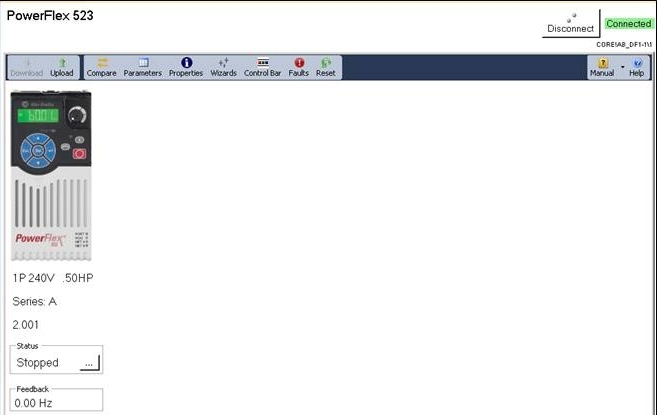
 - The firmware revision is displayed on the screen as shown in this example.
Using Studio 5000 Logix Designer™ Software
- Launch the Logix Designer software.
- Open the project for your PowerFlex 523 drive.
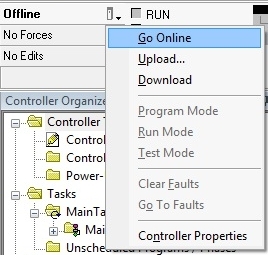
- On the main screen, click
 and select Go Online.
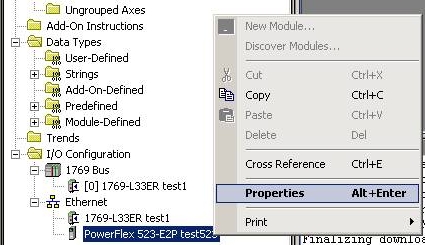
- Right-click on the PowerFlex 523 drive and select Properties.
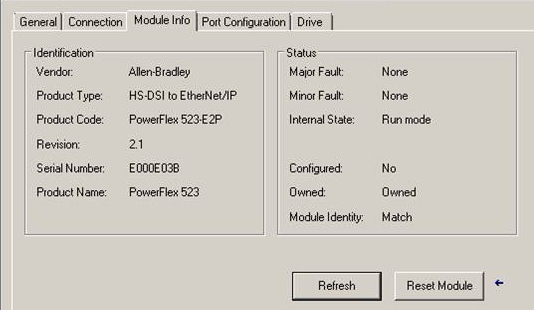
- In the Module Properties window, select the Module Info tab to display the firmware revision.
Using the Drive LCD Display and Keypad
|
Step
|
Key(s)
|
Example Display
| |
|
1.
|
When power is applied, the
last user-selected Basic
Display Group parameter
number is briefly displayed
with flashing characters. The
display then defaults to that
parameter’
s current value.
(Example shows the value of b001 [Output Freq] with the drive stopped.) |
|
 |
|
2.
|
Press Esc to display the
Basic Display Group
parameter number shown on
power-up. The parameter
number will flash.
|
 |
 |
|
3.
|
Press the Up Arrow or Down
Arrow to scroll to parameter
b029 [Control SW Ver].
|

or
 |
 |
|
4.
|
Press Enter to display the
drive’
s firmware revision.
|
 |
 |
Product Updates and Replacements
Using the USB Utility Application
- Separate the Control Module from the Power Module.
|
TIP
|
For more information on how to separate the Control Module from the
Power Module, see the PowerFlex® 520-Series Adjustable Frequency AC
Drive User Manual, publication 520-UM001.
|
- Connect one end of a USB cable to the USB port on the back of the Control Module.
- Connect the other end to the PC. A Windows Explorer window appears.
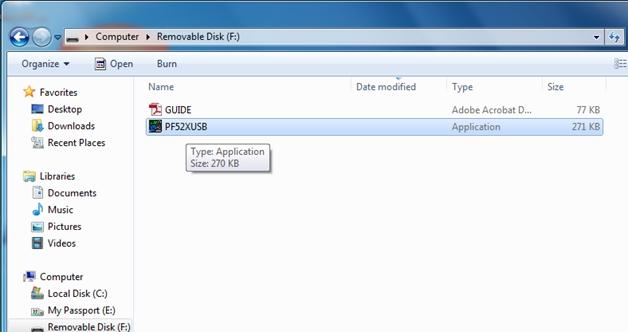
- Launch the PF52XUSB utility application. The PowerFlex 520-Series USB Application window appears.
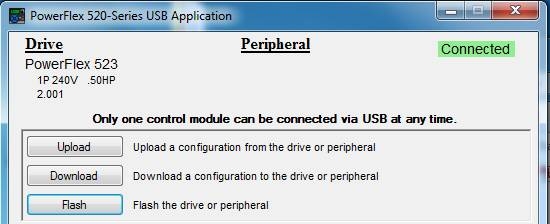
- Click Flash and select the firmware with which you want to update the module.
- Click Yes. The Confirm Flash Update dialog box appears. It displays the current firmware revision and the new revision to be flashed.
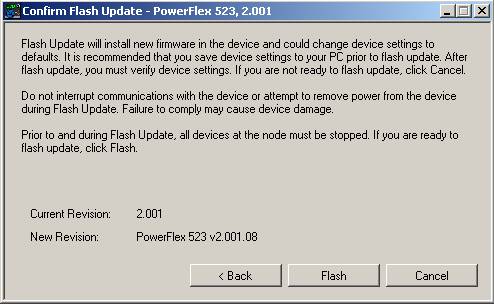
- Click Flash.
- When the process is complete, click OK.
- Close the application and disconnect the Control Module from the PC.
- Connect the Control Module to the Power Module and power cycle the drive.
- During the boot-up sequence, the following commands are displayed on the drive’ s LCD display: BOOT > COPY1 > COPY2 > ERASE > BOOT
- When fault F105 “C Connect Err” occurs, clear the fault to complete the flash update.
- The LCD display shows the drive data and current firmware revision.
Alternatively, you can verify the firmware revision by checking parameter b029 [Control SW Ver].
|
TIP
|
If the firmware revision did not update properly, you may need to reset the
drive to default and cycle drive power.
|
Using the ControlFLASH™ Software
- Install the flash kit utility for the PowerFlex 523 drive. You can download the flash kit utility from the Allen-Bradley Web Updates site at: http://www.ab.com/support/abdrives/webupdate/
- Launch the ControlFLASH software.
- On the ControlFLASH Welcome screen, click Next. The Catalog Number dialog box appears.
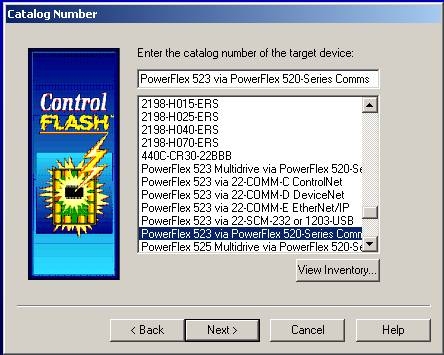
- Select the communication device you will use to update the firmware revision and click Next.
- For this example, select “PowerFlex 523 via PowerFlex 520-Series Comms” .
- In the Select Device to Update dialog box, expand the hardware view by clicking the “+” symbol next to the communication path you are using. For this example, click the “+” next to “AB_ETHIP-1, Ethernet ”.
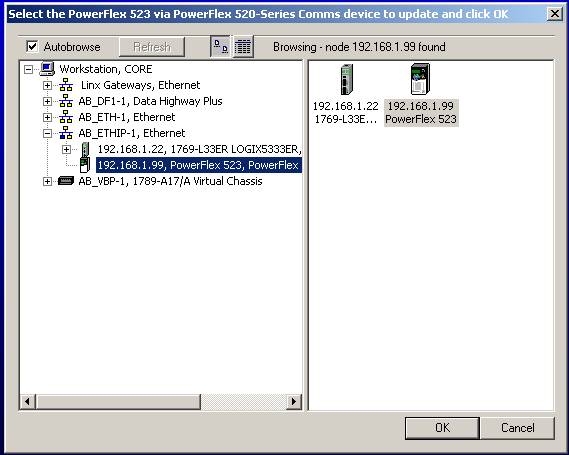
- Select the entry of the PowerFlex 523 drive you are updating and click OK. The Firmware Revision dialog box appears.
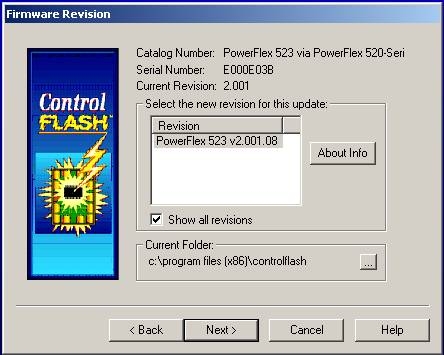
- Select the firmware revision you want to flash and click Next.
- Follow the remaining prompts to complete the flash update. When the process is complete, the new firmware revision is displayed in the dialog box.
Copyright © 2026 Rockwell Automation, Inc. All rights reserved.
Rockwell Automation, Allen-Bradley, and FactoryTalk are trademarks of Rockwell Automation, Inc.
To view a complete list of Rockwell Automation trademarks please click here.
Trademarks not belonging to Rockwell Automation are property of their respective companies.