
Release Notes
Compact GuardLogix 5370 Controller, SIL3, PLe, 2 EtherNet/IP ports, 2Mb Standard+ 1MB Safety memory , 8 Axis CIP Motion
Version 28.011 (released 11/2015)
Catalog Number 1769-L33ERMS/1769-L33ERMSK/1769-L33ERMOS (series A)
Security
This release includes security enhancements as a part of our ongoing efforts to improve security. For information regarding Rockwell Automation's vulnerability disclosure process, please reference the Rockwell Automation Vulnerability Policy.
VxWorks vulnerabilities that affect Logix 5000™ controllers (00225602, 00225603, 00225605, 00225606, 00225607, 880628, 1000204)
CORRECTED Anomaly firmware revisions 28.015, 32.013, and 33.011 for these catalog numbers:
- Compact GuardLogix® 5370 Controllers
CORRECTED Anomaly in firmware revisions 32.013 and 33.011 for these catalog numbers:
- CompactLogix™ 5370 Controllers
- CompactLogix 5480 Controllers
CORRECTED Anomaly in Firmware Revision 31.013, 32.013, and 33.011 for these catalog numbers:
- GuardLogix 5580 Controllers
- Compact GuardLogix 5380 SIL 2 Controllers
CORRECTED Anomaly as of Firmware Revision 30.015, 31.013, 32.013, and 33.011 for these Catalog Numbers:
- ControlLogix® 5580 Controllers
- CompactLogix 5380 Controllers
Known Anomaly First Identified in firmware revision 20.011 for these catalog numbers:
- CompactLogix 5370 Controllers
Known Anomaly First Identified in firmware revision 28.011 for these catalog numbers:
- ControlLogix 5580 Controllers
- CompactLogix 5380 Controllers
- Compact GuardLogix 5370 Controllers
Known Anomaly First Identified in firmware revision 31.011 for these catalog numbers:
- GuardLogix 5580 Controllers
- Compact GuardLogix 5380 SIL2 Controllers
Known Anomaly First Identified in firmware revision 32.011 for these catalog numbers:
- CompactLogix 5480 Controllers
For a full list of the potentially affected Rockwell Automation products and a description of the vulnerabilities, see Knowledgebase Technote VxWorks Vulnerabilities affect Programmable Automation Controllers, EtherNet/IP™ Communication Modules, I/O Modules, Kinetix 6500 Servo Drive, High-Frequency RFID Interface Block.
CORRECTED Anomaly with
- Compact GuardLogix® 5370 controllers, firmware revisions 28.015, 30.014, and 31.011
- CompactLogix™ 5370 controllers, firmware revisions 30.014 and 31.011
Known Anomaly First Identified in
- Compact GuardLogix 5370 controllers, firmware revision 28.011
- CompactLogix 5370 controllers, firmware revision 20.011
Denial-of-Service Vulnerability That Affects Logix 5000™ Controllers (1042476,1042479)
|
Controllers
|
First Known in Firmware
Revision
|
Corrected in Firmware
Revision
|
|
CompactLogix™ 5370
|
20.011
|
33.016, 34.011 and later
|
|
Compact GuardLogix®
5370
|
28.011
|
33.016, 34.011 and later
|
|
ControlLogix® 5570
|
20.011
|
33.016, 34.011 and later
|
|
ControlLogix 5570
redundant
|
20.054
|
33.053, 34.051 and later
|
|
GuardLogix 5570
|
20.011
|
33.016, 34.011 and later
|
|
CompactLogix 5380
|
28.011
|
32.016, 33.011 and later
|
|
Compact GuardLogix 5380
SIL 2
|
31.011
|
32.016, 33.011 and later
|
|
Compact GuardLogix 5380
SIL 3
|
32.013
|
32.016, 33.011 and later
|
|
CompactLogix 5480
|
32.011
|
32.016, 33.011 and later
|
|
ControlLogix 5580
|
28.011
|
32.016, 33.011 and later
|
|
GuardLogix 5580
|
31.011
|
32.016, 33.011 and later
|
For a full list of the potentially affected Rockwell Automation products and a description of the vulnerability, see Knowledgebase Product Notice Logix Controllers Vulnerable to Denial-of-Service Attack.
CVE-2020-6998: Denial-of-Service Vulnerability That Affects Logix 5000™ Controllers (00228528)
|
Controllers
|
First Known in
Firmware Revision
|
Corrected in
Firmware Revision
|
|
CompactLogix™ 5370
|
20.011
|
33.011 and later
|
|
Compact GuardLogix® 5370
|
28.011
|
33.011 and later
|
|
ControlLogix® 5570
|
20.011
|
33.011 and later
|
|
GuardLogix 5570
|
20.011
|
33.011 and later
|
|
ControlLogix 5570 redundant
|
20.054
|
33.051 and later
|
For a full list of the potentially affected Rockwell Automation products and a description of the vulnerability, see Knowledgebase Product Notice CompactLogix 5370 and ControlLogix 5570 Controllers Vulnerable to Denial of Service Conditions due to Improper Input Validation.
Features
This release includes the following system features.
SequenceManager Available
|
Controllers
|
System Feature First Identified as of
Firmware Revision
|
|
CompactLogix™ 5370
|
28.011
|
|
Compact GuardLogix® 5370
|
28.011
|
|
ControlLogix® 5570
|
28.011
|
|
GuardLogix 5570
|
28.011
|
|
CompactLogix 5380 Process
|
35.011
|
|
ControlLogix 5580 Process
|
35.011
|
SequenceManager functionality is available with this release.
You can use SequenceManager to create an Equipment Sequence program to run a unit batch process in a Logix controller. Used in combination with PhaseManager, SequenceManager follows the ISA-88 methodology for automated batch control.
Combining full state model execution, View Site Edition (SE) ActiveX controls, and batch event logging, this product provides flexible and scalable controller base batching solutions to single unit and OEM applications.
Known Anomalies in This Release
This release has the following known anomalies.
Wall Clock Value Different From Previous Value (00169756)
Known Anomaly First Identified as of Firmware Revision 27.011
Catalog Numbers:
- Compact GuardLogix® 5370
- CompactLogix™ 5370
- ControlLogix® 5570
- GuardLogix 5570
After you set the wall clock for a controller, the actual time can be offset from the value that you set by approximately 2 seconds.
This anomaly occurs after Precision Time Protocol (PTP) is disabled in a controller that was previously synchronized with the grandmaster clock.
Attribute Value Incorrect with Get System Value Instruction (00169204)
Corrected Anomaly as of Firmware Revision 30.011
Known Anomaly First Identified as of Firmware Revision 27.011
Catalog Numbers:
- Compact GuardLogix® 5370
- CompactLogix™ 5370
- ControlLogix® 5570
- GuardLogix 5570
When used with a Get System Value (GSV) instruction, the PortPhysicalAddressInfo attribute value can be incorrect.
The PortPhysicalAddressInfo attribute is available when you use the TimeSynchronize Class.
Attribute Values Incorrect with Set System Value Instruction (00169713)
Known Anomaly First Identified as of Firmware Revision 27.011
Catalog Numbers:
- Compact GuardLogix® 5370
- CompactLogix™ 5370
- ControlLogix® 5570
- GuardLogix 5570
When you use a Set System Variable (SSV) instruction to set the values for attributes available with the WallClockTime class, the values can be set incorrectly.
ConfigUpdateInProcess Bit Does Not Change State When Issuing an SSV Instruction to Change the Value of the Conversion Constant (00230152, 00228464, 880625, 1594437)
|
Controllers
|
First Known in Firmware
Revision
|
Corrected in Firmware
Revision
|
|
CompactLogix™ 5370
|
20.011
|
33.011 and later
|
|
Compact GuardLogix®
5370
|
28.011
|
33.011 and later
|
|
ControlLogix® 5570
|
20.011
|
33.011 and later
|
|
GuardLogix 5570
|
20.011
|
33.011 and later
|
|
CompactLogix 5380
|
28.011
|
31.013, 32.016, 33.011 and
later
|
|
Compact GuardLogix 5380
SIL 2
|
31.011
|
31.013, 32.016, 33.011 and
later
|
|
Compact GuardLogix 5380
SIL 3
|
32.013
|
32.016, 33.011 and later
|
|
CompactLogix 5480
|
32.011
|
32.016, 33.011 and later
|
|
ControlLogix 5580
|
28.011
|
31.013, 32.016, 33.011 and
later
|
|
GuardLogix 5580
|
31.011
|
31.013, 32.016, 33.011 and
later
|
The Configuration Update Status Bits attribute provides a method for monitoring the progress of one or more specific module configuration attribute updates initiated by either a Set Attribute List service or an SSV in the user program. As soon as such an update is initiated, the controller sets the ConfigurationUpdateInProcess bit. The bit remains set until the Set Attribute List reply comes back from the servo module indicating that the update process was successful. Thus, the Configuration Update Status Bits attribute provides a method of waiting until the servo configuration data update to the connected motion module is complete before starting a dependent operation.
Expiration Times On a Logix Repository Record Can Differ (00171229)
Known Anomaly First Identified as of Firmware Revision 27.011
Catalog Numbers:
- Compact GuardLogix® 5370
- CompactLogix™ 5370
- ControlLogix® 5570
- GuardLogix 5570
When the Logix Repository deletes a record, the cached value of the earliest expiration time and the actual expiration time value of the record can be different.
Unconnected Timeout Time Incorrect (00171872)
Known Anomaly First Identified as of Firmware Revision 27.011
Catalog Numbers:
- Compact GuardLogix® 5370
- CompactLogix™ 5370
- ControlLogix® 5570
- GuardLogix 5570
The unconnected timeout time can be longer for a Forward Open service than expected.
Motion Run Axis Tuning Instruction Gets Stuck (00172234)
Known Anomaly First Identified as of Firmware Revision 27.011
Catalog Numbers:
- Compact GuardLogix® 5370
- CompactLogix™ 5370
- ControlLogix® 5570
- GuardLogix 5570
A Motion Run Axis Tuning (MRAT) instruction can get stuck and the .IP (In Process) stays set to 1. This anomaly can occur when the MRAT instruction is used to command a motion module to run a tuning motion profile for an axis, the instruction
Media Space Calculation Incorrect with 3rd-party Secure Digital Cards (00175295)
Known Anomaly First Identified as of Firmware Revision 28.011
Catalog Numbers:
- Compact GuardLogix® 5370
- CompactLogix™ 5370
- ControlLogix® 5570
- GuardLogix 5570
The media space calculation that is done to determine the available memory on a Secure Digital (SD) card can be incorrect with 3rd-party SD cards that are 4 GB or greater.
This anomaly does not occur when you use SD cards available from Rockwell Automation. That is, the 1784-SD1 and 1784-SD2 cards.
We recommend that you use the SD cards available from Rockwell Automation with your controller.
While other SD cards can be used with the controller, Rockwell Automation has not tested the use of those cards with the controller. If you use an SD card other than those cards that are available from Rockwell Automation, you can experience data corruption or loss.
Motion Instruction Interference Can Prevent Axis From Being Enabled (00175334)
Known Anomaly First Identified as of Firmware Revision 27.011
Catalog Numbers:
- Compact GuardLogix® 5370
- CompactLogix™ 5370
- ControlLogix® 5570
- GuardLogix 5570
Intermittent execution of a Motion Group Shutdown Reset (MGSR) instruction and Motion Servo On (MSO) instructions can result in an error on the MSO instruction and failure to enable an axis.
Wall Clock Time Incorrect After Controller Reset (00177851)
Corrected Anomaly with Firmware Revision 29.011
updated to reflect Known Anomaly First Identified as of Firmware Revision 28.011
Catalog Numbers:
- Compact GuardLogix® 5370
- CompactLogix™ 5370
- ControlLogix® 5570
- GuardLogix 5570
After the controller is reset, the wall clock time can be set to the incorrect time.
Events in Sequence Missed (00176328)
Corrected Anomaly as of Firmware Revision 29.011
Known Anomaly First Identified as of Firmware Revision 28.011
Catalog Numbers:
- Compact GuardLogix® 5370
- CompactLogix™ 5370
- ControlLogix® 5570
- GuardLogix 5570
When a controller executes alarms, the controller can miss some events from a sequence of events.
Larger Than Expected Increase in the Base Memory Size of an Empty Application Program (Lgx00177148)
Corrected Anomaly with Firmware Revision 28.012
Known Anomaly First Identified as of Firmware Revision 28.011
Catalog Numbers:
- Compact GuardLogix® 5370
- CompactLogix™ 5370
- ControlLogix® 5570
- GuardLogix 5570
- 5370 CompactLogix™ L1
- 5370 CompactLogix L2
A blank controller project that uses this firmware revision had a larger memory size than expected when compared to previous firmware revisions. The base memory size of an empty application program grew more than expected in 28.011 firmware. This increase was 17.4 Kb. The increase was reduced to 0.5 Kb.
Set System Variable Instruction Does Not Update Attribute While Online (00177665)
Corrected Anomaly with Firmware Revision 29.011
Known Anomaly First Identified as of Firmware Revision 28.011
Catalog Numbers:
- Compact GuardLogix® 5370
- CompactLogix™ 5370
- ControlLogix® 5570
- GuardLogix 5570
Attempts to update the TimeZoneString attribute value can fail. The failure occurs if the update attempt is performed via a Set System Variable (SSV) instruction that uses the INT data type.
Data Integrity Anomalies with I/O modules that have large I/O Size (00188017)
Corrected Anomaly as of Firmware Revision 31.011
Known Anomaly First Identified in Firmware Revision 20.011
Catalog Numbers:
- Compact GuardLogix® 5370
- CompactLogix™ 5370
If you are using modules that have large IO sizes (for example, the 1769-SDN, 1769-SM1, 1769-SM2, ProSoft Modules), the controller will need to send the I/O data to these modules fragmented. This could result in the module using a mixture of old and new data.
|
Controllers
|
First Known in Firmware
Revision
|
Corrected in Firmware
Revision
|
|
CompactLogix™ 5370
|
20.011
|
38.011 and later
|
|
Compact GuardLogix® 5370
|
28.011
|
38.011 and later
|
|
ControlLogix® 5570
|
18.012
|
38.011 and later
|
|
GuardLogix 5570
|
20.011
|
38.011 and later
|
|
CompactLogix 5380
|
28.011
|
38.011 and later
|
|
Compact GuardLogix 5380 SIL 2
|
31.011
|
38.011 and later
|
|
Compact GuardLogix 5380 SIL 3
|
32.013
|
38.011 and later
|
|
CompactLogix 5380 Process
|
33.011
|
38.011 and later
|
|
CompactLogix 5480
|
32.011
|
38.011 and later
|
|
ControlLogix 5580
|
28.011
|
38.011 and later
|
|
GuardLogix 5580
|
31.011
|
38.011 and later
|
|
ControlLogix 5580 Process
|
33.011
|
38.011 and later
|
Work arounds to consider:
After several downloads, the Compact GuardLogix controller can experience a MNRF (213715)
Corrected Anomaly with Firmware Revision 28.014 and 29.011
Known Anomaly First Identified as of Firmware Revision 28.011 for these catalog numbers:
- Compact GuardLogix® 5370
After several downloads, the Compact GuardLogix controller can experience a major non-recoverable fault (MNRF). To recover from this fault, you must re-download the application to the controller.
Value That Is Outside the Supported WallClockTime Range (00182341, 00182342, 00190288, Lgx00169520)
Corrected Anomaly in:
- ControlLogix® 5570, Firmware Revision 30.011 and 20.019
- GuardLogix® 5570, Firmware Revision 30.011
- CompactLogix™ 5370, Firmware Revision 30.011 and 20.019
- Compact GuardLogix 5370, Firmware Revision 30.011
- ControlLogix 5560, Firmware Revision 20.019
Known Anomaly First Identified in:
- ControlLogix® 5580, Firmware Revision 28.011
- ControlLogix 5580 Process, Firmware Revision 33.011
- GuardLogix® 5580, Firmware Revision 31.011
- CompactLogix™ 5380, Firmware Revision 28.011
- CompactLogix 5380 Process, Firmware Revision 33.011
- Compact GuardLogix 5380 SIL2, Firmware Revision 31.011
- Compact GuardLogix 5380 SIL3, Firmware Revision 32.013
- CompactLogix 5480, Firmware Revision 32.011
- ControlLogix 5570, Firmware Revision 19.011
- GuardLogix 5570, Firmware Revision 20.011
- CompactLogix 5370, Firmware Revision 20.011
- Compact GuardLogix 5370, Firmware Revision 28.011
- ControlLogix 5560, Firmware Revision 11.011
When reading or viewing the WCT (WallClockTime) of the controller, the year can show a value of 586XXX (where the XXX is any values). This means that the wallclock value is outside the valid range for EPoch time.
The range of the WCT has been tightened in the controller to 1/1/1970 00:00:00.000...12/31/2069 23:59:59.999. If the controller tries to handle a value outside the defined range, the controller does not apply the new value. It now logs a minor fault, Type 13 Code 21. The fault displays an unknown fault in the RSLogix 5000® software.
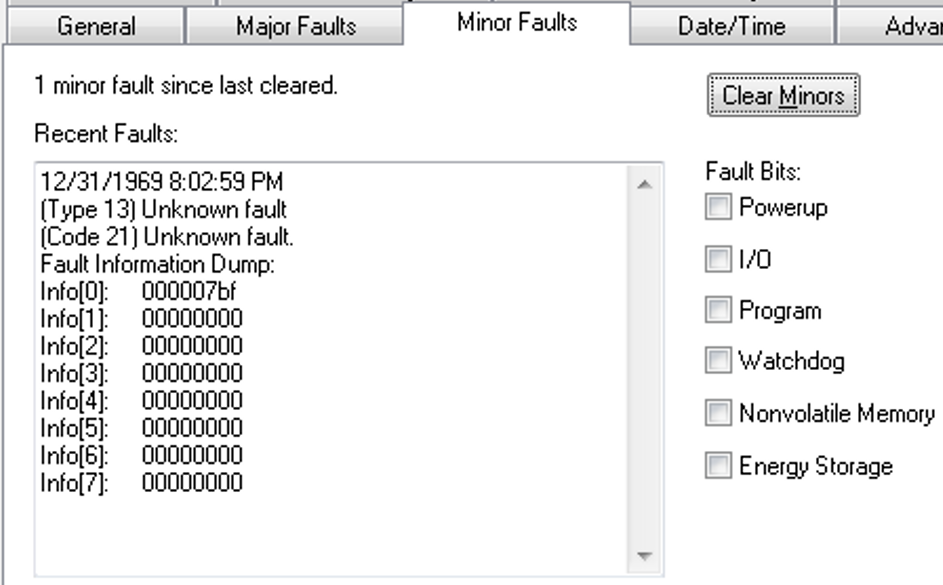
When the fault is logged, the WCT of the controller is set to 1/1/19XX 00:00:00.000, where XX is 81...86. The year corresponds to the Info[0] value for the minor fault.
Compact GuardLogix 5370 Controllers Can Experience a Major Non-recoverable Fault When Power Cycled (00184914, 00186126, 00213382)
Corrected Anomaly in Firmware Revision 28.014 and 30.011
Known Anomaly First Identified as of Firmware Revision 28.011
Catalog Numbers: Compact GuardLogix® 5370
If the controller has been powered for only 65…66 seconds and you cycle power, the controller can experience a major non-recoverable fault.
To recover from this fault, you must re-download the application to the controller.
Applications with PowerFlex drives in the I/O configuration can experience a major non-recoverable fault (MNRF) (00200734, 00200735, 00200600, 00200599)
Corrected Anomaly as of Firmware Revision 31.011 and 30.014 for these catalog numbers:
- CompactLogix™ 5370 Controllers
- Compact GuardLogix® 5370 Controllers
Corrected Anomaly as of Firmware Revision 31.011 and 30.013 for these catalog numbers:
- ControlLogix® 5580 Controllers
- ControlLogix 5570 Controllers
- GuardLogix 5570 Controllers
Known Anomaly First Identified as of Firmware Revision 28.011 for these catalog numbers:
- ControlLogix 5580 Controllers
- CompactLogix 5380 Controllers
- Compact GuardLogix 5370 Controllers
Known Anomaly First Identified as of Firmware Revision 20.011 for these catalog numbers:
- ControlLogix 5570 Controllers
- GuardLogix 5570 Controllers
- ControlLogix 5570 (Redundancy) Controllers
- ControlLogix 5560 Controllers
- GuardLogix 5560 Controllers
- ControlLogix 5560 (Redundancy) Controllers
- CompactLogix 5370 Controllers
- 1769 CompactLogix Controllers
- 1768 CompactLogix Controllers
If a controller already has an application loaded into it that contains PowerFlex drives in the I/O configuration, a MNRF (Major Non-Recoverable Fault) can occur when any of the following occurs:
- A download of a project is performed to the controller.
- A PowerFlex drive is deleted while online.
- A firmware flash update of
the controller is performed.
For more information and workarounds, see Knowledgebase document 1067997.
Controller can MNRF or lock up with the Logix Designer Application during online edit (00192494)
Corrected Anomaly as of Firmware Revision 31.011
Known Anomaly First Identified as of Firmware Revision 24.011 for these catalog numbers:
- ControlLogix® 5570 Controllers
- GuardLogix® 5570 Controllers
- CompactLogix™ 5370 Controllers
Known Anomaly First Identified as of Firmware Revision 28.011 for these catalog numbers:
- Compact GuardLogix 5370 Controllers
If power is lost to the controller while doing an online edit, when power is restored the controller can
experience a major non-recoverable fault (MNRF), or communication with the Studio 5000 Logix
Designer® application cannot be re-established.
Type 14 Code 3 and Type 14 Code 4 faults seen after power cycles (213106, 213883)
Corrected Anomaly with Firmware Revision 28.014 and 32.011
Known Anomaly First Identified as of Firmware Revision 28.011 for these catalog numbers:
- Compact GuardLogix® 5370
After a power cycle, the Compact GuardLogix controller can experience a Type 14 Code 3 (Safety Partner Missing) or a Type 14 Code 4 (Safety Partner Unavailable) major non-recoverable safety fault (MNRF).
Compact GuardLogix controller could experience a MNRF when powering down (213382)
Corrected Anomaly with Firmware Revision 28.014 and 30.011
Known Anomaly First Identified as of Firmware Revision 28.011 for these catalog numbers:
- Compact GuardLogix® 5370
If the internal safety partner controller completes its power down before the safety controller, a major non-recoverable fault (MNRF) will occur. To recover from this fault, you must re-download the application to the controller.
Compact GuardLogix controller can experience a MNRF when power cycling (213381)
Corrected Anomaly with Firmware Revision 28.014 and 29.011
Known Anomaly First Identified as of Firmware Revision 28.011 for these catalog numbers:
- Compact GuardLogix® 5370
If you power up the Compact GuardLogix controller, then power down approximately 62 seconds after power was applied, a major non-recoverable fault (MNRF) can occur. To recover from this fault, you must re-download the application to the controller.
Compact GuardLogix controllers can experience a MNRF when initializing and running background diagnostics (212282, 212487, 212488, 212550, 212552, 213899)
Corrected Anomaly with Firmware Revision 28.014 and 32.011
Known Anomaly First Identified as of Firmware Revision 28.011 for these catalog numbers:
- Compact GuardLogix 5370
Compact GuardLogix® controllers can experience a major non-recoverable fault (MNRF) when initializing and running background diagnostics. To recover from this fault, you must re-download the application to the controller.
AxisHomedStatus Bit Gets Set To Zero When Inhibiting the Axis (00199162, 00217021)
CORRECTED Anomaly with Firmware Revision 33.011 for these catalog numbers:
- ControlLogix® 5570 controllers
- GuardLogix® 5570 controllers
- CompactLogix™ 5370 controllers
- Compact GuardLogix 5370 controllers
- ControlLogix 5580 controllers
- GuardLogix 5580 controllers
- CompactLogix 5380 controllers
- Compact GuardLogix 5380 controllers
- CompactLogix 5480 controllers
Known Anomaly First Identified as of Firmware Revision 20.011 for these catalog numbers:
- ControlLogix 5570 controllers
- GuardLogix 5570 controllers
- CompactLogix 5370 controllers
Known Anomaly First Identified as of Firmware Revision 28.011 for these catalog numbers:
- Compact GuardLogix 5370 controllers
- CompactLogix 5380 controllers
- ControlLogix 5580 controllers
Known Anomaly First Identified as of Firmware Revision 31.011 for these catalog numbers:
- GuardLogix 5580 controllers
- Compact GuardLogix 5380 SIL 2 controllers
Known Anomaly First Identified as of Firmware Revision 32.011 for these catalog numbers:
- CompactLogix 5480 controllers
Known Anomaly First Identified as of Firmware Revision 32.013 for these catalog numbers:
- Compact GuardLogix 5380 SIL 3 controllers
If the AxisHomedStatus bit is already established on a CIP™ drive, issuing an SSV to inhibit the axis resets the AxisHomedStatus bit to zero.
Velocity Scaling Not Performed Before SLAT Setpoint Sent to Drive (00218527, 00200340)
CORRECTED Anomaly with Firmware Revision 33.011 for these catalog numbers:
- ControlLogix® 5580 controllers
- GuardLogix® 5580 controllers
- CompactLogix™ 5380 controllers
- Compact GuardLogix 5380 controllers
- CompactLogix 5480 controllers
- ControlLogix 5570 controllers
- GuardLogix 5570 controllers
- CompactLogix 5370 controllers
- Compact GuardLogix 5370 controllers
Known Anomaly First Identified as of Firmware Revision 20.011 for these catalog numbers:
- ControlLogix 5570 controllers
- GuardLogix 5570 controllers
- CompactLogix 5370 controllers
Known Anomaly First Identified as of Firmware Revision 28.011 for these catalog numbers:
- Compact GuardLogix 5370 controllers
The controller does not perform velocity scaling before it sends the Speed Limited Adjustable Torque (SLAT) setpoint to a drive.
Firmware Supervisor Does Not Update Kinetix 5700 2198-D032-ERS4 Drive Firmware (00218796)
CORRECTED Anomaly with Firmware Revision 33.011 for these catalog numbers:
- ControlLogix® 5570 controllers
- GuardLogix® 5570 controllers
- CompactLogix™ 5370 controllers
- Compact GuardLogix 5370 controllers
Known Anomaly First Identified as of Firmware Revision 20.011 for these catalog numbers:
- ControlLogix 5570 controllers
- GuardLogix 5570 controllers
- CompactLogix 5370 controllers
Known Anomaly First Identified as of Firmware Revision 28.011 for these catalog numbers:
- Compact GuardLogix 5370 controllers
If Firmware Supervisor tries to update the firmware on a
Kinetix® 5700 2198-D032-ERS4 Drive, the Studio 5000 Logix
Designer® Application can report a module fault: “(Code 16#fe11) Automated
Firmware Update Failed: Firmware file invalid.”
Workaround: To update the firmware, use ControlFLASH™ or ControlFLASH Plus™ software.
Controller Does Not Transition to Run Mode after Online Edit of PowerFlex Drive Parameters (00219408)
CORRECTED Anomaly with Firmware Revision 33.011 for these catalog numbers:
- ControlLogix® 5570 controllers
- GuardLogix® 5570 controllers
- CompactLogix™ 5370 controllers
- Compact GuardLogix 5370 controllers
CORRECTED Anomaly with Firmware Revision 33.051 for these catalog numbers:
- ControlLogix 5570 redundant controllers
CORRECTED Anomaly with Firmware Revision 32.012 and 33.011 for these catalog numbers:
- CompactLogix 5480 controllers
CORRECTED Anomaly with Firmware Revision 31.013, 32.012, and 33.011 for these catalog numbers:
- GuardLogix 5580 controllers
- Compact GuardLogix 5380 SIL 2 controllers
CORRECTED Anomaly as of Firmware Revision 30.015, 31.013, 32.012, and 33.011 for these Catalog Numbers:
- ControlLogix 5580 Controllers
- CompactLogix 5380 Controllers
CompactLogix 5380 Controllers Known Anomaly First Identified as of Firmware Revision 20.011 for these catalog numbers:
- ControlLogix 5570 controllers
- GuardLogix 5570 controllers
- CompactLogix 5370 controllers
Known Anomaly First Identified as of Firmware Revision 20.054 for these catalog numbers:
- ControlLogix 5570 redundant controllers
Known Anomaly First Identified as of Firmware Revision 28.011 for these catalog numbers:
- ControlLogix 5580 controllers
- CompactLogix 5380 controllers
- Compact GuardLogix 5370 controllers
Known Anomaly First Identified as of Firmware Revision 31.011 for these catalog numbers:
- GuardLogix 5580 controllers
- Compact GuardLogix 5380 SIL 2 controllers
Known Anomaly First Identified as of Firmware Revision 32.011 for these catalog numbers:
- CompactLogix 5480 controllers
If you edit a PowerFlex® drive parameter online in Program mode, the controller does not transition to run mode when you change from Program mode to run mode. This can occur when you use the 20-750-ENETR PowerFlex 755 dual-port Ethernet communication module.
MCLM/MCCM Set to Merge All Can Cause Controller MNRF (00220553, 00219873)
CORRECTED Anomaly with Firmware Revision 30.011 for these catalog numbers:
- ControlLogix® 5570 controllers
- GuardLogix® 5570 controllers
- CompactLogix™ 5370 controllers
- Compact GuardLogix 5370 controllers
- ControlLogix 5580 controllers
- GuardLogix 5580 controllers
- CompactLogix 5380 controllers
- Compact GuardLogix 5380 controllers
- CompactLogix 5480 controllers
Known Anomaly First Identified as of Firmware Revision 20.011 for these catalog numbers:
- ControlLogix 5570 controllers
- GuardLogix 5570 controllers
- CompactLogix 5370 controllers
Known Anomaly First Identified as of Firmware Revision 28.011 for these catalog numbers:
- Compact GuardLogix 5370 controllers
- CompactLogix 5380 controllers
- ControlLogix 5580 controllers
Known Anomaly First Identified as of Firmware Revision 31.011 for these catalog numbers:
- GuardLogix 5580 controllers
- Compact GuardLogix 5380 SIL 2 controllers
Known Anomaly First Identified as of Firmware Revision 32.011 for these catalog numbers:
- CompactLogix 5480 controllers
Known Anomaly First Identified as of Firmware Revision 32.013 for these catalog numbers:
- Compact GuardLogix 5380 SIL 3 controllers
The controller can experience a major non-recoverable fault (MNRF) due to the following:
- Motion Coordinated Linear Move (MCLM) / Motion Coordinated Circular Move (MCCM) is decelerating.
- Merge All is activated.
- Merging is happening in the last Coarse Update Period of the MCLM/MCCM being
merged.
Socket Application Code Can Cause the Controller to MNRF (00227905, 00228810)
|
Controllers
|
First Known in Firmware
Revision
|
Corrected in Firmware
Revision
|
|
CompactLogix™ 5370
|
20.011
|
33.011
|
|
Compact GuardLogix® 5370
|
28.011
|
33.011
|
|
CompactLogix 5380
|
28.011
|
33.011
|
|
Compact GuardLogix 5380 SIL 2
|
31.011
|
33.011
|
|
Compact GuardLogix 5380 SIL 3
|
32.013
|
33.011
|
|
CompactLogix 5480
|
32.011
|
33.011
|
|
ControlLogix® 5580
|
28.011
|
33.011
|
|
GuardLogix 5580
|
31.011
|
33.011
|
If your application code tries to access a socket that has already been deleted, the controller can experience a major nonrecoverable fault.
Using Compare Instruction with String Data Types (00223326, 00223030,0226535)
|
Controllers
|
First Known in
Firmware Revision
|
Corrected in Firmware
Revision
|
|
CompactLogix™ 5370
|
20.011
|
33.011
|
|
Compact GuardLogix® 5370
|
28.011
|
33.011
|
|
ControlLogix® 5570
|
20.011
|
33.011
|
|
ControlLogix 5570 redundant
|
20.054
|
33.051
|
|
GuardLogix 5570
|
20.011
|
33.011
|
|
CompactLogix 5380
|
28.011
|
33.011
|
|
Compact GuardLogix 5380
SIL 2
|
31.011
|
33.011
|
|
Compact GuardLogix 5380
SIL 3
|
32.013
|
33.011
|
|
CompactLogix 5480
|
32.011
|
33.011
|
|
ControlLogix 5580
|
28.011
|
33.011
|
|
GuardLogix 5580
|
31.011
|
33.011
|
If compare instructions (EQU, GEQ, GRT, LEQ, LES, NEQ) are used with string data types and the length of the string is negative, it can result in the controller experiencing these faults:
- User Task watchdog faults
- Controller major non-recoverable faults (MNRFs)
Nested SFC with Selection Branch Execution on First Transition May Be Incorrect (00227908, 00225009, 880618, 1594431)
|
Controllers
|
First Known in Firmware
Revision
|
Corrected in Firmware
Revision
|
|
CompactLogix™ 5370
|
20.011
|
33.011 and later
|
|
Compact GuardLogix® 5370
|
28.011
|
33.011 and later
|
|
ControlLogix® 5570
|
20.011
|
33.011 and later
|
|
ControlLogix 5570 redundant
|
20.054
|
33.051 and later
|
|
GuardLogix 5570
|
20.011
|
33.011 and later
|
|
CompactLogix 5380
|
28.011
|
31.013, 32.016, 33.011 and later
|
|
Compact GuardLogix 5380
SIL 2
|
31.011
|
31.013, 32.016, 33.011 and later
|
|
Compact GuardLogix 5380
SIL 3
|
32.013
|
32.016, 33.011 and later
|
|
CompactLogix 5480
|
32.011
|
32.016, 33.011 and later
|
|
ControlLogix 5580
|
28.011
|
31.013, 32.016, 33.011 and later
|
|
GuardLogix 5580
|
31.011
|
31.013, 32.016, 33.011 and later
|
Under the following conditions, a sequential function chart (SFC) selection branch will not execute correctly.
- The selection branch is in a nested SFC.
- SFCs are configured for the following:
- Execution Control, Execute current active steps only
- Restart Position, Restart at initial step
- Last Scan of Active Steps, Automatic Reset
- SFR instruction is used to reset the main SFC to the initial step.
Under these conditions, if an SFC is reset while evaluating parallel transitions, the chart may remember that one transition from before the reset was true. If another transition is true after the execution path reaches that select divergence again, the chart could still remember the transition from before the reset and choose the incorrect execution path.
After Power Cycling, The Controller SFC Routines Do Not Execute Properly (00229202, 00229027, 926153, 1594432)
|
Controllers
|
First Known in Firmware
Revision
|
Corrected in Firmware
Revision
|
|
CompactLogix™ 5370
|
20.011
|
33.011 and later
|
|
Compact GuardLogix® 5370
|
28.011
|
33.011 and later
|
|
ControlLogix® 5570
|
20.011
|
33.011 and later
|
|
ControlLogix 5570 redundant
|
20.054
|
33.051 and later
|
|
GuardLogix 5570
|
20.011
|
33.011 and later
|
|
CompactLogix 5380
|
28.011
|
31.013, 32.016, 33.011 and later
|
|
Compact GuardLogix 5380
SIL 2
|
31.011
|
31.013, 32.016, 33.011 and
later
|
|
Compact GuardLogix 5380
SIL 3
|
32.013
|
32.016, 33.011 and later
|
|
CompactLogix 5480
|
32.011
|
32.016, 33.011 and later
|
|
ControlLogix 5580
|
28.011
|
31.013, 32.016, 33.011 and
later
|
|
GuardLogix 5580
|
31.011
|
31.013, 32.016, 33.011 and
later
|
Following a power cycle, if the application program includes an SFC with a simultaneous branch, the possibility exists for one or more steps on that simultaneous branch not to execute. This anomaly does not occur on every power cycle.
See Knowledgebase Technote Unexplained Sequential Function Chart (SFC) simultaneous branch execution.
Unexpected command sent to phase when connection is lost to Logix Designer (00224198)
CORRECTED Anomaly with Firmware Revision 33.011 for these catalog numbers:
- ControlLogix® 5570 controllers
- GuardLogix® 5570 controllers
- CompactLogix™ 5370 controllers
- Compact GuardLogix 5370 controllers
CORRECTED Anomaly with Firmware Revision 33.051 for these catalog numbers:
- ControlLogix 5570 redundant controllers
Known Anomaly First Identified as of Firmware Revision 20.011 for these catalog numbers:
- ControlLogix 5570 controllers
- GuardLogix 5570 controllers
- CompactLogix 5370 controllers
Known Anomaly First Identified as of Firmware Revision 20.054 for these catalog numbers:
- ControlLogix 5570 redundant controllers
Known Anomaly First Identified as of Firmware Revision 28.011 for these catalog numbers:
- Compact GuardLogix 5370 controllers
The options for this configuration are:
- None (continue in its current state)
- Hold
- Stop
- Abort
The anomaly occurs when Logix Designer has an override attach to the equipment phase and the connection is lost to Logix Designer. The anomaly is that the phase is sent the command specified in the ‘External Sequencer Loss of Communication Command’ property. What should happen is no command should be sent—only the override should be cleared. The configured command should only be sent when there is an External Sequencer (FTBatch) attached.
Execution of a MAS Instruction results in error 104 (00213035)
CORRECTED Anomaly with Firmware Revision 33.011 for these catalog numbers:
- ControlLogix® 5570 controllers
- GuardLogix® 5570 controllers
- CompactLogix™ 5370 controllers
- Compact GuardLogix 5370 controllers
Known Anomaly First Identified as of Firmware Revision 28.011 for these catalog numbers:
- ControlLogix 5570 controllers
- GuardLogix 5570 controllers
- CompactLogix 5370 controllers
- Compact GuardLogix 5370 controllers
Under the following specific sequence of events the execution of the MAS instruction could result in error 104. The sequence of events is as follows:
- Interruption of an S-Curve MAM instruction with an MAS instruction of type move.
- Interruption of the MAS instruction with an MSF instruction.
- Interrupting the MAM instruction again with the same MAS instruction.
Consumed axis actual position exceeds the produced axis unwind position (00225674, 00223851)
CORRECTED Anomaly with Firmware Revision 33.011 for these catalog numbers:
- ControlLogix® 5570 controllers
- GuardLogix® 5570 controllers
- CompactLogix™ 5370 controllers
- Compact GuardLogix 5370 controllers
- ControlLogix 5580 controllers
- GuardLogix 5580 controllers
- CompactLogix 5380 controllers
- Compact GuardLogix 5380 controllers
- CompactLogix 5480 controllers
Known Anomaly First Identified as of Firmware Revision 21.011 for these catalog
numbers:
- ControlLogix 5570 controllers
- GuardLogix 5570 controllers
- CompactLogix 5370 controllers
Known Anomaly First Identified as of Firmware Revision 28.011 for these catalog numbers:
- Compact GuardLogix 5370 controllers
- CompactLogix 5380 controllers
- ControlLogix 5580 controllers
Known Anomaly First Identified as of Firmware Revision 31.011 for these catalog numbers:
- GuardLogix 5580 controllers
- Compact GuardLogix 5380 SIL 2 controllers
Known Anomaly First Identified as of Firmware Revision 32.011 for these catalog numbers:
- CompactLogix 5480 controllers
Known Anomaly First Identified as of Firmware Revision 32.013 for these catalog numbers:
- Compact GuardLogix 5380 SIL 3 controllers
The consume axis can reach positions beyond the unwind value. This is something that
can occur depending on the CUP (Course Update Period) of the Motion Group and the
produced axis speed.
The consumed axis is configured for linear, but it applies the unwind value that the consumer gets from the producing axis. Depending on the execution schedule, the unwind value could be applied after the controller tag for the axis position has been updated.
Refer to Knowledgebase article Consumed axis is reaching positions beyond the unwind value.
Homing an axis introduces a spike in the Actual Velocity attribute (00225946, 00223672)
CORRECTED Anomaly with Firmware Revision 33.011 for these catalog numbers:
- ControlLogix® 5570 controllers
- GuardLogix® 5570 controllers
- CompactLogix™ 5370 controllers
- Compact GuardLogix 5370 controllers
- ControlLogix 5580 controllers
- GuardLogix 5580 controllers
- CompactLogix 5380 controllers
- Compact GuardLogix 5380 controllers
- CompactLogix 5480 controllers
Known Anomaly First Identified in these controllers:
- ControlLogix 5570, revision 19.011
- GuardLogix 5570, CompactLogix 5370, revision 20.011
Known Anomaly First Identified as of Firmware Revision 28.011 for these catalog numbers:
- Compact GuardLogix 5370 controllers
- CompactLogix 5380 controllers
- ControlLogix 5580 controllers
Known Anomaly First Identified as of Firmware Revision 31.011 for these catalog numbers:
- GuardLogix 5580 controllers
- Compact GuardLogix 5380 SIL 2 controllers
Known Anomaly First Identified as of Firmware Revision 32.011 for these catalog numbers:
- CompactLogix 5480 controllers
Known Anomaly First Identified as of Firmware Revision 32.013 for these catalog numbers:
- Compact GuardLogix 5380 SIL 3 controllers
While homing to the limit switch, you see a large spike on the axis’ ActualVelocity attribute. The drive position and velocity feedback do not reflect the spike noticed on the ActualVelocity attribute of the controller. They stay consistent with the expected behavior.
CIP Motion Axis Feedback 1 and 2 length incorrectly converted by the controller (00218528, 00218407)
CORRECTED Anomaly with Firmware Revision 33.011 for these catalog numbers:
- ControlLogix® 5570 controllers
- GuardLogix® 5570 controllers
- CompactLogix™ 5370 controllers
- Compact GuardLogix 5370 controllers
- ControlLogix 5580 controllers
- GuardLogix 5580 controllers
- CompactLogix 5380 controllers
- Compact GuardLogix 5380 controllers
- CompactLogix 5480 controllers
Known Anomaly First Identified as of Firmware Revision 20.011 for these catalog numbers:
- ControlLogix 5570 controllers
- GuardLogix 5570 controllers
- CompactLogix 5370 controllers
Known Anomaly First Identified as of Firmware Revision 28.011 for these catalog numbers:
- Compact GuardLogix 5370 controllers
- CompactLogix 5380 controllers
- ControlLogix 5580 controllers
Known Anomaly First Identified as of Firmware Revision 31.011 for these catalog numbers:
- GuardLogix 5580 controllers
- Compact GuardLogix 5380 SIL 2 controllers
Known Anomaly First Identified as of Firmware Revision 32.011 for these catalog numbers:
- CompactLogix 5480 controllers
Known Anomaly First Identified as of Firmware Revision 32.013 for these catalog numbers:
- Compact GuardLogix 5380 SIL 3 controllers
CIP Motion Axis attribute 1419 Feedback 1 Length and 1469 Feedback 2 Length are converted from float to integer by the controller before being sent to the drive. The conversion is unexpected and causes the value in the drive to become incorrect.
Axis Stuck In Synchronizing State When SSV And Inhibiting Axis On The Same Module (00229573, 00225308)
CORRECTED Anomaly with Firmware Revision 33.011 for these catalog numbers:
- ControlLogix® 5580 controllers
- GuardLogix® 5580 controllers
- CompactLogix™ 5380 controllers
- Compact GuardLogix 5380 controllers
- CompactLogix 5480 controllers
- ControlLogix 5570 controllers
- GuardLogix 5570 controllers
- CompactLogix 5370 controllers
- Compact GuardLogix 5370 controllers
Known Anomaly First Identified as of Firmware Revision 20.011 for these catalog numbers:
- ControlLogix 5570 controllers
- GuardLogix 5570 controllers
- CompactLogix 5370 controllers
Known Anomaly First Identified as of Firmware Revision 28.011 for these catalog numbers:
- Compact GuardLogix 5370 controllers
When continually executing multiple SSV instructions to change drive attributes on axis A and inhibiting axis B on the same module, axis A and other axes on the same module become stuck in the synchronizing state and never go to pre-charge/stopped state. You must re-download the project to recover.
Program Scope fault handler in the Safety Task can cause a MNRF on power cycle (00224393, 00226973)
CORRECTED Anomaly with Compact GuardLogix® 5370 controllers, firmware revisions 28.015 and 33.011
Known Anomaly First Identified in Compact GuardLogix 5370 controllers, firmware revision 28.011
If the controller application contains a program scope fault handler in the safety task and the fault handler is executing when power is removed from the controller, the controller will experience a major non-recoverable fault (MNRF) when power is restored to the controller.
Controller can take more time than expected to re-establish connections (00212775, 00227804)
CORRECTED Anomaly with
- Compact GuardLogix® 5370 controllers, firmware revisions 28.015 and 33.011
- CompactLogix™ 5370 controllers, firmware revision 33.011
Known Anomaly First Identified in
- CompactLogix 5370 controllers, firmware revision 20.011
- Compact GuardLogix 5370 controllers, firmware revision 28.011
If repeated connection interruptions occur because of network cable disconnections, the controller can take more than 10 minutes to re-establish connections. If the controller is power cycled, connection re-establishment is almost immediate.
Power cycling the Compact GuardLogix controller during powerup can result in a MNRF (00216856, 00218630)
CORRECTED Anomaly with Compact GuardLogix® 5370, firmware revisions 28.015 and 32.011
Known Anomaly First Identified in Compact GuardLogix 5370, firmware revision 28.011
If power is cycled 51…52 seconds into the power-up cycle of the controller, a major non-recoverable fault (MNRF) can occur.
On powerup CompactLogix and Compact GuardLogix controller Ethernet port may not properly initialize (00223080, 00179897)
CORRECTED Anomaly with
- Compact GuardLogix® 5370 controllers, firmware revisions 28.015 and 32.011
- CompactLogix™ 5370 controllers, firmware revision 32.011
Known Anomaly First Identified in
- Compact GuardLogix 5370 controllers, firmware revision 28.011
- CompactLogix 5370 controllers, firmware revision 20.011
When the controller is powering up, if there is sufficient incoming communication to the embedded Ethernet port, the port may not initialize properly and communication to and from the controller can fail. While the controller is in this state, the IP address of the controller is reported as 0.0.0.0 and the NS (Network Status) indicator is off.
Compact GuardLogix 5370 Controllers Max Observed Input Delay Time is incorrect (00195055, 00196721)
CORRECTED Anomaly with Compact GuardLogix® 5370 controllers, firmware revisions 28.015 and 31.011
Known Anomaly First Identified in Compact GuardLogix 5370 controllers, firmware revision 28.011
In Compact GuardLogix 5370 controllers, the Max Observed Input Delay Time diagnostic value reported in the Studio 5000 Logix Designer® application is not calculated correctly. The incorrectly calculated diagnostic value is higher than the actual value.
For more information, see Product Notice 2017-05-003 - Compact GuardLogix 5370 Controller Inaccurate Maximum Observed Network Delay Value.
Online Editing of PowerFlex Drives (00227003, 1594434)
|
Controllers
|
First Known in Firmware
Revision
|
Corrected in Firmware Revision
|
|
CompactLogix™ 5370
|
20.011
|
33.011 and later
|
|
Compact GuardLogix®
5370
|
28.011
|
33.011 and later
|
|
ControlLogix® 5570
|
20.011
|
33.011 and later
|
|
ControlLogix 5570
redundant
|
20.054
|
33.051 and later
|
|
GuardLogix 5570
|
20.011
|
33.011 and later
|
|
CompactLogix 5380
|
28.011
|
30.015, 31.013, 32.016, 33.011 and
later
|
|
Compact GuardLogix 5380
SIL 2
|
31.011
|
31.013, 32.016, 33.011 and later
|
|
Compact GuardLogix 5380
SIL 3
|
32.013
|
32.016, 33.011 and later
|
|
CompactLogix 5480
|
32.011
|
32.016, 33.011 and later
|
|
ControlLogix 5580
|
28.011
|
30.015, 31.013, 32.016, 33.011 and
later
|
|
GuardLogix 5580
|
31.011
|
31.013, 32.016, 33.011 and later
|
See Knowledgebase Technote Product Notice 2019-01-001 Revision C - Online Editing of PowerFlex Low and Medium Voltage Drives (201901001).
IMPORTANT: You must use a CORRECTED controller firmware revision (listed above) in conjunction with Drives AOP 5.007 or greater; a CORRECTED controller firmware revision alone will not address the anomaly described in the product notice.
Some Safety faults are not logged in the Controller Log (00213448, 00222776, 00223323)
CORRECTED Anomaly with
- Compact GuardLogix® 5370 controllers, firmware revisions 28.015, 32.013, and 33.011
- GuardLogix 5570 controllers, firmware revision 33.011
Known Anomaly First Identified in
- Compact GuardLogix 5370 controllers, firmware revision 28.011
- GuardLogix 5570 controllers, firmware revision 20.011
The Controller Log feature does not properly log some Safety faults in the Controller Log. This does not affect the controller’s ability to detect and react to Safety faults. The Controller Log feature detects and logs changes made to Logix 5000™ controllers without adding any auditing software. For more information about the Controller Log feature, refer to Logix 5000 Controllers Information and Status Programming Manual, publication 1756-PM015.
Compact GuardLogix controllers SRAM diagnostics misses some potential ECC errors on powerup (00214407, 00214185, 00214638, 00214908)
CORRECTED Anomaly with Compact GuardLogix® 5370 controllers, firmware revisions 28.015 and 32.011
Known Anomaly First Identified in Compact GuardLogix 5370 controllers, firmware revision 28.011
SRT (Sort) instruction with a large length can cause the controller to MNRF (00227157)
CORRECTED Anomaly with Firmware Revision 33.011 for these catalog numbers:
- ControlLogix® 5570 controllers
- GuardLogix® 5570 controllers
- CompactLogix™ 5370 controllers
- Compact GuardLogix 5370 controllers
CORRECTED Anomaly with Firmware Revision 33.051 for these catalog numbers:
- ControlLogix 5570 redundant controllers
Known Anomaly First Identified as of Firmware Revision 20.011 for these catalog numbers:
- ControlLogix 5570 controllers
- GuardLogix 5570 controllers
- CompactLogix 5370 controllers
Known Anomaly First Identified as of Firmware Revision 20.054 for these catalog numbers:
- ControlLogix 5570 redundant controllers
Known Anomaly First Identified as of Firmware Revision 28.011 for these catalog numbers:
- Compact GuardLogix 5370 controllers
When the SRT (Sort) instruction is executed, it can result in a controller major non-recoverable fault (MNRF). This can occur when the SRT is performed in an array with a large length, typically over 120 elements.
Dual Feedback Position Error Jumps (00232347, 00232504)
|
Controllers
|
First Known in Firmware
Revision
|
Corrected in Firmware
Revision
|
|
CompactLogix™ 5370
|
20.011
|
34.011
|
|
Compact GuardLogix® 5370
|
28.011
|
34.011
|
|
ControlLogix® 5570
|
20.011
|
34.011
|
|
GuardLogix 5570
|
20.011
|
34.011
|
|
CompactLogix 5380
|
28.011
|
33.011
|
|
Compact GuardLogix 5380 SIL 2
|
31.011
|
33.011
|
|
Compact GuardLogix 5380 SIL 3
|
32.013
|
33.011
|
|
CompactLogix 5480
|
32.011
|
33.011
|
|
ControlLogix 5580
|
28.011
|
33.011
|
|
GuardLogix 5580
|
31.011
|
33.011
|
When the following configuration or conditions are met:
- Dual feedback.
- Feedback 2 is a linear device.
- Linear load type. Direct coupled linear or linear actuator.
Anytime the axis moves past one meter, the position command jumps by 1000 or 39.37 depending on the configured motion units.
Firmware Supervisor fails with “(Code 16#fe11) Automated Firmware Update Failed: Firmware file invalid.” (00206938)
- ControlLogix® 5570 controllers
- GuardLogix® 5570 controllers
- CompactLogix™ 5370 controllers
- Compact GuardLogix 5370 controllers
- ControlLogix 5570 controllers
- GuardLogix 5570 controllers
- CompactLogix 5370 controllers
- Compact GuardLogix 5370 controllers
MAR and MAW Instructions Do Not Execute Properly After Controller Power Is Cycled (1120359, 1161982)
|
Controllers
|
First Known in Firmware
Revision
|
Corrected in Firmware Revision
|
|
CompactLogix™ 5370
|
20.011
|
34.011
|
|
Compact GuardLogix® 5370
|
28.011
|
34.011
|
|
ControlLogix® 5570
|
20.011
|
34.011
|
|
GuardLogix 5570
|
28.011
|
34.011
|
|
CompactLogix 5380
|
28.011
|
34.011
|
|
Compact GuardLogix 5380 SIL 2
|
31.011
|
34.011
|
|
Compact GuardLogix 5380 SIL 3
|
32.013
|
34.011
|
|
CompactLogix 5380 Process
|
33.011
|
34.011
|
|
CompactLogix 5480
|
32.011
|
34.011
|
|
ControlLogix 5580
|
28.011
|
34.011
|
|
GuardLogix 5580
|
31.011
|
34.011
|
|
ControlLogix 5580 Process
|
33.011
|
34.011
|
If a controller is powered down while a Motion Arm Registration (MAR) and/or a Motion Arm Watch (MAW) instruction is active, the state of the instruction will not be accurate on controller power up.
- A Motion Disarm Registration (MDR) is required to reset the MAR instruction.
- A Motion Disarm Watch (MDW) is required to reset to the MAW instruction.
For more information, see the Knowledgebase Technote MAR or MAW Instruction Not Executing Properly After a Power cycle.
Some Faults Are Not Logged in The Controller Log (1061142, 1594647)
|
Controllers
|
First Known in Firmware
Revision
|
Corrected in Firmware
Revision
|
|
CompactLogix™ 5370
|
20.011
|
33.016, 34.011 and later
|
|
Compact GuardLogix® 5370
|
28.011
|
33.016, 34.011 and later
|
|
ControlLogix® 5570
|
20.011
|
33.016, 34.011 and later
|
|
ControlLogix 5570 redundant
|
20.054
|
33.053, 34.051 and later
|
|
GuardLogix 5570
|
20.011
|
33.016, 34.011 and later
|
The Controller Log feature does not properly log User Task Watchdog faults (Type 6 Code 1) in the Controller Log. For more information about the Controller Log feature, see the Logix 5000® Controllers Information and Status Programming Manual, publication 1756-PM015.
PCMD Returns Incorrect Error Code (1056295)
|
Controllers
|
First Known in Firmware
Revision
|
Corrected in Firmware
Revision
|
|
CompactLogix™ 5370
|
20.011
|
34.011
|
|
Compact GuardLogix® 5370
|
28.011
|
34.011
|
|
ControlLogix® 5570
|
20.011
|
34.011
|
|
ControlLogix 5570 redundant
|
20.054
|
34.051
|
|
GuardLogix 5570
|
28.011
|
34.011
|
|
CompactLogix 5380
|
28.011
|
34.011
|
|
Compact GuardLogix 5380 SIL 2
|
31.011
|
34.011
|
|
Compact GuardLogix 5380 SIL 3
|
32.013
|
34.011
|
|
CompactLogix 5380 Process
|
33.011
|
34.011
|
|
CompactLogix 5480
|
32.011
|
34.011
|
|
ControlLogix 5580
|
28.011
|
34.011
|
|
GuardLogix 5580
|
31.011
|
34.011
|
|
ControlLogix 5580 Process
|
33.011
|
34.011
|
Equipment Phase Command (PCMD) returns the incorrect error code “0x6003, HIGH_PRIORITY_OWNED” when it should return “0x6004, NOT_ATTACHED”
Controller Can Assert During The I/O Module Configuration Process (1024030, 00219969)
|
Controllers
|
First Known in Firmware
Revision
|
Corrected in Firmware
Revision
|
|
CompactLogix™ 5370
|
20.011
|
34.011
|
|
Compact GuardLogix® 5370
|
28.011
|
34.011
|
|
ControlLogix® 5570
|
20.011
|
34.011
|
|
ControlLogix 5570 redundant
|
20.054
|
34.051
|
|
GuardLogix 5570
|
28.011
|
34.011
|
|
CompactLogix 5380
|
28.011
|
33.011
|
|
Compact GuardLogix 5380 SIL 2
|
31.011
|
33.011
|
|
Compact GuardLogix 5380 SIL 3
|
32.013
|
33.011
|
|
CompactLogix 5480
|
32.011
|
33.011
|
|
ControlLogix 5580
|
28.011
|
33.011
|
|
GuardLogix 5580
|
31.011
|
33.011
|
Certain I/O modules send more configuration data than fits in a standard forward open (508 bytes) when the connection is being established. Therefore, the configuration process can take longer to complete. Examples include E300™ Electronic Overload Relays, 1444 Dynamics, 1718 I/O, 1719 I/O, and many third-party I/O devices.
When the configuration data is being sent to the device, if you change the configuration through the Add-on Profile for the device and then apply the changes the controller can assert.
CIP™ Axis Velocity Loop Causes Controller To MNRF/Assert (1008498, 1006943)
|
Controllers
|
First Known in Firmware
Revision
|
Corrected in Firmware
Revision
|
|
CompactLogix™ 5370
|
20.011
|
34.011
|
|
Compact GuardLogix® 5370
|
28.011
|
34.011
|
|
ControlLogix® 5570
|
20.011
|
34.011
|
|
GuardLogix 5570
|
28.011
|
34.011
|
|
CompactLogix 5380
|
28.011
|
34.011
|
|
Compact GuardLogix 5380 SIL 2
|
31.011
|
34.011
|
|
Compact GuardLogix 5380 SIL 3
|
32.011
|
34.011
|
|
CompactLogix 5380 Process
|
33.011
|
34.011
|
|
CompactLogix 5480
|
32.011
|
34.011
|
|
ControlLogix 5580
|
28.011
|
34.011
|
|
GuardLogix 5580
|
31.011
|
34.011
|
|
ControlLogix 5580 Process
|
33.011
|
34.011
|
Setting the Axis Direct Command Velocity Tag to “Not a Number” (NaN) causes the controller to experience a major nonrecoverable fault/assert.
Grandmaster Clock Description Not Correctly Being Displayed (939979)
|
Controllers
|
First Known in Firmware
Revision
|
Corrected in Firmware
Revision
|
|
CompactLogix™ 5370
|
20.011
|
34.011
|
|
Compact GuardLogix® 5370
|
28.011
|
34.011
|
|
ControlLogix® 5570
|
20.011
|
34.011
|
|
ControlLogix 5570 redundant
|
20.054
|
34.051
|
|
GuardLogix 5570
|
20.011
|
34.011
|
Located in controller properties → Date Time → Advanced → Grandmaster Clock description could be shown as a blank description or could be showing old information. This does not impact time synchronization.
Message T0 (Timeout) Bit Does Not Function as Designed (1068449)
|
Controllers
|
First Known in Firmware
Revision
|
Corrected in Firmware
Revision
|
|
CompactLogix™ 5370
|
20.011
|
34.011
|
|
Compact GuardLogix® 5370
|
28.011
|
34.011
|
When setting the message TO (TimeOut) bit in the message instruction backing tag the message instruction does not timeout immediately as expected. It will time out as set by the unconnected timeout setting in the message instruction backing tag, which the default is 30 seconds.
SequenceManager Event Client 2.0 Can Experience Slow Performance When Using the Start Up Recovery Option (1769621)
|
Controllers
|
First Known in Firmware
Revision
|
Corrected in
Firmware Revision
|
|
CompactLogix™ 5370
|
28.011
|
36.011 and later
|
|
Compact GuardLogix® 5370
|
28.011
|
36.011 and later
|
|
ControlLogix® 5570
|
28.011
|
36.011 and later
|
|
GuardLogix 5570
|
28.011
|
36.011 and later
|
After downloading a new project, the SequenceManager™ Event Client that started with the Start Up Recovery option should stop attempting to recover events immediately. However, the Event Client can continue to attempt recovery until the maximum number of events has been reached.
Workaround: Start the SequenceManager Event Client with the Start Up Recovery option disabled.
SequenceManager Event Client 2.0 Cannot Reliably Recover Events on Startup of The Service (1766682)
|
Controllers
|
First Known in Firmware
Revision
|
Corrected in
Firmware Revision
|
|
CompactLogix™ 5370
|
28.011
|
36.011 and later
|
|
Compact GuardLogix® 5370
|
28.011
|
36.011 and later
|
|
ControlLogix® 5570
|
28.011
|
36.011 and later
|
|
GuardLogix 5570
|
28.011
|
36.011 and later
|
Starting the SequenceManager™ Event Client 2.0 service with the Start Up Recovery option enabled can result in missing data.
Inverting Motion Polarity Does Not Invert the Value of Certain Signal Attributes (1329074, 1332544)
|
Controllers
|
First Known in Firmware
Revision
|
Corrected in Firmware Revision
|
|
CompactLogix™ 5370
|
20.011
|
34.011 and later
|
|
Compact GuardLogix® 5370
|
28.011
|
34.011 and later
|
|
ControlLogix® 5570
|
19.011
|
34.011 and later
|
|
GuardLogix 5570
|
20.011
|
34.011 and later
|
|
CompactLogix 5380
|
28.011
|
34.011 and later
|
|
CompactLogix 5380 process
|
33.011
|
34.011 and later
|
|
Compact GuardLogix 5380 SIL 2
|
31.011
|
34.011 and later
|
|
Compact GuardLogix 5380 SIL 3
|
32.013
|
34.011 and later
|
|
CompactLogix 5480
|
32.011
|
34.011 and later
|
|
ControlLogix 5580
|
28.011
|
34.011 and later
|
|
ControlLogix 5580 process
|
33.011
|
34.011 and later
|
|
GuardLogix 5580
|
31.011
|
34.011 and later
|
When the axis Motion Polarity bit is set to inverted, certain Signal attributes for a CIP™ axis will display a value opposite of the programmed direction of the axis.
The affected signal attributes are:
• #365 Fine Command Position
• #495 Torque Estimate
• #432 Position Reference
• #523 Motor Electrical Angle
• #565 Slip Compensation
• #600 Output Frequency
• #601 Output Current
• #602 Output Voltage
• #603 Output Power
• #1403 Velocity Feedback 1
• #1453 Velocity Feedback 2
For more information, see the Knowledgebase Technote Inverting Motion Polarity Does Not Invert the Value of Certain Signal Attributes.
Module does not get IP Address Assigned from a DHCP Server (2188094, 2233611)
|
Modules
|
First Known in Firmware
Revision
|
Corrected in Firmware
Revision
|
|
CompactLogix™ 5370
|
20.011
|
36.011
|
|
Compact GuardLogix®
5370
|
28.011
|
36.011
|
|
1756-EN2F
|
5.028 (Signed)
2.005 (Unsigned)
|
12.001 and later
|
|
1756-EN2T
|
5.028 (Signed)
|
12.001 and later
|
|
1756-EN2TP
|
10.020
|
12.001 and later
|
|
1756-EN2TR
|
5.028 (Signed)
1.003 (Unsigned)
|
12.001 and later
|
|
1756-EN3TR
|
5.028 (Signed)
3.004 (Unsigned)
|
12.001 and later
|
|
1756-ENBT
|
1.061
|
—
|
|
1768-ENBT
|
1.003
|
—
|
This anomaly was due to a change in the Dynamic Host Configuration Protocol (DHCP) standard, RFC 6842. This anomaly results in the module not being able to obtain an IP address through DHCP with some Stratix® switches that follow the updated standard.
For more information, see Knowledgebase Technote Some Ethernet devices do not obtain DHCP lease from Stratix 5800 as DHCP Server.
TSSM Instruction May Not Function as Documented (3343045, 3343105)
|
Controllers
|
First Known in
Firmware Revision
|
Corrected in
Firmware Revision
|
|
Compact GuardLogix® 5370
|
28.011
|
37.011 and later
|
|
Compact GuardLogix® 5380 SIL 2
|
31.011
|
37.011 and later
|
|
Compact GuardLogix 5380 SIL 3
|
32.013
|
37.011 and later
|
|
GuardLogix 5560
|
17.008
|
—
|
|
GuardLogix 5570
|
20.011
|
37.011 and later
|
|
GuardLogix 5580
|
31.011
|
37.011 and later
|
For additional information, see Knowledgebase Article Unexpected TSSM Instruction Behaviour.
|
Controllers
|
First Known in Firmware
Revision
|
Corrected in Firmware Revision
|
|
CompactLogix® 5370
|
20.011
|
37.011 and later
|
|
Compact GuardLogix® 5370
|
28.011
|
37.011 and later
|
|
ControlLogix® 5570
|
20.011
|
37.011 and later
|
|
GuardLogix 5570
|
20.011
|
37.011 and later
|
|
CompactLogix 5380
|
29.011
|
34.015, 35.014, 36.013, 37.011 and
later
|
|
Compact GuardLogix 5380 SIL 2
|
31.011
|
34.015, 35.014, 36.013, 37.011 and
later
|
|
Compact GuardLogix 5380 SIL 3
|
32.013
|
34.015, 35.014, 36.013, 37.011 and
later
|
|
CompactLogix 5380 Process
|
33.011
|
34.015, 35.014, 36.013, 37.011 and
later
|
|
CompactLogix 5480
|
32.011
|
34.015, 35.014, 36.013, 37.011 and
later
|
|
ControlLogix 5580
|
28.011
|
34.015, 35.014, 36.013, 37.011 and
later
|
|
GuardLogix 5580
|
31.011
|
34.015, 35.014, 36.013, 37.011 and
later
|
|
ControlLogix 5580 Process
|
33.011
|
34.015, 35.014, 36.013, 37.011 and
later
|
Known Anomalies from Previous Releases
These anomalies are from previous releases but are still known in this release.
A Program’s First Scan May Not Occur if the Program is Uninhibited (00190610, 00190512)
Corrected Anomaly in Firmware Revision 31.011
Known Anomaly First Identified in Firmware Revision 19.013
Catalog Numbers:
- ControlLogix® 5570
- GuardLogix® 5570
- Compact GuardLogix 5370
- CompactLogix™ 5370
If a program is inhibited, and then uninhibited, then a small timing window could occur where the S:FS first scan bit is reset before the program is truly first scanned.
Application Notes
This release has the following application notes.
Application Note First Identified as of Firmware Revision 28.011
Catalog Numbers:
- ControlLogix® 5570
- ControlLogix 5580
- Compact GuardLogix® 5370
- CompactLogix™ 5370
- CompactLogix 5380
- GuardLogix 5570
This firmware revision uses a new file format with an extension of .DMK. These files are named for easy identification, for example: 1756-L73_28.011.dmk.
ControlFLASH™ (version 13 or later) and ControlFLASH Plus™ software support the format. ControlFLASH software is automatically installed as part of the Studio 5000 Logix Designer® application installation. You can also download ControlFLASH and ControlFLASH Plus software from the Rockwell Automation Product Compatibility and Download Center (PCDC) separately, if necessary.
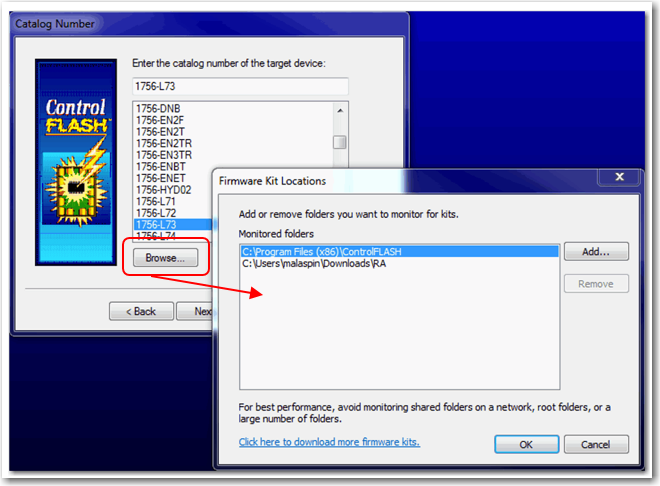
You are not required to install the new firmware file format. When you download .DMK files from the Rockwell Automation PCDC, ControlFLASH software automatically saves the folder location where the .DMK files were downloaded. As a result, ControlFLASH software can easily locate .DMK files.
You can use the Browse option to access and configure the folders that ControlFLASH software monitors, as shown.
|
Controllers
|
Application Note First Identified in
Firmware Revision
|
|
Compact GuardLogix® 5380 SIL 2
|
31.011
|
|
Compact GuardLogix 5380 SIL 3
|
32.013
|
|
GuardLogix 5580
|
31.011
|
|
Compact GuardLogix® 5370
|
28.011
|
|
GuardLogix 5570
|
20.011
|
The RunMode state will provide the mode of the Producing controller from within the Consuming tag’s data. The RunMode state does not provide unique values in the Producing tag’s data. To monitor the state of the Producing controller within the Producing controller’s logic, use a Get System Value (GSV), with the Object set to ControllerDevice and the Attribute set to Status.
This application note applies to all firmware revisions of:
- GuardLogix® 5580, GuardLogix 5570, and GuardLogix 5560 controllers
- Compact GuardLogix 5380 and Compact GuardLogix 5370 controllers
- Compact GuardLogix L4 controllers
- All major and minor firmware releases for GuardLogix controller systems are certified for use in safety applications. As part of the certification process, Rockwell Automation tests the safety-related firmware functions (for example the CIP Safety™ communication subsystems, embedded safety instruction execution, and safety-related diagnostic functions). The firmware release notes identify changes to safety-related functions.
- Perform an impact analysis of the planned firmware upgrade.
- Review of the firmware release notes for changes in safety-related functionality.
- Review of hardware and firmware compatibility in the Product Compatibility and Download site to identify potential compatibility conflicts.
- Any modification, enhancement, or adaptation of your validated software must be planned and analyzed for any impact to the functional safety system as described in the ‘Edit Your Safety Application’ section in the safety reference manual for your controller.
- You must remove and regenerate the safety signature as part of the firmware upgrade process. Use the online and offline edit process described in the safety reference manual for your controller.
- GuardLogix 5580 and Compact GuardLogix 5380 Safety Reference Manual, 1756-RM012
- GuardLogix 5570 and Compact GuardLogix 5370 Safety Reference Manual, 1756-RM099
- GuardLogix 5560 and Compact GuardLogix L4 Safety Reference Manual, 1756-RM093
- From the Product Compatibility and Download Center:
- Review all firmware release notes, starting with the original firmware revision through the new firmware revision, to identify any changes that impact the safety-related implementation of the application.
- Review hardware and firmware compatibility to identify any restrictions between the original system components and the new system components.
- Perform a hazard and risk assessment for any changes identified during the impact analysis and determine what additional testing is necessary.
- Perform the online and offline edit process described in the safety reference manual for your controller. You can restrict the ‘Test the Application’ block to the testing identified by the hazard and risk assessment.
Copyright © 2025 Rockwell Automation, Inc. All rights reserved.
Rockwell Automation, Allen-Bradley, and FactoryTalk are trademarks of Rockwell Automation, Inc.
To view a complete list of Rockwell Automation trademarks please click here.
Trademarks not belonging to Rockwell Automation are property of their respective companies.