
Release Notes
More information: PowerFlex® 525 Site
Version 3.001 (released 9/2014)
Catalog Number PowerFlex 525 (series A)
Features
This release includes the following system features.
System Feature Identified as of PowerFlex 525 Drives Firmware Revision 3.001
System Feature Identified as of PowerFlex 523 Drives Firmware Revision 3.001
d392 [RdyBit Mode Act]
(With PowerFlex 525 FRN 3.xxx and later.)
(With PowerFlex 523 FRN 3.xxx and later.)
Displays the value of A574 [RdyBit Mode Cfg].
|
Values
|
Default:
|
Read Only
|
|
Min/Max:
|
0/1
| |
|
Display:
|
1
|
A574 [RdyBit Mode Cfg]
 Stop drive before changing this parameter.
(With PowerFlex 525 FRN 3.xxx and later.)
(With PowerFlex 523 FRN 3.xxx and later.)
Determines which Stop conditions causes the drive’ s Ready bit (Network Logic Status bit 1) to go low (0). A reset or power cycle is required after selection is made.
|
Stop Conditions
|
Ready Bit Status 1
| |
|
Standard
|
Enhanced
| |
|
Drive fault
|
0
|
0
|
|
Stop digital input terminal 01/11 open
|
1
|
0
|
|
Holding down the drive’
s keypad or the Remote
DSI
HIM Stop button
|
1
|
0
|
|
Stop commanded through Comms (Stop bit = 1)
|
1
|
0
|
|
Software (SW) Enable digital input terminal open
|
1
|
0
|
| Safe-Torque-Off (STO) condition with value of t105 [Safety Open En] set to 1 “FaultDisabled” (1) |
0
|
0
|
(1) Condition is specific to PowerFlex 525 drives only.
|
Options:
|
0 “Standard”
(Default)
|
|
1 “Enhanced”
|
-------------------------
|
1 1 = Active, 0 = Inactive |
Corrected Anomalies in This Release
This release corrects the following anomalies.
Corrected: PowerFlex 525 Drives Firmware Revision 3.001
Known Anomaly as of PowerFlex 525 Drives Firmware Revision 2.002
The loss of accuracy in the Autotune routine sometimes causes the value of parameter A496 [IR Voltage Drop] to be incorrectly configured. When this incorrect value is used, it causes parameters A484/A485 [Current Limit x] to not operate properly.
This anomaly exists in firmware revision 2.002 and 2.003. Once the current limit is reached and the drive’ s frequency is at 0 Hz, after a short time the drive faults on F064 “Drive Overload”.
Firmware revision 3.001 corrects this anomaly. The tuning accuracy is corrected and parameters A484/A485 [Current Limit x] now operate properly.
Corrected: PowerFlex 525 Drives Firmware Revision 3.001
Known Anomaly First Identified as of PowerFlex 525 Drives Firmware Revision 2.002
When the drive is commanded to Stop through Comms (Stop bit =1), the Ready bit goes low (0).
This anomaly exists in firmware revision 2.002 and 2.003. The addition of this Stop condition that affects the behavior of the Ready bit caused a change in functionality for some existing Logix programs.
Firmware revision 3.001 corrects this anomaly by adding two new parameters, d392 [Rdy Bit Mode Act] and A574 [RdyBit Mode Cfg]. These allows users to configure the Ready bit status.
For more information on the two parameters, see System Feature for Firmware Revision 3.001 “New Parameters for Configuring Behavior of Drive Ready Bit.”
Corrected: PowerFlex 525 Drives Firmware Revision 3.001
Reserve AppView Parameter Group G9 is unused and has been removed.
Known Anomalies in This Release
This release has the following known anomalies.
Corrected: PowerFlex 525 Drives Firmware Revision 4.001
Known Anomaly Identified as of PowerFlex 525 Drives Firmware Revision 3.001
When using ADC (Automatic Device Configuration) in Studio 5000 or Connected Components Workbench, the function does not work. Additionally in Connected Components Workbench, a custom group created with firmware revisions 1.xxx or 2.xxx cannot be downloaded to a drive with firmware revision 3.001.
This anomaly exists in firmware revision 3.001.The removal of the reserve AppView Parameter Group G9 caused an incompatibility with firmware revisions 1.xxx and 2.xxx.
Firmware revision 4.001 corrects this anomaly. The reserve AppView Parameter Group G9 is restored. Firmware revision 3.001 is not compatible with firmware revision 4.001 and later.
Known Anomalies from Previous Releases
These anomalies are from previous releases but are still known in this release.
Security Vulnerability in PowerFlex 525 AC Drives with Embedded EtherNet/IP (152230)
Corrected Anomaly with PowerFlex® 525 Drives Firmware Revision 5.002
Known Anomaly First Identified as of PowerFlex 525 Drives Firmware Revision 1.003
Catalog Number: 25B
This product release remediates a security vulnerability in the firmware. This vulnerability may affect the availability of network communications to this product due to resource exhaustion and/or memory corruption. An affected product would require manual intervention to recover. For complete details on the vulnerability and recommended mitigations, refer to KnowledgeBase article 1082684.
Application Notes
This release has the following application notes.
Application Notes
Using Connected Components Workbench™ Software
- Launch the Connected Components Workbench software.
- Open the project for your PowerFlex 525 drive.
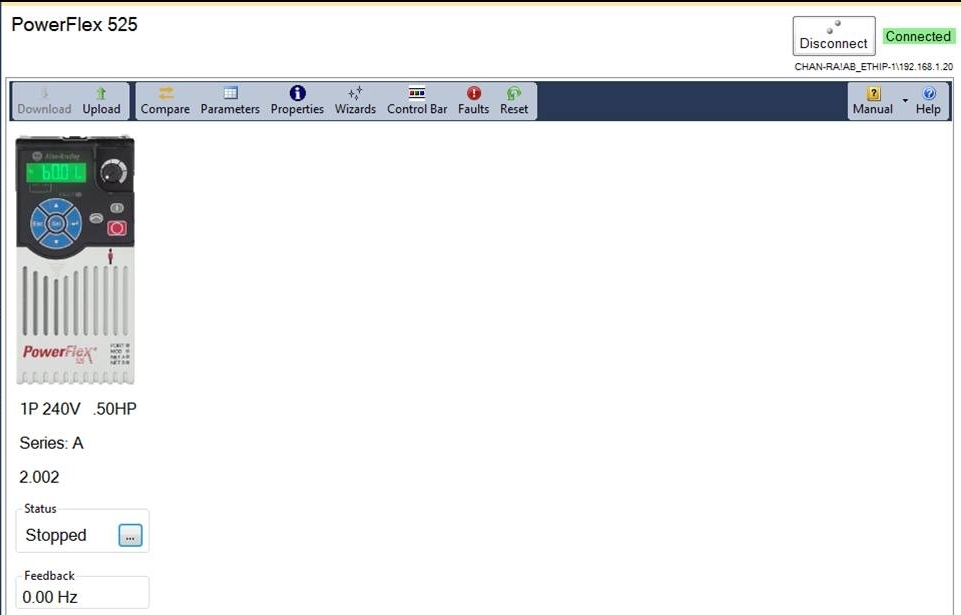
- On the main screen, click
 to go online.
 The firmware revision is displayed on the screen as shown in this example.
Using Studio 5000 Logix Designer™ Software
- Launch the Logix Designer software.
- Open the project for your PowerFlex 525 drive.
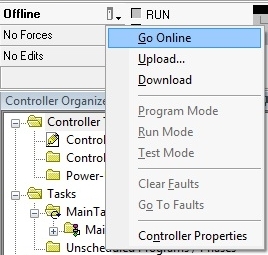
- On the main screen, click
 and select Go Online.
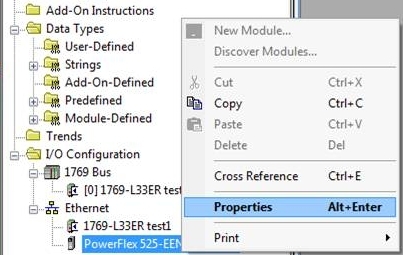
- Right-click on the PowerFlex 525 drive and select Properties.
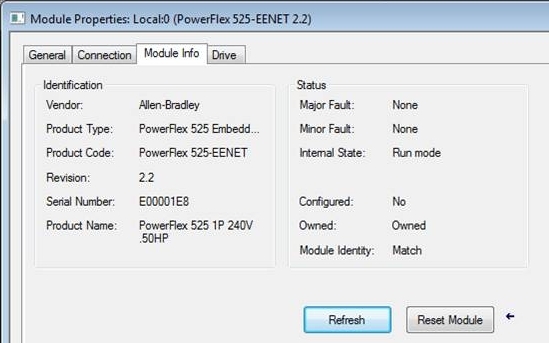
- In the Module Properties window, select the Module Info tab to display the firmware revision.


Using the Drive LCD Display and Keypad
|
Step
|
Key(s)
|
Example Display
| |
|
1.
|
When power is applied, the
last user-selected Basic
Display Group parameter
number is briefly displayed
with flashing characters. The
display then defaults to that
parameter’
s current value.
(Example shows the value of b001 [Output Freq] with the drive stopped.) |
|
 |
|
2.
|
Press Esc to display the
Basic Display Group
parameter number shown on
power-up. The parameter
number will flash.
|
 |
 |
|
3.
|
Press the Up Arrow or Down
Arrow to scroll to parameter
b029 [Control SW Ver].
|

or
 |
 |
|
4.
|
Press Enter to display the
drive’
s firmware revision.
|
 |
 |
Product Updates and Replacements
Using the USB Utility Application
- Separate the Control Module from the Power Module.
|
TIP
|
For more information on how to separate the Control Module from the
Power Module, see the PowerFlex® 520-Series Adjustable Frequency AC
Drive User Manual, publication 520-UM001.
|
- Connect one end of a USB cable to the USB port on the back of the Control Module.
- Connect the other end to the PC. A Windows® Explorer window appears.
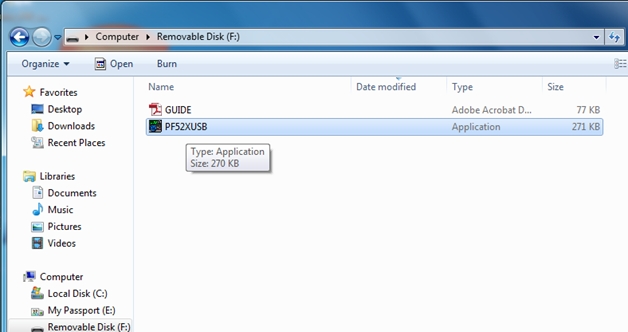
- Launch the PF52XUSB utility application. The PowerFlex 520-Series USB Application window appears.
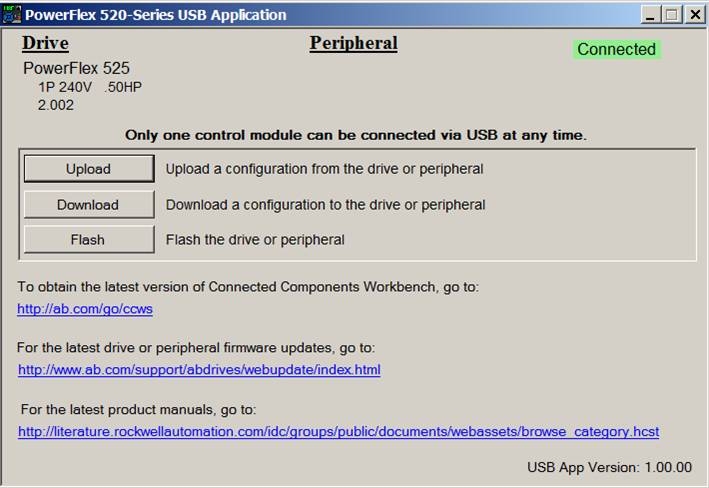
- Click Flash and select the firmware with which you want to update the module.
- Click Yes. The Confirm Flash Update dialog box appears. It displays the current firmware revision and the new revision to be flashed.
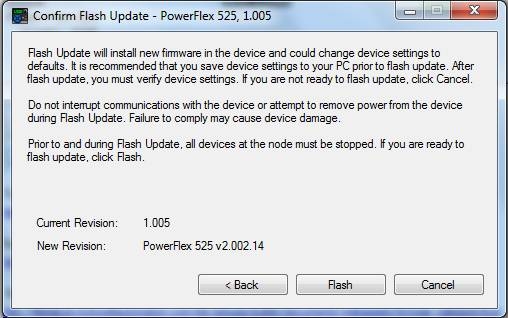
- Click Flash.
- When the process is complete, click OK.
- Close the application and disconnect the Control Module from the PC.
- Connect the Control Module to the Power Module and power cycle the drive.
- During the boot-up sequence, the following commands are displayed on the drive’ s LCD display: BOOT > COPY1 > COPY2 > ERASE > BOOT
- When fault F105 “C Connect Err” occurs, clear the fault to complete the flash update.
- The LCD display shows the drive data and current firmware revision.
Alternatively, you can verify the firmware revision by checking parameter b029 [Control SW Ver].
|
TIP
|
If the firmware revision did not update properly, you may need to reset the
drive to default and cycle drive power.
|
Using the ControlFLASH™ Software
- Install the flash kit utility for the PowerFlex 525 drive. You can download the flash kit utility from the Allen-Bradley Web Updates site at: http://www.ab.com/support/abdrives/webupdate/
- Launch the ControlFLASH software.
- On the ControlFLASH Welcome screen, click Next. The Catalog Number dialog box appears.
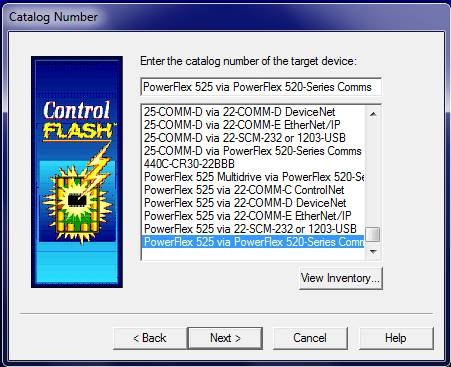
- Select the communication device you will use to update the firmware revision and click Next. For this example, select “PowerFlex 525 via PowerFlex 520-Series Comms” .
- In the Select Device to Update dialog box, expand the hardware view by clicking the “+” symbol next to the communication path you are using. For this example, click the “+” next to “AB_ETHIP-1, Ethernet ”.
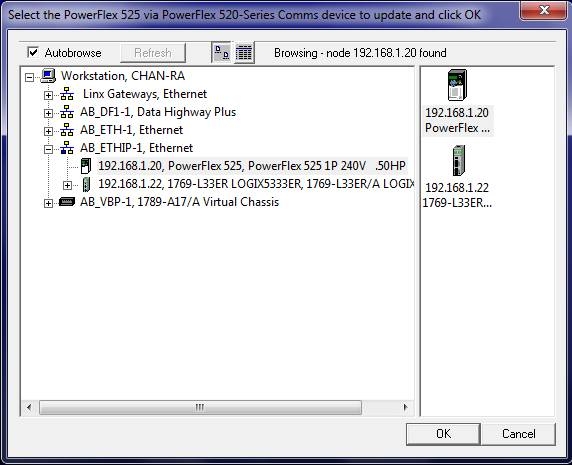
- Select the entry of the PowerFlex 525 drive you are updating and click OK. The Firmware Revision dialog box appears.
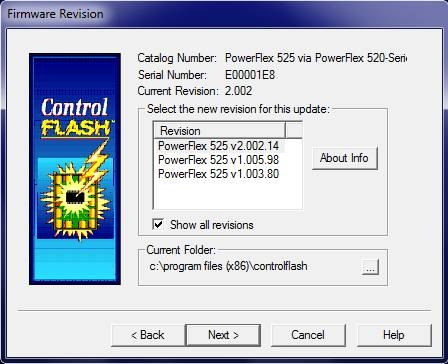
- Select the firmware revision you want to flash and click Next.
- Follow the remaining prompts to complete the flash update. When the process is complete, the new firmware revision is displayed in the dialog box.
Copyright © 2026 Rockwell Automation, Inc. All rights reserved.
Rockwell Automation, Allen-Bradley, and FactoryTalk are trademarks of Rockwell Automation, Inc.
To view a complete list of Rockwell Automation trademarks please click here.
Trademarks not belonging to Rockwell Automation are property of their respective companies.