
Release Notes
( 9358-x ) Metrics is a product for analyzing machine performance, downtime, etc. for identifying process improvements.
Version 11.50.00 (released 8/2014)
Catalog Number FactoryTalk Metrics
Requirements
This release has the following requirements.
The following are the system requirements for RSBizWare 11.50.00.
|
Notes:
|
|
The RSBizWare products are highly configurable and scalable applications, and hardware requirements vary considerably depending upon the size and architecture of the application. For example:
- The server and database components of an RSBizWare application can reside on a single computer, or they can be distributed between multiple computers. The computer requirements for each architecture will be different.
- The entry-level FactoryTalk Historian Classic application allows 150 tags, the largest FactoryTalk Historian Classic application allows 70,000 tags. The largest one has over 450 times more tags than the smallest one. A computer that runs a 70,000 tag system adequately will run a 150 tag system as adequately, but the reverse is not true.
- FactoryTalk Metrics has no license limits on the number of custom events configured in an application. So it is possible to configure a 100 work cell system (for example) that logs anywhere between zero and millions of custom events per day. Obviously, as you increase the number of work cells that you monitor and increase the number of events that you track, you will need progressively more powerful computers to effectively handle the load.
- The number of clients accessing the system and viewing reports has an impact on hardware requirements.
The specifications for server computers listed here are to be considered minimums for a very small RSBizWare application where all services are running on one computer, or for larger applications where there is a separate database server. Your Rockwell Automation salesperson or system integrator should be able to help you in assessing the hardware requirements for your particular application.
Consult the Microsoft website for the processor compatibility and the minimum and recommended memory requirements of the operating system, on which you will install RSBizWare. Note that most compatible operating systems require 64-bit hardware.
The requirements below assume that the database engine will be installed on another computer. Depending on the database that you will be using, consult the Microsoft websites for the requirements of the appropriate database version and edition. Keep in mind that the requirements will also depend upon the number of database users and the size of the database(s). If a version of SQL Server is included with RSBizWare, it will be SQL Server 2012 Standard Edition.
This computer will host the server processes for a FactoryTalk Metrics or FactoryTalk Historian Classic application, and will run a Server operating system. A FactoryTalk Metrics Server license (workcell-limited) or a FactoryTalk Historian Classic Server license (tag limited) is required. You can also install the database server on this computer, but we recommend that you use a second computer for the database server, unless the application is small.
The upgrade of the following software is required during the installation of RSBizWare:
- FactoryTalk Services Platform, to version FactoryTalk Services Platform 2.60
- FactoryTalk Activation, to version FactoryTalk Activation 3.62
You will not be able to install the product without upgrading these applications.
|
Item
|
Description
|
|
Processor
|
Processor type:
Processor speed:
|
|
Memory
|
|
|
Disk space
|
|
|
Graphics
|
Resolution:
|
|
Peripherals
|
A DVD drive.
|
|
Operating
systems
|
Notes:
|
|
Software
|
|
|
|
|
The following operating systems and database servers are no longer supported:
- Microsoft SQL Server 2005 Standard with Service Pack 3
- Microsoft Windows 2003 Server R2 with Service Pack 2
- Oracle 11g
- Oracle 10g
- Oracle 9i
You will not be able to install RSBizWare 11.50 or Report Expert 3.20 on Microsoft Windows 2003 or with SQL Server 2005.
The RSBizWare Configuration Console is a thick client with which you can configure FactoryTalk Metrics applications, FactoryTalk Historian Classic applications, and create QuickWeb (RSBizWare) reports.
An Authoring client license is required for any user to use the Configuration Console, either a FactoryTalk Metrics Authoring Client, or a FactoryTalk Historian Classic Authoring Client.
|
Item
|
Description
|
|
Processor
|
Processor speed: 1 GHz.
|
|
Memory
|
1 GB RAM.
|
|
Disk space
|
112 MB.
|
|
Graphics
|
Minimum: 800 x 600.
|
|
Peripherals
|
A DVD drive.
|
|
Operating
systems
|
Note: See also "Windows Server 2012
prerequisites".
|
|
Software
|
|
- Open Internet Explorer.
- Select Tools > Internet Options.
- Click the Advanced tab, and make sure that the Use HTTP 1.1 check box under the HTTP 1.1 Settings tree is selected.
An RSBizWare client accesses either Report Expert or QuickWeb reports through a web browser. FactoryTalk Metrics/FactoryTalk Historian Classic Runtime Client licenses are required for users to access reports.
|
Item
|
Description
|
|
Disk space
|
100 MB for the installation of ActiveX.
|
|
Graphics
|
Resolution:
|
|
Operating
systems
|
Note: See also "Windows Server 2012
prerequisites".
|
|
Software
|
|
The following requirements and recommendations apply to the server computer on which the database server software and database for the FactoryTalk Metrics or FactoryTalk Historian Classic application will reside. It is recommended that you install the database server on a separate computer from the RSBizWare server.
The database server software included with the product is Microsoft SQL Server 2012 SP1 Standard Edition. It is a runtime-limited version, which means that you can use it only with the application with which it was included. Procuring user licenses for SQL Server is the user’s responsibility, and many of the client licenses provided by Rockwell Software include client licenses – consult a current price list for details. The SQL licensing information is also provided in the Rockwell Software Knowledgebase article no. 64647.
|
Database
|
ODBC driver version
|
Net client driver version
|
|
Microsoft SQL Server 2012
with Service Pack 1
|
6.2.9200.16384 (SQLSRV32.DLL)
|
2011.110.3000.0 (SQLNCLI11.dll)
|
|
Microsoft SQL Server 2008
R2 with Service Pack 2
|
6.1.7601.17514 (SQLSRV32.DLL)
|
2009.100.4000.0 (SQLNCLI10.dll)
|
|
Item
|
Description
|
|
Hardware
|
|
|
Disk space
|
SQL Server:
|
|
Data storage options for
Microsoft SQL Server
|
The Redundant Array of Independent Disks (RAID) is the recommended
data storage option.
Recommended configurations:
Microsoft SQL Server can run well with RAID 1 configurations:
If you use an array of disks for storage, we recommend at least two SCSI
drives using different controller cards:
For more recommendations on configuring SQL Server refer to the
Microsoft web site.
|
Features
This release includes the following system features.
The following are the system features for RSBizWare 11.50.00.
New features
The following features have been introduced in this release of RSBizWare:
- The Event Detail Paged report template has been added.
- The report template displays raw event data, divided into pages, which can make retrieving large amounts of data faster.
- The Event Has Comment Filtering parameter has been added, and is used in the Event Detail and Event All Detail reports.
- The Start Time Grouping parameter has been added, which shows record-level detail of production data (only).
- The Report Expert server can be specified using the server IP address instead of server name.
The following features have been enhanced in this version of Report Expert:
- The Root Cause Analysis report template has been replaced:
- The display of the Gantt chart is improved and made more accurate.
- The X-axis label is timestamp instead of elapsed minutes.
- States can be filtered and displayed selectively.
- The Details panel on the Edit Events, Edit Production Data, and Enter Data Manually screens can be hidden to increase the amount of data displayed on the screen.
- Event query performance is improved, in part by adding new indexes:
- The OEEEvent_IDX7 and OEEEvent_IDX8 indexes added to the OEEEvent table.
- The OEEWorkCell_IDX5 index added to the OEEWorkcell table.
Corrected Anomalies in This Release
This release corrects the following anomalies.
The following are the corrected anomalies for RSBizWare 11.50.00.
|
Item
|
Description
|
|
DFCTS00344224
|
In the Configuration Console, when you select the Manual Activity Area check
box, any configuration of part counts is deleted.
After you clear the Manual Activity Area check box, the configuration is not
restored.
|
|
DFCTS00344488
|
The Part ID system event fails to perform summarization correctly, if the
Summarization setting for system events is changed in the Configuration
Console. After the change of the setting in the Configuration Console, the
summarization is performed as a shift change, regardless of the actual
configuration.
As a result, it is impossible to perform any manual data entry of production
data for a manual workcell for the current shift. It is because the Part ID system
event is always active, and any edits to production data fail.
|
|
DFCTS00345602
|
|
|
|
|
Known Anomalies in This Release
This release has the following known anomalies.
The following are the known anomalies for RSBizWare 11.50.00.
|
Item
|
Description
|
|
DFCTS00030349
|
You cannot create a filter on text parts of date fields.
If you create a filter on a text part of a date field (for example, MONTH NAME
for the field tTimestamp) and set the condition equal to a text string (for
example, = April), you will get an error message when you attempt to use the
filter. The error will read that the text string is an invalid column.
|
|
DFCTS00030619
|
You can specify a timestamp column for the time toolbar only when creating a
report data source (in the Report Data Source Configuration wizard). You cannot
edit this value or add a different value after the report data source is created.
To resolve this issue, create a new report data source that contains all of the
columns you want, including or excluding the timestamp column you want to
add, remove, or change.
|
|
DFCTS00030807
|
When upgrading to a new version of RSBizWare, the HTTP Port and HTML
Root settings for the Information Services Manager are deleted and recreated
with default values: the HTTP port is set to 8080, and the HTML Root path is set
to C:\Program Files\Rockwell Software\RSBizWare\html.
If you are using different values, make sure that you reset these settings to their
appropriate values before starting the Information Services Manager. Also, copy
the contents of the default HTML root directory, except the Reports folder, into
your desired HTML root directory if you are not using the default directory.
|
|
DFCTS00079509
|
You cannot import Windows-linked user groups into a FactoryTalk Directory
configuration under RSBizWare. You can, however, import Windows linked
users.
|
|
DFCTS00083900
|
A FactoryTalk Transaction Manager configuration residing on a remote
computer, but registered to the local Service Console, will be displayed twice on
the FactoryTalk Transaction Manager configuration tree after registration.
To solve this issue, close the Service Console and reopen it.
|
|
DFCTS00097681
|
Under certain circumstances, when you close a dialog box that was opened by
clicking a link on the welcome page in the Configuration Console, a second
RSBizWare Welcome page appears in a new Internet Explorer window.
To resolve this issue, closing Internet Explorer, and then restart the
Configuration Console.
|
|
DFCTS00097773
|
If you uninstall RSBizWare but do not uninstall the FactoryTalk Services
Platform, the FactoryTalk Administration Console will no longer function.
To resolve this issue, manually register the msxml.dll, msxml2.dll (if present),
and msxml3.dll files required by the FactoryTalk Administration Console, using
the regsvr32 command.
|
|
DFCTS00097859
|
If you access the Report Explorer while viewing or designing a report, all of the
buttons on the Report Formatting toolbar are disabled.
To resolve this issue, restart the report that you are designing.
|
|
DFCTS00097942
|
In FactoryTalk Historian Classic, the tool tip text (associated with a data point to
which an analysis tool was applied) shows null for the timestamp and value
fields.
|
|
DFCTS00097979
|
After an upgrade from an earlier version of RSBizWare, the user licenses are no
longer assigned.
To solve this issue, reassign the licenses for users in the Service Console.
|
|
DFCTS00098050
|
When a connection to the Information Services Manager times out while a user
is logged into the Configuration Console, there is no indication to the user that
the connection has timed out. When the user tries to refresh a report after a
connection timeout, the data is displayed, but the user cannot edit the report in
design mode.
|
|
DFCTS00098070
|
If you use the "Use the following User and Password" option when configuring
the Runtime Settings for a report object, the password for that report object (and
every other report object that specifies that user) will need to be manually
changed if the user's password is set to expire on a regular basis in the
FactoryTalk Administration Console. For more information on user security
policy, see the FactoryTalk Security documentation.
|
|
DFCTS00098077
|
The global security session never expires when using the Excel Add-in.
|
| DFCTS00098201
DFCTS00098202
DFCTS00098203
|
The Windows > Close menu item is never enabled and the Windows > Close All
menu item is always enabled (even when no reports are displayed).
The Windows > Close All menu item never prompts you to save an unsaved,
open report.
To solve this issue, use the X button to close reports.
|
|
DFCTS00098262
|
The Configuration Console and the associated help sometimes incorrectly refers
to an activation as a license. A license is a contractual agreement between
Rockwell Automation and its customers. An activation is an entity that enables
users to run software produced by Rockwell Automation.
|
|
DFCTS00098368
|
If you rename a report in the Report Explorer, the title is not updated in the
report HTML.
|
|
DFCTS00098417
|
When you schedule a report to print, it is always printed in the Portrait mode,
even if the Landscape mode is selected.
|
|
DFCTS00098494
|
If you create a user in the FactoryTalk Administration Console and you have a
user with an identical name in RSBizWare prior to upgrading to this release, the
two user accounts will be merged into one and the password specified in the
FactoryTalk Administration Console will be used for the merged account.
|
| DFCTS00098781
DFCTS00098853
|
If your user session expires when you are logged into the Configuration Console,
there is no indication of the time out (that is, no message is displayed). If you
then attempt to create a new report object, you are prompted to log on again, but
the new credentials are not used for the new report object and the report object
cannot be used.
To solve this issue, delete the new report object and restart the Configuration
Console. You might want to consider increasing the credential timeout length on
the Information Services Manager.
|
|
DFCTS00098857
|
If the Client installation type is selected when installing RSBizWare, the
FactoryTalk Historian Classic, FactoryTalk Metrics, and FactoryTalk Historian
for Batch user guides are not available from the help menu or the Welcome page
in the Configuration Console.
To solve this issue, copy the FactoryTalk Historian Classic User Guide,
FactoryTalk Metrics User Guide, and FactoryTalk Historian for Batch User
Guide PDF files from the Docs folder on the RSBizWare DVD to the
RSBizWare installation folder (default location: <Program Files>\Rockwell
Software\RSBizWare).
|
|
DFCTS00098939
|
If you select the "Client" option (or you select the "Custom" option and then
select the Client component) when installing RSBizWare, the
RSBizWareQWTree.dll file is not registered. To ensure that Quick Web will
work, click Yes when prompted to download the DLL or select the Run
command from the Windows Start menu and enter the following command (for
the default RSBizWare installation directory):
regsvr32 C:\Program Files\Rockwell Software\RSBizWare\RSBizWareQWTree.dll. |
|
DFCTS00098956
|
If a user with permissions to manage (start, stop, and restart) FactoryTalk
Transaction Manager configuration logs out of the Configuration Console
without closing it and a second user without those management permissions logs
into the open Configuration Console, the second user will be able to manage
FactoryTalk Transaction Manager configurations from the FactoryTalk
Transaction Manager Configurations dialog box.
To solve this issue, a user with permissions to manage FactoryTalk Transaction
Manager configurations should always exit the Configuration Console, if that
user shares the computer with another RSBizWare user or is concerned about
malicious access by another user. The reverse is also true. If a user without
permissions to manage a FactoryTalk Transaction Manager configuration logs
out of the Configuration Console without closing it and a second user with those
management permissions logs into the open Configuration Console, the second
user will be unable to manage FactoryTalk Transaction Manager configurations
from the FactoryTalk Transaction Manager Configurations dialog box until the
second user restarts the Configuration Console.
|
| DFCTS00099111
DFCTS00099116
|
Registering the Information Services Manager using an IP address rather than the
computer name does not work properly. If the Information Services Manager
was registered using an IP address rather than the host name, the Information
Services Manager fails to synchronize the user model with the Security Services
Manager and users are not added to the user table.
|
|
DFCTS00099408
|
When you are creating a scheduled report object, and you select for it
PlantMetrics Workcell History as the report data source, and OEE Calculation as
the report object, the following error occurs: "This time-series report is missing a
Reporting Tag. The missing Reporting Tag(s) have been deleted from this report
so that it can load successfully."
To solve this issue, close the Schedule Wizard, and then open it again.
|
|
DFCTS00099437
|
Users without administrative rights on the Configuration Console computer
cannot view User Guides from the Configuration Console. Adobe Acrobat
Reader will not start from within the Configuration Console.
To solve this issue, view the documents by double-clicking them in Windows
Explorer.
|
|
DFCTS00099625
|
RSBizWare does not recognize the Windows Administrators Group that is
automatically created when FactoryTalk Directory is configured. If you are
logged onto the machine as a machine/domain administrator, you already have
administrative rights in FactoryTalk, but not in RSBizWare. The first Rockwell
Automation product that you open on your computer automatically logs you in as
an administrator. When you attempt to log on to the Service Console, you get an
error indicating that you must be part of the FactoryTalk administrators group to
log on.
|
|
DFCTS00100479
|
Members of the FactoryTalk administrators group are automatically granted all
permissions for RSBizWare objects (reports, report data sources, report objects,
and filters); however, these permissions are not shown in the various permissions
dialog boxes (such as the Report Data Source Permissions dialog box and the
Filter Permissions dialog box). These permissions cannot be revoked.
|
|
DFCTS00263635
|
The default installation of RSBizWare does not create the Batch Summary report
data source. You should manually run the Database Wizard and load the
FactoryTalk Historian Classic and FactoryTalk Historian for Batch examples in
order to create it. Otherwise, you will not be able to edit the Batch Summary
report data source.
|
|
DFCTS00347113
|
The RSBizWare PlantMetrics Server service of RSBizWare fails to start when
RSBizWare is installed on a Windows operating system localized to one of the
following languages:
To solve this issue, install RSBizWare on an English version of the Windows
operating system with the regional settings set to the language of your choosing.
|
|
n/a
|
Attempts to log on to the Quick Web, or the Configuration Console (formerly
known as the RSBizWare Production Client) will fail if you are using a
FactoryTalk Windows-linked user account that does not have Windows
permissions to log on the server where the Information Services Manager
(formerly known as the RSBizWare Production Server) is running.
To solve this issue, contact your Windows administrator so that they grant you a
linked-Windows account permission to log on that server. Alternatively, you can
use a FactoryTalk account that is not a Windows-linked user account.
|
|
n/a
|
Within RSBizWare, the TimestampOf() and MTimestampOf() functions are
bound into the timestamp fields of FactoryTalk Metrics generated transactions.
The new FactoryTalk Transaction Manager timestamp functions -
OPCTimestampof() and MOPCTimestampof() - and the UTC timestamp format
described in the FactoryTalk Transaction Manager user documentation are not
valid for use with RSBizWare timestamp fields. They should not be used in
expressions created for use with RSBizWare because the data returned by these
expressions is not valid.
|
- FactoryTalk Services Platform 2.60 and Windows Server 2012, Windows 8.1
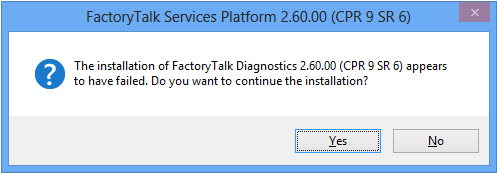
- During the installation of FactoryTalk Services Platform, click Yes in the following message box:
- Open Control Panel.
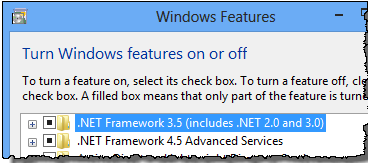
- In Control Panel, click Programs and Features > Turn Windows features on or off, and then select the .NET Framework 3.5 (includes .NET 2.0 and 3.0) option.
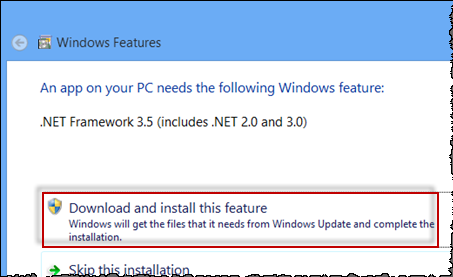
- After the installation is complete, click Restart now in the dialog box that appears.
- After the computer is restarted, install FactoryTalk Services Platform 2.60 again.
Application Notes
This release has the following application notes.
If you are upgrading from a prior version of the FactoryTalk Historian Classic or FactoryTalk Metrics software, there are several things that you should take into consideration before you proceed with the installation:
- It is recommended that you create a backup copy of your RSBizWare database, FactoryTalk Transaction Manager configurations, and sesame.dat file before beginning the installation process.
- It is recommended that you make note of the settings that you have configured for each registered RSBizWare server before beginning the installation process. You will need to reconfigure your server settings after the installation.
- You should remove the old version of the software before installing this version of the software. Refer to the Administration Guide, section "Removing RSBizWare" for details.
- The RSBizWare software will automatically upgrade your existing RSBizWare database as part of the configuration process; therefore, you can ignore the Database Configuration step of the RSBizWare Installation Checklist.
- The upgrade process will automatically reset your HTML root directory to the default directory and your HTTP port to 8080. If you have changed your HTML root directory or your HTTP port to something other than the default in the previous version of RSBizWare, you will need to reset it to your desired directory after you upgrade to the new version of RSBizWare. You will also need to copy the contents of the default HTML root directory, except the Reports folder, into your desired HTML root directory.
- It is recommended that you create and rebuild the appropriate database indexes.
The indexes listed in the following table will be created automatically when the database is loaded for a new RSBizWare installation. However, because the creation of indexes during database upgrades can cause transaction logs to fill, the indexes are intentionally excluded from the automatic upgrade procedure.
After an upgrade, you should make sure these indexes have been created for the specified RSBizWare database tables. If these indexes have not been created in your RSBizWare database, use SQL Server Management Studio to run the .sql files that will create them.
|
Table
|
Index
|
Component
|
|
RSDataPointSample
|
RSDataPointSample_IDX1
|
FactoryTalk Historian Classic
|
|
RSSQL_CMPCOMPRESS
|
RSSQL_CMPCompress_IDX1
| |
|
OEEEvent
|
OEEEvent_IDX1
OEEEvent_IDX2
OEEEvent_IDX3
OEEEvent_IDX4
OEEEvent_IDX5
OEEEvent_IDX6
OEEEvent_IDX7
OEEEvent_IDX8
|
FactoryTalk Metrics
|
|
OEEStateData
|
OEEState_Data_IDX1
| |
|
OEEWorkcell
|
OEEWorkcell_IDX1
OEEWorkcell_IDX2
OEEWorkcell_IDX3
OEEWorkcell_IDX4
OEEWorkcell_IDX5
|
These indexes are on tables that log data at a high rate, so the indexes can become fragmented more easily. Occasionally, you will need to rebuild these indexes due to fragmentation.
|
Important:
|
Do not execute the index scripts when your database is
in active production because these operations can lock
resources and cause problems for database users.
Instead, you should execute these scripts during a down
period or a period of low activity.
|
- Check the size of the transaction log and back it up to free space. (You can minimize the growth of your transaction log by switching from the Full Recovery mode to the Bulk-Logged mode before you run the index scripts. When the scripts are complete, switch back to Full Recovery mode. This will significantly reduce the size of the transaction log growth.)
- If the indexes are on the same drive as your data, ensure there is enough available space.
- Extract the contents of the SQLServerIndexes.zip file (available on the RSBizWare installation DVD in the Support folder) to a directory on the computer containing the target RSBizWare database.
- Open SQL Server Management Studio.
- On the File menu, click Open.
- Select one of the .sql scripts located in the directory containing the scripts.
- Run the script by selecting Query > Execute from the main menu or pressing the F5 key.
- Repeat steps 2 and 3 for each of the remaining .sql scripts in the <Program Files>\Rockwell Software\RSBizWare\db\Historian\SQLServer\index\ folder.
If you see an error message similar to the following, ignore it.
Server: Msg 3703, Level 11, State 7, Line 1
Cannot drop the index 'OEEWorkcell.OEEWorkcell_IDX3', because it does not
exist in the system catalog.
When creating an index in SQL Server, the transaction log can grow quite large. It is recommended that you have ample space in the transaction log (or the disk the log resides on) before you run the indexes. The Bulk-Logged and Simple-Logged Recovery modes in SQL Server minimize the amount of logging that occurs during a CREATE INDEX command; however, it is not recommended that you keep your database in Bulk-Logged or Simple-Logged Recovery mode during production due to potential data loss in the event of failure.
To rebuild indexes in SQL Server, use the DBCC DBREINDEX command. For more information on using this command and integrating it into a regular maintenance schedule, consult your SQL Server documentation.
For information on how to set up Internet Information Services (IIS), SQL Server 2012 Native Client, and the ODBC Data Source, refer to the RSBizWare Installation and Configuration Assistant.
- Run the RSBizWare installation DVD.
The RSBizWare installation wizard appears.
- Go to FactoryTalk Metrics > Read Online Documentation > RSBizWare Installation and Configuration Assistant.
The RSBizWare Installation and Configuration Assistant appears.
Copyright © 2026 Rockwell Automation, Inc. All rights reserved.
Rockwell Automation, Allen-Bradley, and FactoryTalk are trademarks of Rockwell Automation, Inc.
To view a complete list of Rockwell Automation trademarks please click here.
Trademarks not belonging to Rockwell Automation are property of their respective companies.