
Release Notes
ControlLogix Controllers
Version 21.011 (released 3/2013)
Catalog Number 1756-L73XT (series B)
Security
This release includes security enhancements as a part of our ongoing efforts to improve security. For information regarding Rockwell Automation's vulnerability disclosure process, please reference the Rockwell Automation Vulnerability Policy.
Denial of Service/Buffer Overflow Vulnerability
Known Anomaly in Logix5000 Programmable Controllers, Firmware Revisions 16-21
A vulnerability exists in the Logix5000™ Programmable Controller product line that, if successfully exploited, can cause a Denial of Service ("DoS") or potentially allow an attacker to alter the operating state of the controller through a buffer overflow.
Risk Mitigations
Customers using affected controllers are encouraged to upgrade to an available firmware version that addresses the associated risk.
For details on affected controllers, recommended firmware revisions, and other risk mitigations, see Knowledgebase ID 970074.
Access Denied dialog box does not appear when users without FactoryTalk Security access attempt to modify Motion Configuration (Lgx00184951)
Studio 5000 Logix Designer v29.00
Corrected Anomaly with Studio Logix Designer v30.00
When a user without Motion: Modify Configuration security credentials attempts to modify the motion configuration, an Access Denied dialog box does not appear.
Denial-of-Service Vulnerability That Affects Logix 5000™ Controllers (1042476,1042479)
|
Controllers
|
First Known in Firmware
Revision
|
Corrected in Firmware
Revision
|
|
CompactLogix™ 5370
|
20.011
|
33.016, 34.011 and later
|
|
Compact GuardLogix®
5370
|
28.011
|
33.016, 34.011 and later
|
|
ControlLogix® 5570
|
20.011
|
33.016, 34.011 and later
|
|
ControlLogix 5570
redundant
|
20.054
|
33.053, 34.051 and later
|
|
GuardLogix 5570
|
20.011
|
33.016, 34.011 and later
|
|
CompactLogix 5380
|
28.011
|
32.016, 33.011 and later
|
|
Compact GuardLogix 5380
SIL 2
|
31.011
|
32.016, 33.011 and later
|
|
Compact GuardLogix 5380
SIL 3
|
32.013
|
32.016, 33.011 and later
|
|
CompactLogix 5480
|
32.011
|
32.016, 33.011 and later
|
|
ControlLogix 5580
|
28.011
|
32.016, 33.011 and later
|
|
GuardLogix 5580
|
31.011
|
32.016, 33.011 and later
|
For a full list of the potentially affected Rockwell Automation products and a description of the vulnerability, see Knowledgebase Product Notice Logix Controllers Vulnerable to Denial-of-Service Attack.
CVE-2022-3157: Denial-of-Service Vulnerability That Affects Logix 5000™ Controllers (1256258, 1289747)
|
Controllers
|
First Known in
Firmware
Revision
|
Corrected in Firmware
Revision
|
|
CompactLogix™ 5370
|
20.011
|
33.013, 34.011 and later
|
|
Compact GuardLogix® 5370
|
28.011
|
33.013, 34.011 and later
|
|
ControlLogix® 5570
|
20.011
|
33.013, 34.011 and later
|
|
GuardLogix 5570
|
20.011
|
33.013, 34.011 and later
|
|
ControlLogix 5570 redundant
|
20.054
|
33.052, 34.051 and later
|
For a full list of the potentially affected Rockwell Automation products and a description of the vulnerability, see Knowledgebase Product Notice Controllers Vulnerable to a Denial-of-Service Vulnerability.
CVE-2020-6998: Denial-of-Service Vulnerability That Affects Logix 5000™ Controllers (00228528)
|
Controllers
|
First Known in
Firmware Revision
|
Corrected in
Firmware Revision
|
|
CompactLogix™ 5370
|
20.011
|
33.011 and later
|
|
Compact GuardLogix® 5370
|
28.011
|
33.011 and later
|
|
ControlLogix® 5570
|
20.011
|
33.011 and later
|
|
GuardLogix 5570
|
20.011
|
33.011 and later
|
|
ControlLogix 5570 redundant
|
20.054
|
33.051 and later
|
For a full list of the potentially affected Rockwell Automation products and a description of the vulnerability, see Knowledgebase Product Notice CompactLogix 5370 and ControlLogix 5570 Controllers Vulnerable to Denial of Service Conditions due to Improper Input Validation.
Features
This release includes the following system features.
Kinetix 5500 CIP-Motion Servo Drives
Software Feature
Firmware Revision/ Software Version 21
Studio 5000 Engineering and Design Environment and Logix Designer Application
Software Feature
Firmware Revision/ Software Version 21
Version 21 of the application is the first release that re-brands RSLogix 5000 software to Logix Designer application, and embeds the Logix Designer application as a key component of Studio 5000 Engineering and Design Environment. The Studio 5000 Engineering and Design Environment is the new launch point for components of the integrated architecture, providing the infrastructure to share data, share design time components, and share runtime components between traditionally independent automation development tasks.
Project Documentation Stored in Controller
System Feature
Firmware Revision/ Software Version 21.011
Catalog Numbers 1769-L16ER-BB1B, 1769-L18ER-BB1B, 1769-L18ERM-BB1B, 1769-L24ER-QB1B, 1769-24ER-QBFC1B, 1769-L27ERM-QBFC1B, 1769-L30ER, 1769-L30ERM, 1769-L30ER-NSE, 1769-L33ER, 1769-L33ERM, 1769-L36ERM
CIP-Sync Enabled Logix (1756) and Armor-Block (1732E), SOE-Input and Scheduled-Output Modules
Software Feature
Firmware Revision/ Software Version 21
-
Armor Block 1732E-IB8MSOER and 1732E-OB8M8SR modules for On-Machine DIO, and
- 1756-IB16ISOE and 1756-OB16IEFS modules for Logix based IO.
Pre-scan of Add-On Instruction Behavior
System Feature
Firmware Revision/ Software Version 21.011
Catalog Numbers 1769-L16ER-BB1B, 1769-L18ER-BB1B, 1769-L18ERM-BB1B, 1769-L24ER-QB1B, 1769-24ER-QBFC1B, 1769-L27ERM-QBFC1B, 1769-L30ER, 1769-L30ERM, 1769-L30ER-NSE, 1769-L33ER, 1769-L33ERM, 1769-L36ERM
You can access the Rockwell Automation Knowledgebase at: http://www.rockwellautomation.com/rockwellautomation/support/overview.page?
HMI Connectivity and Performance Improvements
System Feature
Firmware Revision/ Software Version 21.011
Catalog Numbers 1769-L16ER-BB1B, 1769-L18ER-BB1B, 1769-L18ERM-BB1B, 1769-L24ER-QB1B, 1769-24ER-QBFC1B, 1769-L27ERM-QBFC1B, 1769-L30ER, 1769-L30ERM, 1769-L30ER-NSE, 1769-L33ER, 1769-L33ERM, 1769-L36ERM
For more information, see the Logix5000™ Data Access Programming Manual, publication 1756-PM020.
Extended Tag Properties
System Feature
Firmware Revision/ Software Version 21.011
Catalog Numbers 1769-L16ER-BB1B, 1769-L18ER-BB1B, 1769-L18ERM-BB1B, 1769-L24ER-QB1B, 1769-24ER-QBFC1B, 1769-L27ERM-QBFC1B, 1769-L30ER, 1769-L30ERM, 1769-L30ER-NSE, 1769-L33ER, 1769-L33ERM, 1769-L36ERM
Corrected Anomalies in This Release
This release corrects the following anomalies.
Corrected: Logix Firmware/Studio 5000 Software 21.011
Buffer Timeout for FactoryTalk Alarms and Events Subscribers (Lgx00069461)
Anomaly
Catalog Numbers 1756-L61, 1756-L61S, 1756-L62, 1756-L62S, 1756-L63, 1756-L63S, 1756-L63XT, 1756-L64, 1756-L65 Revision18.011
Catalog Numbers 1756-L72, 1756-L73, 1756-L74, 1756-L75 Revision 19.011
Catalog Numbers 1756-L71, 1756-L72S, 1756-L73S, 1756-L73XT, 1756-L73SXT Revision 20.011
Catalog Numbers 1769-L16ER-BB1B, 1769-L18ER-BB1B, 1769-L18ERM-BB1B, 1769-L24ER-QB1B, 1769-24ER-QBFC1B, 1769-L27ERM-QBFC1B, 1769-L30ER, 1769-L30ERM, 1769-L30ER-NSE, 1769-L33ER, 1769-L33ERM, 1769-L36ERM
Catalog Numbers 1789-L10, 1789-L30, 1789-L60
Changes made to the Buffer Timeout value for FactoryTalk® Alarm subscribers do not take effect until the existing buffer has been deleted.
The FactoryTalk alarm buffer (stored in Logix controller memory) is designed to persist through power cycles. If you change the Buffer Timeout value (via the Communication Setup dialog in FactoryTalk View SE), the controller does not use the new timeout value until the existing buffer is deleted and then recreated. To force recreation of this buffer, you can either:
- Redownload the project to the controller
- Disconnect the FactoryTalk Alarm subscriber and leave it disconnected until the existing timeout expires.
Corrected: Logix Firmware/RSLogix 5000 Software 20.013, 21.011
Axis Servo Drive Data Type (Lgx00128300, Lgx00128827)
Anomaly
Logix Firmware/RSLogix 5000 Software 20.012
Catalog Numbers 1756-L61, 1756-L61S, 1756-L62, 1756-L62S, 1756-L63, 1756-L63S, 1756-L63XT, 1756-L64, 1756-L65, 1756-L71, 1756-L71S, 1756-L72, 1756-L72S, 1756-L73, 1756-L73S, 1756-L73XT, 1756-L73SXT, 1756-L74, 1756-L75
Corrected: Logix Firmware/RSLogix 5000 Software 20.013/21.011
Axis CIP Drive Data Type (Lgx00128301, Lgx00128828)
Anomaly
Logix Firmware/RSLogix 5000 Software 20.012
Catalog Numbers 1756-L61, 1756-L61S, 1756-L62, 1756-L62S, 1756-L63, 1756-L63S, 1756-L63XT, 1756-L64, 1756-L65, 1756-L71, 1756-L71S, 1756-L72, 1756-L72S, 1756-L73, 1756-L73S, 1756-L73XT, 1756-L73SXT, 1756-L74, 1756-L75
Corrected: Logix Firmware/Studio 5000 Software 21.011
Automatic Device Configuration (Lgx00129012, Lgx00129165)
Known Anomaly First Identified as of Firmware Revision 20.012
Catalog Numbers:
- 1756 ControlLogix® L6
- 1756 ControlLogix L7
- 1756 GuardLogix® L6
- 1756 GuardLogix L7
- 5370 CompactLogix™ L1
- 5370 CompactLogix L2
- 5370 CompactLogix L3
- 1789 SoftLogix™
When using the Automatic Device Configuration (ADC) feature, the Logix controller ‘owns’ the configuration in the drive. Do not use the HIM or other external tools, such as DriveExplorer™ software, to change drive parameters. Doing so may cause a sequence of events to occur that results in the connection between the controller and the drive to be dropped, and causes the controller to not be able to re-establish the connection.
Corrected: Logix Firmware/Studio 5000 Software 21.011
MinDurationPRE and MinDurationACC Members (Lgx00119996, Lgx00119981)
Anomaly
Logix Firmware/RSLogix 5000™ Software 20.011
Catalog Numbers 1756-L61, 1756-L61S, 1756-L62, 1756-L62S, 1756-L63, 1756-L63S, 1756-L63XT, 1756-L64, 1756-L65, 1756-L71, 1756-L72, 1756-L72S, 1756-L73, 1756-L73S, 1756-L73XT, 1756-L73SXT, 1756-L74, 1756-L75
Catalog Numbers 1769-L16ER-BB1B, 1769-L18ER-BB1B, 1769-L18ERM-BB1B, 1769-L24ER-QB1B, 1769-24ER-QBFC1B, 1769-L27ERM-QBFC1B, 1769-L30ER, 1769-L30ERM, 1769-L30ER-NSE, 1769-L33ER, 1769-L33ERM, 1769-L36ERM
Corrected: Logix Firmware/Studio 5000 Software 21.011
Time-Limited Actions in Steps (Lgx00124697)
Anomaly
Catalog Numbers 1756-L61, 1756-L61S, 1756-L62, 1756-L62S, 1756-L63, 1756-L63S, 1756-L63XT, 1756-L64, 1756-L65, 1756-L71, 1756-L72, 1756-L72S, 1756-L73, 1756-L73S, 1756-L73XT, 1756-L73SXT, 1756-L74, 1756-L75 Version 20.011
Catalog Numbers 1769-L16ER-BB1B, 1769-L18ER-BB1B, 1769-L18ERM-BB1B, 1769-L24ER-QB1B, 1769-24ER-QBFC1B, 1769-L27ERM-QBFC1B, 1769-L30ER, 1769-L30ERM, 1769-L30ER-NSE, 1769-L33Er, 1769-L33ERM, 1769-L36ERM Version 20.011
Catalog Numbers 1789-L10, 1789-L30, 1789-L60
Corrected: Logix Firmware/Studio 5000 Software 21.011
Active Reconfigure MSG Instructions (Lgx00125204, Lgx00149693)
Known Anomaly First Identified as of Firmware Revision 20.011
Catalog Numbers:
- 1756 ControlLogix® L6
- 1756 ControlLogix L7
- 1756 GuardLogix L6
- 1756 GuardLogix® L7
- 5370 CompactLogix™ L1
- 5370 CompactLogix L2
- 5370 CompactLogix L3
- 1789 SoftLogix™
Corrected: Logix Firmware/Studio 5000® Software 21.011
RSLogix 5000 Clock Update Tool
Anomaly
Catalog Numbers 1756-L61, 1756-L61S, 1756-L62, 1756-L62S, 1756-L63, 1756-L63S, 1756-L63XT, 1756-L64, 1756-L65, 1756-L71, 1756-L72, 1756-L72S, 1756-L73, 1756-L73S, 1756-L73XT, 1756-L73SXT, 1756-L74, 1756-L75 Version 20.011
Catalog Numbers 1769-L16ER-BB1B, 1769-L18ER-BB1B, 1769-L18ERM-BB1B, 1769-L24ER-QB1B, 1769-24ER-QBFC1B, 1769-L27ERM-QBFC1B, 1769-L30ER, 1769-L30ERM, 1769-L30ER-NSE, 1769-L33ER, 1769-L33ERM, 1769-L36ERM Version 20.011
Catalog Numbers 1789-L10, 1789-L30, 1789-L60
Corrected: Logix Firmware/RSLogix 5000 Software 20.013, 21.011
SD Card Can Cause Major Fault (Lgx00135065, Lgx00130067)
Anomaly
Logix Firmware/RSLogix 5000 Software 20.012
Catalog Numbers 1756-L61, 1756-L61S, 1756-L62, 1756-L62S, 1756-L63, 1756-L63S, 1756-L63XT, 1756-L64, 1756-L65, 1756-L71, 1756-L71S, 1756-L72, 1756-L72S, 1756-L73, 1756-L73S, 1756-L73XT, 1756-L73SXT, 1756-L74, 1756-L75
Corrected: Logix Firmware/Studio 5000 Software 21.011
Launch RSLogix 5000 Software (Lgx00124955)
Known Anomaly First Identified as of Firmware Revision 20.011
Catalog Numbers:
- 1756 ControlLogix® L6
- 1756 ControlLogix L7
- 1756 GuardLogix L6
- 1756 GuardLogix® L7
- 5370 CompactLogix™ L1
- 5370 CompactLogix L2
- 5370 CompactLogix L3
- 1789 SoftLogix™
Corrected: Logix Firmware/Studio 5000 Software 21.011
Anomaly
Logix Firmware/RSLogix 5000 Software 20.013
Catalog Numbers 1756-L61, 1756-L61S, 1756-L62, 1756-L62S, 1756-L63, 1756-L63S, 1756-L63XT, 1756-L64, 1756-L65, 1756-L71, 1756-L71S, 1756-L72, 1756-L72S, 1756-L73, 1756-L73S, 1756-L73XT, 1756-L73XT, 1756-L74, 1756-L75
Catalog Numbers 1769-L18ERM-BB1B, 1769-L27ERM-QBFC1B, 169-L30ERM, 1769-L33ERM, 1769-L36ERM
- The axis uses a rotary feedback device.
- The axis is configured for Cyclic Travel mode.
- The axis windup point configuration is greater than the rotary feedback device's hardware rollover point.
- Either of the following scenarios occurs.
- The axis stops close to the feedback device’s hardware rollover point.
- The axis is powered down.
- The axis moves across the hardware rollover point while powered down.
- The axis is powered up again.
Corrected: Logix Firmware/Studio 5000 Software 21.011
·1769-L18ERM-BB1B,1769-L27ERM-QBFC1B,1769-L30ERM,1769-L33ERM, 1769-L36ERM
Anomaly
Logix Firmware/RSLogix 5000 Software 20.013
Catalog Numbers
If single-axis or multi-axis move instructions are initiated while a Motion Redefine Position (MRP) instruction is in process, the controller experiences Motion Error 85. This anomaly occurs when the MRP instruction is configured to use an Absolute or Relative operation.
With the anomaly correction, motion that is initiated while an MRP instruction, configured for Absolute operation, is in process causes the controller to experience Motion Error 85.
Reconfigure Message Instruction Causes a Major Non-Recoverable Fault (Lgx00131221)
Corrected Anomaly with Firmware Revision 20.018
Known Anomaly First Identified as of Firmware Revision 20.011
Catalog Numbers:
- ControlLogix® 5570 Controllers
- GuardLogix® 5570 Controllers
- ControlLogix 5560 Controllers
- GuardLogix 5560 Controllers
- 1769 CompactLogix™ 5370 L1 Controllers
- 1769 CompactLogix 5370 L2 Controllers
- 1769 CompactLogix 5370 L3 Controllers
- 1769 CompactLogix L23x (packaged controllers)
- 1769 CompactLogix L3x (packaged controllers)
- 1768 CompactLogix L4 Controllers
-
1768 Compact GuardLogix® L4 Controllers
If a message instruction is configured to reconfigure an I/O module, it causes the Controller to Experience a major non-recoverable fault (MNRF).
See Knowledgebase document 576267.
Controller Faults When Alarm Instruction is Executed (Lgx00135333)
Corrected Anomaly with Firmware Revision 20.019
Known Anomaly First Identified as of Firmware Revision 20.011
Catalog Numbers:
- ControlLogix® 5570 Controllers
- GuardLogix® 5570 Controllers
- ControlLogix 5560 Controllers
- GuardLogix 5560 Controllers
- 1769 CompactLogix™ 5370 L1 Controllers
- 1769 CompactLogix 5370 L2 Controllers
- 1769 CompactLogix 5370 L3 Controllers
- 1769 CompactLogix L23x (packaged controllers)
- 1769 CompactLogix L3x (packaged controllers)
- 1768 CompactLogix L4 Controllers
-
1768 Compact GuardLogix® L4 Controllers
If an Analog Alarm (ALMA) or Digital Alarm (ALMD) instruction has a string-type associated tag and the string has a negative length, the controller can experience a major non-recoverable fault (MNRF) when the instruction is executed.
Corrected: Logix Firmware/Studio 5000 Software 21.011
Anomaly
Logix Firmware/RSLogix 5000 Software 20.013
Catalog Numbers:
● 1756-L61, 1756-L62, 1756-L63, 1756-L63XT, 1756-L64, 1756-L65
● 1756-L61S, 1756-L62S, 1756-L63S
● 1756-L71, 1756-L72, 1756-L73, 1756-L73XT, 1756-L74, 1756-L75
● 1756-L71S, 17566-L72S, 1756-L73S, 1756-L73SXT
● 1769-L18ERM-BB1B, 1769-L27ERM-QBFC1B, 1769-L30ERM, 1769-L33ERM, 1769-L36ERM
Corrected: Logix Firmware/Studio 5000® Software 21.011
Anomaly
Logix Firmware/RSLogix 5000™ Software 20.013
Catalog Numbers 1756-L61, 1756-L61S, 1756-L62, 1756-L62S, 1756-L63, 1756-L63S, 1756-L63XT, 1756-L64, 1756-L65, 1756-L71, 1756-L71S, 1756-L72, 1756-L72S, 1756-L73, 1756-L73S, 1756-L73XT, 1756-L73SXT, 1756-L74, 1756-L75
Catalog Numbers 1769-L18ERM-BB1B, 1769-L27ERM-QBFC1B, 1769-L30ERM, 1769-L33ERM, 1769-L36ERM
- The commanded position is on or beyond the SOT position.
- The commanded motion is in the direction of the overtravel.
- Reset the SOT fault.
- Enable the drive, if it is disabled.
- Command motion in the opposite direction of the SOT position.
- The SOT fault will not immediately recur if the drive is enabled outside of the SOT position range.
- No SOT exceptions will be generated when the axis is in the Stopped state.
Axis Likely to Experience Jitter (Lgx00133576)
Anomaly
Incorrect Velocity (Lgx00133577)
Anomaly
PowerFlex 750 Series Drives (Lgx00134308, Lgx00135067, Lgx00130112)
Anomaly
Drive in Safe-Off State (Lgx0013717)
Anomaly
Audit Mask Value (Lgx00135562)
Anomaly
Catalog Numbers 1769-L16ER-BB1B, 1769-L18ER-BB1B, 1769-L18ERM-BB1B, 1769-L24ER-QB1B, 1769-24ER-QBFC1B, 1769-L27ERM-QBFC1B, 1769-L30ER, 1769-L30ERM, 1769-L30ER-NSE, 1769-L33ER, 1769-L33ERM, 1769-L36ERM
Restore Project from Removable Media (Lgx00135973)
Anomaly
Second Download Fails (Lgx00135986)
Anomaly
MAJ Instruction (Lgx00136317)
Anomaly
Catalog Numbers 1769-L18ERM-BB1B, 1769-L27ERM-QBFC1B, 1769-L30ERM, 1769-L33ERM, 1769-L36ERM
Fail Drive Connection on Peripheral Error (Lgx00138238)
Corrected Anomaly with Firmware Revision 21.011 and Firmware Revision 20.019
Known Anomaly First Identified as of Firmware Revision 20.011
Catalog Numbers:
-
ControlLogix® 5570 Controllers
-
ControlLogix 5560 Controllers
-
1769 CompactLogix™ 5370 Controllers
-
1769 CompactLogix 5370 L1 Controllers
-
1769 CompactLogix 5370 L2 Controllers
-
1769 CompactLogix 5370 L3 Controllers
-
1769 CompactLogix L23x (packaged controllers) Controllers
-
1769 CompactLogix L3x (packaged controllers) Controllers
-
1768 CompactLogix L4 Controllers
If you use a PowerFlex® drive that supports automatic drive configuration (ADC) and has a peripheral that is configured to Fail Drive Connection on Peripheral Error, the controller can experience a major non-recoverable fault (MNRF) when your application is downloaded to the controller.
MAJ Instruction (Lgx00136317, Lgx00150458)
Corrected Anomaly with Studio 5000® Environment Software Revision 21.011, RSLogix 5000® Software Revision 20 and Controller Firmware Revision 20.019
Known Anomaly First Identified as of Firmware Revision 20.011
Catalog Numbers:
-
ControlLogix® 5570 Controllers
-
ControlLogix 5560 Controllers
-
1769 CompactLogix™ 5370 L1 Controllers
-
1769 CompactLogix 5370 L2 Controllers
-
1769 CompactLogix 5370 L3 Controllers
-
1768 CompactLogix L4 Controllers
An axis can move in the wrong direction in the following conditions:
- The Motion Axis Jog (MAJ) instruction faceplate of an axis is being merged is configured so that Merge = Enabled and Merge Speed = Current.
- The MAJ instruction is configured in one of the following manners:
– Profile Type = Trapezoidal
In this case, the direction on the faceplate is set to forward.
– Profile Type = S-curve
In this case, the sign of the current axis velocity of the axis being merged via the MAJ instruction and the sign of the velocity that is specified by the combination of the Direction parameter and Speed parameter on the faceplate are inconsistent.
You can complete the following tasks to work around this anomaly:
- For Profile Type = Trapezoidal, set the direction on the faceplate to Reverse
- For Profile Type = S-curve, set the direction on the faceplate to correspond to the sign of the current axis velocity.
Always set the Speed parameter to +1.0.
If the current axis velocity is unknown, use a GSV instruction to obtain it.
CompactLogix Wall Clock Time (WCT) jumps ahead by 100 years (Lgx00152701, Lgx00179778)
Corrected Anomaly with Firmware Revision 20.019
Known Anomaly First Identified as of Firmware Revision 17
Catalog Numbers:
- ControlLogix® 5570 Controllers
- ControlLogix 5560 Controllers Controllers
- 1769 CompactLogix™ 5370 L1 Controllers
- 1769 CompactLogix 5370 L2 Controllers
- 1769 CompactLogix 5370 L3 Controllers
- 1769 CompactLogix L23x (packaged controllers)
- 1769 CompactLogix L3x (packaged controllers)
- 1768 CompactLogix L4 Controllers
The WCT (WallClockTime) of the controller can jump 100 years on a power cycle. This jump can be seen as a one-time 100-year jump or a 100-year jump on every power cycle.
|
Product and Series
|
Continual 100-year
jump on power cycle
|
One-time 100-year jump
on power cycle
|
|
1769-L3x/L2x
|
Yes
|
No
|
|
1768-L4x/A and B
|
No
|
No
|
|
1768-L4x/C and D
|
Yes
|
No
|
|
1756-L63/A
|
No
|
No
|
|
ControlLogix 5560
Controllers series B
|
Yes
|
No
|
|
CompactLogix 5370
|
No
|
No
|
|
1756-L7x
|
No
|
Yes
|
The continual 100-year jump occurs 2 years after a program has been downloaded to a controller after the memory had been cleared / set to default.
The one-time 100-year jump occurs if the WCT is set to a value that has the year from 1990...1999.
Known Anomalies in This Release
This release has the following known anomalies.
Reconfigure Message Instruction Active When Controller Is Power Cycled Causes a Major Non-Recoverable Fault (Lgx139492)
|
Controllers
|
First Known in
Firmware Revision
|
Corrected in
Firmware Revision
|
|
CompactLogix™ 5370
|
21.011
|
29.011
|
|
Compact GuardLogix® 5370
|
21.011
|
29.011
|
|
ControlLogix® 5570
|
21.011
|
29.011
|
|
ControlLogix® 5570 Redundant
|
21.011
|
29.011
|
|
GuardLogix 5570
|
21.011
|
29.011
|
If a message instruction is configured to reconfigure an I/O module and the message is active when you cycle power to the controller, the controller can experience a major non-recoverable fault (MNRF).
See the Knowledgebase article Reconfigure Message if active when the controller powers down, will MNRF on the power up.
.
Soft Overtravel Limits Are Ignored (Lgx00145938, Lgx00143064)
CORRECTED Anomaly with Firmware Revision 24.011
Known Anomaly First Identified As Of Firmware Revision 21.011
Catalog Numbers:
- 1756 ControlLogix L7
- 1756 GuardLogix L7
- 5370 CompactLogix L1 (1769-L18ERM-BB1B only)
- 5370 CompactLogix L2 (1769-L27ERM-QBFC1B only)
- 5370 CompactLogix L3 (1769-L30ERM, 1769-L33ERM, 1769-L36ERM only)
This anomaly applies to only AXIS_SERVO_DRIVE and AXIS_CIP_Drive axes that are configured for Feedback Only and the servo action is disabled.
The Software Overtravel (SOT) limits can fail to change an axis’ behavior when the axis travels beyond the limit. In this case, the SOT does not issue a fault or set an alarm to indicate the condition.
Applications with PowerFlex drives in the I/O configuration can experience a major non-recoverable fault (MNRF) (00200734, 00200735, 00200600, 00200599)
Corrected Anomaly as of Firmware Revision 31.011 and 30.014 for these catalog numbers:
- CompactLogix™ 5370 Controllers
- Compact GuardLogix® 5370 Controllers
Corrected Anomaly as of Firmware Revision 31.011 and 30.013 for these catalog numbers:
- ControlLogix® 5580 Controllers
- ControlLogix 5570 Controllers
- GuardLogix 5570 Controllers
Known Anomaly First Identified as of Firmware Revision 28.011 for these catalog numbers:
- ControlLogix 5580 Controllers
- CompactLogix 5380 Controllers
- Compact GuardLogix 5370 Controllers
Known Anomaly First Identified as of Firmware Revision 20.011 for these catalog numbers:
- ControlLogix 5570 Controllers
- GuardLogix 5570 Controllers
- ControlLogix 5570 (Redundancy) Controllers
- ControlLogix 5560 Controllers
- GuardLogix 5560 Controllers
- ControlLogix 5560 (Redundancy) Controllers
- CompactLogix 5370 Controllers
- 1769 CompactLogix Controllers
- 1768 CompactLogix Controllers
If a controller already has an application loaded into it that contains PowerFlex drives in the I/O configuration, a MNRF (Major Non-Recoverable Fault) can occur when any of the following occurs:
- A download of a project is performed to the controller.
- A PowerFlex drive is deleted while online.
- A firmware flash update of
the controller is performed.
For more information and workarounds, see Knowledgebase document 1067997.
Disable Download Project Documentation and Extended Properties Features (Lgx00135928)
Known Anomaly First Identified As Of Firmware Revision 21.011
Studio 5000 Logix Designer First Identified As Of Version 21.00
Catalog Numbers:
ALMA and ALMD Instructions in Logix Designer
CORRECTED with Firmware Revision 24.011
Studio 5000 Logix Designer Version 24.00
Known Anomaly First Identified as of Firmware Revision 21.011
Catalog Numbers:
- 1756 ControlLogix L7
- 1756 GuardLogix L7
- 5370 CompactLogix L1
- 5370 CompactLogix L2
- 5370 CompactLogix L3
Even though controllers that use firmware revision 21.011 or later can use ALMA and ALMD instructions, FactoryTalk View Studio SE software, versions 6 and 7, cannot connect to a Logix Designer application that uses firmware revision 21.011 or later and uses ALMA or ALMD instructions.
IMPORTANT: This anomaly applies to the use of ALMA and ALMD instructions only. Tag-based alarming systems that use FactoryTalk Alarms and Events functionality work as expected.
IMPORTANT: This anomaly applies to the use of ALMA and ALMD instruction only. Tag-based alarming systems that use FactoryTalk Alarms and Events functionality work as expected with FactoryTalk View Studio SE software, version 6.
Consumed axis actual position exceeds the produced axis unwind position (00225674, 00223851)
CORRECTED Anomaly with Firmware Revision 33.011 for these catalog numbers:
- ControlLogix® 5570 controllers
- GuardLogix® 5570 controllers
- CompactLogix™ 5370 controllers
- Compact GuardLogix 5370 controllers
- ControlLogix 5580 controllers
- GuardLogix 5580 controllers
- CompactLogix 5380 controllers
- Compact GuardLogix 5380 controllers
- CompactLogix 5480 controllers
Known Anomaly First Identified as of Firmware Revision 21.011 for these catalog
numbers:
- ControlLogix 5570 controllers
- GuardLogix 5570 controllers
- CompactLogix 5370 controllers
Known Anomaly First Identified as of Firmware Revision 28.011 for these catalog numbers:
- Compact GuardLogix 5370 controllers
- CompactLogix 5380 controllers
- ControlLogix 5580 controllers
Known Anomaly First Identified as of Firmware Revision 31.011 for these catalog numbers:
- GuardLogix 5580 controllers
- Compact GuardLogix 5380 SIL 2 controllers
Known Anomaly First Identified as of Firmware Revision 32.011 for these catalog numbers:
- CompactLogix 5480 controllers
Known Anomaly First Identified as of Firmware Revision 32.013 for these catalog numbers:
- Compact GuardLogix 5380 SIL 3 controllers
The consume axis can reach positions beyond the unwind value. This is something that
can occur depending on the CUP (Course Update Period) of the Motion Group and the
produced axis speed.
The consumed axis is configured for linear, but it applies the unwind value that the consumer gets from the producing axis. Depending on the execution schedule, the unwind value could be applied after the controller tag for the axis position has been updated.
Refer to Knowledgebase article Consumed axis is reaching positions beyond the unwind value.
Known Anomalies from Previous Releases
These anomalies are from previous releases but are still known in this release.
Mechanical Brake Delay (Lgx00113541, Lgx00107169)
Anomaly
Logix Firmware/RSLogix 5000™ Software 19.011
Catalog Numbers 1756-L61, 1756-L61S, 1756-L62, 1756-L62S, 1756-L63, 1756-L63S, 1756-L63XT, 1756-L64, 1756-L65, 1756-L72, 1756-L73, 1756-L74, 1756-L75
Logix Firmware/RSLogix 5000 Software 20.011
Catalog Numbers 1756-L71, 1756-L72S, 1756-L73S, 1756-L73XT, 1756-L73SXT
Catalog Numbers 1769-L18ERM-BB1B, 1769-L27ERM-QBFC1B, 1769-L30ERM, 1769-L33ERM, 1769-L36ERM
This anomaly occurs only in Integrated Motion on the EtherNet/IP network applications.
When you create a new CIP axis, the default value for Mechanical Brake Delay = 0. If you are using a motor with a brake on this axis and do not change the Mechanical Brake Delay value, the motor will not work properly when you attempt to execute motion.
To work around this anomaly, make sure that you set the Mechanical Brake Delay to the appropriate value before executing motion.
MSF Instruction (Lgx00113540, Lgx00108486)
Known Anomaly First Identified As Of
Catalog Numbers
- 1756-L61, 1756-L61S, 1756-L62, 1756-L62S, 1756-L63, 1756-L63S, 1756-L63XT, 1756-L64, 1756-L65, 1756-L72, 1756-L73, 1756-L74, 1756-L75 - Firmware Revision 19.011
- 1756-L71, 1756-L72S, 1756-L73S, 1756-L73XT, 1756-L73SXT - Firmware Revision 20.011
- 1769-L18ERM-BB1B, 1769-L27ERM-QBFC1B, 1769-L30ERM, 1769-L33ERM, 1769-L36ERM - Firmware Revision 20.011
This anomaly occurs only in Integrated Motion on the EtherNet/IP network applications.
Every time there is a Motion Servo Off (MSF) instruction/Motion Servo On (MSO) instruction cycle, the Position Trim value is added to the axis position. This change in axis position causes the axis to move unexpectedly by a distance equal to the Position Trim value.
Absolute Feedback Offset (Lgx00076298)
Known Anomaly First Identified as of:
Catalog Numbers:
- 1756 ControlLogix® L6, Firmware Revision 18.011
- 1756 ControlLogix L7, Firmware Revision 19.011
- 1756 GuardLogix® L6, Firmware Revision 18.011
- 1756 GuardLogix L7, Firmware Revision 20.011
If you issue an Absolute Feedback Offset, it results in a feedback fault. If you issue an Absolute Feedback Offset via an SSV instruction on the 1756-M02AS module, the result is a feedback fault. The feedback fault occurs regardless of whether feedback is on or off.
Logix CPU Security Tool
Known Anomaly First Identified as of Firmware Revision 20.011
RSLogix 5000™ Version 20.00
Studio 5000 Logix Designer™ First Identified as of Version 21.00
Catalog numbers:
- 1756 ControlLogix® L6
- 1756 ControlLogix L7
- 1756 GuardLogix L6
- 1756 GuardLogix® L7
- 5370 CompactLogix™ L1
- 5370 CompactLogix L2
- 5370 CompactLogix L3
- 1789 SoftLogix™
ConfigUpdateInProcess Bit Does Not Change State When Issuing an SSV Instruction to Change the Value of the Conversion Constant (00230152, 00228464, 880625, 1594437)
|
Controllers
|
First Known in Firmware
Revision
|
Corrected in Firmware
Revision
|
|
CompactLogix™ 5370
|
20.011
|
33.011 and later
|
|
Compact GuardLogix®
5370
|
28.011
|
33.011 and later
|
|
ControlLogix® 5570
|
20.011
|
33.011 and later
|
|
GuardLogix 5570
|
20.011
|
33.011 and later
|
|
CompactLogix 5380
|
28.011
|
31.013, 32.016, 33.011 and
later
|
|
Compact GuardLogix 5380
SIL 2
|
31.011
|
31.013, 32.016, 33.011 and
later
|
|
Compact GuardLogix 5380
SIL 3
|
32.013
|
32.016, 33.011 and later
|
|
CompactLogix 5480
|
32.011
|
32.016, 33.011 and later
|
|
ControlLogix 5580
|
28.011
|
31.013, 32.016, 33.011 and
later
|
|
GuardLogix 5580
|
31.011
|
31.013, 32.016, 33.011 and
later
|
The Configuration Update Status Bits attribute provides a method for monitoring the progress of one or more specific module configuration attribute updates initiated by either a Set Attribute List service or an SSV in the user program. As soon as such an update is initiated, the controller sets the ConfigurationUpdateInProcess bit. The bit remains set until the Set Attribute List reply comes back from the servo module indicating that the update process was successful. Thus, the Configuration Update Status Bits attribute provides a method of waiting until the servo configuration data update to the connected motion module is complete before starting a dependent operation.
PI Function Block (Lgx00070832)
Known Anomaly First Identified as of:
- 1756 ControlLogix® L6 Firmware Revision 16
- 1756 ControlLogix L7 Firmware Revision 19
- 1756 GuardLogix L6 Firmware Revision 16
- 1756 GuardLogix® L7 Firmware Revision 19
- 5370 CompactLogix™ L1 Firmware Revision 20
- 5370 CompactLogix L2 Firmware Revision 20
- 5370 CompactLogix L3 Firmware Revision 20
- 1789 SoftLogix™ Firmware Revision 20

For more information regarding the PI instruction, see the Logix5000™ Controllers Advanced Process Control and Drives Instructions User Manual, publication 1756-RM006.
Arithmetic State Flags (Lgx00122480)
Known Anomaly First Identified as of Firmware Revision 20.011
Catalog Numbers:
- 1756 ControlLogix® L6
- 1756 ControlLogix L7
- 1756 GuardLogix® L6
- 1756 GuardLogix L7
- 5370 CompactLogix™ L1
- 5370 CompactLogix L2
- 5370 CompactLogix L3
- When dealing with Floating point numbers, the controller does not truncate denormalized values or -0.0… 0.0.
- For an integer divide, when the denominator is 0, the S:N and S:Z are not set.
- For the MOD instruction, the S:V is not set if an overflow occurred during the calculation.
Real Time Axis Attribute of VelocityFeedback (Lgx00107793)
Known Anomaly First Identified As Of:
Catalog Numbers 1756-L61, 1756-L61S, 1756-L62, 1756-L62S, 1756-L63, 1756-L63S, 1756-L63XT, 1756-L64, 1756-L65 Version 18.011
Catalog Numbers 1756-L72, 1756-L73, 1756-L74, 1756-L75 Version 19.011
Catalog Numbers 1756-L71, 1756-L72S, 1756-L73S, 1756-L73XT, 1756-L73SXT Version 20.011
This anomaly occurs only in SERCOS applications that use Kinetix SERCOS drives and linear motors.
Under certain conditions, it is possible that the Real Time Axis attribute VelocityFeedback contains an incorrect value. The inaccuracy is the result of incorrect scaling of that attribute.
Your program will have an incorrect value for the VelocityFeedback attribute if you follow these steps.
- While offline, you write your RSLogix 5000 program and, as part of that program, the VelocityFeedback attribute is selected.
- You save the program and download it to the controller.
- You go online.
The VelocityFeedback attribute value is incorrect because that attribute was enabled before the program was saved, downloaded, and put online.
To work around this anomaly, do not enable the VelocityFeedback attribute until the RSLogix 5000 program is online.
MAM Instruction With Merge Enabled (Lgx00078822)
Known Anomaly First Identified as of
Catalog numbers:
- 1756 ControlLogix® L6 Firmware Revision 17.004
- 1756 ControlLogix L7 Firmware Revision 19.011
- 1756 GuardLogix L6 Firmware Revision 17.008
- 1756 GuardLogix® L7 Firmware Revision 20.011
- 5370 CompactLogix™ L1 (1769-L18ERM-BB1B only) Firmware Revision 20.011
- 5370 CompactLogix L2 (1769-L27ERM-QBFC1B only) Firmware Revision 20.011
- 5370 CompactLogix L3 (1769-L30ERM, 1769-L33ERM, 1756-L36ERM only) Firmware Revision 20.011
Under some rare occurrences, if a Motion Axis Move (MAM) instruction with Merge Enabled is activated during the deceleration segment of an active MAM instruction then the new MAM instruction may overshoot its programmed endpoint. The occurrence of the overshoot depends on the following factors:
•The original MAM instruction's remaining travel distance at the time of the merge and the new MAM instruction's remaining travel distance
•The relationship of the decel jerk of the new MAM instruction to the decel jerk of the original MAM instruction
•If the original MAM instruction is decelerating
Typically, the overshoot does not occur. If either of the following conditions exist, you will avoid the overshoot:
•The new MAM instruction is programmed with Merge Disabled. If there is no other motion active at the time of the merge, then the Merge Disable results in the same operation as the Merge Enable.
•The new MAM instruction has a slightly higher jerk (in units/seconds3) than the original MAM instruction. You should note, though, lower value of jerk in % of time results in higher value of jerk (in units/seconds3).
Excessive Velocity Error (Lgx00105360, Lgx00105595)
Known Anomaly First Identified as of:
Catalog Numbers:
- 1756 ControlLogix® L6 Firmware Revision 18.011
- 1756 ControlLogix L7 Firmware Revision 20.011
- 1756 GuardLogix® L6 Firmware Revision 18.011
- 1756 GuardLogix L7 Firmware Revision 20.011
- 5370 CompactLogix™ L1 (1769-L18ERM-BB1B only) Firmware Revision 20.011
- 5370 CompactLogix L2 (1769-L27ERM-QBFC1B only) Firmware Revision 20.011
- 5370 CompactLogix L3 (1769-L30ERM, 1769-L33ERM, 1769-L36ERM only) Firmware Revision 20.011
IMPORTANT: This anomaly occurs only in applications that use Integrated Motion on the EtherNet/IP network.
With any coordinated move in a system that uses two or more CIP axes, if one axis is disabled using a Motion Servo Off (MSF) instruction, any remaining CIP axes will generate an Excessive Velocity Error, that is, Drive Error S55.
Accept Edits (Lgx00122528, Lgx00122622)
Known Anomaly First Identified as of Firmware Revision 20.011
Catalog Numbers:
- 1756 ControlLogix® L6
- 1756 ControlLogix L7
- 1756 GuardLogix L6
- 1756 GuardLogix® L7
- 5370 CompactLogix™ L1
- 5370 CompactLogix L2
- 5370 CompactLogix L3
When you accept edits in LD, ST, and FBD, the controller will log an 'Online Edit' entry in the controller log. Accepting edits in a SFC routine is done by performing a partial import, resulting in a 'Transaction Commit' entry in the controller log. This is confusing because you can select to mask both entries separately. Selecting only Online edits would cause the Audit Value to change only when FBD, ST, and LD edits are made. SFC online edits would change the Audit Value only if the 'Partial Import Online Transaction Completed' bit was set.
A Program’s First Scan May Not Occur if the Program is Uninhibited (00190610, 00190512)
Corrected Anomaly in Firmware Revision 31.011
Known Anomaly First Identified in Firmware Revision 19.013
Catalog Numbers:
- ControlLogix® 5570
- GuardLogix® 5570
- Compact GuardLogix 5370
- CompactLogix™ 5370
If a program is inhibited, and then uninhibited, then a small timing window could occur where the S:FS first scan bit is reset before the program is truly first scanned.
UID and UIE Instructions in a Continuous Task (00149169, 00144170)
|
Controllers
|
First Known in
Firmware Revision
|
Corrected in
Firmware Revision
|
|
CompactLogix™ 5370
|
20.011
|
20.019, 24.011 and
later
|
|
GuardLogix® 5570
|
20.011
|
24.011 and
later
|
|
ControlLogix® 5570
|
20.011
|
20.019, 24.011 and
later
|
|
ControlLogix 5560
|
20.011
|
20.019
|
|
1768 CompactLogix L4
|
20.011
|
20.019
|
If the UID (User Interrupt Disable) and UIE (User Interrupt Enable) instructions are used in a continuous task on powerup the controller could major non-recoverable fault (MNRF).
Message Instructions in Add-On Instruction PreScan and Main Logic Routines (Lgx00152820)
Known Anomaly since Firmware Revision 16
Catalog Numbers:
- ControlLogix® 5570 Controllers
- GuardLogix® 5570 Controllers
- ControlLogix 5560 Controllers
- GuardLogix 5560 Controllers
- 1769 CompactLogix™ 5370 L1 Controllers
- 1769 CompactLogix 5370 L2 Controllers
- 1769 CompactLogix 5370 L3 Controllers
- 1769 CompactLogix L23x (packaged controllers) Controllers
- 1769 CompactLogix L3x (packaged controllers) Controllers
- 1768 CompactLogix L4 Controllers
-
1768 Compact GuardLogix® L4 Controllers
If a message instruction with the same backing tag is used in an Add-On Instruction in the Prescan and Main Logic routine, the controller on a transition to Run mode does one of the following:
- Drops off the backplane and the RSLogix5000® software times out the communication with the controller
Or
- Experiences a major non-recoverable fault (MNRF)
Value That Is Outside the Supported WallClockTime Range (00182341, 00182342, 00190288, Lgx00169520)
Corrected Anomaly in:
- ControlLogix® 5570, Firmware Revision 30.011 and 20.019
- GuardLogix® 5570, Firmware Revision 30.011
- CompactLogix™ 5370, Firmware Revision 30.011 and 20.019
- Compact GuardLogix 5370, Firmware Revision 30.011
- ControlLogix 5560, Firmware Revision 20.019
Known Anomaly First Identified in:
- ControlLogix® 5580, Firmware Revision 28.011
- ControlLogix 5580 Process, Firmware Revision 33.011
- GuardLogix® 5580, Firmware Revision 31.011
- CompactLogix™ 5380, Firmware Revision 28.011
- CompactLogix 5380 Process, Firmware Revision 33.011
- Compact GuardLogix 5380 SIL2, Firmware Revision 31.011
- Compact GuardLogix 5380 SIL3, Firmware Revision 32.013
- CompactLogix 5480, Firmware Revision 32.011
- ControlLogix 5570, Firmware Revision 19.011
- GuardLogix 5570, Firmware Revision 20.011
- CompactLogix 5370, Firmware Revision 20.011
- Compact GuardLogix 5370, Firmware Revision 28.011
- ControlLogix 5560, Firmware Revision 11.011
When reading or viewing the WCT (WallClockTime) of the controller, the year can show a value of 586XXX (where the XXX is any values). This means that the wallclock value is outside the valid range for EPoch time.
The range of the WCT has been tightened in the controller to 1/1/1970 00:00:00.000...12/31/2069 23:59:59.999. If the controller tries to handle a value outside the defined range, the controller does not apply the new value. It now logs a minor fault, Type 13 Code 21. The fault displays an unknown fault in the RSLogix 5000® software.
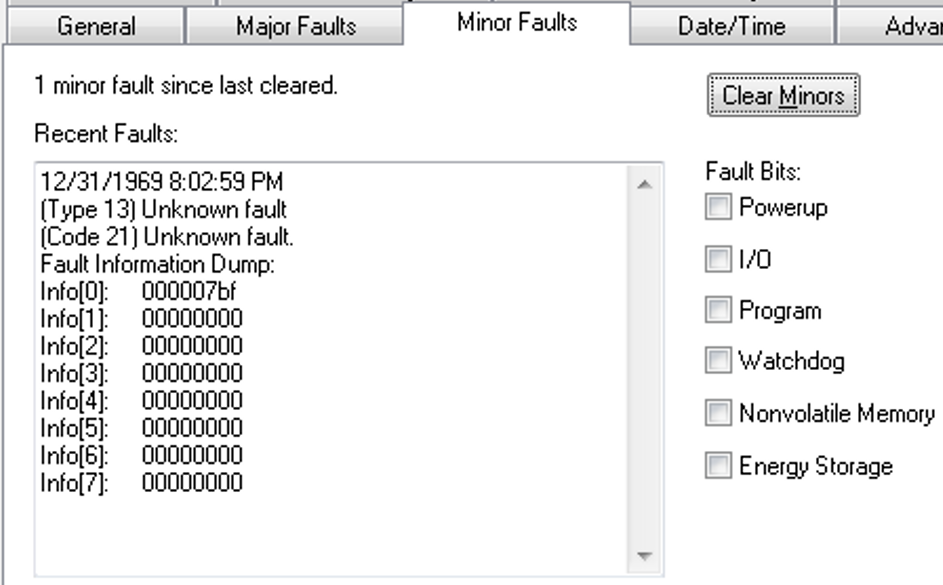
When the fault is logged, the WCT of the controller is set to 1/1/19XX 00:00:00.000, where XX is 81...86. The year corresponds to the Info[0] value for the minor fault.
Tag Incorrectly Identified as Being on Scan (Lgx00148404)
Corrected as of:
- Firmware Revision 20.014, RSLogix™ 5000 Version 20.01
- Firmware Revision 24.011, Studio 5000 Logix Designer® 24.00
Known Anomaly First Identified as of:
- Firmware Revision 21.011, RSLogix 5000 Version 21.00
- Firmware Revision 23.012, Studio 5000 Logix Designer 23.00
Catalog Numbers:
- 1756 ControlLogix 5570
- 1756 GuardLogix® L7
- 5370 CompactLogix™ L1
- 5370 CompactLogix L2
- 5370 CompactLogix L3
- 1756 ControlLogix 5560 – Available with RSLogix 5000 Version 20 and earlier
- 1768 CompactLogix L4 – Available with RSLogix 5000 Version 20 and earlier
- 1769 CompactLogix L2 – Available with RSLogix 5000 Version 20 and earlier
- 1769 CompactLogix L3 – Available with RSLogix 5000 Version 20 and earlier
If you use RSLinx® Enterprise software for HMI communication and you try to modify or delete a controller tag online or try to modify an I/O module configuration, you can get the error 'Failed to modify properties. Tag is actively being read by one or more clients.' The controller improperly determines that a tag is on scan when it is not.
|
Controllers
|
First Known in Firmware
Revision
|
Corrected in Firmware
Revision
|
|
CompactLogix™ 5370
|
20.011
|
38.011 and later
|
|
Compact GuardLogix® 5370
|
28.011
|
38.011 and later
|
|
ControlLogix® 5570
|
18.012
|
38.011 and later
|
|
GuardLogix 5570
|
20.011
|
38.011 and later
|
|
CompactLogix 5380
|
28.011
|
38.011 and later
|
|
Compact GuardLogix 5380 SIL 2
|
31.011
|
38.011 and later
|
|
Compact GuardLogix 5380 SIL 3
|
32.013
|
38.011 and later
|
|
CompactLogix 5380 Process
|
33.011
|
38.011 and later
|
|
CompactLogix 5480
|
32.011
|
38.011 and later
|
|
ControlLogix 5580
|
28.011
|
38.011 and later
|
|
GuardLogix 5580
|
31.011
|
38.011 and later
|
|
ControlLogix 5580 Process
|
33.011
|
38.011 and later
|
Work arounds to consider:
AxisHomedStatus Bit Gets Set To Zero When Inhibiting the Axis (00199162, 00217021)
CORRECTED Anomaly with Firmware Revision 33.011 for these catalog numbers:
- ControlLogix® 5570 controllers
- GuardLogix® 5570 controllers
- CompactLogix™ 5370 controllers
- Compact GuardLogix 5370 controllers
- ControlLogix 5580 controllers
- GuardLogix 5580 controllers
- CompactLogix 5380 controllers
- Compact GuardLogix 5380 controllers
- CompactLogix 5480 controllers
Known Anomaly First Identified as of Firmware Revision 20.011 for these catalog numbers:
- ControlLogix 5570 controllers
- GuardLogix 5570 controllers
- CompactLogix 5370 controllers
Known Anomaly First Identified as of Firmware Revision 28.011 for these catalog numbers:
- Compact GuardLogix 5370 controllers
- CompactLogix 5380 controllers
- ControlLogix 5580 controllers
Known Anomaly First Identified as of Firmware Revision 31.011 for these catalog numbers:
- GuardLogix 5580 controllers
- Compact GuardLogix 5380 SIL 2 controllers
Known Anomaly First Identified as of Firmware Revision 32.011 for these catalog numbers:
- CompactLogix 5480 controllers
Known Anomaly First Identified as of Firmware Revision 32.013 for these catalog numbers:
- Compact GuardLogix 5380 SIL 3 controllers
If the AxisHomedStatus bit is already established on a CIP™ drive, issuing an SSV to inhibit the axis resets the AxisHomedStatus bit to zero.
Velocity Scaling Not Performed Before SLAT Setpoint Sent to Drive (00218527, 00200340)
CORRECTED Anomaly with Firmware Revision 33.011 for these catalog numbers:
- ControlLogix® 5580 controllers
- GuardLogix® 5580 controllers
- CompactLogix™ 5380 controllers
- Compact GuardLogix 5380 controllers
- CompactLogix 5480 controllers
- ControlLogix 5570 controllers
- GuardLogix 5570 controllers
- CompactLogix 5370 controllers
- Compact GuardLogix 5370 controllers
Known Anomaly First Identified as of Firmware Revision 20.011 for these catalog numbers:
- ControlLogix 5570 controllers
- GuardLogix 5570 controllers
- CompactLogix 5370 controllers
Known Anomaly First Identified as of Firmware Revision 28.011 for these catalog numbers:
- Compact GuardLogix 5370 controllers
The controller does not perform velocity scaling before it sends the Speed Limited Adjustable Torque (SLAT) setpoint to a drive.
Firmware Supervisor Does Not Update Kinetix 5700 2198-D032-ERS4 Drive Firmware (00218796)
CORRECTED Anomaly with Firmware Revision 33.011 for these catalog numbers:
- ControlLogix® 5570 controllers
- GuardLogix® 5570 controllers
- CompactLogix™ 5370 controllers
- Compact GuardLogix 5370 controllers
Known Anomaly First Identified as of Firmware Revision 20.011 for these catalog numbers:
- ControlLogix 5570 controllers
- GuardLogix 5570 controllers
- CompactLogix 5370 controllers
Known Anomaly First Identified as of Firmware Revision 28.011 for these catalog numbers:
- Compact GuardLogix 5370 controllers
If Firmware Supervisor tries to update the firmware on a
Kinetix® 5700 2198-D032-ERS4 Drive, the Studio 5000 Logix
Designer® Application can report a module fault: “(Code 16#fe11) Automated
Firmware Update Failed: Firmware file invalid.”
Workaround: To update the firmware, use ControlFLASH™ or ControlFLASH Plus™ software.
Connected Cached Messages Do Not Time Out after Repeated Connection Requests (00206909, 217264)
CORRECTED Anomaly with Firmware Revision 33.011 for these catalog numbers:
- ControlLogix® 5580 controllers
- GuardLogix® 5580 controllers
- CompactLogix™ 5380 controllers
- Compact GuardLogix 5380 controllers
- CompactLogix 5480 controllers
- ControlLogix 5570 controllers
- GuardLogix 5570 controllers
- CompactLogix 5370 controllers
- Compact GuardLogix 5370 controllers
CORRECTED Anomaly with Firmware Revision 33.051 for these catalog numbers:
- ControlLogix 5570 redundant controllers
Known Anomaly First Identified as of Firmware Revision 20.011 for these catalog numbers:
- ControlLogix 5570 controllers
- GuardLogix 5570 controllers
- CompactLogix 5370 controllers
Known Anomaly First Identified as of Firmware Revision 20.054 for these catalog numbers:
- ControlLogix 5570 redundant controllers
Known Anomaly First Identified as of Firmware Revision 28.011 for these catalog numbers:
- Compact GuardLogix 5370 controllers
The connection for connected cached messages does not time out after the max number of retries for the connected request is attempted.
MAOC Drifting Errors (00211178, 00218822)
CORRECTED Anomaly with Firmware Revision 33.011
- ControlLogix® 5570 controllers
- GuardLogix® 5570 controllers
- CompactLogix™ 5370 controllers
- Compact GuardLogix 5370 controllers
- ControlLogix 5580 controllers
- GuardLogix 5580 controllers
- CompactLogix 5380 controllers
- Compact GuardLogix 5380 controllers
- CompactLogix 5480 controllers
Known Anomaly First Identified as of Firmware Revision 20.011 for these catalog numbers:
- ControlLogix® 5570 controllers
- GuardLogix® 5570 controllers
- CompactLogix™ 5370 controllers
Known Anomaly First Identified as of Firmware Revision 28.011 for these catalog numbers:
- Compact GuardLogix 5370 controllers
- CompactLogix 5380 controllers
- ControlLogix 5580 controllers
Known Anomaly First Identified as of Firmware Revision 31.011 for these catalog numbers:
- GuardLogix 5580 controllers
- Compact GuardLogix 5380 SIL 2 controllers
Known Anomaly First Identified as of Firmware Revision 32.011 for these catalog numbers:
- CompactLogix 5480 controllers
Known Anomaly First Identified as of Firmware Revision 32.013 for these catalog numbers:
- Compact GuardLogix 5380 SIL 3 controllers
Motion Arm Output Cam (MAOC) planner’s output can diverge from master axis position over time. For more information, see Knowledgebase article MAOC Drifting Errors.
MCLM/MCCM Set to Merge All Can Cause Controller MNRF (00220553, 00219873)
CORRECTED Anomaly with Firmware Revision 30.011 for these catalog numbers:
- ControlLogix® 5570 controllers
- GuardLogix® 5570 controllers
- CompactLogix™ 5370 controllers
- Compact GuardLogix 5370 controllers
- ControlLogix 5580 controllers
- GuardLogix 5580 controllers
- CompactLogix 5380 controllers
- Compact GuardLogix 5380 controllers
- CompactLogix 5480 controllers
Known Anomaly First Identified as of Firmware Revision 20.011 for these catalog numbers:
- ControlLogix 5570 controllers
- GuardLogix 5570 controllers
- CompactLogix 5370 controllers
Known Anomaly First Identified as of Firmware Revision 28.011 for these catalog numbers:
- Compact GuardLogix 5370 controllers
- CompactLogix 5380 controllers
- ControlLogix 5580 controllers
Known Anomaly First Identified as of Firmware Revision 31.011 for these catalog numbers:
- GuardLogix 5580 controllers
- Compact GuardLogix 5380 SIL 2 controllers
Known Anomaly First Identified as of Firmware Revision 32.011 for these catalog numbers:
- CompactLogix 5480 controllers
Known Anomaly First Identified as of Firmware Revision 32.013 for these catalog numbers:
- Compact GuardLogix 5380 SIL 3 controllers
The controller can experience a major non-recoverable fault (MNRF) due to the following:
- Motion Coordinated Linear Move (MCLM) / Motion Coordinated Circular Move (MCCM) is decelerating.
- Merge All is activated.
- Merging is happening in the last Coarse Update Period of the MCLM/MCCM being
merged.
Using Compare Instruction with String Data Types (00223326, 00223030,0226535)
|
Controllers
|
First Known in
Firmware Revision
|
Corrected in Firmware
Revision
|
|
CompactLogix™ 5370
|
20.011
|
33.011
|
|
Compact GuardLogix® 5370
|
28.011
|
33.011
|
|
ControlLogix® 5570
|
20.011
|
33.011
|
|
ControlLogix 5570 redundant
|
20.054
|
33.051
|
|
GuardLogix 5570
|
20.011
|
33.011
|
|
CompactLogix 5380
|
28.011
|
33.011
|
|
Compact GuardLogix 5380
SIL 2
|
31.011
|
33.011
|
|
Compact GuardLogix 5380
SIL 3
|
32.013
|
33.011
|
|
CompactLogix 5480
|
32.011
|
33.011
|
|
ControlLogix 5580
|
28.011
|
33.011
|
|
GuardLogix 5580
|
31.011
|
33.011
|
If compare instructions (EQU, GEQ, GRT, LEQ, LES, NEQ) are used with string data types and the length of the string is negative, it can result in the controller experiencing these faults:
- User Task watchdog faults
- Controller major non-recoverable faults (MNRFs)
Nested SFC with Selection Branch Execution on First Transition May Be Incorrect (00227908, 00225009, 880618, 1594431)
|
Controllers
|
First Known in Firmware
Revision
|
Corrected in Firmware
Revision
|
|
CompactLogix™ 5370
|
20.011
|
33.011 and later
|
|
Compact GuardLogix® 5370
|
28.011
|
33.011 and later
|
|
ControlLogix® 5570
|
20.011
|
33.011 and later
|
|
ControlLogix 5570 redundant
|
20.054
|
33.051 and later
|
|
GuardLogix 5570
|
20.011
|
33.011 and later
|
|
CompactLogix 5380
|
28.011
|
31.013, 32.016, 33.011 and later
|
|
Compact GuardLogix 5380
SIL 2
|
31.011
|
31.013, 32.016, 33.011 and later
|
|
Compact GuardLogix 5380
SIL 3
|
32.013
|
32.016, 33.011 and later
|
|
CompactLogix 5480
|
32.011
|
32.016, 33.011 and later
|
|
ControlLogix 5580
|
28.011
|
31.013, 32.016, 33.011 and later
|
|
GuardLogix 5580
|
31.011
|
31.013, 32.016, 33.011 and later
|
Under the following conditions, a sequential function chart (SFC) selection branch will not execute correctly.
- The selection branch is in a nested SFC.
- SFCs are configured for the following:
- Execution Control, Execute current active steps only
- Restart Position, Restart at initial step
- Last Scan of Active Steps, Automatic Reset
- SFR instruction is used to reset the main SFC to the initial step.
Under these conditions, if an SFC is reset while evaluating parallel transitions, the chart may remember that one transition from before the reset was true. If another transition is true after the execution path reaches that select divergence again, the chart could still remember the transition from before the reset and choose the incorrect execution path.
After Power Cycling, The Controller SFC Routines Do Not Execute Properly (00229202, 00229027, 926153, 1594432)
|
Controllers
|
First Known in Firmware
Revision
|
Corrected in Firmware
Revision
|
|
CompactLogix™ 5370
|
20.011
|
33.011 and later
|
|
Compact GuardLogix® 5370
|
28.011
|
33.011 and later
|
|
ControlLogix® 5570
|
20.011
|
33.011 and later
|
|
ControlLogix 5570 redundant
|
20.054
|
33.051 and later
|
|
GuardLogix 5570
|
20.011
|
33.011 and later
|
|
CompactLogix 5380
|
28.011
|
31.013, 32.016, 33.011 and later
|
|
Compact GuardLogix 5380
SIL 2
|
31.011
|
31.013, 32.016, 33.011 and
later
|
|
Compact GuardLogix 5380
SIL 3
|
32.013
|
32.016, 33.011 and later
|
|
CompactLogix 5480
|
32.011
|
32.016, 33.011 and later
|
|
ControlLogix 5580
|
28.011
|
31.013, 32.016, 33.011 and
later
|
|
GuardLogix 5580
|
31.011
|
31.013, 32.016, 33.011 and
later
|
Following a power cycle, if the application program includes an SFC with a simultaneous branch, the possibility exists for one or more steps on that simultaneous branch not to execute. This anomaly does not occur on every power cycle.
See Knowledgebase Technote Unexplained Sequential Function Chart (SFC) simultaneous branch execution.
Anomaly
Logix Firmware/RSLogix 5000 Software 20.013, 21.011
Catalog Numbers:
● 1756-L61, 1756-L62, 1756-L63, 1756-L63XT, 1756-L64, 1756-L65
● 1756-L61S, 1756-L62S, 1756-L63S
● 1756-L71, 1756-L72, 1756-L73, 1756-L73XT, 1756-L74, 1756-L75
● 1756-L71S, 1756-L72S, 1756-L73S, 1756-L73SXT
Controller Does Not Transition to Run Mode after Online Edit of PowerFlex Drive Parameters (00219408)
CORRECTED Anomaly with Firmware Revision 33.011 for these catalog numbers:
- ControlLogix® 5570 controllers
- GuardLogix® 5570 controllers
- CompactLogix™ 5370 controllers
- Compact GuardLogix 5370 controllers
CORRECTED Anomaly with Firmware Revision 33.051 for these catalog numbers:
- ControlLogix 5570 redundant controllers
CORRECTED Anomaly with Firmware Revision 32.012 and 33.011 for these catalog numbers:
- CompactLogix 5480 controllers
CORRECTED Anomaly with Firmware Revision 31.013, 32.012, and 33.011 for these catalog numbers:
- GuardLogix 5580 controllers
- Compact GuardLogix 5380 SIL 2 controllers
CORRECTED Anomaly as of Firmware Revision 30.015, 31.013, 32.012, and 33.011 for these Catalog Numbers:
- ControlLogix 5580 Controllers
- CompactLogix 5380 Controllers
CompactLogix 5380 Controllers Known Anomaly First Identified as of Firmware Revision 20.011 for these catalog numbers:
- ControlLogix 5570 controllers
- GuardLogix 5570 controllers
- CompactLogix 5370 controllers
Known Anomaly First Identified as of Firmware Revision 20.054 for these catalog numbers:
- ControlLogix 5570 redundant controllers
Known Anomaly First Identified as of Firmware Revision 28.011 for these catalog numbers:
- ControlLogix 5580 controllers
- CompactLogix 5380 controllers
- Compact GuardLogix 5370 controllers
Known Anomaly First Identified as of Firmware Revision 31.011 for these catalog numbers:
- GuardLogix 5580 controllers
- Compact GuardLogix 5380 SIL 2 controllers
Known Anomaly First Identified as of Firmware Revision 32.011 for these catalog numbers:
- CompactLogix 5480 controllers
If you edit a PowerFlex® drive parameter online in Program mode, the controller does not transition to run mode when you change from Program mode to run mode. This can occur when you use the 20-750-ENETR PowerFlex 755 dual-port Ethernet communication module.
Unexpected command sent to phase when connection is lost to Logix Designer (00224198)
CORRECTED Anomaly with Firmware Revision 33.011 for these catalog numbers:
- ControlLogix® 5570 controllers
- GuardLogix® 5570 controllers
- CompactLogix™ 5370 controllers
- Compact GuardLogix 5370 controllers
CORRECTED Anomaly with Firmware Revision 33.051 for these catalog numbers:
- ControlLogix 5570 redundant controllers
Known Anomaly First Identified as of Firmware Revision 20.011 for these catalog numbers:
- ControlLogix 5570 controllers
- GuardLogix 5570 controllers
- CompactLogix 5370 controllers
Known Anomaly First Identified as of Firmware Revision 20.054 for these catalog numbers:
- ControlLogix 5570 redundant controllers
Known Anomaly First Identified as of Firmware Revision 28.011 for these catalog numbers:
- Compact GuardLogix 5370 controllers
The options for this configuration are:
- None (continue in its current state)
- Hold
- Stop
- Abort
The anomaly occurs when Logix Designer has an override attach to the equipment phase and the connection is lost to Logix Designer. The anomaly is that the phase is sent the command specified in the ‘External Sequencer Loss of Communication Command’ property. What should happen is no command should be sent—only the override should be cleared. The configured command should only be sent when there is an External Sequencer (FTBatch) attached.
Homing an axis introduces a spike in the Actual Velocity attribute (00225946, 00223672)
CORRECTED Anomaly with Firmware Revision 33.011 for these catalog numbers:
- ControlLogix® 5570 controllers
- GuardLogix® 5570 controllers
- CompactLogix™ 5370 controllers
- Compact GuardLogix 5370 controllers
- ControlLogix 5580 controllers
- GuardLogix 5580 controllers
- CompactLogix 5380 controllers
- Compact GuardLogix 5380 controllers
- CompactLogix 5480 controllers
Known Anomaly First Identified in these controllers:
- ControlLogix 5570, revision 19.011
- GuardLogix 5570, CompactLogix 5370, revision 20.011
Known Anomaly First Identified as of Firmware Revision 28.011 for these catalog numbers:
- Compact GuardLogix 5370 controllers
- CompactLogix 5380 controllers
- ControlLogix 5580 controllers
Known Anomaly First Identified as of Firmware Revision 31.011 for these catalog numbers:
- GuardLogix 5580 controllers
- Compact GuardLogix 5380 SIL 2 controllers
Known Anomaly First Identified as of Firmware Revision 32.011 for these catalog numbers:
- CompactLogix 5480 controllers
Known Anomaly First Identified as of Firmware Revision 32.013 for these catalog numbers:
- Compact GuardLogix 5380 SIL 3 controllers
While homing to the limit switch, you see a large spike on the axis’ ActualVelocity attribute. The drive position and velocity feedback do not reflect the spike noticed on the ActualVelocity attribute of the controller. They stay consistent with the expected behavior.
CIP Motion Axis Feedback 1 and 2 length incorrectly converted by the controller (00218528, 00218407)
CORRECTED Anomaly with Firmware Revision 33.011 for these catalog numbers:
- ControlLogix® 5570 controllers
- GuardLogix® 5570 controllers
- CompactLogix™ 5370 controllers
- Compact GuardLogix 5370 controllers
- ControlLogix 5580 controllers
- GuardLogix 5580 controllers
- CompactLogix 5380 controllers
- Compact GuardLogix 5380 controllers
- CompactLogix 5480 controllers
Known Anomaly First Identified as of Firmware Revision 20.011 for these catalog numbers:
- ControlLogix 5570 controllers
- GuardLogix 5570 controllers
- CompactLogix 5370 controllers
Known Anomaly First Identified as of Firmware Revision 28.011 for these catalog numbers:
- Compact GuardLogix 5370 controllers
- CompactLogix 5380 controllers
- ControlLogix 5580 controllers
Known Anomaly First Identified as of Firmware Revision 31.011 for these catalog numbers:
- GuardLogix 5580 controllers
- Compact GuardLogix 5380 SIL 2 controllers
Known Anomaly First Identified as of Firmware Revision 32.011 for these catalog numbers:
- CompactLogix 5480 controllers
Known Anomaly First Identified as of Firmware Revision 32.013 for these catalog numbers:
- Compact GuardLogix 5380 SIL 3 controllers
CIP Motion Axis attribute 1419 Feedback 1 Length and 1469 Feedback 2 Length are converted from float to integer by the controller before being sent to the drive. The conversion is unexpected and causes the value in the drive to become incorrect.
Axis Stuck In Synchronizing State When SSV And Inhibiting Axis On The Same Module (00229573, 00225308)
CORRECTED Anomaly with Firmware Revision 33.011 for these catalog numbers:
- ControlLogix® 5580 controllers
- GuardLogix® 5580 controllers
- CompactLogix™ 5380 controllers
- Compact GuardLogix 5380 controllers
- CompactLogix 5480 controllers
- ControlLogix 5570 controllers
- GuardLogix 5570 controllers
- CompactLogix 5370 controllers
- Compact GuardLogix 5370 controllers
Known Anomaly First Identified as of Firmware Revision 20.011 for these catalog numbers:
- ControlLogix 5570 controllers
- GuardLogix 5570 controllers
- CompactLogix 5370 controllers
Known Anomaly First Identified as of Firmware Revision 28.011 for these catalog numbers:
- Compact GuardLogix 5370 controllers
When continually executing multiple SSV instructions to change drive attributes on axis A and inhibiting axis B on the same module, axis A and other axes on the same module become stuck in the synchronizing state and never go to pre-charge/stopped state. You must re-download the project to recover.
Online Editing of PowerFlex Drives (00227003, 1594434)
|
Controllers
|
First Known in Firmware
Revision
|
Corrected in Firmware Revision
|
|
CompactLogix™ 5370
|
20.011
|
33.011 and later
|
|
Compact GuardLogix®
5370
|
28.011
|
33.011 and later
|
|
ControlLogix® 5570
|
20.011
|
33.011 and later
|
|
ControlLogix 5570
redundant
|
20.054
|
33.051 and later
|
|
GuardLogix 5570
|
20.011
|
33.011 and later
|
|
CompactLogix 5380
|
28.011
|
30.015, 31.013, 32.016, 33.011 and
later
|
|
Compact GuardLogix 5380
SIL 2
|
31.011
|
31.013, 32.016, 33.011 and later
|
|
Compact GuardLogix 5380
SIL 3
|
32.013
|
32.016, 33.011 and later
|
|
CompactLogix 5480
|
32.011
|
32.016, 33.011 and later
|
|
ControlLogix 5580
|
28.011
|
30.015, 31.013, 32.016, 33.011 and
later
|
|
GuardLogix 5580
|
31.011
|
31.013, 32.016, 33.011 and later
|
See Knowledgebase Technote Product Notice 2019-01-001 Revision C - Online Editing of PowerFlex Low and Medium Voltage Drives (201901001).
IMPORTANT: You must use a CORRECTED controller firmware revision (listed above) in conjunction with Drives AOP 5.007 or greater; a CORRECTED controller firmware revision alone will not address the anomaly described in the product notice.
SRT (Sort) instruction with a large length can cause the controller to MNRF (00227157)
CORRECTED Anomaly with Firmware Revision 33.011 for these catalog numbers:
- ControlLogix® 5570 controllers
- GuardLogix® 5570 controllers
- CompactLogix™ 5370 controllers
- Compact GuardLogix 5370 controllers
CORRECTED Anomaly with Firmware Revision 33.051 for these catalog numbers:
- ControlLogix 5570 redundant controllers
Known Anomaly First Identified as of Firmware Revision 20.011 for these catalog numbers:
- ControlLogix 5570 controllers
- GuardLogix 5570 controllers
- CompactLogix 5370 controllers
Known Anomaly First Identified as of Firmware Revision 20.054 for these catalog numbers:
- ControlLogix 5570 redundant controllers
Known Anomaly First Identified as of Firmware Revision 28.011 for these catalog numbers:
- Compact GuardLogix 5370 controllers
When the SRT (Sort) instruction is executed, it can result in a controller major non-recoverable fault (MNRF). This can occur when the SRT is performed in an array with a large length, typically over 120 elements.
Firmware Supervisor fails with “(Code 16#fe11) Automated Firmware Update Failed: Firmware file invalid.” (00206938)
- ControlLogix® 5570 controllers
- GuardLogix® 5570 controllers
- CompactLogix™ 5370 controllers
- Compact GuardLogix 5370 controllers
- ControlLogix 5570 controllers
- GuardLogix 5570 controllers
- CompactLogix 5370 controllers
- Compact GuardLogix 5370 controllers
MAR and MAW Instructions Do Not Execute Properly After Controller Power Is Cycled (1120359, 1161982)
|
Controllers
|
First Known in Firmware
Revision
|
Corrected in Firmware Revision
|
|
CompactLogix™ 5370
|
20.011
|
34.011
|
|
Compact GuardLogix® 5370
|
28.011
|
34.011
|
|
ControlLogix® 5570
|
20.011
|
34.011
|
|
GuardLogix 5570
|
28.011
|
34.011
|
|
CompactLogix 5380
|
28.011
|
34.011
|
|
Compact GuardLogix 5380 SIL 2
|
31.011
|
34.011
|
|
Compact GuardLogix 5380 SIL 3
|
32.013
|
34.011
|
|
CompactLogix 5380 Process
|
33.011
|
34.011
|
|
CompactLogix 5480
|
32.011
|
34.011
|
|
ControlLogix 5580
|
28.011
|
34.011
|
|
GuardLogix 5580
|
31.011
|
34.011
|
|
ControlLogix 5580 Process
|
33.011
|
34.011
|
If a controller is powered down while a Motion Arm Registration (MAR) and/or a Motion Arm Watch (MAW) instruction is active, the state of the instruction will not be accurate on controller power up.
- A Motion Disarm Registration (MDR) is required to reset the MAR instruction.
- A Motion Disarm Watch (MDW) is required to reset to the MAW instruction.
For more information, see the Knowledgebase Technote MAR or MAW Instruction Not Executing Properly After a Power cycle.
Some Faults Are Not Logged in The Controller Log (1061142, 1594647)
|
Controllers
|
First Known in Firmware
Revision
|
Corrected in Firmware
Revision
|
|
CompactLogix™ 5370
|
20.011
|
33.016, 34.011 and later
|
|
Compact GuardLogix® 5370
|
28.011
|
33.016, 34.011 and later
|
|
ControlLogix® 5570
|
20.011
|
33.016, 34.011 and later
|
|
ControlLogix 5570 redundant
|
20.054
|
33.053, 34.051 and later
|
|
GuardLogix 5570
|
20.011
|
33.016, 34.011 and later
|
The Controller Log feature does not properly log User Task Watchdog faults (Type 6 Code 1) in the Controller Log. For more information about the Controller Log feature, see the Logix 5000® Controllers Information and Status Programming Manual, publication 1756-PM015.
PCMD Returns Incorrect Error Code (1056295)
|
Controllers
|
First Known in Firmware
Revision
|
Corrected in Firmware
Revision
|
|
CompactLogix™ 5370
|
20.011
|
34.011
|
|
Compact GuardLogix® 5370
|
28.011
|
34.011
|
|
ControlLogix® 5570
|
20.011
|
34.011
|
|
ControlLogix 5570 redundant
|
20.054
|
34.051
|
|
GuardLogix 5570
|
28.011
|
34.011
|
|
CompactLogix 5380
|
28.011
|
34.011
|
|
Compact GuardLogix 5380 SIL 2
|
31.011
|
34.011
|
|
Compact GuardLogix 5380 SIL 3
|
32.013
|
34.011
|
|
CompactLogix 5380 Process
|
33.011
|
34.011
|
|
CompactLogix 5480
|
32.011
|
34.011
|
|
ControlLogix 5580
|
28.011
|
34.011
|
|
GuardLogix 5580
|
31.011
|
34.011
|
|
ControlLogix 5580 Process
|
33.011
|
34.011
|
Equipment Phase Command (PCMD) returns the incorrect error code “0x6003, HIGH_PRIORITY_OWNED” when it should return “0x6004, NOT_ATTACHED”
Controller Can Assert During The I/O Module Configuration Process (1024030, 00219969)
|
Controllers
|
First Known in Firmware
Revision
|
Corrected in Firmware
Revision
|
|
CompactLogix™ 5370
|
20.011
|
34.011
|
|
Compact GuardLogix® 5370
|
28.011
|
34.011
|
|
ControlLogix® 5570
|
20.011
|
34.011
|
|
ControlLogix 5570 redundant
|
20.054
|
34.051
|
|
GuardLogix 5570
|
28.011
|
34.011
|
|
CompactLogix 5380
|
28.011
|
33.011
|
|
Compact GuardLogix 5380 SIL 2
|
31.011
|
33.011
|
|
Compact GuardLogix 5380 SIL 3
|
32.013
|
33.011
|
|
CompactLogix 5480
|
32.011
|
33.011
|
|
ControlLogix 5580
|
28.011
|
33.011
|
|
GuardLogix 5580
|
31.011
|
33.011
|
Certain I/O modules send more configuration data than fits in a standard forward open (508 bytes) when the connection is being established. Therefore, the configuration process can take longer to complete. Examples include E300™ Electronic Overload Relays, 1444 Dynamics, 1718 I/O, 1719 I/O, and many third-party I/O devices.
When the configuration data is being sent to the device, if you change the configuration through the Add-on Profile for the device and then apply the changes the controller can assert.
CIP™ Axis Velocity Loop Causes Controller To MNRF/Assert (1008498, 1006943)
|
Controllers
|
First Known in Firmware
Revision
|
Corrected in Firmware
Revision
|
|
CompactLogix™ 5370
|
20.011
|
34.011
|
|
Compact GuardLogix® 5370
|
28.011
|
34.011
|
|
ControlLogix® 5570
|
20.011
|
34.011
|
|
GuardLogix 5570
|
28.011
|
34.011
|
|
CompactLogix 5380
|
28.011
|
34.011
|
|
Compact GuardLogix 5380 SIL 2
|
31.011
|
34.011
|
|
Compact GuardLogix 5380 SIL 3
|
32.011
|
34.011
|
|
CompactLogix 5380 Process
|
33.011
|
34.011
|
|
CompactLogix 5480
|
32.011
|
34.011
|
|
ControlLogix 5580
|
28.011
|
34.011
|
|
GuardLogix 5580
|
31.011
|
34.011
|
|
ControlLogix 5580 Process
|
33.011
|
34.011
|
Setting the Axis Direct Command Velocity Tag to “Not a Number” (NaN) causes the controller to experience a major nonrecoverable fault/assert.
Grandmaster Clock Description Not Correctly Being Displayed (939979)
|
Controllers
|
First Known in Firmware
Revision
|
Corrected in Firmware
Revision
|
|
CompactLogix™ 5370
|
20.011
|
34.011
|
|
Compact GuardLogix® 5370
|
28.011
|
34.011
|
|
ControlLogix® 5570
|
20.011
|
34.011
|
|
ControlLogix 5570 redundant
|
20.054
|
34.051
|
|
GuardLogix 5570
|
20.011
|
34.011
|
Located in controller properties → Date Time → Advanced → Grandmaster Clock description could be shown as a blank description or could be showing old information. This does not impact time synchronization.
Inverting Motion Polarity Does Not Invert the Value of Certain Signal Attributes (1329074, 1332544)
|
Controllers
|
First Known in Firmware
Revision
|
Corrected in Firmware Revision
|
|
CompactLogix™ 5370
|
20.011
|
34.011 and later
|
|
Compact GuardLogix® 5370
|
28.011
|
34.011 and later
|
|
ControlLogix® 5570
|
19.011
|
34.011 and later
|
|
GuardLogix 5570
|
20.011
|
34.011 and later
|
|
CompactLogix 5380
|
28.011
|
34.011 and later
|
|
CompactLogix 5380 process
|
33.011
|
34.011 and later
|
|
Compact GuardLogix 5380 SIL 2
|
31.011
|
34.011 and later
|
|
Compact GuardLogix 5380 SIL 3
|
32.013
|
34.011 and later
|
|
CompactLogix 5480
|
32.011
|
34.011 and later
|
|
ControlLogix 5580
|
28.011
|
34.011 and later
|
|
ControlLogix 5580 process
|
33.011
|
34.011 and later
|
|
GuardLogix 5580
|
31.011
|
34.011 and later
|
When the axis Motion Polarity bit is set to inverted, certain Signal attributes for a CIP™ axis will display a value opposite of the programmed direction of the axis.
The affected signal attributes are:
• #365 Fine Command Position
• #495 Torque Estimate
• #432 Position Reference
• #523 Motor Electrical Angle
• #565 Slip Compensation
• #600 Output Frequency
• #601 Output Current
• #602 Output Voltage
• #603 Output Power
• #1403 Velocity Feedback 1
• #1453 Velocity Feedback 2
For more information, see the Knowledgebase Technote Inverting Motion Polarity Does Not Invert the Value of Certain Signal Attributes.
|
Controllers
|
First Known in Firmware
Revision
|
Corrected in Firmware Revision
|
|
CompactLogix® 5370
|
20.011
|
37.011 and later
|
|
Compact GuardLogix® 5370
|
28.011
|
37.011 and later
|
|
ControlLogix® 5570
|
20.011
|
37.011 and later
|
|
GuardLogix 5570
|
20.011
|
37.011 and later
|
|
CompactLogix 5380
|
29.011
|
34.015, 35.014, 36.013, 37.011 and
later
|
|
Compact GuardLogix 5380 SIL 2
|
31.011
|
34.015, 35.014, 36.013, 37.011 and
later
|
|
Compact GuardLogix 5380 SIL 3
|
32.013
|
34.015, 35.014, 36.013, 37.011 and
later
|
|
CompactLogix 5380 Process
|
33.011
|
34.015, 35.014, 36.013, 37.011 and
later
|
|
CompactLogix 5480
|
32.011
|
34.015, 35.014, 36.013, 37.011 and
later
|
|
ControlLogix 5580
|
28.011
|
34.015, 35.014, 36.013, 37.011 and
later
|
|
GuardLogix 5580
|
31.011
|
34.015, 35.014, 36.013, 37.011 and
later
|
|
ControlLogix 5580 Process
|
33.011
|
34.015, 35.014, 36.013, 37.011 and
later
|
Functional Changes
This release has the following functional changes from the previous release.
V21 Additional Memory Requirements for ControlLogix, GuardLogix, and SoftLogix Controllers
Functional Change Available As Of Version 21:
Catalog Numbers 1756-L71, 1756-L71S, 1756-L72, 1756-L72S, 1756-L73, 1756-L73S, 1756-L73XT, 1756-L73SXT, 1756-L74, 1756-L75
Catalog Numbers 1789-L10, 1789-L30, 1789-L60
If you are upgrading your system through multiple firmware revisions, add all components your application uses for each of the revisions you upgrade through.
If you upgrade from 20.x to 21.x
|
Then add the following memory requirements to your project |
Which comes from this type of memory | |||
|
Component |
Increase/Decrease Per Instance |
I/O |
Data and Logic |
Safety |
|
Program |
+ 8 bytes |
|
X |
|
|
Add-On Instruction |
+ 12 bytes |
|
X |
|
|
SFC Routine |
+ 8 bytes |
|
X |
|
|
Tag that uses AXIS_GENERIC data type |
+ 32 bytes |
|
X |
|
|
Tag that uses OUTPUT_CAM data type |
+ 512 bytes |
|
X |
|
|
Tag that uses AXIS_SERVO_DRIVE data type |
- 8 bytes |
|
X |
|
|
Tag that uses CIP_DRIVE data type |
+ 4 bytes |
|
X |
|
|
PRODUCE_TAG |
+ 2 bytes |
|
X |
|
|
Tag that uses ALARM_DIGITAL data type |
+ 64 bytes |
|
X |
|
|
Tag that uses ALARM_ANALOG data type |
+ 436 bytes |
|
X |
|
|
Tag that uses MOTION_GROUP data type |
- 8 bytes |
|
X |
|
|
For each controller |
-76 bytes |
|
X |
|
|
CompactLogix 5370 L1 |
+ 376 bytes |
X |
|
|
|
CompactLogix 5370 L1 |
+ 6600 bytes |
|
X |
|
|
CompactLogix 5370 L2 (1769-L24ER-QB1B) |
+ 1392 bytes |
X |
|
|
|
CompactLogix 5370 L2 (1769-L24ER-QB1B) |
+ 13588 bytes |
|
X |
|
|
CompactLogix 5370 L2 (1769-L24ER-QBFC1B or 1769-L27ERM-QBFC1B) |
+1392 bytes |
X |
|
|
|
CompactLogix 5370 L2 (1769-L24ER-QBFC1B or 1769-L27ERM-QBFC1B) |
+ 13564 bytes |
|
X |
|
|
CompactLogix 5370 L3 |
+ 24 bytes |
X |
|
|
|
CompactLogix 5370 L3 |
+ 14984 bytes |
|
X |
|
|
1756-L7xS |
+ 48 bytes |
X |
|
|
|
1756-L7xS |
+ 24720 bytes |
|
X |
|
|
1756-L7x |
+ 16 bytes |
X |
|
|
|
1756-L7x |
+ 24720 bytes |
|
X |
|
|
1789-L10, 1789-L30, 1789-L60 |
+ 76196 bytes |
X |
|
|
If you upgrade from 19.x to 20.x
|
Then add the following memory requirements to your project |
Which comes from this type of memory | |||
|
Component |
Increase/Decrease Per Instance |
I/O |
Data and Logic |
Safety |
|
Task |
+ 1312 bytes |
|
X |
|
|
Program |
+ 16 bytes |
|
X |
|
|
Equipment phase |
+ 8 bytes |
|
X |
|
|
Routine |
+ 24 bytes |
|
X |
|
|
Add-On Instruction |
+ 32 bytes |
|
X |
|
|
Project with any tags that use ALARM_ANALOG or ALARM_DIGITAL data type |
-76 bytes |
|
X |
|
|
Tag that uses ALARM_ANALOG data type |
+ 4 bytes |
|
X |
|
|
Tag that uses ALARM_DIGITAL data type |
+ 24 bytes |
|
X |
|
|
Tag that uses MOTION_GROUP data type |
+ 56 bytes |
|
X |
|
|
Tag that uses COORDINATE_SYSTEM data type |
+ 950 bytes |
|
X |
|
|
Tag that uses AXIS_CIP_DRIVE data type |
+ 676 bytes |
|
X |
|
|
Tag that uses AXIS data type other than AXIS_CIP_DRIVE |
+ 672 bytes |
|
X |
|
|
Standard produced tag |
+ 4 bytes + (4 bytes x number of consumers) |
X |
|
|
|
Standard consumed tag |
+ 12 bytes |
X |
|
|
|
Safety produced tag |
+ 4 bytes |
|
|
X |
|
Safety consumed tag |
+ 4 bytes |
|
|
X |
|
I/O module |
+ 8 bytes |
|
X |
|
|
Module input connection |
+ 4 bytes |
|
X |
|
|
Module output connection |
+ 4 bytes |
|
X |
|
|
For each controller (> 1 K bytes change): |
|
|
|
|
|
1756-L6x controller |
+ 1264 bytes |
|
X |
|
|
1756-L6x controller |
+ 1268 bytes |
X |
|
|
|
1756-L6xS controller |
+ 1316 bytes |
|
X |
|
|
1756-L6xS controller |
+ 1312 bytes |
X |
|
|
|
1756-L7x controller |
+ 5588 bytes |
|
X |
|
|
1756-L7x controller |
+ 1296 bytes |
X |
|
|
|
1768-L4x, 1768-L4xS controller |
+ 1212 bytes |
|
X |
|
|
1768-L4x controller |
+ 1292 bytes |
X |
|
|
|
1768-L4xS controller |
+ 1340 bytes |
X |
|
|
|
1768-L4xS controller |
+ 1312 bytes |
|
|
X |
|
1769-L23 controller |
+ 2488 bytes |
X |
|
|
|
1769-L31 controller |
+ 2492 bytes |
X |
|
|
|
1769-L32C, 1769-L35CR controller |
+ 2812 bytes |
X |
|
|
|
1769-L33E, 1769-L35E controller |
+ 2496 bytes |
X |
|
|
If you upgrade from 18.x to 19.x
|
Then add the following memory requirements to your project |
Which comes from this type of memory | ||
|
Component |
Increase/Decrease Per Instance |
I/O |
Data and Logic |
|
NA |
<no change> |
|
|
If you upgrade from 17.x to 18.x
|
Then add the following memory requirements to your project |
Which comes from this type of memory | ||
|
Component |
Increase/Decrease Per Instance |
I/O |
Data and Logic |
|
Program |
+ 8 bytes |
|
X |
|
Equipment phase |
+ 20 bytes |
|
X |
|
Add-On Instruction |
+ 12 bytes |
|
X |
| Each tag
In addition, if you use a tag of the types listed below, increase the memory as indicated for each instance: |
+ 4 bytes |
|
X |
|
Produced tag |
+ 36 bytes + (24 bytes * number of consumers) |
X |
|
|
Consumed tag |
+ 24 bytes |
X |
|
|
Data access control |
+ 4 bytes per symbol |
|
X |
|
Tag that uses ALARM_ANALOG data type |
- 20 bytes |
|
X |
|
Tag that uses ALARM_DIGITAL data type |
+ 28 bytes |
|
X |
|
Tag that uses MOTION_GROUP data type |
+ 76 |
|
X |
|
Tag that uses AXIS_SERVO_DRIVE or AXIS_GENERIC_DRIVE data type |
+ 786 bytes |
|
X |
|
Tag that uses AXIS data type other than AXIS_SERVO_DRIVE or AXIS_GENERIC_DRIVE |
+ 818 bytes |
|
X |
|
Tag that uses COORDINATE_SYSTEM data type with no transform dimensions |
+ 40 bytes |
|
X |
|
Tag that uses COORDINATE_SYSTEM data type with transform dimensions |
+ 100 bytes |
|
X |
|
Module input connection |
+ 20 bytes |
|
X |
|
Module output connection |
+ 24 bytes |
|
X |
|
Safety controller |
- 8 bytes |
|
X |
|
Safety partner |
- 8 bytes |
|
X |
|
For each controller (> 1k bytes change): |
|
|
|
|
1756-L6x, 1756-L6xS, 1756-L63XT |
+ 16728 bytes |
|
X |
|
1768-L4x, 1768-L4xS |
+ 14448 bytes |
|
X |
|
1769-L2x |
+ 35084 bytes |
X |
|
|
1769-L31 |
+ 14740 bytes |
X |
|
|
1769-L32C, 1756-L35CR |
+ 35400 bytes |
X |
|
|
1769-L32E, 1756-L35E |
+ 35036 bytes |
X |
|
|
1789-L10, 1789-L30, 1789-L60 |
+ 4992 |
X |
|
If you upgrade from 16.x to 17.x
|
Then add the following memory requirements to your project |
Which comes from this type of memory | ||
|
Component |
Increase/Decrease Per Instance |
I/O |
Data and Logic |
|
Task |
+ 4 bytes |
|
X |
|
Program |
+ 4 bytes |
|
X |
|
Equipment phase |
+ 8 bytes |
|
X |
|
LD routine |
+ 12 bytes |
|
X |
|
FBD routine |
- 8 bytes |
|
X |
|
SFC routine |
+ 28 bytes |
|
X |
|
ST routine |
+ 4 bytes |
|
X |
|
Add-On Instruction |
- 12 bytes |
|
X |
|
If you use a tag of the types listed below, increase the memory as indicated for each instance: |
|
|
|
|
Produced tag |
+ [4 bytes + (4 bytes * number of consumers)] |
X |
|
|
Consumed tag |
+ 8 bytes |
X |
|
|
Tag that uses MESSAGE data type |
+ 4 bytes |
|
X |
|
Tag that uses ALARM_ANALOG data type |
- 64 bytes |
|
X |
|
Tag that uses ALARM_DIGITAL data type |
- 28 bytes |
|
X |
|
Tag that uses AXIS_SERVO_DRIVE or AXIS_GENERIC_DRIVE data type |
- 34 bytes
(2 bytes x number of output cam execution targets) |
|
X |
|
Tag that uses AXIS data type other than AXIS_SERVO_DRIVE or AXIS_GENERIC_DRIVE |
- 52 bytes
(2 bytes x number of output cam execution targets) |
|
X |
|
Tag that uses COORDINATE_SYSTEM data type of 2 dimensions with 2 transform dimensions |
+ 20 bytes |
|
X |
|
Tag that uses COORDINATE_SYSTEM data type of 3 dimensions with 3 transform dimensions |
+ 108 bytes |
|
X |
If you upgrade from 15.x to 16.x
|
Then add the following memory requirements to your project |
Which comes from this type of memory | ||
|
Component |
Increase/Decrease Per Instance |
I/O |
Data and Logic |
|
If you use a tag of the types listed below, increase the memory as indicated for each instance: |
|
|
|
|
Tag that uses ALARM_ANALOG data type (with no associated tag references) |
+ 16 bytes |
|
X |
|
Tag that uses ALARM_DIGITAL data type (with no associated tag references) |
+ 4 bytes |
|
X |
|
Tag that uses ALARM_ANALOG data type (if associated tags are configured for the ALARM_ANALOG tag) |
+ 22 bytes
+ (9 x the number of configured, associated tags)
+ (3 x the sum of the bytes used by the data type of each of the configured associated tags)
For example, an analog alarm moved to V16.03 with two Associated Tags – one DINT (4 bytes) and one STRING (88 bytes) would need to add: 22 + 9(2) + 3(92) = 316 bytes |
|
X |
|
Tag that uses the COORDINATE_SYSTEM data type |
+ 132 bytes |
|
X |
If you upgrade from 14.x to 15.x
|
Then add the following memory requirements to your project |
Which comes from this type of memory | ||
|
Component |
Increase/Decrease Per Instance |
I/O |
Data and Logic |
|
Input module |
+ 4 bytes |
X |
|
|
If you use a tag of the types listed below, increase the memory as indicated for each instance: |
|
|
|
|
Produced tag |
+ 12 bytes |
X |
|
|
Consumed tag |
+ 4 bytes |
X |
|
|
Tag that uses COORDINATE_SYSTEM data type |
+ 748 bytes |
|
X |
|
Tag the uses any AXIS data type |
+ 800 bytes |
|
X |
|
Task |
+ 20 bytes |
|
X |
|
Program or equipment phase |
+ 24 bytes |
|
X |
|
Routine |
+ 4 bytes |
|
X |
|
Serial port |
+ 1120 bytes |
|
X |
|
Project |
+ 4012 bytes |
|
X |
If you upgrade from 13.x to 14.x
|
Then add the following memory requirements to your project |
Which comes from this type of memory | ||
|
Component |
Increase/Decrease Per Instance |
I/O |
Data and Logic |
|
If you use a tag of the types listed below, increase the memory as indicated for each instance: |
|
|
|
|
Tag that uses the COORDINATE SYSTEM data type |
+ 60 bytes |
|
X |
|
Tag that uses any AXIS data type |
+ 4 bytes |
|
X |
If you upgrade from 12.x to 13.x
|
Then add the following memory requirements to your project |
Which comes from this type of memory | ||
|
Component |
Increase/Decrease Per Instance |
I/O |
Data and Logic |
|
Program |
+ 12 bytes |
|
X |
|
Task |
+ 4 bytes |
|
X |
|
User-defined data type |
+ 4 bytes |
|
X |
|
I/O module |
+ 16 bytes |
X
(8 bytes) |
X
(8 bytes) |
|
If you use a tag of the types listed below, increase the memory as indicated for each instance: |
|
|
|
|
Produced tag |
+ 8 bytes |
X |
|
|
Consumed tag |
+ 8 bytes |
X |
|
If you upgrade from 11.x to 12.x
|
Then add the following memory requirements to your project |
Which comes from this type of memory | ||
|
Component |
Increase/Decrease Per Instance |
I/O |
Data and Logic |
|
I/O module with a comm format = Rack Optimization |
+ 90 bytes |
|
X |
|
I/O module with a comm format = something other than Rack Optimization (such as a direct connection) |
+ 144 bytes |
|
X |
|
CompactLogix 1769 I/O module |
+ 170 bytes |
|
X |
|
Bridge module with a comm format = None |
+ 160 bytes |
|
X |
|
Bridge module with a comm format = Rack Optimization |
+ 220 bytes |
|
X |
If you upgrade from 10.x to 11.x
|
Then add the following memory requirements to your project |
Which comes from this type of memory | ||
|
Component |
Increase/Decrease Per Instance |
I/O |
Data and Logic |
User-defined data type
|
+ 128 bytes |
|
X |
Indirect address (using a tag as the subscript for an array in an instruction, such as an Array_A[Tag_B]). This memory change applies only if the array:
has only one dimension (such as UDT_1[5]) |
- 60 bytes |
|
X |
If you upgrade from 9.x to 10.x
|
Then add the following memory requirements to your project |
Which comes from this type of memory | ||
|
Component |
Increase/Decrease Per Instance |
I/O |
Data and Logic |
|
Program |
+ 12 bytes |
|
X |
|
Routine |
+ 16 bytes |
|
X |
If you upgrade from 8.x to 9.x
|
Then add the following memory requirements to your project |
Which comes from this type of memory | ||
|
Component |
Increase/Decrease Per Instance |
I/O |
Data and Logic |
|
If you use a tag of the types listed below, increase the memory as indicated for each instance: |
|
|
|
|
Tag that uses the MESSAGE data type |
+ 376 bytes |
|
X |
If you upgrade from 7.x to 8.x
|
Then add the following memory requirements to your project |
Which comes from this type of memory | ||
|
Component |
Increase/Decrease Per Instance |
I/O |
Data and Logic |
|
Project |
+ 1050 bytes |
X |
|
|
Tag |
+ 0.55 bytes |
|
X |
| Message that transfers more than 500 bytes of data and targets a controller in the same chassis
This memory is allocated only when the MSG instruction is enabled. To estimate, count the number of these messages that are enabled and/or cached at one time |
+ 2000 bytes |
X |
|
If you upgrade from 6.x to 7.x
|
Then add the following memory requirements to your project |
Which comes from this type of memory | ||
|
Component |
Increase/Decrease Per Instance |
I/O |
Data and Logic |
|
If you use a tag of the types listed below, increase the memory as indicated for each instance: |
|
|
|
|
Base tag |
+ 24 bytes |
|
X |
|
Alias tag |
+ 16 bytes |
|
X |
|
Produced tag DINT 4 |
+ 12 bytes |
|
X |
|
Produced tagREAL 4 |
+ 12 bytes |
|
X |
|
Consumed tag DINT 4 |
+ 12 bytes |
|
X |
|
Consumed tagREAL 4 |
+ 12 bytes |
|
X |
|
Routine |
+ 68 bytes |
|
X |
If you upgrade from 5.x to 6.x
|
Then add the following memory requirements to your project |
Which comes from this type of memory | ||
|
Component |
Increase/Decrease Per Instance |
I/O |
Data and Logic |
|
Routine |
+ 116 bytes |
|
X |
MCS Instruction (Lgx00133646, Lgx00133127)
Functional Change First Identified as of:
- ControlLogix® 5570, Firmware Revision 21.011
- GuardLogix® 5570, Firmware Revision 21.011
- CompactLogix™ 5370, Firmware Revision 21.011:
- 1769-L18ERM-BB1B
- 1769-L27ERM-QBFC1B
- 1769-L30ERM, 1769-L33ERM, 1769-L36ERM
Application Notes
This release has the following application notes.
Logix Designer Not Able to Download Project
Application Note for:
- ControlLogix® 5570, Firmware Revision 21.011
- GuardLogix® 5570, Firmware Revision 21.011
- CompactLogix™ 5370, Firmware Revision 21.011
Copyright © 2026 Rockwell Automation, Inc. All rights reserved.
Rockwell Automation, Allen-Bradley, and FactoryTalk are trademarks of Rockwell Automation, Inc.
To view a complete list of Rockwell Automation trademarks please click here.
Trademarks not belonging to Rockwell Automation are property of their respective companies.