
Release Notes
CompactLogix L32E controller
Version 19.015 (released 11/2012)
Catalog Number 1769-L32E (series B)
Security
This release includes security enhancements as a part of our ongoing efforts to improve security. For information regarding Rockwell Automation's vulnerability disclosure process, please reference the Rockwell Automation Vulnerability Policy.
Access Denied dialog box does not appear when users without FactoryTalk Security access attempt to modify Motion Configuration (Lgx00184951)
Studio 5000 Logix Designer v29.00
Corrected Anomaly with Studio Logix Designer v30.00
When a user without Motion: Modify Configuration security credentials attempts to modify the motion configuration, an Access Denied dialog box does not appear.
Denial of Service/Buffer Overflow Vulnerability
Known Anomaly in Logix5000 Programmable Controllers, Firmware Revisions 16-21
A vulnerability exists in the Logix5000™ Programmable Controller product line that, if successfully exploited, can cause a Denial of Service ("DoS") or potentially allow an attacker to alter the operating state of the controller through a buffer overflow.
Risk Mitigations
Customers using affected controllers are encouraged to upgrade to an available firmware version that addresses the associated risk.
For details on affected controllers, recommended firmware revisions, and other risk mitigations, see Knowledgebase ID 970074.
Requirements
This release has the following requirements.
Firmware Requirements – 1769 CompactLogix Controllers
Catalog Numbers 1769-L31, 1769-L32C, 1769-L32E, 1769-L35CR, 1769-L35E
Consider the following before upgrading the firmware on your 1769 CompactLogix controller:
|
Consideration
|
Description
|
| Avoid Interrupting the
Firmware Upgrade
|
When upgrading your controller firmware, it is extremely
important to allow the upgrade to complete without
interruption.
If you interrupt the firmware upgrade either in the software or
by disturbing the physical media, you may render the
controller inoperable.
During an upgrade of the CompactLogix firmware, the
ControlFLASH™ utility displays various progress dialog
boxes. The progress dialog boxes contain these status
statements:
It is crucial that you do not interrupt the firmware upgrade
while these progress statements are displayed. Once the
Update Status dialog box indicates that the firmware upgrade
is complete, you may adjust your controller’s network
connection, make changes using controller-related software,
or cycle controller power.
|
|
End Cap Needed for
Firmware Upgrade
|
Attempting a firmware upgrade without the controller end cap
attached does not complete.
When upgrading your controller firmware, verify that your end
cap is properly attached and locked. If you attempt to upgrade
without the end cap attached, your firmware upgrade may not
complete successfully.
|
|
Controller Memory Limits
|
If your controller is close to its memory limit and this
firmware revision requires more project memory, you can
upgrade to a controller that has more memory.
|
|
Avoid Loss of
Communication During
Firmware Upgrade
|
Loss of communication or power during a controller firmware
upgrade may result in the controller’s rejection of the new
firmware. If the controller firmware upgrade fails due to those
conditions described, the following corrective actions may be
required.
|
|
Disconnect Controller from
DH-485 Network Before
Firmware Upgrade
|
If your controller is connected to a DH-485 network,
disconnect it from the DH-485 network before you update the
firmware of the controller. If you update the firmware of a
controller while it is connected to a DH-485 network,
communication on the network may stop.
|
| Firmware Upgrade on
1769-L32E or 1769-L35E
Controller
IMPORTANT: This
consideration applies only to
1769-L32E and 1769-L35E
controllers.
|
We recommend that you complete the following tasks before
attempting a firmware upgrade on a 1769-L32E or 1769-L35E:
IMPORTANT: If you cannot perform the tasks listed above
before attempting a controller firmware upgrade, Ethernet
traffic on the controller’s Ethernet port may cause the
ControlFLASH utility to timeout during the firmware upgrade. If
the timeout condition is not handled properly, you may render
the Ethernet port on the controller inoperable, requiring you to
return the controller to Rockwell Automation for repair.
In the event that a ControlFLASH timeout occurs, the software
displays an error dialog indicating that the ‘Target Device
failed to report the new revision number’, or that the upgrade
‘Failed to begin update to the target device’.
If the error dialog boxes display, check the MS status
indicator. If the indicator is flashing red, the upgrade is still in
progress and should not be interrupted. Do not cycle power to
the controller while the status indicator is flashing red.
If the upgrade completes, the controller power cycles itself and
indicates the upgrade is complete with a solid green MS status
indicator. The time required to complete the upgrade is
dependent on the level of Ethernet traffic.
If the controller does not complete the upgrade, the MS status
indicator continues flashing red. In this case, contact Rockwell
Automation Services and Support.
|
| Use of ControlFLASH
software, Version 9 (CPR9
SR3) with Firmware
Revision 19
IMPORTANT: This
consideration applies only
when you are using
firmware revision 19.
|
Consider the following before you install the ControlFLASH
software, version 9:
|
Corrected Anomalies in This Release
This release corrects the following anomalies.
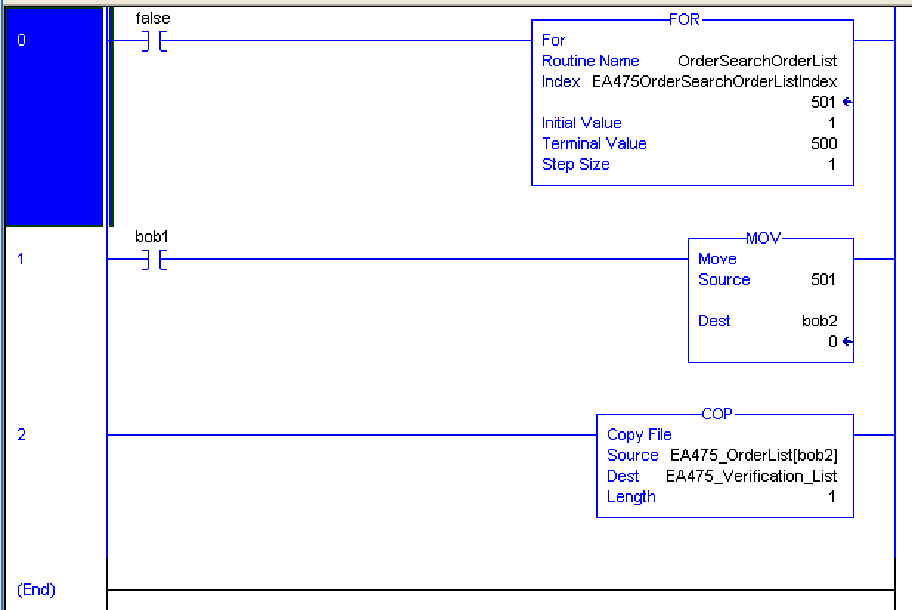
FOR Instruction is Scanned True (Lgx00135466, Lgx00118590)
If a FOR instruction is scanned true, and an instruction has an index out of range that references a UDT or a multi-dimensional array, the controller will fault. Clearing the fault and returning to Run mode causes a non-recoverable major fault.
Corrected
|
Cat. No.
|
Corrected in the Following
|
|
1769-L23E-QB1B,
1769-L23E-QBFC1B,
1769-L23-QBFC1B
|
|
|
1769-L31,
1769-L32C,
1769-L32E,
1769-L35CR,
1769-L35E
|
|
Anomaly Browsing 1769 CompactBus (Lgx00135035, Lgx00129484)
Known Anomaly
|
Cat. No.
|
Identified As Of
|
|
1769-L23E-QB1B,
1769-L23E-QBFC1B,
1769-L23-QBFC1B
|
|
|
1769-L31,
1769-L32C,
1769-L32E,1769-L35CR, 1769-L35E
|
|
Your controller might experience an anomaly when browsing the 1769 CompactBus or through a 1769-SDN on the 1769 CompactBus. Signs of the anomaly are as follows.
- Browsing of the DeviceNet network will not occur.
- Browsing of the local 1769 CompactBus will not occur.
- Messages targeted to I/O modules on the local 1769 CompactBus will continuously error.
- Messages to devices on DeviceNet will continuously error.
Once the controller has entered this state, the only way to correct the anomalous behavior is to do the following.
- Power down the controller.
- Remove the battery.
- Let the controller set for approximately five minutes.
- Reconnect the battery.
- Redownload the application.
Corrected
|
Cat. No. |
Corrected As Of |
|
1769-L23E-QB1B, 1769-L23E-QBFC1B, 1769-L23-QBFC1B |
|
|
1769-L31, 1769-L32C, 1769-L32E, 1769-L35CR, 1769-L35E |
|
Anomaly on CompactBus when using the IOT Instruction (Lgx00133424, Lgx00132827)
Known Anomaly
|
Cat. No. |
Identified As Of |
|
1769-L23E-QB1B, 1769-L23E-QBFC1B, 1769-L23-QBFC1B |
|
|
1769-L31, 1769-L32C, 1769-L32E,1769-L35CR, 1769-L35E |
|
When using the IOT (Immediate Output) instruction with a CompactLogix controllers data integrity anomalies on the 1769 CompactBus may occur.
When using the IOT instruction there is the potential that data integrity anomalies will be seen. These data integrity anomalies will occur for one RPI.
For example:
An IOT instruction is used with an1769-OB16 module. The 1769-OB16 module outputs are wired back to a 1769-IQ16F module. When the IOT instruction triggers for the 1769-OB16 module, the input values that are seen for the 1769-IQ16F module may not match the values sent by the 1769-OB16 module for one RPI. This does not occur every time the IOT instruction is executed.
Known Anomalies from Previous Releases
These anomalies are from previous releases but are still known in this release.
PI Function Block Appears to Stop Executing
Known Anomaly First Identified as of:
- Firmware Revision 16.024, 1768-L43, 1768-L45
- Firmware Revision 18.001, 1768-L43S, 1768-L45S
- Firmware Revision 18.011, 1769-L23-QBFC1B, 1769-L23E-QB1B,
1769-L23E-QBFC1B - Firmware Revision 16.022, 1769-L31, 1769-L32C, 1769-L32E, 1769-L35CR, 1769-L35E
The PI Function block appears to stop executing as the output does not change and instruction faults are logged.
If the PI instruction is being used in Linear mode, this floating point equation is used to calculate the ITerm.

Due to the use of the single-precision floating point values, it is possible. This possibility is dependant on on the values of WLD and KP, for the ITerm value to be small enough, less than 0.0000001, to be lost when adding to the ITermn-1.
For more information regarding the PI instruction, see the Logix5000™ Controllers Process Control and Drives Instructions User Manual, publication 1756-RM006.
Alarm Systems Timeout Changes Require New Download (00069461)
Known Anomaly First Identified as of:
- Firmware Revision 16.024, 1768-L43, 1768-L45
- Firmware Revision 18.011, 1768-L43S, 1768-L45S
- Firmware Revision 18.011, 1769-L23-QBFC1B, 1769-L23E-QB1B, 1769-L23E-QBFC1B
- Firmware Revision 16.022, 1769-L31, 1769-L32C, 1769-L32E, 1769-L35CR, 1769-L35E
Changes made to the Buffer Timeout value for FactoryTalk® Alarm subscribers do not take effect until the existing buffer has been deleted.
The FactoryTalk alarm buffer (stored in Logix controller memory) is designed to persist through power cycles. If you change the Buffer Timeout value (via the Communication Setup dialog in FactoryTalk View SE), the controller does not use the new timeout value until the existing buffer is deleted and then recreated. To force recreation of this buffer, you can either:
- Redownload the project to the controller
- Disconnect the FactoryTalk Alarm subscriber and leave it disconnected until the existing timeout expires.
Corrected
|
Cat. No.
|
Corrected As Of
|
|
11769-L23E-QB1B,
1769-L23E-QBFC1B,
1769-L23-QBFC1B
|
Firmware Revision 20.011/RSLogix 5000
Software Version 20
|
|
1769-L31, 1769-L32E,
1769-L32C,
1769-L35E,
1769-L35CR
|
Firmware Revision 20.011/RSLogix 5000
Software Version 20
|
VA Task Overlap (Lgx00118179, Lgx00117865, Lgx00135044, Lgx00118176)
Restriction/Known Anomaly
|
Cat. No.
|
Identified As Of
|
|
11769-L23E-QB1B,
1769-L23E-QBFC1B,
1769-L23-QBFC1B
|
Firmware Revision 17.005/RSLogix 5000
Software Version 17
|
|
1769-L31, 1769-L32E,
1769-L32C,
1769-L35E,
1769-L35CR
|
Firmware Revision 16.022/RSLogix 5000
Software Version 16
|
Tasks are the basic scheduling mechanism for executing a program and are created as part of the project and program creation process. In addition to other internal tasks, the CompactLogix controllers have an internal task to provide communication with the 1769 I/O modules. This task executes periodically at the Requested Packet Interval (RPI) selected in the properties of the CompactBus. If the task has not completed before it is time to execute again, a task overlap occurs. This task overlap causes the packaged controller to declare a minor fault of Type = 6 (Task Overlap), Code = 4 (VA task).
You can use various strategies to resolve minor faults due to task watchdog timeout and/or task overlap. For more information, see RSLogix 5000 Online Help ‘Identifying and Managing Tasks’. In the case of a minor fault caused by VA task overlap, increase the RPI until the overlap no longer occurs.
Cycle Power to Clear a Major Fault
Known Anomaly First Identified as of:
- Firmware Revision 17.005, 1769-L23E-QB1B, 1769-L23E-QBFC1B, 1769-L23-QBFC1B
- Firmware Revision 16.022, 1769-L31, 1769-L32C, 1769-L32E, 1769-L35CR, 1769-L35E
- Firmware Revision 16.024, 1768-L43, 1768-L45
- Firmware Revision 18.011, 1768-L43S, 1768-L45S
If a 1769 I/O fault occurs, you must cycle power to the CompactLogix™ controller after clearing the major fault. I/O communication is not restored until after the power cycle. Never use the fault handling routine to clear local I/O faults. Clear local I/O faults manually on a per case basis, and then the controller must be power cycled.
MSG Execution in Master Slave Configurations (Lgx00083882, Lgx00082610)
Corrected as of:
- Firmware Revision 20.011, 11769-L23E-QB1B, 1769-L23E-QBFC1B, 1769-L23-QBFC1B
- Firmware Revision 20.011, 1769-L31, 1769-L32E, 1769-L32C, 1769-L35E, 1769-L35CR
- Firmware Revision 20.011, 1768-L43, 1768-L45
- Firmware Revision 20.011, 1768-L43S, 1768-L45S
Known Anomaly
- Firmware Revision 18.011, 1769-L23E-QB1B, 1769-L23E-QBFC1B, 1769-L23-QBFC1B
- Firmware Revision 17.005, 1769-L31, 1769-L32E, 1769-L32C, 1769-L35E, 1769-L35CR
- Firmware Revision 17.004, 1768-L43, 1768-L45
- Firmware Revision 18.011, 1768-L43S, 1768-L45S
Unsuccessful MSG execution results in subsequent unsuccessful messages in master/slave controller configurations.
When a DF1 serial connection is used between a master and slave controller, an MSG instruction is not successfully executed and an in-polling sequence error occurs if the master station address is not listed in the poll node list.
However, with this anomaly, after the in-polling sequence error, subsequent MSG instructions are also unsuccessful.
To work around this anomaly, change the master station address of a controller to another value or re-execute the unsuccessful MSG instruction in Master
Transmit mode and use the Between Station Polls parameter.
Time Synchronization Causes Controller to Become Local Master
Known Anomaly First Identified as of:
- Firmware Revision 18.011, 1769-L23E-QB1B, 1769-L23E-QBFC1B, 1769-L23-QBFC1B
- Firmware Revision 18.011, 1769-L31, 1769-L32C, 1769-L32E,1769-L35CR, 1769-L35E
- Firmware Revision 18.011, 1768-L43, 1768-L43S, 1768-L45, 1768-L45S
Enabling the time synchronization feature of a CompactLogix™ controller results in the controller becoming the local master. It does not result in the controller synchronizing with other wallclock times in the system.
Fault/Program States Not Supported by Using the Module Configuration
Dialog Box
Known Anomaly First Identified as of:
- Firmware Revision 17.005, 1769-L23E-QB1B, 1769-L23E-QBFC1B, 1769-L23-QBFC1B
- Firmware Revision 16.022, 1769-L31, 1769-L32E, 1769-L32C, 1769-L35E, 1769-L35CR
- Firmware Revision 16.024, 1768-L43, 1768-L45
- Firmware Revision 18.011, 1768-L43S, 1768-L45S
This anomaly applies to CompactLogix™ systems as follows:
- 1768 CompactLogix™ and 1769 CompactLogix controllers – Local I/O modules
- 1769 CompactLogix packaged controllers – Embedded I/O modules or local I/O modules, also known as expansion I/O modules in this case
In this description, the term I/O module refers to 1769 Compact output modules or output points on 1769 Compact combination modules.
RSLogix™ 5000 software does not support Fault/Program state action for I/O modules in CompactLogix systems. The controller cannot trigger the configured Fault/Program state action. You can configure the Fault/Program state action in RSLogix 5000 software, but the configuration does not take effect.
If either of the following conditions exists, outputs turn off, regardless of the Fault/Program state action configuration:
- The output loses communication with the controller.
- The controller is placed in Program mode.
Additionally, RSLogix 5000 software generates configuration tags for any I/O modules in the project. Some of the tags define configuration (C) data type members that include attributes for Fault/Program states, also known as alternate output states.
Because CompactLogix systems do not support Fault/Program state action for I/O modules, do not configure the attribute tags listed in the following table.
Attribute Tags to Avoid
|
Digital Output Modules
|
Analog Output Modules
|
|
Where CHx = the channel number
|
Corrected as of:
- Firmware Revision 20.011, 1769-L23E-QB1B, 1769-L23E-QBFC1B, 1769-L23-QBFC1B
- Firmware Revision 20.011, 1769-L31, 1769-L32C, 1769-L32E,1769-L35CR, 1769-L35E
- Firmware Revision 20.011, 1768-L43, 1768-L45
- Firmware Revision 20.011, 1768-L43S, 1768-L45S
Known Anomaly First Identified as of:
- Firmware Revision 19.011, 1769-L23E-QB1B, 1769-L23E-QBFC1B, 1769-L23-QBFC1B
- Firmware Revision 19.011, 1769-L31, 1769-L32C, 1769-L32E,1769-L35CR, 1769-L35E
- Firmware Revision 19.015, 1768-L43, 1768-L45
- Firmware Revision 19.015, 1768-L43S, 1768-L45S
Applications that have a large quantity of HMI tags on scan in the controller can experience a nonrecoverable major fault when doing online edits.
S-curve Function Executes with Uninitialized Values
Corrected as of:
- Firmware Revision 20.011, 1769-L23E-QB1B, 1769-L23E-QBFC1B, 1769-L23-QBFC1B
- Firmware Revision 20.011, 1769-L31, 1769-L32C, 1769-L32E,1769-L35CR, 1769-L35E
- Firmware Revision 20.011, 1768-L43, 1768-L43S, 1768-L45, 1768-L45S
Known Anomaly First Identified as of:
- Firmware Revision 19.011, 1769-L23E-QB1B, 1769-L23E-QBFC1B, 1769-L23-QBFC1B
- Firmware Revision 19.011, 1769-L31, 1769-L32C, 1769-L32E,1769-L35CR, 1769-L35E
- Firmware Revision 19.011, 1768-L43, 1768-L43S, 1768-L45, 1768-L45S
When you perform a Partial Import Online (PIO) of a function block routine that contains S-curve function blocks across Logix platforms, set the Initialize bit in the backing tag control structure of all S-curve instructions. This configuration causes the S-curve instructions to reinitialize themselves.
Failure to set the Initialize bit in the backing tag control structure of all S-curve instructions, can cause the S-curve function block to execute with uninitialized values.
Corrected as of:
- Firmware Revision 20.011, 1769-L23E-QB1B, 1769-L23E-QBFC1B, 1769-L23-QBFC1B
- Firmware Revision 20.011, 1769-L31, 1769-L32C, 1769-L32E,1769-L35CR, 1769-L35E
- Firmware Revision 20.011, 1768-L43, 1768-L43S, 1768-L45, 1768-L45S
Corrected: SoftLogix™ 5800 Version 20.00.00
Known Anomaly First Identified as of:
- Firmware Revision 19.011, 1769-L23E-QB1B, 1769-L23E-QBFC1B, 1769-L23-QBFC1B
- Firmware Revision 19.011, 1769-L31, 1769-L32C, 1769-L32E,1769-L35CR, 1769-L35E
- Firmware Revision 19.015, 1768-L43, 1768-L43S, 1768-L45, 1768-L45S
When using Add-On Instructions, if you use the same backing/reference tag for multiple Add-On Instructions that are in different tasks, the controller can experience a major non-recoverable (MNRF) fault.
For example, you have an Add-On Instruction that is called MotorStart that is used twice in the application, once in Periodic Task 1 and once in Periodic Task 2. In both cases the MotorStart Add-On Instruction uses the same backing/reference tag PumpMotorStart.
The following events can occur when the program is executing:
1. Periodic Task 1 is executing and the Motor_Start is being scanned.
2. Periodic Task 2 pre-empts Periodic Task 1.
3. Periodic Task 2 runs and the Motor_Start is executed.
4. Periodic Task 1 is allowed to again execute and completes scanning of the Motor_Start.
5. Upon completion of scanning Motor_Start, the controller can MNRF.
The MNRF occurs if one instance of the Motor_Start scans false and the other scans true. To work around this anomaly, use individual backing/reference tag for all Add-On Instructions.
Functional Changes
This release has the following functional changes from the previous release.
V19 Additional Memory Requirements for 1769 CompactLogix Controllers
Functional Change
|
Cat. No.
|
Initial Firmware Revision/Software Version
|
|
1769-L31, 1769-L32C,
1769-L32E, 1769-L35CR,
1769-L35E
|
Firmware Revision 19.011/RSLogix 5000
Software Version 19
|
Firmware revision 19.000 or later may require more memory than previous revisions, for example, revision 10.xxx or 11.xxx). To estimate the additional memory that your project may require, use this table.
| If you
upgrade
from
revision
(add all
that
apply)
|
Then add the following memory requirements to your project
|
Which comes
from this type of
memory
|
|
|
Component
|
Increase/Decrease
Per
Instance |
I/O
|
Data and
Logic
|
|
18.x to
19.x
|
|
<no change>
|
|
|
|
17.x to
18.x
|
Program
|
+ 8 bytes
|
|
ü
|
|
|
Equipment phase
|
+ 20 bytes
|
|
ü
|
|
|
Add-On Instruction
|
+ 12 bytes
|
|
ü
|
|
|
Each tag
In addition, if you use a tag of the types listed below, increase the memory as indicated for each instance: |
+ 4 bytes
|
|
ü
|
|
|
Produced tag
|
+ 36 bytes + (24
bytes x number of
consumers)
|
ü
|
|
|
|
Consumed tag
|
+ 24 bytes
|
ü
|
|
|
|
Data access control
|
+ 4 bytes per symbol
|
|
ü
|
|
|
Tag that uses ALARM_ANALOG data
type
|
- 20 bytes
|
|
ü
|
|
|
Tag that uses ALARM_DIGITAL data
type
|
+ 28 bytes
|
|
ü
|
|
|
Tag that uses MOTION_GROUP data
type
|
+ 76 bytes
|
|
ü
|
|
|
Tag that uses AXIS_SERVO_DRIVE or
AXIS_GENERIC_DRIVE data type
|
+ 786 bytes
|
|
ü
|
|
|
Tag that uses AXIS data type other than
AXIS_SERVO_DRIVE or
AXIS_GENERIC_DRIVE |
+ 818 bytes
|
|
ü
|
|
|
Tag that uses COORDINATE_SYSTEM
data type with no transform dimensions
|
+ 40 bytes
|
|
ü
|
|
|
Tag that uses COORDINATE_SYSTEM
data type with transform dimensions
|
+ 100 bytes
|
|
ü
|
|
|
Module input connection
|
+ 20 bytes
|
|
ü
|
|
|
Module output connection
|
+ 24 bytes
|
|
ü
|
|
|
Safety controller
|
- 8 bytes
|
|
ü
|
|
|
Safety partner
|
- 8 bytes
|
|
ü
|
|
|
For each controller (> 1K bytes change):
|
|
|
|
|
|
1756-L6x, 1756-L6xS, 1756-L63XT
|
+ 16728 bytes
|
|
ü
|
|
|
1768-L4x, 1768-L4xS
|
+ 14448 bytes
|
|
ü
|
|
|
1769-L2x
|
+ 35084 bytes
|
ü
|
|
|
|
1769-L31
|
+ 14740 bytes
|
ü
|
|
|
|
1769-L32C, 1769-L35CR
|
+ 35400 bytes
|
ü
|
|
|
|
1769-L32E, 1769-L35E
|
+ 35036 bytes
|
ü
|
|
|
|
1789-L10, 1789-L30, 1789-L60
|
+ 4992 bytes
|
ü
|
|
|
16.x to
17.x
|
Task
|
+ 4 bytes
|
|
ü
|
|
|
Program
|
+ 4 bytes
|
|
ü
|
|
|
Equipment phase
|
+ 8 bytes
|
|
ü
|
|
|
LD routine
|
+ 12 bytes
|
|
ü
|
|
|
FBD routine
|
- 8 bytes
|
|
ü
|
|
|
SFC routine
|
+ 28 bytes
|
|
ü
|
|
|
ST routine
|
+ 4 bytes
|
|
ü
|
|
|
Add-On Instruction
|
- 12 bytes
|
|
ü
|
|
|
If you use a tag of the types listed below,
increase the memory as indicated for
each instance:
|
|
|
|
|
|
Produced tag
|
+ [4 bytes + (4 bytes
x number of
consumers)
|
ü
|
|
|
|
Consumed tag
|
+ 8 bytes
|
ü
|
|
|
|
Tag that uses MESSAGE data type
|
+ 4 bytes
|
|
ü
|
|
|
Tag that uses ALARM_ANALOG data
type
|
- 64 bytes
|
|
ü
|
|
|
Tag that uses ALARM_DIGITAL data
type
|
- 28 bytes
|
|
ü
|
|
|
Tag that uses AXIS_SERVO_DRIVE or
AXIS_GENERIC_DRIVE data type
|
- 34 bytes
(2 bytes x number of output cam execution targets) |
|
ü
|
|
|
Tag that uses AXIS data type other than
AXIS_SERVO_DRIVE or
AXIS_GENERIC_DRIVE |
- 52 bytes
(2 bytes x number of output cam execution targets) |
|
ü
|
|
|
Tag that uses COORDINATE_SYSTEM
data type of 2 dimensions with 2
transform dimensions
|
+ 20 bytes
|
|
ü
|
|
|
Tag that uses COORDINATE_SYSTEM
data type of 3 dimensions with 3
transform dimensions
|
+ 108 bytes
|
|
ü
|
|
15.x to
16.x
|
If you use
a tag of
the types
listed
below,
increase
the
memory
as
indicated
for each
instance:
|
|
|
|
|
|
Tag that uses ALARM_ANALOG data
type (with no associated tag references)
|
+ 16 bytes
|
|
ü
|
|
|
Tag that uses ALARM_DIGITAL data
type (with no associated tag references)
|
+ 4 bytes
|
|
ü
|
|
|
Tag that uses ALARM_ANALOG data
type (if associated tags are configured
for the ALARM_ANALOG tag)
|
+ 22 bytes
+ (9 x the number of configured, associated tags) + (3 x the sum of the bytes used by the data type of each of the configured associated tags) For example, an analog alarm moved to V16.03 with two Associated Tags – one DINT (4 bytes) and one STRING (88 bytes) would need to add: 22 + 9(2) + 3(92) = 316 bytes |
|
ü
|
|
|
Tag that uses the
COORDINATE_SYSTEM data type
|
+ 132 bytes
|
|
ü
|
|
14.x to
15.x
|
Input
module
|
+ 4 bytes
|
ü
|
|
|
|
If you use a tag of the types listed below,
increase the memory as indicated for
each instance:
|
|
|
|
|
|
Produced tag
|
+ 12 bytes
|
ü
|
|
|
|
Consumed tag
|
+ 4 bytes
|
ü
|
|
|
|
Tag that uses COORDINATE_SYSTEM
data type
|
+ 748 bytes
|
|
ü
|
|
|
Tag the uses any AXIS data type
|
+ 800 bytes
|
|
ü
|
|
|
Task
|
+ 20 bytes
|
|
ü
|
|
|
Program or equipment phase
|
+ 24 bytes
|
|
ü
|
|
|
Routine
|
+ 4 bytes
|
|
ü
|
|
|
Serial port
|
+ 1120 bytes
|
|
ü
|
|
|
Project
|
+ 4012 bytes
|
|
ü
|
|
13.x to
14.x
|
If you use
a tag of
the types
listed
below,
increase
the
memory
as
indicated
for each
instance:
|
|
|
|
|
|
Tag that uses the COORDINATE
SYSTEM data type
|
+ 60 bytes
|
|
ü
|
|
|
Tag that uses any AXIS data type
|
+ 4 bytes
|
|
ü
|
|
12.x to
13.x
|
Program
|
+ 12 bytes
|
|
ü
|
|
|
Task
|
+ 4 bytes
|
|
ü
|
|
|
User-defined data type
|
+ 4 bytes
|
|
ü
|
|
|
I/O module
|
+ 16 bytes
|
ü
(8 bytes) |
ü
(8 bytes) |
|
|
If you use a tag of the types listed below,
increase the memory as indicated for
each instance:
|
|
|
|
|
|
Produced tag
|
+ 8 bytes
|
ü
|
|
|
|
Consumed tag
|
+ 8 bytes
|
ü
|
|
Copyright © 2026 Rockwell Automation, Inc. All rights reserved.
Rockwell Automation, Allen-Bradley, and FactoryTalk are trademarks of Rockwell Automation, Inc.
To view a complete list of Rockwell Automation trademarks please click here.
Trademarks not belonging to Rockwell Automation are property of their respective companies.