
Release Notes
PanelView Plus 7 Standard (2711P-*8S) Firmware and compatibility that applies to all catalog items in this product line.
Version 13.00-20230203 (released 5/2023)
Catalog Number PanelView Plus 7 Standard (series D)
These release notes describe version information for PanelView Plus 7 Standard, version 13.00-20230203 (released 5/2023).
Requirements
This release has the following requirements.
PanelView Plus 7 Standard Firmware Upgrade Package 13.00-20230203 works within the system
requirements of all Rockwell Automation® software products. For the latest compatibility information, refer to
the Product Compatibility and Download Center.
Hardware requirements
PanelView Plus 7 Standard Firmware Upgrade Package 13.00-20230203 requires the following hardware:
- PanelView Plus 7 Standard terminal types (Series A, B, C, and D)
Component revisions
The following table identifies the new component revision information after PanelView Plus 7 Standard
Firmware Upgrade Package 13.00-20230203 is installed.
|
Components
|
Revisions
|
|
FactoryTalk View ME
|
13.00.11
|
|
FactoryTalk ViewPoint
|
13.00.02
|
|
FactoryTalk Services Platform
|
6.30.00
|
|
FactoryTalk Linx
|
6.30.10
|
|
Operating System
|
2.64.00
|
|
Operating System Extensions
|
2.64.00
|
|
Fonts
|
2.00.00
|
Features
This release includes the following system features.
PanelView Plus 7 Standard Firmware Upgrade Package 13.00-20230203 contains updates for
PanelView Plus 7 Standard terminals and includes the following new and enhanced features:
- Recipe enhancements
RecipePlus is enhanced to write the runtime recipe name to a tag after downloading the recipe.
- FactoryTalk Linx updates
- FactoryTalk Linx version 6.30.00 supports communication with the Studio 5000 v34 controllers but does not support the new time data types.
- FactoryTalk Linx version 6.30.00 adds one predefined tag (@TrackedStateValue) to show the tracked state value from the controller.
- FactoryTalk Linx version 6.30.00 adds @RedundancyEnabled and @RedundancyState predefined tags associated with a processor shortcut, to indicate if the associated controller is operating in a ControlLogix Redundancy configuration and its current operational state. These tags are helpful for Human Machine Interface (HMI) displays that monitor the operation of a redundant ControlLogix controller's operation.
Corrected Anomalies in This Release
This release corrects the following anomalies.
- Rotation animation does not work with a direct reference tag in FactoryTalk ViewPoint. First identified in Firmware Upgrade Package 12.00. [Jira 1289598]
- Parameters are not resolved in FactoryTalk Diagnostics. First identified in Firmware Upgrade Package 12.00. [Jira 1415315]
- .tmp file that is created during user creation is not deleted automatically when the terminal is restarted. First identified in Firmware Upgrade Package 12.00. [Jira 1184544]
- When accessing a runtime application from FactoryTalk ViewPoint, an error message shows. First identified in Firmware Upgrade Package 12.00. [Jira 1231444]
- Printing alarm history does not print the alarms properly. First identified in Firmware Upgrade Package 11.00. [Jira 968352]
Known Anomalies in This Release
This release has the following known anomalies.
- VNC configuration file cannot be saved. First identified in Firmware Upgrade Package 10.00. [Jira 361421]
There is currently no workaround for this anomaly.
Known Anomalies from Previous Releases
These anomalies are from previous releases but are still known in this release.
- If two or more pens are used with the display option to isolate the graphs, the colors of the pens will no longer match the legend and will appear offset. First identified in Firmware Upgrade Package 7.00. [289734]
To avoid this problem, use a Next Pen button to align the legend with the pen.
- The date of backup file is not updated after the file is overwritten. First identified in Firmware Upgrade Package 7.00. [EOI00037403]
There is currently no workaround for this anomaly.
- The default background image is always selected after restoring a backup file that uses a different image. First identified in Firmware Upgrade Package 7.00. [EOI00037616]
There is currently no workaround for this anomaly.
- Transparency does not work for a Symbol Factory object containing PolyPolygon elements. First identified in Firmware Upgrade Package 10.00. [Jira 343451]
To avoid this problem, you can use the PNG files provided in Knowledgebase Document ID: BF17144 -
Transparency is not working correctly on the PanelView Plus 6/7 terminals for Symbol Factory objects.
Functional Changes
This release has the following functional changes from the previous release.
PanelView Plus 7 Standard Firmware Upgrade Package 13.00-20230203 has no changes in functionality since
the last release.
Application Notes
This release has the following application notes.
The following are the application notes for PanelView Plus 7 Standard Firmware Upgrade Package
13.00-20230203.
When to perform an update?
If any of the listed anomalies appear similar or identical to symptoms experienced on your terminal's software or
hardware, we recommend that you perform an update to the listed firmware release to eliminate potential
issues.
After performing a firmware upgrade, third-party applications may need to be reinstalled and the FactoryTalk
View ME startup application may need to be reconfigured.
How to get firmware updates?
Firmware Upgrade Packages are available from the Product Compatibility and Download Center. After signing
in, a selection of updates will become available for download.
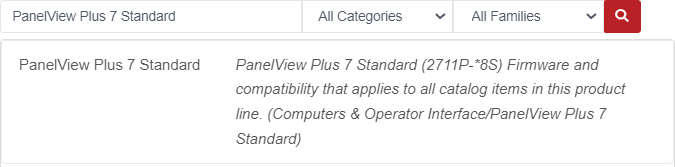
To get the firmware updates
- Select PanelView Plus 7 Standard.
- Select the version of the Firmware Upgrade Package and click Downloads.
- Click
 and follow the web page instruction to complete the download.
Rockwell Automation Knowledgebase Documents
Additional information regarding PanelView Plus firmware updates can be found in Rockwell Automation
Knowledgebase. To locate pertinent documents, search using the keywords: "PanelView Plus 7",
"PanelView Plus v7", "TOC", or "PVP7".
Rockwell Automation recognizes that some of the terms that are currently used in our industry and in this publication are not in alignment with the movement toward inclusive language in technology. We are proactively collaborating with industry peers to find alternatives to such terms and making changes to our products and content. Please excuse the use of such terms in our content while we implement these changes.
Copyright © 2025 Rockwell Automation, Inc. All rights reserved.
Rockwell Automation, Allen-Bradley, and FactoryTalk are trademarks of Rockwell Automation, Inc.
To view a complete list of Rockwell Automation trademarks please click here.
Trademarks not belonging to Rockwell Automation are property of their respective companies.
Copyright © 2025 Rockwell Automation, Inc. All rights reserved.
Rockwell Automation, Allen-Bradley, and FactoryTalk are trademarks of Rockwell Automation, Inc.
To view a complete list of Rockwell Automation trademarks please click here.
Trademarks not belonging to Rockwell Automation are property of their respective companies.