
Release Notes
Stratix 5400 family of Ethernet managed switches, 1783-HMS
Version 15.2(8)E4 (released 6/2023)
Catalog Number 1783-HMS
Features
This release includes the following system features.
REP Segment ID Autodiscovery
Feature First Identified as of IOS Release 15.2(8)E4
- Stratix® 5400 and 5410 Firmware Revision 8.004
This feature allows the REP Segment ID Autodiscovery feature to exist on Cisco Classic IOS switches.
REP Zero Touch Provisioning
Feature First Identified as of IOS Release 15.2(8)E4
- Stratix® 5400 and 5410 Firmware Revision 8.004
The REP ZTP feature allows PnP to function on the insertion of a new switch into an existing REP ring.
Corrected Anomalies in This Release
This release corrects the following anomalies.
Stratix in Boundary Clock Mode Should Allow Setting Default UTC Offset in Device Manager (SWCSTRATIX-1905)
Corrected Anomaly as of IOS Release 15.2(8)E4
- Stratix® 5400 and 5410 Firmware Revision 8.004
- Stratix 5700 and ArmorStratix™ 5700 Firmware Revision 13.004
- Stratix 8000 Firmware Revision 17.004
When a LAN switch in PRP topology is rebooted and comes back online, DAN devices show time shifts of 37 seconds until the switch is synced to the GM with the correct UTC offset. The time jump lasts 1…3 seconds. Need to add CLI command “ptp utc-offset” to the Boundary Clock mode on Classic and IOS XE platforms.
Switch with 10M Link may Drop First Frame on Linkup
Corrected Anomaly as of IOS Release 15.2(8)E4
- Stratix® 5400 Firmware Revision 8.004
A switch may drop the first frame that comes in the interface when the link is running at 10M. All subsequent frames are forwarded with no issue.
ID: 26205
Unable to Apply MKA Policy
Corrected Anomaly as of IOS Release 15.2(8)E4
- Stratix® 5400 Firmware Revision 8.004
Unable to apply MKA Policy "MKAPOLICY" to this interface.
Workaround: If 'show mka policy' shows any interfaces as having the "DEFAULT POLICY' attached, then temporarily apply a dummy MKA policy to those interfaces.
ID: 60460
REP Diagnostics Show a Maximum of 22 Switches (Lgx00194932)
Corrected Anomaly as of IOS Release 15.2(8)E4
- Stratix® 5400 and 5410 Firmware Revision 8.004
- Stratix 5700 and ArmorStratix™ 5700 Firmware Revision 13.004
- Stratix 8000 Firmware Revision 17.004
Known Anomaly First Identified as of IOS Release 15.2(6)E0a
- Stratix® 5400 and 5410 Firmware Revision 3.001
- Stratix 5700 and ArmorStratix™ 5700 Firmware Revision 8.001
- Stratix 8000 Firmware Revision 12.001
This diagnostics page should be able to list more than 22 switches in the REP ring.
Disabling PTP on a Port in Boundary Clock Mode stays Disabled after Changing to TC Mode (Lgx00207278)
Corrected Anomaly as of IOS Release 15.2(8)E4
- Stratix® 5400 and 5410 Firmware Revision 8.004
- Stratix 5700 and ArmorStratix™ 5700 Firmware Revision 13.004
- Stratix 8000 Firmware Revision 17.004
Known Anomaly First Identified as of IOS Release 15.2(6)E0a
- Stratix® 5400 and 5410 Firmware Revision 4.001
- Stratix 5700 and ArmorStratix™ 5700 Firmware Revision 9.001
- Stratix 8000 Firmware Revision 13.001
When you disable PTP on a Port in Boundary Clock Mode it stays disabled after you change to TC Mode.
Device Manager IPDT Page cannot Delete or Remove previous IPDT Settings (Lgx00220837)
Corrected Anomaly as of IOS Release 15.2(8)E4
- Stratix® 5400 and 5410 Firmware Revision 8.004
- Stratix 5700 and ArmorStratix™ 5700 Firmware Revision 13.004
Known Anomaly First Identified in IOS Release 15.2(7)E
- Stratix® 5400 and 5410 Firmware Revision 6.001
- Stratix 5700 and ArmorStratix™ 5700 Firmware Revision 12.001
The IPDT page in Device Manager cannot delete or remove previous IPDT settings.
IPDT Probe Delay (Lgx00218267)
Corrected Anomaly as of IOS Release 15.2(8)E4
- Stratix® 5400 and 5410 Firmware Revision 8.004
- Stratix 5700 and ArmorStratix™ 5700 Firmware Revision 13.004
Known Anomaly First Identified as of IOS Release 15.2(7)E
- Stratix® 5400 and 5410 Firmware Revision 6.001
- Stratix 5700 and ArmorStratix™ 5700 Firmware Revision 12.001
When trying to configure IPDT there is an option for Probe Delay. In Device Manager the range for Probe Delay is 0…120 seconds. However, Probe Delay for 0 seconds is not valid, and Device Manager changes it back to the previously set delay.
Device Manager NetFlow Template for StealthWatch Missing Command (Lgx00216330)
Corrected Anomaly as of IOS Release 15.2(8)E4
- Stratix® 5400 and 5410 Firmware Revision 8.004
Known Anomaly First Identified as of IOS Release 15.2(7)E
- Stratix® 5400 and 5410 Firmware Revision 4.001
When configuring NetFlow via Device Manager specifically for use with StealthWatch, collect counter packets are missing from the commands.
AAA and SCP Server Command Authorization Issue
Corrected Anomaly as of IOS Release 15.2(8)E4
- Stratix® 5400 and 5410 Firmware Revision 8.004
- Stratix 5700 and ArmorStratix™ 5700 Firmware Revision 12.005
- Stratix 8000 Firmware Revision 17.004
An access device policy with "Deny Any" command set but with Shell Profile set to 15 (to mimic the "permit specific level 15 commands for certain users" scenario that is described in the report and actively being used for RBAC) on a device exposes the running configuration. The IOS versions that we tested (recent tests are on IOS XE 17.03.05) show no audit trail whatsoever on the specific SCP request to retrieve and to push changes. It's important to note that there is no direct device CLI access performed. The action that is taken is an "SCP" command from an endpoint (like a management server) towards the device. Both a "configuration pull" and a "configuration push" initiated from that (Linux) host allow the access. Attack scenario: attacker obtains a limited access account that does not expose the configuration (through show run) but does expose specific commands that normally fall under Level 15 scope. Using the SCP initiated from an endpoint, the configuration becomes visible. The combination of an underdocumented "Shell Profile Level 15" configuration tied to the risks associated with the SCP server requirement (which is a valid and normal requirement) together with the lack of any audit trail for SCP-based file I/O (read and write) from the IOS level is an interesting attack vector.
ID: 55871
Known Anomalies in This Release
This release has the following known anomalies.
Removing DLR Configuration Globally Deletes DHCP Pool Configurations (SWCSTRATIX-4846)
Corrected Anomaly as of IOS Release 15.2(8)E5
- Stratix® 5400 Firmware Revision 8.005
Known Anomaly First Identified with IOS Release 15.2(8)E4
- Stratix® 5400 Firmware Revision 8.004
If you remove a DLR configuration globally to test if all the DLR related configurations get removed, the DHCP pool configurations are also deleted.
No Logging Message Seen with "sh platform software factory-reset secure log”
Known Anomaly First Identified as of IOS Release 15.2(8)E4
- Stratix® 5400 and 5410 Firmware Revision 8.004
There is no logging message seen with the “sh platform software factory-reset secure log” in CLI for the RA3K platform.
ID: 59337
Medium Press Express Setup with Non-Default VLANs add the IP DHCP Configures to the Wrong VLAN (SWCSTRATIX-4839)
Corrected Anomaly as of IOS Release 15.2(8)E5
- Stratix® 5400 and 5410 Firmware Revision 8.005
- Stratix 5700 and ArmorStratix™ 5700 Firmware Revision 13.005
- Stratix 8000 Firmware Revision 17.005
Known Anomaly First Identified with IOS Release 15.2(8)E4
- Stratix® 5400 and 5410 Firmware Revision 8.004
- Stratix 5700 and ArmorStratix™ 5700 Firmware Revision 13.004
- Stratix 8000 Firmware Revision 17.004
While running Express Setup using Medium Press, and submitting a non-default VLAN, the non-default VLANs add the DHCP configurations to the default VLAN 1 instead of selected management VLAN.
Known Anomalies from Previous Releases
These anomalies are from previous releases but are still known in this release.
DHCP Lease Doesn’t Work as Expected (SWCSTRATIX-5189)
Corrected Anomaly as of IOS Release 15.2(8)E6
Known Anomaly Identified as of IOS Release 15.2(8)E3
- Stratix® 5400 and 5410 Firmware Revision 8.003
- Stratix 5700 and ArmorStratix™ 5700 Firmware Revision 13.003
- Stratix 8000 Firmware Revision 17.003
Creating a User-Defined DHCP Pool from Device Manager does not lose its IP address.
PTP Over PRP K5500 Axis Reports FD04 but Time Sync is Enabled (Lgx00198154) (SWCSTRATIX-583)
Corrected Anomaly as of IOS Release 15.2(8)E6
Known Anomaly Identified as of IOS Release 15.2(8)E3
- Stratix® 5400 and 5410 Firmware Revision 8.003
- Stratix 5700 and ArmorStratix™ 5700 Firmware Revision 13.003
- Stratix 8000 Firmware Revision 17.003
PTP over PRP K5500 axis reports FD04 but Time Sync is enabled. When the anomaly occurs, after waiting for about 1 hour and 40 minutes, the axis syncs successfully and motion resumes.
Remove UDLD Port aggressive command from Multiport device smart port (SWCSTRATIX-4408)
Known Anomaly Identified as of IOS Release 15.2(8)E1
- Stratix® 5400 and 5410 Firmware Revision 8.001
- Stratix 5700 and ArmorStratix™ 5700 Firmware Revision 13.001
- Stratix 8000 Firmware Revision 17.001
The UDLD Port aggressive command needs removed from Multiport device smart port.
- Stratix® 5400 and 5410 Firmware Revision 3.001
- Stratix 5700 and ArmorStratix™ 5700 Firmware Revision 7.001
- Stratix 8000 and 8300 Firmware Revision 11.001
Incorrect Frame Rate for Classes with Larger Queue-limit Sizes
Known Anomaly Identified as of IOS Release 15.2(2)EA1
Stratix 5400™ Firmware Revision 1.001
When a port becomes congested, classes with larger queue-limit sizes do not receive more frames per second than classes with smaller queue-limit sizes.
Workaround: There is no workaround.
Mini-USB Cables Incompatible with Windows 7
Known Anomaly Identified as of IOS Release 15.2(2)EA1
Stratix 5400™ Firmware Revision 1.001
When connecting a mini-USB cable to a computer running Windows 7, the system attempts to install the device driver but returns an error.
Workaround:
- Install the USB console driver to \windows 64\setup(x64).
- Follow the installation wizard and accept the default configuration.
- Restart the computer.
- After restarting the computer, connect the USB cable. The system returns an error message stating that the device driver software installation failed.
- Click the Windows Start button, right-click Computer, and choose Manage.
- Under Computer Management, choose Device Manager.
- Expand Ports (COM & LPT).
- Right-click the port with the yellow exclamation point, and choose Properties.
- On the Driver tab, click Update Driver.
- Click Browse my computer for driver software.
- Click Let me pick from a list of device drivers on my computer.
- Choose the serial driver and take note of the communication port.
The device driver is installed successfully.
System Does Not Notify on Lost LAN_A or LAN_B Errors in PRP
Known Anomaly Identified as of IOS Release 15.2(2)EA1
Stratix 5400™ Firmware Revision 1.001
The system provides no indication of a lost connection on LAN_A or LAN_B when using Parallel Redundancy Protocol (PRP). However, traffic is still routed to its destination due to LAN redundancy.
Workaround: There is no workaround.
Last Kinetix Faults when DLR is Recovering (SWCSTRATIX-6849)
Corrected Anomaly as of IOS Release 15.2(8)E8
- Stratix® 5400 Firmware Revision 8.008
- Stratix and ArmorStratix™ 5700 Firmware Revision 13.008
Known Anomaly First Identified as of IOS Release 15.2(8)E1
- Stratix 5400 Firmware Revision 7.002
- Stratix and ArmorStratix™ 5700 Firmware Revision 10.001
When the Ethernet cable is reconnected, the Kinetix faults.
PRP Randomly Disabled
Extended ACLs
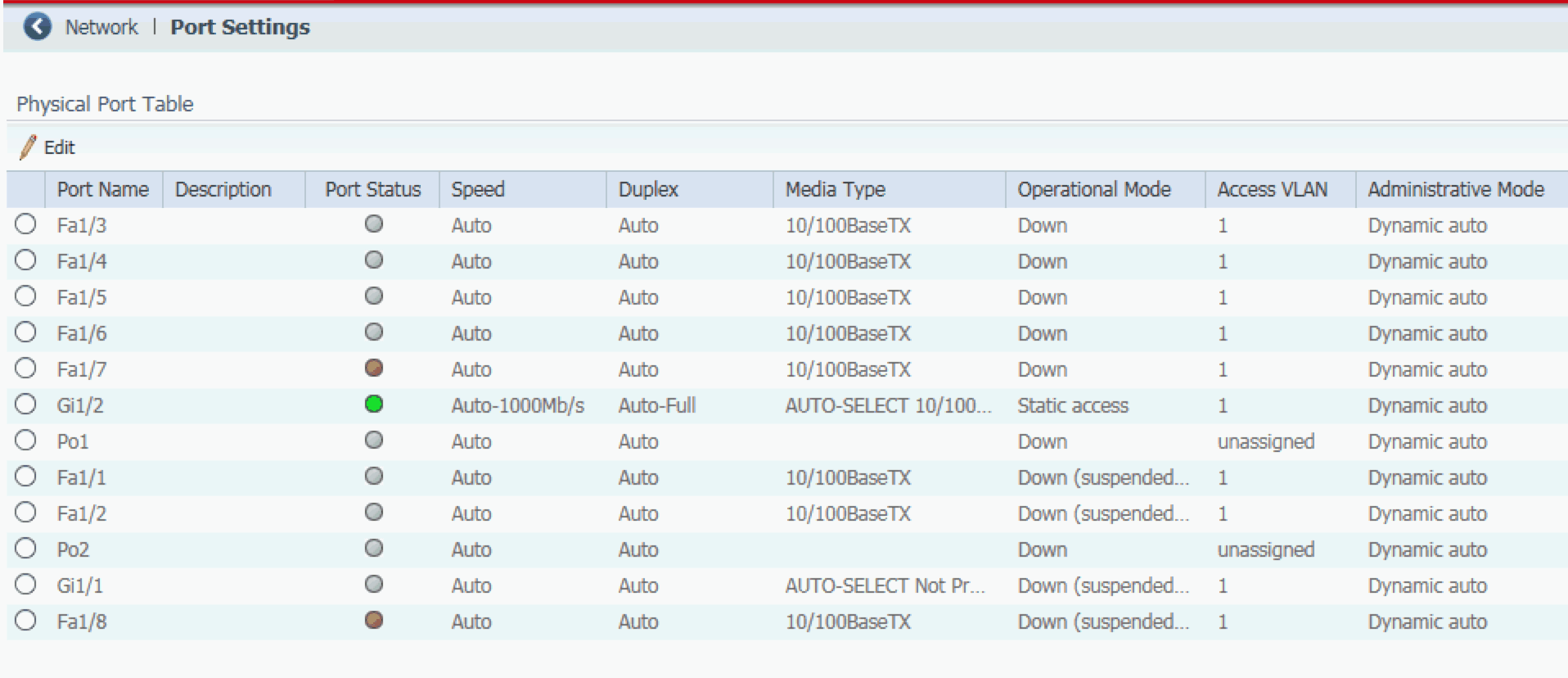
EtherChannels on Port Settings Page
Change to Ring Device Causes Ring Fault
Known Anomaly Identified as of IOS Release 15.2(5)EA.fc4
- Stratix® 5400 Firmware Revision 3.001
- Stratix 5700 and ArmorStratix™ 5700 Firmware Revision 8.001
Parallel Redundancy Protocol (PRP) Channel Remains Connected
Known Anomaly Identified as of IOS Release 15.2(5)EA.fc4
Stratix® 5400 and 5410 Firmware Revision 3.001
Known Anomaly Identified as of IOS Release 15.2(6)E0a
Stratix® 5400 and 5410 Firmware Revision 4.001
- Stratix® 5400 and 5410 All Firmware Revisions
- Stratix 5700 and ArmorStratix™ 5700 All Firmware Revisions
- Stratix 8000 and 8300 All Firmware Revisions
This anomaly applies to a PRP system that includes a switch configured as an IGMP querier. If any Stratix switch in the PRP system loses connection to the IGMP querier, then multicast traffic is interrupted as soon as the connection to the querier is re-established. The interruption can affect multicast CIP connections and PTP (Precision Time Protocol).
Known Anomaly Identified as of IOS Release 15.2(6)E0a
- Stratix® 5400 and 5410 Firmware Revision 4.001
- Stratix 5700 and ArmorStratix™ 5700 Firmware Revision 9.001
- Stratix 8000 Firmware Revision 13.001
- DLG_FLAGS_WEAK_SIGNATURE
- SSL_WEAK_SERVER_CERT_KEY
Known Anomaly Identified as of IOS Release 15.2(6)E0a
- Stratix® 5400 and 5410 Firmware Revision 4.001
- Stratix 5700 and ArmorStratix™ 5700 Firmware Revision 9.001
Known Anomaly Identified as of IOS Release 15.2(6)E0a
Known Anomaly Identified as of IOS Release 15.2(6)E0a
- Stratix® 5400 and 5410 Firmware Revision 4.001
- Stratix 5700 and ArmorStratix™ 5700 Firmware Revision 9.001
- Stratix® 5400 and 5410 Firmware Revision 5.001
- Stratix 5700 and ArmorStratix™ 5700 Firmware Revision 10.001
- Stratix 8000 Firmware Revision 14.001
In the Studio 5000 Logix Designer application, you cannot delete a Network Time Protocol (NTP) association on the NTP Client view.
Workaround: Use Device Manager to delete an association.
- Stratix® 5400 Firmware Revision 5.001
- Stratix 5700 and ArmorStratix™ 5700 Firmware Revision 10.001
When setting up DHCP for ring devices and the active and backup DHCP servers are not on VLAN 1, there is no method in Device Manager to configure DHCP snooping on a VLAN for the backup DHCP server.
Workaround: Use the command-line interface (CLI) to enable DHCP snooping on a VLAN for the backup DHCP server:
ip dhcp snooping vlan [id]
For more details, see Knowledgebase answer ID 542120.
- Stratix® 5400 and 5410 Firmware Revision 5.001
- Stratix 5700 and ArmorStratix™ 5700 Firmware Revision 10.001
- Stratix 8000 Firmware Revision 14.001
Plug-n-Play (PnP) mode does not work properly with FactoryTalk® Network Manager software.
Workaround: Use Express Setup mode in Device Manager to configure network settings or use PnP mode with a prior IOS release.
- Stratix® 5400 and 5410 Firmware Revision 5.001
- Stratix 5700 and ArmorStratix™ 5700 Firmware Revision 10.001
- Stratix 8000 Firmware Revision 14.001
EtherNet/IP RegisterSession Connection Limit
Corrected with IOS Release 15.2(7)E1a
Stratix® 5400 and 5410 Firmware Revision 7.001
- Stratix 5700 and ArmorStratix™ 5700 Firmware Revision 12.001
- Stratix 8000 Firmware Revision 16.001
CIP: The EtherNet/IP™ RegisterSession requires a connection limit to avoid denial-of-service.
Workaround: Limit connections to avoid denial-of-service through the CLI or CIP connection.
ID: 17827
Mismatch in Response between Attributes (Lgx00186592)
Known Anomaly First Identified as of IOS 15.2(6)
- Stratix® 5400 and 5410 Firmware Revision 7.001
- Stratix 5700 and ArmorStratix™ 5700 Firmware Revision 12.001
- Stratix 8000 Firmware Revision 16.001
There is a mismatch in the response between two attributes when a static MAC address is added.
Workaround: There is no workaround.
Improved Product Resiliency in Stratix Switches
Product Feature First Identified as of IOS Release 15.2(7)E2:
- Stratix® 5400 and 5410 Firmware Revision 7.003
- Stratix 5700 and ArmorStratix™ 5700 Firmware Revision 12.003
- Stratix 8000 Firmware Revision 16.003
Product improvements have been made to increase resiliency. See Product Security Vulnerabilities for more information.
- Stratix® 5400 and 5410 Firmware Revision 7.004
- Stratix 5700 and ArmorStratix™ 5700 Firmware Revision 12.004
IP arp Inspection Commands appears after Express Setup and Reload (Lgx00234348)
Known Anomaly as of IOS Release 15.2(6)E2a
- Stratix® 5400 and 5410 Firmware Revision 7.005
- Stratix 8000 Firmware Revision 16.005
After an express setup and a reload, new commands appear on the startup configurations.
Workaround: Remove with CLI.
Dropping Message Errors are Not Updating in Error Counters
Known Anomaly First Identified in IOS Release 15.2(8)E
- Stratix® 5400 and 5410 Firmware Revision 7.005
- Stratix 5700 and ArmorStratix™ 5700 Firmware Revision 12.005
- Stratix 8000 Firmware Revision 16.005
Error counters are not increasing in the switches.
ID:52065
DLR Beacon Parameters Change After a Rapid Fault on the Switch Causing Instability (SWCSTRATIX-4412)
Corrected Anomaly as of IOS Release 15.2(8)E5
- Stratix® 5400 Firmware Revision 8.005
Known Anomaly First Identified with IOS Release 15.2(8)E3
- Stratix 5400 Firmware Revision 8.003
DLR beacon parameters change after a rapid fault on a Stratix 5400 switch.
Device Manager does not Allow Setting the Falling Threshold Value for Storm-Control (SWCSTRATIX-4350)
Corrected Anomaly with IOS Release 15.2(8)E5
- Stratix® 5400 and 5410 Firmware Revision 8.005
- Stratix 5700 and ArmorStratix™ 5700 Firmware Revision 13.005
- Stratix 8000 Firmware Revision 17.005
Known Anomaly First Identified with IOS Release 15.2(8)E1
- Stratix® 5400 and 5410 Firmware Revision 8.002
- Stratix 5700 and ArmorStratix™ 5700 Firmware Revision 12.002
- Stratix 8000 Firmware Revision 17.001
Device Manager does not allow you to set the falling threshold value for storm-control.
Produced and Consumed Safety Tags through the Switch Cause a Layer 2 Error (SWCSTRATIX-2447)
Corrected Anomaly as of IOS Release 15.2(8)E5
- Stratix® 5400 Firmware Revision 8.005
- Stratix 5700 and ArmorStratix™ 5700 Firmware Revision 13.005
Known Anomaly First Identified with IOS Release 15.2(8)E1
- Stratix® 5400 Firmware Revision 8.001
- Stratix 5700 and ArmorStratix™ 5700 Firmware Revision 13.001
A problem exists for Produce/Consume Safety Data between two L8xS families CPU communicating on a switch where the level 2 NAT is set.
Copyright © 2025 Rockwell Automation, Inc. All rights reserved.
Rockwell Automation, Allen-Bradley, and FactoryTalk are trademarks of Rockwell Automation, Inc.
To view a complete list of Rockwell Automation trademarks please click here.
Trademarks not belonging to Rockwell Automation are property of their respective companies.