
Release Notes
ControlLogix Controllers
Version 19.015 (released 3/2013)
Catalog Number 1756-L75 (series B)
Security
This release includes security enhancements as a part of our ongoing efforts to improve security. For information regarding Rockwell Automation's vulnerability disclosure process, please reference the Rockwell Automation Vulnerability Policy.
Access Denied dialog box does not appear when users without FactoryTalk Security access attempt to modify Motion Configuration (Lgx00184951)
Studio 5000 Logix Designer v29.00
Corrected Anomaly with Studio Logix Designer v30.00
When a user without Motion: Modify Configuration security credentials attempts to modify the motion configuration, an Access Denied dialog box does not appear.
Denial of Service/Buffer Overflow Vulnerability
Known Anomaly in Logix5000 Programmable Controllers, Firmware Revisions 16-21
A vulnerability exists in the Logix5000™ Programmable Controller product line that, if successfully exploited, can cause a Denial of Service ("DoS") or potentially allow an attacker to alter the operating state of the controller through a buffer overflow.
Risk Mitigations
Customers using affected controllers are encouraged to upgrade to an available firmware version that addresses the associated risk.
For details on affected controllers, recommended firmware revisions, and other risk mitigations, see Knowledgebase ID 970074.
Features
This release includes the following system features.
Integrated Motion on the EtherNet/IP Network Motor Test and Commutation Angle Test
System Feature
Logix Firmware/RSLogix 5000 Software 19.11
Catalog Numbers 1756-L61, 1756-L61S, 1756-L62, 1756-L62S, 1756-L63, 1756-L63S, 1756-L63XT, 1756-L64, 1756-L65, 1756-L72, 1756-L73, 1756-L74, 1756-L75
With RSLogix 5000 software, version 19, support for defining and commissioning third-party motors is available. You can enter motor name plate data directly into RSLogix 5000 software. You can also use Motor test and Commutation Angle Test utilities to commission the motor. This enhancement eliminates the need to use custom motor data base files for third-party motor support.
Corrected Anomalies in This Release
This release corrects the following anomalies.
Corrected: Logix Firmware/RSLogix 5000 Software 20.011, 19.015
Corrected: SoftLogix 5800 Version 20.00.00
FOR Instruction (Lgx00118589, Lgx00113423)
Anomaly
Catalog Numbers 1756-L61, 1756-L61S, 1756-L62, 1756-L62S, 1756-L63, 1756-L63S, 1756-L63XT, 1756-L64, 1756-L65, 1756-L72, 1756-L73, 1756-L74, 1756-L75
Catalog Numbers 1789-L10, 1789-L30, 1789-L60
Corrected: Logix Firmware/RSLogix 5000 Software 19.015
Anomaly
Logix Firmware/RSLogix 5000 Software 20.013
Catalog Numbers 1756-L72, 1756-L73, 1756-L74, 1756-L75
Known Anomalies in This Release
This release has the following known anomalies.
Corrected: Logix Firmware/RSLogix 5000 Software 20.012
MCLM and MCCD Instructions (Lgx00124758, Lgx124134)
Anomaly
Logix Firmware/RSLogix 5000 Software 20.011, 19.015
Catalog Numbers 1756-L61, 1756-L61S, 1756-L62, 1756-L62S, 1756-L63, 1756-L63S, 1756-L63XT, 1756-L64, 1756-L65, 1756-L71, 1756-L72, 1756-L72S, 1756-L73, 1756-L73S, 1756-L73XT, 1756-L73XT, 1756-L74, 1756-L75
Corrected: Logix Firmware/RSLogix 5000 Software 20.011
HMI Tags on Scan (Lgx00118192, Lgx00115817)
Anomaly
Logix Firmware/RSLogix 5000 Software 19.015
Catalog Numbers 1756-L61, 1756-L61S, 1756-L62, 1756-L62S, 1756-L63, 1756-L63S, 1756-L63XT, 1756-L64, 1756-L65, 1756-L72, 1756-L73, 1756-L74, 1756-L75
Corrected: Logix Firmware/RSLogix 5000 Software 20.011
Corrected: SoftLogix 5800 Version 20.00.00
MAH Instruction Causes Unintended Motion (Lgx00124698, Lgx00123947)
Anomaly
Catalog Numbers 1756-L61, 1756-L61S, 1756-L62, 1756-L62S, 1756-L63, 1756-L63S, 1756-L63XT, 1756-L64, 1756-L65, 1756-L72, 1756-L73, 1756-L74, 1756-L75 Version 19.015
ControlLogix Redundancy Firmware 19.053, 19.053
- Home Mode = Active
- Home Sequence = Marker or Switch-Marker
- Home Offset = Small incremental distance (that is, 5 degrees)
- Rotary Configuration with an unwind
Corrected: Logix Firmware/RSLogix 5000 Software 20.011
Anomaly
Logix Firmware/RSLogix 5000 Software 20.011
Catalog Numbers 1756-L61, 1756-L61S, 1756-L62, 1756-L62S, 1756-L63, 1756-L63S, 1756-L63XT, 1756-L64, 1756-L65, 1756-L71, 1756-L72, 1756-L72S, 1756-L73, 1756-L73S, 1756-L73XT, 1756-L74, 1756-L75
Corrected: Logix Firmware/RSLogix 5000 Software 20.011
Multiple Rotations (Lgx00124962, Lgx00124945)
Anomaly
Logix Firmware/RSLogix 5000 Software 19.015
Catalog Numbers 1756-L61, 1756-L61S, 1756-L62, 1756-L62S, 1756-L63, 1756-L63S, 1756-L63XT, 1756-L64, 1756-L65, 1756-L72, 1756-L73, 1756-L74, 1756-L75
Known Anomalies from Previous Releases
These anomalies are from previous releases but are still known in this release.
Corrected: Logix Firmware/RSLogix 5000 Software 20.011
Add-On Instructions (Lgx00113790, Lgx00113448)
Anomaly
Logix Firmware/RSLogix 5000 Software 19.11
Catalog Numbers 1756-L61, 1756-L61S, 1756-L62, 1756-L62S, 1756-L63, 1756-L63S, 1756-L63XT, 1756-L64, 1756-L65, 1756-L72, 1756-L73, 1756-L74, 1756-L75
When using Add-On Instructions, if you use the same backing/reference tag for multiple Add-On Instructions that are in different tasks, the controller may experience a major non-recoverable (MNRF) fault.
For example, you have an Add-On Instruction called Motor_Start that is used twice in the application, once in Periodic Task 1 and once in Periodic Task 2, in both cases the Motor_Start Add-On Instruction uses the same backing/reference tag Pump_Motor_Start.
The following events may occur when the program is executing:
- Periodic Task 1 is executing and the Motor_Start is being scanned.
- Periodic Task 2 preempts Periodic Task 1.
- Periodic Task 2 runs and the Motor_Start is executed.
- Periodic Task 1 is allowed to again execute and completes scanning of the Motor_Start.
- Upon completion of scanning Motor_Start the controller can MNRF.
The MNRF occurs if one instance of the Motor_Start scans false and the other scans true.
To work around this anomaly, use individual backing/reference tag for all Add-On Instructions.
Corrected: Logix Firmware/RSLogix 5000 Software 20.011
Controller Power Cycle (Lgx00113409, Lgx00113263)
Anomaly
Logix Firmware/RSLogix 5000 Software 19.011
Catalog Numbers 1756-L72, 1756-L73, 1756-L74, 1756-L75
On every controller power cycle, a Media Removed event is recorded in the controller log.
Corrected: Logix Firmware/RSLogix 5000 Software 20.011
Cyclic Travel Mode (Lgx00113950, Lgx00114022)
Anomaly
Logix Firmware/RSLogix 5000 Software 19.11, 19.015
Catalog Numbers 1756-L61, 1756-L61S, 1756-L62, 1756-L62S, 1756-L63, 1756-L63S, 1756-L63XT, 1756-L64, 1756-L65, 1756-L72, 1756-L73, 1756-L74, 1756-L75
This anomaly occurs only in Integrated Motion on the EtherNet/IP network applications.
When a CIP Motion drive operates on an axis that is configured for Cyclic Travel Mode and uses a Coarse Update Rate that is fast enough to generate Lost and Late Drive to Controller updates, there may be instances where the axis' Actual Position briefly exceeds its Unwind Position. In this case, the Late and Lost Drive to Controller updates are logged in the drive's Status tags.
Some network activities, for example, disturbances or loading, may also cause the controller to experience this anomaly.
To workaround this anomaly, complete one of the following:
- Change the axis' Coarse Update Rate to a rate that does not cause Lost and Late Drive to Controller updates, that is, slow down the Coarse Update Rate.
- Troubleshoot the network for other causes of the anomaly and correct those issues.
Corrected: Logix Firmware/RSLogix 5000 Software 20.011
Corrected: SoftLogix 5800 Version 20.00.00
MAPC Instruction (Lgx00113538, Lgx00112356)
Anomaly
Catalog Numbers 1756-L61, 1756-L61S, 1756-L62, 1756-L62S, 1756-L63, 1756-L63S, 1756-L63XT, 1756-L64, 1756-L65, 1756-L72, 1756-L73, 1756-L74, 1756-L75 Version 19.11
Catalog Numbers 1789-L10, 1789-L30, 1789-L60
When a Master Axis Position Cam (MAPC) instruction, with Execution Schedule = Pending, is executed, its master axis is ignored. However, its master axis’ scaling constant is used to scale the Master Scaling parameter instead of the scaling constant on the axis that is currently active. Using the incorrect scaling constant results in incorrect overall scaling of the PCAM.
You can take one of the following actions to work around this anomaly:
- Set the PCAM’s master axis to be identical to the active master axis.
- Update the Master Scaling coefficient off the pending move to achieve desired scaling factor.
Mechanical Brake Delay (Lgx00113541, Lgx00107169)
Anomaly
Logix Firmware/RSLogix 5000™ Software 19.011
Catalog Numbers 1756-L61, 1756-L61S, 1756-L62, 1756-L62S, 1756-L63, 1756-L63S, 1756-L63XT, 1756-L64, 1756-L65, 1756-L72, 1756-L73, 1756-L74, 1756-L75
Logix Firmware/RSLogix 5000 Software 20.011
Catalog Numbers 1756-L71, 1756-L72S, 1756-L73S, 1756-L73XT, 1756-L73SXT
Catalog Numbers 1769-L18ERM-BB1B, 1769-L27ERM-QBFC1B, 1769-L30ERM, 1769-L33ERM, 1769-L36ERM
This anomaly occurs only in Integrated Motion on the EtherNet/IP network applications.
When you create a new CIP axis, the default value for Mechanical Brake Delay = 0. If you are using a motor with a brake on this axis and do not change the Mechanical Brake Delay value, the motor will not work properly when you attempt to execute motion.
To work around this anomaly, make sure that you set the Mechanical Brake Delay to the appropriate value before executing motion.
MSF Instruction (Lgx00113540, Lgx00108486)
Known Anomaly First Identified As Of
Catalog Numbers
- 1756-L61, 1756-L61S, 1756-L62, 1756-L62S, 1756-L63, 1756-L63S, 1756-L63XT, 1756-L64, 1756-L65, 1756-L72, 1756-L73, 1756-L74, 1756-L75 - Firmware Revision 19.011
- 1756-L71, 1756-L72S, 1756-L73S, 1756-L73XT, 1756-L73SXT - Firmware Revision 20.011
- 1769-L18ERM-BB1B, 1769-L27ERM-QBFC1B, 1769-L30ERM, 1769-L33ERM, 1769-L36ERM - Firmware Revision 20.011
This anomaly occurs only in Integrated Motion on the EtherNet/IP network applications.
Every time there is a Motion Servo Off (MSF) instruction/Motion Servo On (MSO) instruction cycle, the Position Trim value is added to the axis position. This change in axis position causes the axis to move unexpectedly by a distance equal to the Position Trim value.
Corrected: Logix Firmware/RSLogix 5000 Software 20.011
S-Curve Function Blocks (Lgx114927, Lgx114956)
Anomaly
Catalog Numbers 1756-L61, 1756-L61S, 1756-L62, 1756-L62S, 1756-L63, 1756-L63S, 1756-L63XT, 1756-L64, 1756-L65, 1756-L72, 1756-L73, 1756-L74, 1756-L75 Version 19.011, 19.015
Catalog Numbers 1789-L10, 1789-L30, 1789-L60
When you perform a Partial Import Online (PIO) of a function block routine that contains S-Curve function blocks across Logix platforms, set the .Initialize bit in the backing tag control structure of all S-Curve instructions. This configuration causes the S-Curve instructions to re-initialize themselves.
Failure to set the .Initialize bit in the backing tag control structure of all S-Curve instructions, may cause the S-Curve function block to execute with uninitialized values.
Corrected: Logix Firmware/RSLogix 5000 Software 20.011
Absolute Position on Motion Axes (Lgx00119576, Lgx00119400)
Anomaly
Logix Firmware/RSLogix 5000 Software 19.13, 19.015
Catalog Numbers 1756-L61, 1756-L61S, 1756-L62, 1756-L62S, 1756-L63, 1756-L63S, 1756-L63XT, 1756-L64, 1756-L65, 1756-L72, 1756-L73, 1756-L74, 1756-L75
An anomaly will occur that causes the controller to lose the Absolution Position on motion axes when converting version 18 RSLogix 5000 projects to version 19 RSLogix 5000 projects.
When this anomaly occurs, the motion axes revert to the raw drive position scaled in user units, and the AxisHomedStatus bit is cleared.
To work around this anomaly, complete these tasks.
- Record the actual positions of the axes that are already Homed in the version 18 RSLogix 5000 project.
- After converting the version 18 RSLogix 5000 project to a version 19 project, execute an Active or Passive Home with ‘Immediate Sequence’ to the actual positions used in the version 18 project that you recorded before converting the project
Corrected: Logix Firmware/RSLogix 5000 Software 20.011
Cyclic Travel Mode and Actual Position Exceeds Unwind Position (Lgx00114256, Lgx00113950)
Anomaly
Logix Firmware/RSLogix 5000 Software 19.13, 19.015
Catalog Numbers 1756-L61, 1756-L61S, 1756-L62, 1756-L62S, 1756-L63, 1756-L63S, 1756-L63XT, 1756-L64, 1756-L65, 1756-L72, 1756-L73, 1756-L74, 1756-L75
This anomaly occurs only in Integrated Motion on the EtherNet/IP network applications.
An anomaly can occur when an Integrated Motion on the EtherNet/IP network axis is configured for Cyclic Travel mode and its Actual Position exceeds its Unwind Position. For example, the anomaly can occur when the Unwind Position is configured to 360 degrees, but the actual Position reaches 371 degrees.
Typically, this anomaly appears when a 1756-L7x controller operating at high Integrated Motion on the EtherNet/IP network loading as indicated by regular late updates seen in the Integrated Motion on the EtherNet/IP network drive's Motion_Diagnostic tag.
The capacity level at which the controller operates and the speed determine the number of packets missed. The packets missed are found in the late or lost Transmission counts shown in the Motion_Diagnostic tag.
Therefore, the controller's operating capacity and the speed of packets missed determines the size of difference between the Unwind Position value and the Actual Position value.
Corrected: Logix Firmware/RSLogix 5000 Software 20.011
Cyclic Travel Mode and Motion Polarity Inverted (Lgx00118600, Lgx00118507)
Anomaly
Logix Firmware/RSLogix 5000 Software 19.13, 19.05
Catalog Numbers 1756-L61, 1756-L61S, 1756-L62, 1756-L62S, 1756-L63, 1756-L63S, 1756-L63XT, 1756-L64, 1756-L65, 1756-L72, 1756-L73, 1756-L74, 1756-L75
This anomaly occurs only in Integrated Motion on the EtherNet/IP network applications.
When the axis is jogged, a high actual velocity occurs at the Position unwind for one iteration. I the axis is geared or cammed to another axis with Master Reference = Actual, the slave axis experiences Position and Velocity Error faults immediately.
To work around this anomaly, the Motion Axis Gear (MAG) or Motion Axis Position Cam (MAPC) instructions that are used for Gearing and Camming should use the Master Reference = Command.
Corrected: Logix Firmware/RSLogix 5000 Software 20.011
Corrected: ControlLogix Redundancy Firmware Software 20.054
Corrected: SoftLogix 5800 version 20.00.00
Online Editing of SFCs (Lgx00119071)
Anomaly
Catalog Numbers 1756-L61, 1756-L61S, 1756-L62, 1756-L62S, 1756-L63, 1756-L63S, 1756-L63XT, 1756-L64, 1756-L65, 1756-L72, 1756-L73, 1756-L74, 1756-L75 Version 9.011, 19.013, 19.015
ControlLogix Redundancy Firmware 19.053
Catalog Numbers 1789-L10, 1789-L30, 1789-L60
During online editing, an anomaly can occur when testing edits to a Sequential Function Chart (SFC) routine. Normally, test edits are applied to a test SFC routine and verified before accepting them in the program's logic.
When this anomaly occurs, test edits are implemented in the online routine. When the option appears to cancel the program edits, they are accepted despite trying to cancel the online editing operation.
There are no workarounds for this anomaly.
Absolute Feedback Offset (Lgx00076298)
Known Anomaly First Identified as of:
Catalog Numbers:
- 1756 ControlLogix® L6, Firmware Revision 18.011
- 1756 ControlLogix L7, Firmware Revision 19.011
- 1756 GuardLogix® L6, Firmware Revision 18.011
- 1756 GuardLogix L7, Firmware Revision 20.011
If you issue an Absolute Feedback Offset, it results in a feedback fault. If you issue an Absolute Feedback Offset via an SSV instruction on the 1756-M02AS module, the result is a feedback fault. The feedback fault occurs regardless of whether feedback is on or off.
Corrected: Logix Firmware/RSLogix 5000 Software 20.011
ACCEL and DECEL Motion Status Bits (Lgx00107793)
Anomaly
Logix Firmware/RSLogix 5000 Software 18.11
Catalog Numbers 1756-L61, 1756-L61S, 1756-L62, 1756-L62S, 1756-L63, 1756-L63S, 1756-L63XT, 1756-L64, 1756-L65
Logix Firmware/RSLogix 5000 Software 19.11
Catalog Numbers 1756-L72, 1756-L73, 1756-L74, 1756-L75
The .ACCEL and .DECEL Motion status bits operate differently than in RSLogix 5000 programming software, version 17.x because the axis status bits of the consumed axis are recalculated instead of reusing the axis status bits of the producer axis.
Corrected: Logix Firmware/RSLogix 5000 Software 20.011
Corrected: ControlLogix Redundancy Firmware Software 20.054
Corrected: SoftLogix 5800 Version 20.00.00
Nested Simultaneous Branches (Lgx00118189, Lgx00116506)
Anomaly
Catalog Numbers 1756-L61, 1756-L62, 1756-L63, 1756-L64, 1756-L65, 1756-L61S, 1756-L62S, 1756-L63S, 1756-L63XT, 1756-L72, 1756-L73, 1756-L74, 1756-L75 Version 19.013
ControlLogix Redundancy Firmware 19.053, 19.053
Catalog Numbers 1789-L10, 1789-L30, 1789-L60
An anomaly can occur when you nest simultaneous branches in a Sequential Function Chart (SFC) routine as shown below.

During normal operations, the logic does not step out of a simultaneous branch until all of the incoming legs have reached their bottom-most step. In the example shown, the logic does not step out of the Outer simultaneous branch until the leftmost leg has stepped out of the Inner simultaneous branch.
The first time through the SFC routine, the application works as expected. On subsequent scans, however, the chart steps out of the Outer simultaneous branch even though the left leg has not reached the Inner simultaneous branch yet.
This behavior occurs because the information in the bottom step, that is, the step next to the word Outer, remains from the previous scan. This stale information incorrectly causes the transition to move on as if the left leg is at the bottom step when it actually is not.
To work around this anomaly, confirm all of the incoming legs have reached their bottom steps in the transition. You can check the .x bits to make sure the bottom-most step of each converging leg is active before allowing the chart to advance. This check can be added to the transition logic already present.
For example, the steps in the following expression are the bottom steps (see graphic above) of the incoming legs. Each step has a
timer. The transition does not move on until all of the step timers have reached their preset value.
The expression can be modified to be sure those steps are truly active. This is the original expression:
// Unit is ready to Transition
Step1_ready.dn and Step2_ready.dn and Step3_ready.dn and Step4_ready.dn and Step5_ready.dn
This is the modified expression to workaround this anomaly.
// Unit is ready to Transition
Step1_ready.x and Step2_ready.x and Step3_ready.x and Step4_ready.x and Step5_ready.x and Step1_ready.dn and
Step2_ready.dn and Step3_ready.dn and Step4_ready.dn and Step5_ready.dn
IMPORTANT: The x bit is cleared when the chart transitions out of a step.
Adding this check to the condition forces the engine to wait until all of those steps are genuinely active before advancing out of the simultaneous branch.
Corrected: Logix Firmware/Studio 5000 Software 21.011
Buffer Timeout for FactoryTalk Alarms and Events Subscribers (Lgx00069461)
Anomaly
Catalog Numbers 1756-L61, 1756-L61S, 1756-L62, 1756-L62S, 1756-L63, 1756-L63S, 1756-L63XT, 1756-L64, 1756-L65 Revision18.011
Catalog Numbers 1756-L72, 1756-L73, 1756-L74, 1756-L75 Revision 19.011
Catalog Numbers 1756-L71, 1756-L72S, 1756-L73S, 1756-L73XT, 1756-L73SXT Revision 20.011
Catalog Numbers 1769-L16ER-BB1B, 1769-L18ER-BB1B, 1769-L18ERM-BB1B, 1769-L24ER-QB1B, 1769-24ER-QBFC1B, 1769-L27ERM-QBFC1B, 1769-L30ER, 1769-L30ERM, 1769-L30ER-NSE, 1769-L33ER, 1769-L33ERM, 1769-L36ERM
Catalog Numbers 1789-L10, 1789-L30, 1789-L60
Changes made to the Buffer Timeout value for FactoryTalk® Alarm subscribers do not take effect until the existing buffer has been deleted.
The FactoryTalk alarm buffer (stored in Logix controller memory) is designed to persist through power cycles. If you change the Buffer Timeout value (via the Communication Setup dialog in FactoryTalk View SE), the controller does not use the new timeout value until the existing buffer is deleted and then recreated. To force recreation of this buffer, you can either:
- Redownload the project to the controller
- Disconnect the FactoryTalk Alarm subscriber and leave it disconnected until the existing timeout expires.
Corrected: Logix Firmware/RSLogix 5000 Software 20.011
Command Update Delay Offset (Lgx00107320)
Anomaly
Logix Firmware/RSLogix 5000 Software 18.11
Catalog Numbers 1756-L61, 1756-L61S, 1756-L62, 1756-L62S, 1756-L63, 1756-L63S, 1756-L63XT, 1756-L64, 1756-L65
Logix Firmware/RSLogix 5000 Software 19.11
Catalog Numbers 1756-L72, 1756-L73, 1756-L74, 1756-L75
The Command Update Delay Offset feature is typically used with generic SERCOS drives that have different dynamic responses. The feature aligns the command position for each drive to compensate for the different dynamic responses. The Command Delay Compensation Offset parameter for each drive is adjusted as needed. However, the Command Update Delay Offset feature does not affect a CIP axis. An SSV instruction of ’CommandUpdateDelayOffset’ on a CIP axis is accepted but has no effect on the Command Delay Compensation Offset feature. Even though the axis attributes can be modified, the instruction execution does not alter the command position of a CIP axis.
Corrected: Logix Firmware/RSLogix 5000 Software 20.011
Corrected: SoftLogix 5800 Version 20.00.00
MGS Instruction (Lgx00106782)
Anomaly
Catalog Numbers 1756-L61, 1756-L61S, 1756-L62, 1756-L62S, 1756-L63, 1756-L63S, 1756-L63XT, 1756-L64, 1756-L65 Version 18.11
Catalog Numbers 1756-L72, 1756-L73, 1756-L74, 1756-L75 Version 19.11
Catalog Numbers 1789-L10, 1789-L30, 1789-L60
Only in a program that is configured with Stop mode set to Fast Disable, the axis status bit 'DriveEnableStatus' is set to true for one coarse update after a Motion Group Stop (MGS) instruction transitions to the Process Complete (.PC) state. The axis status bit should be false when the MGS instruction transitions to the .PC state but remains true.
You may need to delay initiation of other motion instructions until the enable status has cleared.
PI Function Block (Lgx00070832)
Known Anomaly First Identified as of:
- 1756 ControlLogix® L6 Firmware Revision 16
- 1756 ControlLogix L7 Firmware Revision 19
- 1756 GuardLogix L6 Firmware Revision 16
- 1756 GuardLogix® L7 Firmware Revision 19
- 5370 CompactLogix™ L1 Firmware Revision 20
- 5370 CompactLogix L2 Firmware Revision 20
- 5370 CompactLogix L3 Firmware Revision 20
- 1789 SoftLogix™ Firmware Revision 20

For more information regarding the PI instruction, see the Logix5000™ Controllers Advanced Process Control and Drives Instructions User Manual, publication 1756-RM006.
Real Time Axis Attribute of VelocityFeedback (Lgx00107793)
Known Anomaly First Identified As Of:
Catalog Numbers 1756-L61, 1756-L61S, 1756-L62, 1756-L62S, 1756-L63, 1756-L63S, 1756-L63XT, 1756-L64, 1756-L65 Version 18.011
Catalog Numbers 1756-L72, 1756-L73, 1756-L74, 1756-L75 Version 19.011
Catalog Numbers 1756-L71, 1756-L72S, 1756-L73S, 1756-L73XT, 1756-L73SXT Version 20.011
This anomaly occurs only in SERCOS applications that use Kinetix SERCOS drives and linear motors.
Under certain conditions, it is possible that the Real Time Axis attribute VelocityFeedback contains an incorrect value. The inaccuracy is the result of incorrect scaling of that attribute.
Your program will have an incorrect value for the VelocityFeedback attribute if you follow these steps.
- While offline, you write your RSLogix 5000 program and, as part of that program, the VelocityFeedback attribute is selected.
- You save the program and download it to the controller.
- You go online.
The VelocityFeedback attribute value is incorrect because that attribute was enabled before the program was saved, downloaded, and put online.
To work around this anomaly, do not enable the VelocityFeedback attribute until the RSLogix 5000 program is online.
MAM Instruction With Merge Enabled (Lgx00078822)
Known Anomaly First Identified as of
Catalog numbers:
- 1756 ControlLogix® L6 Firmware Revision 17.004
- 1756 ControlLogix L7 Firmware Revision 19.011
- 1756 GuardLogix L6 Firmware Revision 17.008
- 1756 GuardLogix® L7 Firmware Revision 20.011
- 5370 CompactLogix™ L1 (1769-L18ERM-BB1B only) Firmware Revision 20.011
- 5370 CompactLogix L2 (1769-L27ERM-QBFC1B only) Firmware Revision 20.011
- 5370 CompactLogix L3 (1769-L30ERM, 1769-L33ERM, 1756-L36ERM only) Firmware Revision 20.011
Under some rare occurrences, if a Motion Axis Move (MAM) instruction with Merge Enabled is activated during the deceleration segment of an active MAM instruction then the new MAM instruction may overshoot its programmed endpoint. The occurrence of the overshoot depends on the following factors:
•The original MAM instruction's remaining travel distance at the time of the merge and the new MAM instruction's remaining travel distance
•The relationship of the decel jerk of the new MAM instruction to the decel jerk of the original MAM instruction
•If the original MAM instruction is decelerating
Typically, the overshoot does not occur. If either of the following conditions exist, you will avoid the overshoot:
•The new MAM instruction is programmed with Merge Disabled. If there is no other motion active at the time of the merge, then the Merge Disable results in the same operation as the Merge Enable.
•The new MAM instruction has a slightly higher jerk (in units/seconds3) than the original MAM instruction. You should note, though, lower value of jerk in % of time results in higher value of jerk (in units/seconds3).
Excessive Velocity Error (Lgx00105360, Lgx00105595)
Known Anomaly First Identified as of:
Catalog Numbers:
- 1756 ControlLogix® L6 Firmware Revision 18.011
- 1756 ControlLogix L7 Firmware Revision 20.011
- 1756 GuardLogix® L6 Firmware Revision 18.011
- 1756 GuardLogix L7 Firmware Revision 20.011
- 5370 CompactLogix™ L1 (1769-L18ERM-BB1B only) Firmware Revision 20.011
- 5370 CompactLogix L2 (1769-L27ERM-QBFC1B only) Firmware Revision 20.011
- 5370 CompactLogix L3 (1769-L30ERM, 1769-L33ERM, 1769-L36ERM only) Firmware Revision 20.011
IMPORTANT: This anomaly occurs only in applications that use Integrated Motion on the EtherNet/IP network.
With any coordinated move in a system that uses two or more CIP axes, if one axis is disabled using a Motion Servo Off (MSF) instruction, any remaining CIP axes will generate an Excessive Velocity Error, that is, Drive Error S55.
Corrected: Logix Firmware/RSLogix 5000 Software 20.011
Media Removed (Lgx00113409, Lgx00113263)
Anomaly
Logix Firmware/RSLogix 5000 Software 19.13
Catalog Numbers 1756-L72, 1756-L73, 1756-L74, 1756-L75
|
Controllers
|
First Known in Firmware
Revision
|
Corrected in Firmware
Revision
|
|
CompactLogix™ 5370
|
20.011
|
38.011 and later
|
|
Compact GuardLogix® 5370
|
28.011
|
38.011 and later
|
|
ControlLogix® 5570
|
18.012
|
38.011 and later
|
|
GuardLogix 5570
|
20.011
|
38.011 and later
|
|
CompactLogix 5380
|
28.011
|
38.011 and later
|
|
Compact GuardLogix 5380 SIL 2
|
31.011
|
38.011 and later
|
|
Compact GuardLogix 5380 SIL 3
|
32.013
|
38.011 and later
|
|
CompactLogix 5380 Process
|
33.011
|
38.011 and later
|
|
CompactLogix 5480
|
32.011
|
38.011 and later
|
|
ControlLogix 5580
|
28.011
|
38.011 and later
|
|
GuardLogix 5580
|
31.011
|
38.011 and later
|
|
ControlLogix 5580 Process
|
33.011
|
38.011 and later
|
Work arounds to consider:
Value That Is Outside the Supported WallClockTime Range (00182341, 00182342, 00190288, Lgx00169520)
Corrected Anomaly in:
- ControlLogix® 5570, Firmware Revision 30.011 and 20.019
- GuardLogix® 5570, Firmware Revision 30.011
- CompactLogix™ 5370, Firmware Revision 30.011 and 20.019
- Compact GuardLogix 5370, Firmware Revision 30.011
- ControlLogix 5560, Firmware Revision 20.019
Known Anomaly First Identified in:
- ControlLogix® 5580, Firmware Revision 28.011
- ControlLogix 5580 Process, Firmware Revision 33.011
- GuardLogix® 5580, Firmware Revision 31.011
- CompactLogix™ 5380, Firmware Revision 28.011
- CompactLogix 5380 Process, Firmware Revision 33.011
- Compact GuardLogix 5380 SIL2, Firmware Revision 31.011
- Compact GuardLogix 5380 SIL3, Firmware Revision 32.013
- CompactLogix 5480, Firmware Revision 32.011
- ControlLogix 5570, Firmware Revision 19.011
- GuardLogix 5570, Firmware Revision 20.011
- CompactLogix 5370, Firmware Revision 20.011
- Compact GuardLogix 5370, Firmware Revision 28.011
- ControlLogix 5560, Firmware Revision 11.011
When reading or viewing the WCT (WallClockTime) of the controller, the year can show a value of 586XXX (where the XXX is any values). This means that the wallclock value is outside the valid range for EPoch time.
The range of the WCT has been tightened in the controller to 1/1/1970 00:00:00.000...12/31/2069 23:59:59.999. If the controller tries to handle a value outside the defined range, the controller does not apply the new value. It now logs a minor fault, Type 13 Code 21. The fault displays an unknown fault in the RSLogix 5000® software.
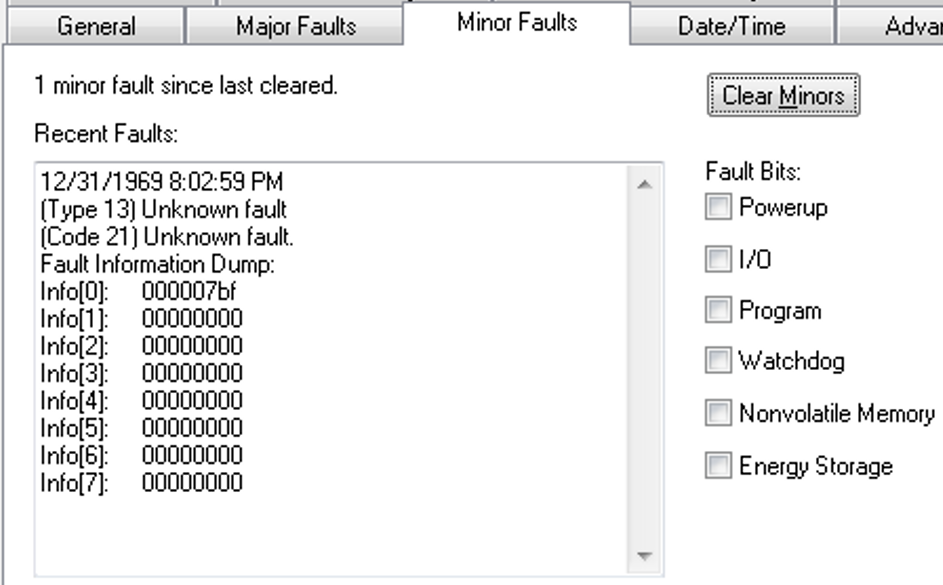
When the fault is logged, the WCT of the controller is set to 1/1/19XX 00:00:00.000, where XX is 81...86. The year corresponds to the Info[0] value for the minor fault.
A Program’s First Scan May Not Occur if the Program is Uninhibited (00190610, 00190512)
Corrected Anomaly in Firmware Revision 31.011
Known Anomaly First Identified in Firmware Revision 19.013
Catalog Numbers:
- ControlLogix® 5570
- GuardLogix® 5570
- Compact GuardLogix 5370
- CompactLogix™ 5370
If a program is inhibited, and then uninhibited, then a small timing window could occur where the S:FS first scan bit is reset before the program is truly first scanned.
Inverting Motion Polarity Does Not Invert the Value of Certain Signal Attributes (1329074, 1332544)
|
Controllers
|
First Known in Firmware
Revision
|
Corrected in Firmware Revision
|
|
CompactLogix™ 5370
|
20.011
|
34.011 and later
|
|
Compact GuardLogix® 5370
|
28.011
|
34.011 and later
|
|
ControlLogix® 5570
|
19.011
|
34.011 and later
|
|
GuardLogix 5570
|
20.011
|
34.011 and later
|
|
CompactLogix 5380
|
28.011
|
34.011 and later
|
|
CompactLogix 5380 process
|
33.011
|
34.011 and later
|
|
Compact GuardLogix 5380 SIL 2
|
31.011
|
34.011 and later
|
|
Compact GuardLogix 5380 SIL 3
|
32.013
|
34.011 and later
|
|
CompactLogix 5480
|
32.011
|
34.011 and later
|
|
ControlLogix 5580
|
28.011
|
34.011 and later
|
|
ControlLogix 5580 process
|
33.011
|
34.011 and later
|
|
GuardLogix 5580
|
31.011
|
34.011 and later
|
When the axis Motion Polarity bit is set to inverted, certain Signal attributes for a CIP™ axis will display a value opposite of the programmed direction of the axis.
The affected signal attributes are:
• #365 Fine Command Position
• #495 Torque Estimate
• #432 Position Reference
• #523 Motor Electrical Angle
• #565 Slip Compensation
• #600 Output Frequency
• #601 Output Current
• #602 Output Voltage
• #603 Output Power
• #1403 Velocity Feedback 1
• #1453 Velocity Feedback 2
For more information, see the Knowledgebase Technote Inverting Motion Polarity Does Not Invert the Value of Certain Signal Attributes.
Copyright © 2026 Rockwell Automation, Inc. All rights reserved.
Rockwell Automation, Allen-Bradley, and FactoryTalk are trademarks of Rockwell Automation, Inc.
To view a complete list of Rockwell Automation trademarks please click here.
Trademarks not belonging to Rockwell Automation are property of their respective companies.